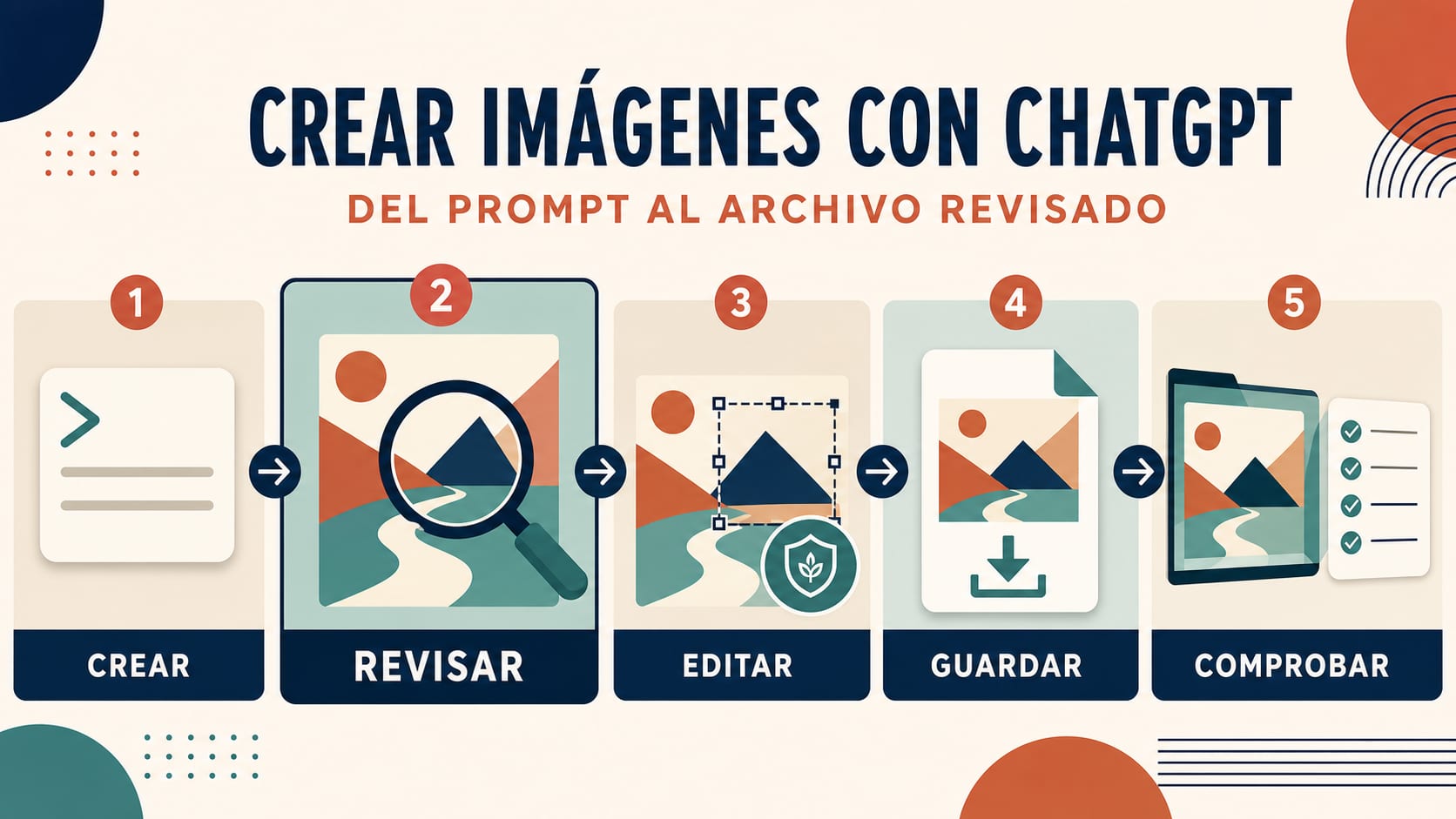
Para crear una imagen con ChatGPT, entra en el producto oficial, inicia una conversación o abre la sección de Imágenes y explica para qué necesitas la pieza, qué debe aparecer, cómo debe componerse y qué no puede cambiar. Genera un primer resultado, ábrelo a tamaño completo, corrige una sola variable por turno y usa Guardar para descargar la versión aceptada. El trabajo no termina al verla bien en pantalla: abre el archivo local y revisa texto, datos, dimensiones, derechos y señales de procedencia.
Ese es el flujo útil para quien busca un “generador de imágenes ChatGPT”. Un sitio que usa ese nombre no es necesariamente el producto oficial de OpenAI. Tampoco hay que mezclar la app de ChatGPT con la API, sus precios o los límites de otro proveedor.
El recorrido completo en ocho pasos
1. Confirma que estás en la superficie oficial
Empieza en ChatGPT, no en una página de terceros que solo incluya “ChatGPT” en el título. Según la ayuda oficial de Imágenes en ChatGPT, puedes pedir una imagen desde una conversación o desde la sección de Imágenes. Los nombres y la posición de los controles pueden variar entre web, iOS, Android, plan y estado de despliegue; sigue el resultado que necesitas, no una captura antigua.
Antes de escribir el prompt, define una frase de éxito. Por ejemplo: “Necesito un cartel vertical legible para anunciar un taller ficticio, sin logotipos ni personas reales”. Esa frase permite descartar un resultado atractivo que no resuelve la tarea.
2. Escribe un primer prompt que funcione como contrato
Un prompt largo no es automáticamente mejor. La guía oficial de generación de imágenes recomienda concretar los elementos que determinan el éxito: propósito, sujeto, acción, entorno, composición, estilo y restricciones. Para una pieza en español, añade el texto exacto entre comillas y limita su cantidad.
hljs textCrea un cartel vertical para un taller ficticio de cerámica dirigido a principiantes. Muestra dos manos modelando una taza sobre una mesa clara, con luz natural lateral y mucho espacio limpio en la parte superior. Incluye únicamente este texto: “TALLER DE CERÁMICA” “SÁBADO 18 · 11:00” Estilo editorial contemporáneo, colores arcilla y azul oscuro. No incluyas logotipos, precios, personas reconocibles ni texto adicional.
El prompt separa lo negociable de lo obligatorio. La paleta puede cambiar; las dos líneas, la ausencia de logotipos y el formato vertical no. Si una fecha o un dato son reales, compruébalos antes y después de generar: el modelo no es la fuente de verdad del evento.
3. Inspecciona el primer resultado completo
No juzgues desde la miniatura. Abre la imagen y recórrela por zonas:
- título, tildes, signos, números y texto pequeño;
- manos, rostros, objetos, sombras y reflejos;
- jerarquía visual y espacio para el uso previsto;
- elementos inventados, marcas o palabras que no pediste;
- relación de aspecto y encuadre;
- coherencia entre la imagen y cualquier afirmación factual.
Clasifica los problemas en tres grupos: contenido incorrecto, composición poco útil y acabado visual. Así evitas pedir “mejórala” y perder partes que ya funcionaban.
4. Corrige una variable cada vez
La conversación permite iterar, pero cada nueva imagen es una candidata completa, no un parche garantizado. Cuando algo importante ya está bien, repítelo como condición.
hljs textMantén exactamente las dos líneas de texto, la composición vertical, la mesa clara y la ausencia de logotipos. Cambia solo el fondo: reduce el detalle y deja más aire alrededor del título. No modifiques las manos, la taza, la iluminación ni la paleta.
Después de cada edición, vuelve a revisar toda la imagen. Un cambio de fondo puede alterar el texto, el encuadre o un objeto distante. Si intentas corregir tipografía, paleta, sujeto y formato en el mismo turno, será difícil saber qué instrucción provocó el desvío.
5. Para editar una imagen, di qué cambia y qué se conserva
ChatGPT también puede editar una imagen existente. Sube únicamente material propio o autorizado y distingue el cambio de los invariantes.
hljs textEdita la fotografía adjunta, que tengo permiso para usar. Cambia únicamente el color del jarrón de verde a azul cobalto. Conserva la forma del producto, el ángulo de cámara, la etiqueta, la mesa, las sombras, el fondo, el encuadre y todos los demás detalles. No añadas texto ni objetos.
Puedes describir la edición en la conversación o seleccionar un área cuando el editor lo permita. La ayuda oficial advierte que el resaltado no siempre es preciso y que la edición puede extenderse fuera de la selección. Por eso hay que inspeccionar tanto la zona modificada como el resto de la imagen.
Si el control de carga no aparece, el archivo se rechaza o la subida falla incluso con una prueba sencilla y autorizada, no conviertas esta guía en un diagnóstico largo: sigue la guía de problemas al subir imágenes en ChatGPT.
6. Elige el modo por dificultad, no por prestigio
La creación ordinaria sirve para una petición bien definida y una iteración directa. “Imágenes con razonamiento” está pensada para trabajos que se benefician de más planificación, como organizar una infografía, reconciliar varias restricciones o investigar antes de construir una pieza visual.
La disponibilidad es volátil. El 21 de julio de 2026, la ayuda oficial indica que ChatGPT Imágenes 2.0 está disponible en todos los niveles, mientras que Imágenes con razonamiento está disponible en Plus, Pro y Business y pronto llegará a Enterprise y Edu. Comprueba lo que muestra tu cuenta en el momento de usarlo; no conviertas una lista de planes fechada en una promesa permanente.
| Situación | Punto de partida razonable |
|---|---|
| Ilustración, portada o concepto con requisitos claros | Creación ordinaria de imágenes |
| Infografía con varias relaciones y datos que hay que organizar | Imágenes con razonamiento, si aparece en tu cuenta |
| Edición localizada de una imagen autorizada | Editor o instrucción conversacional precisa |
| Generación automática dentro de una aplicación | No es este flujo: corresponde a la API |
Un modo más deliberado no vuelve correctos los datos ni garantiza que una solicitud sea aceptada. La revisión humana y las políticas siguen siendo necesarias.
7. Guarda y verifica el archivo local
En los controles de la imagen, Guardar descarga el resultado al dispositivo. La biblioteca o la conversación pueden conservar acceso a las imágenes creadas, pero eso no sustituye el archivo final que utilizarás.
Después de descargarlo:
- abre el archivo fuera de ChatGPT;
- comprueba que no esté corrupto y que corresponda a la variante elegida;
- registra formato, ancho, alto y relación de aspecto;
- amplía al 100 % para revisar bordes, texto, manos y detalles;
- conserva el prompt, la fuente de cualquier dato y la autorización de las referencias;
- renombra la versión aprobada para no confundirla con borradores.
Elegir una relación de aspecto en la app no equivale a un contrato técnico de salida 4K. Si la necesidad real son dimensiones exactas, generación nativa frente a escalado o un archivo de producción específico, pásala a la guía dedicada de GPT Image 2 y 4K.
8. Haz una revisión de publicación
Antes de usar la imagen en una web, anuncio, presentación o entrega a cliente, responde sí o no a estas preguntas:
| Revisión | Pregunta de aprobación |
|---|---|
| Texto | ¿Cada palabra, tilde, cifra, fecha y unidad es correcta? |
| Hechos | ¿Los datos proceden de una fuente autorizada y actual? |
| Imagen | ¿No hay deformaciones, duplicados ni relaciones visuales engañosas? |
| Identidad | ¿El parecido de una persona es autorizado y no induce a engaño? |
| Derechos | ¿Puedes usar las referencias, marcas, personajes y resultado en este contexto? |
| Seguridad | ¿La pieza evita daño, material privado y suplantación? |
| Archivo | ¿La versión, dimensiones y formato coinciden con el destino? |
| Procedencia | ¿La explicación sobre origen es exacta y no exagera lo que demuestran las señales? |
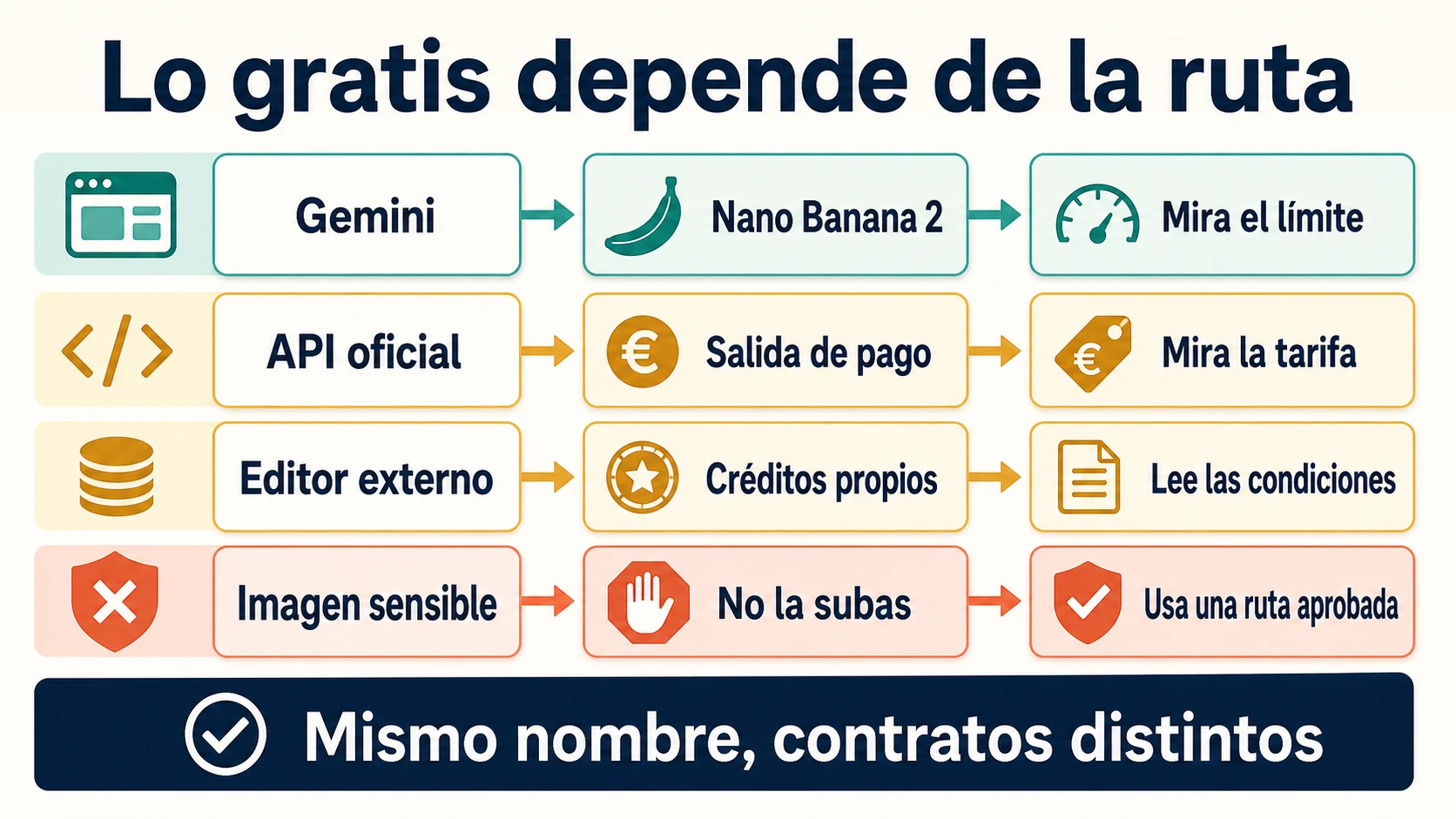
Gratis no significa sin cuenta ni sin límites
Los usuarios del nivel Gratis pueden crear imágenes, según las preguntas frecuentes oficiales de ChatGPT Gratis. La misma fuente explica que la creación de imágenes puede tener un límite separado del límite principal del chat y que el producto muestra cuándo se puede volver a intentar.
Por eso esta página no publica una cifra diaria ni un intervalo fijo. El límite puede depender del producto, plan, cuenta y momento. Si necesitas saber cuántas generaciones quedan, cuándo se restablecen o por qué aparece un aviso, consulta la guía específica sobre límites gratuitos de imágenes en ChatGPT y, sobre todo, el mensaje actual de tu cuenta.
Tampoco hay base para prometer aquí creación completa sin iniciar sesión. Ver una página o un campo de texto no demuestra que generar, editar y guardar terminen sin cuenta en todas las regiones. “Ilimitado” tampoco es una descripción segura: pueden existir límites de herramienta, plan, seguridad o uso razonable.
Qué demuestran C2PA y SynthID, y qué no
OpenAI explica que las imágenes generadas con ChatGPT, Codex y su API incluyen metadatos C2PA y señales SynthID. Estas tecnologías ayudan a evaluar si una imagen pudo originarse en herramientas de OpenAI, pero no convierten el archivo en una prueba de verdad.
Una detección positiva puede apoyar la atribución del origen técnico. No demuestra que:
- el contenido represente un hecho real;
- la imagen no haya sido editada después;
- quien la publica sea propietario de todo lo representado;
- exista consentimiento de las personas;
- el contexto o el pie de foto sean correctos;
- el uso sea legal o autorizado.
La ausencia de una señal tampoco demuestra que la imagen haya sido creada por una persona. Capturas de pantalla, redes sociales, conversiones y otras transformaciones pueden eliminar o degradar información. La explicación oficial sobre C2PA y SynthID separa expresamente la procedencia de la exactitud, la propiedad y el contexto.
No elimines señales de procedencia para ocultar el origen. Si una pieza requiere transparencia, guarda además el prompt, las referencias autorizadas, la versión final y la decisión editorial.
ChatGPT, API y páginas de terceros son contratos distintos
La app de ChatGPT es la ruta adecuada para este tutorial: una persona conversa, crea, edita y guarda. La Image API es una ruta de desarrollo para generación o edición directa. La herramienta de generación de imágenes de Responses API sirve para flujos conversacionales o de varios pasos dentro de una aplicación. Sus modelos, facturación, verificación de cuenta, formatos y límites no definen la cuota de la app.
| Si tu pregunta cambió a… | Continúa en… |
|---|---|
| “¿Existe una API oficial gratis?” | GPT Image 2 API gratis |
| “¿Qué cuesta la API o qué proveedor conviene?” | GPT Image 2 API: coste y rutas |
| “¿Puedo obtener 4K o dimensiones concretas?” | GPT Image 2 y salida 4K |
| “¿Por qué no puedo subir la imagen?” | Problemas de carga de imágenes en ChatGPT |
| “¿Cuántas imágenes gratis quedan?” | Límites gratuitos de imágenes en ChatGPT |
Una suscripción a ChatGPT no crea automáticamente saldo de API. Del mismo modo, una demo o un wrapper que usa la expresión “generador de imágenes ChatGPT” no hereda el contrato de privacidad, límites, modelo o procedencia del producto oficial.
Un ejemplo completo de iteración
Supón que preparas una cabecera ficticia para una guía de jardinería urbana. El primer prompt fija el trabajo:
hljs textCrea una ilustración horizontal para una guía de jardinería urbana. Muestra tres macetas con tomate, albahaca y romero en un balcón luminoso. Deja el tercio izquierdo despejado para añadir el título después. Estilo editorial original, formas claras, luz de mañana y colores naturales. No incluyas personas, logotipos, texto ni edificios reconocibles.
Al revisar, descubres que el romero parece otra albahaca. La siguiente instrucción no pide rehacerlo todo:
hljs textMantén la composición horizontal, las tres macetas, el balcón, el espacio vacío de la izquierda, la luz y la paleta. Cambia solo la planta de la maceta derecha para que sea romero reconocible, con hojas estrechas y alargadas. No añadas texto ni otros objetos.
Después compruebas de nuevo las tres plantas, no solo la maceta derecha. Si el título se añadirá en un editor, mantienes ese espacio sin pedir tipografía generada. Si decides colocar texto dentro de la imagen, escribes el texto exacto y lo revisas carácter por carácter.
Este patrón —primer contrato, inspección, una corrección, revisión completa, guardado y QA— es más fiable que una colección de prompts “mágicos”. También permite saber cuándo el problema ya no es de prompt, sino de carga, límite, derechos o ruta de producto.
Preguntas frecuentes
¿ChatGPT puede crear imágenes desde una descripción?
Sí. En el producto oficial puedes pedir una imagen desde una conversación o desde Imágenes, describir el resultado, revisar las variantes, iterar y guardar la elegida. Los controles concretos pueden variar por dispositivo y despliegue.
¿Puedo editar una foto que ya tengo?
Sí, si tienes derecho a compartirla y usarla. Sube la imagen, explica el cambio y enumera lo que debe mantenerse. Una selección no garantiza que solo cambien esos píxeles, así que revisa toda la imagen después.
¿Cuál es un buen prompt para crear imágenes con ChatGPT?
Incluye propósito, público, sujeto, acción, entorno, composición, formato, estilo, texto exacto y exclusiones. Empieza con pocas instrucciones decisivas y cambia una variable cada vez.
¿ChatGPT crea imágenes gratis?
El nivel Gratis puede crear imágenes, pero la herramienta tiene límites variables y separados. ChatGPT muestra el aviso y la información disponible cuando alcanzas el límite; no hay una cifra universal segura para publicar aquí.
¿Se puede usar el generador de imágenes ChatGPT sin iniciar sesión?
No hay evidencia oficial suficiente para prometer que crear, editar y guardar se completen sin cuenta en todas las regiones. Usa la superficie oficial y verifica el requisito actual en tu sesión.
¿Guardar la imagen es lo mismo que publicarla?
No. Guardar obtiene un archivo local. Publicar exige revisar texto, hechos, derechos, consentimiento, seguridad, contexto, dimensiones y procedencia.
¿C2PA o SynthID demuestran que la imagen es verdadera?
No. Son señales de procedencia. Pueden indicar un origen compatible con herramientas de OpenAI, pero no prueban exactitud, ausencia de edición, propiedad, consentimiento o contexto correcto.
¿ChatGPT Images es lo mismo que GPT Image 2 API?
No. Están relacionados, pero la app de ChatGPT y la API tienen contratos distintos. Este artículo cubre el flujo manual del producto; implementación, precio, modelos y límites API pertenecen a las guías de desarrollo.
Crear bien una imagen con ChatGPT no consiste en acertar un prompt perfecto a la primera. Consiste en fijar el trabajo, revisar el primer resultado sin confiar en su apariencia, conservar lo que funciona, cambiar poco, guardar la versión correcta y verificarla antes de usarla.