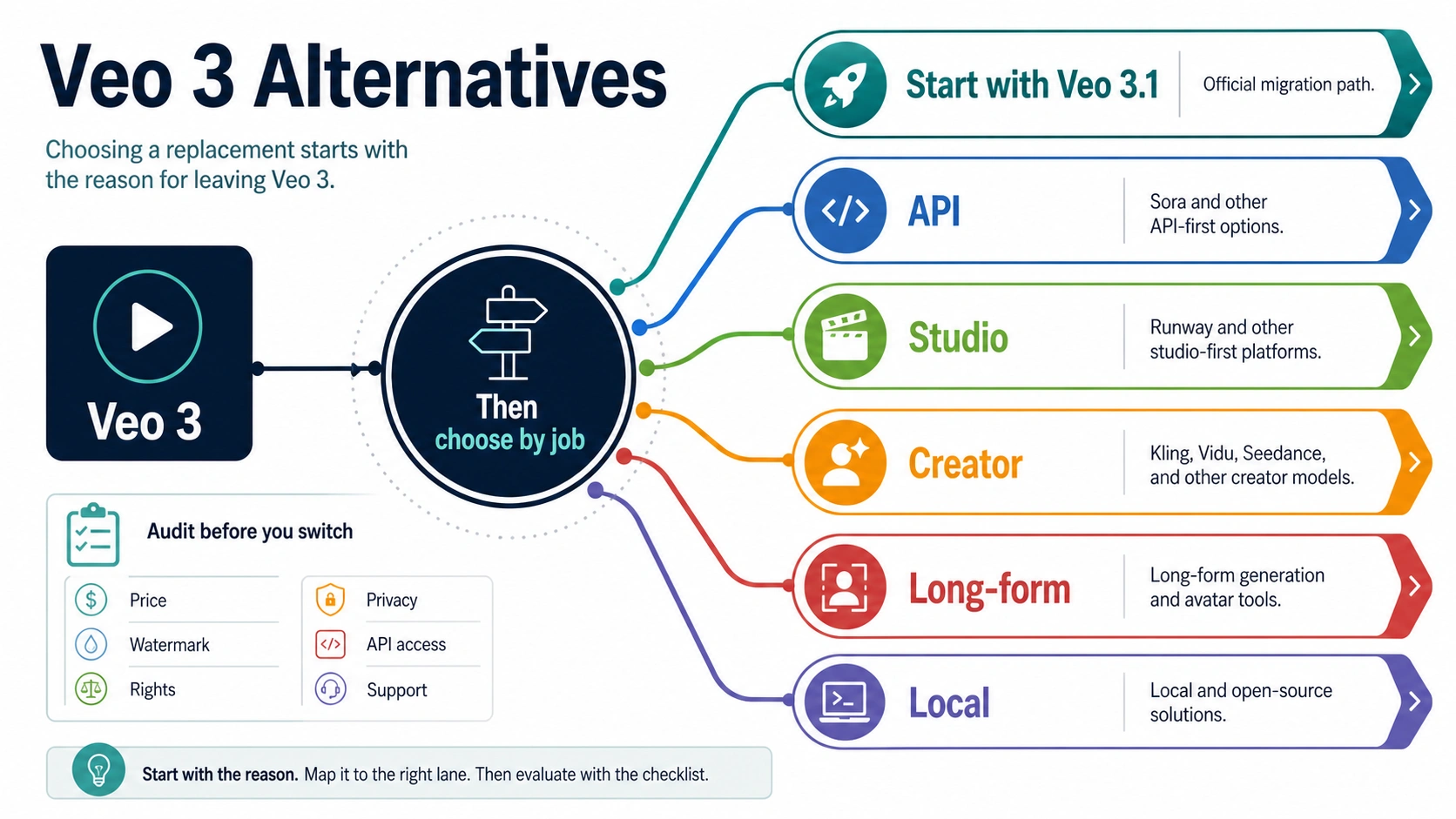
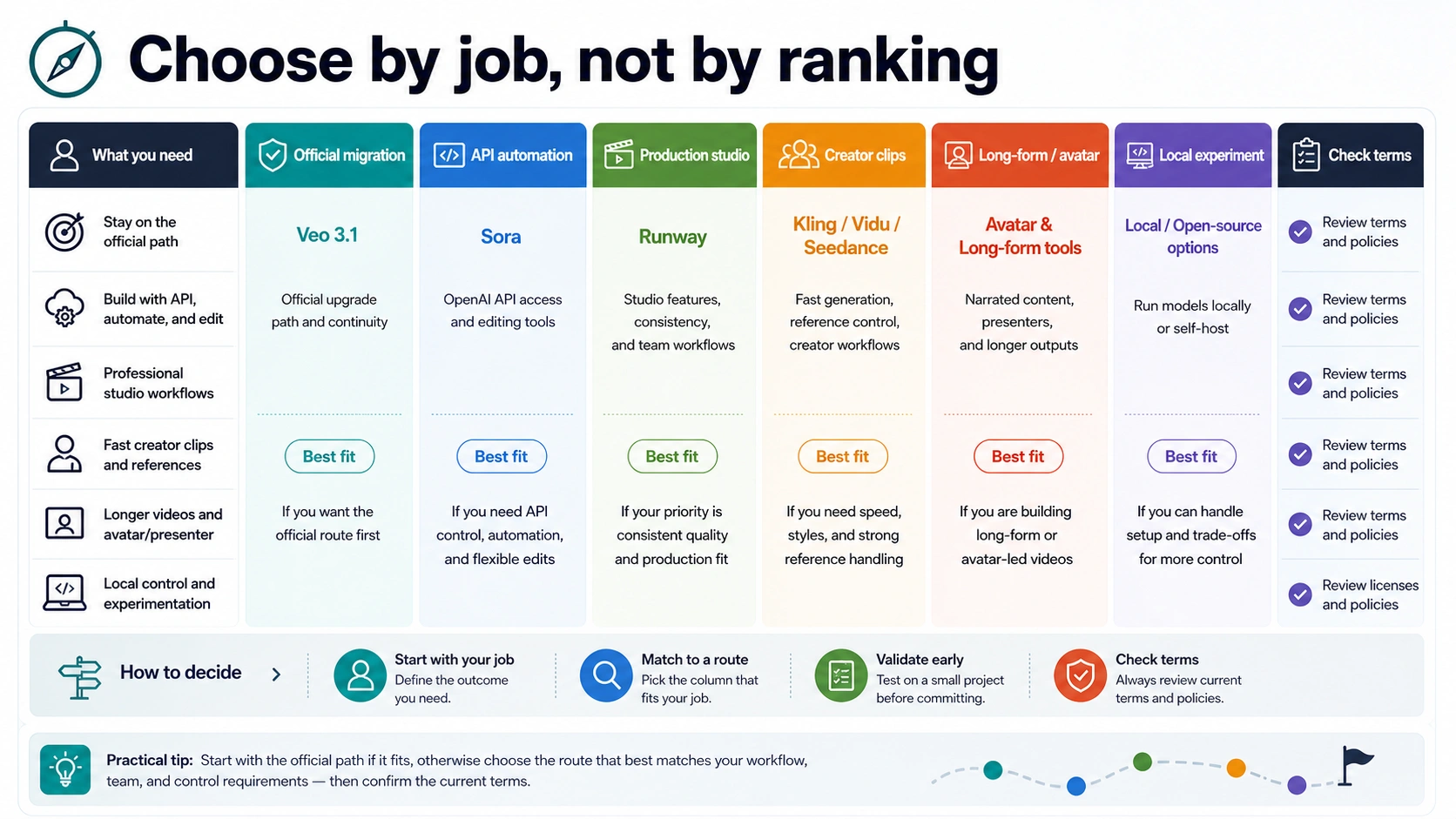
The best Veo 3 alternative is not one tool. If the problem is legacy Veo 3 API access, check Veo 3.1 first because Google marks Veo 3 API models as deprecated with a June 30, 2026 shutdown. If the job has changed, choose the replacement by route: Sora for OpenAI API and edit workflows, Runway for production-studio control, Kling, Vidu, or Seedance for creator-model workflows, long-form or avatar tools for narrated output, and local/open-source only when setup and quality tradeoffs are acceptable.
Before switching, verify the current provider contract for price, credits, watermark, export rights, upload privacy, failed-job handling, API access, and support. The route board below starts with the official migration branch, then separates the non-Google alternatives by the work they are actually good for.
Veo 3 Alternatives by Reason for Leaving
Start with the reason you are leaving Veo 3, then choose the smallest replacement test that proves the next route. A developer whose old Veo 3 API model is near shutdown has a different decision from a creator who wants lower-cost social clips, a studio editor who needs character consistency, or a marketer who wants narrated avatar output.
| Reason for replacing Veo 3 | Best first route | What to verify before paying or uploading |
|---|---|---|
| Legacy Veo 3 API model is being retired | Veo 3.1 through Gemini API or Google Cloud | Current model ID, paid-tier billing, resolution, audio, output lifecycle, and shutdown date |
| Want to stay inside Google products | Veo 3.1 API, Flow, Vids, or Gemini app | Which surface owns the limits, credits, model label, export path, and account rules |
| Need a non-Google video API | Sora video generation API | Current Sora model, price, duration, restriction, edit, extension, and download rules |
| Need studio control for production clips | Runway | Character and scene consistency, editor workflow, API model list, export terms, and cost |
| Want creator-model options and fast social clips | Kling, Vidu, or Seedance | Credits, watermark, duration, upload privacy, reference control, native audio, and commercial-use terms |
| Need scripted explainers, presenters, or editable marketing videos | Long-form builder or avatar/editor tool | Whether it is a video model replacement or a template/editor workflow |
| Want local or open-source control | Verified local/open-source project | Hardware, license, model source, quality ceiling, setup time, and data privacy |
The important point is not which logo wins a ranking. The useful decision is which route can produce the kind of video you need without hiding the cost, data, or support owner.
If the Problem Is Veo 3 API Shutdown, Start With Veo 3.1
The most urgent branch is the Google API branch. Google's Gemini API pricing documentation, checked on June 24, 2026, marks Veo 3 API models as deprecated with a scheduled shutdown on June 30, 2026. That makes Veo 3.1 the first route to check for legacy Veo 3 API migration.
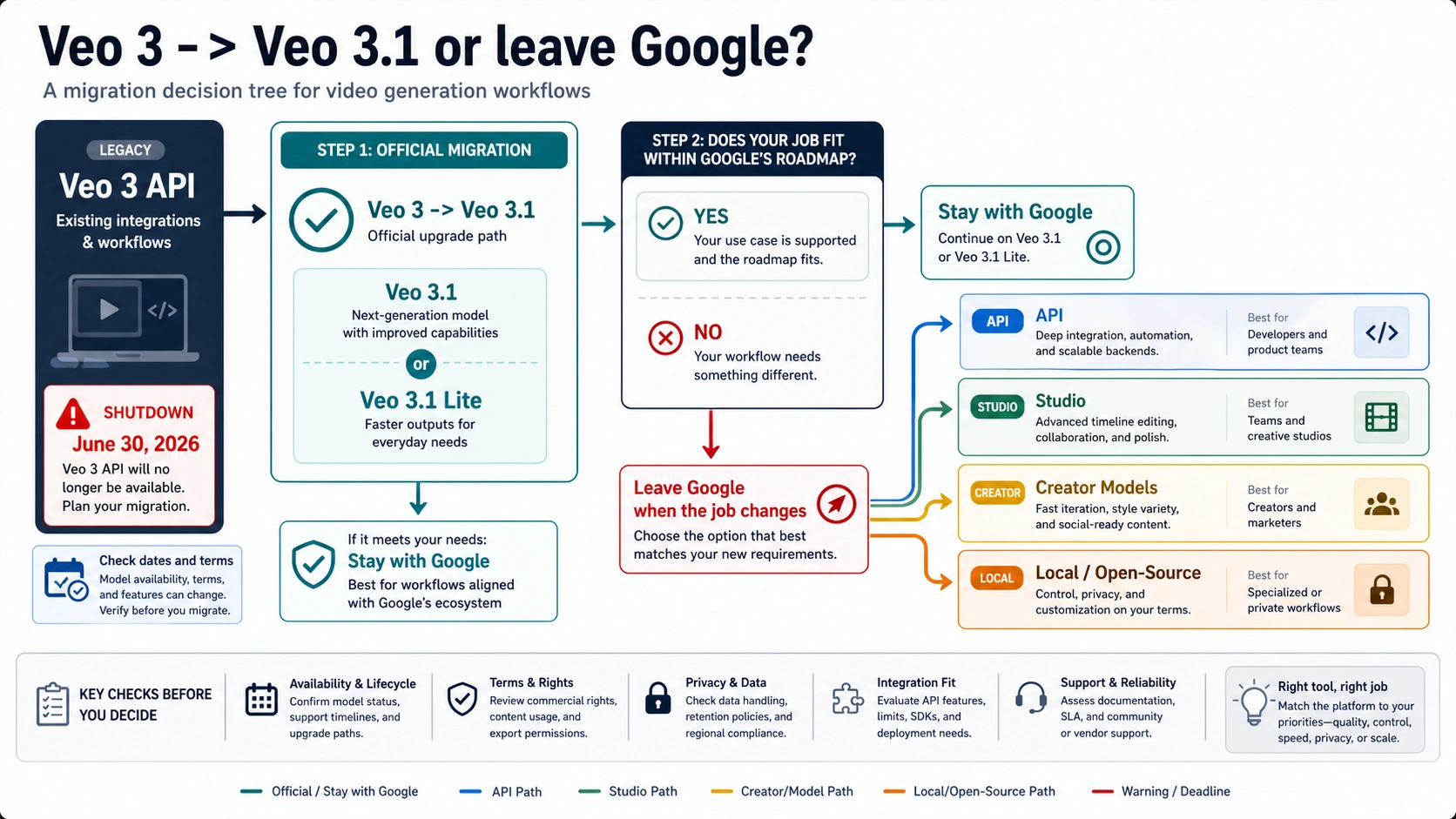
Use the official Gemini API video generation documentation for request shape, output handling, model capabilities, and current examples. Google describes Veo 3.1 as a video generation route with native audio, portrait and landscape output, extension, frame-specific generation, and reference-image support. Use the Gemini API pricing page for paid-tier status and current model rows.
Choose Veo 3.1 first when:
- existing code already uses Google's developer ecosystem;
- billing, compliance, logs, and support need to stay under a Google-owned route;
- the workload depends on native audio, reference images, frame controls, or higher-resolution output;
- the team is migrating a backend rather than choosing a new creative app;
- the production risk of switching vendors is higher than the cost of updating model IDs and tests.
Leave Google only when the actual job changed. For example, Sora may be the better replacement when the application is already OpenAI-centered and needs Sora-specific edits or extension features. Runway may be better when a production team wants a creative studio around video iteration. Kling, Vidu, or Seedance may be better when a creator wants platform-native motion, reference, or audio behavior and is willing to verify each provider's terms.
Staying With Google: Veo 3.1, Flow, Vids, and Gemini App
Staying with Google is not a single choice. The Google route splits into developer API, creator studio, Workspace editor, and consumer app surfaces.
| Google surface | Use when | Do not assume |
|---|---|---|
| Gemini API / Google Cloud Veo docs | You need code, model IDs, polling, output handling, billing, quota, or enterprise governance | Consumer credits or app limits apply to API calls |
| Google Flow | You want a creative filmmaking workflow with scene, camera, asset, and iteration controls | Flow credits equal API seconds or Vids limits |
| Google Vids | You are creating clips inside a Workspace video, deck, or team explainer | Vids monthly language applies to Flow or API work |
| Gemini app | You want account-facing app creation or editing | App naming proves the current API model ID |
For the operational split between Flow, Vids, Gemini app, and developer routes, use the dedicated Google Veo 3 route guide. For free, credit, and trial questions, use the narrower Veo 3.1 free trial and paid-route guide. Keeping those questions separate prevents one surface's allowance from being copied into another surface's bill.
Stay with Google when the work is already tied to Google account controls, Workspace collaboration, Cloud governance, or a Gemini API integration. Switch away when the creative process, API ecosystem, output length, editor workflow, or cost model is now a better fit somewhere else.
Sora Is the OpenAI API and Edit-Workflow Alternative
Sora is the strongest non-Google route when the replacement job is developer workflow inside the OpenAI ecosystem. OpenAI's video generation documentation describes Sora 2 and Sora 2 Pro as API video models that can create video from prompts, use image references, extend or edit videos, download outputs, and run batch jobs. The same documentation also sets policy restrictions for sensitive or protected subjects, including under-18 suitability, copyrighted characters and music, real people, and human-likeness uploads.
Choose Sora first when:
- the product already uses OpenAI APIs and the team wants one authentication, logging, or SDK ecosystem;
- edits, extensions, image references, and batch workflows matter more than staying in Google;
- the team can validate OpenAI policy boundaries before accepting user-uploaded faces, brands, or copyrighted material;
- a developer workflow is more important than a creator-studio interface.
Do not choose Sora just because a comparison table says it is newer or better. Check the current OpenAI video generation documentation and OpenAI pricing page before budgeting. Video pricing, supported duration, resolution, model availability, and policy behavior are volatile enough that copied numbers should not drive production planning.
The safest Sora migration test is a single prompt, one image-reference test if the product needs it, one edit or extension test, one restricted-content test using non-sensitive material, and one cost estimate using the current pricing page. If those pass, expand into a controlled batch. If not, the issue may be route fit rather than prompt quality.
Runway Fits Studio Control and Consistent Production Work
Runway belongs in a different lane from a raw API migration. Its strongest case is a production workflow around characters, scenes, camera control, iterative editing, and creative review. Runway's Gen-4 materials emphasize world consistency, consistent characters and locations, production-ready video, physics, and visual effects. Its API documentation also exposes a model list through Runway's own contract, which means the billing, access, support, and model-routing owner is Runway even when a model name looks familiar.
Choose Runway when:
- the team needs a creative editor and production review loop, not just an endpoint;
- character, object, or location consistency is the central pain;
- designers and editors need to iterate visually before a developer automates anything;
- post-production control and export workflow matter more than lowest possible cost.
The risk is treating a studio tool as a drop-in Veo API substitute. If the current product needs deterministic API throughput, account-level audit trails, or predictable backend billing, inspect Runway's developer docs and account terms before planning the migration. If the work is creative review with human approval, Runway can be a better replacement than a model-only endpoint.
Kling, Vidu, and Seedance Are Creator-Model Alternatives, Not One Bucket
Kling, Vidu, and Seedance are often grouped together because they are fast-moving AI video options with strong creator interest. They should still be evaluated as separate routes.
| Route | Best when | Check before committing |
|---|---|---|
| Kling | You want a creator platform around multimodal prompts, native audio, storyboard control, and platform-native generation | Current plan, credit unit, watermark, upload handling, export rights, and support |
| Vidu | You care about text-to-video, image-to-video, reference-to-video, first/last frame control, or social and ad-like clips | Free-credit scope, privacy terms, commercial-use wording, resolution, watermark, and renewal |
| Seedance | You want multimodal reference and motion control from ByteDance's video model family | Access route, regional or compliance risk, licensing, pricing, and whether the route is product, API, or platform-specific |
Use Kling, Vidu, or Seedance when the work is creator-model exploration, social video, reference-image motion, stylized output, or platform-level iteration. Be cautious when the work is regulated, client-confidential, or production API infrastructure. The provider's homepage can explain capability direction, but it does not prove account-specific cost, privacy, failure handling, or long-term availability.
If the real job is turning a still image into motion rather than replacing Veo as a text-to-video model, use the AI image-to-video route guide. If cost and free access are the main question, use the free AI image-to-video generator guide. If the question is whether Nano Banana itself can make videos, use the Nano Banana text-to-video boundary guide.
Long-Form Builders and Avatar Editors Solve a Different Job
Some strong-looking Veo alternatives are not direct video model replacements. Long-form builders, avatar editors, script-to-video platforms, and template-based marketing tools solve workflow assembly rather than raw generative-video capability.
That can still be the right answer. A training team may need a narrated presenter, slides, captions, stock clips, and brand templates more than it needs an eight-second cinematic model. A marketer may need a product explainer with editable text, voice, and scene order. A support team may need reusable tutorial videos from scripts.
Choose a long-form or avatar route when:
- the output is a narrated explainer, onboarding video, course module, or sales asset;
- editing, captions, brand templates, or presenter avatars are required;
- the team wants repeatable production speed more than raw motion realism;
- generated video clips are only one component inside a longer asset.
Do not compare these tools against Veo 3.1, Sora, or Runway as if all of them are interchangeable model endpoints. Compare them against the finished job: script quality, editability, export format, voice control, caption workflow, template lock-in, data handling, and cancellation rules.
Local and Open-Source Routes Are Control Trades, Not Free Magic
Local or open-source video routes can be attractive when privacy, offline experimentation, custom pipelines, or cost control matter. They can also consume more time than a paid provider if the team has to manage hardware, model weights, dependencies, inference speed, quality tuning, and licenses.
Choose a local route only after verifying the exact project, not a vague category. Check:
- where the weights, code, examples, and license are published;
- whether the project supports text-to-video, image-to-video, or both;
- what GPU memory, runtime, storage, and driver stack are realistic for your hardware;
- whether the output quality meets the actual use case without heavy post-processing;
- whether commercial use, model redistribution, or client data handling is allowed;
- who fixes broken installs, dependency drift, or unsafe output behavior.
Local can be the right replacement for privacy-sensitive research, internal experiments, or teams that already own ML infrastructure. It is usually the wrong first route for a marketer who simply needs reliable finished clips this week. Treat "free" as "you own the setup cost," not as a guarantee of production readiness.
Provider Proof Checklist Before You Switch
Provider proof is part of the replacement decision. Any tool can look good in a demo when the prompt is public, the clip is short, and the claim is copied from a landing page. The switch becomes risky when real budgets, client assets, private faces, brand characters, API code, or paid exports enter the workflow.
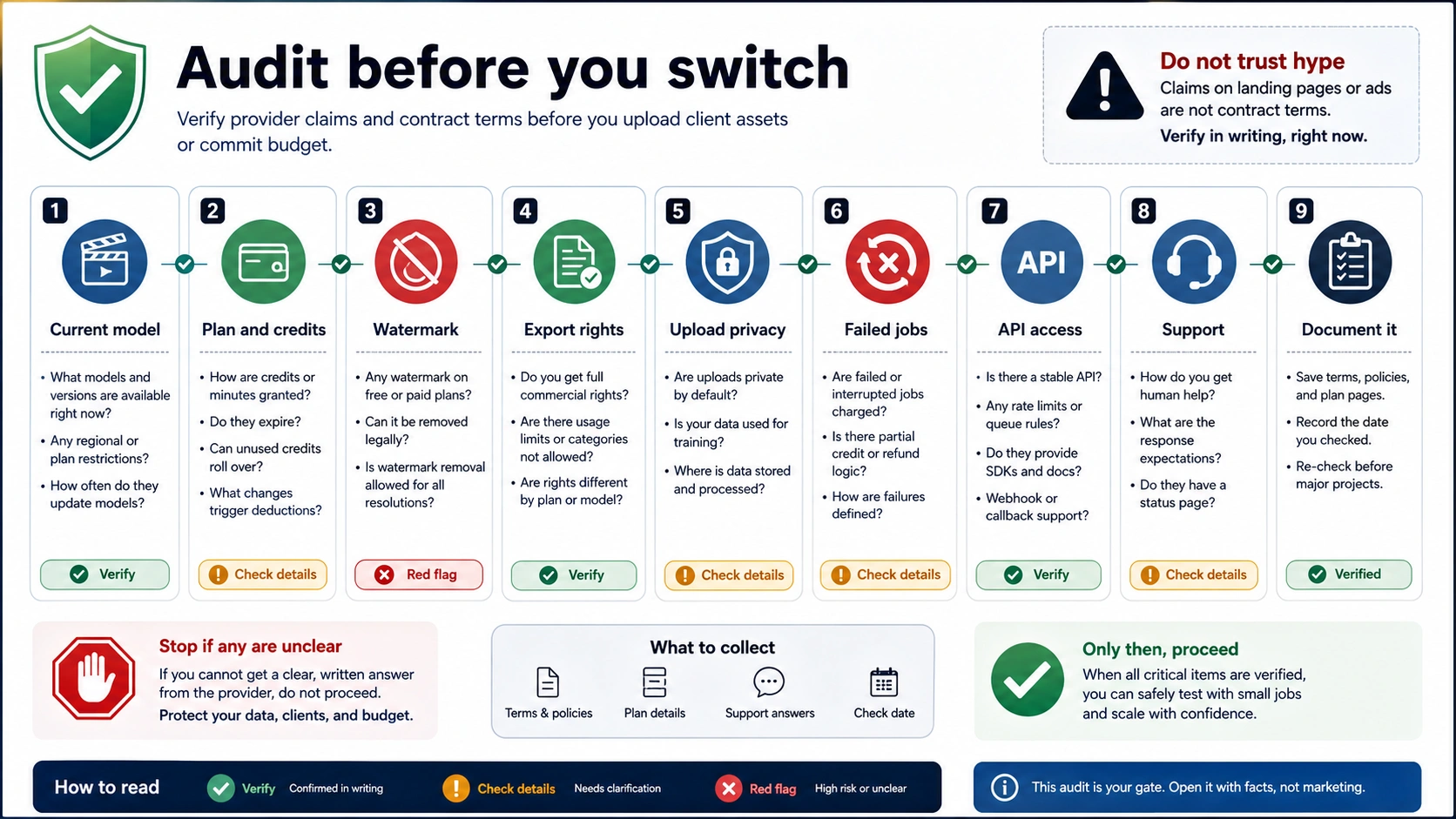
Use this checklist before the first paid or sensitive test:
| Proof point | Why it matters |
|---|---|
| Owner and route | A wrapper, studio app, official API, and local project have different support and data paths. |
| Current price or credit unit | Seconds, clips, quality modes, queue priority, and failed generations may be billed differently. |
| Free scope | A free prompt box can still restrict resolution, watermark removal, downloads, rights, or queue speed. |
| Watermark and export | Commercial output may depend on plan, resolution, attribution, or post-export rules. |
| Upload privacy | Video prompts, reference images, faces, logos, and client footage may be stored or reviewed. |
| Failed-job handling | A failed generation may or may not return credits. Check before batch work. |
| API availability | A product UI does not prove an API exists, and an API model list does not prove consumer access. |
| Policy and rights | Real people, copyrighted characters, music, brand marks, and minors can trigger stricter limits. |
| Support path | A paid provider without clear support is a poor production dependency. |
Run one controlled test before any large migration: one non-sensitive prompt, one representative aspect ratio, one reference upload if needed, one download, one failed or blocked prompt if safe, and one billing check. The result tells you more than a long alternatives list.
Recommended First Test by Workflow
Use the route that minimizes irreversible commitment.
| Workflow | First test | Pass condition |
|---|---|---|
| Existing Veo 3 API backend | Port one request to Veo 3.1 | Correct model ID, output lifecycle, cost estimate, and quality baseline are acceptable |
| OpenAI-centered app | One Sora prompt plus one edit or extension | API behavior, restrictions, duration, and cost fit the product |
| Creative production | One Runway scene with a repeated character or object | Review loop improves consistency faster than prompt-only testing |
| Social creator clip | One Kling, Vidu, or Seedance clip from the same prompt | Output, credits, watermark, upload terms, and export are acceptable |
| Scripted marketing video | One long-form or avatar draft from a real script | Editing, voice, caption, brand, and export workflow are faster than manual assembly |
| Private or experimental pipeline | One verified local setup with non-sensitive assets | Install, license, hardware, output quality, and maintenance burden are realistic |
The best replacement is the first route that passes a small real test under the same cost, rights, privacy, and support rules the production workflow will need.
FAQ
What is the best Veo 3 alternative?
For legacy Veo 3 API migration, check Veo 3.1 first because Google marks Veo 3 API models as deprecated with a June 30, 2026 shutdown. For non-Google routes, choose by job: Sora for OpenAI API and edit workflows, Runway for studio control, Kling, Vidu, or Seedance for creator-model exploration, long-form or avatar tools for narrated assets, and local/open-source only when setup and quality tradeoffs are acceptable.
Is there a free Veo 3 alternative?
There may be free credits, free trials, or free prompt boxes in specific products, but those are provider-owned terms. Check the exact route for watermark, export rights, upload privacy, duration, queue priority, renewal, and cancellation. Do not treat a free consumer demo as API quota or commercial-use proof.
Is Sora better than Veo 3?
Sora can be better when the workflow needs OpenAI API integration, edits, extensions, image references, and batch behavior. Veo 3.1 can be better when the team needs Google's official migration route, Google account controls, or Google-specific video capabilities. The better route depends on the integration and review workflow, not just model branding.
Which Veo alternative has audio?
Veo 3.1 has native audio in Google's current developer video documentation. Sora, Kling, Seedance, and other providers may expose audio or audio-adjacent workflows, but each provider's current docs and account terms should own that claim. Verify audio generation, upload, rights, and export before choosing a production route.
Are Kling, Vidu, and Seedance real Veo competitors?
They are real alternatives for some creator workflows, especially social video, reference-image motion, and fast platform experimentation. They are not automatically drop-in replacements for a Google API backend. Treat each as a separate product route with its own credit, watermark, upload, API, and support rules.
Should I use a local open-source alternative instead?
Use a local or open-source route when privacy, custom infrastructure, offline experimentation, or research control matters enough to justify setup and maintenance. Verify the exact project, model weights, license, hardware needs, quality ceiling, and support burden before calling it a replacement.
What should developers do before Veo 3 shuts down?
Developers using legacy Veo 3 API models should inspect Google's current Veo 3.1 documentation, port one request, verify output lifecycle and billing, rerun quality tests, and update monitoring before the June 30, 2026 shutdown. If the replacement test fails for business reasons rather than code reasons, then compare Sora, Runway API, or another provider route.