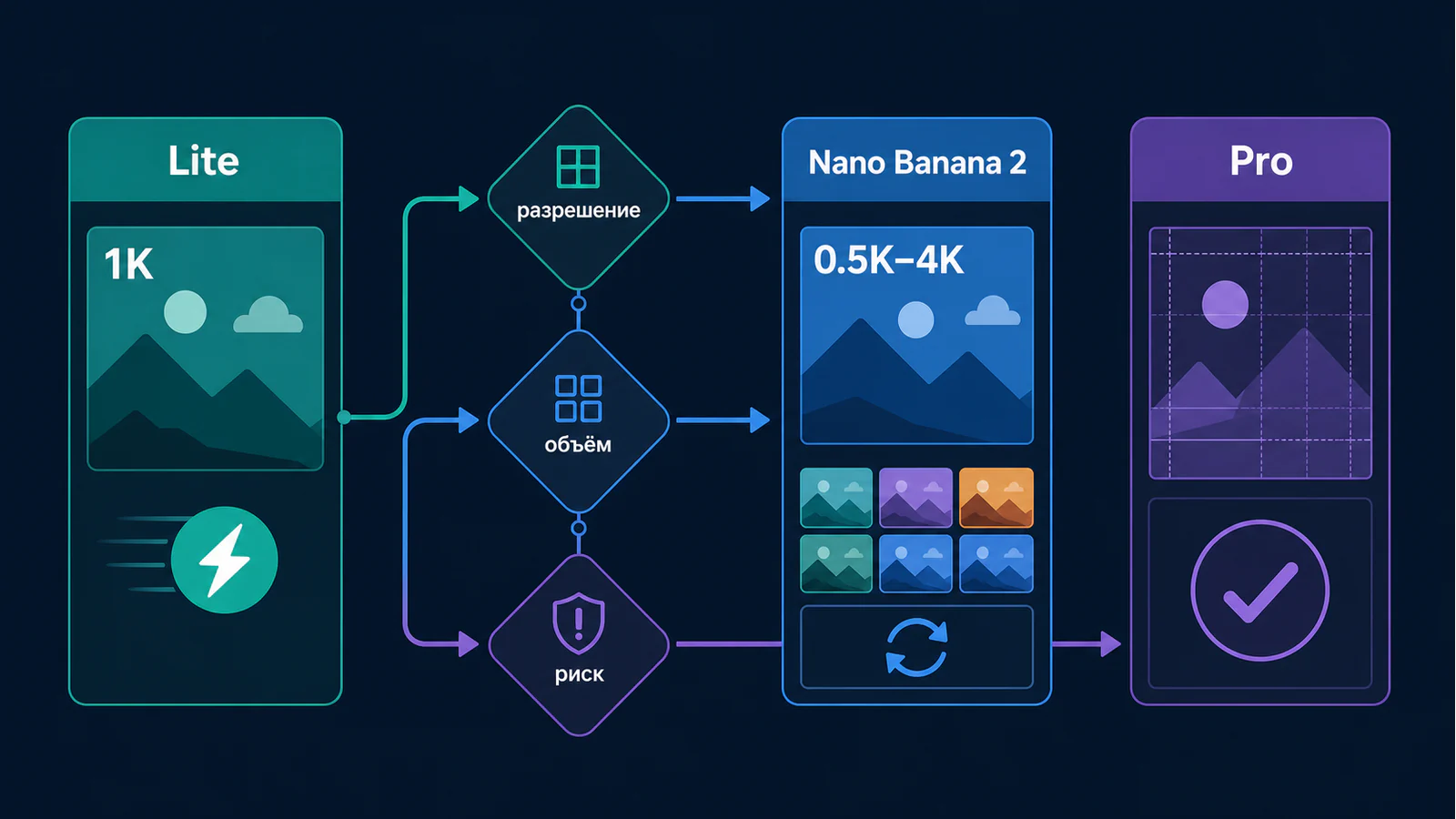
Выбирайте не «самую сильную» модель, а самый дешёвый маршрут, который проходит ваш критерий приёмки. Nano Banana 2 Lite (gemini-3.1-flash-lite-image) подходит для быстрых 1K-вариантов; Nano Banana 2 (gemini-3.1-flash-image) — для итераций и объёма с вариантами от 0.5K до 4K; Nano Banana Pro (gemini-3-pro-image) стоит включать раньше, если результат должен выдержать плотный текст, строгую сетку, сложный референс или дорогую человеческую проверку.
Это сравнение относится к официальным строкам Gemini API. Доступность в Gemini App, AI Studio, Vertex, регионе или у посредника, а также их лимиты и цена — отдельные условия. Для финального брендового, регулируемого или содержащего много текста материала сохраняйте проверку человеком и останавливайте доставку при ошибке в факте, букве, обязательной маркировке или идентичности референса.
Дерево выбора Lite, Nano Banana 2 и Pro
Начните с трёх вопросов: какое разрешение действительно нужно, сколько вариантов вы будете генерировать и насколько дорого исправлять отказ. Это дерево намеренно не объявляет победителя: один и тот же маршрут может быть разумным для черновика и неприемлемым для финальной упаковки.
- Нужны только быстрые 1K-наброски, лёгкая правка или много однотипных вариантов? Начните с Lite. В текущей документации Lite поддерживает 1K, а 2K и 4K для него не поддерживаются.
- Нужны 0.5K, 2K или 4K, либо поток вариантов и интерактивные итерации? Начните с Nano Banana 2 и измерьте, проходит ли результат вашу планку без чрезмерных повторов.
- Есть плотный текст, жёсткая вёрстка, критичный референс, финальная 4K-доставка или дорогая ошибка? Проведите тот же тест на Pro. Оставьте Pro, только если он снижает стоимость принятого результата или неприемлемый риск.
| Условие задачи | Первый маршрут | Что подтверждает выбор | Когда переключаться |
|---|---|---|---|
| Черновые 1K-варианты и быстрые локальные правки | Lite | Достаточно 1K, текст не является критичным, принятый вариант находится без долгой доработки | Нужны 2K/4K или растёт число отказов |
| Массовые креативы, поиск направления, разные форматы | Nano Banana 2 | Проходит проверку на нужном разрешении при приемлемом числе повторов | Повторяются сбои текста, сетки или референса |
| Финальная инфографика, упаковка, сложная сцена, рискованная доставка | Pro после одинакового теста | Меньше ручных исправлений и отказов при тех же входных данных | Pro не уменьшает общую цену и риск |
Когда дерево нужно остановить
Не продолжайте выбирать по красивому одиночному примеру. Если поставщик не раскрывает точный model ID, единицу биллинга, поведение при неудачном запросе, правила данных или региональную доступность, зафиксируйте это как неизвестное и не переносите его обещания на официальный API. Для изображения с юридической, брендовой или медицинской ответственностью остановите выпуск до проверки человеком, даже если модель прошла технический тест.
Карточка одного и того же теста и стоимость принятого результата
Сравнивайте модели на одинаковом задании: одинаковые промпт, референсы, соотношение сторон, разрешение, число попыток и критерий приёмки. Иначе вы сравниваете не модели, а две разные задачи. Для каждого маршрута заполните карточку ниже хотя бы на пяти типах работ: текстовый макет, товарное изображение, редактирование референса, схема или инфографика, финальный 4K-материал.
| Поле карточки | Что записать | Критерий «принято» |
|---|---|---|
| Вход | Промпт, референсы, формат и разрешение | Входы совпадают для всех трёх моделей |
| Проверка | Текст и цифры, сетка, сохранность референса, артефакты | Все обязательные пункты прошли |
| Повторы | Все оплачиваемые генерации, а не только сохранённые | Число повторов видно отдельно |
| Ручная работа | Минуты на исправление, ретушь, согласование и повторную сдачу | Время учтено в цене, а не скрыто |
| Итог | Принятые результаты и причина отказа | Есть стоп-причина для критичной ошибки |
Стоимость принятого результата = (расходы на модель + стоимость ручной доработки) / число принятых результатов.
Например, Lite может дать самую низкую цену одного 1K-выхода, но не подойдёт, если ваша задача требует 2K/4K. Nano Banana 2 может быть выгоднее Pro для десятков вариантов, пока повторов и исправлений немного. Если в финальном русскоязычном макете регулярно ломаются буквы, порядок блоков или важный референс, более дорогой вызов Pro может оказаться дешевле после учёта повторов и времени человека. Это проверяемая гипотеза конкретного набора задач, а не обещание о всеобщем превосходстве.
Что считать стоп-причиной
Стоп-причина должна быть задана до запуска: неверный обязательный текст, ошибка в цене или факте, сломанная идентичность референса, недопустимый артефакт, неразборчивая подпись либо несоответствие согласованному формату. Не «чините» такой результат оценкой на глаз; отметьте отказ, сохраните причину и сравните долю принятых результатов. Если Pro не сокращает такие отказы, не делайте его постоянным маршрутом.
Что подтверждают официальные страницы Gemini API
В документации Nano Banana 2 модель gemini-3.1-flash-image названа стабильной, ориентированной на скорость и высокий объём. Для неё указаны генерация изображений, Search grounding и варианты 0.5K, 1K, 2K и 4K. В документации Lite указан стабильный ID gemini-3.1-flash-lite-image, 1K как единственный поддерживаемый размер и постоянная маркировка SynthID с C2PA.
Для gemini-3-pro-image официальная страница Pro описывает профессиональную генерацию и редактирование, а также документирует Batch, Flex и Priority как варианты потребления API. Это не гарантирует одинаковую доступность в приложении, стране или у любого шлюза.
| Маршрут | Официальный ID | Практическое ограничение или преимущество | Как использовать в решении |
|---|---|---|---|
| Nano Banana 2 Lite | gemini-3.1-flash-lite-image | Только 1K; 2K и 4K не поддерживаются | Быстрые варианты, если 1K действительно достаточно |
| Nano Banana 2 | gemini-3.1-flash-image | 0.5K, 1K, 2K и 4K; скорость и объём | Базовый кандидат для итеративного потока |
| Nano Banana Pro | gemini-3-pro-image | Маршрут для профессиональных задач; есть Batch, Flex и Priority | Сравнить на том же входе при высокой цене ошибки |
На странице цен Gemini API приведены именно строки официального API: для Nano Banana 2 стандартные примеры image output составляют $0.045 за 0.5K, $0.067 за 1K, $0.101 за 2K и $0.151 за 4K; для Lite — $0.0336 за 1K; для Pro — $0.134 за 1K/2K и $0.24 за 4K. Это не цена приложения, местного тарифа или пакета посредника. Подробно отделить цену API от квоты и способа доступа помогает гайд по цене и квотам Nano Banana Pro.
Не смешивайте API, приложение, регион и посредника
Перед запуском проверьте четыре независимых поля: точный model ID, слой доступа, владельца биллинга и условия повторов. Официальная таблица не доказывает, что модель доступна в вашем регионе, что сторонний сервис не списывает неудачные вызовы или что лимит приложения равен лимиту API. Не используйте советы о смене региона, обходе ограничений или удалении обязательных меток как часть маршрута выбора.
| Слой | Что нужно проверить отдельно |
|---|---|
| Официальный API | ID, единицу цены, допустимые разрешения, лимиты, условия данных и форму ответа |
| Gemini App или AI Studio | Фактический доступ, квоту и соответствие требуемому API-маршруту |
| Vertex или Cloud | Регион, проектный биллинг, квоты и корпоративные требования |
| Посредник | Точный ID, цену, списание при сбое, конфиденциальность, поддержку и запасной маршрут |
Частые вопросы
Lite всегда дешевле?
Для стандартного официального API Lite имеет меньший пример цены 1K, но он ограничен 1K. Если вам нужны 2K или 4K, Lite не является альтернативой: сначала выберите маршрут, который вообще соответствует требованию к выходу, затем считайте стоимость принятого результата.
Nano Banana 2 всегда лучше для массовой генерации?
Он является сильным первым кандидатом для скорости и объёма, но «лучше» подтверждается только вашим одинаковым тестом. Плотный текст, сложная вёрстка, референсы и цена ошибки могут сделать Pro выгоднее на финальном этапе.
Можно ли считать цены Google ценами в России?
Нет. Официальные строки Gemini API указаны в долларах и не подтверждают региональную доступность, цену Gemini App, условия AI Studio, Vertex или пакета посредника. Эти условия нужно проверять у выбранного слоя доступа перед оплатой или запуском в производство.
Нужна ли проверка человеком для Pro?
Да, если изображение несёт высокий брендовый, правовой, медицинский, финансовый или редакционный риск. Модельный маршрут может сократить повторы, но не заменяет проверку обязательных фактов, текста, маркировки и прав на референс.