What is ChatGPT Plus? Complete Guide to Features, Pricing & Free Version Differences (2025)
Comprehensive comparison of ChatGPT Plus vs Free in 2025. Learn about GPT-5 access, usage limits, Agent Mode, Sora video, pricing, and whether the $20/month subscription is worth it for your needs.
Nano Banana Pro
4K-80%Google Gemini 3 Pro · AI Inpainting
谷歌原生模型 · AI智能修图

If you have been using ChatGPT and wondering whether the $20 monthly subscription is worth upgrading to, you are not alone. With over 300 million weekly active users as of late 2024 according to OpenAI's official announcements, ChatGPT has become an essential productivity tool for millions of people worldwide. The question of whether to stay on the free tier or upgrade to ChatGPT Plus has become increasingly relevant as OpenAI continues to add new features and capabilities to the platform.
ChatGPT Plus is OpenAI's premium subscription tier that provides enhanced access to ChatGPT's most advanced features for $20 per month. The subscription unlocks higher usage limits, priority access during peak hours, advanced AI models including GPT-5, and exclusive features like Agent Mode, Sora video generation, and custom GPT creation. However, the free version has also improved significantly in recent months, making the decision less straightforward than it used to be.
This comprehensive guide will walk you through every aspect of ChatGPT Plus versus the free version, providing specific data, real-world testing results, and honest assessments to help you make an informed decision. Whether you are a student, professional, developer, or casual user, you will find detailed information tailored to your specific use case.
ChatGPT Plans and Pricing Overview
OpenAI offers five distinct subscription tiers, each designed for different user needs and budgets. Understanding the complete pricing landscape helps you choose the right plan without overpaying for features you do not need.
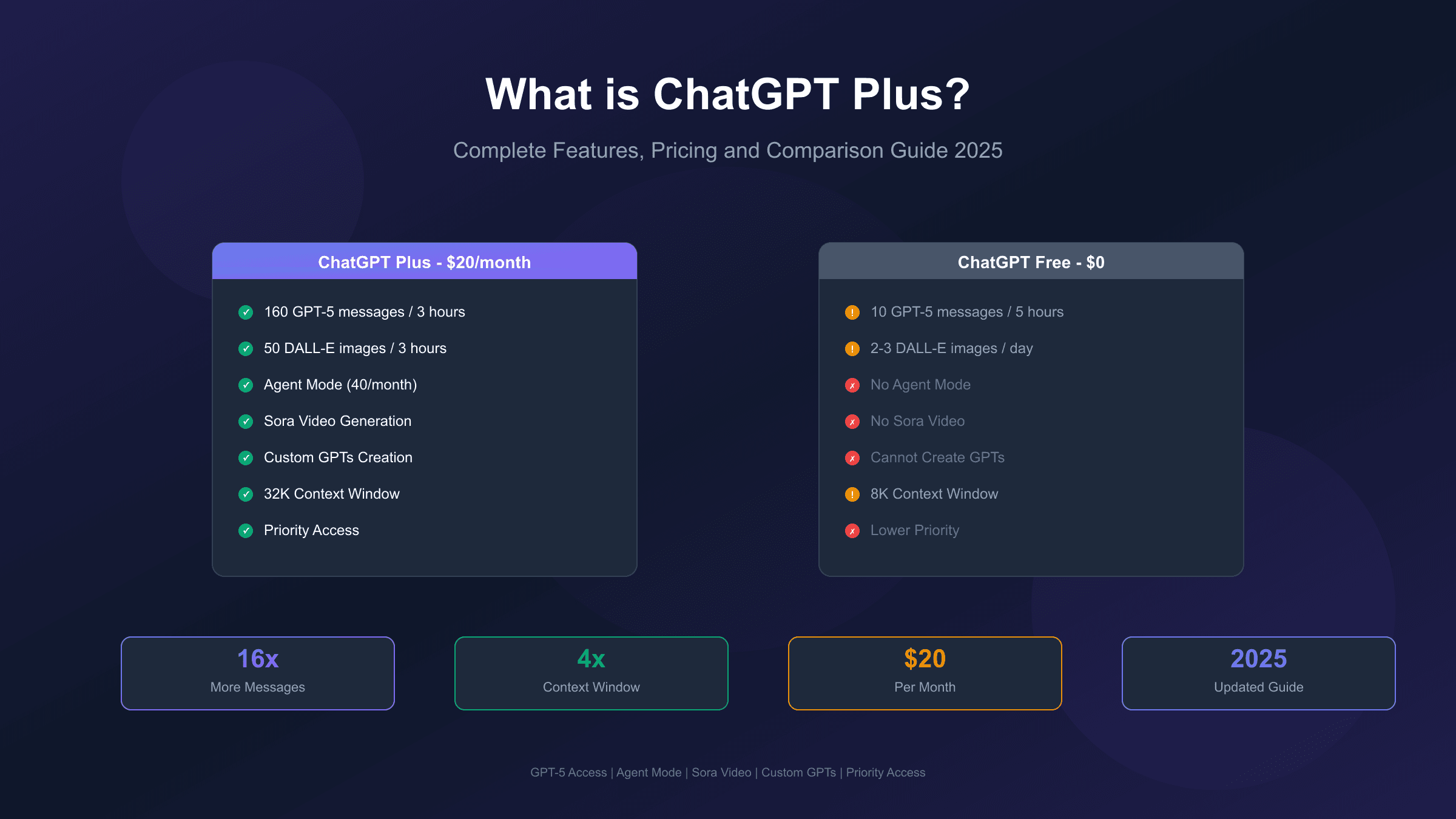
ChatGPT Free costs nothing and provides access to GPT-5, the latest flagship model, with limited usage. Free users receive approximately 10 messages every 5 hours using GPT-5, after which the system automatically switches to the lighter GPT-5 mini model. This tier is surprisingly capable for casual use, offering basic image generation, file uploads, and web browsing capabilities.
ChatGPT Plus at $20 per month represents the most popular paid tier for individual users. According to OpenAI's pricing page, Plus subscribers receive approximately 160 GPT-5 messages every 3 hours, 3,000 GPT-5 Thinking messages per week, and access to all advanced features including Agent Mode, expanded DALL-E image generation, and Sora video creation. The subscription also provides priority access during high-demand periods when free users may experience slowdowns.
ChatGPT Pro costs $200 per month and targets power users who need virtually unlimited access. Pro users get unlimited GPT-5 messages (subject to fair use policies), 400 Agent Mode requests per month, higher-quality Sora video generation at 1080p resolution, and the longest response times for complex reasoning tasks.
ChatGPT Team runs $25-30 per user monthly with annual billing and adds collaborative features like shared workspaces, admin controls, and higher limits suitable for small teams. ChatGPT Enterprise uses custom pricing for large organizations requiring additional security, compliance features, and dedicated support.
| Plan | Monthly Cost | GPT-5 Messages | Key Features |
|---|---|---|---|
| Free | $0 | 10 per 5 hours | Basic access, auto-switches to mini model |
| Plus | $20 | 160 per 3 hours | Agent Mode, Sora, custom GPTs, priority access |
| Pro | $200 | Unlimited (fair use) | 1080p Sora, 400 agent requests, extended thinking |
| Team | $25-30/user | Higher limits | Workspace collaboration, admin controls |
| Enterprise | Custom | Highest limits | Security, compliance, dedicated support |
OpenAI currently only offers monthly billing for individual plans, with no annual subscription discount available. The total annual cost for ChatGPT Plus works out to $240 if subscribed for the full year. Payment is processed in USD globally, though local taxes and processing fees can increase the actual cost to $22-26 depending on your region. For users in regions with payment difficulties, services like fastgptplus.com offer iOS-based payment solutions that simplify the subscription process. For more details on the newest plan option, check out our comparison of ChatGPT Go vs Plus.
ChatGPT Free vs Plus: Complete Feature Comparison
The feature gap between ChatGPT Free and Plus has evolved significantly throughout 2025. While the free tier has become remarkably capable, Plus subscribers still enjoy meaningful advantages across multiple dimensions.
Both free and Plus users now have access to GPT-5, OpenAI's most advanced publicly available model. This represents a major change from previous years when free users were limited to older models. However, the difference lies in how much you can use it and what additional tools are available. Free users get GPT-5 with strict limitations, while Plus users enjoy expanded access with higher message caps and priority processing.
The core feature differences center on usage volume, advanced capabilities, and exclusive tools. Plus subscribers can send roughly 16 times more GPT-5 messages per day compared to free users when accounting for the different rate limit windows. More importantly, Plus users maintain consistent access to GPT-5 even during peak demand periods, while free users may be automatically downgraded to the lighter GPT-5 mini model when servers are busy.
| Feature | Free | Plus |
|---|---|---|
| GPT-5 Access | 10 msgs / 5 hours | 160 msgs / 3 hours |
| GPT-5 Thinking | 1 msg / day | 3,000 msgs / week |
| DALL-E Images | 2-3 per day | 50 per 3 hours |
| Agent Mode | Not available | 40 msgs / month |
| Deep Research | 4 per month | Expanded access |
| Sora Video | Not available | Limited 720p access |
| Custom GPTs | Use only | Create and publish |
| Advanced Voice | 10 minutes | 1 hour |
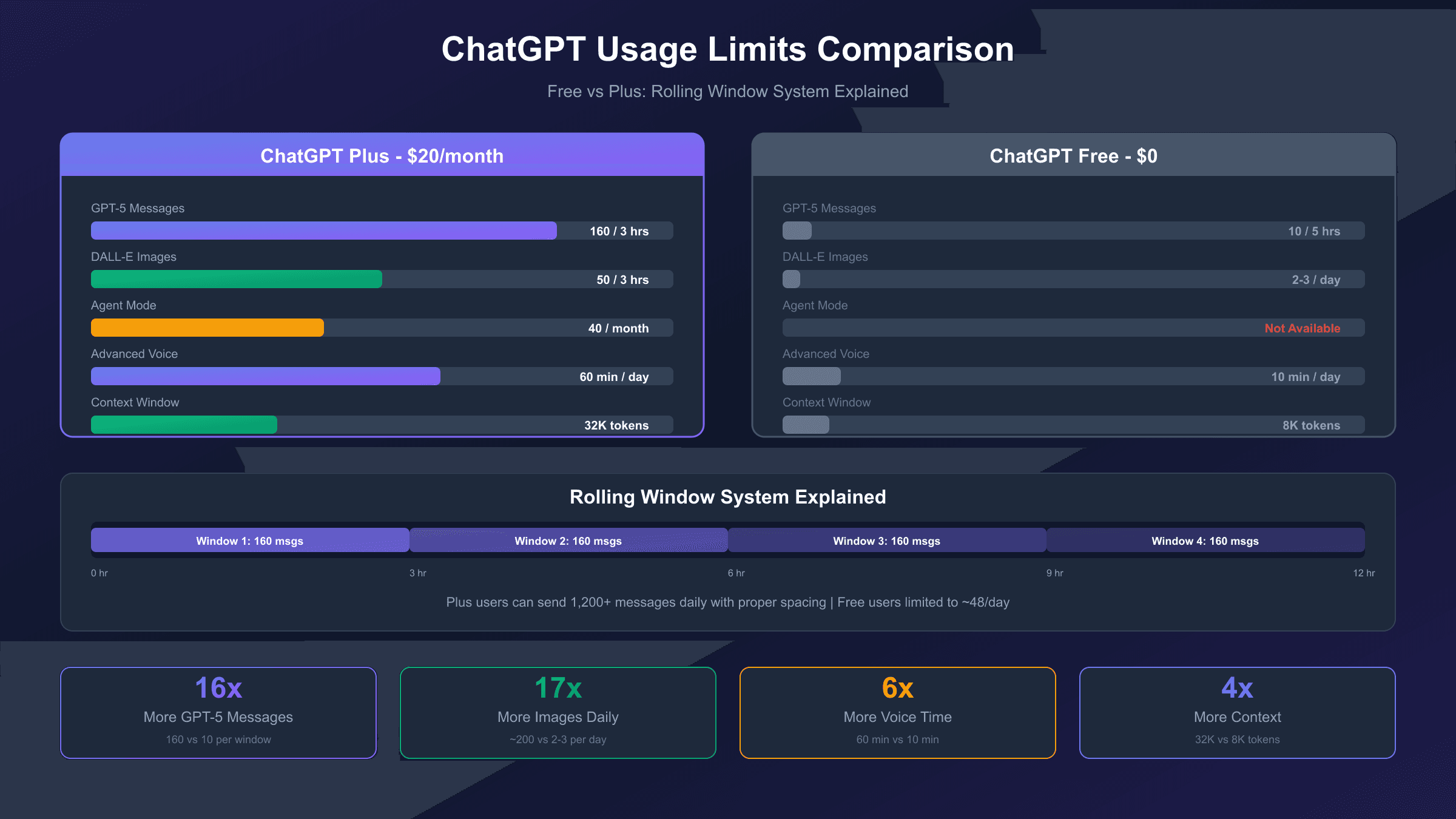
| Context Window | 8K tokens | 32K tokens |
| Priority Access | No | Yes |
| New Feature Access | Delayed | Early access |
Agent Mode represents one of the most significant Plus-exclusive features. This capability allows ChatGPT to autonomously browse the web, execute multi-step tasks, and complete complex workflows without constant user intervention. According to OpenAI's Agent Mode introduction, the feature can handle tasks ranging from research compilation to booking management, essentially acting as an AI assistant that takes initiative.
Custom GPT creation is another major differentiator. While free users can access and use GPTs created by others, only Plus subscribers can build and publish their own custom AI assistants. This feature enables users to create specialized tools tailored to specific workflows, from writing assistants with particular style guidelines to technical support bots with domain knowledge.
AI Model Access: GPT-5 and Beyond
The AI model landscape within ChatGPT has undergone a fundamental transformation with GPT-5 becoming the new default. Understanding model access differences is crucial for evaluating whether Plus provides sufficient value for your needs.
GPT-5 launched as OpenAI's flagship model, replacing GPT-4o as the default for all signed-in users. According to OpenAI's GPT-5 announcement, the new model integrates reasoning capabilities directly into its core architecture, applying deeper thinking automatically when responses would benefit from it. This means both free and Plus users access the same underlying intelligence, though with different usage allowances.
The model selector within ChatGPT allows Plus users to choose between different models for specific tasks. Plus subscribers can switch between GPT-5, GPT-5 Fast (optimized for speed), and GPT-5 Thinking (optimized for complex reasoning). Additionally, Plus users have access to legacy models including GPT-4o, GPT-4.1, o3, and o4-mini through the settings menu, providing flexibility for tasks where older models might perform better or faster.
| Model | Free Access | Plus Access | Context Window |
|---|---|---|---|
| GPT-5 | 10 msgs / 5 hrs | 160 msgs / 3 hrs | 32K tokens |
| GPT-5 Thinking | 1 msg / day | 3,000 msgs / week | 32K tokens |
| GPT-5 mini | Unlimited (fallback) | Available | 16K tokens |
| GPT-4o | Limited access | Full access | 128K tokens |
| GPT-4.1 | Not available | Via settings | 128K tokens |
| Legacy models | Not available | Via settings | Varies |
Context window represents a critical but often overlooked difference. The context window determines how much information the model can consider at once, directly affecting its ability to maintain coherence across long conversations or documents. Free users work with an 8K token limit (approximately 6,000 words), while Plus users enjoy a 32K token context (roughly 24,000 words). Pro subscribers get access to 128K tokens, enabling work with entire books or extensive codebases.
The practical impact of context window differences becomes apparent in extended conversations or document analysis. With the free tier's 8K limit, uploading just two medium-length PDF articles can max out the available context. Plus users can maintain coherent discussions across much longer documents without the model forgetting earlier content.
Usage Limits Deep Dive
Usage limits represent one of the most practical differences between ChatGPT tiers, directly affecting how much you can accomplish in a given time period. Understanding the rolling window system helps you optimize your usage patterns.
ChatGPT uses rolling time windows rather than fixed daily resets for most limits. When you send a message using GPT-5, that message slot becomes available again exactly three hours later for Plus users, or five hours later for free users. This rolling system means heavy users can space out their usage throughout the day rather than exhausting their entire quota early and waiting for a midnight reset.
For free users, the limit of 10 GPT-5 messages every 5 hours translates to roughly 48 messages per day if usage is perfectly spaced. In practice, most users hit the limit within 1-2 hours of intensive work and then either wait or switch to the GPT-5 mini fallback. Plus users with 160 messages per 3 hours can theoretically send over 1,200 messages daily, though few users approach this ceiling.
| Limit Type | Free | Plus | Pro |
|---|---|---|---|
| GPT-5 Messages | 10 / 5 hours | 160 / 3 hours | Unlimited* |
| GPT-5 Thinking | 1 / day | 3,000 / week | Unlimited* |
| DALL-E Images | 2-3 / day | 50 / 3 hours | 100 / 3 hours |
| Agent Mode | Not available | 40 / month | 400 / month |
| Deep Research | 4 / month | 15 lightweight + 10 standard | Expanded |
| Advanced Voice | 10 min / day | 60 min / day | Extended |
| File Upload Size | 50 MB | 250 MB | 500 MB |
*Subject to fair use policies
Image generation limits differ substantially between tiers. Free users can generate 2-3 images daily through DALL-E 3, while Plus subscribers enjoy 50 images every 3 hours, effectively allowing around 180-200 images per day. The 50-image quota applies to both DALL-E 3 requests and GPT-4o native image generation as a unified pool. Testing reveals that image generation speed also differs dramatically: Plus users typically receive images within 2-3 minutes, while free users may wait 30+ minutes during peak hours.
What happens when you hit limits varies by feature. For messaging limits, the system automatically switches to GPT-5 mini, which provides faster but less sophisticated responses. For image generation, you simply cannot create more images until the window resets. For Agent Mode, you receive a notification that your monthly quota has been reached. For a detailed breakdown of image limits, see our guide on free tier image limits.
Advanced Features: Agent Mode and Deep Research
Agent Mode and Deep Research represent ChatGPT's evolution from a simple question-answering tool to an autonomous AI assistant capable of completing complex multi-step tasks independently.
Agent Mode, exclusive to Plus, Pro, and Team subscribers, enables ChatGPT to browse the web, execute tasks, and make decisions autonomously. When activated, the AI can navigate websites, fill out forms, gather information from multiple sources, and synthesize findings without requiring constant user input. OpenAI describes this as ChatGPT learning to "think and act" proactively, choosing from a toolbox of agentic skills to complete tasks.
Practical applications of Agent Mode span numerous workflows. Research tasks that might require 30-60 minutes of manual work can often be completed in under 10 minutes. For example, asking Agent Mode to "research the top 5 project management tools, compare their pricing, and summarize the pros and cons" results in a comprehensive report with cited sources. The AI autonomously visits each tool's website, extracts relevant information, and compiles structured findings.
Plus users receive 40 Agent Mode messages monthly, while Pro subscribers get 400. The limit resets at the beginning of each billing cycle rather than using a rolling window. Given the complexity and resource intensity of Agent Mode operations, these limits are intentionally conservative compared to regular messaging.
Deep Research complements Agent Mode by providing thorough, citation-rich analysis of complex topics. When enabled, ChatGPT spends additional time gathering evidence from the web, analyzing sources, and producing structured summaries with proper attribution. Free users receive 4 Deep Research queries monthly, while Plus users get significantly expanded access with 15 lightweight and 10 standard research credits.
The distinction between lightweight and standard Deep Research affects thoroughness. Lightweight research provides quick overviews with basic source verification, suitable for getting up to speed on unfamiliar topics. Standard research involves more extensive web browsing, cross-referencing multiple sources, and producing more detailed analysis suitable for professional or academic use. For a comprehensive guide to these features, see our Agent Mode and Deep Research guide.
Creative Tools: Image Generation and Sora Video
Creative capabilities within ChatGPT have expanded dramatically, with image generation and video creation now accessible directly within the chat interface. These tools transform ChatGPT from a text-focused assistant into a multimedia content creation platform.
DALL-E 3 integration provides high-quality image generation for both free and Plus users, though with significant differences in limits and speed. The image generation engine interprets natural language descriptions and produces detailed visuals, useful for everything from marketing materials to concept art. Plus users can generate approximately 50 images every 3 hours, while free users are limited to 2-3 daily. The quality of generated images is identical between tiers; only the volume and speed differ.
GPT-4o native image creation offers an alternative approach within the same platform. This newer capability generates images with a different aesthetic compared to DALL-E 3, sometimes producing more photorealistic or stylistically distinct results. Both DALL-E 3 and GPT-4o image generation count against the same quota pool for Plus subscribers, giving users flexibility in which engine to use based on the desired output style.
Sora video generation, announced via OpenAI's Sora 2 release, brings text-to-video capabilities to ChatGPT Plus subscribers. Users can generate videos up to 20 seconds long at resolutions up to 1080p for Pro users, or 10 seconds at 720p for Plus users. Videos can be created in widescreen, vertical, or square aspect ratios, making them suitable for various platforms from YouTube to TikTok.
The practical limitations of Sora on the Plus tier merit honest assessment. At 720p resolution and 10-second maximum length, the videos are suitable for social media content, quick demonstrations, or creative experiments, but may not meet professional production standards. Pro tier access at $200/month unlocks higher resolution and longer videos, which may be necessary for commercial content creation. Free users have no access to Sora video generation.
Voice Mode and Memory Features
Voice interaction and persistent memory capabilities enhance ChatGPT's utility as a conversational assistant, though access levels differ significantly between subscription tiers.
Standard Voice Mode is available to all users, enabling spoken conversations with ChatGPT through mobile apps and web browsers. This basic voice functionality processes speech-to-text, generates responses, and converts them back to speech. The experience is functional but somewhat mechanical, with noticeable delays between speaking and receiving responses.
Advanced Voice Mode, available to Plus and higher tiers, provides a fundamentally different experience. According to OpenAI's release notes, Advanced Voice processes speech directly rather than converting to text first, enabling more natural real-time conversation with improved intonation and emotional expression. The feature supports video and screen sharing, allowing you to show ChatGPT what you are looking at while discussing it.
Usage limits for Advanced Voice differ substantially. Free users receive approximately 10 minutes daily, sufficient for brief queries but not extended discussions. Plus users enjoy 60 minutes of Advanced Voice daily, enough for multiple substantial conversations. The time resets every 24 hours based on your first usage rather than at a fixed time.
Memory features help ChatGPT maintain context across separate conversations, remembering your preferences, past discussions, and personal details you have shared. Both free and Plus users have access to Memory, though Plus users report better consistency in memory retention across sessions. Important privacy consideration: memory can be disabled entirely or selectively in settings, and OpenAI provides controls to view and delete stored information.
The context window differences discussed earlier also affect conversational memory within single sessions. Plus users with 32K tokens can maintain coherent discussions that reference content from much earlier in the conversation, while free users' 8K limit means the model may "forget" details from more than a few exchanges ago. For users who frequently have extended technical discussions or work sessions, this difference proves significant.
Custom GPTs: Create Your Own AI Assistants
Custom GPTs enable users to build specialized AI assistants tailored to specific tasks, workflows, or domains. This feature democratizes AI customization, allowing anyone to create purpose-built tools without coding knowledge.
Creating a custom GPT is available exclusively to Plus, Pro, Team, and Enterprise subscribers. According to OpenAI's GPT creation guide, the process is conversational: you describe what you want your GPT to do, and the system guides you through configuration. You can specify custom instructions, upload knowledge files (up to 20 documents), enable specific capabilities like web browsing or image generation, and even connect external APIs through custom actions.
The practical applications of custom GPTs span numerous use cases. Content creators build GPTs with their specific style guidelines and brand voice. Educators create subject-specific tutors with curriculum-aligned knowledge. Developers build coding assistants specialized in particular frameworks or languages. Customer support teams deploy GPTs trained on their product documentation.
Free users can access and use GPTs created by others but cannot create or publish their own. This means you can benefit from the GPT Store's library of community-created tools without a subscription, though the most specialized tools for your specific needs will likely require building yourself.
The GPT Store provides a marketplace where creators can share and discover custom GPTs. Before publishing publicly, creators must verify their Builder Profile. Most GPTs appear in the Store within minutes of submission, though some undergo longer review depending on content. Popular GPTs can attract significant usage, though OpenAI has not yet implemented creator monetization for GPT usage.
Recent updates allow creators to select specific models for their custom GPTs, choosing from GPT-4o, o3, o4-mini, and other available models. This flexibility helps optimize performance for different task types, whether requiring speed, creativity, or analytical depth. GPTs with custom actions currently support GPT-4o and GPT-4.1, while those without external integrations can use the full model picker.
Is ChatGPT Plus Worth It? ROI Analysis
Determining whether ChatGPT Plus justifies its $20 monthly cost requires honest assessment of usage patterns, productivity gains, and alternative options. The value proposition varies significantly based on how frequently and intensively you use the platform.
For users who engage ChatGPT daily for substantive tasks, the math often favors Plus. At $20 monthly, the subscription costs roughly $0.67 per day. If Plus features save even 15-20 minutes daily through faster responses, higher limits, and advanced capabilities, the hourly value proposition becomes compelling for anyone whose time has measurable worth. Reviewers consistently report saving multiple hours weekly on research, writing, and analysis tasks.
The free tier's limitations become apparent quickly for intensive users. With only 10 GPT-5 messages every 5 hours, many users exhaust their quota within 1-2 hours of focused work. The automatic switch to GPT-5 mini provides continuity but with noticeably reduced capability for complex tasks. Plus users can work through an entire day without hitting meaningful limits for typical usage patterns.
Specific feature value depends on individual workflows. Image generation limits matter greatly for designers and content creators but minimally for those who never generate images. Agent Mode provides dramatic value for research-heavy work but offers nothing for simple Q&A usage. Custom GPT creation enables workflow optimization that compounds over time but requires investment in setup and refinement.
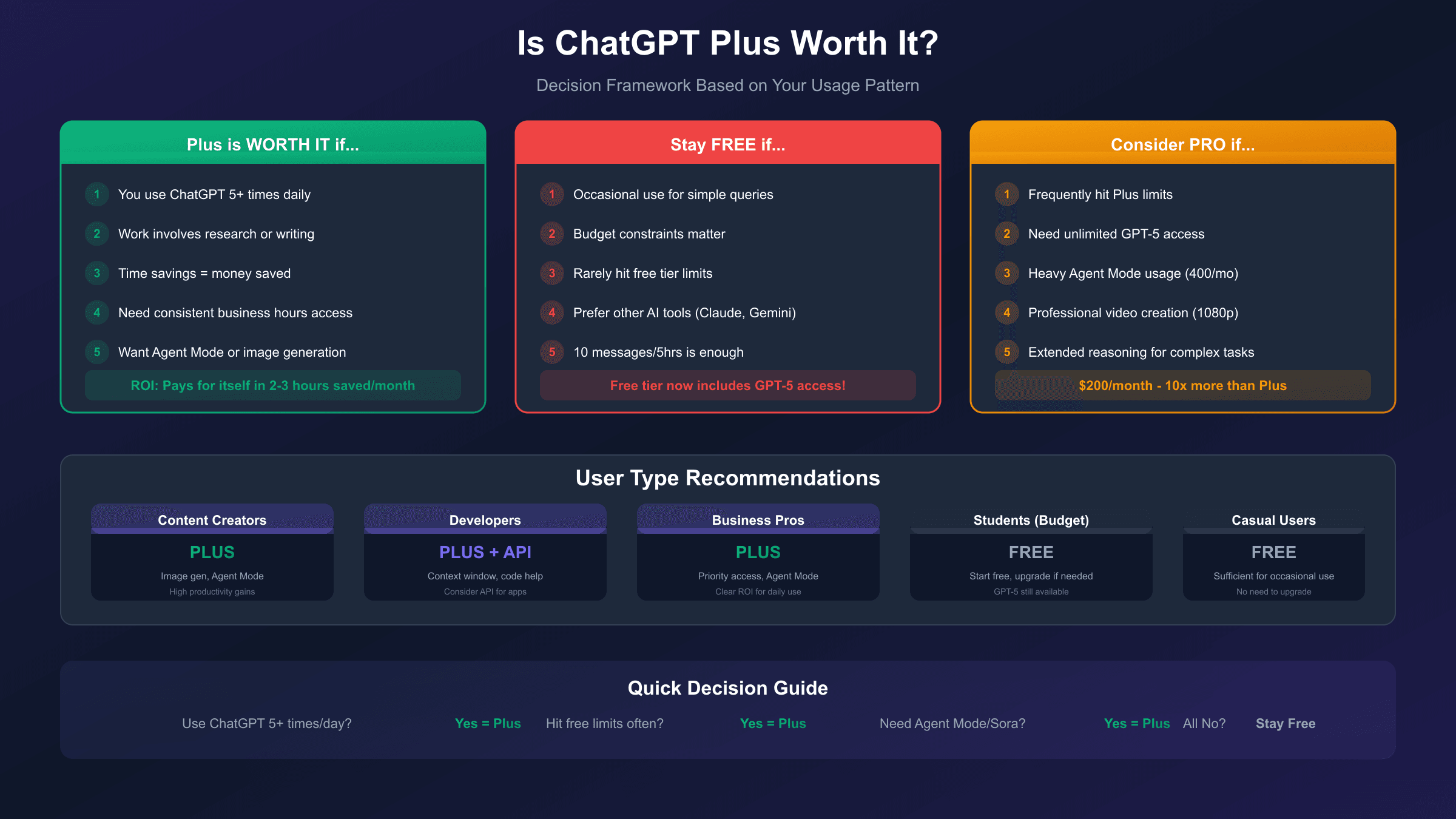
When ChatGPT Plus is worth it:
- You use ChatGPT more than 5 times daily
- Your work involves research, writing, or analysis
- Time savings directly translate to financial value
- You need consistent access during business hours
- Advanced features (Agent Mode, image generation) align with your tasks
When ChatGPT Plus may not be worth it:
- Occasional use for simple questions
- Budget constraints where $20/month matters
- Needs that the free tier adequately serves
- Preference for alternative AI tools like Claude or Gemini
For developers who need programmatic API access rather than the web interface, the calculation differs. OpenAI's API is billed separately based on usage, and platforms like laozhang.ai offer OpenAI-compatible API endpoints at competitive rates, potentially providing better value for high-volume technical use cases. API access makes sense when integrating ChatGPT capabilities into applications rather than using the conversational interface directly.
Who Should Subscribe: Use Case Guide
Different user profiles benefit from ChatGPT Plus in distinct ways. This breakdown provides specific guidance based on typical needs and usage patterns.
Students and Academic Researchers find significant value in Plus when their coursework involves substantial research, writing, or analysis. The expanded Deep Research capability helps gather and synthesize sources efficiently. Longer context windows support working with academic papers and extensive reading materials. However, students with limited budgets who primarily use ChatGPT for occasional homework help may find the free tier sufficient. Recommendation: Try the free tier first; upgrade if you consistently hit limits during study sessions.
Content Creators and Writers often see immediate productivity gains from Plus. The expanded image generation limits support content illustration without external tools. Agent Mode can accelerate research for articles and scripts. Custom GPTs allow building specialized writing assistants tuned to particular styles or formats. For creators publishing frequently, the time savings typically exceed the subscription cost. Recommendation: Plus is generally worth it for professional creators; consider Pro if video content is core to your work.
Developers and Technical Users benefit from Plus primarily through extended context windows and higher limits for code-related conversations. Complex debugging sessions and architectural discussions require maintaining context across many exchanges. However, developers who primarily need API access for building applications should evaluate API pricing separately, as the web interface subscription and API are billed independently. Recommendation: Plus for interactive development work; consider API access for production applications.
Business Professionals using ChatGPT for emails, reports, presentations, and analysis typically find Plus cost-effective. Priority access ensures availability during business hours when free users may experience throttling. Agent Mode can handle research tasks that would otherwise consume significant time. The monthly cost is typically trivial compared to productivity gains for knowledge workers. Recommendation: Plus is usually worthwhile for daily professional use.
Casual Users asking occasional questions or using ChatGPT for entertainment may find the free tier perfectly adequate. With recent improvements, free users access the same GPT-5 model as Plus subscribers, just with lower limits. If you rarely hit the 10-message-per-5-hours ceiling, upgrading provides limited additional value. Recommendation: Start with free; only upgrade if you consistently want more than the free tier provides.
| User Type | Recommended Plan | Key Value Drivers |
|---|---|---|
| Heavy daily user | Plus | Message limits, priority access |
| Researcher | Plus | Deep Research, context window |
| Content creator | Plus/Pro | Image gen, Sora video, Agent Mode |
| Developer | Plus + API | Context window, code assistance |
| Business professional | Plus | Reliability, Agent Mode |
| Casual user | Free | Cost savings, sufficient features |
| Student (budget) | Free | Try before upgrading |
| Student (intensive) | Plus | Research, writing support |
How to Subscribe, Manage, or Cancel
The subscription process for ChatGPT Plus is straightforward, though some users face regional payment challenges. Here is what you need to know about managing your subscription.
To subscribe to ChatGPT Plus, log into your ChatGPT account at chat.openai.com and click on your profile icon in the bottom left corner. Select "Upgrade to Plus" and follow the payment prompts. OpenAI accepts major credit cards and debit cards. The charge appears immediately, and Plus features activate within minutes of successful payment. For those who encounter payment issues, our step-by-step subscription guide provides detailed instructions.
Managing your subscription is handled through the same settings menu. You can view your current plan, check your next billing date, and update payment methods. OpenAI sends email reminders before each renewal. The billing cycle starts on your subscription date and renews monthly on that same date.
Canceling ChatGPT Plus can be done at any time through Settings > Subscription > Manage Subscription > Cancel Plan. Cancellation takes effect at the end of your current billing period, meaning you retain Plus access until the date you would have been charged next. OpenAI does not prorate refunds for partial months. For detailed cancellation steps, see our guide on how to cancel your ChatGPT Plus subscription.
Refund policy is limited. OpenAI generally does not offer refunds for subscriptions, though exceptions may be made for immediate cancellation after accidental purchases or technical issues preventing service access. Contact OpenAI support directly for refund requests.
Frequently Asked Questions
Can I try ChatGPT Plus before committing? OpenAI does not currently offer a free trial for ChatGPT Plus. However, the free tier provides access to the same GPT-5 model with lower limits, allowing you to evaluate the core experience before subscribing. You can cancel Plus at any time if it does not meet your expectations after the first month.
Does ChatGPT Plus include API access? No, ChatGPT Plus and API access are separate products with independent billing. The $20/month Plus subscription covers only the web and mobile app interface. API access requires a separate account at platform.openai.com with usage-based billing. Some users need both subscriptions if they use the conversational interface personally and build applications with the API.
Will I lose my chat history if I cancel Plus? No, your chat history, custom GPTs, and settings are preserved when you cancel. You simply lose access to Plus features like expanded limits, Agent Mode, and Sora video. If you resubscribe later, everything remains intact.
Is there a student or educational discount? OpenAI does not currently offer official student discounts for ChatGPT Plus. However, many universities provide institutional access through ChatGPT Enterprise or Team plans, so check with your school's IT department. Third-party resellers sometimes offer promotional rates, though these carry varying levels of reliability.
What happens to my custom GPTs if I downgrade to free? Your custom GPTs remain saved but become inaccessible for editing. You can still view them, but creating new GPTs or modifying existing ones requires an active Plus, Pro, or Team subscription. Others can still use your published GPTs.
Can I share my ChatGPT Plus account? OpenAI's terms of service prohibit sharing accounts. Plus subscriptions are intended for individual use, and sharing could result in account restrictions. For teams or families needing multiple users, ChatGPT Team provides legitimate multi-user access with proper administrative controls.
How do ChatGPT Plus and ChatGPT Pro differ? Plus costs $20/month and provides generous but limited access to all features. Pro costs $200/month and offers virtually unlimited GPT-5 messages, 10x more Agent Mode requests (400 vs 40 monthly), higher-quality Sora video at 1080p, and extended reasoning time for complex tasks. Pro is designed for power users who would frequently hit Plus limits.
Conclusion
ChatGPT Plus offers meaningful advantages over the free tier, though the value depends entirely on your usage patterns and needs. The $20 monthly subscription provides approximately 16 times more GPT-5 messages, exclusive access to Agent Mode and Sora video, the ability to create custom GPTs, and priority access during peak demand periods.
For users who engage ChatGPT daily for substantive work, the productivity gains typically justify the cost within the first few days of heavy usage. Content creators, researchers, developers, and business professionals consistently report time savings that exceed the subscription value. The expanded context window alone transforms ChatGPT's utility for anyone working with long documents or extended conversations.
However, the free tier has improved substantially and may be sufficient for casual users, students with limited budgets, or anyone who uses ChatGPT only occasionally. With GPT-5 now available to all users, the intelligence gap between tiers has narrowed. The difference lies primarily in volume and advanced features rather than core capability.
If you are unsure whether Plus is right for you, start with the free tier and track how often you hit limits. If you frequently exhaust the 10-message quota or find yourself wanting features like Agent Mode or expanded image generation, upgrading becomes an easy decision. If the free tier meets your needs comfortably, there is no pressure to upgrade. The right choice is the one that matches your actual usage, not the one with the longest feature list.