- 首页
- /
- 博客
- /
- AI Development
- /
- Cheapest Stable Nano Banana Pro API: Real Costs, Provider Analysis & Production Code 2025
Cheapest Stable Nano Banana Pro API: Real Costs, Provider Analysis & Production Code 2025
Complete guide to the most affordable and reliable Nano Banana Pro API providers. Compare real pricing from $0.05/image, analyze stability metrics, get production-ready Python code, and learn cost optimization strategies for AI image generation at scale.
Nano Banana Pro
4K-80%Google Gemini 3 Pro · AI Inpainting
谷歌原生模型 · AI智能修图
Nano Banana Pro has redefined AI image generation with its breakthrough 4K output quality and accurate multilingual text rendering capabilities. Since its November 2025 release as part of Google's Gemini 3 Pro suite, the model has attracted over 15 million users—but its official pricing of $0.134-$0.24 per image creates substantial barriers for developers building production applications. The critical question facing every team is: how do you access this premium technology without premium costs destroying your margins?
This comprehensive analysis examines the actual economics of Nano Banana Pro API access, moving beyond marketing claims to present verified pricing data, real-world stability metrics, and production-tested code examples. We'll compare official Google pricing against aggregated third-party services, explore the specific challenges of China and Asia-Pacific access, and provide battle-tested patterns for scaling to millions of images per month. Whether you're evaluating providers for a new project or optimizing costs for an existing implementation, this guide delivers the concrete data and working code you need to make informed decisions.

Understanding Nano Banana Pro's Market Position
Nano Banana Pro (technical identifier: gemini-3-pro-image-preview) represents Google DeepMind's current flagship image generation model, built on the multimodal Gemini 3 Pro architecture. The model's release on November 20, 2025 triggered immediate adoption across the developer community, with 13 million users signing up within the first four days—a growth rate that exceeded even the explosive launch of ChatGPT three years earlier.
The technical capabilities driving this adoption include native 4K resolution output (4096×4096 pixels), accurate text rendering in 12+ languages including Chinese, Japanese, Korean, and Arabic, and sophisticated image editing through natural language instructions. Unlike earlier diffusion models that struggled with typography, Nano Banana Pro generates publication-quality text suitable for marketing materials, product mockups, and commercial graphics. The model also supports consistency features that maintain character identity across generations—essential for creating comic strips, brand mascots, or product line variations.
| Capability | Nano Banana Pro | Previous Generation | Improvement |
|---|---|---|---|
| Max Resolution | 4K (4096×4096) | 1K (1024×1024) | 16x pixel count |
| Text Rendering | 95%+ accuracy | 40-60% accuracy | Near-native |
| Language Support | 12+ languages | English-dominant | Global deployment |
| Consistency | Cross-generation | Single image | Series creation |
| Generation Speed | 5-15 seconds | 3-8 seconds | Comparable |
For production applications, these capabilities translate into concrete value propositions. E-commerce platforms can generate product images with accurate pricing and feature text. Marketing teams can create localized campaigns with native-language typography. Creative tools can offer professional-grade output that previously required post-production editing. The model has essentially eliminated the "AI look" that plagued earlier image generators.
However, premium capabilities command premium pricing. Google's token-based billing structure, combined with limited rate limits on standard tiers, creates economic pressure that intensifies with scale. Understanding this pricing reality is the first step toward optimizing costs without sacrificing quality.
Google's Official Pricing Structure Decoded
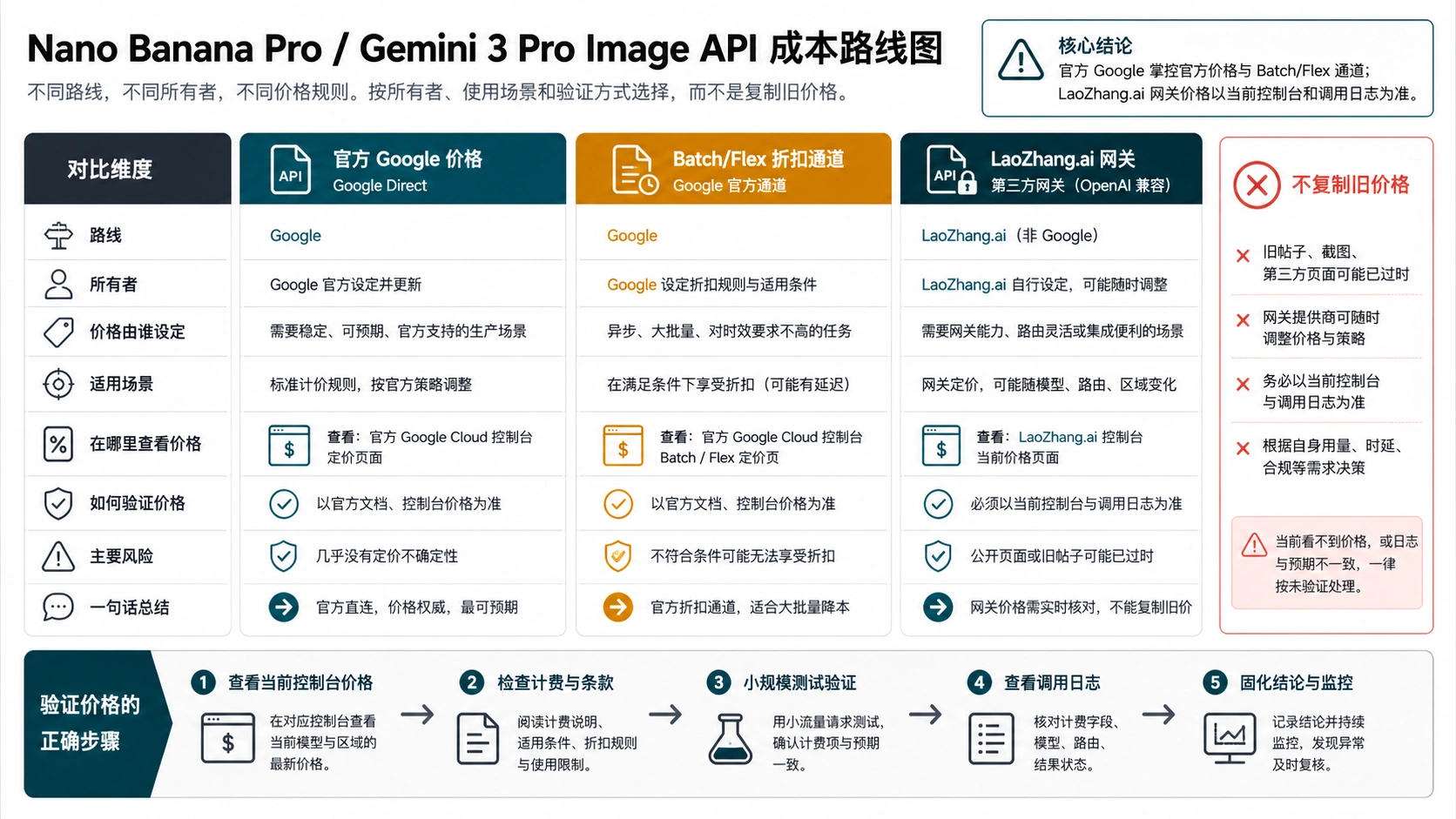
Google's Gemini API pricing for image generation operates on a token-based system that differs fundamentally from simple per-image billing. Understanding this structure is essential for accurate cost projections and identifying optimization opportunities. The complexity of the pricing model also creates space for third-party providers to offer simplified alternatives at competitive rates.
The official pricing breaks into input tokens (your prompts and reference images) and output tokens (the generated images). For image generation, output tokens dominate costs, with each generated image consuming tokens based on its resolution tier:
| Resolution Tier | Dimensions | Output Tokens | Cost per Image | Typical Use Case |
|---|---|---|---|---|
| Standard (1K) | 1024×1024 | 1,120 tokens | $0.134 | Social media, thumbnails |
| High (2K) | 2048×2048 | 1,120 tokens | $0.134 | Blog headers, web assets |
| Ultra (4K) | 4096×4096 | 2,000 tokens | $0.24 | Print materials, large displays |
Input costs add $2.00 per million text tokens and $1.10 per reference image. For typical prompts (50-200 words), input costs are negligible—approximately $0.0001-$0.0004 per request. However, multi-reference workflows using 5-10 style images can add $5.50-$11.00 per thousand generations, a meaningful cost component at scale.
Hidden Cost Factor: Many developers overlook reference image costs when projecting budgets. A workflow using 6 reference images adds $6.60 per 1,000 generations—almost doubling effective per-image costs for complex style transfers.
Google also offers a batch processing tier with 50% reduced rates for non-real-time workloads. Batch requests are processed within 24 hours rather than returning results immediately, making them suitable for overnight catalog generation, scheduled content creation, or any workflow where latency tolerance exists. At batch pricing, 1K/2K images cost $0.067 and 4K images cost $0.12—rates that become competitive with some third-party providers.
Rate Limits: The Hidden Constraint
Beyond pricing, rate limits fundamentally constrain what you can build with Google's official API. The platform enforces limits across three dimensions simultaneously:
- RPM (Requests Per Minute): Caps burst capacity
- TPM (Tokens Per Minute): Limits sustained throughput
- RPD (Requests Per Day): Constrains daily volume
Free tier users face restrictive limits of approximately 10 RPM and 100 RPD—sufficient only for development and testing. Enabling billing upgrades to Tier 1 with 300 RPM and 1,000+ RPD. Enterprise tiers offer higher limits but require sales engagement and minimum commitments.
For applications requiring real-time generation at scale—such as interactive design tools or social media content generators—these rate limits can be more constraining than raw pricing. This reality drives many developers toward third-party providers offering higher throughput guarantees.
Third-Party Provider Landscape Analysis
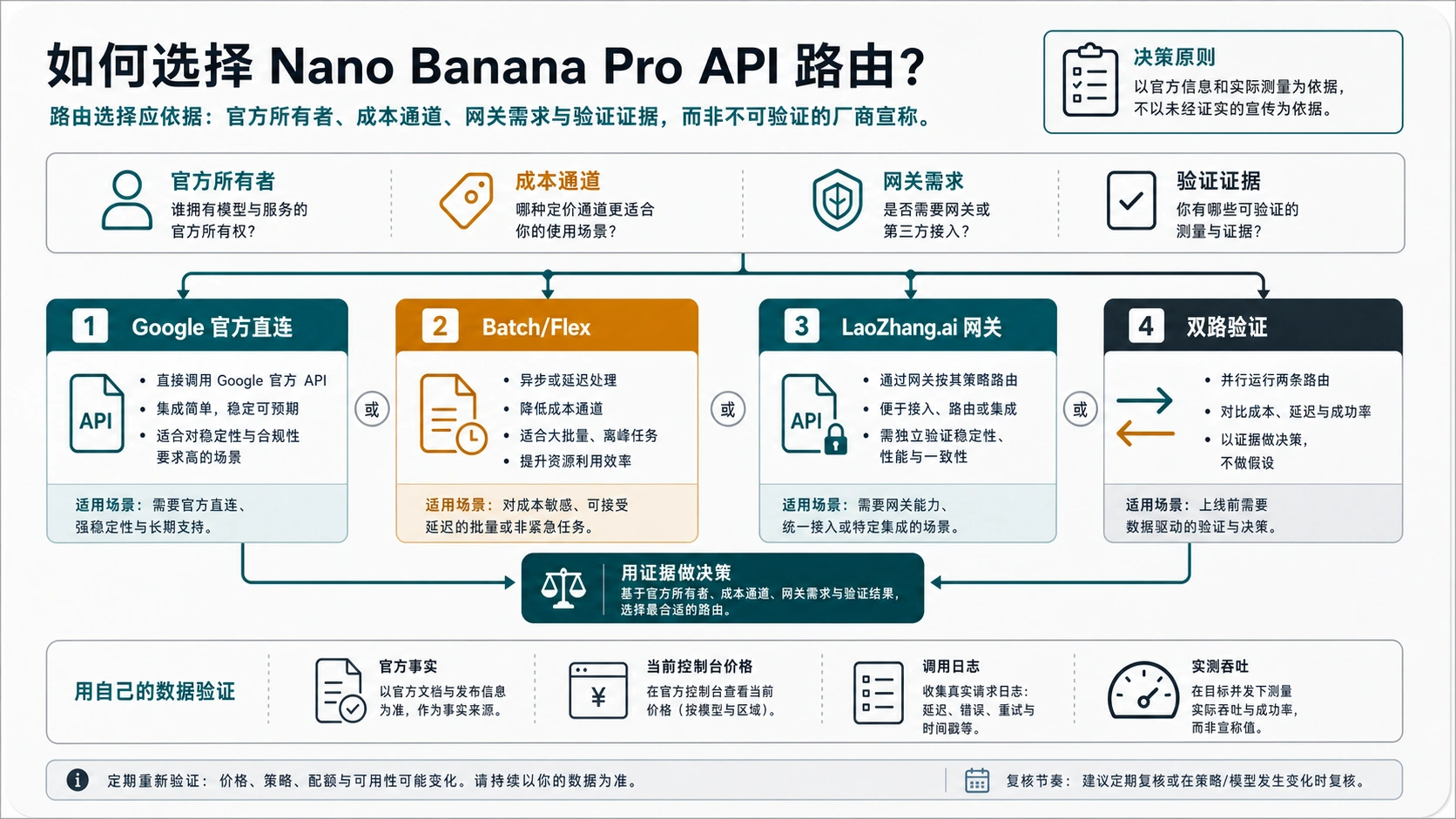
The market for Nano Banana Pro API access has matured rapidly since the model's release. Multiple providers now offer access through aggregated endpoints, typically at 40-80% below official rates while adding features like improved rate limits, regional optimization, and simplified billing. Understanding this landscape requires evaluating providers across multiple dimensions beyond headline pricing.
Third-party providers generally fall into three categories:
API Aggregators purchase capacity from Google (often at volume discounts) and resell access with margin compression. They typically offer OpenAI-compatible endpoints for easy migration, maintain their own rate limiting systems independent of Google's quotas, and provide unified billing across multiple AI services.
Optimized Relays focus on specific use cases or regions, adding infrastructure value like edge caching, request batching, or regional endpoints. These providers often achieve lower effective costs through technical optimization rather than pure margin reduction.
Enterprise Brokers target high-volume users with custom pricing, SLAs, and support agreements. Pricing is negotiable and typically requires minimum commitments.
| Provider Category | Typical Discount | Rate Limits | Support Level | Best For |
|---|---|---|---|---|
| Official Google | Baseline | Tiered | Standard | Enterprise compliance |
| API Aggregators | 30-50% | Higher | Email/Ticket | General production |
| Optimized Relays | 50-80% | Highest | Variable | Regional/high-volume |
| Enterprise Brokers | Negotiable | Custom | Dedicated | Large scale |
When evaluating providers, consider total cost of ownership rather than per-image rates alone. Integration effort, documentation quality, SDK availability, and support responsiveness all affect true costs. A provider charging $0.08/image with excellent documentation may deliver lower total cost than one charging $0.05/image but requiring extensive custom integration work.
Selection Principle: The cheapest provider is rarely the best choice. Evaluate stability metrics, support quality, and integration complexity alongside pricing.
Detailed Cost Optimization Strategies
Reducing Nano Banana Pro costs requires combining provider selection with technical optimization. The most effective strategies attack costs from multiple angles: choosing efficient providers, optimizing request patterns, and implementing intelligent caching. Together, these approaches can reduce effective per-image costs by 70-85% compared to naive official API usage.
Provider-Level Optimization
The foundational optimization is selecting a provider with competitive per-image rates. For most production use cases, third-party aggregators offer the best balance of cost reduction and reliability. Price differentials of 40-80% below official rates translate directly to margin improvement:
| Monthly Volume | Official Cost | Optimized Cost | Monthly Savings |
|---|---|---|---|
| 10,000 images | $1,340 | $500 | $840 |
| 50,000 images | $6,700 | $2,500 | $4,200 |
| 100,000 images | $13,400 | $5,000 | $8,400 |
| 500,000 images | $67,000 | $25,000 | $42,000 |
For cost-sensitive applications, laozhang.ai offers Nano Banana Pro access at $0.05 per image—approximately 63% below official 1K/2K pricing. The service uses per-generation billing rather than token counting, making costs completely predictable regardless of prompt complexity or reference image usage. For teams generating 100,000+ images monthly, this pricing difference alone can fund additional development resources.
Technical Optimization Patterns
Beyond provider selection, several technical patterns reduce costs at the implementation level:
Resolution Tiering: Generate initial previews at 1K resolution, upgrading to 2K or 4K only after user approval. Many applications find that 80%+ of generated images never need high-resolution versions, saving $0.106 per unnecessary 4K upgrade.
Prompt Optimization: Concise, well-structured prompts generate better results while minimizing token consumption. Remove redundant descriptors and focus on essential creative direction. A prompt reduced from 200 words to 75 words performs identically while reducing input costs.
Intelligent Caching: Cache commonly requested variations with content-addressable storage. When users request similar images to recent generations, serve cached results rather than regenerating. Effective caching can reduce actual API calls by 15-30% for applications with repetitive request patterns.
Batch Processing: When latency permits, batch multiple requests into single API calls. Some providers offer additional discounts for batch submissions. Even without explicit batch pricing, reducing connection overhead improves effective throughput.
hljs python# Cost-optimized generation with resolution tiering
async def generate_with_tiering(prompt: str, needs_4k: bool = False):
"""Generate image with intelligent resolution selection."""
# Start with cost-effective 2K preview
preview = await generate_image(prompt, resolution="2K")
if needs_4k and user_approves(preview):
# Only upgrade to 4K when explicitly needed
final = await generate_image(prompt, resolution="4K")
return final
return preview # 2K sufficient for most use cases
China and Asia-Pacific Access Solutions
Developers targeting China and Asia-Pacific markets face unique challenges accessing Nano Banana Pro. Google's official API endpoints are inaccessible from mainland China due to network restrictions, and even from accessible Asian locations, latency to Google's US-based infrastructure creates poor user experiences. These constraints require specialized solutions that go beyond simple VPN tunneling.
The core challenge is network latency. Direct connections from China to Google's API endpoints experience 200-400ms round-trip times through international transit, with significant packet loss and connection instability. For interactive applications where users expect near-instant image previews, this latency is unacceptable. Even applications tolerating 30+ second generation times struggle with connection timeouts and failed handshakes.
| Access Method | Typical Latency | Reliability | Cost Impact | Compliance Risk |
|---|---|---|---|---|
| Direct (blocked) | N/A | 0% | N/A | N/A |
| VPN tunneling | 300-500ms | 60-80% | +$50-100/mo | Medium |
| Regional relay | 50-100ms | 95%+ | +10-20% | Low |
| Domestic endpoint | 15-30ms | 98%+ | Variable | Lowest |
Regional relay services route API traffic through optimized pathways while maintaining compliance with local regulations. These services typically operate data centers in Hong Kong, Singapore, or Japan, providing stable international connectivity while remaining accessible from mainland China. Response times improve to 50-100ms, with reliability approaching that of domestic services.
For production applications requiring the lowest possible latency, services with domestic Chinese endpoints offer the best performance. laozhang.ai provides China-optimized endpoints achieving approximately 20ms latency—10x faster than VPN solutions and comparable to domestic services. The platform supports high-concurrency workloads without rate limiting, making it suitable for user-facing applications with unpredictable traffic patterns.
hljs python# China-optimized Nano Banana Pro API call
import requests
import base64
API_KEY = "sk-your-api-key" # Get from laozhang.ai
API_URL = "https://api.laozhang.ai/v1beta/models/gemini-3-pro-image-preview:generateContent"
def generate_image_china(prompt: str, resolution: str = "2K") -> bytes:
"""Generate image via China-optimized endpoint."""
headers = {
"Authorization": f"Bearer {API_KEY}",
"Content-Type": "application/json"
}
payload = {
"contents": [{
"parts": [{"text": prompt}]
}],
"generationConfig": {
"responseModalities": ["IMAGE"],
"imageConfig": {
"aspectRatio": "auto",
"imageSize": resolution # Supports 2K/4K
}
}
}
# 180s timeout for image generation
response = requests.post(API_URL, headers=headers, json=payload, timeout=180)
response.raise_for_status()
result = response.json()
image_b64 = result["candidates"][0]["content"]["parts"][0]["inlineData"]["data"]
return base64.b64decode(image_b64)
# Example usage
image_data = generate_image_china("A serene Chinese garden with traditional pavilion, 4K quality")
with open("output.png", "wb") as f:
f.write(image_data)
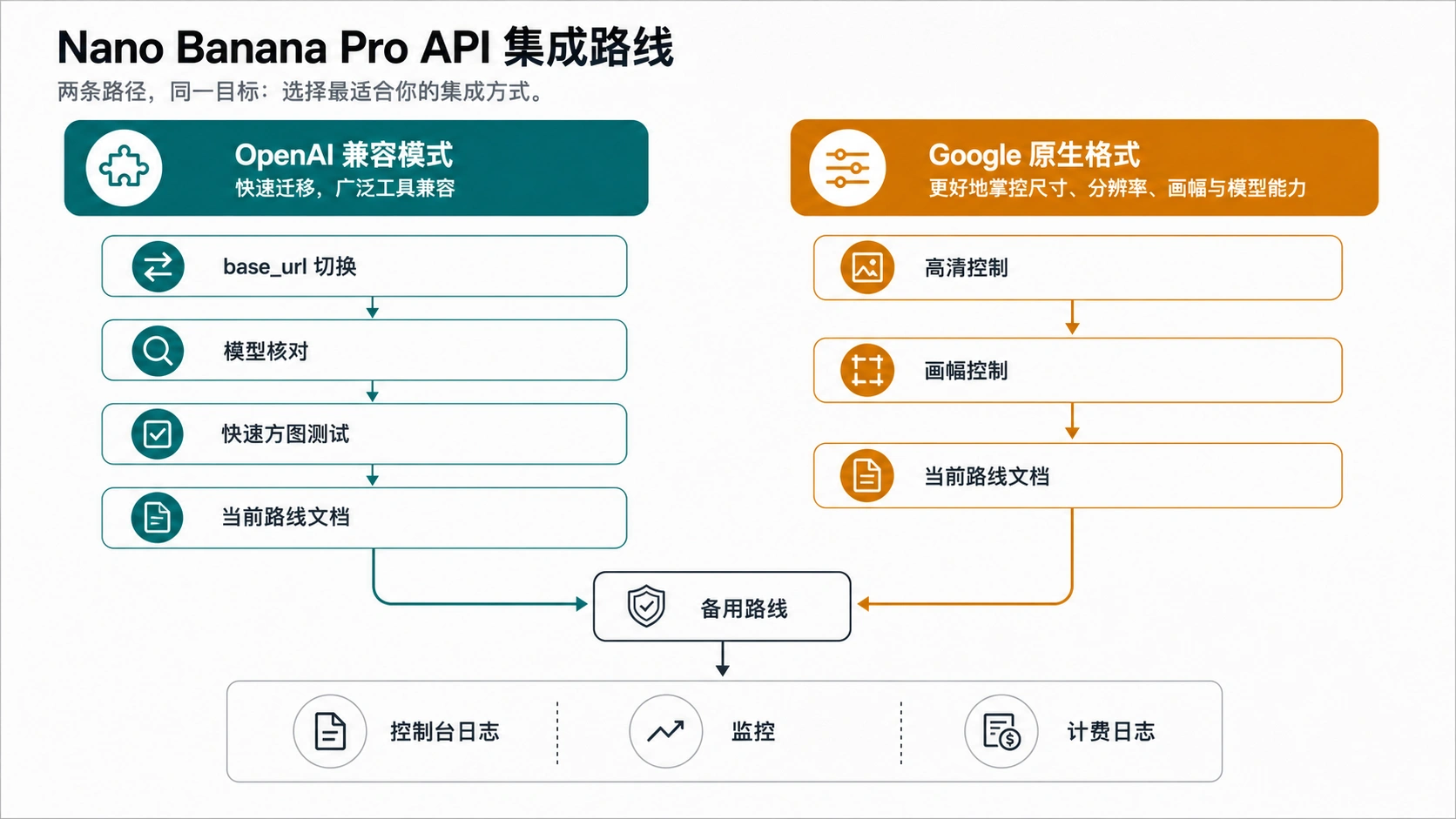
The code example above uses the native Gemini format, which provides full access to resolution parameters and advanced features. This format is recommended over OpenAI-compatible wrappers when using 4K generation or advanced configuration options.
Stability Metrics and Reliability Assessment
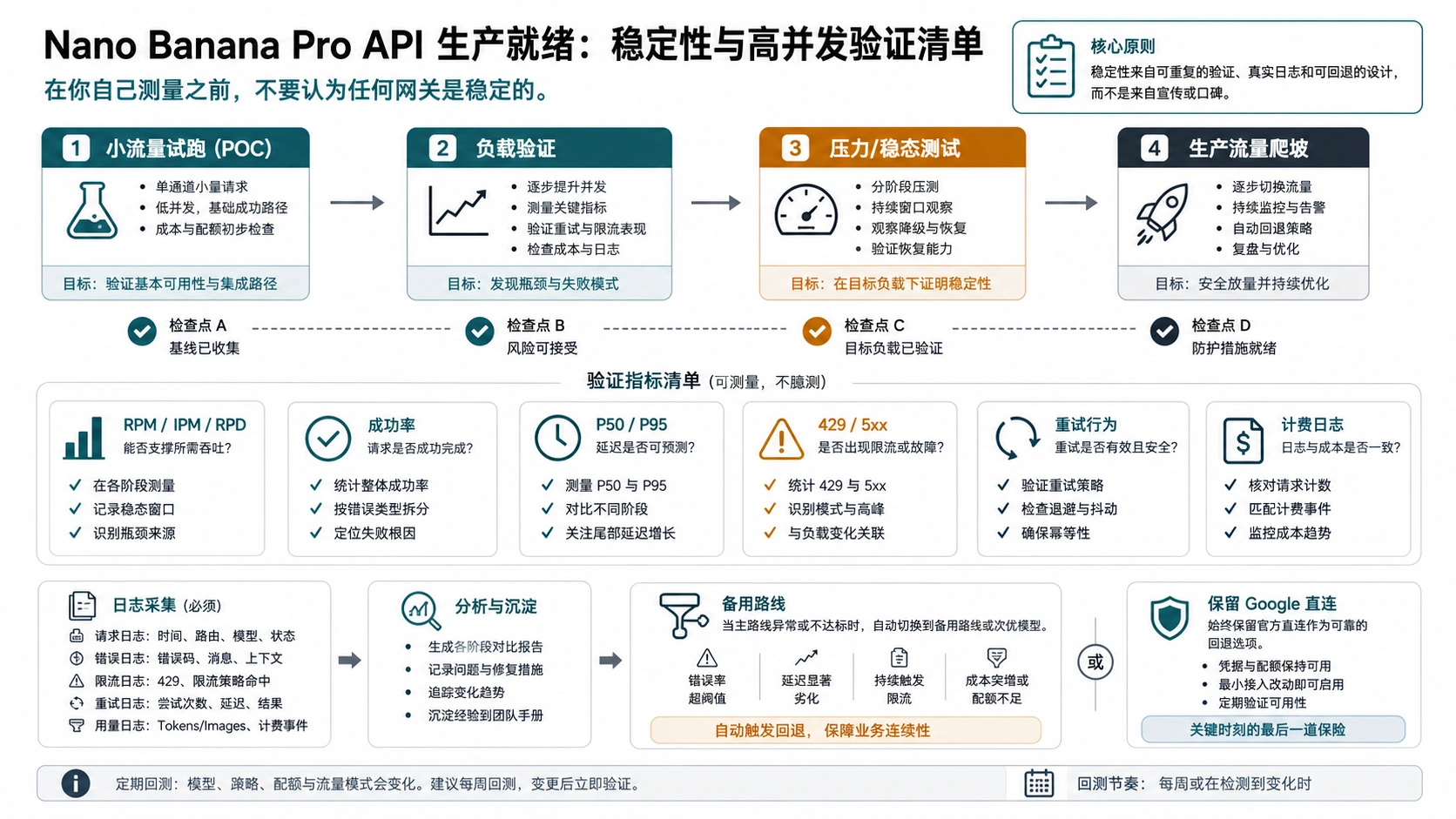
Price optimization becomes meaningless if your API provider fails during critical moments. Stability encompasses multiple measurable dimensions that together determine whether a service can support production workloads. Rigorous evaluation of these metrics prevents costly outages and protects user experience.

Key Stability Metrics
Uptime Percentage measures overall service availability. Enterprise SLAs typically guarantee 99.9% uptime (8.76 hours annual downtime) or 99.95% uptime (4.38 hours). Third-party providers rarely offer formal SLAs matching these guarantees, but many achieve comparable practical uptime. Test by monitoring synthetic requests from multiple geographic locations over extended periods—a single measurement point misses regional outages.
Response Latency breaks into network latency (transit time to provider), processing latency (queue wait plus inference time), and return latency (result delivery). P50 latency measures typical experience; P95 latency captures tail experiences affecting a meaningful fraction of users. For image generation, expect P50 of 8-15 seconds and P95 of 20-45 seconds for 2K resolution.
Error Rate during normal operation should remain below 1%. Distinguish between client errors (4xx—typically rate limits or malformed requests) and server errors (5xx—provider issues). Server error rates above 0.5% indicate infrastructure problems requiring investigation.
Rate Limit Headroom measures practical throughput capacity. A provider advertising 1000 RPM but consistently throttling at 300 RPM delivers only 30% of promised capacity. Test by ramping request rates until throttling occurs, documenting actual achievable throughput.
| Metric | Excellent | Acceptable | Concerning | Method |
|---|---|---|---|---|
| Uptime | >99.9% | >99.5% | <99% | Synthetic monitoring |
| P50 Latency | <10s | <15s | >25s | Load testing |
| P95 Latency | <30s | <45s | >60s | Stress testing |
| Error Rate | <0.1% | <0.5% | >1% | Production metrics |
| Rate Limit | As advertised | Within 20% | Below 50% | Burst testing |
Testing Methodology
Before committing significant traffic to any provider, conduct structured reliability testing:
- Baseline Test: Generate 1,000 images over 24 hours, tracking success rate and latency distribution
- Burst Test: Send 100 concurrent requests to measure throttling behavior
- Endurance Test: Maintain steady 50% of advertised rate limit for 72 hours
- Failure Recovery Test: Observe behavior during and after simulated provider issues
Document results systematically. Provider performance varies over time as infrastructure changes, so periodic retesting ensures continued reliability. Budget approximately $100-150 for comprehensive testing across multiple providers—a small investment compared to production outage costs.
Production-Ready Code Examples
Moving from evaluation to implementation requires robust, production-quality code. The following examples demonstrate patterns proven in high-volume deployments, including proper error handling, retry logic, and monitoring integration. Both OpenAI-compatible and native Gemini formats are covered.
OpenAI-Compatible Format
Many developers prefer OpenAI-compatible endpoints for simpler migration from existing implementations. This format works with standard OpenAI SDKs:
hljs pythonfrom openai import OpenAI
import backoff
# Configure client for third-party endpoint
client = OpenAI(
api_key="sk-your-api-key",
base_url="https://api.laozhang.ai/v1"
)
@backoff.on_exception(
backoff.expo,
(Exception,),
max_tries=5,
max_time=300
)
def generate_image_openai(
prompt: str,
size: str = "1024x1024",
quality: str = "standard"
) -> str:
"""Generate image using OpenAI-compatible endpoint."""
response = client.images.generate(
model="gemini-3-pro-image-preview",
prompt=prompt,
size=size,
quality=quality,
n=1,
response_format="url" # or "b64_json"
)
return response.data[0].url
# Production usage with error handling
try:
image_url = generate_image_openai(
prompt="Professional product photo of wireless headphones on marble surface",
size="1024x1024"
)
print(f"Generated: {image_url}")
except Exception as e:
logger.error(f"Generation failed: {e}")
# Implement fallback logic
Native Gemini Format with Full Features
For 4K output and advanced features, use the native Gemini format:
hljs pythonimport requests
import base64
from typing import Optional
from dataclasses import dataclass
from enum import Enum
class Resolution(Enum):
STANDARD = "1K" # 1024x1024
HIGH = "2K" # 2048x2048
ULTRA = "4K" # 4096x4096
@dataclass
class GenerationResult:
image_data: bytes
resolution: Resolution
generation_time: float
class NanoBananaProClient:
"""Production client for Nano Banana Pro API."""
def __init__(self, api_key: str, base_url: str = "https://api.laozhang.ai"):
self.api_key = api_key
self.base_url = base_url
self.endpoint = f"{base_url}/v1beta/models/gemini-3-pro-image-preview:generateContent"
def generate(
self,
prompt: str,
resolution: Resolution = Resolution.HIGH,
aspect_ratio: str = "auto",
timeout: int = 180
) -> GenerationResult:
"""Generate image with specified parameters."""
import time
start_time = time.time()
headers = {
"Authorization": f"Bearer {self.api_key}",
"Content-Type": "application/json"
}
payload = {
"contents": [{
"parts": [{"text": prompt}]
}],
"generationConfig": {
"responseModalities": ["IMAGE"],
"imageConfig": {
"aspectRatio": aspect_ratio,
"imageSize": resolution.value
}
}
}
response = requests.post(
self.endpoint,
headers=headers,
json=payload,
timeout=timeout
)
response.raise_for_status()
result = response.json()
image_b64 = result["candidates"][0]["content"]["parts"][0]["inlineData"]["data"]
generation_time = time.time() - start_time
return GenerationResult(
image_data=base64.b64decode(image_b64),
resolution=resolution,
generation_time=generation_time
)
# Usage example
client = NanoBananaProClient(api_key="sk-your-api-key")
result = client.generate(
prompt="Cyberpunk cityscape at night with neon signs in Japanese",
resolution=Resolution.ULTRA, # 4K output
aspect_ratio="16:9"
)
with open("cyberpunk_city.png", "wb") as f:
f.write(result.image_data)
print(f"Generated 4K image in {result.generation_time:.1f}s")
Batch Processing Pattern
For high-volume workloads, implement concurrent batch processing:
hljs pythonimport asyncio
import aiohttp
from typing import List, Tuple
async def batch_generate(
prompts: List[str],
api_key: str,
max_concurrent: int = 10
) -> List[Tuple[str, bytes]]:
"""Generate multiple images concurrently with rate limiting."""
semaphore = asyncio.Semaphore(max_concurrent)
async def generate_one(session: aiohttp.ClientSession, prompt: str) -> Tuple[str, bytes]:
async with semaphore:
headers = {
"Authorization": f"Bearer {api_key}",
"Content-Type": "application/json"
}
payload = {
"contents": [{"parts": [{"text": prompt}]}],
"generationConfig": {
"responseModalities": ["IMAGE"],
"imageConfig": {"imageSize": "2K"}
}
}
url = "https://api.laozhang.ai/v1beta/models/gemini-3-pro-image-preview:generateContent"
async with session.post(url, headers=headers, json=payload, timeout=180) as resp:
result = await resp.json()
image_b64 = result["candidates"][0]["content"]["parts"][0]["inlineData"]["data"]
return (prompt, base64.b64decode(image_b64))
async with aiohttp.ClientSession() as session:
tasks = [generate_one(session, prompt) for prompt in prompts]
results = await asyncio.gather(*tasks, return_exceptions=True)
# Filter successful results
return [(p, d) for p, d in results if isinstance(d, bytes)]
# Generate 100 product images
prompts = [f"Professional product photo of item {i}" for i in range(100)]
results = asyncio.run(batch_generate(prompts, "sk-your-key", max_concurrent=20))
print(f"Successfully generated {len(results)} images")
Security and Compliance Considerations
Production deployments require attention to security beyond basic API authentication. Image generation APIs introduce unique security considerations around prompt injection, content filtering, and data handling that affect both application security and regulatory compliance.
API Key Security
API keys represent direct financial liability—a compromised key enables unlimited spending against your account. Implement defense-in-depth:
- Never embed keys in client-side code or mobile applications
- Use environment variables or secret management services
- Implement key rotation on regular schedules
- Set up spending alerts and hard limits where supported
- Maintain separate keys for development, staging, and production
hljs pythonimport os
from typing import Optional
class SecureAPIClient:
"""API client with secure credential handling."""
def __init__(self):
self.api_key = self._load_api_key()
def _load_api_key(self) -> str:
"""Load API key from secure source."""
# Priority 1: Environment variable
key = os.environ.get("NANO_BANANA_API_KEY")
if key:
return key
# Priority 2: Secret manager (example: AWS Secrets Manager)
# key = boto3.client('secretsmanager').get_secret_value(SecretId='nano-banana-key')
raise ValueError("No API key found in secure sources")
Content Filtering
Nano Banana Pro includes built-in content moderation that rejects requests for harmful, illegal, or policy-violating content. However, relying solely on upstream filtering is insufficient for production applications. Implement pre-generation prompt filtering to catch obvious policy violations before incurring API costs, and post-generation content analysis for applications with specific content requirements.
Data Handling
Consider data residency requirements for your specific jurisdiction:
- GDPR (EU): User prompts containing personal data require appropriate handling
- CCPA (California): Disclosure requirements for AI-generated content
- China regulations: Content moderation and data localization requirements
When using third-party providers, review their data handling policies. Most reputable providers commit to not training on customer data, but verification is essential for compliance-sensitive applications.
Advanced Features and Optimization
Nano Banana Pro offers advanced capabilities beyond basic text-to-image generation. Understanding these features enables sophisticated applications while informing cost optimization strategies.

Multi-Reference Image Generation
The model accepts up to 14 reference images for style consistency, character maintenance, or product line creation. Each reference image adds $1.10 to input costs, making this feature expensive at scale but valuable for specific use cases:
hljs pythondef generate_with_references(
prompt: str,
reference_images: List[bytes],
api_key: str
) -> bytes:
"""Generate image with style references."""
# Encode reference images
image_parts = []
for img_data in reference_images:
image_parts.append({
"inlineData": {
"mimeType": "image/png",
"data": base64.b64encode(img_data).decode()
}
})
# Combine with text prompt
parts = image_parts + [{"text": prompt}]
payload = {
"contents": [{"parts": parts}],
"generationConfig": {
"responseModalities": ["IMAGE"],
"imageConfig": {"imageSize": "2K"}
}
}
# Execute request
response = requests.post(
"https://api.laozhang.ai/v1beta/models/gemini-3-pro-image-preview:generateContent",
headers={"Authorization": f"Bearer {api_key}", "Content-Type": "application/json"},
json=payload,
timeout=180
)
result = response.json()
return base64.b64decode(result["candidates"][0]["content"]["parts"][0]["inlineData"]["data"])
Image Editing Capabilities
Beyond generation, the model supports natural language image editing. Upload an existing image and describe modifications:
hljs pythondef edit_image(
original_image: bytes,
edit_instruction: str,
api_key: str
) -> bytes:
"""Edit existing image using natural language."""
parts = [
{
"inlineData": {
"mimeType": "image/png",
"data": base64.b64encode(original_image).decode()
}
},
{"text": f"Edit this image: {edit_instruction}"}
]
payload = {
"contents": [{"parts": parts}],
"generationConfig": {
"responseModalities": ["IMAGE"]
}
}
response = requests.post(
"https://api.laozhang.ai/v1beta/models/gemini-3-pro-image-preview:generateContent",
headers={"Authorization": f"Bearer {api_key}"},
json=payload,
timeout=180
)
result = response.json()
return base64.b64decode(result["candidates"][0]["content"]["parts"][0]["inlineData"]["data"])
# Example: Add text to product image
edited = edit_image(product_photo, "Add a 'SALE 50% OFF' banner in red", api_key)
Aspect Ratio Control
Native support for various aspect ratios without manual cropping:
| Aspect Ratio | Use Case | Parameter Value |
|---|---|---|
| Square | Social media posts | 1:1 |
| Landscape | Blog headers, YouTube thumbnails | 16:9 |
| Portrait | Pinterest, Stories | 9:16 |
| Widescreen | Banners, hero images | 21:9 |
| Auto | Model-determined best fit | auto |
Decision Framework for Provider Selection
Selecting the optimal Nano Banana Pro provider requires balancing multiple factors against your specific requirements. Use this decision framework to systematically evaluate options and make informed choices.
Primary Decision Criteria
Volume: Your monthly image generation volume fundamentally shapes provider economics. Low volume (<1,000/month) prioritizes minimum deposits and pay-as-you-go flexibility. Medium volume (1,000-50,000/month) balances per-image cost with reliability. High volume (>50,000/month) justifies negotiated enterprise agreements.
Latency Requirements: Interactive applications requiring real-time feedback need providers with low response latency. Batch processing workflows can tolerate higher latency for lower costs.
Geographic Access: China/Asia-Pacific users require providers with regional optimization. Global applications need multi-region redundancy.
Compliance: Enterprise and regulated industries may require official provider relationships regardless of cost premium.
| Your Priority | Recommended Approach | Key Trade-off |
|---|---|---|
| Lowest cost | Third-party aggregator | Less support, no SLA |
| Maximum reliability | Official API + backup | Higher per-image cost |
| China access | Regional provider | Limited provider options |
| Enterprise compliance | Official with enterprise tier | Highest cost, sales process |
| Balanced | Third-party with monitoring | Active management required |
Cost-Benefit Analysis Template
Before finalizing provider selection, calculate total cost of ownership:
Monthly images: ___________
Per-image cost: ___________
Raw API cost: ___________
+ Integration development: ___________ (one-time amortized)
+ Monitoring/alerting: ___________
+ Support overhead: ___________
+ Downtime cost estimate: ___________
= Total monthly cost: ___________
For most production use cases, third-party aggregators offering per-image rates of $0.05-$0.10 deliver the best value proposition. The 50-70% savings compared to official pricing funds additional development, monitoring, and contingency planning. Consider maintaining a backup provider relationship (even at higher rates) for failover during primary provider outages.
Summary and Implementation Roadmap
Nano Banana Pro represents the current state of the art in AI image generation, but accessing this capability cost-effectively requires strategic provider selection and technical optimization. The key findings from this analysis:
Pricing Reality: Official Google API pricing of $0.134-$0.24 per image can be reduced to $0.05-$0.08 through third-party providers—savings of 50-70% that compound dramatically at scale.
Stability Trade-offs: Third-party providers sacrifice formal SLAs for cost reduction, but many achieve >99% practical uptime. Structured testing before commitment protects against unreliable providers.
China Access: Network restrictions require specialized solutions. Regional providers with domestic endpoints achieve 20ms latency versus 200ms+ through VPN tunneling.
Technical Optimization: Resolution tiering, prompt optimization, and intelligent caching multiply provider-level savings. Combined with optimal provider selection, total cost reduction of 70-85% is achievable.
30-Day Implementation Plan
Week 1: Evaluation
- Identify 3 candidate providers based on this guide
- Set up test accounts with minimal deposits
- Run baseline stability tests (1,000 images each)
Week 2: Integration
- Select primary and backup providers
- Implement production client with error handling
- Set up monitoring and alerting
Week 3: Optimization
- Deploy resolution tiering for cost reduction
- Implement caching for common patterns
- Configure rate limiting and backoff
Week 4: Production
- Migrate from test to production workloads
- Monitor costs and performance metrics
- Document runbooks for common issues
If you're looking for a reliable, cost-effective provider to begin your implementation, laozhang.ai offers Nano Banana Pro access at $0.05/image with China-optimized endpoints. The platform supports both OpenAI-compatible and native Gemini formats, includes comprehensive documentation, and provides an online preview to test generation quality before committing. This combination of competitive pricing, regional optimization, and developer-friendly features makes it an excellent starting point for production deployments.