Gemini 3 Pro Image API Quota Limits: Complete 2025 Guide to Rate Limits, Tiers & Solutions
Master Gemini 3 Pro image API quota limits with this comprehensive guide. Learn about RPM, TPM, RPD limits by tier, fix 429 errors, optimize costs, and discover production-ready solutions for high-volume image generation.
Nano Banana Pro
4K-80%Google Gemini 3 Pro · AI Inpainting
谷歌原生模型 · AI智能修图

Working with Gemini 3 Pro image generation API means navigating a complex system of quotas and rate limits that can make or break your application. Whether you are building a marketing tool, an e-commerce platform, or a creative application, understanding these limits is essential for reliable service delivery.
Google restructured its Gemini API quotas in December 2025, catching many developers off guard with significantly reduced free tier allocations. Applications that previously worked flawlessly suddenly started returning 429 errors, highlighting the importance of quota management in production environments.
This guide provides everything you need to understand Gemini 3 Pro image API quotas: the exact limits by tier, how the December 2025 changes affected developers, practical solutions for 429 errors, and cost-effective alternatives for high-volume applications. All information reflects current quota structures as of January 2025.
Understanding Gemini API Quota Dimensions
Google's Gemini API enforces rate limits across four distinct dimensions, each serving a specific purpose in managing API usage. Understanding how these dimensions interact is the first step toward building reliable applications.
Requests Per Minute (RPM) controls how many API calls you can make within a 60-second window. This prevents applications from overwhelming Google's infrastructure with rapid-fire requests. For image generation, even a single high-resolution output counts as one request regardless of complexity.
Tokens Per Minute (TPM) measures the computational resources consumed by your requests. Each image generation request consumes input tokens (your prompt) and output tokens (the generated image). A 1024x1024 image consistently consumes 1,290 output tokens, while higher resolutions require proportionally more computational resources.
Requests Per Day (RPD) establishes daily quotas that reset at midnight Pacific Time. This dimension proved most controversial in the December 2025 changes, as Google dramatically reduced free tier allocations from 250 daily requests to as few as 20 for some models.
Images Per Minute (IPM) applies specifically to image generation models, including Gemini 3 Pro Image (Nano Banana Pro). This dedicated metric exists because image generation requires substantially more compute resources than text operations. Free tier users face a strict 2 IPM limit that makes batch processing virtually impossible without upgrading.
Critical Understanding: Rate limits apply at the project level, not per API key. Creating additional API keys within the same Google Cloud project will not increase your available quota—all keys share the same pool.
The enforcement mechanism uses a token bucket algorithm where each dimension maintains its own bucket that refills at a constant rate. When any single bucket empties, subsequent requests receive HTTP 429 errors until tokens replenish. This means you might have RPM capacity remaining but still encounter errors if you have exhausted your TPM allocation.
Complete Tier Breakdown: Free Through Tier 3
Google structures Gemini API access across four tiers, each offering progressively higher quotas based on usage patterns and spending history. The December 2025 quota restructuring significantly impacted the free and Tier 1 levels, making tier selection more critical than ever.
Free Tier Limits (Post-December 2025)
The free tier underwent the most dramatic changes in the December 2025 restructuring. What was once a generous allocation for experimentation became significantly more restrictive:
| Metric | Before Dec 2025 | After Dec 2025 | Impact |
|---|---|---|---|
| RPM (Gemini 2.5 Pro) | 15 | 5 | -67% |
| RPM (Gemini 3 Pro) | 10 | 5 | -50% |
| RPD (Gemini 2.5 Flash) | 250 | 20-50 | -80% to -92% |
| IPM (Image Generation) | 5 | 2 | -60% |
Free tier users now face strict limitations that make production deployment impractical. The 2 IPM limit for image generation means generating just 120 images per hour under ideal conditions, though the 50-100 RPD cap often proves more restrictive in practice.
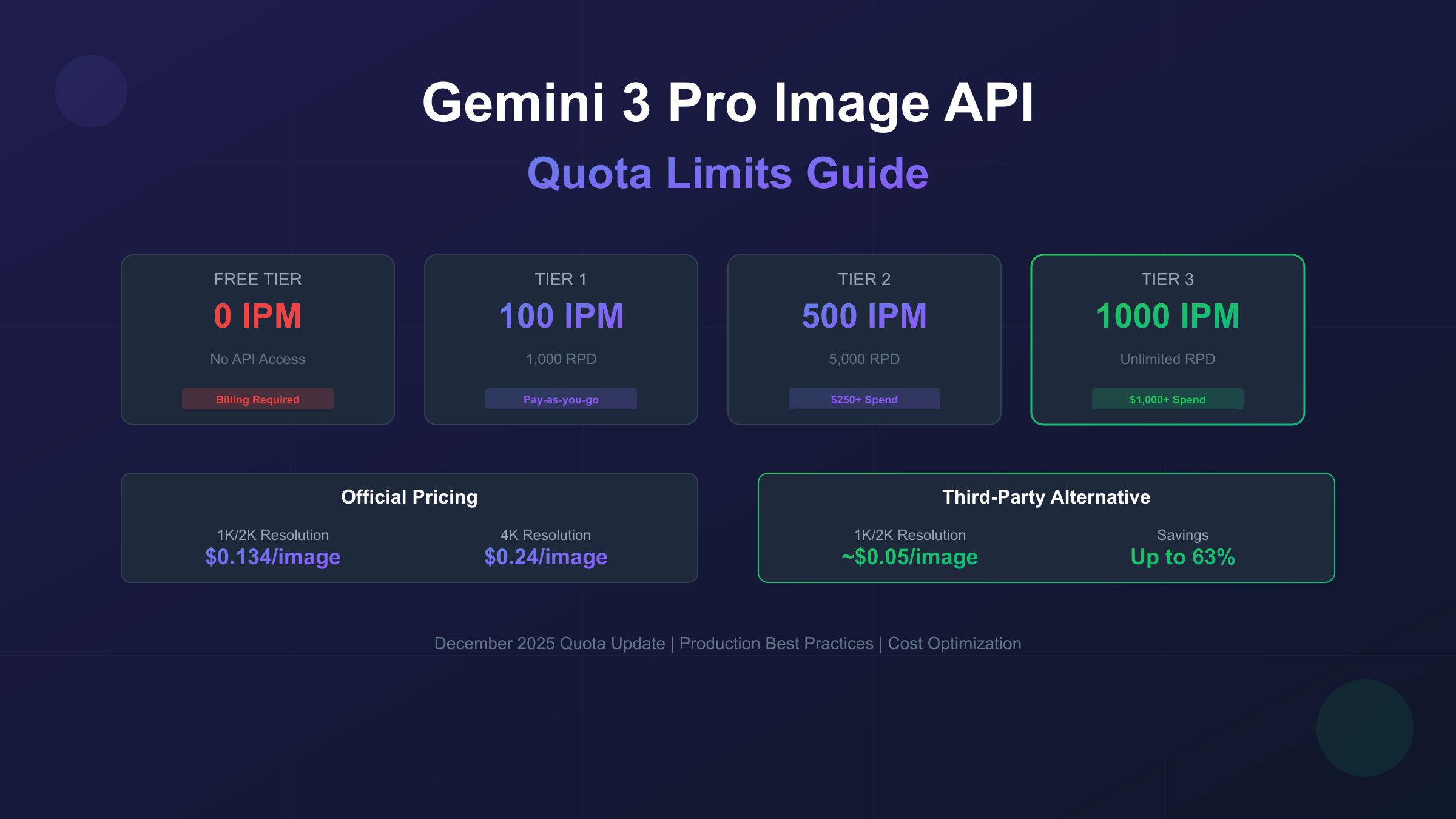
Important limitation for Gemini 3 Pro Image Preview (Nano Banana Pro): The free tier provides 0 IPM and 0 RPD for API access. This model requires billing enablement for any API usage, making it effectively unavailable to free tier developers. For a detailed breakdown of free tier limits across all Gemini models, see the Google Gemini API free tier guide.
Tier 1: Pay-as-You-Go
Tier 1 activates immediately when you enable Cloud Billing on your Google Cloud project. No approval process exists—simply connect a payment method and start paying for usage above free tier limits.
| Model | RPM | TPM | RPD |
|---|---|---|---|
| Gemini 2.5 Flash | 150 | 1,000,000 | 1,500 |
| Gemini 2.5 Pro | 150 | 1,000,000 | 1,500 |
| Gemini 3 Pro | 300 | 2,000,000 | Unlimited |
| Gemini 3 Pro Image | 100 | N/A | 1,000 |
Tier 1 represents the most common configuration for development teams and small production deployments. The unlimited RPD for Gemini 3 Pro text models provides flexibility, while image generation remains capped at 1,000 daily requests—sufficient for most applications but constraining for high-volume services.
Tier 2: Growth Level
Tier 2 requires meeting two conditions: total cumulative spending exceeding $250 on Google Cloud services (not just Gemini API) and at least 30 days since your first payment. This tier targets growing startups and established applications.
| Model | RPM | TPM | RPD |
|---|---|---|---|
| Gemini 2.5 Flash | 1,000 | 4,000,000 | 5,000 |
| Gemini 2.5 Pro | 1,000 | 4,000,000 | 5,000 |
| Gemini 3 Pro | 1,500 | 8,000,000 | Unlimited |
| Gemini 3 Pro Image | 500 | N/A | 5,000 |
Tier 3: Enterprise Level
Tier 3 represents Google's enterprise offering, requiring over $1,000 in total cumulative spending plus 30 days since first payment. Organizations at this level typically negotiate custom agreements with Google Cloud representatives. For official documentation, refer to Google AI Developer rate limits.
| Model | RPM | TPM | RPD |
|---|---|---|---|
| Gemini 2.5 Flash | 2,000 | 8,000,000 | Unlimited |
| Gemini 2.5 Pro | 2,000 | 8,000,000 | Unlimited |
| Gemini 3 Pro | 2,500 | 16,000,000 | Unlimited |
| Gemini 3 Pro Image | 1,000 | N/A | Unlimited |
Even at Tier 3, the 1,000 RPM cap for image generation presents challenges for high-volume applications. A social media platform processing user-generated content or an e-commerce site generating product variations at scale may still encounter bottlenecks, driving many enterprises toward hybrid architectures combining official API access with third-party solutions.
Gemini Image Models: 2.5 Flash vs 3 Pro Image Comparison
Google currently offers two primary image generation models through the Gemini API, each optimized for different use cases and operating under distinct quota structures. Choosing between them requires understanding their technical differences and cost implications.
Gemini 2.5 Flash Image
Model ID: gemini-2.5-flash-image
Gemini 2.5 Flash Image represents Google's speed-optimized offering, designed for high-volume, low-latency applications. The model achieved general availability status in late 2025, making it production-ready with stable API guarantees.
Key characteristics include:
- Resolution: Fixed at 1024x1024 across all aspect ratios (1:1, 2:3, 3:2, 4:3, 16:9, 21:9)
- Token consumption: 1,290 tokens per generated image regardless of aspect ratio
- Pricing: $0.039 per image ($30 per million output tokens)
- Free tier: 500 requests per day (API separate from consumer app quota)
- Best languages: English, Spanish (Mexican), Japanese, Chinese, Hindi
The 500 daily requests on free tier represents the most generous allocation among Gemini image models, making it suitable for development, testing, and light production workloads. However, the fixed resolution limits its applicability for professional asset creation where higher fidelity is required.
Gemini 3 Pro Image Preview (Nano Banana Pro)
Model ID: gemini-3-pro-image-preview
Gemini 3 Pro Image, internally codenamed Nano Banana Pro, targets professional asset production with advanced reasoning capabilities and multi-resolution output support. The model remains in preview status but offers substantially higher quality and more sophisticated capabilities. For comprehensive documentation, see the official Nano Banana image generation guide.
Key characteristics include:
- Resolution tiers: 1K (1024x1024), 2K (2048x2048), 4K (4096x4096)
- Token consumption: 1,120 tokens for 1K/2K, 2,000 tokens for 4K output
- Pricing: $0.134 per 1K/2K image, $0.24 per 4K image
- Free tier: None—billing required for API access
- Special features: Dynamic thinking for complex prompts, text rendering, multi-turn editing
The lack of free tier access represents a significant barrier for developers wanting to evaluate the model before commitment. Production applications requiring high-fidelity output must budget accordingly, though the quality improvements often justify the cost difference. For detailed pricing analysis, see the Nano Banana Pro API pricing guide.
Practical Selection Criteria
| Criterion | Choose 2.5 Flash | Choose 3 Pro Image |
|---|---|---|
| Budget constraints | Free tier available | Billing required |
| Resolution needs | 1K sufficient | 2K/4K required |
| Text in images | Simple text only | Complex typography |
| Use case | Thumbnails, previews | Marketing assets, products |
| Volume | High volume, cost-sensitive | Quality-critical, lower volume |
For applications requiring text rendering accuracy—such as social media graphics, infographics, or marketing materials—Gemini 3 Pro Image significantly outperforms the Flash variant. The advanced reasoning capabilities produce noticeably better results for complex compositional prompts involving multiple subjects, specific spatial relationships, or detailed style requirements.

Pricing and Token Consumption Deep Dive
Understanding the pricing structure for Gemini image generation requires distinguishing between input costs (your prompts) and output costs (generated images). This section breaks down exactly how Google charges for image generation and provides real-world cost calculations.
Token Consumption by Resolution
Every image generation request consumes tokens on both input and output sides. The input consumption depends on your prompt length and any reference images provided, while output follows fixed rates based on resolution.
| Output Resolution | Tokens Consumed | Cost per Image |
|---|---|---|
| 1K (1024x1024) - Flash | 1,290 tokens | $0.039 |
| 1K (1024x1024) - Pro | 1,120 tokens | $0.134 |
| 2K (2048x2048) - Pro | 1,120 tokens | $0.134 |
| 4K (4096x4096) - Pro | 2,000 tokens | $0.240 |
The pricing disparity between Gemini 2.5 Flash Image and Gemini 3 Pro Image is substantial—roughly 3.4x more expensive for 1K output and over 6x for 4K. This difference reflects the additional computational resources required for the Pro model's advanced reasoning and higher output quality.
Batch API Pricing
Google offers a 50% discount for requests submitted through the Batch API, which processes jobs within a 24-hour window rather than providing immediate responses. For applications where real-time generation is unnecessary, batch processing significantly reduces costs.
| Model | Standard Price | Batch Price | Savings |
|---|---|---|---|
| Gemini 2.5 Flash Image | $0.039/image | $0.0195/image | 50% |
| Gemini 3 Pro (1K/2K) | $0.134/image | $0.067/image | 50% |
| Gemini 3 Pro (4K) | $0.24/image | $0.12/image | 50% |
Real-World Cost Scenarios
Understanding theoretical pricing helps, but practical cost planning requires examining realistic usage patterns. Consider these common scenarios:
Personal Project (Hobbyist Level)
- 30 images per day, all at 1K resolution
- Using Gemini 2.5 Flash Image free tier: $0/month
- Using Gemini 3 Pro Image: $4.02/day = $120.60/month
Startup MVP (Development Phase)
- 200 images per day for user-facing features
- Using Gemini 2.5 Flash: $7.80/day = $234/month
- Using Gemini 3 Pro (1K): $26.80/day = $804/month
Production Application (Growth Stage)
- 2,000 images per day for e-commerce platform
- Using Gemini 2.5 Flash: $78/day = $2,340/month
- Using Gemini 3 Pro mixed (70% 1K, 30% 2K): $268/day = $8,040/month
- With Batch API discount (if applicable): $4,020/month
Cost Reality Check: The December 2025 changes primarily affected free tier users. Paid tier pricing remained stable, but the psychological impact of losing free tier capacity drove many developers to explore alternatives, regardless of their actual cost sensitivity.
Hidden Costs to Consider
Beyond per-image charges, several factors can unexpectedly increase your bill:
Failed generations still consume quota: Content policy rejections, technical errors, and malformed requests all count against your daily limits. Repeated retry attempts during 429 errors can rapidly deplete allocations without producing usable output.
Resolution upsizing penalties: Generating exclusively at 4K resolution effectively reduces your daily capacity by 1.8x due to higher token consumption. Planning your resolution strategy based on actual output requirements prevents overspending.
Context caching fees: While caching reduces per-request costs for repeated prompts, storage charges accumulate at $4.50 per million tokens per hour for Pro models. Short-duration caching rarely provides net savings.
Troubleshooting 429 Errors: Complete Guide with Code Examples
The 429 RESOURCE_EXHAUSTED error indicates your application has exceeded one or more quota limits. Since the December 2025 changes, these errors have become significantly more common, particularly for developers who previously relied on generous free tier allocations. Understanding the error patterns and implementing proper handling separates resilient applications from fragile ones.
Diagnosing Which Limit You Have Hit
Different 429 error patterns indicate different underlying causes. Identifying the specific limit helps determine the appropriate response:
RPM limit exceeded: Errors occur in bursts followed by periods of success. Requests sent immediately after the error fail, but waiting 60 seconds typically resolves the issue. The error response includes specific mention of "requests per minute."
TPM limit exceeded: Errors correlate with request size. Longer prompts or requests for higher resolutions trigger errors more frequently. Reducing prompt length or image resolution may provide immediate relief.
RPD limit exceeded: Errors increase throughout the day and clear after midnight Pacific Time. Morning requests succeed while afternoon/evening requests fail consistently. This pattern is most common post-December 2025.
IPM limit exceeded: Specific to image generation, this occurs when submitting image requests faster than your tier's IPM allocation allows, regardless of other quota availability. For a dedicated troubleshooting guide, see Gemini image generation error 429 fix.
Production-Ready Exponential Backoff Implementation
The standard approach for handling 429 errors combines exponential backoff with jitter to prevent synchronized retry storms. Here is a production-ready Python implementation:
hljs pythonimport time
import random
from google import genai
from google.genai.types import GenerateContentConfig, ImageConfig
client = genai.Client(api_key="YOUR_API_KEY")
def generate_image_with_retry(
prompt: str,
max_retries: int = 5,
initial_delay: float = 1.0,
max_delay: float = 60.0
) -> bytes | None:
"""Generate image with exponential backoff retry logic.
Args:
prompt: Text description for image generation
max_retries: Maximum retry attempts before giving up
initial_delay: Starting delay in seconds
max_delay: Maximum delay cap in seconds
Returns:
Generated image bytes or None if all retries exhausted
"""
delay = initial_delay
for attempt in range(max_retries):
try:
response = client.models.generate_content(
model="gemini-3-pro-image-preview",
contents=prompt,
config=GenerateContentConfig(
response_modalities=["IMAGE"],
image_config=ImageConfig(image_size="1K")
)
)
# Extract image from response
for part in response.candidates[0].content.parts:
if part.inline_data:
return part.inline_data.data
return None # No image in response
except Exception as e:
error_message = str(e)
if "429" in error_message or "RESOURCE_EXHAUSTED" in error_message:
if attempt == max_retries - 1:
print(f"Max retries exceeded. Final error: {error_message}")
return None
# Add jitter to prevent thundering herd
jitter = random.uniform(0, delay * 0.1)
sleep_time = min(delay + jitter, max_delay)
print(f"Rate limited. Retry {attempt + 1}/{max_retries} "
f"after {sleep_time:.2f}s")
time.sleep(sleep_time)
# Exponential increase for next attempt
delay = min(delay * 2, max_delay)
else:
# Non-rate-limit error, don't retry
print(f"Non-recoverable error: {error_message}")
return None
return None
JavaScript/TypeScript Implementation
For Node.js applications, here is the equivalent implementation using async/await:
hljs typescriptimport { GoogleGenAI } from "@google/genai";
const client = new GoogleGenAI({ apiKey: "YOUR_API_KEY" });
async function generateImageWithRetry(
prompt: string,
maxRetries: number = 5,
initialDelay: number = 1000,
maxDelay: number = 60000
): Promise<Buffer | null> {
let delay = initialDelay;
for (let attempt = 0; attempt < maxRetries; attempt++) {
try {
const response = await client.models.generateContent({
model: "gemini-3-pro-image-preview",
contents: prompt,
config: {
responseModalities: ["IMAGE"],
imageConfig: { imageSize: "1K" }
}
});
const part = response.candidates?.[0]?.content?.parts?.find(
(p) => p.inlineData
);
if (part?.inlineData?.data) {
return Buffer.from(part.inlineData.data, "base64");
}
return null;
} catch (error: any) {
const errorMessage = error.message || String(error);
if (errorMessage.includes("429") ||
errorMessage.includes("RESOURCE_EXHAUSTED")) {
if (attempt === maxRetries - 1) {
console.error(`Max retries exceeded: ${errorMessage}`);
return null;
}
const jitter = Math.random() * delay * 0.1;
const sleepTime = Math.min(delay + jitter, maxDelay);
console.log(
`Rate limited. Retry ${attempt + 1}/${maxRetries} ` +
`after ${(sleepTime / 1000).toFixed(2)}s`
);
await new Promise((resolve) => setTimeout(resolve, sleepTime));
delay = Math.min(delay * 2, maxDelay);
} else {
console.error(`Non-recoverable error: ${errorMessage}`);
return null;
}
}
}
return null;
}
Monitoring and Alerting Best Practices
Production applications should implement comprehensive monitoring beyond basic retry logic:
- Track 429 error rates by endpoint and time window. A sudden spike often indicates quota changes or usage pattern shifts.
- Monitor retry success rates to identify whether exponential backoff is actually resolving issues or just delaying failures.
- Set up alerts for sustained error rates exceeding your baseline. A 5% error rate might be acceptable; 20% requires immediate attention.
- Log retry attempts with timing to optimize your backoff parameters based on actual recovery patterns.
For applications where 429 errors significantly impact user experience, consider implementing request queuing that smooths burst traffic into steady streams matching your quota allocation.
Production Architecture Patterns for High-Volume Applications
Building reliable image generation services at scale requires architectural decisions that go beyond basic retry logic. The patterns described here have been proven in production environments handling thousands of daily image generation requests.
Request Queue Architecture
Queue-based systems decouple user-facing request acceptance from actual API calls, providing predictable latency and graceful degradation during quota constraints. Instead of immediately calling the Gemini API, requests enter a queue processed at rates matching your quota allocation.
The core implementation pattern involves three components:
Request acceptor: Validates incoming requests, assigns tracking IDs, and enqueues them immediately. Users receive confirmation that their request was received, even if processing will take time.
Rate-limited processor: Pulls requests from the queue at a controlled rate matching your IPM/RPM limits. This component implements the retry logic shown earlier, placing failed requests back in the queue with appropriate delays.
Result delivery: Stores completed images and notifies users through webhooks, polling endpoints, or push notifications depending on your application architecture.
This pattern transforms strict rate limits into predictable latency. A user submitting a request when the queue contains 50 pending items knows they will wait approximately 50 minutes (at 1 IPM) rather than receiving an unpredictable error.
Multi-Project Quota Pooling
Since quotas apply at the project level, organizations can multiply their effective quota by distributing requests across multiple Google Cloud projects. This approach requires careful management but provides substantial capacity increases.
Implementation considerations include:
- Each project requires separate billing enablement and API key management
- A load balancer tracks quota consumption per project and routes requests accordingly
- Tier progression ($250 for Tier 2, $1,000 for Tier 3) must be achieved per-project
- Operational complexity increases with project count
Ten Tier 1 projects provide 1,000 IPM combined, equivalent to Tier 3 capacity. However, the management overhead and cumulative costs may exceed the benefits compared to third-party alternatives discussed later.
Hybrid Provider Strategy
Many production deployments combine multiple image generation services to optimize for cost, quality, and reliability. The routing logic considers several factors:
Quality requirements: Marketing materials and customer-facing content use Gemini 3 Pro Image for maximum quality. Internal tools and previews use Gemini 2.5 Flash for cost efficiency.
Latency sensitivity: Real-time applications prioritize providers with available quota. Batch workloads route to the cheapest available option regardless of latency.
Failover handling: When primary providers experience quota exhaustion or outages, requests automatically route to backups. This prevents user-facing failures even during unexpected quota changes.
A typical configuration might use Gemini 3 Pro Image as the primary provider for quality-critical requests, Gemini 2.5 Flash for high-volume previews, and a third-party aggregation service as a failover for all traffic types. For a comprehensive guide to stable API access, see the cheapest stable Nano Banana Pro API guide.
Monitoring Architecture
Production image generation systems require visibility into several key metrics:
| Metric | Purpose | Alert Threshold |
|---|---|---|
| Success rate | Overall system health | < 95% sustained |
| P95 latency | User experience | > 30 seconds |
| Queue depth | Capacity planning | > 100 pending |
| Quota utilization | Cost optimization | > 80% sustained |
| Provider distribution | Failover effectiveness | < 10% to backup |
Dashboards displaying these metrics enable proactive capacity management rather than reactive firefighting when quotas are exhausted.
Cost Optimization Strategies
Managing image generation costs requires balancing output quality, processing speed, and budget constraints. These strategies have been tested in production environments where cost efficiency directly impacts business viability.
Resolution-Based Cost Optimization
The most significant cost lever is output resolution. Generating at 4K when 1K suffices wastes substantial budget.
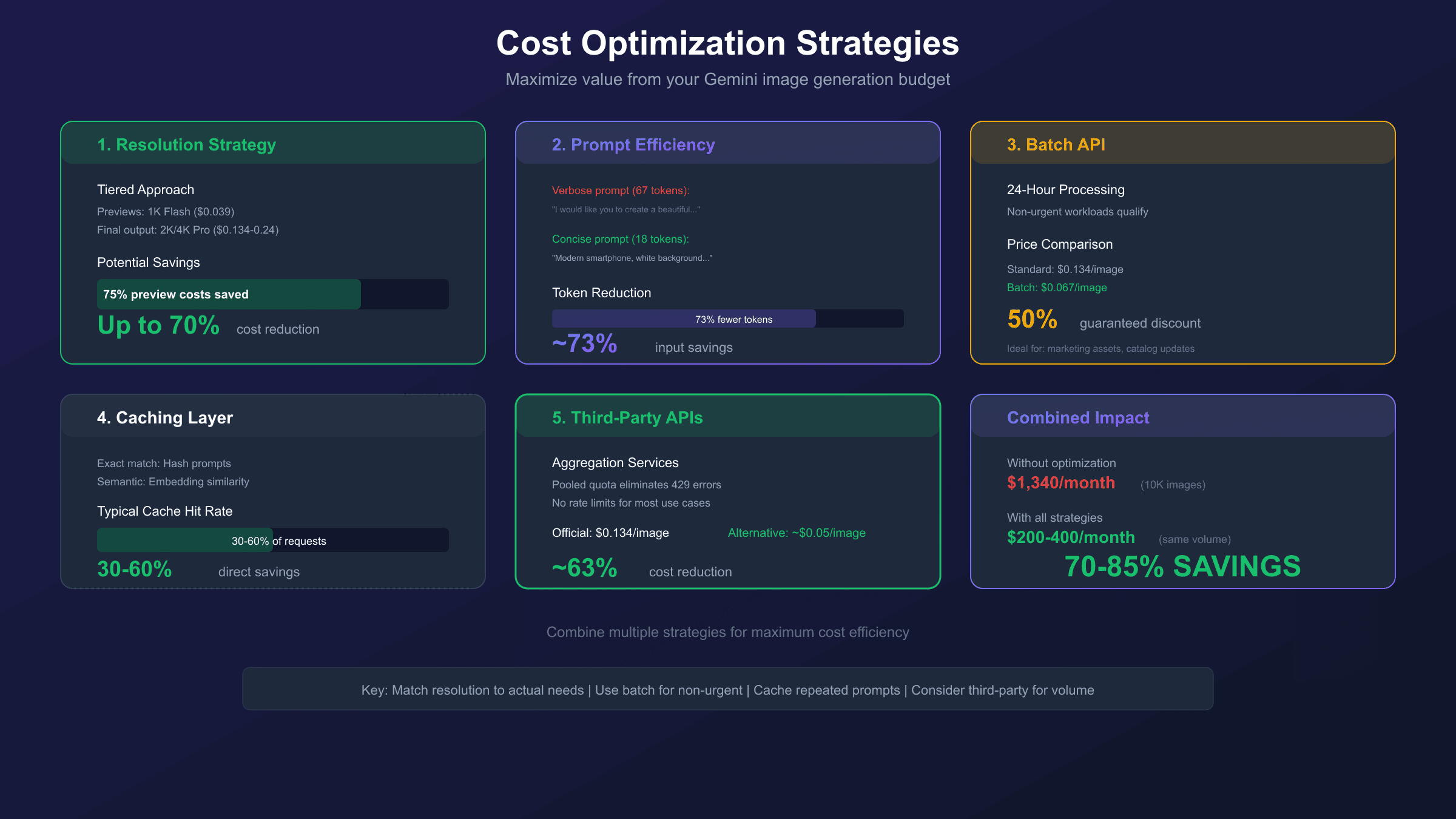
Tiered resolution strategy: Generate previews and thumbnails at 1K resolution using Gemini 2.5 Flash ($0.039/image). Only upscale to 2K/4K using Gemini 3 Pro ($0.134-$0.24/image) when users explicitly request high-resolution output or the image will be used for print/marketing materials.
Resolution auditing: Track which resolutions are actually used versus generated. Many applications generate high-resolution images that are immediately downscaled for web display. Identifying these patterns reveals immediate savings opportunities.
Prompt Efficiency
Token consumption includes your input prompt, making concise prompts directly cheaper than verbose ones. Beyond cost, shorter prompts often produce better results by focusing the model on essential details.
Compare these prompts for generating a product photo:
Verbose (67 tokens): "I would like you to create a beautiful, stunning, amazing photograph of a modern smartphone that is placed carefully on a clean, white, minimalist background with soft, gentle studio lighting that creates a professional appearance suitable for an e-commerce website product listing page."
Concise (18 tokens): "Modern smartphone on white background, soft studio lighting, e-commerce product photo style."
Both produce comparable results, but the concise version costs approximately 73% less on the input side. Across thousands of requests, these savings compound significantly.
Batch Processing for Non-Urgent Workloads
Google's Batch API offers 50% cost reduction for requests processed within a 24-hour window. Applications with flexibility in delivery timing should route appropriate workloads through batch processing.
Suitable use cases for batch processing include:
- Marketing asset generation for planned campaigns
- Product catalog updates during overnight processing windows
- Background image generation for content management systems
- Training data generation for machine learning pipelines
The implementation requires separating time-sensitive requests from batch-eligible ones at the application layer, then routing accordingly.
Caching and Deduplication
Many applications generate identical or near-identical images repeatedly. Implementing a caching layer prevents redundant API calls:
Exact match caching: Hash prompts and store generated images in a content-addressable storage system. Identical prompts return cached results immediately.
Semantic similarity caching: For applications with prompt variations that produce visually similar results, implement embedding-based similarity search to identify cache hits.
Cache invalidation strategy: Set appropriate TTL values based on your use case. Marketing images might cache indefinitely, while dynamic content may require daily refresh.
A well-implemented cache typically achieves 30-60% hit rates in production, directly translating to equivalent cost savings.
Third-Party Alternatives for High-Volume Needs
When official API quotas prove insufficient or cost-prohibitive, third-party aggregation services offer an alternative path to high-volume image generation. These services pool quota across multiple sources, providing effectively unlimited capacity at competitive prices.
Understanding Third-Party API Services
Third-party providers maintain large pools of API capacity by aggregating access across multiple projects and accounts. This infrastructure investment allows them to offer services that individual developers cannot achieve through direct API access alone.
Key benefits include:
- No rate limits: Requests are distributed across their pooled capacity, eliminating 429 errors for most use cases
- Simplified billing: Pay per image rather than managing tier qualifications and quota tracking
- Unified API: Access multiple models (Gemini, DALL-E, Stable Diffusion) through consistent interfaces
- Automatic failover: Provider-side redundancy handles outages transparently
The trade-off involves trusting a third party with your prompts and generated content. For sensitive applications, evaluate each provider's data handling policies carefully.
Cost Comparison: Official vs Third-Party
For Gemini 3 Pro Image specifically, the pricing differential makes third-party services attractive for cost-conscious applications:
| Provider | Cost per 1K Image | Cost per 4K Image | Rate Limits |
|---|---|---|---|
| Google Official | $0.134 | $0.24 | 100-1000 IPM by tier |
| laozhang.ai | ~$0.05 | ~$0.08 | Effectively unlimited |
The approximately 63% cost reduction through services like laozhang.ai becomes significant at scale. Generating 10,000 images monthly costs $1,340 through official channels versus approximately $500 through third-party services—a savings of $840 per month.
Important consideration: Third-party services typically cannot guarantee the same data privacy commitments as direct API access. Evaluate whether your use case permits third-party processing before migrating production workloads.
When to Choose Official vs Third-Party
Choose official Google API when:
- Data sensitivity requires Google's enterprise privacy commitments
- Your organization requires direct vendor accountability
- Free tier capacity meets your needs
- You need guaranteed access to latest model versions immediately upon release
Consider third-party services when:
- Volume exceeds what your tier qualification supports
- Cost optimization is a primary concern
- Rate limit flexibility is essential for user experience
- You need unified access to multiple image generation models
Integration Example
Third-party services typically maintain OpenAI-compatible endpoints, making migration straightforward. Here is an example using laozhang.ai:
hljs pythonfrom openai import OpenAI
client = OpenAI(
api_key="sk-YOUR_LAOZHANG_KEY",
base_url="https://api.laozhang.ai/v1"
)
# Same code structure works across providers
response = client.images.generate(
model="gemini-3-pro-image",
prompt="Modern smartphone on white background",
n=1,
size="1024x1024"
)
image_url = response.data[0].url
The minimal code changes required (just base_url and api_key) make third-party services an easy failover option even for applications primarily using official APIs. For detailed pricing and model availability, refer to laozhang.ai documentation.
Quick Reference: Essential Quota Information
This section consolidates the most frequently referenced quota information for rapid lookup during development and capacity planning.
Quota Reset Times
| Quota Type | Reset Time | Notes |
|---|---|---|
| API Daily (RPD) | Midnight Pacific Time | PT = UTC-8 (standard) or UTC-7 (DST) |
| Consumer App | Midnight UTC | Different from API quota |
| Per-Minute (RPM/IPM) | Rolling 60-second window | Continuous replenishment |
For international developers, midnight PT translates to:
- US East Coast: 3:00 AM Eastern
- UK/Europe: 8:00 AM GMT, 9:00 AM CET
- Asia (Tokyo): 5:00 PM JST
- Asia (Singapore/Beijing): 4:00 PM CST
Tier Qualification Summary
| Tier | Spending Requirement | Time Requirement | Approval Process |
|---|---|---|---|
| Free | None | None | Automatic |
| Tier 1 | Billing enabled | None | Automatic |
| Tier 2 | $250+ cumulative | 30+ days | Automatic |
| Tier 3 | $1,000+ cumulative | 30+ days | Automatic |
| Enterprise | Custom | Custom | Contact Google |
Error Response Quick Reference
| Error Code | Meaning | Immediate Action |
|---|---|---|
| 429 RPM | Requests per minute exceeded | Wait 60 seconds, implement backoff |
| 429 TPM | Tokens per minute exceeded | Reduce request size, wait 60 seconds |
| 429 RPD | Daily requests exhausted | Wait until midnight PT, upgrade tier |
| 429 IPM | Images per minute exceeded | Wait 60 seconds, reduce batch size |
| 400 | Invalid request | Check prompt content, image format |
| 403 | Access denied | Verify API key, check billing status |
Key API Parameters
hljs python# Essential configuration for image generation
config = GenerateContentConfig(
response_modalities=["IMAGE"], # Required for image output
image_config=ImageConfig(
image_size="1K", # Options: "1K", "2K", "4K"
aspect_ratio="1:1" # Options: "1:1", "16:9", "4:3", etc.
)
)
Frequently Asked Questions
Why am I getting 429 errors when my dashboard shows available quota?
Rate limits apply independently across RPM, TPM, RPD, and IPM dimensions. Your dashboard may show available daily quota while you have exhausted per-minute limits. Additionally, the December 2025 changes introduced model-specific variations—ensure you are checking the correct model's allocation.
Does creating multiple API keys increase my quota?
No. All API keys within a Google Cloud project share the same quota pool. To genuinely increase quota, you need either a higher tier qualification or separate Google Cloud projects with independent billing.
How quickly can I upgrade from free tier to Tier 1?
Immediately. Enabling Cloud Billing on your project activates Tier 1 automatically. No approval process or waiting period exists for this transition.
Can I request quota increases beyond Tier 3?
Yes, though Google offers no guarantees. Submit requests through the API keys page in AI Studio. Enterprise customers should contact their Google Cloud representative for custom agreements.
Why does Gemini 3 Pro Image have no free tier for API access?
Google positions Gemini 3 Pro Image (Nano Banana Pro) as a premium professional model. The computational resources required for its advanced reasoning capabilities make free tier access economically impractical. Developers can evaluate the model through the consumer Gemini app (limited to 2 images daily) before committing to API billing.
Do failed generations count against my quota?
Yes. Content policy rejections, technical errors, and malformed requests all consume quota allocations. Implementing client-side prompt validation before API submission helps minimize wasted quota on preventable failures.
What happens when my quota resets—do unused requests carry over?
No. Quotas reset to their tier-defined values at the specified reset time. Unused per-minute capacity is lost continuously, while unused daily capacity expires at midnight PT.
Conclusion
Managing Gemini 3 Pro image API quotas requires understanding the interplay between rate limit dimensions, tier qualifications, and architectural decisions. The December 2025 changes made this understanding more critical than ever, particularly for developers who previously relied on generous free tier allocations.
For most applications, the path forward involves three considerations: implementing robust 429 error handling with exponential backoff, choosing the appropriate tier based on realistic volume projections, and evaluating whether third-party alternatives better serve your cost and capacity requirements.
The code examples and architectural patterns provided here represent battle-tested approaches from production deployments. Adapting them to your specific requirements should provide a solid foundation for reliable image generation services.
For applications requiring Gemini 3 Pro Image quality at scale without the complexity of quota management, third-party services like laozhang.ai offer a compelling alternative—effectively unlimited capacity at roughly 60% cost reduction compared to official pricing. The minimal integration effort makes them worth evaluating alongside direct API access.
As Google continues evolving its Gemini API offerings, staying current with quota changes and pricing adjustments ensures your application architecture remains optimized for both cost and reliability.