Clawdbot Cost Optimization Guide: Cheapest Models & Money-Saving Strategies
Complete guide to reducing OpenClaw/Clawdbot API costs. Learn to configure cheap models like Claude Haiku, set up free local models with Ollama, implement multi-tier fallback strategies, and prevent unexpected cost spikes.
Nano Banana Pro
4K-80%Google Gemini 3 Pro · AI Inpainting
谷歌原生模型 · AI智能修图

OpenClaw (formerly Clawdbot) is free to download and run, but your API costs can range from $10 to over $150 monthly depending on how you configure it. Some users have burned through thousands of dollars in a single month by running complex agentic workflows on expensive models. The good news is that with the right configuration, you can reduce these costs by 60-90% or even run OpenClaw completely free using local models. This guide covers every cost optimization strategy available, from choosing cheaper cloud models to setting up fully local operation.
The key to cost optimization lies in understanding that not every task requires the most powerful model. Simple status checks, routine automations, and basic conversations can run on models that cost a fraction of Claude Sonnet's pricing. Meanwhile, complex reasoning tasks might justify the premium. By implementing a tiered model strategy with intelligent fallback routing, you can get the best of both worlds: high performance when needed and minimal costs for routine operations.
Real Costs of Running OpenClaw
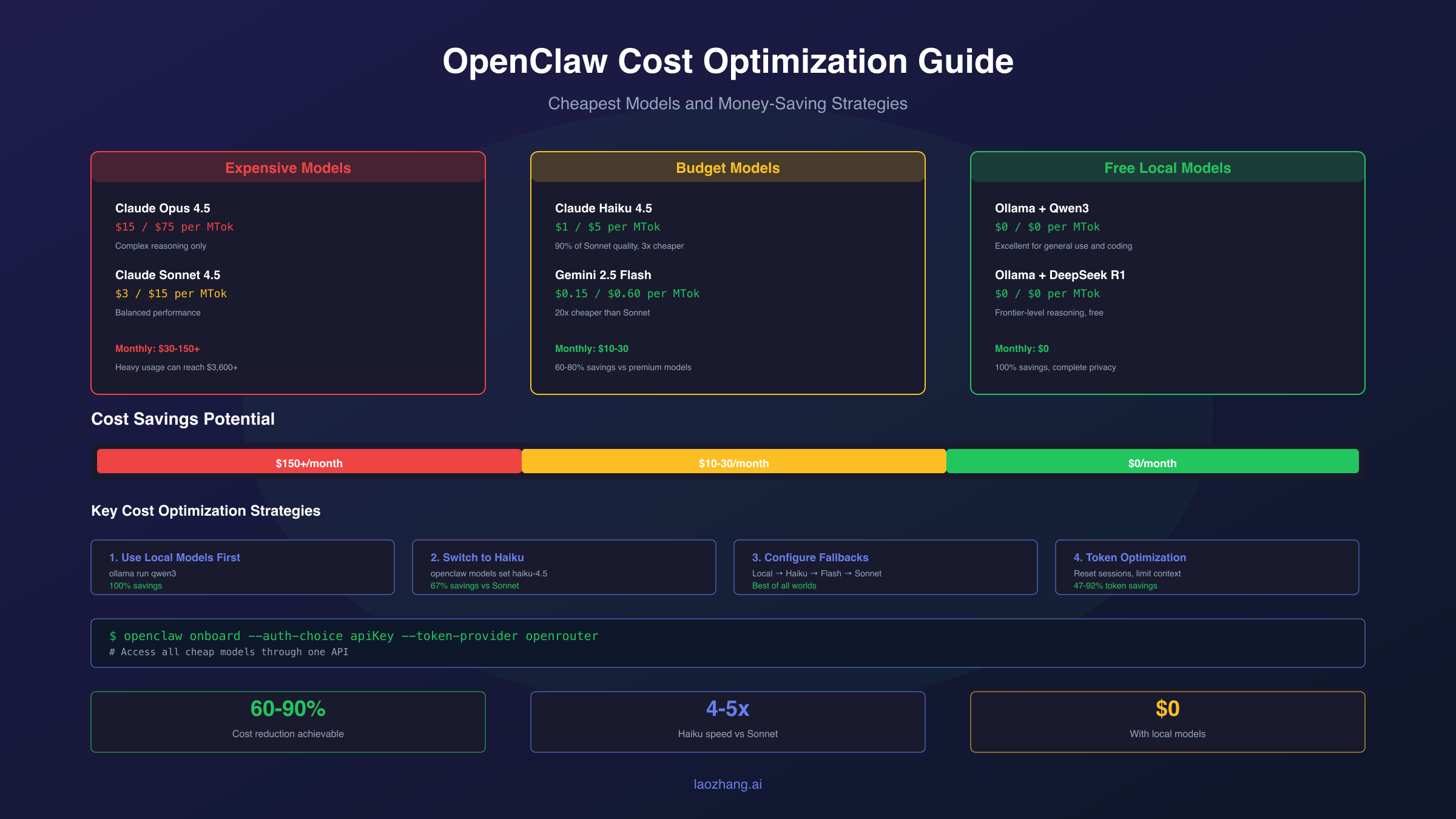
The actual cost of running OpenClaw depends entirely on your usage patterns and model choices. Users report spending anywhere from $10 to $150+ monthly, with the typical range falling between $30-70 for regular use. Understanding where your tokens go helps you identify the biggest opportunities for savings.
Light users who send a few messages daily and run occasional automations typically spend $10-30 monthly. These users often stay within Claude Haiku's pricing tier or use OpenRouter's auto-routing to minimize costs. Moderate users running OpenClaw as their primary AI assistant across multiple messaging channels usually see costs between $30-70, especially when using Claude Sonnet for complex tasks.
Heavy users can easily exceed $150 monthly. Power users running extensive automations, processing large files, or using OpenClaw for development tasks see the highest bills. The extreme example is MacStories' Federico Viticci, who burned through 180 million tokens in his first month, translating to approximately $3,600 at Claude Sonnet rates. This happened because agentic workflows compound token usage: each tool call adds context, and complex multi-step operations can consume tokens exponentially.
The hidden cost driver is context accumulation. Every message in your conversation history gets resent with each new request. A session with 1000 messages carrying forward a massive tool output means you're paying to process that entire context on every turn. Session management becomes critical for cost control.
Cheapest Models for OpenClaw
OpenClaw works with numerous AI providers, each offering models at different price points. Choosing the right model for your use case is the single biggest factor in controlling costs. Here's how the major options compare:
| Model | Input/MTok | Output/MTok | Best For |
|---|---|---|---|
| Claude Opus 4.5 | $15 | $75 | Complex reasoning only |
| Claude Sonnet 4.5 | $3 | $15 | Balanced performance |
| Claude Haiku 4.5 | $1 | $5 | Speed + cost efficiency |
| Gemini 2.5 Pro | $1.25-2.50 | $10-15 | Long context tasks |
| Gemini 2.5 Flash | $0.15 | $0.60 | High-volume operations |
| GPT-5 nano | $0.05 | $0.40 | Simple tasks |
| Ollama (local) | $0 | $0 | Complete privacy + free |
Claude Haiku 4.5 offers exceptional value for OpenClaw users. At $1/$5 per million tokens compared to Sonnet's $3/$15, you get roughly 90% of Sonnet's coding performance at one-third the price. Haiku runs 4-5x faster than Sonnet, making it ideal for interactive chat and quick automations. For most OpenClaw use cases, Haiku handles tasks competently while keeping costs manageable.
Gemini 2.5 Flash represents the cheapest mainstream cloud option at $0.15/$0.60 per million tokens. That's 20x cheaper than Claude Sonnet for input and 25x cheaper for output. The tradeoff is lower performance on complex reasoning tasks, but for routine operations, Flash performs adequately while barely registering on your API bill.
OpenRouter's auto-routing model (openrouter/openrouter/auto) automatically selects the most economical model based on prompt complexity. Simple heartbeat checks route to the cheapest available model while complex requests get smarter models. This suits OpenClaw well since most channel status checks and simple interactions don't need frontier-tier intelligence.
Configuring Cheap Models in OpenClaw
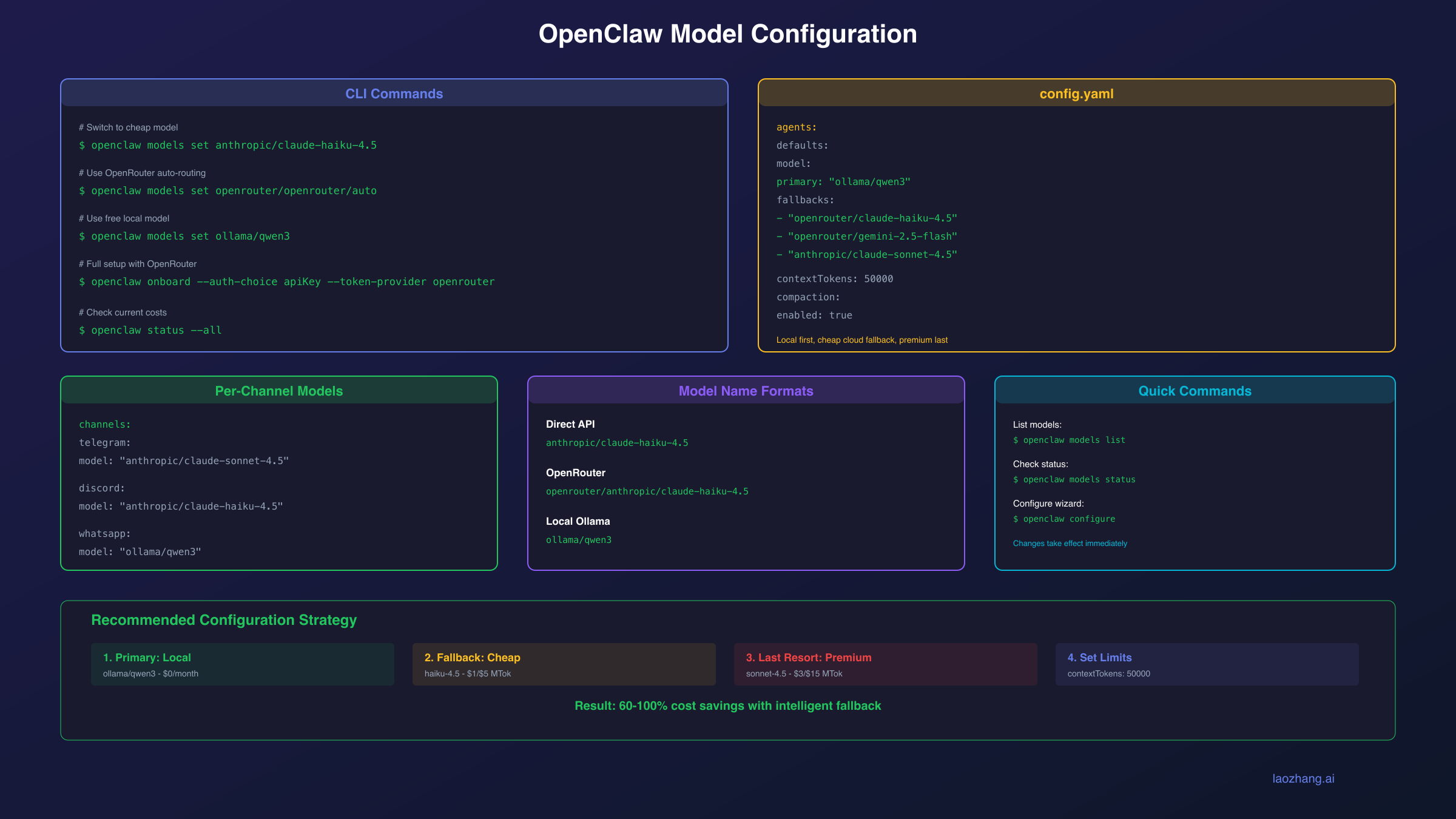
Switching to a cheaper model in OpenClaw takes just a few commands. The quickest method uses the CLI to set your default model:
hljs bash# Set Claude Haiku as default
openclaw models set anthropic/claude-haiku-4.5
# Or use OpenRouter for more options
openclaw models set openrouter/anthropic/claude-haiku-4.5
# Enable OpenRouter auto-routing for automatic cost optimization
openclaw models set openrouter/openrouter/auto
For permanent configuration, edit your config.yaml or use the configuration wizard:
hljs bashopenclaw configure
The configuration structure for models looks like this:
hljs yamlagents:
defaults:
model:
primary: "openrouter/anthropic/claude-haiku-4.5"
# Or for local models:
# primary: "ollama/qwen3"
If you're using OpenRouter, the onboarding command handles most configuration automatically:
hljs bashopenclaw onboard --auth-choice apiKey --token-provider openrouter --token "$OPENROUTER_API_KEY"
This configures OpenClaw to use OpenRouter with your API key, giving you access to dozens of model options without individual provider setup. You can then switch between models freely without reconfiguring authentication.
For channel-specific model assignment, you can set different models for different messaging platforms. Perhaps you want Sonnet for complex Telegram conversations but Haiku for simple Discord status updates:
hljs yamlchannels:
telegram:
model: "anthropic/claude-sonnet-4.5"
discord:
model: "anthropic/claude-haiku-4.5"
Running OpenClaw for Free with Local Models
The ultimate cost optimization is eliminating API costs entirely by running local models. OpenClaw supports Ollama out of the box, and tools like Lynkr provide transparent routing to local models. Here's how to set up completely free operation.
First, install Ollama if you haven't already:
hljs bash# macOS/Linux
curl -fsSL https://ollama.com/install.sh | sh
# Or via Homebrew on macOS
brew install ollama
Pull a capable model. DeepSeek and Qwen offer excellent performance for local use:
hljs bash# DeepSeek R1 for reasoning tasks
ollama pull deepseek-r1
# Qwen3 for general use and coding
ollama pull qwen3
# Smaller option for limited hardware
ollama pull llama3.2
Ollama runs a local server that OpenClaw detects automatically at http://127.0.0.1:11434. Configure OpenClaw to use it:
hljs bashopenclaw models set ollama/qwen3
For hardware requirements, 7B models run on systems with 8GB RAM and a basic CPU. For better performance with 70B models, you need 32GB+ RAM and an NVIDIA GPU with at least 24GB VRAM. The sweet spot for most users is running quantized 7B-14B models, which balance quality with accessibility.
Lynkr provides an alternative approach, acting as a universal proxy that routes OpenClaw requests to any backend. The advantage is that OpenClaw thinks it's talking to Anthropic while Lynkr transparently redirects to your local Ollama instance:
hljs bash# Install Lynkr
npm install -g lynkr
# Configure for Ollama backend
lynkr config set backend ollama
lynkr config set model qwen3
# Start the proxy
lynkr start
Lynkr's enterprise features include token compression achieving 47-92% reduction, making even cloud fallback significantly cheaper when local models can't handle a request.
Model Fallback Configuration for Cost Optimization
A robust cost optimization strategy uses multiple fallback tiers. If your primary model fails or hits rate limits, OpenClaw automatically falls back to the next model in your chain. Configure this to fall back from expensive to cheap rather than just for reliability:
hljs yamlagents:
defaults:
model:
primary: "ollama/qwen3" # Free local model first
fallbacks:
- "openrouter/anthropic/claude-haiku-4.5" # Cheap cloud fallback
- "openrouter/google/gemini-2.5-flash" # Even cheaper option
- "anthropic/claude-sonnet-4.5" # Premium only when needed
With this configuration, OpenClaw attempts your free local model first. If the local model is unavailable or returns an error, it tries Claude Haiku. Gemini Flash serves as a cost-conscious alternative, and Sonnet acts as the final fallback for complex tasks that cheaper models can't handle.
OpenClaw moves to the next fallback when all authentication profiles for a provider fail. This includes auth failures, rate limits, and timeouts that exhaust profile rotation. The system implements exponential backoff: 1 minute → 5 minutes → 25 minutes → 1 hour maximum for rate limits, with billing failures backing off even longer.
OpenRouter's auto model provides another layer of intelligent routing. When configured as your primary cloud fallback, it automatically selects models based on task complexity:
hljs yamlagents:
defaults:
model:
primary: "ollama/qwen3"
fallbacks:
- "openrouter/openrouter/auto" # Let OpenRouter choose
This setup gives you local-first operation with intelligent cloud fallback that minimizes costs automatically.
Reducing Token Consumption
Beyond model selection, reducing how many tokens you consume per request offers substantial savings. Token consumption in OpenClaw compounds through context accumulation, tool outputs, and session history.
The most impactful optimization is session management. Every message in your conversation history gets resent with each new request. A session with 1000 messages carrying a massive tool output (like a full config.schema dump) means you're paying to process that entire context repeatedly. Start fresh sessions regularly:
hljs bash# In chat, reset your session
/reset session
# Or start a new session directly
openclaw chat --new-session
For diagnostic commands that produce large outputs, run them in isolated debug sessions rather than your main conversation:
hljs bash# Instead of running in main chat
openclaw status --all # Don't do this in active sessions
# Use a separate session for diagnostics
openclaw chat --session debug-session
> openclaw status --all
Configure context limits to prevent runaway accumulation:
hljs yamlagents:
defaults:
contextTokens: 50000 # Limit context size
compaction:
enabled: true
aggressive: true # More aggressive history compression
Tool output truncation prevents massive JSON responses from bloating your context. The gateway can automatically truncate large tool outputs before they hit your token budget. Enable this in your configuration if you frequently run tools that return extensive data.
Cron jobs and scheduled tasks deserve special attention. Each triggered job potentially starts a new agent turn, consuming tokens. Ensure scheduled jobs start fresh session IDs and don't inherit bloated history from previous runs. Disable or reduce frequency of no-op runs that consume tokens without adding value.
Choosing the Right Model for Each Task
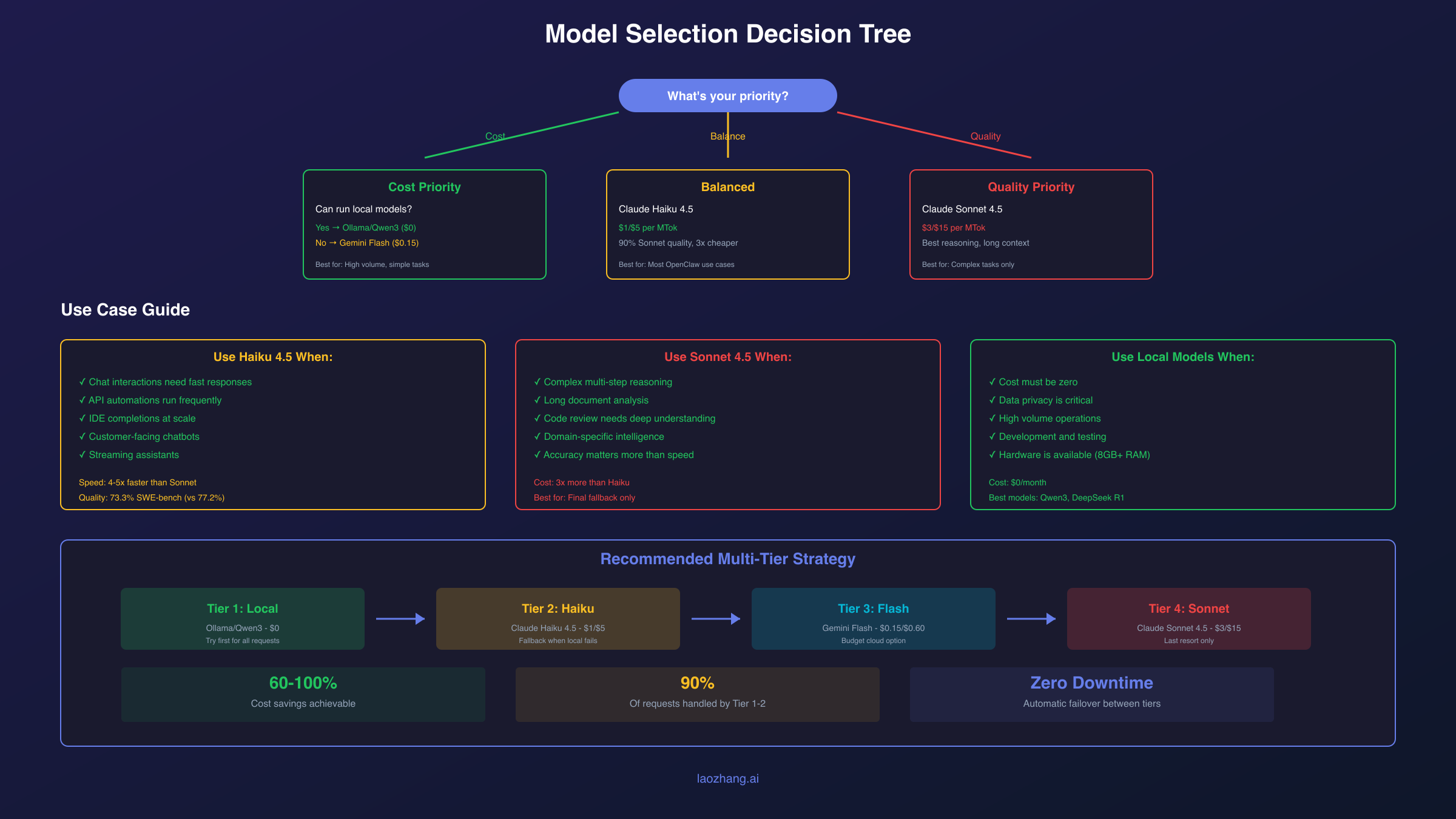
Different tasks have different requirements. Using an expensive model for simple operations wastes money, while using a cheap model for complex reasoning produces poor results. Understanding when each model excels helps you configure intelligent routing.
Use Claude Haiku 4.5 when:
Haiku dominates for speed and cost efficiency. Use it for customer-facing chatbots where latency matters, API automations running frequently, streaming assistants needing quick responses, and IDE completions at scale. Haiku achieves 73.3% on SWE-bench Verified, only four percentage points behind Sonnet's 77.2%, while running 4-5x faster at one-third the cost.
Use Claude Sonnet 4.5 when:
Sonnet excels at complex reasoning, extended context analysis, and tasks requiring domain-specific intelligence. Choose Sonnet for multi-step planning and orchestration, code review requiring deep understanding, document analysis across long contexts, and any task where accuracy matters more than speed.
Use Gemini 2.5 Flash when:
Flash offers the best value for high-volume, simple operations. Use it for status checks and heartbeats, simple data extraction, template-based responses, and any task where you're optimizing for cost above all else.
Use local models (Ollama) when:
Local models eliminate costs entirely and provide complete privacy. Use them for sensitive data that shouldn't leave your infrastructure, high-volume operations where API costs would be prohibitive, development and testing, and as your primary model with cloud fallback for complex tasks.
The optimal strategy combines these tiers. Configure a local model as primary, Claude Haiku as your cost-effective cloud fallback, and reserve Sonnet for complex tasks that actually need its capabilities.
Preventing Cost Spikes and Budget Protection
Unexpected cost spikes happen when agentic workflows run longer than expected or context accumulation goes unchecked. Implementing budget protection prevents unpleasant surprises on your API bill.
Set spending limits at the provider level before deploying OpenClaw:
Anthropic Console: Navigate to console.anthropic.com, go to Settings → Billing, and set a monthly spending limit. This hard cap prevents any usage beyond your specified amount.
OpenRouter: Visit openrouter.ai/settings to set account-level limits. You can also configure per-key limits for more granular control, useful if you have multiple deployments sharing an account.
OpenAI: Similar spending caps exist in the OpenAI dashboard under Billing → Usage limits.
For OpenClaw-specific protection, configure conservative context limits:
hljs yamlagents:
defaults:
contextTokens: 50000 # Reasonable limit
maxTurns: 10 # Prevent runaway loops
Monitor your usage actively. The /status command shows current session statistics including token counts and estimated costs:
hljs bash# In any OpenClaw chat
/status
Consider alternative API providers if you need more predictable pricing. Services like laozhang.ai offer Claude API access with transparent pricing models. While you should compare with official Anthropic API rates for your specific use case, alternative providers can offer different rate limit structures and billing models that might suit your usage patterns better.
The most important protection is architectural: design your workflows to fail gracefully when they hit limits rather than running up costs trying to complete an impossible task.
Monitoring Your OpenClaw Spending
Active monitoring catches cost issues before they become expensive problems. OpenClaw provides several built-in mechanisms for tracking spending, and external tools offer additional visibility.
The /status command provides immediate visibility into your current session:
hljs bash/status
# Output includes:
# - Current model
# - Session token count
# - Estimated session cost
For comprehensive system status:
hljs bashopenclaw status --all
This shows all active sessions, authentication status, and cumulative usage. Run it periodically to understand your consumption patterns.
OpenRouter's Activity Dashboard provides the most detailed cost tracking if you route through OpenRouter. Access it at openrouter.ai/activity to see:
- Per-model usage breakdown
- Daily and monthly spending trends
- Request volume by model
- Cost per conversation
For automated monitoring, OpenClaw exposes metrics that can feed into monitoring systems. Configure alerts when daily spending exceeds thresholds:
hljs yamlmonitoring:
alerts:
dailySpendingThreshold: 10 # Alert if daily cost exceeds $10
sessionTokenThreshold: 100000 # Alert on large sessions
Track your costs weekly to identify trends. A sudden increase often indicates a runaway automation or context accumulation issue. Catching these early prevents the surprise of a massive monthly bill.
Frequently Asked Questions
How much does OpenClaw actually cost per month?
OpenClaw itself is free. API costs range from $10-150+ monthly depending on usage. Light users spend $10-30, typical users $30-70, and heavy users $150+. You can reduce this to $0 by using local models exclusively.
Can I run OpenClaw completely free?
Yes. Install Ollama, pull a model like Qwen3 or DeepSeek, and configure OpenClaw to use it as your primary model. Local models have zero API costs, though you need adequate hardware (8GB+ RAM for 7B models, 32GB+ for 70B models).
What's the cheapest cloud model that works well with OpenClaw?
Gemini 2.5 Flash at $0.15/$0.60 per million tokens offers the lowest cloud pricing. Claude Haiku 4.5 at $1/$5 provides better performance at reasonable cost. OpenRouter's auto model automatically selects economical options based on task complexity.
How do I prevent OpenClaw from running up a huge bill?
Set spending caps in your API provider dashboards (Anthropic, OpenRouter, OpenAI). Configure context limits in OpenClaw (contextTokens: 50000). Reset sessions regularly to prevent context accumulation. Use /status to monitor costs actively.
Should I use Haiku or Sonnet for OpenClaw?
Use Haiku as your default for most tasks—it's one-third the cost and handles typical conversations and automations well. Reserve Sonnet for complex reasoning, long-context analysis, and tasks where you need maximum accuracy. Configure Haiku as primary with Sonnet as fallback.
How do I set up model fallback for cost optimization?
Configure your config.yaml with a fallback chain from cheap to expensive: local model first, then Haiku, then Flash, then Sonnet as last resort. OpenClaw automatically falls back when the primary model fails or hits rate limits.
This guide covers the essential strategies for minimizing OpenClaw costs while maintaining functionality. The key principles are: use local models when possible, choose the cheapest cloud model that meets your needs, configure intelligent fallback, and actively monitor your spending. For additional help, see our Clawdbot installation guide and 403 error troubleshooting guide, or check the official OpenClaw documentation.