Clawdbot 403 Forbidden Fix: Complete Guide to OpenRouter and OpenClaw Authentication Errors
Step-by-step solutions to fix 403 forbidden errors in Clawdbot (OpenClaw), OpenRouter, and Anthropic API. Covers content moderation flags, OAuth token issues, Telegram bot blocked errors, and gateway authentication problems with diagnostic commands.
Nano Banana Pro
4K-80%Google Gemini 3 Pro · AI Inpainting
谷歌原生模型 · AI智能修图

The 403 forbidden error is one of the most frustrating issues you can encounter with Clawdbot (now known as OpenClaw). Unlike a simple "wrong password" error, 403 can mean multiple different things depending on where it originates: your API provider might be flagging your content, your authentication token might lack proper permissions, or your messaging platform might be incorrectly reporting that users have blocked your bot. This guide breaks down every type of 403 error you might encounter with OpenClaw and OpenRouter, providing specific diagnostic steps and fixes for each scenario.
Whether you're seeing "403: Forbidden" from OpenRouter, "bot was blocked by the user" from Telegram, or "OAuth token does not meet scope requirement" from Anthropic, understanding the root cause is essential before attempting any fix. Many users waste hours trying generic solutions when their specific 403 error requires a targeted approach. This troubleshooting guide starts with diagnosis to identify your exact error type, then provides step-by-step fixes tailored to each scenario.
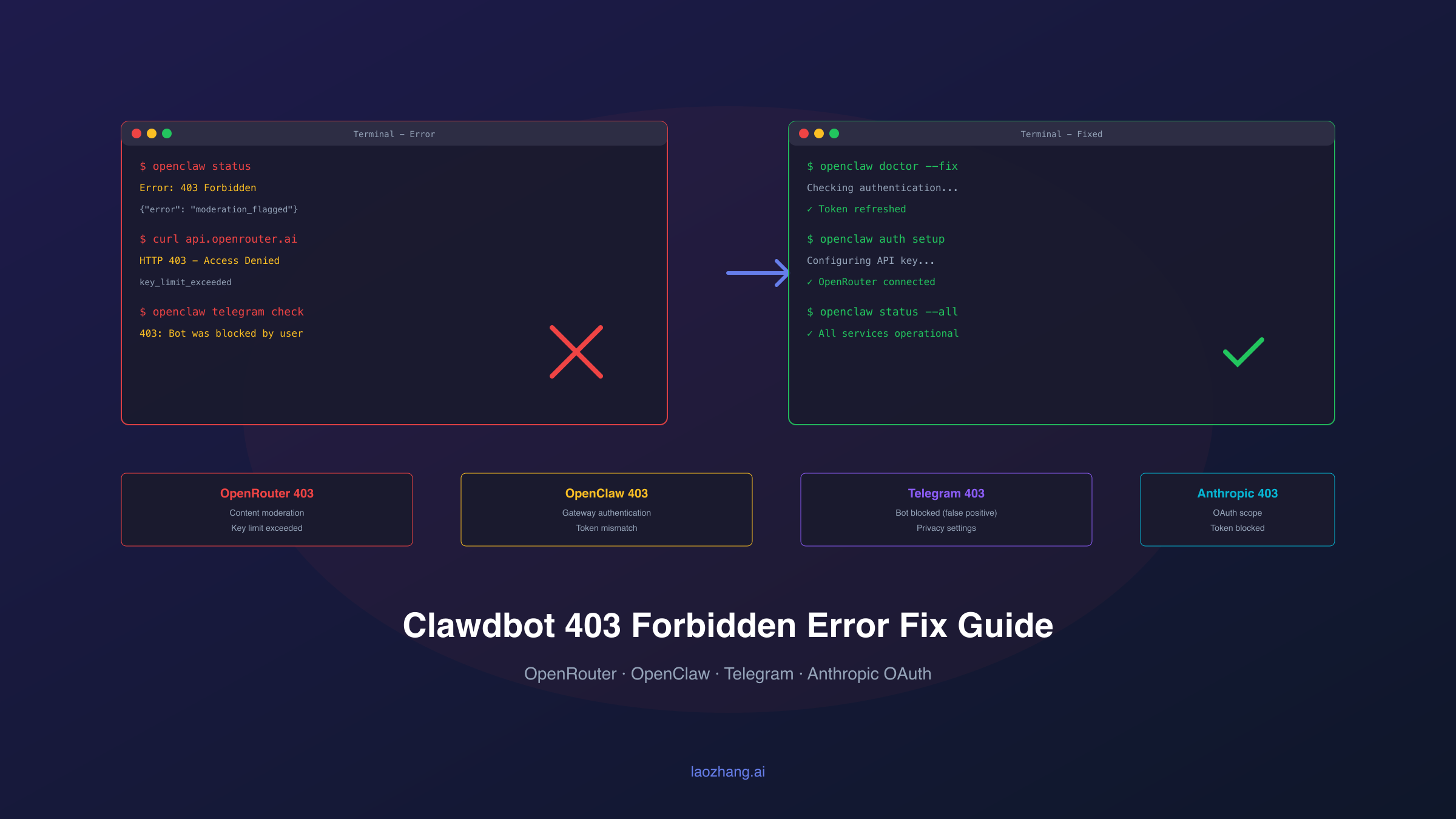
Understanding the 403 Forbidden Error
A 403 Forbidden error means the server understood your request but refuses to authorize it. This differs fundamentally from other authentication errors you might encounter. A 401 error means your credentials are invalid or missing entirely. A 402 error (common with OpenRouter) indicates insufficient credits. But 403 specifically means your credentials were accepted, yet access to the requested resource was denied for policy reasons.
In the context of OpenClaw and AI API providers, 403 errors typically fall into several categories. Content moderation 403s occur when your input triggers safety filters on models like Claude or GPT. Permission 403s happen when your API key or OAuth token lacks the required scopes for the operation you're attempting. Rate or quota 403s appear when you've exceeded limits specific to your account tier. Platform-specific 403s arise from messaging services like Telegram or Discord reporting blocked access even when no block exists.
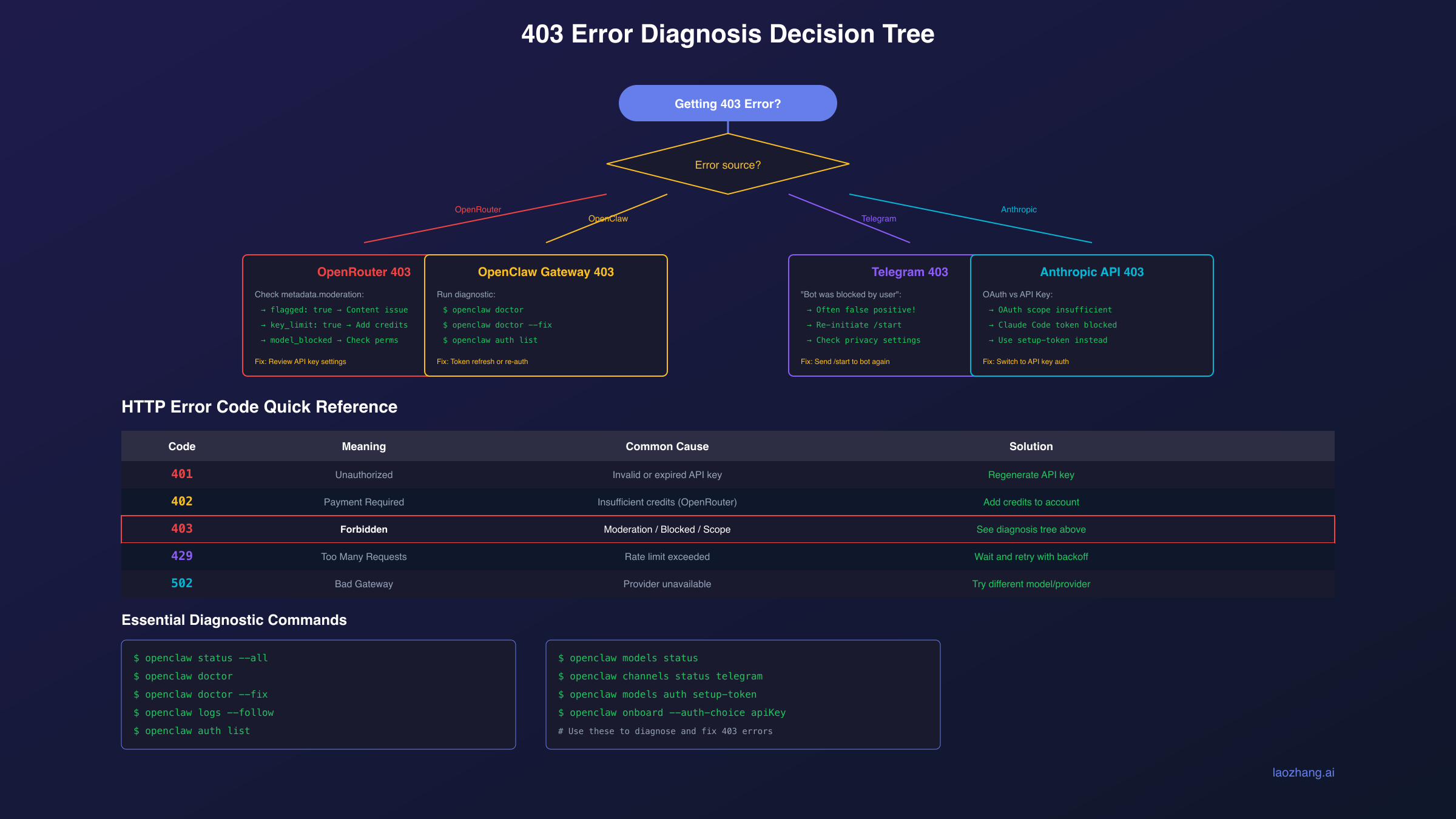
The HTTP status codes you might encounter while using OpenClaw follow a clear hierarchy. Understanding this hierarchy helps you diagnose issues faster:
| Error Code | Meaning | Common Cause in OpenClaw |
|---|---|---|
| 401 | Unauthorized | Invalid or expired API key |
| 402 | Payment Required | Insufficient OpenRouter credits |
| 403 | Forbidden | Moderation flag, scope issue, or blocked |
| 408 | Timeout | Request took too long to process |
| 429 | Rate Limited | Too many requests in short period |
| 502 | Bad Gateway | Provider temporarily unavailable |
The most confusing aspect of 403 errors is that they can appear identical in your logs while having completely different causes. A 403 from OpenRouter's moderation system requires content changes, while a 403 from Anthropic's OAuth system requires authentication reconfiguration. Always check the full error message and any metadata returned with the error before attempting fixes.
Diagnosing Your Specific 403 Error
Before applying any fix, you need to identify exactly which 403 error you're experiencing. OpenClaw provides several diagnostic commands that reveal the error source. Run these commands in sequence to gather information about your setup's current state.
Start with the comprehensive status check:
hljs bashopenclaw status --all
This command shows your authentication state, active sessions, and any queued events. It automatically redacts sensitive tokens, making it safe to share in support requests. Look for any warnings or errors related to authentication providers.
For deeper gateway diagnostics:
hljs bashopenclaw status --deep
This probes the running gateway and connected channels, revealing whether Telegram, Discord, or other messaging services are reporting issues. Pay attention to any 403 mentions in the channel status sections.
To see recent error patterns:
hljs bashopenclaw logs --limit 200 | grep -i "403\|forbidden\|blocked"
This filters your recent logs for 403-related messages. The full error context often contains metadata that identifies the specific cause. Look for patterns like "moderation," "scope," "blocked by user," or "key limit."
Run the configuration validator:
hljs bashopenclaw doctor
The doctor command checks for common misconfigurations that can trigger 403 errors, including invalid model references, missing authentication profiles, and inconsistent gateway settings.
Based on what these commands reveal, you can categorize your 403 error into one of these scenarios:
OpenRouter Content Moderation: Error message contains "moderation," "flagged," or metadata about flagged content. The response includes error.metadata.reasons explaining why content was blocked.
OpenRouter Key/Account Issues: Error message mentions "key limit exceeded" or appears after heavy usage. Check your OpenRouter dashboard for key status.
OpenClaw Gateway Authentication: Error appears when connecting to the gateway or Control UI. Often includes "token mismatch" or "authentication failed" in logs.
Telegram Bot Blocked: Error specifically shows "403: Forbidden: bot was blocked by the user" but the user confirms they haven't blocked the bot.
Anthropic OAuth Scope: Error mentions "OAuth token does not meet scope requirement" or appears after recent authentication changes.
Fixing OpenRouter 403 Errors
OpenRouter 403 errors primarily occur in two scenarios: content moderation and key/account restrictions. The error response metadata tells you which applies to your situation.
Content Moderation 403
When OpenRouter returns a 403 with moderation metadata, your input triggered content filters. The response includes specific information:
hljs json{
"error": {
"code": 403,
"message": "Content flagged by moderation",
"metadata": {
"reasons": ["violence", "explicit_content"],
"flagged_input": "The problematic text segment...",
"provider_name": "anthropic",
"model_slug": "claude-sonnet-4.5"
}
}
}
To resolve content moderation 403s, review the flagged_input field to understand what triggered the filter. Common triggers include violent scenarios even in fictional contexts, explicit content even when discussing safety, and certain medical or legal topics depending on the model. Rephrase your input to avoid the flagged patterns, or consider using a model with different moderation policies. OpenRouter's model list indicates which models have strict moderation enabled.
Key Limit Exceeded 403
If you see "403 Key limit exceeded," your API key has reached its configured spending limit. This differs from the 402 insufficient credits error, which indicates your account balance is depleted. Key limits are per-key restrictions you or your admin configured.
Fix this by visiting your OpenRouter keys page:
- Identify the affected key by checking which key is configured in OpenClaw
- Either increase the key's spending limit or remove the limit entirely
- Alternatively, create a new key with higher limits and update OpenClaw:
hljs bashopenclaw onboard --auth-choice apiKey --token-provider openrouter --token "sk-or-your-new-key"
If you've added credits and created a new key but still see 403 errors, completely restart OpenClaw:
hljs bashopenclaw gateway stop openclaw gateway
The gateway caches authentication state, so a restart ensures it picks up the new key.
Model Not Allowed 403
After hitting rate limits, OpenRouter may temporarily restrict model access. Users report that even after increasing limits, model switches fail with "model not allowed" errors. This appears to be a caching issue on OpenRouter's side.
Wait 5-10 minutes after changing limits before retrying. If the error persists, explicitly re-authenticate:
hljs bashopenclaw auth clear openrouter:default openclaw onboard --auth-choice apiKey --token-provider openrouter
Fixing OpenClaw Gateway 403 Errors
Gateway-level 403 errors typically occur after migrations or configuration changes. The most common scenario is the ClawdBot to OpenClaw migration leaving dual services running with conflicting tokens.
Token Mismatch After Migration
If you upgraded from ClawdBot to OpenClaw and now see 403 errors when accessing the gateway or Control UI, you likely have conflicting services. Each service may have a different gateway token, causing authentication failures.
First, identify running services:
hljs bashps aux | grep -i "claw\|molt\|openclaw"
Stop all Clawdbot/Moltbot/OpenClaw services:
hljs bashopenclaw gateway stop
# Also check for legacy services
launchctl list | grep -i claw # macOS
systemctl --user list-units | grep -i claw # Linux
Unload any legacy launch agents or services, then reinstall cleanly:
hljs bashopenclaw gateway install --force openclaw gateway
Verify the token is consistent:
hljs bashopenclaw status --all
# Check the displayed gateway token matches what you're using in Control UI
Control UI 403 on HTTP
If you access the Control UI over plain HTTP (not HTTPS) and see "Device Identity Required" or connection failures, this is a browser security restriction, not a true 403.
The recommended fix is using HTTPS via Tailscale Serve. If you must use HTTP, enable insecure auth in your configuration:
hljs bashopenclaw config set gateway.controlUi.allowInsecureAuth true
openclaw gateway --force
For local-only access, the loopback address bypasses this restriction:
http://127.0.0.1:18789/
Gateway Won't Start with 403
If the gateway itself fails to start with authentication errors, check your configuration:
hljs bashopenclaw doctor --fix
The doctor command with --fix applies migrations and repairs common configuration issues. If this doesn't resolve the problem, reset your gateway configuration:
hljs bashopenclaw configure
This launches the configuration wizard, allowing you to reconfigure authentication from scratch.
Fixing Telegram 403 Bot Blocked Errors
Telegram's "403: Forbidden: bot was blocked by the user" error is particularly frustrating because it often appears even when the user hasn't blocked your bot. This error is overloaded in Telegram's API, meaning it triggers for multiple conditions beyond actual blocking.
The error appears in logs like this:
GrammyError: Call to 'sendMessage' failed! (403: Forbidden: bot was blocked by the user)
Causes Beyond Actual Blocking
Telegram returns this 403 error when:
- The user actually blocked the bot (obvious case)
- The chat was never properly initiated (user never sent /start)
- Privacy settings prevent the bot from sending unsolicited messages
- The bot was removed from a group without being blocked
- Rate limiting triggered by too many failed message attempts
- The user deleted their Telegram account
Diagnostic Steps
First, verify your bot's actual status:
hljs bashopenclaw channels status telegram
Check if the user has started a conversation with your bot. The user must have sent at least one message to the bot (typically /start) before the bot can message them first.
Review recent Telegram events:
hljs bashopenclaw logs --channel telegram --limit 50
Look for patterns: does the error occur with specific users or all users? Specific users suggest individual permission issues; all users suggest a broader configuration problem.
Resolution Steps
For individual user 403 errors, have the user:
- Open a direct chat with your bot
- Send /start or any message
- Check their Telegram privacy settings under Settings > Privacy and Security > Messages
For widespread 403 errors affecting all users:
- Verify your bot token is current and valid
- Check that the bot hasn't been flagged or restricted by Telegram
- Ensure your server can reach api.telegram.org (some networks block it)
Reset the Telegram channel in OpenClaw:
hljs bashopenclaw channels logout telegram
openclaw channels login telegram
This forces a fresh connection and often resolves intermittent 403 issues.
Fixing Anthropic OAuth and API Key 403 Errors
Anthropic authentication in OpenClaw has evolved significantly, and older OAuth methods now trigger 403 errors. Understanding what changed helps you choose the right fix.
OAuth Token Scope Restrictions
Recent changes mean OAuth tokens from Claude Code setup now have limited scopes. If you see:
HTTP 403: OAuth token does not meet scope requirement user:profile
Your token only has user:inference scope but the operation requires user:profile. This commonly affects usage tracking features.
The fix is switching to API key authentication instead of OAuth:
hljs bashopenclaw models auth setup-token --provider anthropic openclaw models status
Claude Code Tokens Blocked for External Use
Anthropic now blocks Claude Code OAuth tokens from external API use entirely. If you're using a token synced from Claude Code (~/.clawdbot/credentials/oauth.json), you'll receive:
This credential is only authorized for use with Claude Code and cannot be used for other API requests.
This is a policy change, not a bug. Anthropic explicitly prohibits using Claude subscription OAuth for external applications like OpenClaw. You have two options:
Option 1: Use Anthropic API Key (Recommended)
If you have access to Anthropic's API directly:
- Generate an API key at console.anthropic.com
- Configure OpenClaw with the API key:
hljs bashopenclaw auth set anthropic:default --key "sk-ant-your-key"
openclaw models status
Option 2: Use Setup Token (For Subscriptions)
If you only have a Claude Pro/Max subscription without API access:
hljs bashopenclaw models auth setup-token --provider anthropic
Follow the prompts to generate and paste a setup token. Note: Verify with Anthropic that this usage aligns with subscription terms.
Credential Not Found 403
If you see "No API key found for provider Anthropic," your authentication profile is missing or corrupted:
hljs bashopenclaw auth list
If anthropic is missing, re-authenticate:
hljs bashopenclaw onboard --auth-choice apiKey --token-provider anthropic
Or directly set the key:
hljs bashexport ANTHROPIC_API_KEY="sk-ant-your-key"
openclaw auth set anthropic:default --key "$ANTHROPIC_API_KEY"
Preventing Future 403 Errors
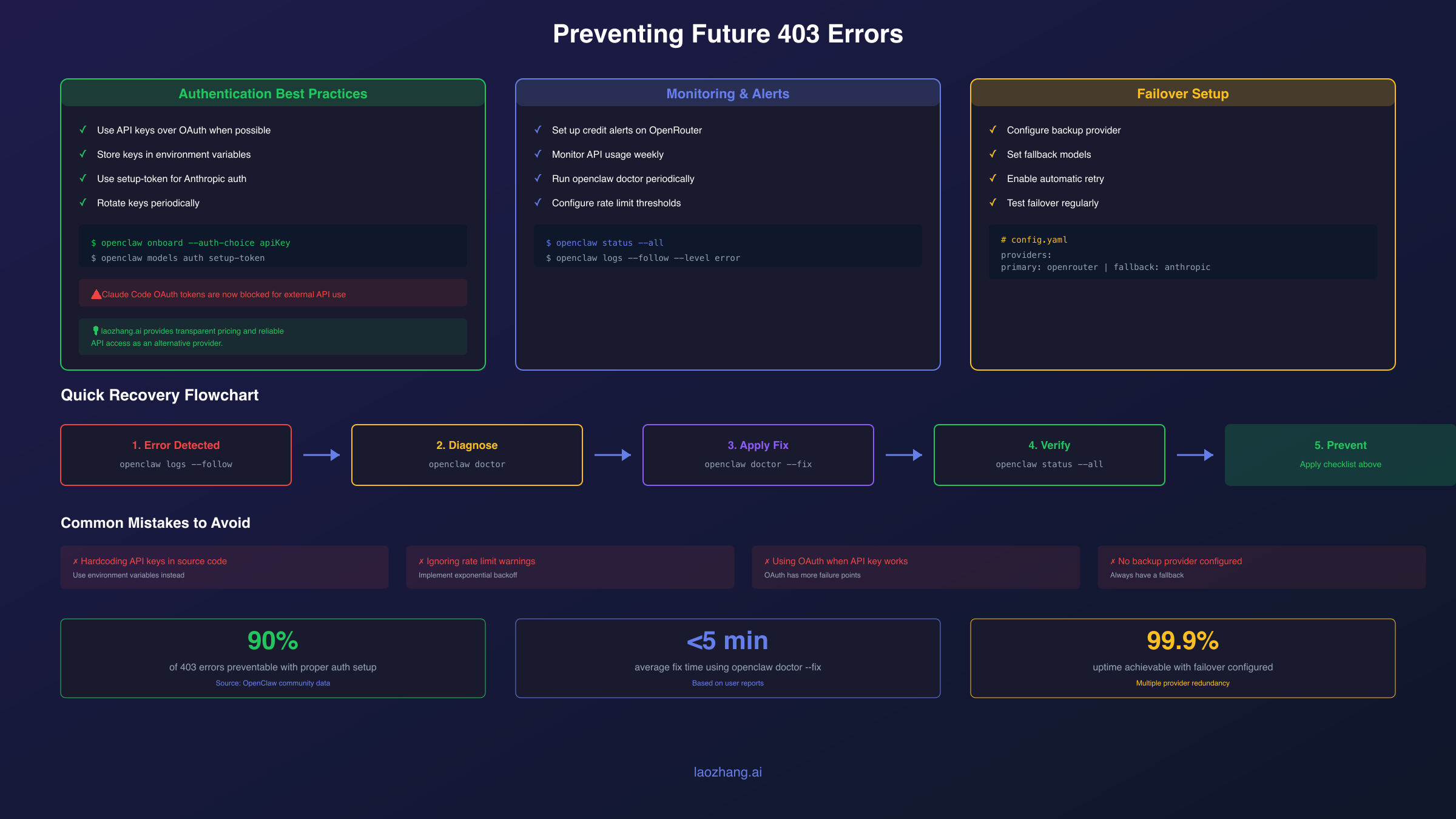
Once you've fixed your immediate 403 error, implementing preventive measures saves you from repeated troubleshooting sessions.
Use API Keys Over OAuth
The most reliable authentication method is direct API keys rather than OAuth tokens. OAuth tokens can expire, have scope limitations, and may be revoked by providers. API keys, while requiring proper security practices, provide more predictable behavior.
For Anthropic, generate an API key at console.anthropic.com and store it securely:
hljs bashopenclaw auth set anthropic:default --key "$ANTHROPIC_API_KEY"
For OpenRouter, create a dedicated key for OpenClaw at openrouter.ai/keys with appropriate spending limits:
hljs bashopenclaw auth set openrouter:default --key "$OPENROUTER_API_KEY"
Configure Spending Limits Appropriately
OpenRouter 403 "key limit exceeded" errors occur when keys hit spending caps. Set realistic limits that accommodate your usage patterns while providing budget protection:
- Visit OpenRouter settings
- Set account-level limits as your absolute maximum
- Set key-level limits slightly below that for operational flexibility
Monitor Authentication Status Regularly
Add a periodic health check to catch authentication issues before they cause 403 errors:
hljs bash# Add to cron or scheduled task
openclaw models status
openclaw status --deep
Consider Alternative API Providers
If you frequently encounter 403 errors due to rate limits, content moderation, or regional restrictions, alternative API providers can offer more reliable access. Services like laozhang.ai provide Claude API access with potentially different rate limits and moderation policies, though you should verify current availability and compare with official Anthropic API pricing for your use case.
The configuration requires only an API endpoint and key change:
hljs json{
"providers": {
"alternative": {
"baseUrl": "https://api.laozhang.ai/v1",
"apiKey": "your-key"
}
}
}
Configuring Failover and Backup Providers
OpenClaw supports multiple authentication profiles and providers, enabling automatic failover when one provider returns 403 errors. This resilience prevents a single provider's issues from completely breaking your assistant.
Setting Up Multiple Providers
Configure both OpenRouter and direct Anthropic API as providers:
hljs bashopenclaw auth set anthropic:default --key "$ANTHROPIC_API_KEY"
openclaw auth set openrouter:default --key "$OPENROUTER_API_KEY"
In your configuration, specify the failover order:
hljs json{
"agents": {
"defaults": {
"model": {
"primary": "anthropic/claude-sonnet-4.5",
"fallback": ["openrouter/anthropic/claude-sonnet-4.5"]
}
}
}
}
Handling Cooldown States
When a provider returns 403 or rate limit errors, OpenClaw places it in cooldown. The issue #2811 documents cases where gateway crashes when all profiles enter cooldown simultaneously.
To prevent this, ensure you have enough provider options that at least one remains available:
hljs json{
"model": {
"primary": "anthropic/claude-sonnet-4.5",
"fallback": [
"openrouter/anthropic/claude-sonnet-4.5",
"openrouter/google/gemini-2.0-flash",
"ollama/llama3.2"
]
}
}
Including a local Ollama model as final fallback ensures you always have some capability even when all cloud providers are unavailable.
Monitoring Failover Events
Track when failovers occur to understand your error patterns:
hljs bashopenclaw logs --limit 500 | grep -i "failover\|cooldown\|switching"
Frequent failovers to the same backup provider suggest you should reconsider your primary provider configuration or investigate why it's consistently failing.
Frequently Asked Questions
What's the difference between 401 and 403 errors in OpenClaw?
A 401 error means your credentials are invalid, expired, or missing entirely. A 403 error means your credentials were accepted but access is denied for policy reasons like content moderation, insufficient permissions, or account restrictions.
Why does Telegram say "bot was blocked" when I didn't block it?
Telegram's API overloads this 403 error for multiple conditions: the chat was never initiated with /start, privacy settings prevent messages, the bot was removed from a group, or rate limiting triggered. Have the user send /start directly to the bot to establish the chat.
Can I still use Claude Pro subscription with OpenClaw?
Anthropic now blocks Claude Code OAuth tokens from external API use. You can use openclaw models auth setup-token for subscription authentication, but verify this complies with Anthropic's terms of service. The most reliable method is using an Anthropic API key if available.
How do I know if my OpenRouter 403 is from moderation or account limits?
Check the error metadata. Content moderation 403s include metadata.reasons and metadata.flagged_input. Account limit 403s mention "key limit exceeded" and direct you to manage limits at openrouter.ai/keys.
Why do I still get 403 errors after adding credits to OpenRouter?
The gateway may cache authentication state. After adding credits or updating limits, restart the gateway with openclaw gateway stop followed by openclaw gateway. If using a new API key, also run the onboarding command with the new key.
How can I prevent 403 errors when running OpenClaw on a VPS?
VPS deployments face additional challenges: ensure your server's IP isn't blocked by providers, configure proper HTTPS for the gateway, use API keys instead of OAuth, and set up multiple provider failover to handle regional restrictions.
This comprehensive guide covers the most common 403 error scenarios in Clawdbot/OpenClaw with OpenRouter and Anthropic. The key to efficient troubleshooting is accurate diagnosis using the provided commands before attempting fixes. If you encounter a 403 error pattern not covered here, check the OpenClaw GitHub issues or the official troubleshooting documentation for the latest solutions. For more OpenClaw help, see our Clawdbot installation guide and general troubleshooting guide. If you're experiencing Claude API errors beyond 403, our Claude API error code guide covers all status codes in detail.