Gemini 3 Pro Image Preview vs Gemini 2.5 Flash Image: Complete 2025 Guide
In-depth comparison of Gemini 3 Pro Image Preview (Nano Banana Pro) and Gemini 2.5 Flash Image (Nano Banana). Pro offers 4K resolution at $0.134-$0.24/image with superior text rendering, while Flash delivers speed at $0.039/image. Includes API examples, pricing analysis, and migration guide.
Nano Banana Pro
4K-80%Google Gemini 3 Pro · AI Inpainting
谷歌原生模型 · AI智能修图

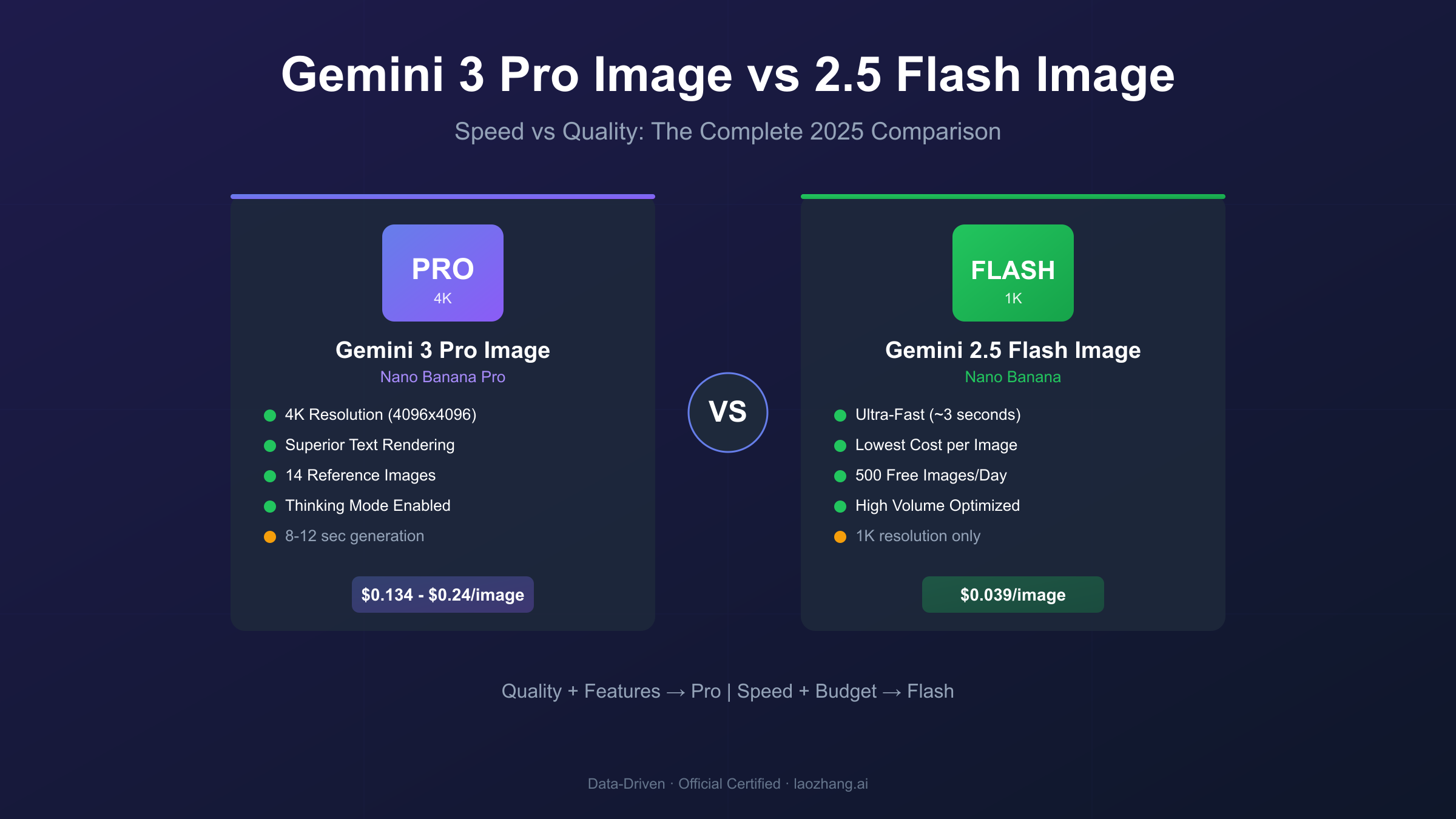
Google's Gemini image generation family now includes two distinct models optimized for different workflows: Gemini 3 Pro Image Preview (codenamed "Nano Banana Pro") and Gemini 2.5 Flash Image (codenamed "Nano Banana"). Understanding when to use each model can dramatically impact your development costs, output quality, and production timelines. The naming conventions alone cause confusion—many developers don't realize these are separate models with fundamentally different architectures and pricing structures.
This comparison provides actionable guidance based on real-world testing and official Google documentation. Gemini 3 Pro Image Preview delivers professional-grade 4K output with superior text rendering at $0.134-$0.24 per image, while Gemini 2.5 Flash Image prioritizes speed and cost efficiency at just $0.039 per image with ~3 second generation times. By the end of this guide, you'll know exactly which model fits your specific use case and how to implement both effectively.
Quick Comparison: Pro vs Flash at a Glance
Before diving into details, here's a comprehensive feature comparison based on Google's official documentation and Vertex AI specifications.
| Feature | Gemini 3 Pro Image Preview | Gemini 2.5 Flash Image |
|---|---|---|
| Model ID | gemini-3-pro-image-preview | gemini-2.5-flash-image |
| Codename | Nano Banana Pro | Nano Banana |
| Architecture | Gemini 3 Pro (advanced reasoning) | Gemini 2.5 Flash (speed-optimized) |
| Max Resolution | 4K (4096×4096) | 1K (1024×1024) |
| Generation Speed | 8-12 seconds | ~3 seconds |
| Text Rendering | Excellent (multilingual) | Limited (basic only) |
| Reference Images | Up to 14 | Up to 3 |
| Thinking Mode | Yes | No |
| Search Grounding | Yes | No |
| Base Price | $0.134/image (2K) | $0.039/image |
| 4K Price | $0.24/image | N/A |
| Batch Discount | 50% | 50% |
| Free Tier (API) | ~1,500 images/day | ~500 images/day |
This table reveals the fundamental trade-off: Pro prioritizes quality and features while Flash prioritizes speed and cost. For most developers, Flash handles 80% of use cases at 70% lower cost, but Pro becomes essential when you need print-ready quality, accurate text rendering, or complex multi-image compositions.
Understanding the Model Hierarchy
The naming conventions can confuse developers encountering these models for the first time. Both models belong to Google's Gemini family but serve distinctly different purposes.
Gemini 3 Pro Image Preview builds on Google DeepMind's latest Gemini 3 architecture, integrating advanced reasoning capabilities directly into image generation. The model uses a Thinking Mode that generates intermediate "thought signatures" during complex prompts, essentially planning composition, lighting, and element placement before rendering final pixels. According to Google's Gemini 3 developer guide, this approach enables the model to follow complex multi-step instructions and produce outputs that accurately reflect detailed prompts.
Gemini 2.5 Flash Image inherits the speed-optimized architecture from Gemini 2.5 Flash, a model designed explicitly for high-throughput, low-latency applications. Rather than sophisticated reasoning, Flash focuses on rapid generation with minimal computational overhead. This makes it ideal for applications where generation speed directly impacts user experience or where volume requirements make per-image costs critical.
Key Insight: Think of Pro as the "studio camera" and Flash as the "smartphone camera." Both take photos, but you wouldn't use a smartphone for professional product photography, and you wouldn't bring studio equipment for casual snapshots.
The architectural differences manifest in practical capabilities. Pro can query Google Search during generation to verify facts and incorporate accurate visual information. Flash lacks this grounding capability and relies entirely on its training data. For applications requiring current information—news graphics, data visualizations, product imagery—this distinction matters significantly.
Speed vs Quality: The Core Trade-off
Generation speed directly impacts both development workflows and production user experience. Testing across multiple prompt categories reveals consistent patterns.
Speed Benchmarks
| Prompt Complexity | Gemini 3 Pro Image | Gemini 2.5 Flash Image |
|---|---|---|
| Simple subject | 8-10 seconds | 2-3 seconds |
| Complex scene | 10-12 seconds | 3-4 seconds |
| Text-heavy | 10-15 seconds | 3-5 seconds |
| Multi-reference | 12-15 seconds | N/A (limited support) |
Flash's ~3 second generation time represents approximately 3-4x faster throughput than Pro. For batch processing 1,000 images, this difference translates to roughly 50 minutes with Flash versus 3+ hours with Pro. In real-time applications where users wait for generation, the difference between 3 and 12 seconds dramatically affects perceived performance.
Quality Dimensions
Speed comes at a cost. Flash's optimizations sacrifice several quality dimensions:
Resolution: Flash generates at maximum 1024×1024 (approximately 1 megapixel). Pro supports native 4K generation at 4096×4096 (approximately 16 megapixels). This 16x pixel difference becomes immediately visible when printing larger than 5×5 inches at 200 DPI or displaying on high-resolution screens.
Detail Preservation: Pro captures finer textures, more accurate material properties, and better lighting interactions. Flash outputs often appear slightly "softer" or less defined in direct comparison.
Compositional Accuracy: Pro's Thinking Mode enables better handling of complex prompts involving multiple subjects, specific spatial relationships, or detailed style requirements. Flash handles simpler prompts well but may ignore or misinterpret complex instructions.
For rapid prototyping during creative exploration, Flash's speed advantage outweighs its quality limitations. For final production assets, Pro's quality justifies the additional generation time.
Resolution and Output Specifications
Resolution capabilities determine viable use cases. The technical specifications differ significantly between models.
Gemini 3 Pro Image Preview
| Resolution | Dimensions | Token Cost | Use Cases |
|---|---|---|---|
| 1K | ~1024×1024 | 1,120 tokens | Social media, web thumbnails |
| 2K | ~2048×2048 | 1,120 tokens | Web content, digital marketing |
| 4K | ~4096×4096 | 2,000 tokens | Print, large displays, professional assets |
Pro's pricing structure makes 2K the optimal default choice—it costs the same as 1K while providing 4x the pixel count. Only upgrade to 4K when print requirements or large-format displays demand the additional resolution. The 4K option adds approximately 80% cost premium ($0.24 vs $0.134).
Gemini 2.5 Flash Image
Flash generates all outputs at fixed 1024×1024 resolution using 1,290 tokens per image. While upscaling tools can increase pixel dimensions, they cannot recover detail that wasn't captured during generation. For applications requiring genuine high resolution, Pro remains the only option.
Aspect Ratio Support
Both models support identical aspect ratio options:
- 1:1 (square)
- 2:3, 3:2 (portrait/landscape)
- 3:4, 4:3 (standard)
- 4:5, 5:4 (social media)
- 9:16, 16:9 (video/stories)
- 21:9 (ultra-wide/cinematic)
The 21:9 ultra-wide support enables cinematic banner generation and panoramic imagery for both models, though Pro's higher base resolution produces significantly more detail in these wider formats.
Text Rendering: The Decisive Differentiator
Text rendering quality represents the most dramatic capability gap between these models. Historical AI image generators struggled with legible text, and while both Gemini models improve on predecessors, their text handling differs substantially.
Gemini 3 Pro Image Preview leverages its language model foundation to understand text structure, spelling rules, and typography conventions. The model renders text as language rather than visual patterns, resulting in:
- Accurate spelling across multiple languages (English, Chinese, Japanese, Korean, French, Arabic)
- Proper typography placement respecting design conventions
- Consistent font styling and sizing
- Natural integration with surrounding visual elements
Testing with multilingual prompts shows Pro accurately rendering Japanese kanji alongside English text on signage, maintaining correct character forms and appropriate styling for both languages simultaneously.
Gemini 2.5 Flash Image generates text through pattern recognition rather than linguistic understanding. Results typically include:
- Acceptable accuracy for single words or very short phrases
- Frequent spelling errors in longer text
- Inconsistent character forms in non-Latin scripts
- Distortion when text interacts with complex backgrounds
Practical Rule: If your images require more than 3-4 words of readable text, choose Gemini 3 Pro Image Preview. For simple labels, watermarks, or images without text, Flash may suffice.
Specific use case testing reveals the practical gap:
- Infographics: Pro renders data labels, annotations, and explanatory text accurately. Flash struggles with dense information.
- Marketing Posters: Pro produces ready-to-use assets. Flash typically requires post-processing text corrections.
- Product Mockups: Pro places text naturally on packaging and labels. Flash frequently distorts or misaligns text.
- Presentations: Pro generates slides with readable bullet points. Flash produces illegible or garbled text.
API Integration: Complete Code Examples
Both models use the Gemini API with slightly different configurations. The following examples demonstrate tested workflows.
Gemini 3 Pro Image Preview (Python)
hljs pythonfrom google import genai
from google.genai import types
# Initialize client
client = genai.Client()
# Professional 4K image generation
response = client.models.generate_content(
model="gemini-3-pro-image-preview",
contents="Create a professional product photograph of a ceramic coffee mug with 'Morning Brew' text, marble surface, soft studio lighting",
config=types.GenerateContentConfig(
response_modalities=['Text', 'Image'],
image_config=types.ImageConfig(
aspect_ratio="16:9",
image_quality="4k" # Options: "1k", "2k", "4k"
)
)
)
# Process response (Pro returns both text and image)
for part in response.parts:
if part.text is not None:
print(f"Model notes: {part.text}")
elif image := part.as_image():
image.save("product_photo_4k.png")
Gemini 2.5 Flash Image (Python)
hljs pythonfrom google import genai
from google.genai import types
# Initialize client
client = genai.Client()
# Fast 1K image generation
response = client.models.generate_content(
model="gemini-2.5-flash-image",
contents="Modern office interior with large windows, minimalist furniture, natural lighting",
config=types.GenerateContentConfig(
response_modalities=['Text', 'Image'],
image_config=types.ImageConfig(
aspect_ratio="16:9"
# Note: Flash doesn't support image_quality parameter
)
)
)
# Process response
for part in response.parts:
if image := part.as_image():
image.save("office_interior.png")
Key API Differences
| Capability | Gemini 3 Pro Image | Gemini 2.5 Flash Image |
|---|---|---|
| Resolution Parameter | Yes (1k/2k/4k) | No (fixed 1K) |
| Max Reference Images | 14 | 3 |
| Response Format | Text + Image | Text + Image |
| Search Grounding | Supported | Not supported |
| Thinking Mode | Default enabled | Not available |
| SDK Package | google-genai | google-genai |
For applications with existing OpenAI integrations, third-party services provide OpenAI-compatible endpoints for both models. This approach minimizes migration effort—only base_url and api_key changes are required.
Pricing Deep Dive: Complete Cost Analysis
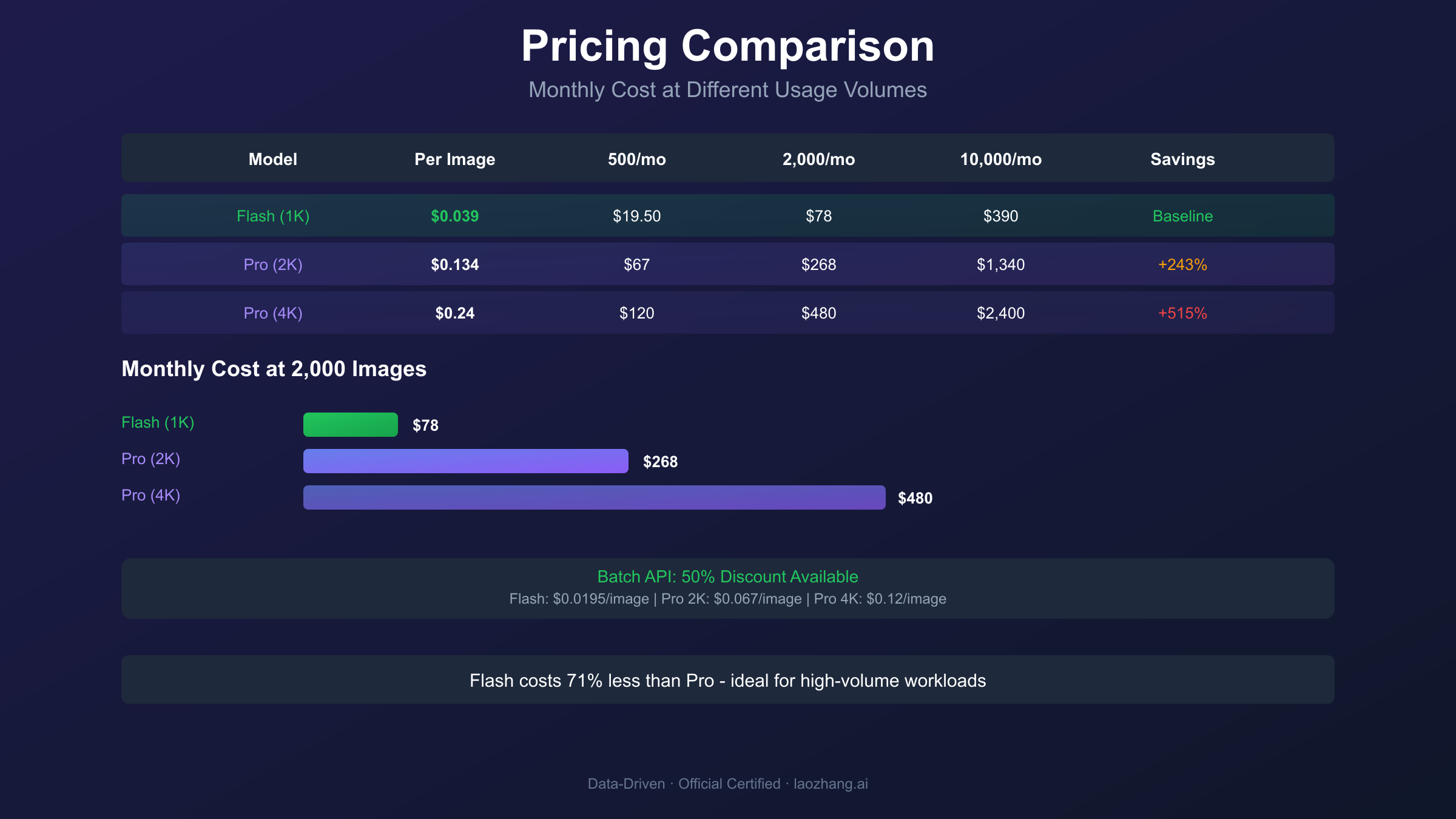
Understanding the full pricing structure helps optimize budgets for production workloads. Official pricing from Google's pricing documentation.
Standard API Pricing
| Model & Quality | Per-Image Cost | Monthly Cost (1,000 images) |
|---|---|---|
| Flash (1K) | $0.039 | $39 |
| Pro (1K/2K) | $0.134 | $134 |
| Pro (4K) | $0.24 | $240 |
Batch API Pricing (50% Discount)
| Model & Quality | Per-Image Cost | Monthly Cost (1,000 images) |
|---|---|---|
| Flash (1K) | $0.0195 | $19.50 |
| Pro (1K/2K) | $0.067 | $67 |
| Pro (4K) | $0.12 | $120 |
The pricing reveals significant differences:
- Flash costs 71% less than Pro for standard API usage
- Flash costs 71% less than Pro for batch processing
- Pro's 4K option costs 79% more than its 2K option
Free Tier Allocations
Google AI Studio provides generous free access for development:
- Gemini 2.5 Flash Image: ~500 images/day
- Gemini 3 Pro Image Preview: ~1,500 images/day (varies by account)
These quotas reset at midnight UTC and operate separately from consumer Gemini app limits.
Cost Optimization Strategies
1. Use Flash for Exploration, Pro for Execution
Generate concept variations with Flash's speed advantage, then produce final assets with Pro's quality. This workflow can reduce costs by 60-70% compared to using Pro exclusively.
2. Leverage Batch API for Non-Urgent Work
Catalog generation, overnight processing, and any workflow without real-time requirements should use batch endpoints for 50% savings.
3. Match Resolution to Use Case
Pro's 2K option costs the same as 1K—always use 2K as the default. Only upgrade to 4K when print requirements justify the premium.
Third-Party API Options
For production applications requiring cost efficiency, aggregation platforms offer alternatives. Services like laozhang.ai provide access to both models through OpenAI-compatible endpoints:
hljs pythonfrom openai import OpenAI
# Access Gemini models through third-party API
client = OpenAI(
api_key="sk-YOUR_API_KEY", # From laozhang.ai
base_url="https://api.laozhang.ai/v1"
)
# Use Gemini 3 Pro Image with OpenAI-compatible format
response = client.chat.completions.create(
model="gemini-3-pro-image-preview",
messages=[
{"role": "user", "content": "Generate a professional headshot for a tech company"}
]
)
These platforms typically offer 40-60% cost reductions while providing multi-provider redundancy for production reliability. For China-based developers, these services resolve access restrictions affecting direct Google API connections (latency approximately 20ms versus 200ms+ with VPN).
Use Case Recommendations: Decision Framework
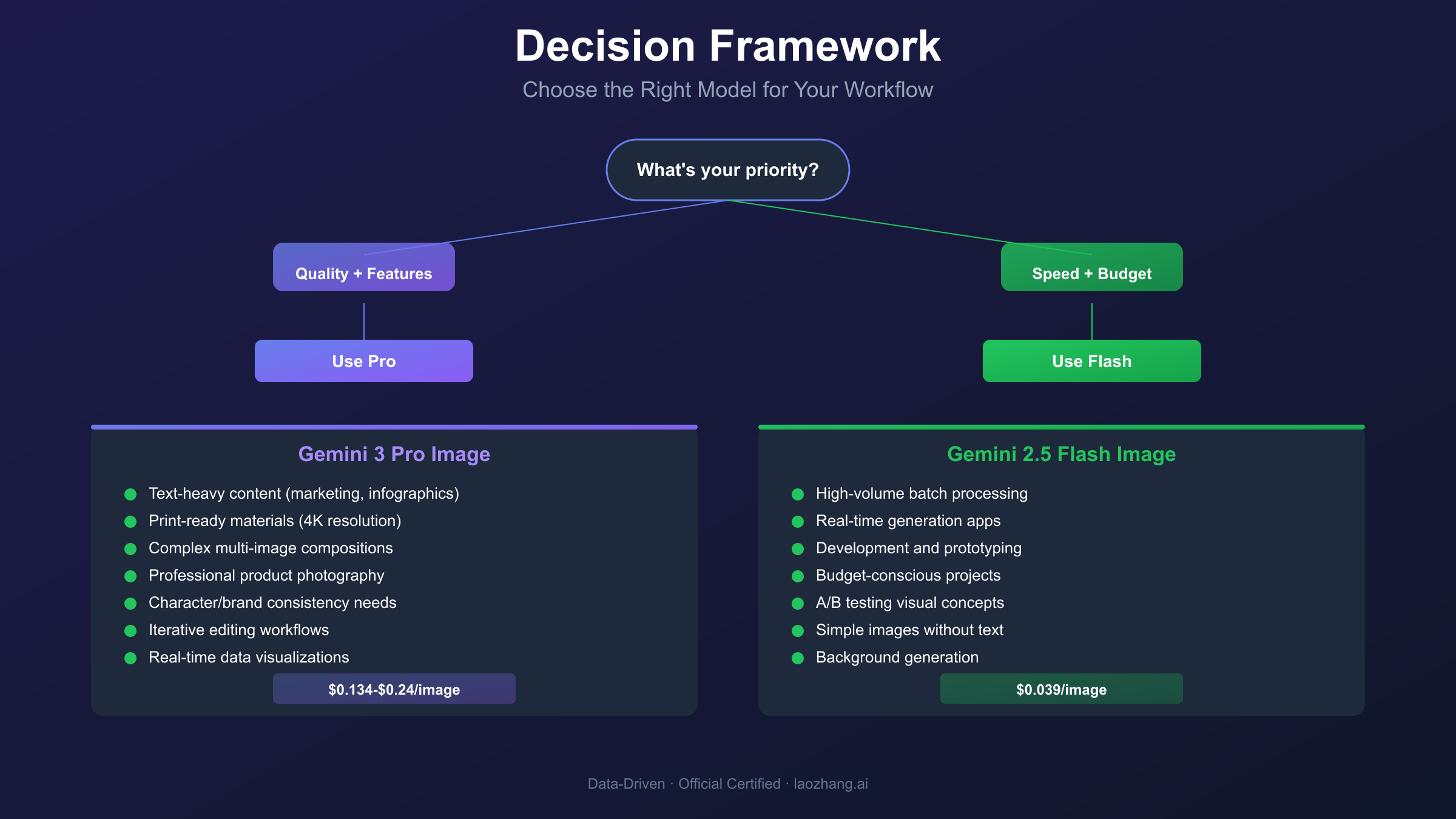
Selecting the right model requires matching capabilities to specific requirements. Use this framework for quick decisions.
Choose Gemini 3 Pro Image Preview When:
Professional Asset Production
- Marketing materials requiring text accuracy
- Product photography for e-commerce
- Print-ready materials (posters, brochures, packaging)
- Large-format display content
Complex Creative Requirements
- Multi-image compositions with character consistency
- Detailed style requirements with specific lighting/composition
- Images requiring factual accuracy (Search Grounding)
- Iterative editing workflows (Thinking Mode)
Text-Heavy Content
- Infographics and data visualizations
- Presentation slides and diagrams
- UI mockups and design concepts
- Multilingual marketing materials
Choose Gemini 2.5 Flash Image When:
High-Volume Operations
- A/B testing visual concepts
- Batch processing for catalogs
- Real-time generation for user-facing apps
- Development and prototyping
Cost-Sensitive Projects
- Startups with limited budgets
- Personal projects and experimentation
- Background generation for compositing
- Placeholder imagery during development
Speed-Critical Applications
- Interactive applications requiring fast response
- Live preview features
- Creative exploration and brainstorming
- Rapid iteration during design phases
Hybrid Workflow Example
Most production environments benefit from using both models strategically:
- Concept Phase (Flash): Generate 20-30 variations quickly to explore directions
- Selection Phase: Review Flash outputs and identify winning concepts
- Production Phase (Pro): Generate final 4K assets with accurate text
- Iteration Phase (Pro): Use conversational editing for refinements
This workflow reduces overall costs by 50-60% compared to using Pro exclusively while maintaining professional output quality.
Migration Guide: Moving Between Models
Developers often need to migrate between models as project requirements evolve. Here's practical guidance for common migration scenarios.
Flash to Pro Migration
When to Migrate:
- Quality feedback indicates Flash outputs are insufficient
- Text rendering requirements increase
- Print or large-format display needs emerge
- Multi-image composition becomes necessary
Migration Steps:
- Update model ID from
gemini-2.5-flash-imagetogemini-3-pro-image-preview - Add
image_qualityparameter for resolution control - Adjust timeout settings (Pro takes 3-4x longer)
- Update cost projections (Pro costs ~3.4x more)
- Test prompts—Pro may interpret complex prompts differently
Code Changes:
hljs python# Before (Flash)
config=types.GenerateContentConfig(
response_modalities=['Text', 'Image'],
image_config=types.ImageConfig(
aspect_ratio="16:9"
)
)
# After (Pro)
config=types.GenerateContentConfig(
response_modalities=['Text', 'Image'],
image_config=types.ImageConfig(
aspect_ratio="16:9",
image_quality="2k" # Added resolution control
)
)
Pro to Flash Migration
When to Migrate:
- Cost optimization becomes priority
- Generation speed requirements increase
- Quality requirements decrease
- Volume scales beyond budget
Migration Considerations:
- Remove
image_qualityparameter (ignored by Flash) - Reduce reference image count to 3 maximum
- Simplify prompts—Flash may struggle with complex instructions
- Add post-processing pipeline for text correction if needed
- Implement upscaling workflow if resolution matters
Deprecation Notice
The gemini-2.0-flash-preview-image-generation and gemini-2.5-flash-image-preview models will be retired on October 31, 2025. Migrate any workflows to gemini-2.5-flash-image before that date to avoid service disruption. The newer model offers improved quality at identical pricing.
Best Practices and Optimization Tips
Prompt Engineering Differences
Both models respond to prompts differently due to their architectural foundations:
Gemini 3 Pro Image Preview:
- Benefits from detailed, natural language descriptions
- Handles multi-step instructions effectively
- Responds to explicit composition guidance
- Leverages conversation history for consistency
Gemini 2.5 Flash Image:
- Performs best with concise, direct prompts
- May ignore complex or multi-part instructions
- Benefits from style keywords over detailed descriptions
- Works best with single-subject focuses
Error Handling
Both APIs share common error patterns requiring handling:
hljs pythonimport time
from google.api_core import exceptions
def generate_with_retry(client, model, prompt, max_retries=3):
for attempt in range(max_retries):
try:
response = client.models.generate_content(
model=model,
contents=prompt,
config=config
)
return response
except exceptions.ResourceExhausted:
# Rate limit hit - exponential backoff
wait_time = 2 ** attempt
time.sleep(wait_time)
except exceptions.InvalidArgument as e:
# Content policy violation - modify prompt
raise ValueError(f"Prompt rejected: {e}")
raise RuntimeError("Max retries exceeded")
Rate Limits
| Limit Type | Pro | Flash |
|---|---|---|
| Requests/minute | Varies by tier | Varies by tier |
| Daily quota (free) | ~1,500 | ~500 |
| Concurrent requests | Limited | Higher |
Monitor usage through Google Cloud Console to avoid unexpected quota exhaustion during production workloads.
Conclusion: Making the Right Choice
The comparison between Gemini 3 Pro Image Preview and Gemini 2.5 Flash Image reveals complementary tools rather than direct competitors. Each model excels in scenarios aligned with its design philosophy.
Choose Gemini 3 Pro Image Preview for:
- Professional-grade output requiring 4K resolution
- Any content containing readable text
- Complex compositions with multiple subjects
- Print and large-format display applications
- Workflows requiring iterative editing
Choose Gemini 2.5 Flash Image for:
- High-volume, cost-sensitive generation
- Real-time applications where speed matters
- Development, prototyping, and exploration
- Simple compositions without text requirements
- Budget-constrained projects
For most teams, a hybrid approach delivers optimal results: use Flash for rapid exploration and concept testing, then Pro for final production assets. This strategy balances quality with cost efficiency while leveraging each model's strengths.
The AI image generation landscape continues evolving rapidly. Both models receive regular updates, so periodic reassessment against current capabilities ensures your pipeline remains optimized.
Frequently Asked Questions
What's the actual difference between Nano Banana and Nano Banana Pro? These are marketing codenames. Nano Banana refers to Gemini 2.5 Flash Image (fast, cheap, 1K resolution). Nano Banana Pro refers to Gemini 3 Pro Image Preview (slower, pricier, 4K resolution with advanced features). The "Pro" designation indicates the more capable but more expensive option.
Can I upgrade Flash outputs to Pro quality later? You can upscale Flash images using third-party tools, but this cannot recover detail that wasn't generated initially. For genuine high-quality output, generate with Pro from the start rather than attempting to enhance Flash outputs.
Which model has better free tier limits? Gemini 3 Pro Image Preview offers approximately 1,500 free images/day in Google AI Studio, compared to Flash's ~500/day. However, Flash's faster generation makes its quota feel larger during development sessions.
Is the text rendering difference really that significant? Yes. Flash frequently produces garbled or misspelled text even for simple phrases. Pro handles complex multilingual text reliably. For any commercial application involving text, Pro's accuracy justifies its higher cost.
How do I access these models from China? Direct Google API access from mainland China is restricted. Third-party aggregators like laozhang.ai provide stable access with low latency (~20ms versus 200ms+ with VPN). For more details, see the documentation.
Should I switch from Flash to Pro if my project grows? Not necessarily. Many production applications continue using Flash successfully at scale. Switch to Pro only if you encounter specific limitations: text rendering failures, resolution requirements, or composition complexity that Flash cannot handle.
What happens when Gemini 2.5 Flash Image Preview is deprecated?
Migrate to gemini-2.5-flash-image (the stable release) before October 31, 2025. The migration is straightforward—update the model ID and test your workflows. The stable release offers improved quality at the same pricing.
For more detailed comparisons with other models, see our guides on Nano Banana vs Nano Banana Pro and Gemini 3 Pro Image API quota limits.