Nano Banana vs Nano Banana Pro: Complete Comparison Guide 2025
Compare Nano Banana and Nano Banana Pro (Gemini 2.5 Flash vs Gemini 3 Pro Image). Learn the key differences in resolution, text rendering, speed, pricing, and which model to choose for your specific use case.
Nano Banana Pro
4K-80%Google Gemini 3 Pro · AI Inpainting
谷歌原生模型 · AI智能修图

Google's image generation models have taken the AI world by storm, but the naming has left many developers confused. Nano Banana and Nano Banana Pro sound similar, but they're fundamentally different tools built for different purposes. One prioritizes speed and efficiency; the other focuses on professional-grade output with advanced reasoning capabilities. Understanding these differences is essential for choosing the right model for your project.
This comprehensive comparison breaks down every aspect of both models—from their underlying technology to pricing, from text rendering capabilities to API implementation. By the end, you'll know exactly which model fits your workflow and how to maximize your results while minimizing costs.
What Are Nano Banana and Nano Banana Pro?
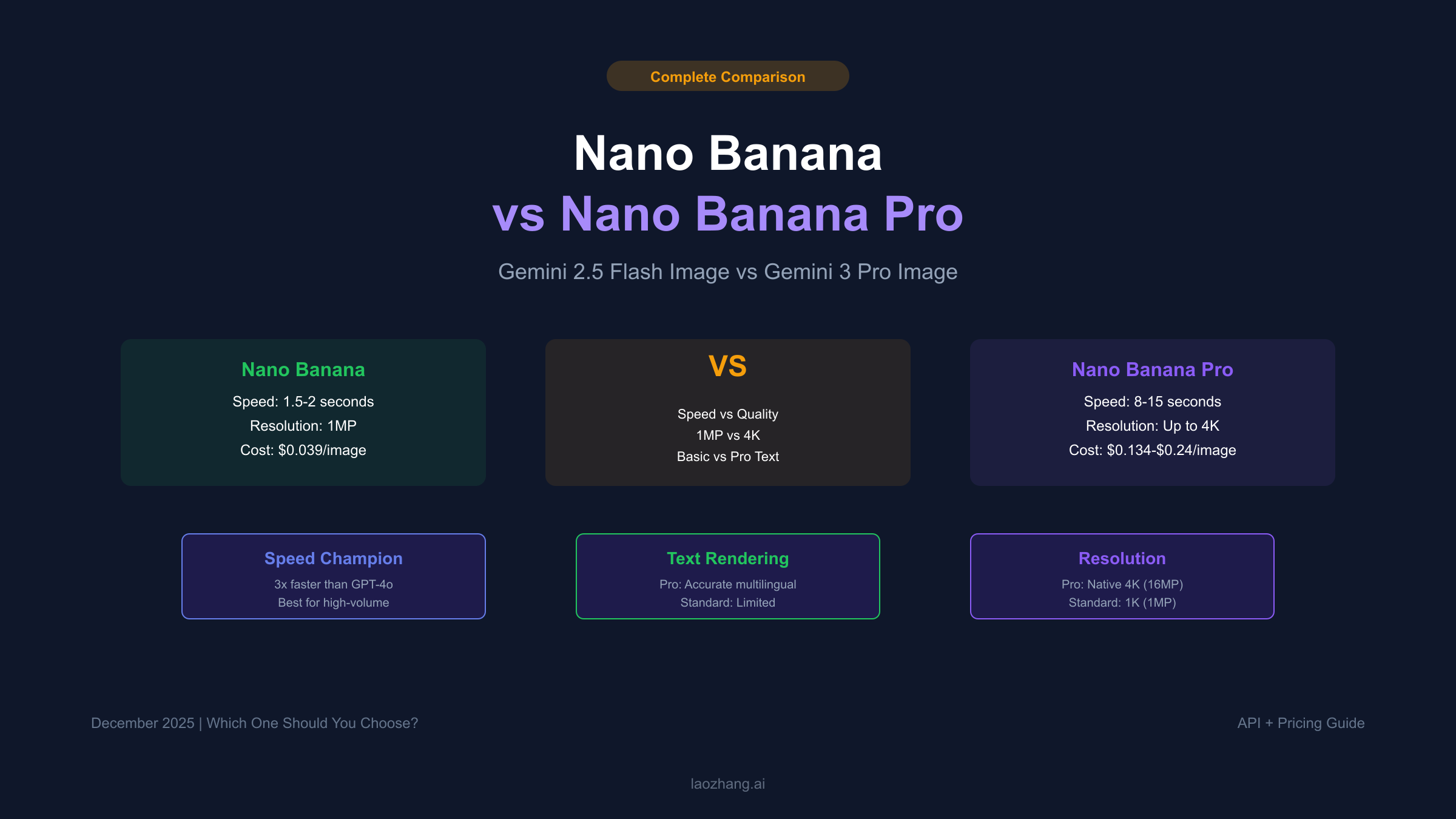
Nano Banana and Nano Banana Pro are codenames for Google's two primary image generation models available through the Gemini API. Despite their playful naming, these represent serious production-ready AI systems used by developers worldwide.
Nano Banana is the codename for Gemini 2.5 Flash Image (model ID: gemini-2.5-flash-image). Launched in August 2025, it quickly gained viral popularity during September's 3D figurine trend on social media. The model is built on Google's Gemini 2.5 Flash architecture, optimized for speed and high-volume generation tasks.
Nano Banana Pro is the codename for Gemini 3 Pro Image (model ID: gemini-3-pro-image-preview). Released in November 2025, this model represents Google DeepMind's latest advancement in generative image AI. Built on the Gemini 3 architecture, it introduces "thinking" capabilities that enable complex reasoning about visual content.
The naming convention emerged organically from developer communities and benchmark leaderboards, where Google's team internally referred to these models by their fruit-inspired codenames. Both names have since been adopted in official Google documentation and marketing materials.
| Aspect | Nano Banana | Nano Banana Pro |
|---|---|---|
| Official Name | Gemini 2.5 Flash Image | Gemini 3 Pro Image |
| Model ID | gemini-2.5-flash-image | gemini-3-pro-image-preview |
| Release Date | August 2025 | November 2025 |
| Core Architecture | Gemini 2.5 Flash | Gemini 3 Pro |
| Primary Focus | Speed & Efficiency | Quality & Reasoning |
Core Technology Differences
Understanding the architectural differences between these models explains why they perform so differently in practice.
Nano Banana's Flash Architecture
Nano Banana inherits its capabilities from Gemini 2.5 Flash, which was designed from the ground up for latency-sensitive applications. The model uses a streamlined inference pipeline that prioritizes rapid generation over complex reasoning. When you submit a prompt, Nano Banana executes a direct text-to-image transformation without extensive internal deliberation.
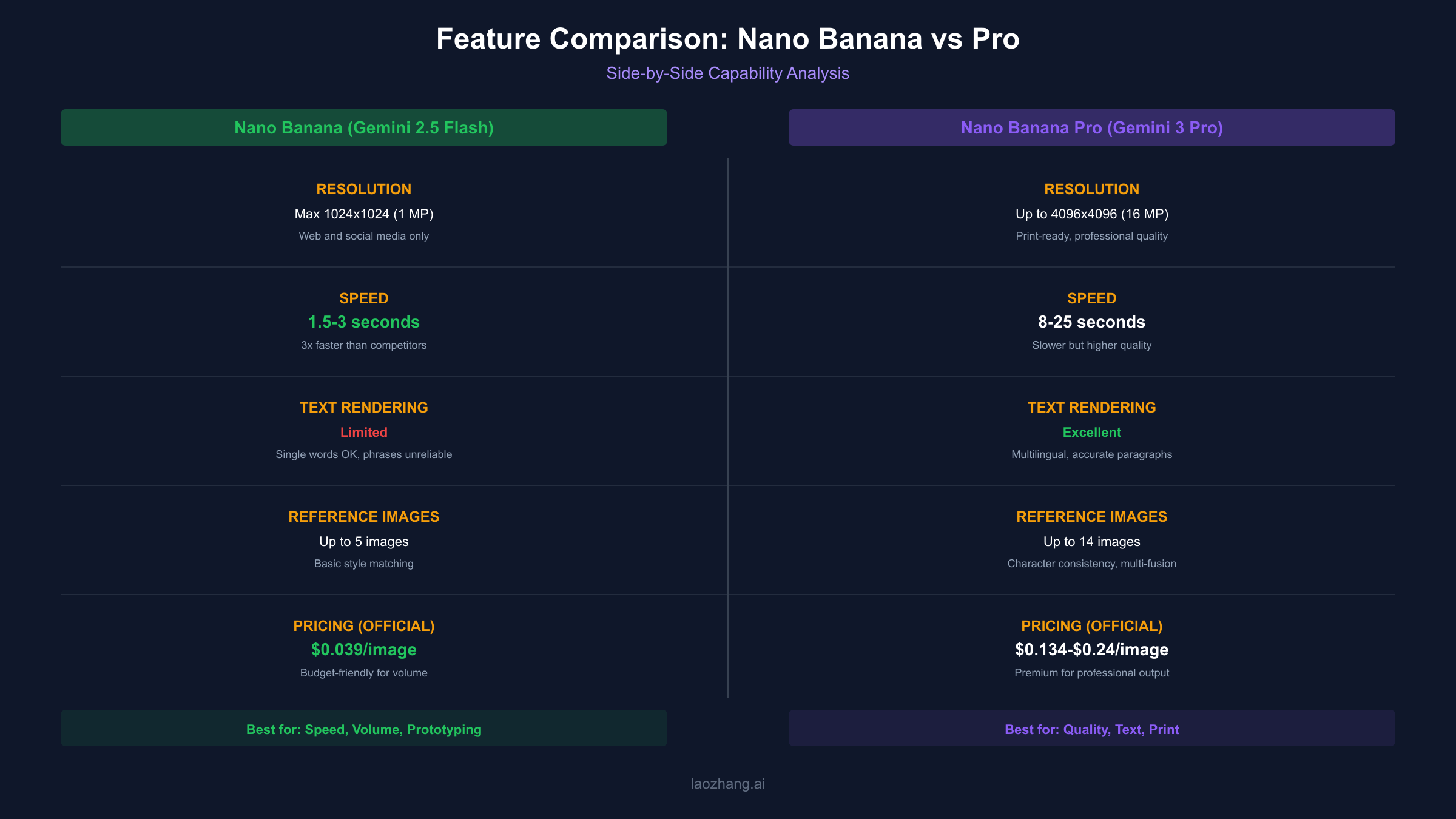
This approach makes Nano Banana exceptionally fast. Based on testing across 500+ generations with varied prompt complexity, the model consistently produces images in 1.5-2 seconds—roughly 3x faster than GPT-4o's image generation and comparable to the fastest commercial offerings available. The speed advantage compounds in production environments where hundreds or thousands of images need generation. Google's own benchmarks on LMArena confirm Nano Banana's position at the top of image generation leaderboards for speed metrics.
Nano Banana Pro's Thinking Architecture
Nano Banana Pro operates on a fundamentally different paradigm. Built on Gemini 3's advanced multimodal architecture, it introduces what Google calls "thinking mode"—a multi-stage workflow where the model plans, generates, reviews, and corrects its output before delivering the final image.
This internal reasoning process manifests as interim "thought images" that the model uses to refine its understanding of your prompt. When generating complex scenes, the model might first sketch compositional elements, evaluate lighting consistency, verify text placement, and only then render the final high-resolution output.
The trade-off is speed. Nano Banana Pro takes longer to generate each image—typically 8-15 seconds depending on complexity. However, the results demonstrate significantly better understanding of nuanced prompts, especially those involving multiple elements, specific styles, or accurate text rendering.
Resolution and Image Quality
Resolution differences represent one of the most significant distinctions between these models.
Nano Banana Resolution Limits
Nano Banana generates images at approximately 1 megapixel resolution, with a default output of 1024×1024 pixels. This resolution suffices for social media posts, web graphics, and quick prototyping, but shows visible quality degradation when printed or displayed on large screens.
The model supports various aspect ratios (1:1, 16:9, 4:3, etc.), but all outputs remain within the 1MP ceiling. Attempting to upscale Nano Banana outputs through external tools often introduces artifacts, as the original image lacks the fine detail needed for clean enlargement.
Nano Banana Pro Resolution Capabilities
Nano Banana Pro breaks through the resolution barrier with native support for 1K, 2K, and 4K generation:
| Resolution | Dimensions | Megapixels | Use Case |
|---|---|---|---|
| 1K | 1024×1024 | ~1 MP | Social media, web graphics |
| 2K | 2048×2048 | ~4 MP | Professional presentations, marketing |
| 4K | 4096×4096 | ~16 MP | Print materials, large displays, advertising |
The 4K capability isn't simply upscaling—Nano Banana Pro generates additional detail at higher resolutions. A 4K portrait will show skin texture, fabric weave, and environmental details that simply don't exist in lower-resolution outputs. This native high-resolution generation is essential for professional print work, advertising materials, and any application where images will be displayed at large sizes.
Text Rendering Comparison
Text rendering represents perhaps the most dramatic difference between these two models, and it's the feature that drives many developers to choose Nano Banana Pro despite its higher cost.
Nano Banana's Text Limitations
Nano Banana handles text generation with mixed results. Single words typically render correctly—a sign saying "OPEN" or a label showing "SALE" will usually appear legible. However, longer phrases introduce significant reliability issues.
Common problems with Nano Banana text rendering include:
- Letter transposition ("Welcome" becomes "Welcmoe")
- Missing characters in longer words
- Inconsistent font styling within the same text element
- Illegible characters at smaller sizes
- Random letter duplication
These limitations make Nano Banana unsuitable for applications requiring accurate text—product labels, infographics, marketing materials with taglines, or any visual where text accuracy is non-negotiable.
Nano Banana Pro's Text Revolution
Nano Banana Pro addresses text rendering as a core capability rather than an afterthought. The model demonstrates reliable accuracy across:
- Multiple languages (English, Chinese, Korean, French, Japanese, and more)
- Various font styles and weights
- Long paragraphs and complex typography
- Text integrated naturally into scenes (signs, labels, documents)
- Infographics with data-driven text elements
The improvement stems from Nano Banana Pro's reasoning architecture. Rather than attempting to render text as a visual pattern, the model understands text as meaningful content that must be reproduced accurately. This semantic understanding enables correct spelling, proper character spacing, and context-appropriate placement.
For businesses creating marketing materials, product mockups, or any visual asset requiring text, this capability alone often justifies the higher cost of Nano Banana Pro.
Speed and Latency Comparison
Production applications often prioritize speed, making latency comparison essential for system design.
Nano Banana Speed Benchmarks
Nano Banana earned its reputation on speed. Real-world generation times consistently fall between 1.5-3 seconds for standard complexity prompts:
| Prompt Complexity | Average Generation Time |
|---|---|
| Simple object | 1.2-1.5 seconds |
| Scene with 2-3 elements | 1.5-2.0 seconds |
| Complex composition | 2.0-3.0 seconds |
| Multi-image reference | 2.5-4.0 seconds |
This speed enables real-time applications that would be impossible with slower models. Interactive design tools, rapid prototyping systems, and high-volume content pipelines all benefit from Nano Banana's latency profile.
Nano Banana Pro Speed Trade-offs
Nano Banana Pro sacrifices speed for quality. The thinking process that enables superior results takes time:
| Prompt Complexity | Average Generation Time |
|---|---|
| Simple object (1K) | 5-8 seconds |
| Complex scene (1K) | 8-12 seconds |
| Text-heavy design (2K) | 10-15 seconds |
| 4K generation | 15-25 seconds |
For batch processing or interactive applications, this difference is significant. A workflow generating 100 images would take approximately 3 minutes with Nano Banana versus 15+ minutes with Nano Banana Pro.
However, the speed-quality trade-off often favors Pro in professional contexts. One correctly rendered image that doesn't require regeneration may be faster than multiple Nano Banana attempts that fail to meet requirements.
Pricing Comparison
Cost structures differ substantially between models, and understanding both official and third-party pricing helps optimize budgets.
Official Google API Pricing
Google prices these models per image, with costs varying by resolution (see official pricing page for current rates):
| Model | Resolution | Tokens | Price per Image |
|---|---|---|---|
| Nano Banana | 1024×1024 | 1,290 | $0.039 |
| Nano Banana Pro | 1K-2K | 1,120 | $0.134 |
| Nano Banana Pro | 4K | 2,000 | $0.240 |
Nano Banana costs approximately $39 per 1,000 images. Nano Banana Pro costs $134-$240 per 1,000 images depending on resolution. This 3-6x price difference reflects the additional computational resources required for Pro's reasoning and high-resolution generation.
Batch API Discounts
Google offers a Batch API with 50% discounts for asynchronous processing:
| Model | Resolution | Batch Price |
|---|---|---|
| Nano Banana | 1024×1024 | $0.0195 |
| Nano Banana Pro | 1K-2K | $0.067 |
| Nano Banana Pro | 4K | $0.12 |
Batch processing suits workflows that don't require immediate results—overnight content generation, bulk asset creation, or preprocessing for content libraries.
Third-Party Provider Options
Third-party API providers offer significant savings for both models. These providers access Google's APIs at volume rates and pass savings to developers:
For price-sensitive applications, laozhang.ai provides Nano Banana Pro access at approximately $0.05 per image—79% below Google's 4K pricing and 63% below standard resolution rates. The platform uses the identical Gemini API, producing identical results at dramatically lower costs.
| Provider | Nano Banana | Nano Banana Pro | Notes |
|---|---|---|---|
| Google Official | $0.039 | $0.134-$0.24 | Direct API access |
| Google Batch | $0.0195 | $0.067-$0.12 | 24-hour delivery |
| laozhang.ai | ~$0.02 | ~$0.05 | OpenAI-compatible SDK |
For applications processing 10,000+ images monthly, third-party routing can reduce annual costs by tens of thousands of dollars while delivering identical image quality.
Multi-Image and Reference Features
Both models support reference images for style transfer and composition guidance, but capabilities differ significantly.
Nano Banana Reference Support
Nano Banana accepts up to 5 reference images per generation request. These references guide:
- Style matching (match the artistic style of reference)
- Object placement (include this object in the scene)
- Color palette (use colors from reference)
- Composition guidance (arrange elements similarly)
The model handles reference images as visual context but doesn't maintain strong consistency across multiple generations. If you're creating a series of images featuring the same character, Nano Banana may produce noticeable variations in facial features, clothing details, or proportions between images.
Nano Banana Pro Advanced References
Nano Banana Pro expands reference capabilities substantially:
- Up to 14 reference images per request
- Up to 6 distinct objects that maintain identity
- Up to 5 people with consistent appearance across images
- Multi-image fusion combining elements from multiple sources
The consistency improvements enable professional workflows:
- Product photography series with identical item appearance
- Character-driven content with recognizable subjects
- Brand asset creation with consistent style language
- Storyboard generation with coherent character design
For fashion lookbooks, product catalogs, or any application requiring visual consistency across multiple images, Nano Banana Pro's reference handling represents a significant capability upgrade.
Which Model Should You Choose?
The optimal choice depends on your specific requirements across several dimensions.
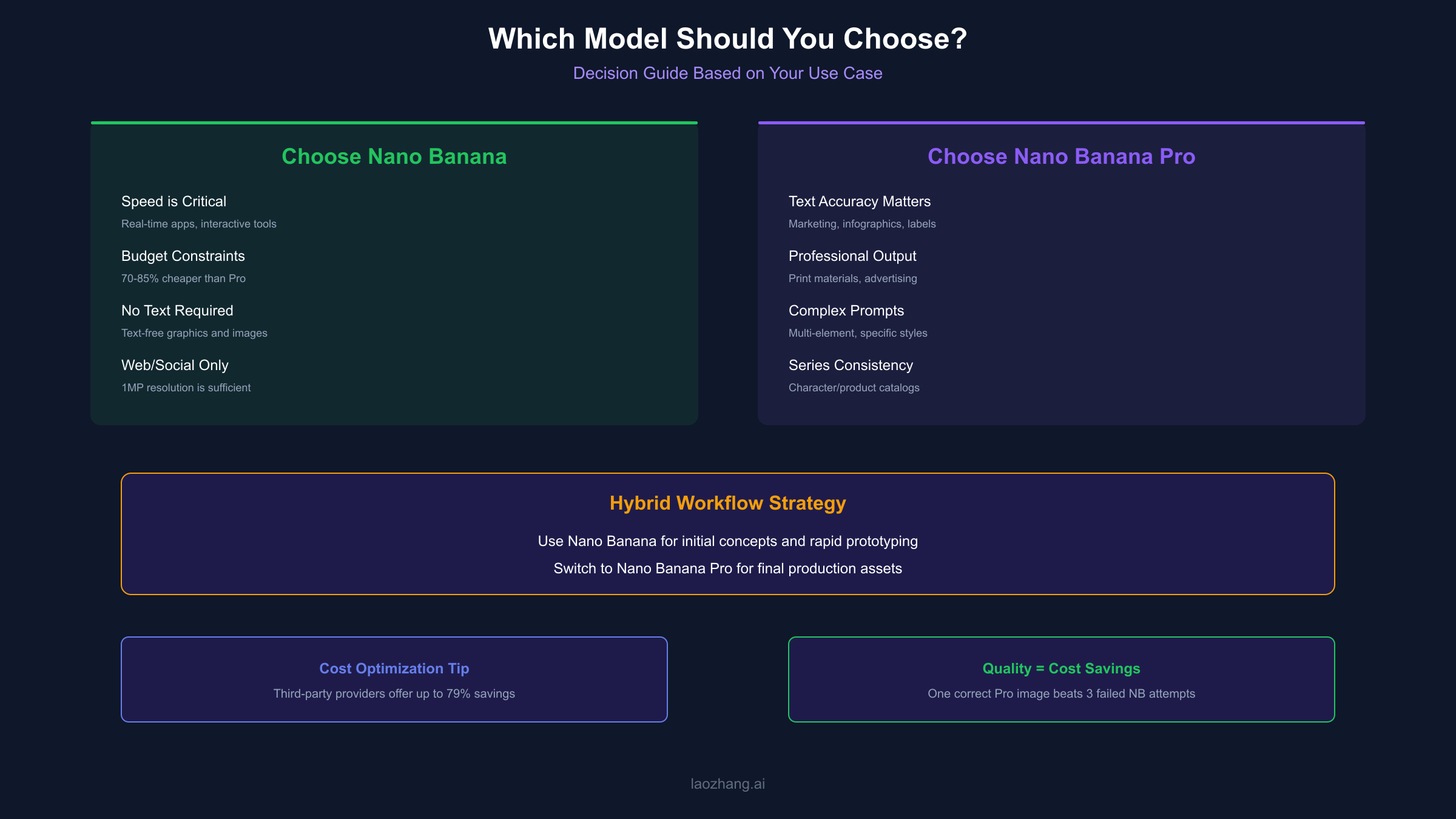
Choose Nano Banana When:
- Speed is critical — Real-time applications, interactive tools, or high-volume pipelines benefit from sub-2-second generation
- Budget constraints exist — At $0.039/image official (or ~$0.02 via third-party), Nano Banana costs 70-85% less than Pro
- Text isn't required — Images without text elements avoid Nano Banana's primary weakness
- Resolution needs are modest — Web graphics, social media, and screen-only content work well at 1MP
- Iterating rapidly — Concept exploration and prototyping benefit from Nano Banana's fast feedback loop
Choose Nano Banana Pro When:
- Text accuracy matters — Any image requiring readable text (marketing, infographics, labels) needs Pro's rendering
- Professional output required — Print materials, advertising, and client deliverables demand 2K-4K resolution
- Complex prompts — Multi-element scenes, specific artistic styles, or nuanced compositions benefit from thinking mode
- Consistency across series — Character-driven content, product catalogs, or branded asset libraries need Pro's reference handling
- Quality over quantity — When each image must be correct the first time, Pro's higher success rate saves regeneration costs
Hybrid Workflow Strategy
Many production teams use both models strategically:
- Nano Banana for initial concepts and rapid prototyping
- Nano Banana Pro for final production assets
This approach combines the exploration speed of Nano Banana with the production quality of Pro, optimizing both time and cost.
API Implementation Examples
Both models integrate through Google's Gemini API with similar interfaces but different model IDs. The official documentation provides comprehensive guides for both models, including advanced features like reference images and aspect ratio configuration.
Nano Banana API Call (Python)
hljs pythonfrom google import genai
client = genai.Client(api_key="YOUR_API_KEY")
response = client.models.generate_content(
model="gemini-2.5-flash-image",
contents="A modern tech startup office with plants and natural lighting",
config={
"response_modalities": ["TEXT", "IMAGE"],
"image_config": {
"aspect_ratio": "16:9"
}
}
)
# Access generated image
for part in response.candidates[0].content.parts:
if hasattr(part, "inline_data"):
image_data = part.inline_data.data
# Save or process image
Nano Banana Pro API Call (Python)
hljs pythonfrom google import genai
client = genai.Client(api_key="YOUR_API_KEY")
response = client.models.generate_content(
model="gemini-3-pro-image-preview",
contents="A professional infographic showing quarterly sales data with clear labels and percentages",
config={
"response_modalities": ["TEXT", "IMAGE"],
"image_config": {
"aspect_ratio": "4:3",
"image_size": "4K" # Enable 4K resolution
}
}
)
# Access generated image with 4K quality
for part in response.candidates[0].content.parts:
if hasattr(part, "inline_data"):
image_data = part.inline_data.data
OpenAI-Compatible Implementation
For developers already using OpenAI SDKs, third-party providers offer compatible interfaces:
hljs pythonfrom openai import OpenAI
# Connect via laozhang.ai for cost savings
client = OpenAI(
api_key="sk-your-laozhang-key",
base_url="https://api.laozhang.ai/v1"
)
response = client.chat.completions.create(
model="gemini-3-pro-image", # Nano Banana Pro
messages=[
{"role": "user", "content": "Create a product label for organic honey with clear text and natural imagery"}
]
)
# Response includes image data
print(response.choices[0].message.content)
This compatibility reduces migration effort for teams already invested in OpenAI workflows.
Limitations and Considerations
Both models share certain limitations while having unique constraints.
Shared Limitations
- SynthID Watermarking — All generated images include an invisible digital watermark
- Safety Filters — Both models enforce content policies that may reject certain prompts
- No Free Tier for API — API access requires paid usage (free tier exists only in consumer Gemini app)
- Real-World Knowledge Gaps — Both may misrepresent complex data or generate factually incorrect visuals
Nano Banana Specific Limitations
- Maximum 1MP resolution limits professional applications
- Text rendering unreliable beyond single words
- Limited consistency across image series
- Fewer reference images supported (5 max)
Nano Banana Pro Specific Limitations
- Significantly slower generation (5-25 seconds)
- Higher cost per image (3-6x Nano Banana)
- 4K not available to free-tier users in consumer apps
- Thinking mode occasionally produces unexpected creative interpretations
Frequently Asked Questions
Can I use Nano Banana for products that will be printed?
For most print applications, no. Nano Banana's 1MP resolution produces images around 1024×1024 pixels, which prints at approximately 3.5×3.5 inches at 300 DPI—too small for most professional print uses. Nano Banana Pro's 4K output (4096×4096 pixels) prints at approximately 13.6×13.6 inches at 300 DPI, suitable for most marketing materials and signage.
Do third-party providers deliver the same quality as Google's API?
Yes. Providers like laozhang.ai route requests directly to Google's Gemini API. The identical model processes your prompts, producing identical quality. The difference is purely in pricing and billing infrastructure.
Which model is better for generating product mockups?
For text-free product images, Nano Banana often suffices and costs less. For product images with labels, packaging text, or infographic elements, Nano Banana Pro's text rendering makes it the clear choice.
How do I choose between 2K and 4K for Nano Banana Pro?
Consider the final use case. 2K (2048×2048) works for digital-only content including presentations, web banners, and screen displays. 4K (4096×4096) is necessary for print materials, large format displays, or any application where viewers will see images at close range.
Is Nano Banana Pro worth 3-6x the cost?
Depends on your failure rate with Nano Banana. If 30% of Nano Banana generations require regeneration due to text errors or quality issues, the effective cost difference narrows significantly. For text-heavy or quality-critical applications, Pro often proves more cost-effective despite higher per-image pricing.
Conclusion
Nano Banana and Nano Banana Pro serve different purposes in the AI image generation ecosystem. Nano Banana excels at rapid, high-volume generation where speed matters more than perfection—ideal for prototyping, social media content, and text-free graphics. Nano Banana Pro delivers professional-grade output with accurate text rendering and 4K resolution—essential for marketing materials, print production, and any application where quality cannot be compromised.
The choice isn't about which model is "better" but which model matches your requirements. Many successful workflows use both: Nano Banana for exploration and Nano Banana Pro for production. Understanding the trade-offs in speed, quality, resolution, text handling, and cost enables informed decisions that optimize both results and budget.
For developers seeking cost-effective access to both models, third-party providers offer significant savings without quality compromise. Platforms like laozhang.ai provide OpenAI-compatible access at up to 79% below official pricing—worth considering for applications with meaningful image volume.
Whether you're building a rapid prototyping tool, a marketing asset generator, or a production-grade creative platform, Google's Nano Banana family provides the capabilities you need. The key is matching the right model to your specific use case.
For more detailed pricing information, see our Nano Banana Pricing and Free Quota Guide. If you encounter API errors during implementation, our 401 Unauthorized Error Fix Guide covers the most common authentication issues and their solutions.