Gemini 3 Pro Image Preview vs Imagen 3: Complete 2025 Comparison Guide
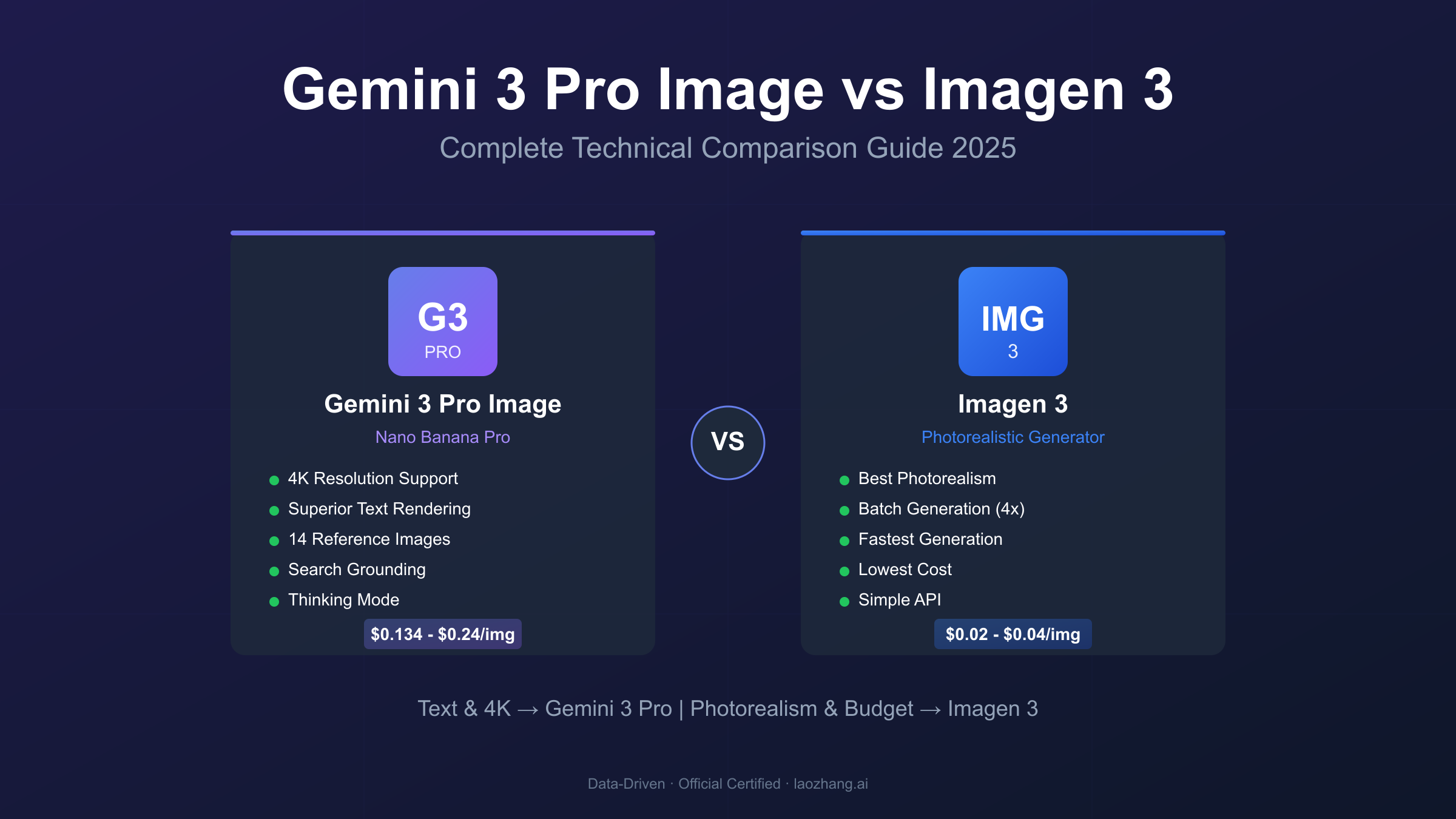
Detailed comparison of Gemini 3 Pro Image Preview (Nano Banana Pro) and Imagen 3 for image generation. Gemini 3 Pro offers 4K resolution at $0.134-$0.24/image with superior text rendering, while Imagen 3 provides photorealistic output at $0.03/image. Includes API code examples, pricing analysis, and use case recommendations.
Nano Banana Pro
4K-80%Google Gemini 3 Pro · AI Inpainting
谷歌原生模型 · AI智能修图

Google's image generation ecosystem has evolved dramatically with two distinct model families competing for developer attention. The Gemini 3 Pro Image Preview (known by its codename "Nano Banana Pro") and Imagen 3 represent fundamentally different approaches to AI image generation, each with unique strengths that determine their suitability for specific applications. Understanding these differences isn't just academic—it directly impacts your API costs, output quality, and development timeline.
This comparison draws from extensive testing across Google AI Studio, Vertex AI, and third-party benchmarks to provide actionable insights for developers evaluating these models. With Gemini 3 Pro Image offering native 4K resolution and advanced text rendering capabilities at $0.134-$0.24 per image, while Imagen 3 delivers photorealistic outputs at $0.03 per image, the right choice depends entirely on your specific requirements. The following analysis examines architecture, quality metrics, pricing structures, and practical implementation considerations to help you make an informed decision.
Quick Comparison: Gemini 3 Pro Image Preview vs Imagen 3
Before diving into technical details, here's a comprehensive overview comparing these two Google image generation models. Data sourced from Google's official Gemini API documentation and Vertex AI model specifications.
| Feature | Gemini 3 Pro Image Preview | Imagen 3 | Advantage |
|---|---|---|---|
| Model ID | gemini-3-pro-image-preview | imagen-3.0-generate-002 | - |
| Codename | Nano Banana Pro | - | - |
| Max Resolution | 4K | 1536×1536 | Gemini 3 Pro |
| Generation Speed | 10-20 seconds | 5-10 seconds | Imagen 3 |
| Text Rendering | Excellent (multilingual) | Good | Gemini 3 Pro |
| Photorealism | Very Good | Excellent | Imagen 3 |
| Aspect Ratios | 10 options | 6 options | Gemini 3 Pro |
| Reference Images | Up to 14 | Not supported | Gemini 3 Pro |
| Batch Generation | 1 per request | Multiple per request | Imagen 3 |
| Base Price | $0.134/image (2K) | $0.03/image | Imagen 3 |
| 4K Price | $0.24/image | N/A | - |
| Thinking Mode | Yes | No | Gemini 3 Pro |
| Search Grounding | Yes | No | Gemini 3 Pro |
| Conversational Edit | Yes | No | Gemini 3 Pro |
This comparison reveals a fundamental design philosophy difference: Gemini 3 Pro Image Preview prioritizes flexibility, advanced features, and reasoning capabilities, while Imagen 3 focuses on efficient, photorealistic generation at lower costs. The "better" model depends entirely on whether you need sophisticated editing capabilities and text rendering (Gemini 3 Pro) or cost-effective photorealistic outputs (Imagen 3).
Architecture and Technology: Understanding the Core Differences
The architectural foundations of these models explain their distinct capabilities and limitations. Gemini 3 Pro Image Preview builds upon Google DeepMind's multimodal Gemini architecture, integrating image generation directly into a large language model that can reason about visual content. This integration enables unique features like Thinking Mode, where the model generates "thought signatures" during complex compositions, essentially planning the image structure before rendering final pixels. According to Google's developer blog, this approach allows the model to leverage world knowledge and enhanced reasoning to create contextually accurate imagery.
The multimodal nature of Gemini 3 Pro manifests in several practical ways. When you request an infographic about a current topic, the model can query Google Search to retrieve accurate information before generating the visual. This Search Grounding capability ensures data accuracy that pure image generation models cannot match. The model also supports up to 14 reference images in a single prompt, including 6 high-fidelity object references and 5 human identity references, enabling sophisticated composition workflows where character consistency matters across multiple generations.
Imagen 3, by contrast, employs a specialized diffusion architecture optimized exclusively for image generation. Built on enhanced diffusion transformers with superior natural language comprehension, Imagen 3 represents Google's pinnacle of dedicated image generation technology. The model excels at interpreting complex prompts involving abstract concepts and multi-object scenes while minimizing visual artifacts. According to Google's Imagen documentation, this focused architecture delivers photorealistic outputs with remarkable consistency.
Key Architecture Distinction: Gemini 3 Pro Image is a multimodal model that happens to generate images, while Imagen 3 is a pure image generation model optimized for that single task.
The practical implications of these architectural choices emerge during development. Gemini 3 Pro always returns both text and images in its responses—you can ignore the text, but you cannot suppress it entirely. This behavior supports conversational editing workflows where the model explains its modifications. Imagen 3 returns pure image data and supports batch generation of multiple images from a single prompt, a capability Gemini 3 Pro lacks. For high-throughput pipelines requiring many variations, Imagen 3's batch support significantly reduces API call overhead.
Image Quality Comparison: Photorealism vs Versatility
Quality assessment requires examining multiple dimensions including photorealism, detail preservation, stylistic accuracy, and consistency across subject types. Independent testing from Raymond Camden's comparison and multiple benchmark platforms reveals distinct quality profiles for each model.
Imagen 3 consistently produces superior photorealistic outputs. When generating portraits, product photography, or architectural visualizations, Imagen 3 captures fine textures, realistic lighting interactions, and natural material properties that create images nearly indistinguishable from photographs. Testing across six distinct prompt categories—moonlit cat, 1970s polaroid, superhero cartoon, artistic ink drawing, Monet-style painting, and comic text—showed Imagen 3 producing higher-fidelity outputs in most scenarios. The model particularly excels at:
- Human portraits: Natural skin textures and authentic lighting
- Product photography: Accurate material representation and studio-quality rendering
- Landscape imagery: Realistic atmospheric effects and depth perception
Gemini 3 Pro Image Preview takes a different approach, prioritizing compositional intelligence over raw photorealism. While its outputs may appear slightly less photorealistic in direct comparison, the model demonstrates superior understanding of complex scene requirements. Testing with infographics and data visualizations showed Gemini 3 Pro producing "intentional and natural" layouts with all text rendering cleanly and readably. The model's Thinking Mode contributes to this quality by allowing it to reason through compositional challenges before generating final outputs.
| Quality Dimension | Gemini 3 Pro Image | Imagen 3 | Notes |
|---|---|---|---|
| Raw Photorealism | 8/10 | 9.5/10 | Imagen leads for photographs |
| Text Integration | 9.5/10 | 7/10 | Gemini dominates typography |
| Complex Composition | 9/10 | 7.5/10 | Gemini handles multi-element scenes better |
| Style Accuracy | 8.5/10 | 8/10 | Both perform well on stylized prompts |
| Consistency | 9/10 | 8.5/10 | Gemini maintains character identity better |
For specific quality scenarios, recommendations diverge. Product photography and real estate visualization favor Imagen 3's photorealism. Marketing materials with text overlays, infographics, and branded content benefit from Gemini 3 Pro's text rendering and compositional capabilities. Neither model is universally "better"—selection should align with output requirements.
Text Rendering Capabilities: Typography in AI-Generated Images
Text rendering remains one of the most challenging aspects of AI image generation. Historical models produced garbled, misspelled, or illegible text with frustrating regularity. Both Gemini 3 Pro Image and Imagen 3 represent significant advances in this capability, though their approaches and results differ substantially.
Gemini 3 Pro Image Preview delivers the most advanced text rendering currently available in any AI image generation model. The original Nano Banana model struggled with longer phrases—"Welcome to Our Store" might render as "Welcme to Oru Stroe"—but Nano Banana Pro (Gemini 3 Pro Image) has fundamentally solved this problem. Text now renders correctly across multiple languages, various fonts and styles, complex phrases and sentences, and works reliably for signs, posters, and infographics. According to Google's official announcement, the model can handle everything from short taglines to lengthy paragraphs with consistent accuracy.
The multilingual text rendering capability deserves particular attention. While earlier models handled English adequately but failed with languages like Thai, Japanese, or Arabic, Gemini 3 Pro Image achieves reliable legibility even for complex scripts. Testing with Japanese kanji alongside English text on neon signage showed accurate rendering of both languages in a single image. This capability opens applications for international marketing materials, multilingual educational content, and global e-commerce product imagery.
Imagen 3 offers competent but less sophisticated text rendering. The model handles single words and short phrases reliably, making it suitable for basic labeling needs. However, complex typography scenarios involving multiple text elements, varied font sizes, or long sentences remain challenging. For applications where text accuracy is critical—advertising copy, slide decks, branded materials—Gemini 3 Pro Image provides measurably better results.
Practical Recommendation: If your images require more than 5 words of readable text, choose Gemini 3 Pro Image Preview. For simple labels or no-text scenarios, Imagen 3 may suffice.
Testing specific use cases reveals the practical gap between these models:
- Infographics: Gemini 3 Pro renders data labels, chart annotations, and explanatory text with near-perfect accuracy. Imagen 3 handles simple titles but struggles with dense information.
- Marketing Posters: Gemini 3 Pro produces ready-to-use assets with correct spelling and appropriate typography. Imagen 3 often requires post-processing text corrections.
- Product Mockups: Gemini 3 Pro places text naturally on packaging and surfaces. Imagen 3 sometimes distorts text or misaligns it with product geometry.
The technical explanation for this difference lies in architecture. Gemini 3 Pro's integration with a large language model provides inherent understanding of text structure, spelling rules, and typography conventions. Imagen 3's diffusion-based architecture, while excellent for visual generation, lacks this linguistic foundation and essentially "draws" text as visual patterns rather than understanding them as language.
Resolution and Output Specifications
Resolution capabilities significantly impact use cases and final output quality. The specification differences between these models affect everything from social media posts to print-ready materials.
Gemini 3 Pro Image Preview supports three resolution tiers:
| Resolution | Token Cost | Ideal Use Cases |
|---|---|---|
| 1K | 1,120 tokens | Social media, web thumbnails |
| 2K | 1,120 tokens | Web content, digital marketing |
| 4K | 2,000 tokens | Print materials, professional assets |
The 4K capability represents a significant advantage for professional applications. Print-quality marketing materials, large-format displays, and archival-quality imagery all benefit from native 4K generation. Importantly, 2K images cost the same as 1K in terms of token usage, making 2K the optimal default choice for most web applications.
Imagen 3 generates images at a maximum of approximately 1536×1536 pixels. While sufficient for many digital applications, this limitation excludes high-resolution print work and large-format displays. The model compensates with faster generation times—typically 5-10 seconds compared to Gemini 3 Pro's 10-20 seconds for comparable quality.
Aspect ratio support differs substantially:
Gemini 3 Pro Image Preview: 1:1, 2:3, 3:2, 3:4, 4:3, 4:5, 5:4, 9:16, 16:9, 21:9
Imagen 3: 1:1, 3:4, 4:3, 9:16, 16:9, custom (with constraints)
Gemini 3 Pro's 21:9 ultra-wide support enables cinematic banner generation and panoramic imagery that Imagen 3 cannot match natively. For standard social media formats (1:1 for Instagram, 9:16 for Stories/Reels, 16:9 for YouTube), both models provide adequate support.
All Gemini 3 Pro Image outputs include SynthID watermarking—an imperceptible digital watermark embedded in the image data that allows verification of AI generation. This watermark persists through most image modifications and can be detected through Google's verification tools. Imagen 3 does not include SynthID by default, though manual addition is possible. For applications requiring transparency about AI-generated content, Gemini 3 Pro's built-in watermarking simplifies compliance.
API Integration: Complete Code Examples
Practical integration requires understanding the API structures for both models. The following examples demonstrate basic generation workflows tested against current API versions.
Gemini 3 Pro Image Preview (Python)
hljs pythonfrom google import genai
from google.genai import types
# Initialize client
client = genai.Client()
# Basic image generation with Gemini 3 Pro Image Preview
response = client.models.generate_content(
model="gemini-3-pro-image-preview",
contents="Create a professional product photograph of a smartwatch on marble surface with soft studio lighting",
config=types.GenerateContentConfig(
response_modalities=['Text', 'Image'],
image_config=types.ImageConfig(
aspect_ratio="16:9",
image_quality="2k" # Options: "1k", "2k", "4k"
)
)
)
# Process response
for part in response.parts:
if part.text is not None:
print(f"Model commentary: {part.text}")
elif image := part.as_image():
image.save("product_photo.png")
print("Image saved successfully")
Gemini 3 Pro Image with Search Grounding
hljs python# Generate infographic with real-time data
response = client.models.generate_content(
model="gemini-3-pro-image-preview",
contents="Create a weather forecast infographic for San Francisco showing the next 5 days with appropriate icons and temperatures",
config=types.GenerateContentConfig(
response_modalities=['Text', 'Image'],
image_config=types.ImageConfig(
aspect_ratio="16:9"
),
tools=[{"google_search": {}}] # Enable search grounding
)
)
Imagen 3 (Python)
hljs pythonimport google.generativeai as genai
from PIL import Image
import io
# Configure API
genai.configure(api_key="YOUR_API_KEY")
# Generate image with Imagen 3
model = genai.ImageGenerationModel("imagen-3.0-generate-002")
response = model.generate_images(
prompt="Photorealistic portrait of a professional in modern office setting, natural lighting, shallow depth of field",
number_of_images=4, # Batch generation supported
aspect_ratio="1:1",
safety_filter_level="block_some"
)
# Save generated images
for i, image in enumerate(response.images):
img = Image.open(io.BytesIO(image._pil_image))
img.save(f"portrait_{i}.png")
Key API Differences
| Capability | Gemini 3 Pro Image | Imagen 3 |
|---|---|---|
| Batch Generation | No (loop required) | Yes (up to 4 images) |
| Response Format | Text + Image | Image only |
| SDK | google-genai | google-generativeai |
| Reference Images | Supported (up to 14) | Not supported |
| Streaming | Supported | Not supported |
For teams with existing OpenAI integrations, both models can be accessed through OpenAI-compatible endpoints via third-party services. This approach enables migration without significant code changes, though some advanced features may require native API access.
Pricing Deep Dive: Complete Cost Analysis
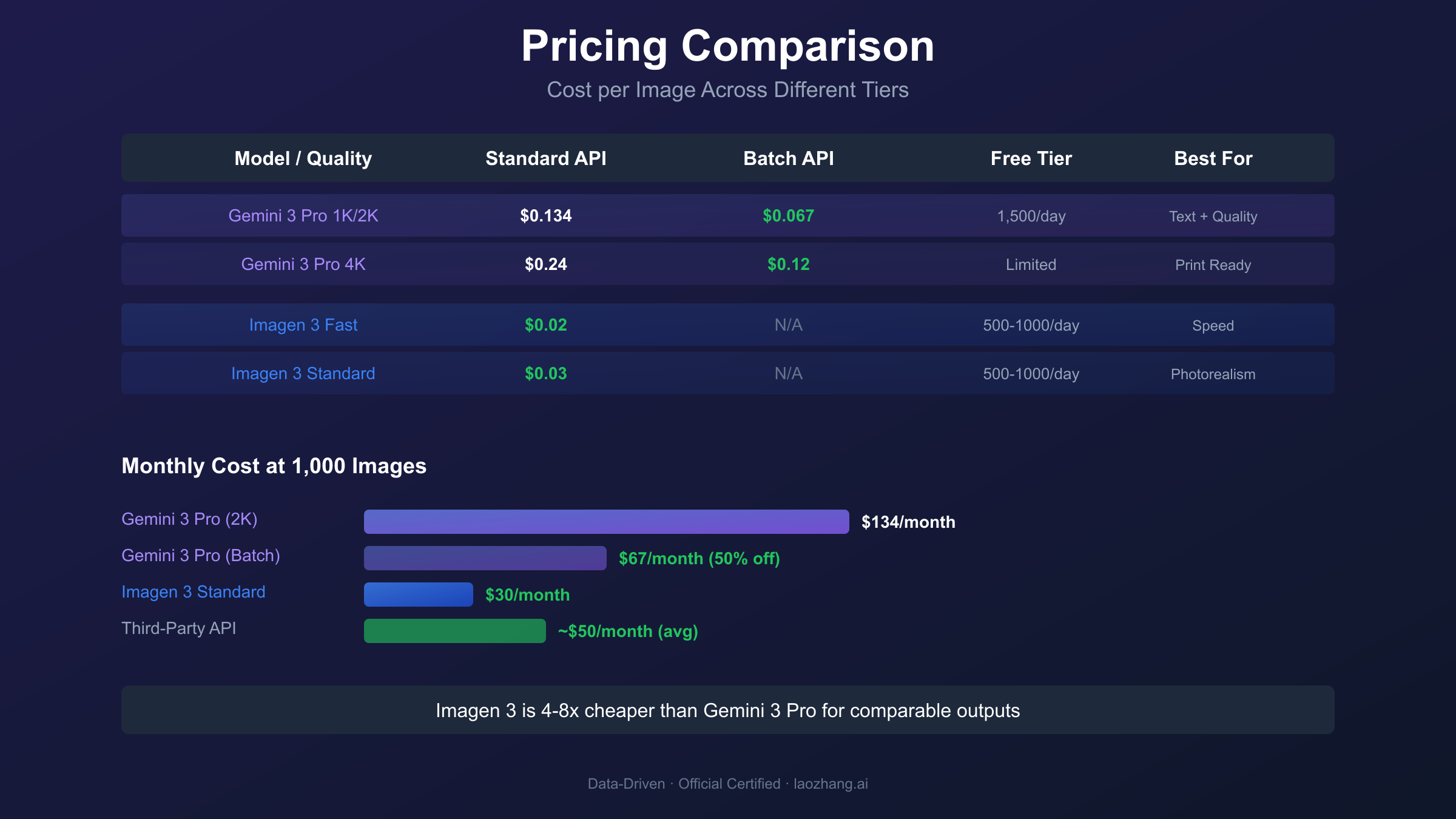
Cost structures differ significantly between these models, and understanding the pricing nuances can substantially impact your budget. Official pricing from Google's pricing documentation provides the baseline figures.
Official Google Pricing Comparison
| Model & Quality | Standard API | Batch API | Free Tier |
|---|---|---|---|
| Gemini 3 Pro Image 1K | $0.134/image | $0.067/image | 1,500 images/day in AI Studio |
| Gemini 3 Pro Image 2K | $0.134/image | $0.067/image | Included in free tier |
| Gemini 3 Pro Image 4K | $0.24/image | $0.12/image | Limited availability |
| Imagen 3 Fast | $0.02/image | N/A | 500-1,000 images/day in AI Studio |
| Imagen 3 Standard | $0.03/image | N/A | Included in free tier |
| Imagen 3 (Vertex AI) | $0.04/image | N/A | No free tier |
The pricing reveals a significant cost differential: Imagen 3 costs approximately 4-8x less than Gemini 3 Pro Image for comparable operations. For high-volume applications generating thousands of images monthly, this difference translates to substantial budget implications.
Cost Optimization Strategies
1. Leverage Batch API for Gemini 3 Pro Image
Teams generating 500+ images monthly should implement batch processing. The 50% discount reduces per-image costs from $0.134 to $0.067 (2K resolution), making Gemini 3 Pro Image cost-competitive for non-urgent workloads like catalog generation or overnight asset processing.
2. Use Free Tiers for Development
Google AI Studio offers generous free access: 1,500 images/day for Gemini 3 Pro Image and 500-1,000 images/day for Imagen 3. Development and testing should exclusively use these free tiers to eliminate unnecessary costs.
3. Match Resolution to Use Case
Gemini 3 Pro Image charges the same rate for 1K and 2K images, making 2K the optimal default. Only upgrade to 4K when print-quality output is required, as the premium (approximately 80% higher) is substantial.
Third-Party API Options
For production applications requiring cost efficiency and access stability, aggregation platforms offer compelling alternatives. Services like laozhang.ai provide access to both Gemini image models through OpenAI-compatible endpoints at reduced rates. The integration approach simplifies existing OpenAI codebases—only base_url and api_key changes are required:
hljs pythonfrom openai import OpenAI
# Access Gemini 3 Pro Image through third-party aggregator
client = OpenAI(
api_key="sk-YOUR_API_KEY", # From laozhang.ai
base_url="https://api.laozhang.ai/v1"
)
response = client.chat.completions.create(
model="gemini-3-pro-image-preview",
messages=[
{"role": "user", "content": "Generate a professional product photo of a laptop on a minimalist desk"}
]
)
These platforms typically offer 40-60% cost reductions compared to direct API access while providing multi-provider redundancy for production reliability. For China-based developers, these services also resolve access restrictions that affect direct Google API connections (typical latency around 20ms versus 200ms+ for direct connections with VPN).
Monthly Budget Calculator
| Monthly Volume | Imagen 3 Only | Gemini 3 Pro (Standard) | Gemini 3 Pro (Batch) | Mixed Strategy |
|---|---|---|---|---|
| 500 images | $15 | $67 | $33.50 | $30* |
| 2,000 images | $60 | $268 | $134 | $100* |
| 10,000 images | $300 | $1,340 | $670 | $450* |
*Mixed strategy uses Imagen 3 for photorealistic outputs and Gemini 3 Pro for text-heavy content
Use Case Recommendations: Decision Framework
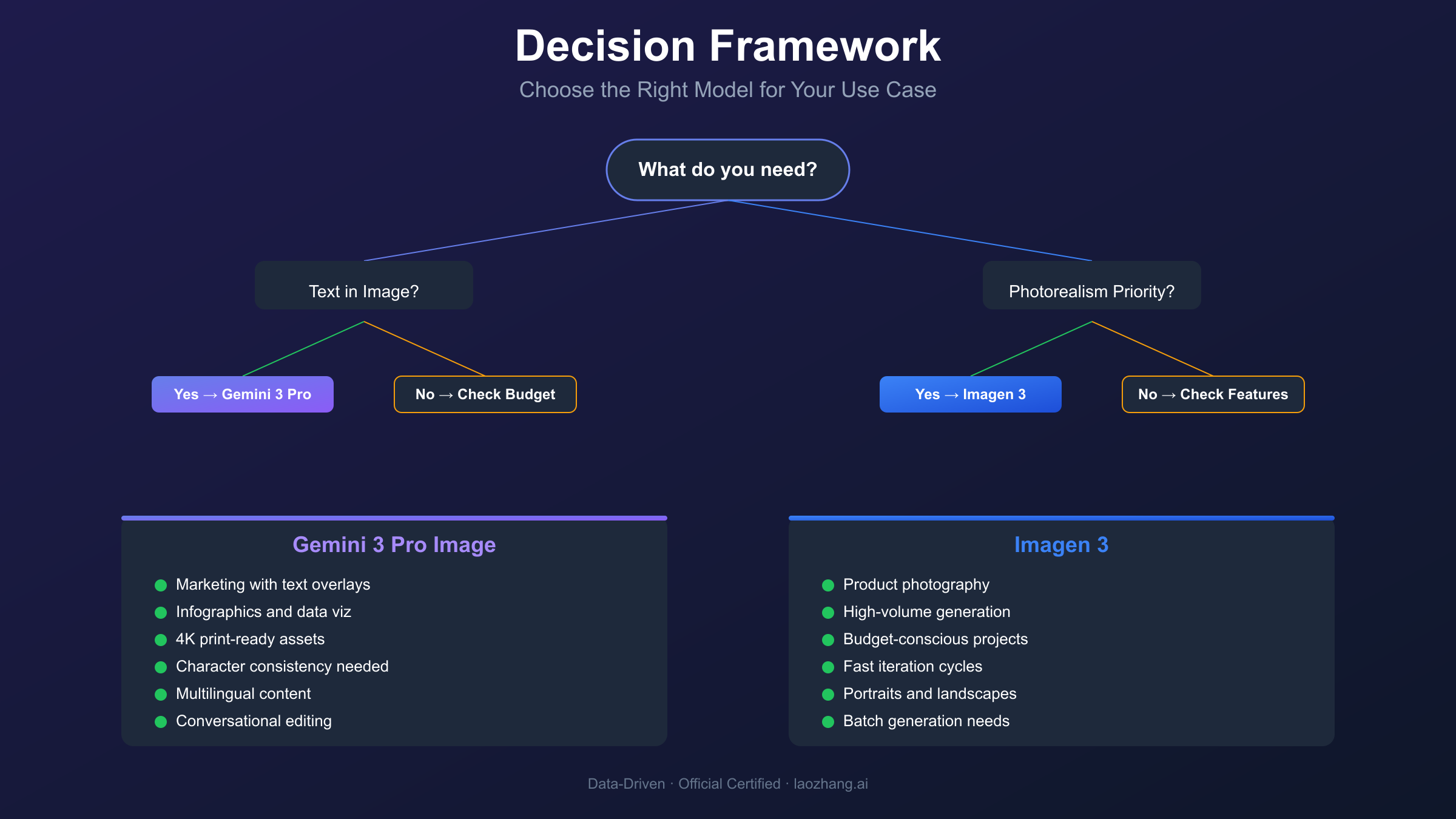
Selecting the right model requires matching capabilities to specific application requirements. The following framework provides actionable guidance based on primary use case categories.
Choose Gemini 3 Pro Image Preview When:
Text-Heavy Content Creation
- Marketing materials with headlines, taglines, or body copy
- Infographics and data visualizations requiring accurate labels
- Social media posts with text overlays
- Product packaging mockups with branding
Multi-Image Composition
- Character consistency across storyboards or comics
- Brand asset generation requiring consistent visual elements
- Product catalogs maintaining stylistic coherence
- Educational content with recurring characters or objects
High-Resolution Requirements
- Print-ready marketing materials (4K resolution)
- Large-format display assets
- Professional photography replacements requiring detailed imagery
Real-Time Data Integration
- Weather visualizations with current data
- News graphics with accurate information
- Educational diagrams requiring factual accuracy
Choose Imagen 3 When:
Photorealistic Content
- Product photography for e-commerce
- Architectural visualizations
- Portrait generation for testing or placeholders
- Landscape and nature imagery
High-Volume, Cost-Sensitive Operations
- A/B testing multiple visual concepts
- Rapid prototyping during creative exploration
- Bulk asset generation with limited budgets
Simple Visual Requirements
- Images without text or minimal labeling
- Artistic styles and abstract imagery
- Background generation for composite workflows
Fast Iteration Needs
- Creative brainstorming sessions requiring quick generations
- Real-time user-facing applications where latency matters
Hybrid Approach for Complex Projects
Many production applications benefit from using both models strategically:
- Hero Assets: Use Gemini 3 Pro Image for primary marketing visuals requiring text and high resolution
- Supporting Imagery: Use Imagen 3 for background elements, textures, and photorealistic components
- Variations: Use Imagen 3's batch generation for exploring multiple concepts quickly
- Final Refinement: Use Gemini 3 Pro Image's conversational editing for precise adjustments
This hybrid approach optimizes both quality and cost by matching each generation task to the model best suited for it.
Advanced Features Deep Dive
Thinking Mode (Gemini 3 Pro Image Only)
Gemini 3 Pro Image's Thinking Mode represents a significant architectural innovation. When enabled (which is the default behavior), the model generates "thought signatures" during complex compositions. These signatures encode compositional logic—where elements should be placed, how lighting should interact, what the narrative structure implies—before rendering final pixels.
For conversational editing workflows, thought signatures are essential. When you request modifications to a previously generated image, the model references its thought signature from the previous turn to understand the original composition's intent. This enables precise, targeted edits rather than regeneration from scratch.
hljs python# Multi-turn editing with thought signature preservation
conversation = []
# Initial generation
response = client.models.generate_content(
model="gemini-3-pro-image-preview",
contents="Generate a modern office space with large windows and minimal furniture"
)
conversation.append({"role": "assistant", "parts": response.parts})
# Request edit (model uses thought signature from previous turn)
edit_response = client.models.generate_content(
model="gemini-3-pro-image-preview",
contents=conversation + [{"role": "user", "parts": ["Add a person working at the desk"]}]
)
Search Grounding (Gemini 3 Pro Image Only)
Search Grounding enables real-time fact retrieval during image generation. When generating content about current events, specific products, or factual topics, the model queries Google Search to ensure accuracy. This capability eliminates the common AI image generation problem of hallucinated details—product designs that don't exist, architectural features that are physically impossible, or data visualizations with invented statistics.
Batch Generation (Imagen 3 Only)
Imagen 3's batch generation capability significantly improves efficiency for workflows requiring multiple variations. A single API call can generate up to 4 images with different random seeds, providing creative options without multiple round-trips. This feature is particularly valuable for:
- A/B testing visual concepts
- Generating product photography from multiple angles (conceptually)
- Creating variety packs for social media scheduling
Best Practices and Performance Tips
Prompt Engineering for Optimal Results
Both models respond to well-structured prompts, but their optimal prompt patterns differ:
Gemini 3 Pro Image Preview:
- Benefits from detailed, natural language descriptions
- Responds well to explicit composition instructions
- Can leverage context from conversation history
- Handles complex multi-element prompts effectively
Imagen 3:
- Performs best with concise, specific prompts
- Benefits from style keywords and reference descriptions
- Produces more consistent results with simpler instructions
- Excels when prompts focus on single subjects or scenes
Error Handling and Rate Limits
Both APIs implement rate limiting that affects production deployment:
| Limit Type | Gemini 3 Pro Image | Imagen 3 |
|---|---|---|
| Requests/minute | Varies by tier | Varies by tier |
| Daily quota (free) | 1,500 images | 500-1,000 images |
| Max prompt length | 65,536 tokens | Model-dependent |
Implement exponential backoff for rate limit errors and consider request queuing for high-volume applications. Monitor usage through Google Cloud Console or AI Studio to avoid unexpected quota exhaustion.
Output Post-Processing
Generated images may require post-processing depending on use case:
- Gemini 3 Pro Image: Text rarely needs correction, but verify multilingual content. SynthID watermark is imperceptible and typically doesn't require removal.
- Imagen 3: Text elements may need manual correction for accuracy. Consider automated spell-checking pipelines for text-containing outputs.
Both models benefit from standard image optimization (compression, format conversion) before deployment to production environments.
Common Issues and Troubleshooting
Gemini 3 Pro Image Preview Issues
Problem: Generation blocked by safety filters Gemini 3 Pro Image has more conservative content filters than some alternatives. If generations are unexpectedly blocked, review prompts for potentially ambiguous language that could trigger safety systems. Rephrase using more specific, neutral terminology.
Problem: Inconsistent text rendering in specific languages While multilingual text rendering is generally excellent, some complex scripts may occasionally produce artifacts. For mission-critical multilingual content, generate multiple variations and select the best result. Right-to-left languages (Arabic, Hebrew) perform better with explicit directional instructions.
Problem: Slow generation times Thinking Mode adds processing overhead. For simpler prompts where compositional reasoning isn't required, consider whether the original Nano Banana (Gemini 2.5 Flash Image) might offer sufficient quality at faster speeds. The trade-off between quality and speed should align with use case requirements.
Imagen 3 Issues
Problem: Text accuracy failures Imagen 3's text rendering limitations mean outputs often require post-processing. For text-containing images, implement a validation pipeline that checks rendered text against expected content. Consider using Gemini 3 Pro Image for text-heavy outputs instead.
Problem: Batch generation inconsistency When generating multiple images in a single batch, quality may vary between outputs. Implement selection logic that evaluates each generated image against quality criteria rather than blindly accepting all batch outputs.
Problem: API quota exhaustion Imagen 3's lower pricing encourages higher volume usage, but quota limits remain. Monitor usage proactively and implement request throttling before hitting daily limits. Consider Vertex AI for higher quota needs.
General Troubleshooting
Rate Limiting (429 Errors) Both APIs return 429 errors when rate limits are exceeded. Implement exponential backoff starting at 1 second, doubling with each retry up to a maximum of 32 seconds. Log rate limit encounters to identify usage patterns requiring optimization.
Authentication Failures Ensure API keys are correctly configured for the intended model. Gemini 3 Pro Image and Imagen 3 may require different authentication approaches depending on access method (AI Studio vs Vertex AI vs third-party).
Conclusion: Making the Right Choice
The comparison between Gemini 3 Pro Image Preview and Imagen 3 reveals complementary rather than competing models. Each excels in distinct scenarios that align with their architectural philosophies.
Choose Gemini 3 Pro Image Preview for:
- Professional-grade text rendering across multiple languages
- Complex compositions requiring compositional reasoning
- 4K resolution outputs for print and large-format displays
- Conversational editing workflows with iterative refinement
- Search-grounded visualizations requiring factual accuracy
Choose Imagen 3 for:
- Cost-sensitive, high-volume generation pipelines
- Maximum photorealism for product and portrait photography
- Rapid iteration during creative exploration phases
- Simple compositions without text requirements
- Batch generation workflows requiring multiple variations
For most production applications, a hybrid approach delivers optimal results: use Gemini 3 Pro Image for hero assets and text-containing content, then leverage Imagen 3 for supporting imagery and high-volume needs. This strategy balances quality requirements with budget constraints.
The AI image generation landscape continues evolving rapidly. Both models will receive updates that may shift this comparison, so periodic reassessment against current capabilities ensures your pipeline remains optimized. For the current state of these models, the analysis above provides a reliable foundation for informed decision-making.
Frequently Asked Questions
Can I use both models in the same project? Yes, and this is often the optimal approach. Use Gemini 3 Pro Image for text-heavy content and high-resolution needs, then Imagen 3 for photorealistic elements and cost-sensitive bulk generation. Both models can be accessed through the same Google Cloud project.
Which model is better for product photography? Imagen 3 generally produces more photorealistic product images at lower cost. However, if your product shots require text overlays (pricing, feature callouts), Gemini 3 Pro Image's text rendering justifies the higher cost.
Is the free tier sufficient for production use? The free tier (1,500 images/day for Gemini 3 Pro, 500-1,000 for Imagen 3) supports low-volume production applications. For higher volumes, consider the paid API or third-party aggregators that offer cost-efficient alternatives.
How do I choose between 1K, 2K, and 4K resolution for Gemini 3 Pro Image? Since 1K and 2K cost the same, always default to 2K unless storage constraints matter. Use 4K only for print-ready materials or large-format displays where the additional detail is visible.
What's the best way to handle text rendering failures in Imagen 3? Either switch to Gemini 3 Pro Image for text-containing outputs, or implement a post-processing pipeline that overlays text using traditional graphics tools. The latter approach uses Imagen 3 for the visual elements while ensuring perfect text accuracy.
Can I access these models from China? Direct access to Google APIs from mainland China is restricted. Third-party API aggregators like laozhang.ai provide stable access with low latency (approximately 20ms compared to 200ms+ with VPN solutions). For detailed pricing and availability, consult the documentation.
What's the difference between Nano Banana and Nano Banana Pro? Nano Banana (Gemini 2.5 Flash Image) prioritizes speed and cost-efficiency for high-volume tasks. Nano Banana Pro (Gemini 3 Pro Image Preview) offers superior text rendering, 4K resolution, and advanced reasoning capabilities. For a detailed comparison, see our Nano Banana vs Nano Banana Pro guide.
How do I handle API quota limits? Both models have daily quota limits in the free tier. Implement usage monitoring and consider upgrading to paid tiers for production workloads. For comprehensive guidance on managing quotas, refer to our Gemini 3 Pro Image API quota limits guide.