Google Gemini API Free Tier 2026: Complete Limits Guide + 429 Error Solutions
Complete guide to Google Gemini API free tier in 2026. Learn exact RPM/TPM/RPD limits for Flash and Flash-Lite models, handle 429 errors with production-ready code, and compare free vs paid tiers with real cost analysis.
Nano Banana Pro
4K-80%Google Gemini 3 Pro · AI Inpainting
谷歌原生模型 · AI智能修图

Google's Gemini API free tier remains one of the most generous offerings in the LLM API landscape, even after the December 2025 quota adjustments that caught many developers off guard. Unlike OpenAI which requires a credit card for any API access, or Anthropic with its limited free trial, Gemini provides ongoing free access with no credit card required and no expiration date. This guide covers everything you need to know about the current free tier limits, how to handle the inevitable 429 rate limit errors, and when upgrading to paid makes financial sense.
Key Numbers for January 2026: Gemini 2.5 Flash free tier provides 10 RPM (requests per minute), 250,000 TPM (tokens per minute), and 250 RPD (requests per day). Flash-Lite offers higher limits at 30 RPM and 1,000 RPD, making it the better choice for most free tier users.
The landscape shifted significantly in December 2025 when Google reduced free tier quotas for Flash models and effectively removed Gemini 2.5 Pro from the free tier entirely. Understanding these changes—and knowing how to work within the new constraints—separates developers who successfully leverage Gemini's free tier from those who hit constant rate limits.
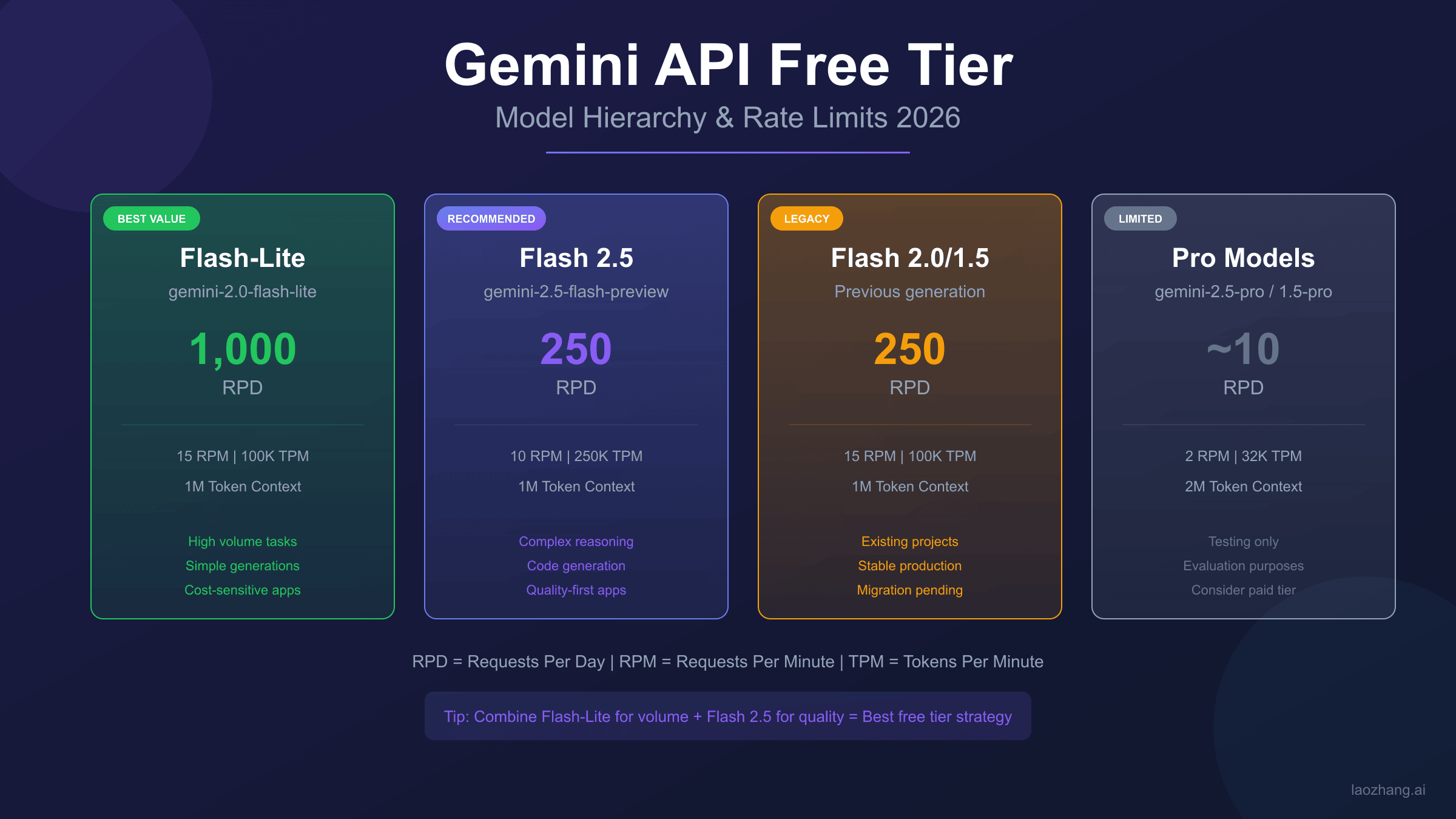
Current Free Tier Limits: Complete Model Matrix (January 2026)
The Gemini API free tier structure varies significantly between models. Choosing the right model for your free tier usage directly impacts how many requests you can make before hitting limits. Here's the complete breakdown based on Google's official documentation.
| Model | RPM | TPM | RPD | Context Window | Notes |
|---|---|---|---|---|---|
| Gemini 2.5 Flash | 10 | 250,000 | 250 | 1M tokens | Best capability/limit balance |
| Gemini 2.5 Flash-Lite | 30 | 1,000,000 | 1,000 | 1M tokens | Highest free limits |
| Gemini 2.0 Flash | 10 | 250,000 | 250 | 1M tokens | Legacy, still available |
| Gemini 1.5 Flash | 10 | 250,000 | 250 | 1M tokens | Stable legacy option |
| Gemini 1.5 Pro | 2 | 50,000 | 25 | 2M tokens | Heavily restricted |
| Gemini 2.5 Pro | Minimal | - | ~10 | - | Effectively removed |
Flash 2.5 vs Flash-Lite: Key Differences
Gemini 2.5 Flash-Lite emerges as the clear winner for free tier users prioritizing volume over capability. With 4x the daily request limit (1,000 vs 250 RPD) and 3x the requests per minute (30 vs 10 RPM), Flash-Lite handles most use cases that don't require Flash's enhanced reasoning capabilities.
The trade-off comes in response quality. Flash-Lite uses a smaller, faster model optimized for simple tasks like classification, extraction, and basic Q&A. For complex reasoning, code generation, or nuanced analysis, Flash 2.5 delivers notably better results despite the lower limits. Testing both models on your specific use case before committing to one is the practical approach—the free tier makes this experimentation cost-free.
Legacy Models: 1.5 Flash and 1.5 Pro Status
Google continues supporting Gemini 1.5 models, though with no advantage over their 2.x successors for free tier users. The limits mirror 2.0 Flash, so there's no reason to choose 1.5 unless you have specific compatibility requirements or prefer the more predictable behavior of older models.
Gemini 1.5 Pro retains minimal free tier access (approximately 2 RPM, 25 RPD), but these limits are too restrictive for any meaningful development work. Most developers hitting these limits quickly transition to either Flash models or paid tiers.
December 2025 Changes: What Got Cut and Why
The December 2025 quota changes represent Google's most significant free tier adjustment since Gemini's launch. Understanding what changed helps contextualize current limits and anticipate potential future adjustments.
| Metric | Before December 2025 | After December 2025 | Change |
|---|---|---|---|
| Flash RPD | 1,500 | 250 | -83% |
| Flash RPM | 15 | 10 | -33% |
| Pro Free Access | 50 RPD | ~10 RPD | -80% |
| Flash-Lite RPD | 1,500 | 1,000 | -33% |
| Enforcement | Soft limits | Hard limits | Stricter |
Why Google made these changes: According to discussions on the Google AI Developer Forum, the changes addressed "unsustainable free tier usage patterns" that were impacting paid tier service quality. Several developers reported using free tier for production workloads with thousands of daily requests, which wasn't the intended use case.
The timing coincided with Gemini 2.5's release, suggesting Google wanted to clearly differentiate free tier capabilities from the premium offering. The removal of Gemini 2.5 Pro from free tier reinforces this positioning—if you want the best model, you pay for it.
Silver Lining: The January 2026 limits stabilized after initial volatility. Flash RPD returned to 250 (from a low of 20 during the transition), and Google appears committed to maintaining these levels for the foreseeable future.
429 Rate Limit Errors: Production-Ready Solutions
Hitting 429 "Resource Exhausted" errors is inevitable when working with Gemini's free tier. The question isn't whether you'll encounter them, but how gracefully your application handles them. Here are production-tested patterns for managing rate limits effectively.
Understanding 429 Error Types
Gemini returns 429 errors for three distinct limit types, each requiring different handling:
- RPM exceeded: You've made too many requests in the current minute. Solution: wait for the minute to reset.
- TPM exceeded: You've consumed too many tokens in the current minute. Solution: reduce request size or wait.
- RPD exceeded: You've exhausted your daily quota. Solution: wait until UTC midnight or upgrade.
The response headers include retry-after information when available, though implementation varies. Parsing these headers when present provides more efficient retry timing than fixed delays.
Exponential Backoff Implementation
The standard solution for transient rate limits (RPM/TPM) is exponential backoff with jitter. Here's a production-ready Python implementation:
hljs pythonimport time
import random
import google.generativeai as genai
from google.api_core import exceptions
def call_gemini_with_retry(prompt, max_retries=5, base_delay=1):
"""
Call Gemini API with exponential backoff for rate limit handling.
Args:
prompt: The prompt to send
max_retries: Maximum retry attempts (default 5)
base_delay: Initial delay in seconds (default 1)
Returns:
API response or raises exception after max retries
"""
model = genai.GenerativeModel('gemini-2.5-flash')
for attempt in range(max_retries):
try:
response = model.generate_content(prompt)
return response
except exceptions.ResourceExhausted as e:
if attempt == max_retries - 1:
raise # Re-raise on final attempt
# Calculate delay with exponential backoff + jitter
delay = base_delay * (2 ** attempt) + random.uniform(0, 1)
delay = min(delay, 60) # Cap at 60 seconds
print(f"Rate limited. Retrying in {delay:.1f}s (attempt {attempt + 1}/{max_retries})")
time.sleep(delay)
except Exception as e:
raise # Re-raise non-rate-limit errors immediately
raise Exception("Max retries exceeded")
This pattern typically achieves 99%+ success rates for RPM-limited scenarios. The jitter (random component) prevents thundering herd problems when multiple processes retry simultaneously.
Request Queue Pattern for High Volume
For applications making many requests, a queue-based approach provides better throughput than simple retry logic:
hljs pythonimport asyncio
from collections import deque
from datetime import datetime, timedelta
class GeminiRateLimiter:
def __init__(self, rpm_limit=10, tpm_limit=250000):
self.rpm_limit = rpm_limit
self.tpm_limit = tpm_limit
self.request_times = deque()
self.token_usage = deque()
async def wait_for_capacity(self, estimated_tokens=1000):
"""Wait until we have capacity for a request."""
now = datetime.now()
minute_ago = now - timedelta(minutes=1)
# Clean old entries
while self.request_times and self.request_times[0] < minute_ago:
self.request_times.popleft()
while self.token_usage and self.token_usage[0][0] < minute_ago:
self.token_usage.popleft()
# Check RPM
if len(self.request_times) >= self.rpm_limit:
wait_time = (self.request_times[0] - minute_ago).total_seconds()
await asyncio.sleep(max(0, wait_time + 0.1))
# Check TPM
current_tokens = sum(t[1] for t in self.token_usage)
if current_tokens + estimated_tokens > self.tpm_limit:
await asyncio.sleep(60) # Wait full minute for token reset
# Record this request
self.request_times.append(datetime.now())
self.token_usage.append((datetime.now(), estimated_tokens))
This proactive approach prevents 429 errors rather than reacting to them, which is particularly valuable when you're close to daily limits and can't afford failed requests.

Free vs Paid: When to Upgrade (Cost Analysis)
The free tier works well for development, testing, and low-volume applications. But at what point does paying make more sense? Let's break down the actual costs.
Price Per Token Breakdown
Gemini's paid tier uses a tiered pricing structure. For most developers, Tier 1 (pay-as-you-go) applies:
| Model | Input (per 1M tokens) | Output (per 1M tokens) | Context |
|---|---|---|---|
| Gemini 2.5 Flash | $0.15 | $0.60 | Up to 200K |
| Gemini 2.5 Flash | $0.30 | $1.20 | 200K-1M |
| Gemini 2.5 Flash-Lite | $0.075 | $0.30 | All contexts |
| Gemini 2.5 Pro | $1.25 | $5.00 | Up to 200K |
| Gemini 2.5 Pro | $2.50 | $10.00 | 200K-1M |
Real-World Monthly Cost Estimates
Let's calculate costs for typical usage scenarios:
Light usage (100 requests/day, 2K tokens average):
- Monthly tokens: 100 × 30 × 2,000 = 6M tokens
- Flash cost: ~$1.50/month (input) +
$3.60/month (output) = **$5/month** - Free tier: Fully covered (100 < 250 RPD)
Medium usage (500 requests/day, 3K tokens average):
- Monthly tokens: 500 × 30 × 3,000 = 45M tokens
- Flash cost: ~$7/month (input) +
$27/month (output) = **$34/month** - Free tier: Not possible (500 > 250 RPD limit)
Heavy usage (2,000 requests/day, 4K tokens average):
- Monthly tokens: 2,000 × 30 × 4,000 = 240M tokens
- Flash cost: ~$36/month (input) +
$144/month (output) = **$180/month** - Free tier: Far exceeds limits
Decision Framework: If you consistently need more than 250 requests per day, paid tier becomes necessary. For cost-conscious projects, Flash-Lite's 1,000 RPD limit might extend free tier viability.
Hidden Costs to Consider
Beyond token costs, paid tiers include charges for:
- Audio input: $0.025 per minute
- Video input: $0.025 per minute (first 1M frames free)
- Image generation: Separate pricing via Imagen API
- Grounding with Google Search: Additional per-request fee
These costs add up quickly for multimodal applications. Factor them into total cost projections before committing to heavy paid tier usage.
Regional Restrictions and Solutions
Gemini API availability varies by region, with significant restrictions affecting developers in certain countries.
EU/UK/Switzerland Limitations
Due to the AI Act and data protection requirements, some Gemini features face restrictions in the European Economic Area:
- Gemini 2.5 Pro: Limited availability
- Grounding features: May require additional compliance
- Data residency: Processing occurs outside EU (US data centers)
For EU-based commercial applications, verify compliance requirements before building on Gemini. Google's Vertex AI platform offers more regional controls but requires GCP setup and has different pricing. For detailed troubleshooting of region-related access issues, see our Gemini region restriction diagnosis guide.
Chinese Developer Solutions
Gemini API is completely blocked in mainland China—no direct access regardless of account type. Chinese developers seeking Gemini capabilities have several options:
Option 1: VPN + Official API
- Requires reliable paid VPN service
- Latency: 200ms+ due to routing
- Risk: Account suspension if detected
- Cost: VPN subscription + API costs
Option 2: API Aggregator Services Third-party services provide Gemini access through alternate routing. For example, laozhang.ai offers Gemini models alongside GPT and Claude through a unified interface:
- Direct connection from China (no VPN needed)
- Latency: approximately 20ms
- OpenAI-compatible SDK (easy migration)
- Alipay/WeChat payment support
When to choose official API: If you're outside China, have reliable VPN, need the absolute latest model features immediately upon release, or have enterprise compliance requirements mandating direct Google relationship.
When aggregators make sense: China-based development, need for multi-model access through single API, payment method limitations, or prioritizing connection stability over feature freshness.
Quick Start: Your First Gemini API Call
Getting started with Gemini's free tier takes about five minutes. Here's the streamlined process.
Get Your API Key
- Visit Google AI Studio
- Sign in with your Google account
- Click "Get API key" in the left sidebar
- Select "Create API key in new project" (or existing project)
- Copy and securely store your API key
No credit card required. No billing setup needed. The key activates immediately with free tier limits.
Python Quickstart
Install the SDK and make your first call:
hljs bashpip install google-generativeai
hljs pythonimport google.generativeai as genai
# Configure with your API key
genai.configure(api_key="YOUR_API_KEY")
# Initialize the model
model = genai.GenerativeModel('gemini-2.5-flash')
# Generate content
response = model.generate_content("Explain quantum computing in simple terms")
print(response.text)
Node.js Alternative
hljs bashnpm install @google/generative-ai
hljs javascriptconst { GoogleGenerativeAI } = require("@google/generative-ai");
const genAI = new GoogleGenerativeAI("YOUR_API_KEY");
async function run() {
const model = genAI.getGenerativeModel({ model: "gemini-2.5-flash" });
const result = await model.generateContent("Explain quantum computing in simple terms");
console.log(result.response.text());
}
run();
Common first-time errors:
API key not valid: Double-check the key copied correctly, no trailing spacesModel not found: Use exact model names likegemini-2.5-flash, not abbreviationsRegion blocked: Your IP may be in a restricted region (see Regional Restrictions section)
Alternative Free LLM APIs: When Gemini Limits Aren't Enough
When Gemini's free tier constraints become limiting, consider these alternatives:
OpenAI Free Tier Options
OpenAI offers no traditional free tier—credit card required for any API access. However, several approaches provide free or near-free access:
- $5 trial credit: New accounts receive initial credit (requires card)
- Azure OpenAI: Some educational/startup programs include credits
- Microsoft Copilot: Consumer product with GPT-4 access (not API)
Claude API Considerations
Anthropic provides limited free access:
- Console playground: Free experimentation
- API: Requires payment method, no ongoing free tier
- Some partners offer Claude access through free tiers
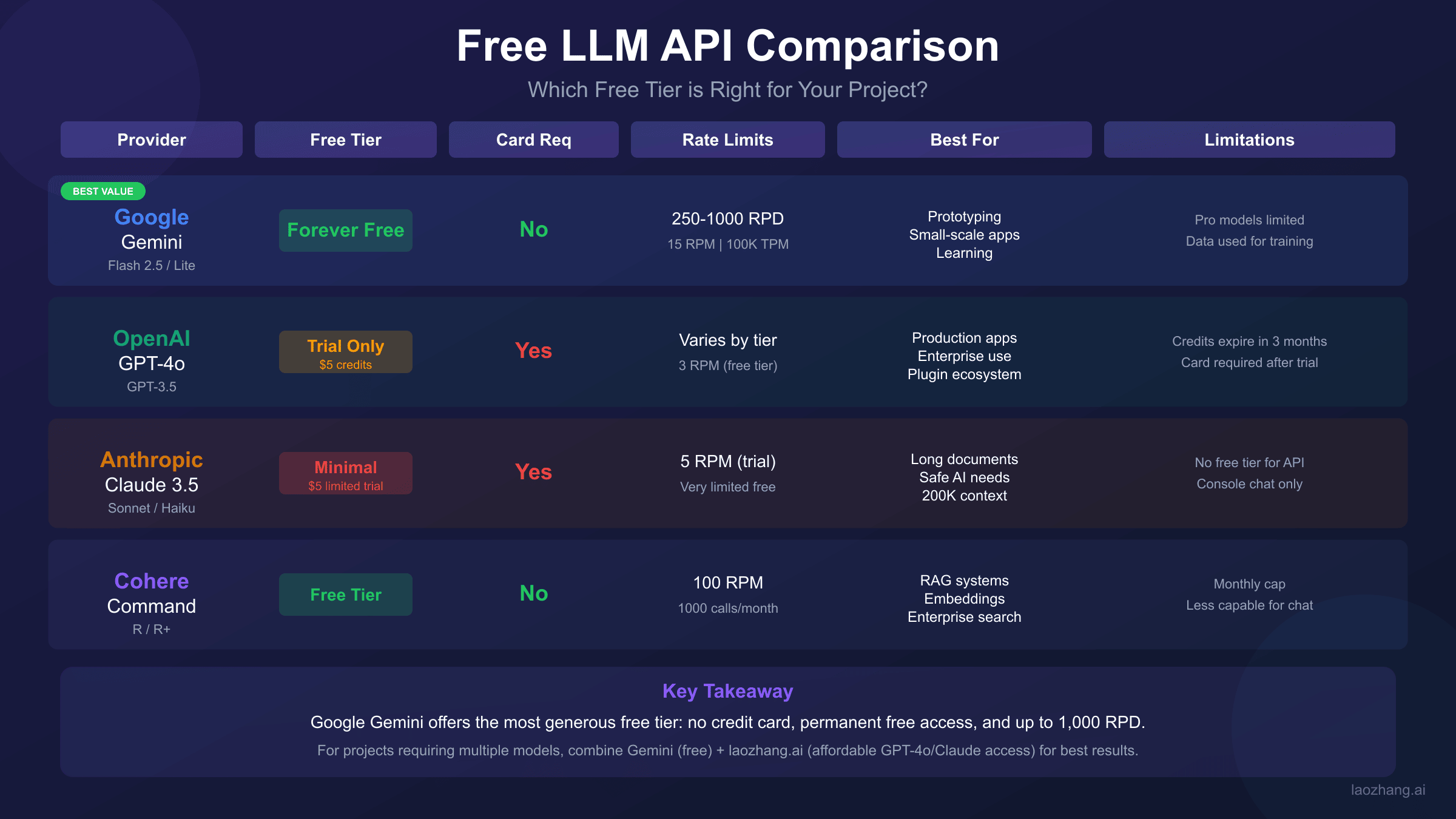
Comparison: Free LLM API Landscape
| Provider | Free Tier | Credit Card | Daily Limit | Expiration |
|---|---|---|---|---|
| Gemini | Yes | No | 250-1000 RPD | Never |
| OpenAI | Trial only | Yes | N/A | 30 days |
| Anthropic | Minimal | Yes | Low | Limited |
| Cohere | Yes | No | 1000 RPM | Never |
| Mistral | Yes | No | Limited | Never |
When Aggregator Services Make Sense
For developers needing higher limits or multi-model access, API aggregator services provide an alternative path. These platforms purchase API access in bulk and resell at competitive rates. Benefits include:
- Unified interface: One SDK for GPT, Claude, Gemini, and open-source models
- Higher rate limits: Typically 3000+ RPM vs free tier's 10-30
- Flexible payment: Support for various payment methods globally
- Stability focus: Multi-node routing reduces downtime
For example, services like laozhang.ai offer OpenAI-compatible endpoints that work with existing code—changing only the base URL and API key.
Limitations of aggregators: Prices generally match or slightly exceed official rates (not cheaper). Newest model features may arrive 1-2 weeks after official launch. Data routes through third-party infrastructure. For applications requiring official support or enterprise compliance, direct API access remains necessary.
Maximizing Free Tier: Pro Tips and Best Practices
Extract maximum value from Gemini's free tier with these optimization strategies.
Token optimization techniques:
- Use system instructions efficiently—they count against token limits
- Implement prompt templates that minimize repetitive content
- Truncate conversation history to essential context
- Choose Flash-Lite for simple tasks, reserving Flash for complex ones
Caching strategies:
- Cache identical queries—Gemini's responses are deterministic with temperature=0
- Implement semantic caching for similar queries
- Store embeddings locally rather than regenerating
- Use context caching for multi-turn conversations (paid feature, but plan for it)
Multi-model fallback pattern:
hljs pythondef smart_generate(prompt, complexity="auto"):
"""Use appropriate model based on task complexity."""
if complexity == "simple" or len(prompt) < 100:
model = genai.GenerativeModel('gemini-2.5-flash-lite')
else:
model = genai.GenerativeModel('gemini-2.5-flash')
return model.generate_content(prompt)
Monitoring setup:
- Track daily request counts to anticipate limit exhaustion
- Log response times to detect degradation
- Set alerts at 80% of daily quota
- Implement graceful degradation when approaching limits
Common Questions About Gemini Free Tier
Is Gemini API really free forever?
Yes, Google has committed to maintaining a free tier indefinitely. However, specific limits may change (as happened in December 2025). The free tier exists to encourage developer adoption, so Google has incentive to maintain it while balancing infrastructure costs.
What happens when I hit the limit?
You receive a 429 "Resource Exhausted" error. For RPM/TPM limits, waiting briefly allows requests to succeed. For RPD limits, you must wait until UTC midnight for quota reset. No account suspension or penalties occur—you simply can't make more requests until limits reset. For more detailed 429 error troubleshooting, see our Gemini API quota exceeded fix guide.
Can I use Gemini free tier for commercial projects?
Yes, with caveats. Google's terms permit commercial use, but the free tier's data may be used for model improvement. For production applications handling sensitive data, paid tier (which opts out of training data usage) or enterprise agreements provide better privacy guarantees. Check current terms at Google AI Terms of Service.
How do I switch from free to paid?
Enable billing in your Google Cloud Console. Your existing API key continues working—billing simply unlocks higher limits. No code changes required. For pay-as-you-go, you're charged based on actual usage. For enterprise pricing, contact Google Cloud sales.
Conclusion: Is Gemini Free Tier Worth It in 2026?
Gemini's free tier remains the best no-commitment option for LLM API experimentation. Despite December 2025's quota reductions, the offering still provides meaningful capacity: 250-1,000 requests daily, million-token context windows, and access to capable Flash models—all without credit card registration.
Use free tier when:
- Developing and testing applications
- Running personal projects with modest volume
- Learning LLM API development
- Prototyping before committing to paid infrastructure
Consider paid or alternatives when:
- Exceeding 250 daily requests consistently
- Requiring Gemini 2.5 Pro capabilities
- Building production applications with uptime requirements
- Operating from regions with access restrictions
The practical approach: Start with Gemini's free tier for development, implement proper rate limit handling from day one, and plan your upgrade path before hitting production scale. The code patterns in this guide work identically on free and paid tiers, making the transition seamless when the time comes.
For related guides on API limits and optimization, see our Gemini 3 Pro API quota guide and Claude API rate limits comparison.