How Much Is Nano Banana Pro? Complete Pricing Guide 2025
Nano Banana Pro
4K-80%Google Gemini 3 Pro · AI Inpainting
谷歌原生模型 · AI智能修图

Quick Answer: How Much Does Nano Banana Pro Cost?
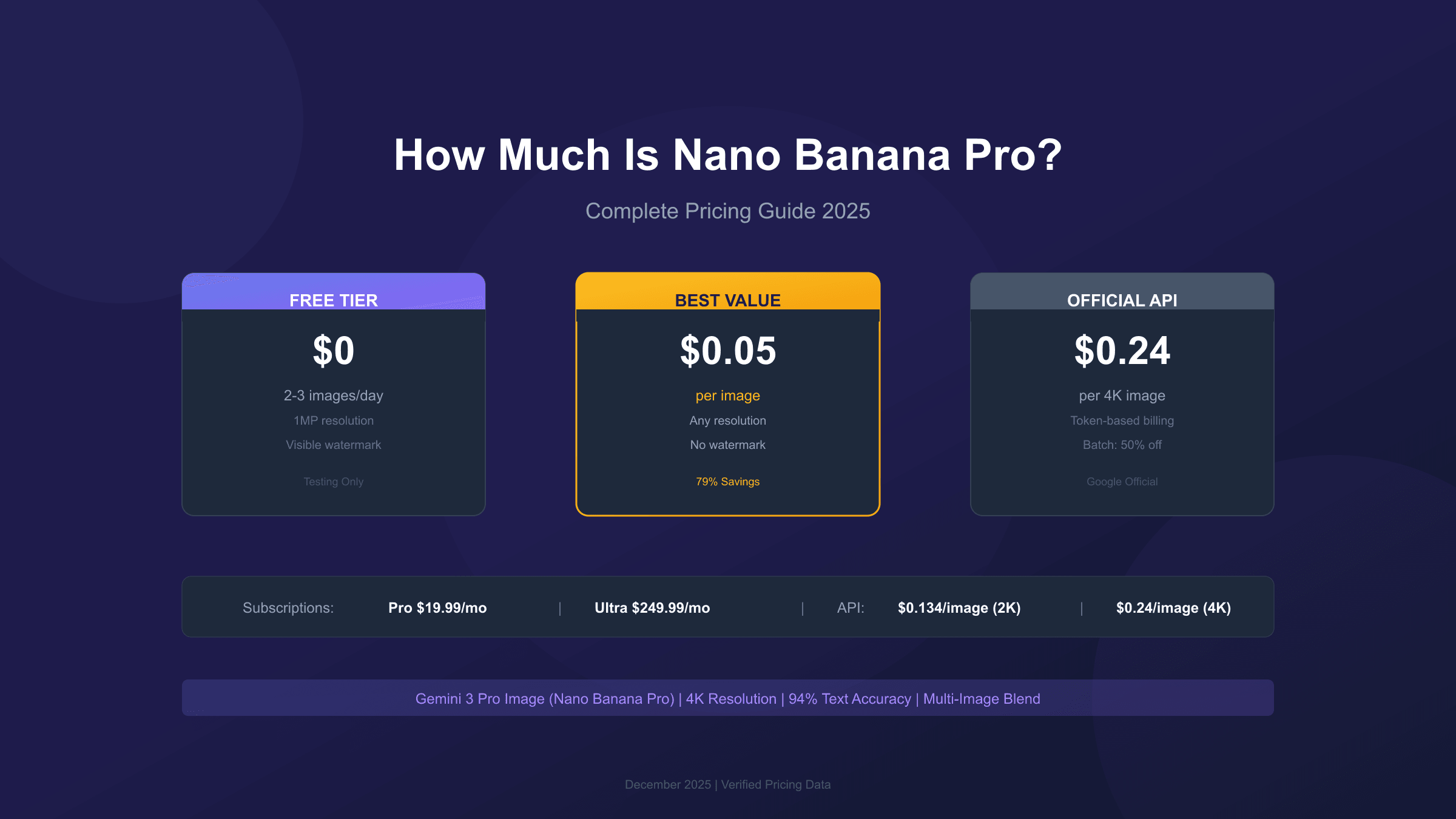
Nano Banana Pro pricing varies significantly depending on how you access it. Through Google's official API, you'll pay $0.134 per image for 1K/2K resolution and $0.24 per image for 4K output. Subscription plans range from completely free (with severe limitations) to $249.99 per month for unlimited commercial use. However, third-party API providers offer the same model for as little as $0.05 per image, representing savings of up to 79% compared to official rates.
Here's the complete pricing landscape at a glance:
| Access Method | Price | Best For |
|---|---|---|
| Free Tier | $0 (2 images/day) | Testing only |
| Google AI Pro | $19.99/month | Regular users |
| Google AI Ultra | $249.99/month | Commercial (no watermark) |
| Official API (1K/2K) | $0.134/image | Developers |
| Official API (4K) | $0.24/image | High-quality needs |
| Batch API | 50% off standard | Volume generation |
| Third-party providers | $0.05/image | Maximum savings |
The right option depends on your use case, volume requirements, and whether you need commercial-grade output without watermarks. Read on for a detailed breakdown of each pricing tier and strategies to minimize your costs.
Understanding Nano Banana Pro: What You're Paying For
Before diving into specific pricing tiers, it's worth understanding what makes Nano Banana Pro worth paying for in the first place. Released by Google DeepMind in November 2025, Nano Banana Pro is the codename for Gemini 3 Pro Image Preview, representing the cutting edge of AI-powered image generation technology. This isn't just another image generator—it's a significant leap forward in quality, accuracy, and capability.
The model delivers several features that justify its premium positioning in the market. First, there's the resolution advantage: Nano Banana Pro generates images up to 4096 x 4096 pixels (4K), far exceeding the 1024px limitation of most competitors. For print materials, large-format displays, or high-resolution marketing assets, this capability alone can justify the cost difference.
Text rendering accuracy represents another major strength. Independent benchmarks show Nano Banana Pro achieving 94-96% text accuracy in generated images, compared to just 71% for Midjourney V7 and 85% for DALL-E 3. If you're creating marketing materials, product mockups, or infographics with embedded text, this accuracy translates directly into fewer regeneration attempts and faster workflows.
The model also supports advanced composition features including multi-image blending (up to 8 reference images), character consistency across multiple generations (maintaining up to 5 people), and professional editing controls for lighting, depth of field, and color grading. These capabilities explain why pricing varies so dramatically across different access methods—you're paying for enterprise-grade technology packaged for different user segments.
Understanding this context matters because the "right" pricing tier depends entirely on which capabilities you actually need. A hobbyist exploring AI image generation has very different requirements than a marketing agency producing thousands of images monthly.
The pricing structure reflects this segmentation intentionally. Google wants casual users to experiment through the Gemini app's subscription tiers, while developers and businesses access the same technology through API-based pricing that scales with actual usage. Third-party providers add another layer of options, often matching or exceeding official quality while undercutting prices significantly.
What makes pricing comparison particularly complex is the multiple dimensions involved: resolution affects cost, volume affects optimal pricing tier, and commercial requirements like watermark-free output dictate minimum subscription levels. The sections that follow break down each option systematically, helping you identify the approach that minimizes cost while meeting your specific requirements.
Official Google Subscription Plans: Free, Pro, and Ultra
Google offers three subscription tiers for accessing Nano Banana Pro through consumer-facing applications like the Gemini app. Each tier targets different user segments with progressively fewer restrictions and more capabilities.
Free Tier: Severely Limited but Useful for Testing
The free tier provides the most restricted access to Nano Banana Pro. As of late 2025, Google reduced free access to just 2-3 image generations per day at approximately 1 megapixel resolution (roughly 1024x1024 pixels). This represents a significant reduction from earlier quotas, which Google attributed to "high demand" for the latest models.
Several important limitations apply to free tier usage. All generated images display a visible Gemini watermark, making them unsuitable for professional or commercial applications. You cannot generate images of people, which eliminates many common use cases. Once you exhaust your daily quota, the system automatically reverts to the older Nano Banana model rather than the Pro version. Geographic restrictions also apply, with some features limited to US users only.
Despite these limitations, the free tier serves a valuable purpose for exploration and testing. If you're evaluating whether Nano Banana Pro meets your quality requirements before committing to paid access, these 2-3 daily images provide enough opportunity to assess the model's capabilities without financial risk.
For developers, Google AI Studio offers a more generous free tier specifically designed for development and testing purposes. You can access up to 1,500 requests daily without payment, though this allocation is intended for experimentation rather than production workloads. Combining Gemini app access with AI Studio effectively provides substantial free usage for anyone willing to work within these constraints.
The key question becomes whether free tier limitations align with your actual needs. For learning AI image generation basics, exploring prompt techniques, or evaluating whether Nano Banana Pro suits your workflow, free access provides meaningful value. For anything approaching regular production use, you'll quickly hit walls that require upgrading to paid tiers. For a detailed guide on maximizing free access, see our Nano Banana Pro Free Tier Guide.
Google AI Pro: $19.99/Month for Regular Users
The Google AI Pro subscription costs $19.99 per month and removes most of the free tier's restrictions. Subscribers receive approximately 100 image generations per day, access to full 4K resolution output, and priority processing during high-demand periods.
However, Pro subscribers still contend with visible watermarks on all generated images. This limitation matters significantly for anyone producing content for professional or commercial purposes. The watermark clearly identifies images as AI-generated, which may or may not align with your intended use case.
Pro makes sense for content creators, designers, and professionals who generate images frequently but don't require watermark-free output. At roughly $0.20 per image (assuming 100 images daily for 30 days = 3,000 images), the subscription offers reasonable value compared to API pricing for moderate-volume users.
Google AI Ultra: $249.99/Month for Commercial Use
The Google AI Ultra tier costs $249.99 per month and targets commercial users requiring the highest quality output. The key differentiator from Pro is simple but significant: no visible watermark on generated images.
Ultra subscribers also receive the highest daily quotas (approximately 1,000 images per day), fastest processing times, and early access to new features. For businesses producing commercial assets, marketing materials, or client deliverables, the watermark-free output alone justifies the price premium.
At this price point, Ultra competes directly with API-based access. For volumes under 1,000 images monthly, the subscription may offer better value. However, the comparison becomes more complex when considering third-party API providers, which we'll explore in detail later.
The subscription approach makes most sense for users who want predictable monthly costs without worrying about per-image billing. If you're generating images consistently throughout the month rather than in occasional bursts, and your volume stays within the daily limits, subscriptions provide financial predictability that API pricing lacks.
However, subscription tiers lock you into Gemini app access rather than programmatic API access. If you need to integrate image generation into applications, automate workflows, or process images programmatically, you'll need API access regardless of whether you also maintain a subscription. This distinction matters significantly for technical users and businesses building products that incorporate AI image generation.
| Plan | Monthly Cost | Daily Images | Max Resolution | Watermark | Commercial Rights |
|---|---|---|---|---|---|
| Free | $0 | 2-3 | 1MP | Yes | No |
| Pro | $19.99 | ~100 | 4K | Yes | Limited |
| Ultra | $249.99 | ~1,000 | 4K | No | Yes |
API Pricing: Per-Image and Token-Based Costs Explained
For developers and businesses requiring programmatic access, Google offers API-based pricing through Google AI Studio and Vertex AI. This pricing model differs fundamentally from subscriptions—you pay for exactly what you use, with costs calculated per image or per token. The official Gemini API pricing page provides current rates, though the summary below captures the essential information.
Standard API Rates
The official API pricing follows a resolution-based structure:
| Resolution | Price per Image | Tokens Consumed |
|---|---|---|
| 1K/2K (up to 2048px) | $0.134 | 1,120 tokens |
| 4K (up to 4096px) | $0.24 | 2,000 tokens |
| Image Input | $0.0011 | 560 tokens |
Notice that 4K images cost 79% more than 2K images while producing four times the pixels. This pricing reflects the additional computational resources required for higher resolution generation. For many web and social media applications where images are compressed and displayed at effectively 2K resolution anyway, paying the 4K premium offers negligible visible improvement.
Understanding Token-Based Billing
Behind the per-image prices, Google's API uses token-based billing:
- Image output: $120 per million tokens (standard)
- Text input (prompts): $2 per million tokens
- Thinking output: $12 per million tokens
In practice, text prompt costs remain negligible—a typical 100-token prompt costs just $0.0002. The vast majority of your costs will come from image output tokens. This tokenization matters most when you're doing complex multi-turn conversations or using the model's "thinking" capabilities for iterative refinement.
Batch API: 50% Discount for Delayed Processing
Google offers a Batch API that cuts standard rates in half:
| Resolution | Standard Price | Batch Price | Savings |
|---|---|---|---|
| 1K/2K | $0.134 | $0.067 | 50% |
| 4K | $0.24 | $0.12 | 50% |
The trade-off? Results arrive within 24 hours rather than seconds. This approach suits workflows where immediate results aren't critical: overnight content generation for marketing teams, bulk product catalog updates for e-commerce platforms, or dataset creation for machine learning training.
Cost Impact: A workflow generating 1,000 2K images monthly costs $134 at standard rates but just $67 through batch processing—that's $804 in annual savings from a simple workflow change.
Teams generating hundreds or thousands of monthly images routinely achieve 40-60% cost reductions through strategic batch utilization combined with resolution optimization. The implementation requires minimal code changes—swap synchronous endpoints for batch submission endpoints, then poll for completion or configure webhook notifications.
The batch approach works particularly well for predictable workloads. Marketing teams preparing campaign assets can queue overnight generation runs. E-commerce platforms can update product catalogs during off-peak hours. Content teams can generate illustration libraries ahead of publication schedules. Any workflow where you can plan 24 hours ahead becomes eligible for automatic 50% savings.
However, batch processing doesn't suit all use cases. Interactive applications requiring real-time image generation, customer-facing tools where users expect immediate results, and rapid prototyping workflows all require standard API access despite the higher per-image costs. The key is matching pricing tier to workflow requirements rather than forcing all generation through a single approach.
For maximum cost efficiency, many organizations implement hybrid strategies: urgent, user-facing requests go through standard API endpoints while background processing, asset library generation, and scheduled updates route through batch queues. This approach captures batch discounts on eligible workloads while maintaining responsiveness where it matters.
Third-Party Alternatives: How to Save Up to 79% on Nano Banana Pro
While Google's official pricing sets the baseline, third-party API providers offer significant cost savings by providing access to the same Gemini 3 Pro Image model through alternative infrastructure. Understanding these options can dramatically reduce your image generation costs, particularly for high-volume applications.
Provider Comparison
| Provider | 1K/2K Price | 4K Price | Savings vs Official | Key Benefit |
|---|---|---|---|---|
| Google Standard | $0.134 | $0.24 | Baseline | Official support |
| Google Batch API | $0.067 | $0.12 | 50% | Reliable, 24h delay |
| laozhang.ai | $0.05 | $0.05 | 79% on 4K | Flat rate, all resolutions |
The most striking difference among third-party providers is pricing structure. While Google charges 79% more for 4K versus 2K images, laozhang.ai maintains a flat $0.05 per image regardless of resolution. This flat-rate approach particularly benefits users generating high-resolution content, where the per-image savings compound significantly at scale.
Real-World Cost Impact
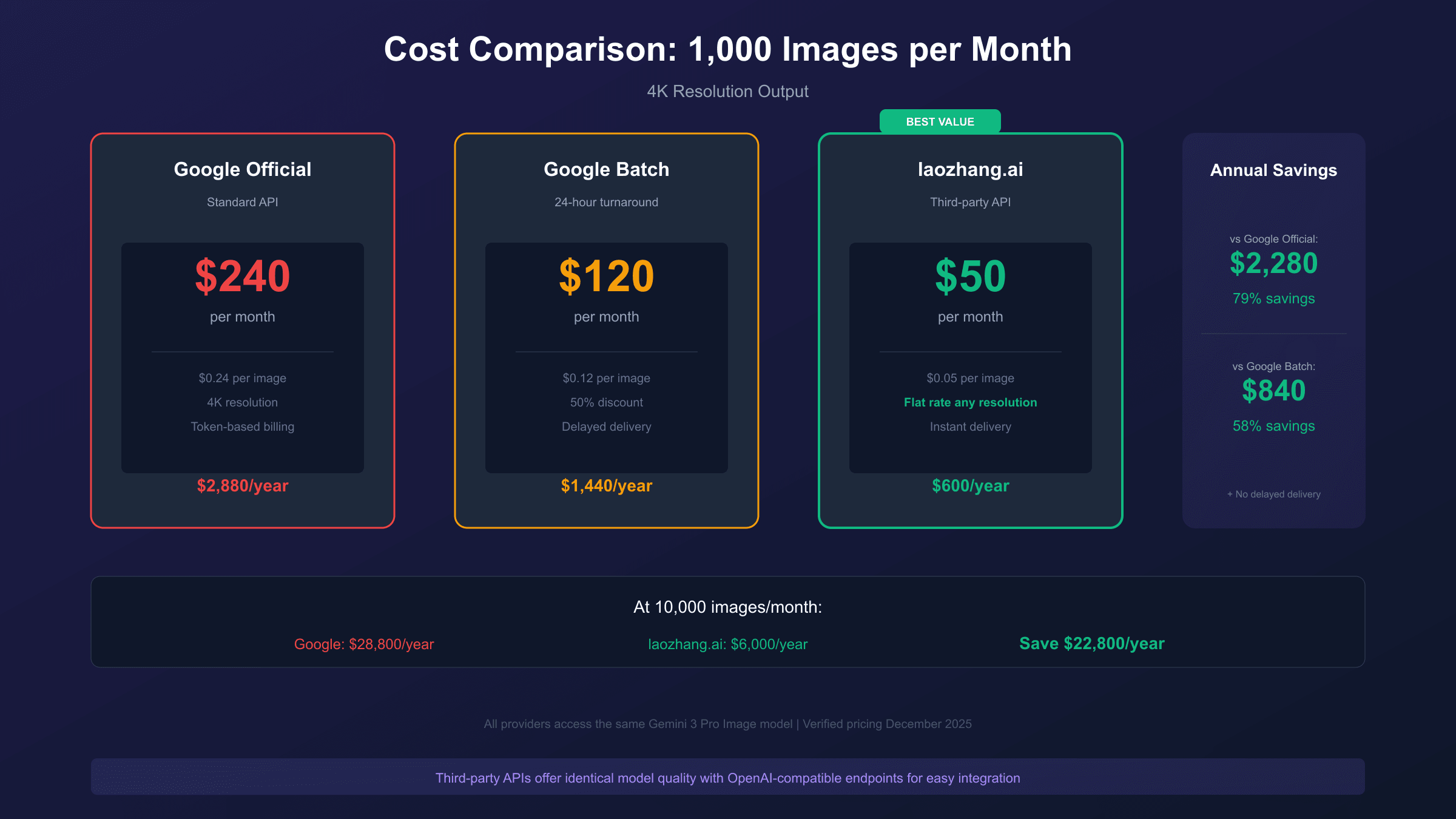
Consider a marketing agency generating 10,000 images monthly, primarily at 4K resolution for print and large-format displays:
| Provider | Monthly Cost | Annual Cost |
|---|---|---|
| Google Standard API | $2,400 | $28,800 |
| Google Batch API | $1,200 | $14,400 |
| laozhang.ai | $500 | $6,000 |
The difference is substantial: $22,800 in annual savings by switching from Google's standard API to a third-party provider. Even compared to Google's discounted Batch API, annual savings exceed $8,000.
Technical Implementation
Third-party providers typically offer OpenAI-compatible endpoints, enabling drop-in replacement for existing integrations. Here's a practical example using laozhang.ai:
hljs pythonfrom openai import OpenAI
client = OpenAI(
base_url="https://api.laozhang.ai/v1",
api_key="sk-YOUR_API_KEY" # Register at laozhang.ai
)
response = client.chat.completions.create(
model="gemini-3-pro-image-preview",
messages=[{
"role": "user",
"content": "A professional product photo of wireless headphones, 4K quality"
}]
)
# Cost: $0.05 per image, any resolution
The OpenAI SDK compatibility means existing codebases require only endpoint and API key changes—no architectural modifications needed.
When to Use Official vs Third-Party
Third-party providers suit most use cases, but official Google APIs remain preferable in specific scenarios:
- Enterprise compliance requirements mandating direct vendor relationships
- SLA-dependent applications requiring Google's uptime guarantees
- Cutting-edge features that may reach third-party providers with delay
- Support requirements where vendor accountability matters
For most developers, startups, and small-to-medium businesses, third-party providers deliver identical model quality at dramatically lower costs. For a comprehensive comparison of third-party providers, see our Cheapest Nano Banana Pro API Guide.
The decision between official and third-party access often comes down to organizational requirements rather than technical considerations. Startups and individual developers typically have flexibility to prioritize cost optimization. Enterprise organizations may face procurement policies, compliance requirements, or risk management frameworks that mandate direct vendor relationships despite the price premium.
One important consideration: third-party providers typically route requests through Google's API under their own accounts, then resell access at a markup (albeit still below official rates). This means the underlying model, quality, and capabilities remain identical—you're paying for the convenience of simplified billing, pre-negotiated rates, and often more flexible rate limits than direct API access provides.
The reliability question deserves attention as well. While third-party providers generally maintain high uptime, they add a dependency layer between your application and Google's infrastructure. For mission-critical applications where every percentage point of availability matters, the direct relationship with Google may justify higher costs. For most applications, the reliability difference is negligible in practice.
Cost Optimization Strategies: Maximize Value, Minimize Spend
Beyond choosing the right pricing tier, several optimization strategies can further reduce your Nano Banana Pro costs without sacrificing output quality.
Strategy 1: Resolution Optimization
The 79% price premium for 4K images only makes sense when you genuinely need that resolution. Consider your actual display context:
| Use Case | Recommended Resolution | Price Impact |
|---|---|---|
| Social media posts | 1K/2K | Save 79% vs 4K |
| Website images | 1K/2K | Save 79% vs 4K |
| Email marketing | 1K | Save 79% vs 4K |
| Print materials | 4K | Necessary premium |
| Large format displays | 4K | Necessary premium |
| Archival/source files | 4K | Necessary premium |
Most web content undergoes compression and resizing that negates 4K benefits anyway. Reserve 4K generation for genuine requirements like print production or large-format displays where resolution differences become visible.
Strategy 2: Batch Processing for Non-Urgent Work
Rearranging workflows to accommodate batch processing delivers immediate 50% savings on official API costs. Identify image generation tasks that don't require real-time results:
- Marketing asset pipelines scheduled overnight
- Product catalog updates running during off-hours
- Content libraries generated ahead of publication
- A/B test variants created in batches
Even a partial shift to batch processing—say, 50% of volume—reduces effective costs by 25% with no change to output quality.
Strategy 3: Prompt Engineering for First-Attempt Success
Regenerating images due to unsatisfactory results doubles or triples effective costs. Investment in prompt engineering pays dividends:
- Be specific: "Professional product photo of white wireless headphones on marble surface, soft studio lighting, 45-degree angle" outperforms "headphones photo"
- Reference styles: Mention specific aesthetic references when relevant
- Specify technical parameters: Include aspect ratio, lighting style, and composition details in prompts
Better prompts mean fewer regeneration cycles and lower costs per usable image.
The economics here are straightforward: if poor prompts result in regenerating 30% of images, your effective cost increases by 30%. Spending an extra 30 seconds crafting a detailed prompt typically eliminates most regeneration needs. For high-volume applications, this investment in prompt quality compounds into significant savings over time.
Consider developing prompt templates for common use cases in your workflow. A well-tested template for product photography, marketing banners, or social media graphics ensures consistent quality across thousands of generations. Document what works, iterate on failures, and build a library of reliable prompts that minimize costly trial-and-error at generation time.
Strategy 4: Leverage Free Tiers for Development
Google AI Studio provides 1,500 free requests daily for development and testing. Use this allocation for:
- Prompt development and iteration
- Quality assessment before production runs
- Feature exploration and experimentation
Reserve paid API calls for production workloads where you've already validated prompts and parameters using free allocations.
This approach separates experimentation costs (zero) from production costs (optimized). During development phases, iterate freely without worrying about per-image charges. Once you've validated that prompts produce desired outputs reliably, transition those workflows to production API access with confidence that you're not paying for trial-and-error refinement.
The free tier also enables ongoing experimentation without impacting production budgets. Want to test a new prompt approach? Try it on free tier first. Curious whether a different resolution might work for a particular use case? Validate using free allocations. This separation between experimentation and production costs enables continuous improvement without continuous expense increases.
Which Pricing Tier Is Right for You?
Matching pricing tiers to use cases requires honest assessment of your volume requirements, quality needs, and budget constraints. The following framework helps identify optimal approaches for different user profiles.
Decision Framework by User Type
| User Profile | Monthly Volume | Recommended Option | Expected Cost |
|---|---|---|---|
| Hobbyist/Explorer | <100 images | Free tier + AI Studio | $0 |
| Content Creator | 100-500 images | Pro subscription | $19.99/mo |
| Small Business | 500-2,000 images | Third-party API | $25-100/mo |
| Agency/Team | 2,000-10,000 images | Third-party + Batch | $100-500/mo |
| Enterprise | 10,000+ images | Negotiated/Volume | Custom |
Detailed Recommendations
For Hobbyists and Explorers: The combination of Gemini app's free tier (2-3 images daily) and Google AI Studio's development quota (1,500 requests daily) provides substantial free access for experimentation. You'll hit quality limitations rather than quota limits. This approach suits learning, personal projects, and capability evaluation.
For Content Creators: The $19.99/month Pro subscription makes sense when you generate 50-100 images weekly and can tolerate visible watermarks. At this volume, subscription pricing undercuts API costs while providing predictable monthly expenses. However, if watermarks pose problems, consider third-party API access instead.
For Small Businesses: API-based access through third-party providers typically offers the best value. At $0.05 per image, generating 1,000 monthly images costs just $50—far less than subscription tiers and dramatically cheaper than official API rates. The OpenAI-compatible endpoints simplify integration, and flat-rate pricing eliminates resolution-based premium concerns.
For Agencies and Teams: High-volume users benefit most from combining third-party providers with strategic batch processing. Urgent client deliverables go through real-time API calls while non-time-sensitive work routes through batch queues. This hybrid approach balances responsiveness with cost optimization.
Key Decision Questions
Ask yourself these questions to identify the right tier:
- Volume: How many images do you generate monthly?
- Resolution: Do you genuinely need 4K, or will 2K suffice?
- Watermarks: Can you accept visible AI watermarks?
- Urgency: Do all images need immediate generation?
- Compliance: Do you have vendor relationship requirements?
Your answers should point clearly toward one of the options outlined above.
Beyond these core questions, consider your growth trajectory. If you're starting small but expect rapid scaling, beginning with a third-party provider makes sense even if current volumes don't demand it. Establishing workflows and integrations with cost-efficient providers from the start avoids painful migrations later when costs become significant enough to matter.
Similarly, consider seasonality in your usage patterns. Businesses with predictable demand peaks—holiday marketing campaigns, product launch cycles, seasonal content updates—may benefit from different pricing approaches during peak versus off-peak periods. The flexibility to scale API usage up and down without subscription commitments provides cost advantages for variable workloads.
Nano Banana Pro vs Midjourney vs DALL-E: Pricing Comparison
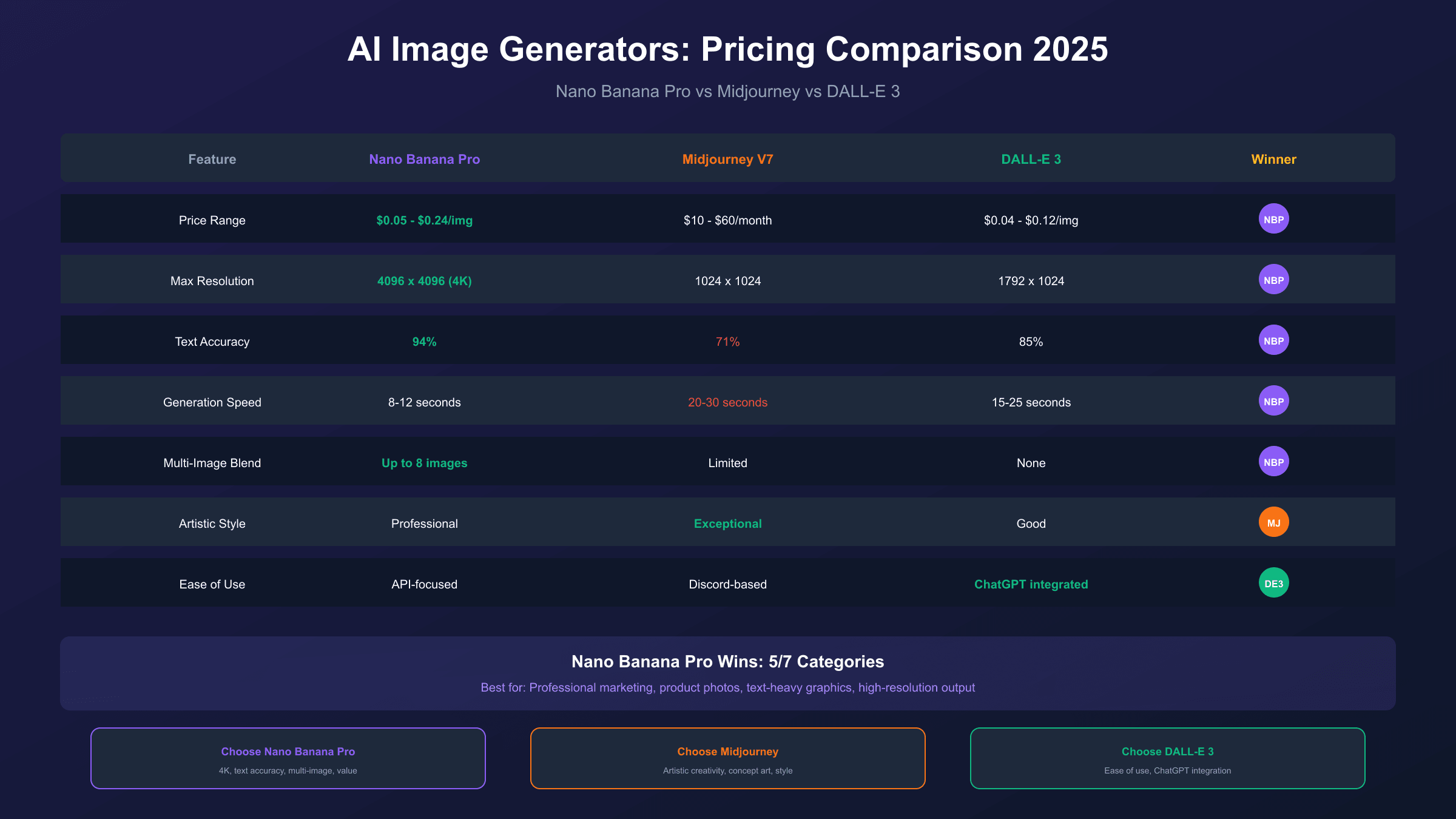
Understanding Nano Banana Pro pricing requires context—how does it compare to the major alternatives? Here's a comprehensive comparison across pricing, capabilities, and value proposition.
Pricing Comparison
| Model | Pricing Model | Typical Cost | Resolution | Text Accuracy |
|---|---|---|---|---|
| Nano Banana Pro | Per-image or subscription | $0.05-$0.24/image | Up to 4K | 94% |
| Midjourney V7 | Monthly subscription | $10-60/month | 1024px | 71% |
| DALL-E 3 | Per-image (API) | $0.04-$0.12/image | Up to 1792px | 85% |
Value Analysis
Nano Banana Pro wins on: Maximum resolution (4K), text rendering accuracy (94%), and multi-image blending capabilities. For professional marketing materials, product mockups, or any application requiring accurate text in images, Nano Banana Pro delivers measurably better results.
Midjourney V7 wins on: Artistic style and aesthetic quality for creative work. The subscription model also provides predictable costs for high-volume creative professionals. However, the 1024px resolution cap and 71% text accuracy limit professional applications.
DALL-E 3 wins on: Ease of use through ChatGPT integration and conversational editing. The lower per-image cost ($0.04-$0.12) appeals to budget-conscious users, though resolution and text accuracy fall between the other options.
When to Choose Each
-
Choose Nano Banana Pro when you need 4K resolution, accurate text rendering, or are generating high volumes where third-party pricing ($0.05/image) undercuts all alternatives. For a detailed comparison, see our GPT Image vs Nano Banana Pro analysis.
-
Choose Midjourney when artistic style matters more than technical accuracy, you prefer subscription pricing, and you're doing creative exploration rather than production work.
-
Choose DALL-E 3 when ease of use trumps other considerations, you're already in the OpenAI ecosystem, or you need conversational image editing within ChatGPT.
The pricing comparison reveals interesting trade-offs. Midjourney's subscription model provides predictable monthly costs regardless of volume, making it attractive for heavy users within the subscription limits. However, per-image costs become effectively higher as usage decreases—generating just 100 images monthly on a $30 subscription works out to $0.30 per image, significantly more than API-based alternatives.
DALL-E 3's per-image pricing appears competitive, but lower resolution limits mean you may need upscaling for professional applications, adding hidden costs to the workflow. Nano Banana Pro's native 4K output eliminates this concern, and third-party pricing at $0.05/image makes it the clear value leader for high-resolution requirements.
For mixed use cases requiring both artistic creativity and professional output quality, some organizations maintain multiple tools: Midjourney for concept exploration and creative direction, Nano Banana Pro for final production assets requiring text accuracy and high resolution. The combined cost often remains lower than using a single tool that compromises on key requirements.
Getting Started: API Setup Guide
Ready to start using Nano Banana Pro? Here's a practical guide to setting up API access through both official and third-party channels.
Option 1: Google AI Studio (Official)
Google AI Studio provides the most direct access to Nano Banana Pro's official API with generous free development quotas.
Step 1: Visit Google AI Studio and sign in with your Google account.
Step 2: Create an API key from the dashboard. Store it securely—treat it like a password.
Step 3: Install the Google GenAI SDK:
hljs bashpip install google-genai
Step 4: Generate your first image:
hljs pythonfrom google import genai
client = genai.Client(api_key="YOUR_API_KEY")
response = client.models.generate_content(
model="gemini-3-pro-image-preview",
contents="A professional product photo of vintage cameras"
)
# Handle the response (base64 image data)
image_data = response.candidates[0].content.parts[0].inline_data.data
Development usage is free up to 1,500 requests daily. Production usage bills at the rates discussed earlier ($0.134-$0.24/image).
Option 2: Third-Party API (Cost-Optimized)
For production workloads where cost matters, third-party providers offer significant savings with identical model access.
Step 1: Register at laozhang.ai and create your account.
Step 2: Generate an API key from the dashboard. Keys are prefixed with "sk-".
Step 3: Use the standard OpenAI SDK (already installed in most AI projects):
hljs bashpip install openai
Step 4: Configure and generate:
hljs pythonfrom openai import OpenAI
client = OpenAI(
base_url="https://api.laozhang.ai/v1",
api_key="sk-YOUR_API_KEY"
)
response = client.chat.completions.create(
model="gemini-3-pro-image-preview",
messages=[{
"role": "user",
"content": "A minimalist tech workspace, 4K quality, soft lighting"
}]
)
# Extract and save the image
# Cost: $0.05 regardless of resolution
The OpenAI SDK compatibility means you can switch between providers by changing just the base_url and api_key parameters—no code restructuring required.
Choosing Your Setup
| Consideration | Google AI Studio | Third-Party API |
|---|---|---|
| Setup complexity | Moderate | Simple |
| Free tier | 1,500/day (dev) | Trial credits |
| Production cost | $0.134-$0.24/image | $0.05/image |
| SDK compatibility | Google GenAI | OpenAI (universal) |
| Best for | Official support needs | Cost optimization |
Most developers start with Google AI Studio for exploration, then migrate to third-party providers for production to optimize costs.
The transition between providers is straightforward because third-party APIs maintain OpenAI SDK compatibility. Code that works with one provider typically works with others after changing endpoint configuration. This portability means you're not locked into any single provider and can switch based on pricing changes, reliability issues, or feature requirements.
For teams just getting started, we recommend a phased approach: begin with Google AI Studio's free tier to understand the model's capabilities and develop effective prompts. Once you've validated your use case and developed reliable workflows, transition to a third-party provider for production to capture cost savings. Maintain AI Studio access for ongoing experimentation and prompt development.
This approach minimizes initial investment while building toward cost-optimized production workflows. You'll understand exactly what you're paying for before committing significant resources, and you'll have established workflows that maximize the value of every dollar spent on image generation.
Frequently Asked Questions
Is Nano Banana Pro free?
Nano Banana Pro offers a limited free tier through the Gemini app: 2-3 images daily at 1 megapixel resolution with visible watermarks. Google AI Studio provides additional free development access (1,500 requests daily) for testing and experimentation. However, meaningful production usage requires paid access through subscriptions or API.
How much does Nano Banana Pro API cost?
Official API pricing is $0.134 per image for 1K/2K resolution and $0.24 per image for 4K. The Batch API offers 50% discounts ($0.067 and $0.12 respectively) for 24-hour turnaround. Third-party providers like laozhang.ai offer flat rates as low as $0.05 per image regardless of resolution.
Is there a cheaper alternative to official pricing?
Yes. Third-party API providers offer the same Gemini 3 Pro Image model at significantly lower costs. The cheapest option currently available is $0.05 per image through providers like laozhang.ai, representing 79% savings compared to Google's official 4K pricing.
What's the difference between Pro and Ultra subscriptions?
The primary difference is watermarks. Pro ($19.99/month) includes visible watermarks on all images, while Ultra ($249.99/month) generates watermark-free output suitable for commercial use. Ultra also offers higher daily quotas (~1,000 vs ~100 images) and priority processing.
How do I reduce Nano Banana Pro costs?
Four key strategies: (1) Use Batch API for non-urgent work (50% savings), (2) Choose 2K resolution unless you genuinely need 4K (79% savings), (3) Consider third-party API providers (up to 79% savings), and (4) Leverage free tiers for development and testing.
Can I use Nano Banana Pro for commercial purposes?
Yes, but approach depends on your access method. The Ultra subscription ($249.99/month) explicitly permits commercial use without watermarks. API access (both official and third-party) typically permits commercial usage—check specific terms of service. Free and Pro tiers include watermarks that may limit commercial viability.
How does Nano Banana Pro compare to Midjourney pricing?
Midjourney uses subscription pricing ($10-60/month) while Nano Banana Pro offers both subscription and per-image API options. For low volumes, Midjourney's subscription may be cheaper. For high volumes or 4K resolution needs, Nano Banana Pro's API access—particularly through third-party providers at $0.05/image—typically offers better value.
The key difference lies in the pricing model. Midjourney charges fixed monthly fees regardless of usage, while Nano Banana Pro's API pricing scales with actual consumption. For consistent, high-volume usage, Midjourney's subscription can provide predictable costs. For variable usage or businesses requiring precise cost accounting per project, API-based pricing offers more granular control.
Resolution also factors into the comparison. Midjourney caps at 1024px while Nano Banana Pro delivers up to 4K. If your use cases require high-resolution output, the resolution difference alone may justify choosing Nano Banana Pro despite potentially higher per-image costs through official channels.
What hidden costs should I watch for?
Several costs beyond per-image pricing can impact your total spend. Failed generations that require retrying add to costs without delivering value—prompt engineering helps minimize these. Image input for editing workflows incurs separate charges ($0.0011/image). The "thinking" mode for complex multi-step prompts generates additional token costs ($12/million tokens for thinking output).
Storage and bandwidth costs outside of image generation itself also matter at scale. Processing base64 image data returned by the API requires compute resources. Archiving generated images requires storage. Serving images to end users incurs bandwidth costs. These peripheral costs can become significant for high-volume applications even when per-image generation costs are optimized.
Conclusion: Making the Right Pricing Choice
Nano Banana Pro's pricing structure offers flexibility that can be overwhelming—free tiers, multiple subscriptions, official API, batch processing, and third-party alternatives all compete for attention. The right choice depends on your specific situation:
If you're exploring: Start with the free tier and Google AI Studio's development quota. You'll learn the model's capabilities without financial commitment.
If you're a regular user: The $19.99/month Pro subscription balances cost and convenience for moderate usage, though watermarks may limit professional applications.
If you're cost-conscious: Third-party API providers like laozhang.ai offer the same model quality at up to 79% lower cost. The $0.05 flat rate per image regardless of resolution delivers predictable pricing and significant savings at scale.
If you need commercial-grade output: Either the Ultra subscription ($249.99/month) or API access (official or third-party) provides watermark-free images suitable for professional use.
The AI image generation landscape continues evolving rapidly, with pricing typically trending downward over time. Whatever option you choose today, revisiting your approach quarterly ensures you're capturing the best available value as the market matures.
The key takeaway from this pricing analysis: Nano Banana Pro offers genuinely compelling capabilities—4K resolution, 94% text accuracy, multi-image blending—but accessing those capabilities cost-effectively requires understanding the full landscape of options available. Official pricing through Google represents just one path, and often not the most economical one.
For most users, the practical recommendation is clear: start with free tiers to validate your use case, then move to third-party API providers for production workloads. This approach captures Nano Banana Pro's quality advantages while minimizing costs. The $0.05/image flat rate through providers like laozhang.ai makes even high-volume 4K generation economically viable for businesses of any size.
Whether you're a developer integrating AI image generation into applications, a marketer producing campaign assets, or a creative professional exploring new workflows, understanding these pricing options positions you to make informed decisions that balance quality requirements with budget constraints. The right pricing tier exists for virtually any use case—the challenge is simply identifying which option aligns best with your specific needs.