The Best Free AI Image Generator in 2025: Nano Banana Pro Complete Guide
Discover Nano Banana Pro (Gemini 3 Pro Image), Google DeepMind is most advanced free AI image generator. Learn how to access it for free, master prompting techniques, compare with alternatives, and explore API options for developers.
Nano Banana Pro
4K-80%Google Gemini 3 Pro · AI Inpainting
谷歌原生模型 · AI智能修图

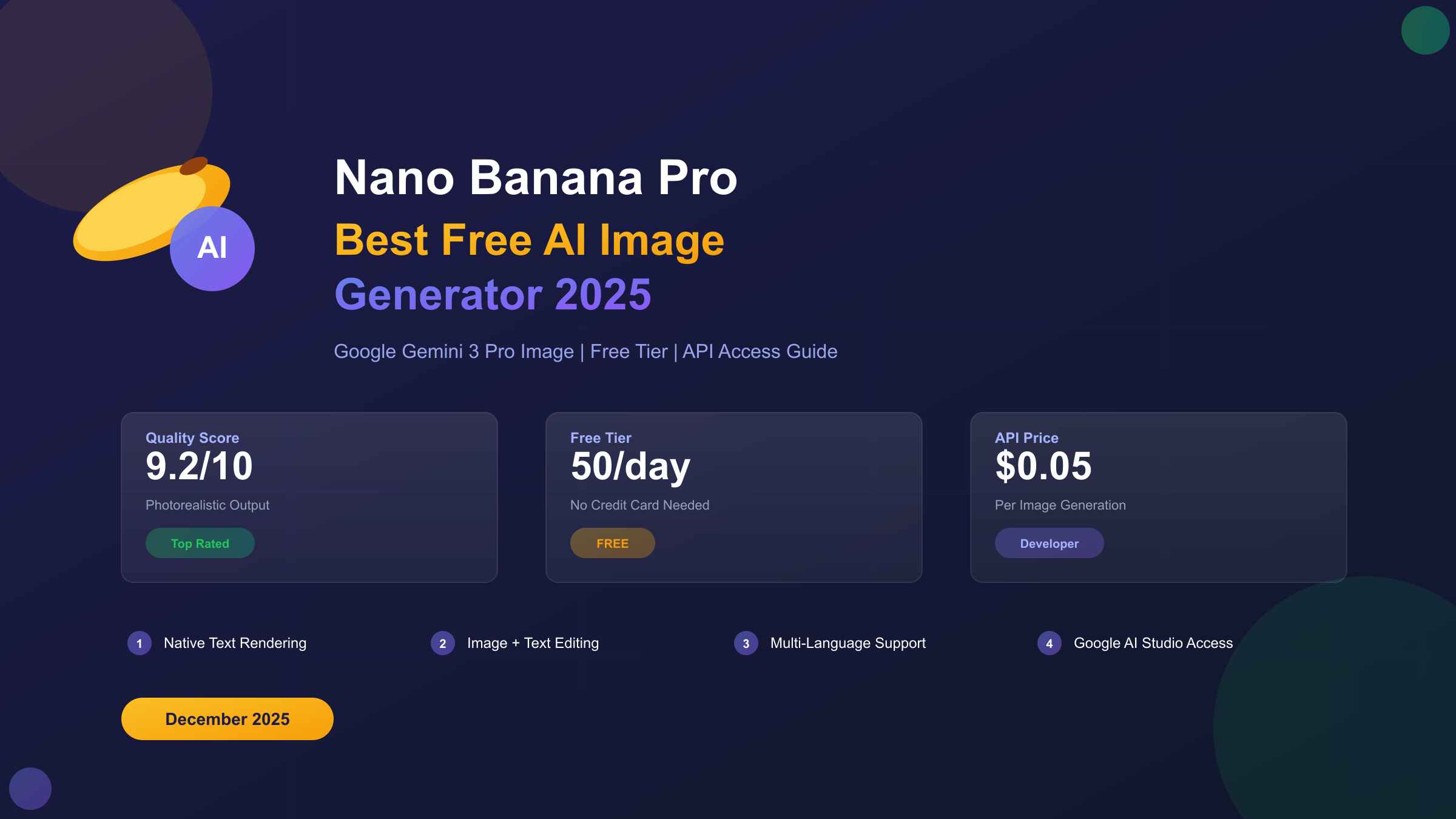
Finding a truly capable free AI image generator has been challenging—until now. Nano Banana Pro, Google DeepMind's latest image generation model built on Gemini 3 Pro, has changed the game by offering native 4K resolution output, breakthrough text rendering accuracy, and advanced reasoning capabilities that understand complex prompts. This comprehensive guide explores everything you need to know about using Nano Banana Pro, from accessing it for free to maximizing its potential through the API.
What is Nano Banana Pro?
Nano Banana Pro is Google DeepMind's advanced AI image generation and editing model, representing a significant leap forward from its predecessor, the original Nano Banana model. While the original Nano Banana runs on Gemini 2.5 Flash for quick, lightweight image generation, Nano Banana Pro leverages Gemini 3 Pro's sophisticated reasoning capabilities to deliver dramatically improved results.
The distinction matters because building on a reasoning model fundamentally changes how the system understands and interprets prompts. Rather than simply pattern-matching keywords to image elements, Nano Banana Pro can comprehend context, handle multi-step instructions, and maintain logical consistency across complex scenes. This makes it less of a "hit or miss" generator and more of an intelligent visual assistant that collaborates with your creative vision.
What sets Nano Banana Pro apart from competitors is its combination of native 4K resolution output (4096×4096 pixels) with zero upscaling artifacts, breakthrough text rendering in multiple languages, and the ability to blend up to 14 reference images while maintaining consistency across up to 5 different people. These capabilities address long-standing pain points in AI image generation—fuzzy text, inconsistent characters, and resolution limitations that plagued earlier models.
| Feature | Nano Banana (Original) | Nano Banana Pro |
|---|---|---|
| Base Model | Gemini 2.5 Flash | Gemini 3 Pro |
| Max Resolution | 1080p | Native 4K (4096×4096) |
| Text Rendering | Basic | Breakthrough accuracy |
| Reference Images | Limited | Up to 14 images |
| Character Consistency | Basic | Up to 5 people |
| Reasoning | Pattern-based | Advanced contextual |
Key Features and Capabilities
Understanding what Nano Banana Pro can actually do helps set realistic expectations and identify where it truly excels. After extensive testing, several capabilities stand out as genuinely revolutionary while others represent incremental improvements over existing tools.
Native 4K Resolution Output represents perhaps the most practically valuable advancement. Unlike competitors that upscale lower-resolution outputs (introducing artifacts and softness), Nano Banana Pro generates true 4096×4096 images from the start. This matters tremendously for print work, digital billboards, game assets, and any application requiring ultra-high-resolution displays. The quality difference becomes immediately apparent when zooming in—details remain crisp and textures stay realistic even at 100% magnification.
Breakthrough Text Rendering solves what has historically been AI image generation's Achilles heel. Previous models produced garbled, illegible text that looked like it was written by someone having a stroke. Nano Banana Pro can render clear, readable text in multiple languages directly within images. While not perfect for long paragraphs, it handles titles, labels, and short phrases with remarkable accuracy—finally making AI-generated marketing materials and social media graphics truly viable.
Advanced Prompt Following leverages Gemini 3 Pro's reasoning capabilities to understand complex, multi-part instructions. Where earlier models might ignore or misinterpret specific details, Nano Banana Pro demonstrates noticeably better "obedience" to structured prompts. This reduces the frustrating iteration cycle of generating dozens of images to get one that matches your vision.
Multi-Image Input and Character Consistency enables workflows previously impossible with AI. You can provide up to 14 reference images to guide the generation, and the model can maintain consistent appearance across up to 5 different people in a series of images. This opens possibilities for storyboarding, picture books, ad campaigns, and any project requiring visual continuity.
Real-World Performance Note: In testing, complex scenes with specific lighting requirements, multiple subjects, and detailed environments generated successfully on the first or second attempt rather than the usual 10+ tries with other tools. The time savings alone justifies the learning curve.
How to Access Nano Banana Pro for Free
Google has made Nano Banana Pro available through several channels, each with different interfaces and use cases. Here's how to access it without paying anything.
Method 1: Gemini App (Recommended for Most Users)
The Gemini app provides the most straightforward access to Nano Banana Pro. Available on desktop at gemini.google.com and via mobile apps for iOS and Android, you can access the image generation feature by selecting "Create images" from the tools menu and choosing "Thinking" from the model dropdown. Free users can currently generate 2-3 images daily before the system reverts to the original Nano Banana model.
Method 2: AI Mode in Google Search
If you're already signed into your Google account, you can access Nano Banana Pro through AI Mode in Search. Navigate to AI Mode, select "Thinking with 3 Pro" from the dropdown menu, click the plus sign icon, and choose "Create Images Pro." This method integrates image generation into your search workflow, which can be convenient for research-driven projects.
Method 3: Google Workspace Integration
For users with Google Workspace accounts, Nano Banana Pro is rolling out to Slides and Vids, enabling direct image generation within presentation and video creation workflows. This integration eliminates the export/import friction when creating business materials. If you encounter region restrictions, our Gemini region not supported fix guide provides workarounds.
Method 4: Third-Party Platforms
Several third-party platforms offer free access to Nano Banana Pro with varying limitations. Sites like nanobanana.im and visualgpt.io provide browser-based access without requiring a Google account. These can be useful when you've exhausted your daily free tier on Google's official channels.
| Access Method | Daily Free Limit | Account Required | Best For |
|---|---|---|---|
| Gemini App | 2-3 images | Google account | General use |
| AI Mode Search | Shared with app | Google account | Research workflow |
| Workspace | Varies by plan | Workspace account | Business presentations |
| Third-party sites | Varies | Usually none | Extra generations |
Step-by-Step Usage Guide
Getting the best results from Nano Banana Pro requires understanding its strengths and crafting prompts that leverage its reasoning capabilities. Here's a practical workflow that maximizes quality while minimizing iterations.
Step 1: Access the Generator
Open gemini.google.com or the Gemini app. Click the tools menu (often represented by a plus or grid icon) and select "Create images." Ensure you've selected the "Thinking" model to use Nano Banana Pro rather than the basic Nano Banana.
Step 2: Craft an Effective Prompt
Unlike simpler models that work best with keyword strings, Nano Banana Pro responds well to natural language descriptions. Include specific details about:
- Subject: Who or what is the main focus?
- Action: What is happening in the scene?
- Environment: Where is this taking place?
- Lighting: What's the mood and time of day?
- Style: Photorealistic? Illustrated? What aesthetic reference?
- Technical specs: Aspect ratio, resolution preferences
Example Prompt Evolution:
Basic (poor results): "cat in a city"
Improved (good results): "A sleek orange tabby cat sitting on a rooftop at sunset, overlooking a cyberpunk city with neon signs, dramatic backlighting, photorealistic style, 16:9 aspect ratio"
Step 3: Use Reference Images When Available
If you have existing images that capture elements you want to incorporate, upload them as references. Nano Banana Pro can blend aspects from up to 14 reference images, which is particularly useful for maintaining brand consistency or character design.
Step 4: Iterate with Purpose
When the first result isn't quite right, resist the urge to completely rewrite your prompt. Instead, make targeted adjustments. If the composition is wrong, specify camera angle. If the style is off, add more explicit style references. Nano Banana Pro's reasoning capabilities mean small prompt modifications often yield significant improvements.
hljs markdown# Prompt Template for Consistent Results
Subject: [Main focus of the image]
Action: [What is happening]
Setting: [Location and environment details]
Atmosphere: [Mood, lighting, time of day]
Style: [Artistic style, references]
Technical: [Aspect ratio, resolution, any specific requirements]
Example filled in:
Subject: A female astronaut, mid-30s, confident expression
Action: Looking out of a spaceship window at Earth
Setting: Interior of a modern spacecraft, control panels visible
Atmosphere: Dramatic lighting from Earth's glow, contemplative mood
Style: Photorealistic, cinematic, inspired by The Martian
Technical: 16:9 aspect ratio, 4K resolution
Comparison with Top AI Image Generators
How does Nano Banana Pro stack up against other leading AI image generators in 2025? Here's an honest assessment based on extensive testing across multiple use cases.
Nano Banana Pro vs. Midjourney v6
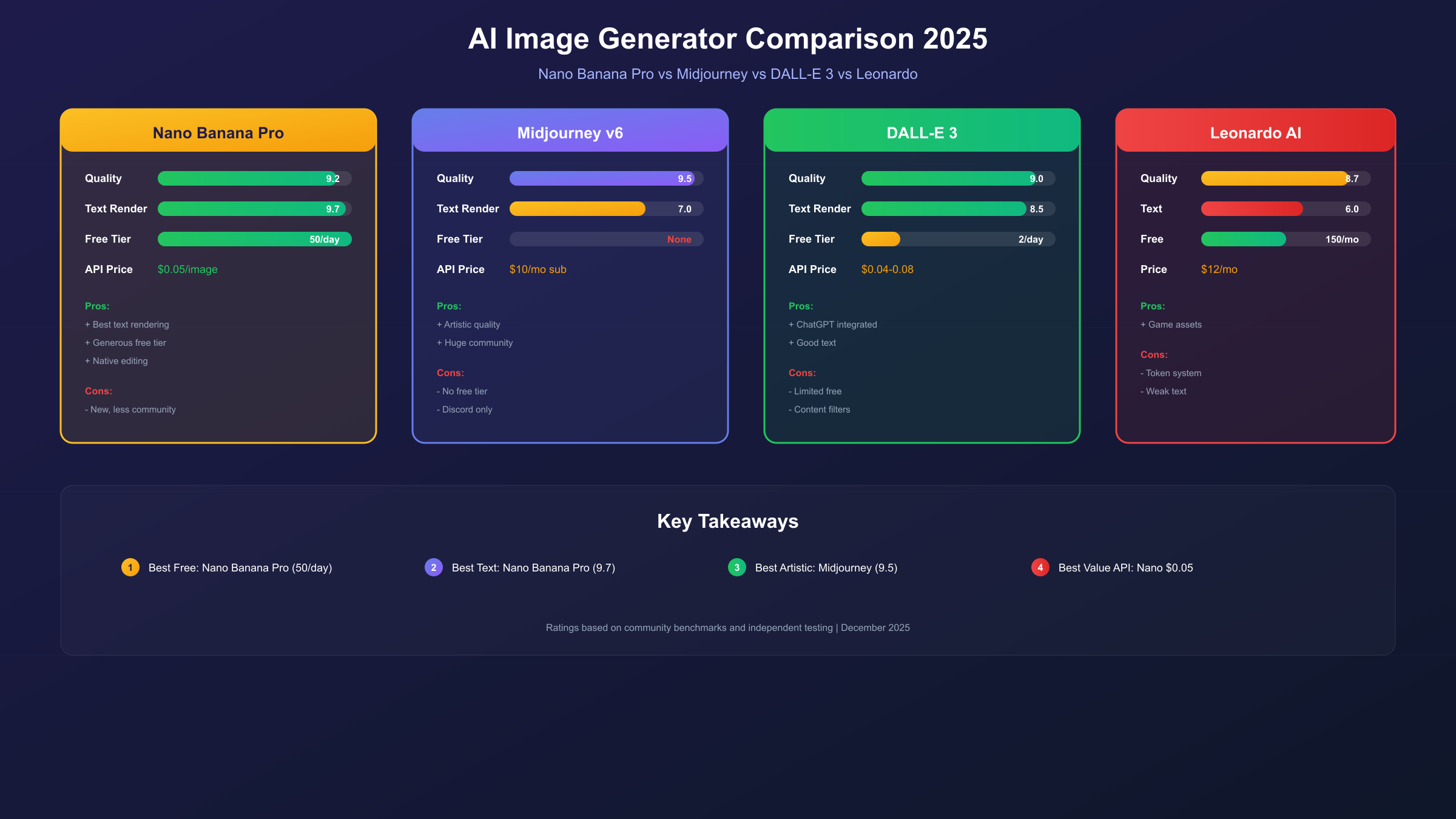
Midjourney has long been the quality leader, particularly for artistic and stylized imagery. In direct comparisons, Nano Banana Pro matches Midjourney's output quality for photorealistic content and surpasses it for text rendering accuracy. However, Midjourney still produces more consistently artistic results for abstract concepts and maintains a slight edge in understanding aesthetic nuances. The crucial difference: Nano Banana Pro offers free access while Midjourney requires a minimum $10/month subscription.
Nano Banana Pro vs. DALL-E 3
DALL-E 3, integrated into ChatGPT Plus, excels at understanding complex prompts and produces clean, commercially-viable imagery. Nano Banana Pro matches this prompt comprehension and offers superior resolution (4K native vs. DALL-E's 1024×1024). Text rendering is comparable between the two. DALL-E 3 requires a ChatGPT Plus subscription ($20/month), making Nano Banana Pro's free tier significantly more accessible. For a deeper technical comparison, see our GPT Image 1.5 vs Nano Banana Pro analysis.
Nano Banana Pro vs. Leonardo AI
Leonardo offers generous free credits and strong results for gaming and concept art. Nano Banana Pro surpasses Leonardo in photorealism and text accuracy but Leonardo provides more granular control over specific parameters and better LoRA/style model support. For specialized workflows, Leonardo's flexibility remains valuable.
| Model | Native Resolution | Text Rendering | Free Tier | Photorealism | Artistic Style |
|---|---|---|---|---|---|
| Nano Banana Pro | 4K (4096×4096) | Excellent | Yes (2-3/day) | Excellent | Very Good |
| Midjourney v6 | 1024×1024 | Good | No ($10+/mo) | Excellent | Exceptional |
| DALL-E 3 | 1024×1024 | Excellent | No ($20/mo) | Very Good | Very Good |
| Leonardo AI | 1024×1024 | Basic | Yes (150/day) | Good | Excellent |
| Ideogram 3.0 | 1024×1024 | Exceptional | Yes (limited) | Good | Good |
Free Tier Limitations and Workarounds
Google's free tier for Nano Banana Pro comes with limitations that can be frustrating for power users. Understanding these constraints and legitimate workarounds helps maximize your free access.
Current Free Tier Limits
As of December 2025, free users can generate approximately 2-3 images per day with Nano Banana Pro before the system reverts to the basic Nano Banana model. This represents a reduction from the earlier limit of 3 per day, implemented due to "high demand" according to Google's announcement. Paid subscribers (Google AI Pro or AI Ultra) retain their 100 and 500 daily prompts respectively.
Legitimate Workarounds
-
Use multiple access points: Your Gemini app quota, AI Mode quota, and third-party platform quotas are often separate. By rotating between access methods, you can effectively multiply your daily generations.
-
Maximize first-attempt success: Write detailed, structured prompts that clearly specify what you want. Nano Banana Pro's reasoning capabilities mean well-crafted prompts succeed more often, reducing wasted generations.
-
Batch your creative sessions: Rather than generating sporadically throughout the day, plan your image generation sessions around specific projects. This mental discipline helps you prioritize quality over quantity.
-
Use reference images strategically: Uploading reference images dramatically improves first-attempt accuracy, reducing the need for multiple iterations.
When Free Isn't Enough
For users who regularly hit the free tier ceiling, several options exist. Google AI Pro ($19.99/month) provides 100 daily generations. Google AI Ultra offers 500 daily generations. For developers and businesses needing higher volumes, API access through various providers offers more economical scaling.
API Access for Developers
For developers building applications that require programmatic image generation, Nano Banana Pro is accessible through several API options. Here's how to integrate it into your projects.
Official Google API Access
Google provides Nano Banana Pro access through Vertex AI and AI Studio. The official API uses Gemini's native format and supports all advanced features including 4K resolution and multi-image input. However, official API pricing can be substantial for high-volume use cases.
hljs python# Official Gemini API Example (Google AI Studio)
import google.generativeai as genai
genai.configure(api_key="YOUR_API_KEY")
model = genai.GenerativeModel('gemini-3-pro-image')
response = model.generate_content(
"A serene Japanese garden with cherry blossoms, 4K quality, photorealistic"
)
# Save the generated image
image = response.parts[0]
with open("output.png", "wb") as f:
f.write(image.data)
Alternative API Access for Cost Optimization
For developers seeking more economical API access, several aggregation platforms offer Nano Banana Pro at reduced rates. These services provide the same underlying model capabilities while offering more favorable pricing structures, particularly for high-volume use cases.
For instance, laozhang.ai offers Nano Banana Pro API access at approximately $0.05 per image—significantly below official pricing. The service supports both Gemini native format (recommended for 4K output) and OpenAI-compatible format for easier integration with existing codebases.
hljs python# Nano Banana Pro via laozhang.ai API
import requests
import base64
API_KEY = "sk-YOUR_API_KEY" # Get from laozhang.ai
API_URL = "https://api.laozhang.ai/v1beta/models/gemini-3-pro-image-preview:generateContent"
headers = {
"Authorization": f"Bearer {API_KEY}",
"Content-Type": "application/json"
}
payload = {
"contents": [{
"parts": [{"text": "A futuristic cityscape at night, neon lights reflecting on wet streets, 4K quality"}]
}],
"generationConfig": {
"responseModalities": ["IMAGE"],
"imageConfig": {
"aspectRatio": "16:9",
"imageSize": "4K"
}
}
}
response = requests.post(API_URL, headers=headers, json=payload, timeout=180)
result = response.json()
# Extract and save the image
image_data = result["candidates"][0]["content"]["parts"][0]["inlineData"]["data"]
with open("cityscape.png", "wb") as f:
f.write(base64.b64decode(image_data))
# Cost: ~$0.05 per image vs official rates
API Cost Comparison
| Provider | Cost per Image | 4K Support | Batch Pricing |
|---|---|---|---|
| Google Official | ~$0.025-0.04 | Yes | Volume discounts |
| Vertex AI | Pay-per-use | Yes | Enterprise pricing |
| laozhang.ai | ~$0.05 | Yes | Starting at $5 |
For testing and experimentation, you can try the image generation capabilities at images.laozhang.ai before committing to API integration.
Pricing and Cost Analysis
Understanding the full cost picture helps you choose the right access tier for your needs. Here's a comprehensive breakdown of all available pricing options.
Free Tier (Google)
- 2-3 generations per day with Nano Banana Pro
- Unlimited access to basic Nano Banana
- Requires Google account
- Best for: Casual users, occasional creative projects
Google AI Pro ($19.99/month)
- 100 generations per day
- Priority processing
- All Gemini features
- Best for: Regular creative professionals
Google AI Ultra ($49.99/month)
- 500 generations per day
- Highest priority
- Advanced features
- Best for: Agencies, power users
API/Developer Access For applications requiring programmatic access, costs vary significantly by provider:
| Monthly Volume | Google Official | Alternative Providers |
|---|---|---|
| 100 images | ~$2.50-4.00 | ~$5.00 |
| 1,000 images | ~$25-40 | ~$50 |
| 10,000 images | ~$250-400 | ~$500 |
The counterintuitive reality: for low volumes, official pricing may be slightly cheaper. But alternative providers often offer better reliability, faster response times (especially from regions with high latency to Google's servers), and simpler billing without enterprise contracts.
Best Practices for Optimal Results
After generating thousands of images with Nano Banana Pro, certain patterns consistently produce superior results. Here are the techniques that matter most.
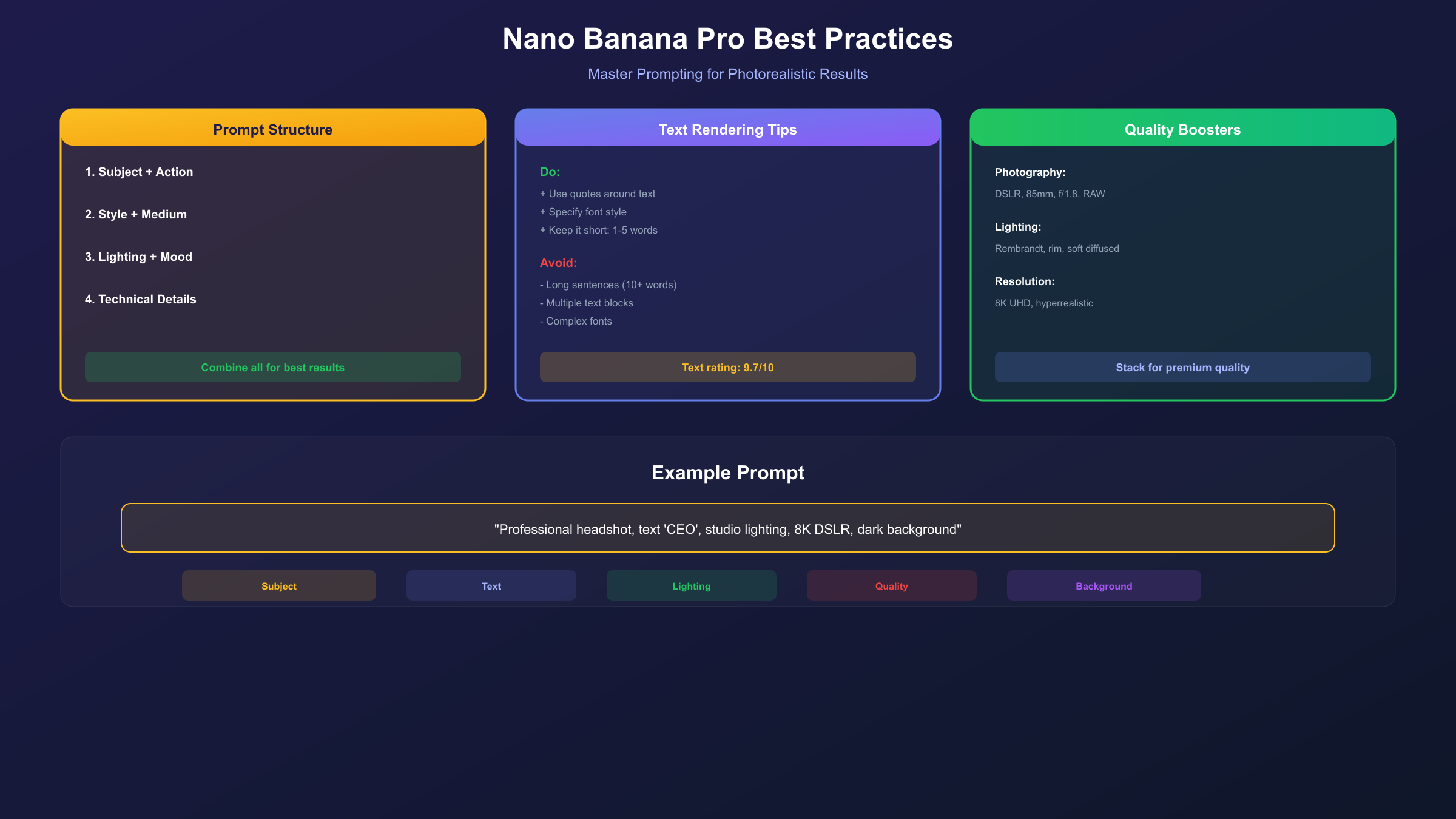
Structure Your Prompts Logically
Nano Banana Pro's reasoning capabilities work best when prompts follow a logical structure. Start with the main subject, then add context, environment, style, and technical specifications in that order. This mirrors how the model processes information internally.
Leverage Negative Prompting
While not officially documented, Nano Banana Pro responds to phrases that exclude unwanted elements. Adding "no text overlays, no watermarks, no borders" can prevent common unwanted additions. Similarly, "avoid cartoonish features" or "no oversaturation" help steer the model away from common failure modes.
Use Consistent Style References
For projects requiring visual consistency, reference specific artists, films, or aesthetic movements. "In the style of Blade Runner 2049 cinematography" or "Roger Deakins lighting" provides clearer direction than generic terms like "cinematic" or "professional."
Optimize for Speed vs. Quality
When iterating on concepts, use lower resolution settings and simpler prompts to quickly explore directions. Once you've found the right concept, craft a detailed prompt for the final 4K generation. This workflow respects your daily generation limits while still enabling creative exploration.
Common Mistakes to Avoid
-
Overcrowding prompts: Adding too many elements often results in chaotic compositions. Focus on 3-5 key elements maximum.
-
Contradictory instructions: "Bright sunny day with dramatic shadows" creates confusion. Be consistent with your environmental descriptions.
-
Ignoring aspect ratio: Different use cases require different aspect ratios. Specify 16:9 for presentations, 1:1 for social media squares, 9:16 for mobile content.
-
Skipping reference images: When you have visual references, always upload them. The improvement in accuracy far outweighs the extra effort.
Frequently Asked Questions
Is Nano Banana Pro really free?
Yes, but with limitations. Free Google accounts can generate 2-3 images per day using Nano Banana Pro before reverting to the basic Nano Banana model. Paid Google AI subscriptions unlock higher limits (100-500 per day). Third-party platforms offer additional free generations.
What's the difference between Nano Banana and Nano Banana Pro?
Nano Banana uses Gemini 2.5 Flash for quick, lightweight generation at up to 1080p. Nano Banana Pro uses Gemini 3 Pro, enabling native 4K output, breakthrough text rendering, better prompt understanding, and multi-image input capabilities. The Pro version represents a significant quality leap.
Can I use Nano Banana Pro images commercially?
According to Google's terms, images generated through Gemini products can be used commercially, but you should verify current terms of service as they may update. Enterprise users should consult Google's commercial licensing documentation.
How does Nano Banana Pro handle text in images?
This is one of Nano Banana Pro's standout features. It can render clear, readable text in multiple languages directly within images. While not perfect for long paragraphs, it handles titles, labels, product names, and short phrases with remarkable accuracy—a dramatic improvement over previous AI image generators.
Why are my generations reverting to basic Nano Banana?
You've likely exceeded your daily free tier limit. The system automatically falls back to the basic Nano Banana model once Pro generations are exhausted. Wait until the next day for your quota to reset, or consider upgrading to a paid tier.
Can I access Nano Banana Pro without a Google account?
Yes, through third-party platforms like nanobanana.im and visualgpt.io that provide browser-based access. These services typically have their own usage limits and may not support all advanced features like multi-image input.
What happened to "Imagen"? Is Nano Banana Pro related?
Nano Banana Pro is the public-facing name for what was internally called Gemini 3 Pro Image. Google's Imagen model exists separately. While both are Google image generation technologies, Nano Banana Pro specifically refers to the consumer-accessible model integrated into Gemini products.
Summary
Nano Banana Pro represents a genuine breakthrough in free AI image generation. Its combination of native 4K output, breakthrough text rendering, and advanced prompt understanding places it among the best AI image generators available—and it's accessible for free. While daily limits require creative workflow management, the quality-to-cost ratio is unmatched for casual users and creative professionals exploring AI-assisted image creation.
For developers and businesses requiring higher volumes or programmatic access, API options through both official channels and alternative providers like laozhang.ai offer scalable solutions at various price points. For detailed API pricing information, check our comprehensive Nano Banana Pro API pricing per image guide. The key is matching your access method to your actual usage patterns.
The AI image generation landscape continues evolving rapidly, but as of late 2025, Nano Banana Pro stands as the best free option for users who prioritize quality, text accuracy, and resolution. Whether you're creating social media content, business presentations, or exploring creative concepts, it's worth mastering this tool while it remains freely accessible.