Nano Banana Pro API Pricing Per Image: Complete 2025 Cost Guide
Nano Banana Pro
4K-80%Google Gemini 3 Pro · AI Inpainting
谷歌原生模型 · AI智能修图

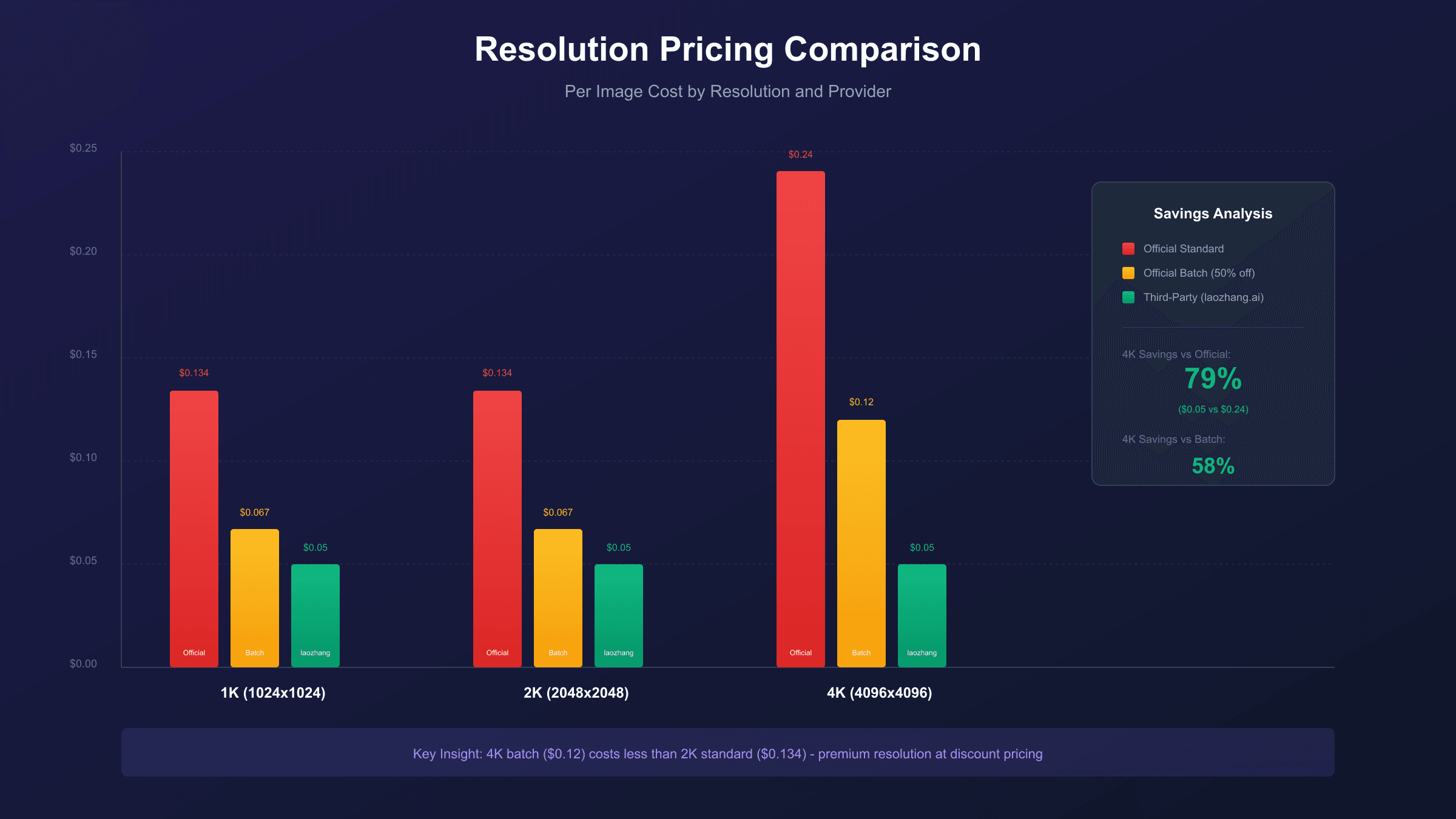
Nano Banana Pro API costs $0.134 per image for standard 1K and 2K resolution, and $0.24 per image for 4K output through Google's official Vertex AI platform. The Batch API offers a 50% discount, reducing 4K generation to $0.12 per image with a 24-hour turnaround. Third-party providers like laozhang.ai offer the same Gemini 3 Pro Image model at just $0.05 per image—a 79% savings on 4K generation.
This comprehensive guide breaks down every pricing tier, explains the token-based billing system, and shows you exactly how to minimize your per-image costs whether you're generating 100 images or 100,000.
Understanding the full pricing landscape matters because Nano Banana Pro (Google's marketing name for Gemini 3 Pro Image capabilities) represents the premium tier of AI image generation. The model excels at text rendering (94% accuracy), native 4K output (4096×4096 pixels), and multi-image blending (up to 8 reference images). These capabilities justify higher per-image costs for professional applications, but only if you understand how to access them cost-effectively.

Official Nano Banana Pro API Pricing Table
Google prices Nano Banana Pro (Gemini 3 Pro Image) based on resolution and processing method. Here's the complete official pricing breakdown:
| Resolution | Standard Price | Batch Price | Token Count | Best For |
|---|---|---|---|---|
| 1K (1024×1024) | $0.134/image | $0.067/image | 1,120 tokens | Social media, thumbnails |
| 2K (2048×2048) | $0.134/image | $0.067/image | 1,120 tokens | Web graphics, presentations |
| 4K (4096×4096) | $0.24/image | $0.12/image | 2,000 tokens | Print, professional marketing |
These prices come directly from Google's Vertex AI pricing page as of December 2025. The key insight here is that 1K and 2K resolution share identical pricing—there's no cost penalty for choosing 2K over 1K, making 2K the obvious choice for most use cases.
Additional costs to consider include image input at $0.0011 per reference image (useful for style transfer), and text prompt tokens at $2.00 per million tokens. In practice, text costs are negligible—a typical 100-token prompt adds just $0.0002 to your generation cost.
The pricing structure rewards efficiency in interesting ways. Since 1K and 2K cost the same, you're essentially getting 4x the pixels (4 megapixels versus 1 megapixel) for no additional cost. This makes 2K the default choice for virtually every use case—the only exception being applications where smaller file sizes matter more than quality, such as low-bandwidth mobile delivery.
For developers building on the API, understanding these pricing tiers enables smart architectural decisions. A product photography service might offer customers a choice between "standard" (2K, $0.134 cost, passed through at $0.50) and "print-ready" (4K, $0.24 cost, passed through at $1.00). The margin structure remains healthy at both tiers while giving customers meaningful choice.
Understanding Token-Based Billing
Nano Banana Pro uses a token-based pricing model where image output tokens determine your actual cost. The formula is straightforward: Image Cost = (Tokens × Rate) / 1,000,000, where the current rate is $120 per million tokens for Gemini 3 Flash Preview image output. This approach differs fundamentally from subscription models used by consumer tools like Midjourney, where monthly fees grant limited generation credits regardless of actual usage.
Each resolution tier consumes a fixed number of tokens regardless of image complexity or prompt length. A simple "cat sitting" and a detailed "cyberpunk cityscape with neon reflections" both consume exactly 1,120 tokens at 2K resolution. This predictability makes budget planning remarkably simple compared to other AI services where output complexity affects pricing.
The token consumption breakdown reveals why 4K costs nearly double: the output contains roughly 1.78x more data (2,000 vs 1,120 tokens). However, the quality improvement is often more than 1.78x—4K images capture fine details like text, textures, and small objects that lower resolutions simply cannot reproduce. For applications requiring readable text in images (product labels, signage, infographics), the 4K premium often pays for itself through reduced regeneration attempts.
Understanding the complete billing stack helps avoid surprise charges. Image output tokens dominate cost at $120 per million, but the system also bills for text input and processing. The $2.00 per million token rate for prompts means even a detailed 500-word prompt (approximately 700 tokens) adds just $0.0014 to your image cost—effectively a rounding error. The "thinking" tokens at $12.00 per million represent the model's internal processing and typically consume 200-400 tokens per request, adding roughly $0.003-0.005 per image.
Reference image uploads for style transfer or editing workflows cost $0.0011 per image (560 tokens each), regardless of the reference image's resolution. You can include up to 8 reference images per generation request, adding a maximum of $0.0088 to any single generation. For most workflows, total non-output costs remain under $0.02 per image—the image output tokens represent 90%+ of every invoice.
Resolution Pricing: When to Pay for 4K
The price jump from 2K ($0.134) to 4K ($0.24) represents a 79% increase, raising the question: when does 4K resolution actually deliver 79% more value? The answer depends entirely on your output destination and quality requirements.
| Use Case | Recommended Resolution | Cost | Rationale |
|---|---|---|---|
| Social media posts | 1K/2K | $0.134 | Platforms compress to ~1K anyway |
| Website hero images | 2K | $0.134 | Adequate for most screens |
| E-commerce product shots | 4K | $0.24 | Zoom functionality needs detail |
| Print marketing (brochures) | 4K | $0.24 | 300 DPI requires high resolution |
| Text-heavy graphics | 4K | $0.24 | Text legibility demands pixels |
| Video thumbnails | 1K | $0.134 | 1280×720 maximum display |
Professional marketing teams often default to 4K for everything, but this approach wastes budget. A social media image displayed at 1080×1080 pixels gains nothing from 4K generation—the platform's compression algorithms discard the extra detail before users ever see it. Generate at the resolution your distribution channel actually supports.
For A/B testing and creative exploration, always use 2K. You can regenerate final approved concepts at 4K, paying the premium only for images that will actually ship. This workflow reduces generation costs by 44% during the iterative design phase.
The resolution selection also affects generation speed. 1K and 2K images typically complete in 8-10 seconds, while 4K generation extends to 12-15 seconds under normal conditions. During peak usage periods, 4K generation can stretch to 20+ seconds as the more compute-intensive process competes for resources. If your application requires sub-10-second response times, factor this latency consideration alongside cost.
One technical detail worth noting: Nano Banana Pro generates images at the exact specified resolution, not approximate targets. A 4K (4096×4096) output delivers exactly 16.7 megapixels—no upscaling, no interpolation. This native generation at resolution distinguishes it from competitors that generate at 1K and algorithmically upscale, producing noticeably softer results at equivalent apparent resolutions.
Batch API: 50% Discount for Patient Workflows
The Batch API represents the single largest cost optimization available through official channels. By accepting 24-hour turnaround instead of real-time generation (8-12 seconds), you unlock 50% off every image. The math is compelling: 4K batch pricing at $0.12 per image actually beats standard 2K pricing at $0.134.
Here's where batch processing makes strategic sense. The 50% discount fundamentally changes the economics of certain workflows, making previously cost-prohibitive applications suddenly viable.
Ideal for batch: Content calendars represent the most natural fit—social media managers can queue an entire week's visual content Sunday evening and have everything ready Monday morning. Product catalog updates benefit tremendously, especially for e-commerce sites with thousands of SKUs needing seasonal variations. Training dataset generation for machine learning applications often requires tens of thousands of labeled images, where the 50% discount can mean the difference between affordable and impractical. Background variation libraries—generating the same product against 50 different settings—convert naturally to batch since creative approval happens after generation anyway.
Not for batch: Client demos require immediate visual feedback during meetings, making 24-hour delays unworkable. Live prototyping sessions where designers iterate rapidly on concepts need real-time generation to maintain creative flow. Real-time personalization systems that generate custom images based on user context (location, time, browsing history) require instant response. Any workflow involving external deadlines shorter than 24 hours—whether client approval windows, publication schedules, or event timing—precludes batch processing.
The batch discount compounds dramatically at scale. A 10,000-image product catalog costs $2,400 at standard 4K rates but only $1,200 through batch processing—a $1,200 savings from a single workflow restructure. Teams that can queue Friday evening batch jobs for Monday delivery access premium resolution at discount pricing without impacting production schedules.
One often-overlooked advantage: batch processing provides more consistent quality. The 24-hour window allows Google's infrastructure to process requests during off-peak hours with more compute resources per image, often resulting in slightly better detail preservation compared to peak-hour real-time generation.
The implementation differences between standard and batch are minimal. Batch requests use the same API endpoints with an additional header specifying batch mode. Responses don't arrive via callback or webhook—you poll for completion status. Google's batch processing typically completes in 4-8 hours despite the 24-hour SLA, but building workflows around the guaranteed maximum rather than typical performance ensures reliability.
Rate limits differ substantially between modes. Standard API allows 60 requests per minute for most accounts, while batch mode accepts essentially unlimited queued requests. For bulk operations—generating 50,000 product variants or creating a comprehensive training dataset—batch mode removes throughput constraints that would otherwise require request throttling.
Third-Party API Alternatives: The $0.05 Option
While Google's official API provides reliability and direct support, third-party providers offer the same Gemini 3 Pro Image model at significantly reduced prices. These services act as API aggregators, purchasing bulk capacity and passing savings to developers. The mechanism is straightforward: third-party providers commit to high-volume usage with Google Cloud, accessing committed-use discount tiers unavailable to individual developers, then resell that capacity at prices above their discounted cost but below public rates.
| Provider | 1K/2K Price | 4K Price | API Format | Notes |
|---|---|---|---|---|
| laozhang.ai | $0.05/image | $0.05/image | OpenAI-compatible | Flat rate any resolution |
| Kie.ai | $0.09/image | $0.12/image | Gemini format | ~20% off official |
| fal.ai | $0.039/image | $0.15/image | Custom SDK | Variable by model |
| Replicate | $0.002+/image | — | Unified API | Stable Diffusion focused |
The provider landscape changes frequently as new entrants launch and established players adjust pricing. When evaluating options, prioritize providers with established track records—at least 6-12 months of operation with verifiable customer feedback. Newer providers may offer aggressive introductory pricing that proves unsustainable, potentially disrupting your production workflows when they adjust rates or cease operations.
The standout value proposition comes from laozhang.ai, which charges a flat $0.05 per image regardless of resolution. This means 4K generation costs $0.05 instead of Google's $0.24—a 79% reduction. At 1,000 images monthly, that's $50 versus $240. The service uses OpenAI-compatible endpoints, requiring minimal code changes for existing integrations.
Third-party providers do introduce considerations beyond price. Uptime guarantees may differ from Google's 99.9% SLA. Support response times vary. And you're trusting an intermediary with your API traffic. For production applications, evaluate these trade-offs against your cost sensitivity and reliability requirements.
The technical implementation remains identical—you're accessing the same Gemini 3 Pro Image model, just through different infrastructure. Image quality, generation speed, and capability set match official API performance since the underlying model is unchanged.
When evaluating third-party providers, assess these factors beyond raw pricing: geographic latency (providers with regional nodes offer faster response times), rate limit policies (some aggregate across all customers, creating unpredictable throttling), and billing granularity (some round up to whole-cent minimums, inflating costs for low-volume testing). Documentation quality and SDK support also vary significantly—well-documented providers reduce integration time and troubleshooting overhead.
The business model behind third-party pricing deserves transparency. These providers typically purchase committed-use discounts from Google Cloud, accessing volume pricing unavailable to individual developers. The margin between their purchase price and resale price covers infrastructure, support, and profit. This model is sustainable when providers maintain sufficient volume—a consideration when evaluating provider longevity for production dependencies.
Free Tier and Testing Options
Before committing to any paid tier, test Nano Banana Pro's capabilities through several free access points. Google's AI Studio provides approximately 50 images per day for development and evaluation—enough to validate the model fits your use case without spending a dollar.
| Platform | Free Allowance | Limitations |
|---|---|---|
| Google AI Studio | ~50 images/day | Testing only, watermark |
| Leonardo.ai | 150 tokens/day (~4 images) | Daily reset, limited features |
| Lovart.ai | 200 credits/day | Limited resolution options |
| DeepSider.ai | 200 credits/day | Fewer customization options |
The free tier experience differs meaningfully from paid API access. Google AI Studio's interface provides convenient prompt experimentation but adds visible watermarks to outputs and limits resolution options. The interface optimizes for exploration rather than integration testing—you cannot test API endpoints, error handling, or rate limit behavior through the studio alone.
Google Cloud also offers $300 in free credits for new accounts, which translates to over 2,200 standard-resolution images—sufficient for extensive prototyping and initial production runs. These credits expire after 90 days, so plan your testing timeline accordingly. The credits apply to all Google Cloud services, not just Nano Banana Pro—budget carefully if you're also testing other Google AI capabilities during your evaluation period.
For serious evaluation, combine AI Studio's free tier (quick capability testing) with free cloud credits (production-like API testing). This dual approach validates both the model's creative output and your integration code before production spend begins.
The free tier limitations matter for production planning. Google AI Studio images include visible watermarks unsuitable for commercial use, and API access through free tiers imposes stricter rate limits (typically 10 requests per minute). These constraints are intentional—Google wants to prevent production workloads from running entirely on free infrastructure while enabling legitimate evaluation.
For teams comparing Nano Banana Pro against alternatives, request access to all platforms simultaneously. The 90-day free credit windows don't pause while you're evaluating competitors, so parallelizing evaluation maximizes the value extracted from each platform's trial period. Create a standardized test prompt set covering your typical use cases, then run identical tests across all candidates to generate directly comparable results.
Volume Pricing Scenarios: 100 to 10,000 Images
Understanding cost at different scales helps budget planning and reveals optimization break-even points. Here's how monthly costs stack up across providers and processing methods:
| Monthly Volume | Official Standard | Official Batch | laozhang.ai | Annual Savings (vs Official) |
|---|---|---|---|---|
| 100 images (4K) | $24 | $12 | $5 | $228 |
| 500 images (4K) | $120 | $60 | $25 | $1,140 |
| 1,000 images (4K) | $240 | $120 | $50 | $2,280 |
| 5,000 images (4K) | $1,200 | $600 | $250 | $11,400 |
| 10,000 images (4K) | $2,400 | $1,200 | $500 | $22,800 |
These figures assume consistent 4K generation. In practice, most applications use mixed resolutions. A realistic e-commerce workflow might generate 70% of images at 2K (web display) and 30% at 4K (print catalogs). This blended approach changes the math: at 1,000 images monthly, 700 at $0.134 plus 300 at $0.24 equals $165.80—versus $240 for all-4K or $134 for all-2K.
The annual savings column reveals the compounding effect of provider selection. At 10,000 images monthly, choosing laozhang.ai over official standard API saves $22,800 annually—enough to fund a full-time junior developer in many markets, or reinvest into marketing that generates return on the cost-optimized image infrastructure.
The savings compound dramatically at scale. A startup generating 10,000 marketing images monthly faces a stark choice: $2,400/month through Google's standard API, $1,200/month with batch processing (if 24-hour delays work), or $500/month through laozhang.ai—an annual savings of $22,800 while accessing identical model quality.
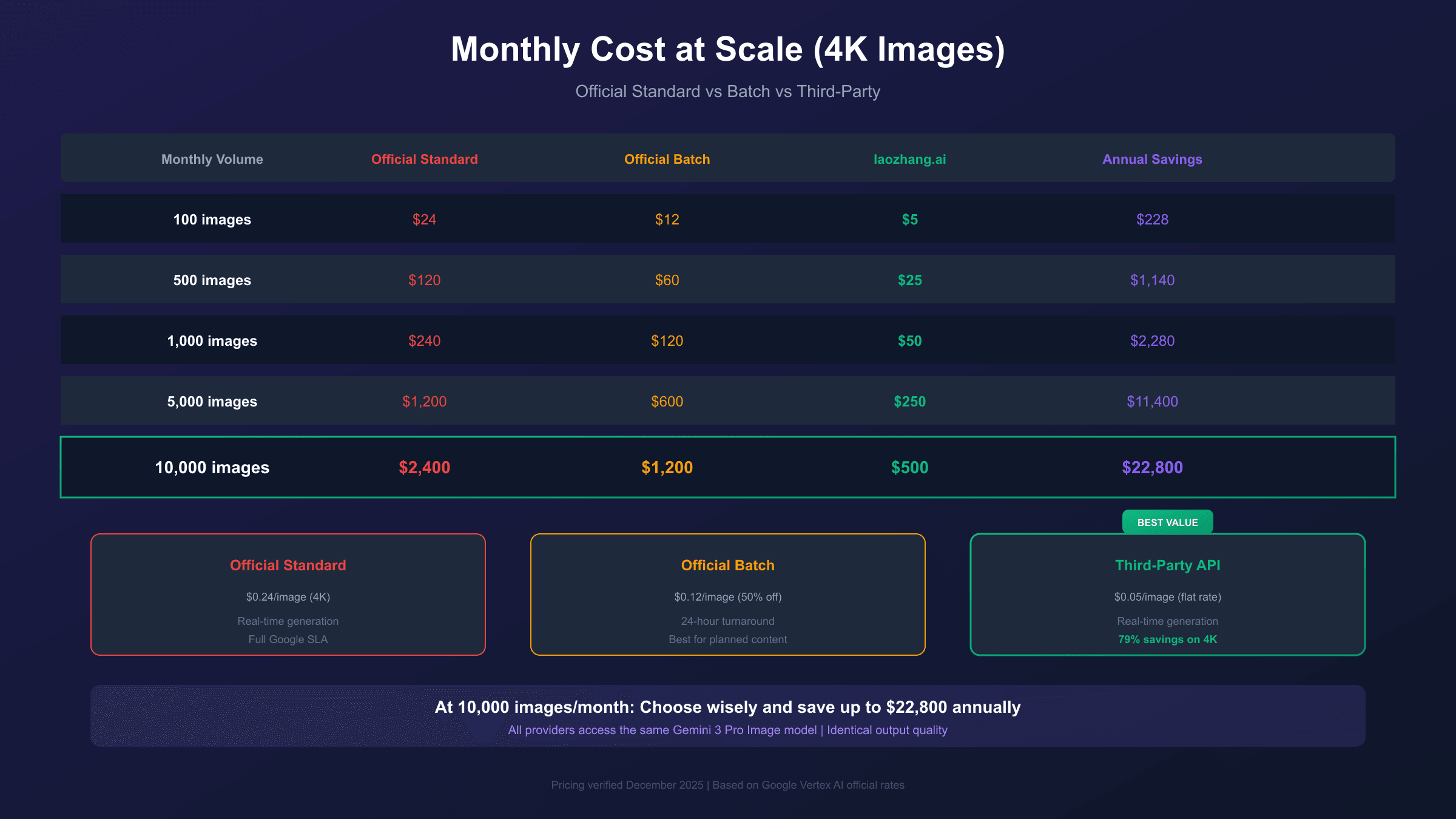
For smaller operations generating 100-500 images monthly, the absolute savings are modest ($228-$1,140 annually), and the convenience and reliability of official APIs may outweigh cost optimization. The break-even point where third-party savings become significant typically falls around 500+ images per month.
Mixed strategies work well too. Use official real-time API for client-facing demos and time-sensitive generation, then route bulk background work through cheaper channels. This approach captures most of the savings while maintaining premium service for critical workflows.
Enterprise negotiations become relevant above 50,000 images monthly. At this scale, direct discussions with Google Cloud sales teams or third-party provider account managers can unlock custom pricing tiers not publicly advertised. Committed-use contracts—guaranteeing minimum monthly spend in exchange for discounted rates—typically begin saving money at the 100,000+ image level. The negotiation leverage increases with demonstrated usage history, so running at standard rates for 2-3 months before requesting custom pricing often yields better outcomes.
Budget forecasting for variable-volume applications requires careful modeling. If your image generation scales with user activity, historical traffic patterns help predict future costs. A marketing automation platform might generate 5,000 images monthly during quiet periods but spike to 50,000 during campaign launches. Building budget models that account for this variability—using weighted averages across expected usage scenarios—prevents both over-provisioning and surprise overage charges.
Competitor Price Comparison
How does Nano Banana Pro pricing compare to other AI image generators? Here's a comprehensive market analysis:
| Platform | Per Image Cost | Max Resolution | API Access | Text Accuracy | Best For |
|---|---|---|---|---|---|
| Nano Banana Pro | $0.134-$0.24 | 4096×4096 | Full API | 94% | Text-heavy, 4K output |
| DALL-E 3 | $0.04-$0.12 | 1792×1024 | Full API | 85% | Precision, ChatGPT integration |
| Midjourney v6 | $0.05-$0.28 | 1024×1024 | Enterprise only | 71% | Artistic style |
| Imagen 3 | $0.03-$0.04 | 1024×1024 | Full API | 80% | Speed, Google ecosystem |
| Stable Diffusion | $0.002-$0.04 | Variable | Self-host/API | 65% | Customization, volume |
| Flux Pro | $0.03-$0.05 | 1024×1024 | Full API | 78% | Quality/cost balance |
This comparison reveals significant variation in what "per image cost" actually means across platforms. DALL-E 3's $0.04-$0.12 range reflects resolution tiers, but even the highest tier produces only 1792×1024 pixels—less than half the pixel count of Nano Banana Pro's 2K output at comparable cost.
Nano Banana Pro commands higher per-image pricing than most competitors, but the value proposition centers on capabilities, not price. The 94% text accuracy rate leads the industry—crucial for marketing materials where brand names, slogans, and product information must render correctly. The native 4K output eliminates upscaling artifacts that plague 1K-native competitors.
DALL-E 3 offers the most competitive direct alternative at $0.04-$0.12 per image, with excellent ChatGPT integration for prompt refinement. However, its maximum 1792×1024 resolution limits print and large-format applications.
Midjourney excels at artistic interpretation but lacks public API access—enterprise pricing starts at thousands monthly, and the Discord-based workflow doesn't integrate with automated pipelines. For programmatic generation, it's essentially unavailable.
Stable Diffusion's $0.002+ per-image pricing (via self-hosting or Replicate) represents the budget extreme, but requires significant infrastructure investment and technical expertise. The 65% text accuracy means regenerating most text-containing images multiple times.
The pricing comparison reveals an important market segmentation. Nano Banana Pro targets professional and commercial applications where quality, resolution, and text accuracy justify premium pricing. DALL-E 3 serves similar use cases with better integration into ChatGPT-based workflows. Midjourney dominates artistic and conceptual applications where creative interpretation outweighs literal accuracy. Stable Diffusion suits high-volume, cost-sensitive workloads where technical sophistication and customization requirements exist.
For applications requiring multi-image blending—combining product photos with different backgrounds, merging portraits with illustrated elements, or compositing multiple reference images into coherent outputs—Nano Banana Pro's support for up to 8 reference images per request creates unique value. Competitors typically support 0-2 reference images, limiting creative flexibility in composite workflows. The per-image price premium disappears when alternatives would require multiple generation passes or external compositing tools.
When total cost of ownership matters, factor in regeneration rates. Nano Banana Pro's 94% text accuracy means roughly 1 in 17 text-containing images needs regeneration. At DALL-E 3's 85% accuracy, that becomes roughly 1 in 7. Midjourney's 71% accuracy pushes regeneration to nearly 1 in 3 images. For a 1,000-image project with text, actual generation counts become: 1,060 (Nano Banana), 1,180 (DALL-E), and 1,400+ (Midjourney). The cheapest per-image price isn't always the cheapest total project cost.
API Integration: Python Example
Integrating Nano Banana Pro into your application requires minimal code. Here's a complete working example using laozhang.ai's OpenAI-compatible endpoint:
hljs pythonimport requests
import base64
API_KEY = "sk-YOUR_API_KEY" # Get from laozhang.ai
API_URL = "https://api.laozhang.ai/v1beta/models/gemini-3-pro-image-preview:generateContent"
headers = {
"Authorization": f"Bearer {API_KEY}",
"Content-Type": "application/json"
}
payload = {
"contents": [{
"parts": [{"text": "A professional product photo of wireless headphones on white background, 4K quality, studio lighting"}]
}],
"generationConfig": {
"responseModalities": ["IMAGE"],
"imageConfig": {
"aspectRatio": "1:1",
"imageSize": "4K"
}
}
}
response = requests.post(API_URL, headers=headers, json=payload, timeout=180)
result = response.json()
# Extract and save image
image_data = result["candidates"][0]["content"]["parts"][0]["inlineData"]["data"]
with open("headphones.png", "wb") as f:
f.write(base64.b64decode(image_data))
# Cost: $0.05 per image (vs $0.24 official)
Key implementation notes: Set timeout to 180 seconds for 4K generation—high-resolution images take 8-15 seconds even under optimal conditions. The response includes base64-encoded image data directly; no secondary download required. Error handling should catch rate limits (429), timeouts, and content policy blocks.
For production systems, implement exponential backoff for transient failures, queue management for burst requests, and result caching to avoid regenerating identical prompts. These patterns typically reduce actual API costs by 15-25% through eliminated duplicates.
Error handling deserves special attention for cost control. Content policy violations return errors without generating images but still consume rate limit capacity. Implementing pre-validation for prompts that commonly trigger safety filters prevents wasted quota. Similarly, connection timeouts at 175 seconds (just under the 180-second limit) allow retry logic to engage before complete failure, often recovering from transient network issues without user intervention.
The SDK choice affects development speed significantly. Python's requests library works as shown above, but dedicated SDKs like the official Google Cloud client library or community-maintained wrappers provide stronger typing, automatic retry logic, and cleaner response parsing. For TypeScript/JavaScript applications, the Gemini SDK offers similar benefits with proper async/await patterns already implemented.
For Node.js implementations, the pattern mirrors Python closely. Here's equivalent TypeScript code:
hljs typescriptconst response = await fetch(API_URL, {
method: 'POST',
headers: {
'Authorization': `Bearer ${API_KEY}`,
'Content-Type': 'application/json'
},
body: JSON.stringify(payload),
signal: AbortSignal.timeout(180000)
});
const result = await response.json();
const imageData = result.candidates[0].content.parts[0].inlineData.data;
const buffer = Buffer.from(imageData, 'base64');
await fs.writeFile('output.png', buffer);
The implementation patterns transfer across languages—HTTP POST with JSON payload, authentication via header, base64 decoding of response. Most programming languages with HTTP client support can integrate Nano Banana Pro within 20-30 lines of code.
Cost Optimization Strategies
Maximizing value from Nano Banana Pro requires strategic thinking beyond just choosing the cheapest provider. Here are proven optimization tactics:
Resolution matching reduces waste immediately. Audit your output destinations and generate at their actual display resolution, not an aspirational maximum. A website hero image displayed at 1920×1080 needs 2K generation, not 4K. This single adjustment cuts costs 44% with zero quality loss.
Batch consolidation captures the 50% discount for planned work. Restructure workflows to batch requests overnight: queue next week's social media images Friday evening for Monday morning delivery. Product catalogs benefit enormously—batch process entire collections rather than generating images individually.
Prompt optimization minimizes regeneration. Nano Banana Pro's 94% text accuracy means most text renders correctly on first attempt. For the remaining 6%, refine prompts with explicit text placement instructions: "centered text reading 'SALE' in bold white letters" outperforms "add sale text somewhere."
Caching identical requests eliminates waste. If your application generates the same prompt multiple times (common in template-based systems), cache results for 24-48 hours. A single product description might power dozens of page views—pay once, serve many.
Hybrid provider strategy balances reliability and cost. Route real-time, client-facing generation through official API for maximum reliability. Push bulk background work through third-party providers where 99% uptime suffices. This typically achieves 60-70% of maximum savings while maintaining premium service for critical paths.
Request batching within API calls unlocks efficiency at the protocol level. While distinct from Batch API processing (which offers 50% cost reduction), combining multiple generation requests into single API calls reduces per-request overhead. Some third-party providers offer request bundling that processes 5-10 images per API call, reducing network round-trips and associated latency.
Usage monitoring enables proactive optimization. Implement logging that tracks cost per feature, per user cohort, and per time period. This data reveals optimization opportunities invisible to aggregate billing: perhaps 80% of your costs come from 20% of users, suggesting usage-based pricing tiers. Or weekend generation volume drops 90%, indicating batch processing potential for Monday deliveries.
A/B testing generation parameters quantifies quality-cost tradeoffs. Run controlled experiments comparing 2K versus 4K output for specific use cases, measuring user engagement or conversion rates alongside cost. The data often reveals that resolution premiums don't translate to measurable business outcomes—or confirms that they do, justifying the investment.
Pricing FAQ: Common Questions Answered
Does prompt length affect pricing? No. Whether your prompt is 10 words or 500 words, the image output cost remains identical. Text tokens are billed separately at $2.00 per million—effectively negligible. A 500-word prompt adds roughly $0.001 to your generation cost.
Are there hidden fees beyond per-image costs? The main hidden cost is failed generations that consume rate limit quota without producing output. Content policy violations, malformed prompts, and timeout errors don't charge for image output but do count against your rate limits. Implementing proper validation reduces this overhead.
How often does Google change pricing? Historically, Google has maintained stable pricing for 6-12 months between adjustments. The Batch API discount has remained at 50% since introduction. Third-party providers may adjust more frequently as their own costs change.
Can I get refunds for failed generations? Official API doesn't charge for images that fail to generate, but network-level failures (timeouts on your end, not Google's) don't qualify for automatic credits. Third-party policies vary—some offer credits for any failure, others only for provider-side issues.
What's the minimum purchase or commitment? Google Cloud requires no minimum—you pay only for what you use. Some third-party providers require minimum credit purchases ($10-$50 typically), which eventually get consumed but represent upfront capital commitment.
Do prices differ by region? No. Nano Banana Pro pricing is global—the same rates apply whether you're generating from US, European, or Asian endpoints. However, egress bandwidth costs (downloading generated images) can vary by region if you're using Google Cloud storage for intermediate processing.
Is there volume-based pricing? Not publicly listed. However, enterprises generating 100,000+ images monthly can negotiate custom rates through Google Cloud sales. Third-party providers sometimes offer volume discounts starting at lower thresholds—inquire directly with providers handling significant throughput.
How do I track spending? Google Cloud Console provides real-time usage dashboards, cost alerts, and budget limits. Set spending caps to prevent unexpected charges during development. Third-party providers typically offer usage APIs or dashboard access for spend monitoring.
What happens if I exceed rate limits? Requests receive HTTP 429 (Too Many Requests) responses. Implement exponential backoff in your client code—wait 1 second after first failure, 2 seconds after second, 4 seconds after third, up to a reasonable maximum. Well-designed clients recover automatically from transient rate limiting.
Related Resources
For more details on Nano Banana Pro capabilities and alternatives, explore these related guides:
- How Much Is Nano Banana Pro? - Comprehensive pricing overview
- Nano Banana Pro Free Options - Free tier and trial access
- Cheapest Stable Nano Banana Pro API - Budget optimization strategies
- GPT Image 1.5 vs Nano Banana Pro - Direct comparison with DALL-E
External references for official pricing verification:
- Google Vertex AI Pricing
- Gemini API Developer Pricing
- Google AI Studio for free tier testing
These resources provide authoritative pricing data and should be checked before major purchasing decisions, as rates can change without individual notice. Google typically announces significant pricing changes 30-90 days in advance, but incremental adjustments may not receive formal announcement.
Conclusion: Making the Right Pricing Decision
Nano Banana Pro API pricing follows a clear hierarchy: $0.134 per image for 1K/2K resolution, $0.24 per image for 4K, with 50% batch discounts for non-urgent workflows. Third-party alternatives like laozhang.ai offer the same model at $0.05 per image flat—delivering identical quality at 79% lower cost.
For most development and production use cases, the optimal strategy combines resolution matching (don't pay for pixels you won't display), batch processing for planned content (capture that 50% discount), and third-party routing for high-volume work (maximize savings at scale). A 10,000-image monthly workflow can cost anywhere from $2,400 (worst case) to $500 (optimized)—a $22,800 annual difference from the same model producing the same images.
The decision framework simplifies to three questions. First, does your workflow tolerate 24-hour delays? If yes, batch processing delivers immediate 50% savings through official channels. Second, can you accept third-party infrastructure? If yes, further reduce costs by 60-80% depending on provider and resolution. Third, what's your quality threshold? Nano Banana Pro's 94% text accuracy and native 4K resolution command premiums that competitors can't match—if your use case requires these capabilities, the pricing makes sense.
Start with Google AI Studio's free tier to validate Nano Banana Pro fits your requirements. Then evaluate whether official API reliability justifies premium pricing for your specific use case, or whether third-party savings make more business sense. The model quality is identical—you're choosing infrastructure and support, not creative output.
For developers building products on top of Nano Banana Pro, the per-image economics directly impact business model viability. Understanding these costs—and the optimization levers available—transforms image generation from an unpredictable expense into a manageable, scalable infrastructure component. Whether you generate 100 images or 100,000, the principles remain constant: match resolution to output requirements, batch when possible, and route strategically between providers based on reliability needs.