Nano Banana Pro Image Generation: Complete Guide to Google's Most Advanced AI Image Model [2025]
Master Nano Banana Pro (Gemini 3 Pro Image) with this comprehensive guide covering features, pricing, API integration, prompting techniques, and cost optimization strategies for professional image generation.
Nano Banana Pro
4K-80%Google Gemini 3 Pro · AI Inpainting
谷歌原生模型 · AI智能修图

Google's Nano Banana Pro represents a significant leap forward in AI image generation technology. Built on the Gemini 3 Pro foundation, this model combines advanced reasoning capabilities with unprecedented image quality, offering professionals and developers a tool that generates photorealistic visuals, renders accurate text in multiple languages, and integrates real-time data through Google Search grounding.
Released in November 2025, Nano Banana Pro (officially known as Gemini 3 Pro Image) addresses many limitations that plagued earlier AI image generators. The model supports resolutions up to 4K, accepts up to 14 reference images for complex compositions, and maintains consistency across multiple characters within a single scene. These capabilities position it as the current state-of-the-art for production-quality image generation.
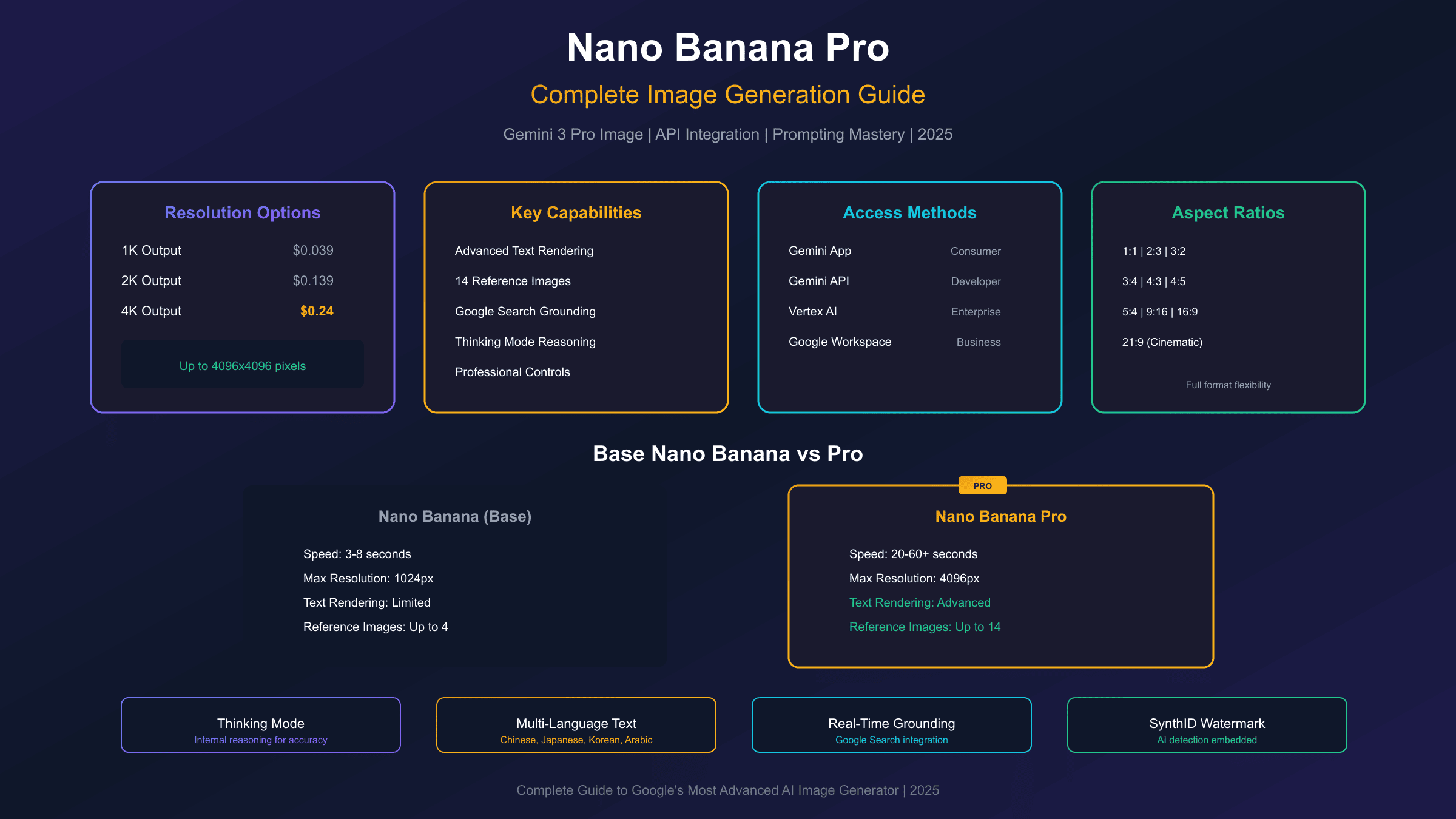
Key Specifications: 4K output ($0.24/image) | 2K output ($0.139/image) | Up to 14 reference images | Advanced text rendering | Google Search grounding
What is Nano Banana Pro
Nano Banana Pro is Google DeepMind's flagship image generation model, representing the culmination of their work on multimodal AI systems. The name derives from Google's internal project codename, though the official designation is Gemini 3 Pro Image (model ID: gemini-3-pro-image-preview). Unlike its predecessor, the base Nano Banana model which prioritizes speed, Nano Banana Pro focuses on precision, creative control, and professional-grade output quality.
The architectural foundation builds upon Gemini 3 Pro's reasoning capabilities, enabling the model to interpret complex prompts with greater accuracy than previous generations. When you request an image, the model engages in an internal "thinking" process, generating interim compositions before producing the final output. This reasoning step improves adherence to detailed specifications, particularly for prompts involving multiple subjects, specific spatial arrangements, or technical requirements like lighting conditions and camera angles.
What sets Nano Banana Pro apart from competitors like DALL-E 3, Midjourney, and Stable Diffusion is its native integration with Google's knowledge graph. The model can access real-time information through Google Search grounding, enabling it to generate images containing current data such as weather conditions, stock prices, or recent events. This capability proves particularly valuable for creating infographics, data visualizations, and time-sensitive marketing materials.
Key Features and Capabilities
Understanding what Nano Banana Pro can accomplish helps determine whether it suits your specific use case. The model excels in several areas that previous AI image generators struggled with.
High-Resolution Output
Nano Banana Pro supports three resolution tiers: 1K (approximately 1024x1024), 2K (approximately 2048x2048), and 4K (approximately 4096x4096). The resolution parameter uses uppercase 'K' in API calls (imageSize: "2K" or imageSize: "4K"). Higher resolutions preserve fine details and produce print-ready assets, though they increase both generation time and cost.
The model also supports multiple aspect ratios beyond the traditional square format. Available options include 1:1, 2:3, 3:2, 3:4, 4:3, 4:5, 5:4, 9:16, 16:9, and 21:9, covering most professional photography and video production needs.
Advanced Text Rendering
One of the most significant improvements in Nano Banana Pro is its text rendering capability. Previous AI image generators consistently struggled with legible text, producing garbled letters and inconsistent typography. Nano Banana Pro generates clear, stylized text suitable for infographics, menus, diagrams, marketing materials, and social media graphics.
The model handles multiple languages effectively, including complex scripts like Chinese, Japanese, Korean, and Arabic. You can specify font styles, sizes, and placements within your prompts, and the model will attempt to match your requirements. While not perfect for every request, the text rendering quality represents a substantial advancement over earlier models.
Multi-Image Composition
Nano Banana Pro accepts up to 14 reference images as inputs, enabling complex composition workflows. This feature supports several practical applications:
- Product mockups: Combine product photos with background scenes
- Brand integration: Blend logos and brand assets into generated environments
- Character consistency: Use up to 5 human reference images to maintain character appearance across multiple generations
- Object placement: Position up to 6 specific objects with high fidelity within compositions
Professional Controls
The model provides granular control over photographic parameters that photographers and designers expect. You can specify:
- Camera angles and lens focal lengths
- Scene lighting conditions and color temperature
- Depth of field and focus points
- Color grading and mood attributes
These controls move AI image generation closer to a professional photography workflow, where specific technical decisions shape the final output.
How to Access Nano Banana Pro
Google offers multiple access points for Nano Banana Pro, each suited to different use cases and user types.
Consumer Access
The simplest method involves the Gemini app, available on web, iOS, and Android. Select "Create Image" and choose the "Thinking" model option to use Nano Banana Pro. Free users receive limited daily generations (currently 2 images per day), after which the system reverts to the faster but less capable base Nano Banana model. Paid tiers offer higher quotas: Gemini Advanced provides 100 prompts daily, while Google One AI Premium offers 500 prompts per day.
Developer Access via API
Developers can integrate Nano Banana Pro through the Gemini API, accessible via Google AI Studio or Vertex AI for enterprise applications. The API uses the model ID gemini-3-pro-image-preview and follows the standard Gemini API format. Unlike some Google AI models, Nano Banana Pro requires a billing-enabled API key and is not available through the free tier.
The REST endpoint for direct API calls is:
https://generativelanguage.googleapis.com/v1beta/models/gemini-3-pro-image-preview:generateContent
Enterprise Deployment
Large organizations can access Nano Banana Pro through Vertex AI, which provides additional features like private endpoints, custom quotas, and enterprise security controls. The model is also integrated into Google Workspace tools including Slides and Vids for in-product image generation.
Understanding the Pricing Structure
Nano Banana Pro operates on a tiered pricing model that balances quality against cost. Understanding these tiers helps you budget appropriately and select the right resolution for each use case.
| Resolution | Official Price | Output Quality | Best For |
|---|---|---|---|
| 1K (1024px) | $0.039 | Standard | Quick drafts, concepts |
| 2K (2048px) | $0.139 | High | Web graphics, social media |
| 4K (4096px) | $0.24 | Professional | Print, marketing assets |
The pricing differential reflects computational requirements. A 4K image contains 16 million pixels compared to 1 million in a 1K image, requiring significantly more processing power and generation time. For most web applications, 2K resolution provides excellent quality at a reasonable cost.
Cost Projections for Common Use Cases
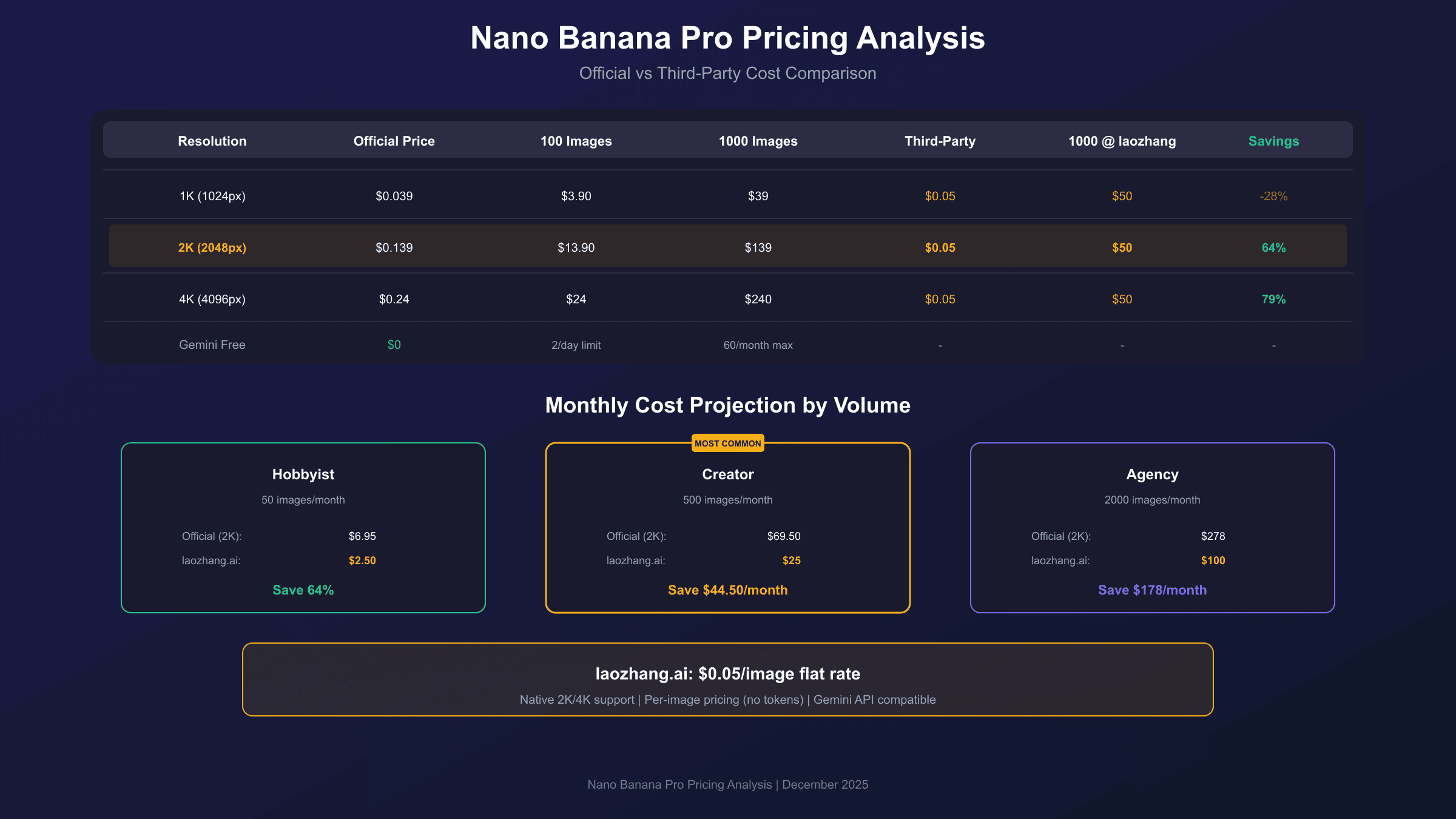
For individual creators generating approximately 50 images monthly, official API costs range from $2 (1K only) to $12 (4K only). Creative agencies with higher volumes face steeper costs: generating 1,000 images per month at 2K resolution results in approximately $139 in API fees through official channels.
Third-party API providers offer alternative pricing structures. For example, laozhang.ai provides access to Nano Banana Pro at $0.05 per image with native support for 2K and 4K parameters. This per-image pricing model eliminates token counting complexity and reduces costs for high-volume usage scenarios, though tradeoffs exist in terms of direct Google support and SLA guarantees.
API Integration Guide
Integrating Nano Banana Pro into your applications requires understanding the API structure and available parameters. The following examples demonstrate practical implementation patterns.
Basic Python Implementation
hljs pythonimport requests
import base64
# Configuration
API_KEY = "YOUR_API_KEY" # From Google AI Studio or laozhang.ai
API_URL = "https://generativelanguage.googleapis.com/v1beta/models/gemini-3-pro-image-preview:generateContent"
headers = {
"Authorization": f"Bearer {API_KEY}",
"Content-Type": "application/json"
}
payload = {
"contents": [{
"parts": [{"text": "A professional product photo of a sleek smartphone on a marble surface, soft studio lighting, 4K quality, commercial photography style"}]
}],
"generationConfig": {
"responseModalities": ["IMAGE"],
"imageConfig": {
"aspectRatio": "4:3",
"imageSize": "2K"
}
}
}
response = requests.post(API_URL, headers=headers, json=payload, timeout=180)
result = response.json()
# Extract and save the generated image
image_data = result["candidates"][0]["content"]["parts"][0]["inlineData"]["data"]
with open("product_photo.png", "wb") as f:
f.write(base64.b64decode(image_data))
Key API Parameters
The generationConfig object controls output characteristics:
- responseModalities: Set to
["IMAGE"]for image-only output, or["TEXT", "IMAGE"]for interleaved responses - aspectRatio: One of the supported ratios (1:1, 16:9, etc.)
- imageSize: Resolution tier ("1K", "2K", or "4K")
For image editing workflows, include the source image as base64 data in the parts array alongside your text prompt describing the desired modifications.
Error Handling Best Practices
Nano Banana Pro generation can take 20 seconds to over a minute depending on complexity. Implement appropriate timeout handling:
hljs pythonimport time
def generate_with_retry(payload, max_retries=3):
for attempt in range(max_retries):
try:
response = requests.post(API_URL, headers=headers, json=payload, timeout=180)
if response.status_code == 200:
return response.json()
elif response.status_code == 429: # Rate limited
time.sleep(2 ** attempt) # Exponential backoff
except requests.exceptions.Timeout:
continue
raise Exception("Max retries exceeded")
Mastering Prompts for Best Results
Effective prompting dramatically impacts output quality. The model responds best to descriptive narratives rather than keyword lists.
Prompt Structure Best Practices
Build prompts using this framework:
- Subject: What is the main focus of the image
- Action/State: What the subject is doing or how it appears
- Environment: Where the scene takes place
- Style: Artistic approach or visual treatment
- Technical details: Lighting, camera settings, resolution
Weak prompt: "cat, garden, sunny, professional photo"
Strong prompt: "A tabby cat lounging in a sunlit English cottage garden, surrounded by lavender and roses, golden hour lighting casting long shadows, shallow depth of field with the cat in sharp focus, professional nature photography style"
Text Integration Tips
When generating images with text, explicitly specify typography details:
- Font style: "in bold sans-serif typography" or "using elegant script lettering"
- Text placement: "centered at the bottom" or "along the left edge"
- Text content: Use quotation marks for exact text: "displaying the text 'Welcome Home'"
Working with Reference Images
When using reference images for character consistency or object placement:
- Provide clear images with good lighting and minimal background clutter
- Describe which elements from the reference you want preserved
- Specify how reference elements should interact with new generated content
- Use consistent reference images across a batch for character continuity
Nano Banana vs Nano Banana Pro Comparison
Google offers two distinct image generation models under the Nano Banana brand. Understanding their differences helps you choose appropriately.
| Feature | Nano Banana (Base) | Nano Banana Pro |
|---|---|---|
| Model ID | gemini-2.5-flash-image | gemini-3-pro-image-preview |
| Max Resolution | 1024x1024 | 4096x4096 |
| Generation Speed | 3-8 seconds | 20-60+ seconds |
| Text Rendering | Limited | Advanced |
| Reference Images | Up to 4 | Up to 14 |
| Google Search Grounding | No | Yes |
| Thinking Mode | No | Yes |
| Price per Image | $0.039 | $0.139-$0.24 |
When to Use Base Nano Banana
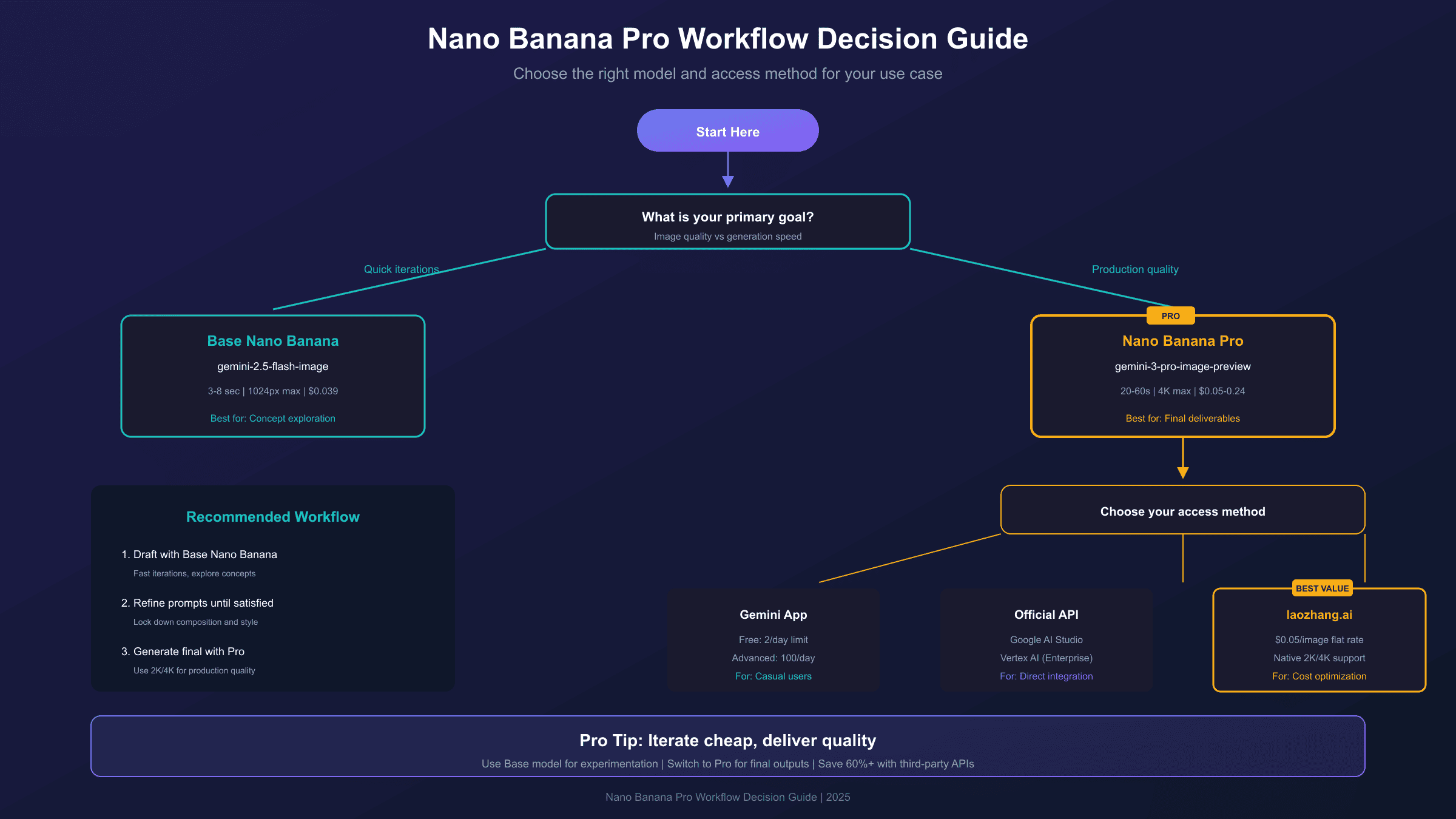
The base model suits rapid iteration, concept exploration, and high-volume generation where individual image quality matters less than throughput. It generates images in 3-8 seconds compared to 20-60+ seconds for Pro, making it practical for interactive applications.
When to Use Nano Banana Pro
Choose the Pro model when output quality directly impacts business outcomes: marketing campaigns, client deliverables, product photography, and any context where text legibility matters. The additional generation time and cost are justified by substantially higher quality.
Cost Optimization Strategies
For users generating significant volumes, several strategies can reduce expenses without sacrificing quality.
Resolution Matching
Not every image requires 4K output. Analyze your actual display requirements:
- Social media posts: 2K or even 1K suffices for most platforms
- Website headers: 2K provides excellent quality at 2x retina resolution
- Print materials: 4K is necessary for physical production
Batch Processing Efficiency
Group similar requests to leverage model warm-up effects. Processing 10 related images in sequence typically yields more consistent results than interleaving unrelated prompts.
Third-Party API Services
For developers in regions with limited Google AI access or those seeking cost optimization, third-party providers offer viable alternatives. laozhang.ai provides Nano Banana Pro API access at $0.05 per image, supporting the native Gemini API format including 2K/4K parameters. This represents significant savings for high-volume usage (approximately 64% reduction compared to official 2K pricing), with the tradeoff of routing requests through an intermediary service.
Sample integration using laozhang.ai's endpoint:
hljs pythonimport requests
import base64
API_KEY = "sk-YOUR_LAOZHANG_KEY" # From laozhang.ai
API_URL = "https://api.laozhang.ai/v1beta/models/gemini-3-pro-image-preview:generateContent"
headers = {
"Authorization": f"Bearer {API_KEY}",
"Content-Type": "application/json"
}
payload = {
"contents": [{
"parts": [{"text": "Professional business card design, elegant typography, minimalist style, 4K quality"}]
}],
"generationConfig": {
"responseModalities": ["IMAGE"],
"imageConfig": {
"aspectRatio": "3:2",
"imageSize": "4K" # Native 4K support at $0.05/image
}
}
}
response = requests.post(API_URL, headers=headers, json=payload, timeout=180)
result = response.json()
image_data = result["candidates"][0]["content"]["parts"][0]["inlineData"]["data"]
with open("business_card.png", "wb") as f:
f.write(base64.b64decode(image_data))
You can also try the service online before integrating the API.
Limitations and Best Practices
While Nano Banana Pro represents the current state-of-the-art, understanding its limitations helps set appropriate expectations.
Known Limitations
Realism Bias: The model strongly favors realistic outputs. Requests for surreal, abstract, or intentionally unrealistic imagery often get "corrected" toward conventional representations. If you need truly abstract or stylized results, the base Nano Banana model may actually perform better.
Character Reference Adherence: When provided reference images of stylized or non-canonical characters, the model tends to normalize toward mainstream representations rather than matching the reference style precisely.
Grounding Reliability: While Google Search grounding enables real-time data integration, the feature doesn't consistently surface information about recent cultural phenomena or niche topics beyond the model's training data.
Small Details: Faces at small scales, fine text in complex scenes, and intricate patterns may still exhibit artifacts. Review generated images at 100% zoom before final use.
Best Practices for Professional Use
- Quality control workflow: Generate multiple variations and select the best rather than expecting perfection from single generations
- Iterative refinement: Use the conversation interface for progressive adjustments rather than crafting the perfect prompt immediately
- Resolution budgeting: Start with 2K for drafts, upgrade to 4K only for final approved concepts
- Prompt documentation: Maintain a library of effective prompts for consistent style across projects
- SynthID awareness: All generated images include SynthID watermarks, detectable through Google's verification tools
Safety Considerations
Google applies content filtering to prevent generation of harmful, deceptive, or inappropriate imagery. Nano Banana Pro will refuse requests that violate usage policies, including generating realistic images of public figures, creating deceptive content, or producing explicit material. For enterprise applications with specialized needs, discuss requirements directly with Google Cloud sales.
Conclusion
Nano Banana Pro establishes a new benchmark for AI image generation, combining superior output quality with practical features like text rendering and real-time data integration. The model suits professional workflows where image quality directly impacts outcomes, from marketing materials to product visualization.
For most users, the recommended approach involves starting with the base Nano Banana model for rapid experimentation, then switching to Nano Banana Pro for final production outputs. This workflow balances cost efficiency during iteration with quality assurance for deliverables. Developers integrating at scale should evaluate both official Google pricing and third-party alternatives to optimize for their specific volume and budget requirements.
Whether accessing through the Gemini app for occasional use or integrating via API for automated workflows, Nano Banana Pro provides the capabilities needed to create professional-grade AI-generated imagery. The combination of high resolution output, advanced text rendering, and sophisticated composition controls positions it as the leading choice for businesses and creators requiring production-quality results.
For more detailed guides, explore our related articles: Nano Banana Pro Pricing Guide for cost analysis, Complete API Documentation for technical reference, and Best Prompts for Nano Banana Pro for prompt engineering tips.