Fix Nano Banana Pro Policy & Blocked Errors: Complete Troubleshooting Guide (2025)
Solve Nano Banana Pro "Content Blocked" and policy violation errors with proven fixes. Includes trigger word reference, safety settings configuration, prompt engineering techniques, and debugging workflow.
Nano Banana Pro
4K-80%Google Gemini 3 Pro · AI Inpainting
谷歌原生模型 · AI智能修图

"Content Blocked" and "Content Not Permitted" are the most frustrating errors when using Nano Banana Pro. Unlike rate limits or server errors that resolve with time, policy violations require understanding exactly what triggered the block and how to reframe your request. This guide provides systematic solutions for every type of content policy error you'll encounter.
The core challenge is that Google's safety filters operate as a black box—the same prompt might work perfectly one day and get blocked the next. Based on extensive testing and analysis of Google's official safety documentation, developer forum reports, and real-world API responses, this guide maps the complete landscape of policy errors and their proven solutions.
Whether you're seeing finishReason: SAFETY in API responses, encountering "Content Not Permitted" in Google AI Studio, or dealing with mysteriously blocked prompts that seem completely innocent, you'll find actionable fixes here. The key is correctly diagnosing which type of block you're facing, then applying the right solution for that specific category.
Understanding Nano Banana Pro Content Policy Errors
Before attempting fixes, you need to understand the different types of content policy errors and what each one actually means. Google uses multiple layers of content filtering, each with different behaviors and workarounds.
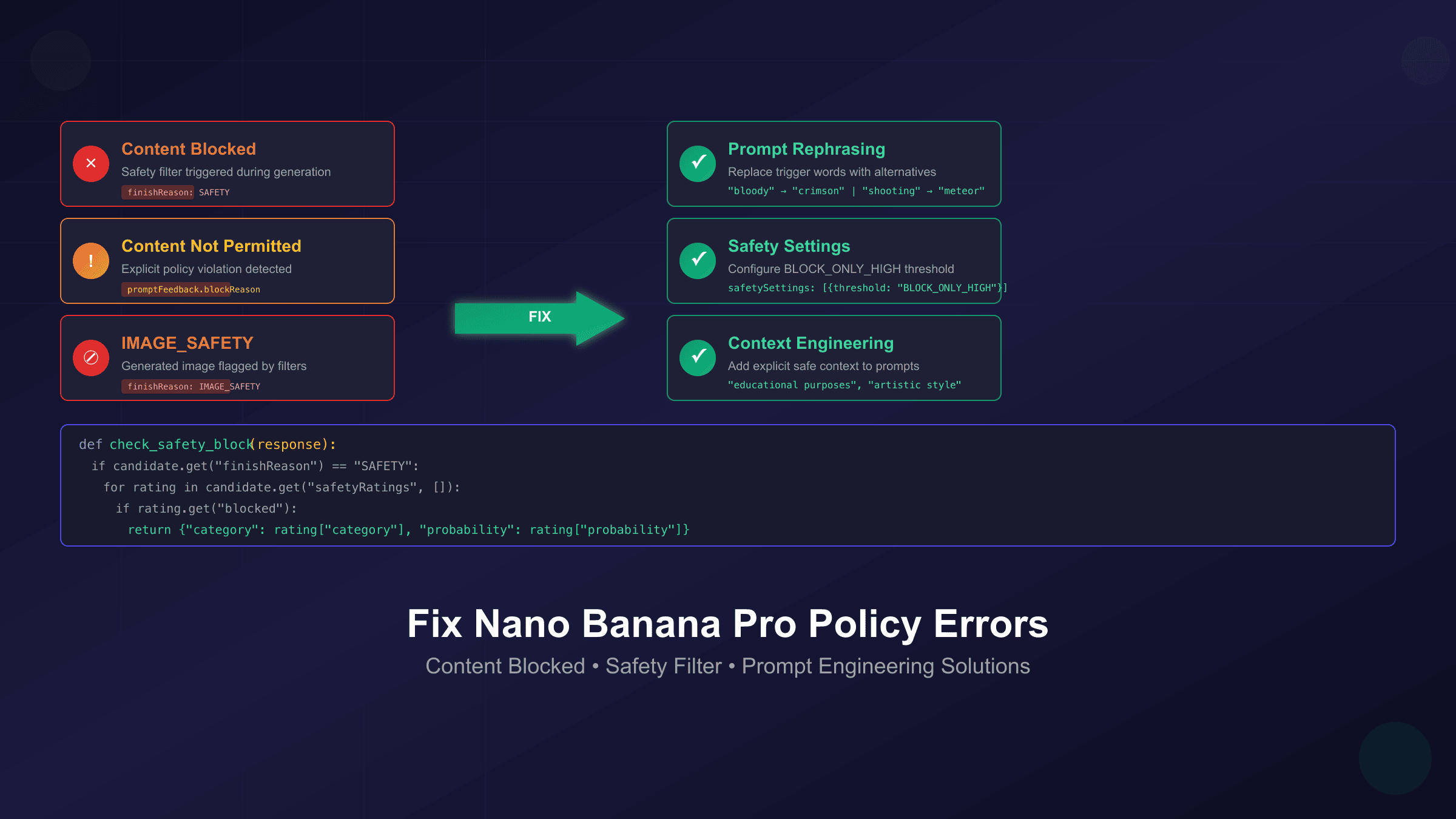
"Content Blocked" appears when Google's safety filter detects a high probability of unsafe content in either your prompt or the generated image. This is the most common error, triggered by keyword patterns, image analysis, or contextual interpretation. The important distinction is that "blocked" indicates the model attempted to process your request but stopped during generation due to safety concerns.
"Content Not Permitted" signals a more explicit policy violation. This message appears when your prompt contains keywords or requests that directly violate Google's usage policies—requests for real person manipulation, copyrighted characters, or content categories that are strictly prohibited regardless of context. Unlike "Content Blocked," this rejection often happens before any generation attempt.
finishReason: SAFETY is what API users see in the response object when content is blocked. The response will include a safetyRatings array showing which category triggered the block and the probability level. Understanding this response structure is essential for debugging API integrations.
finishReason: IMAGE_SAFETY is specific to image generation endpoints. This indicates the generated image itself (not just the prompt) was flagged by Google's image analysis. Even a seemingly safe prompt can trigger this if the model generates an image that violates visual content policies.
promptFeedback.blockReason appears when the prompt itself is rejected before any generation occurs. If this field is set, the API won't attempt to generate anything—your prompt was blocked at the input validation stage rather than during generation.
| Error Type | Where It Appears | Meaning | Primary Cause |
|---|---|---|---|
| Content Blocked | Web interface | Safety filter triggered during generation | Trigger words, context interpretation |
| Content Not Permitted | Web interface | Explicit policy violation | Prohibited content categories |
| finishReason: SAFETY | API response | Generation stopped by safety filter | Combined prompt and output analysis |
| finishReason: IMAGE_SAFETY | API response | Generated image flagged | Visual content violation |
| promptFeedback.blockReason | API response | Prompt rejected before generation | Input validation failure |
Understanding these distinctions matters because the fix for each type differs. A "Content Blocked" error from a false positive requires prompt rephrasing, while "Content Not Permitted" may indicate you're requesting something that cannot be generated regardless of how you phrase it.
Quick Fixes to Try First
Before diving into complex debugging, try these quick solutions that resolve the majority of policy errors. These work for both web interface and API users.
Clear Your Session and Cache
According to multiple reports on Google's developer forums, cached context from previous conversations can contaminate new requests. The model maintains conversation memory, and previous prompts in the same session may bias how it interprets your new request.
The fix is straightforward: close your current Gemini session completely, clear your browser cache and cookies, then open a fresh session. For API users, create a new conversation thread rather than continuing an existing one. This reset eliminates any accumulated context that might be triggering false positives.
Start with an Obviously Safe Prompt
Before retrying your actual prompt, test with something unambiguously safe like "Generate an image of a blue square on a white background." If this simple prompt works, your account and API access are functioning correctly—the issue is with your specific prompt. If even this fails, you have a deeper configuration or service problem.
Remove All Ambiguity
Vague prompts give the model room for unsafe interpretation. The phrase "add some drama" could mean dramatic lighting or violent content. Instead of relying on the model to interpret your intent safely, specify exactly what you mean: "add dramatic contrast lighting with deep shadows."
Check for Hidden Context
If you're using a multi-turn conversation or image editing workflow, review all previous messages in the thread. The model considers the full context, so even if your current prompt is safe, something from earlier in the conversation might be creating a problematic interpretation. Try your prompt in a completely fresh session to isolate the issue.
Verify Image Input Quality
When editing or extending existing images, the source image itself can trigger blocks. Heavily compressed images with artifacts may be misinterpreted, and low-resolution faces can appear distorted in ways that trigger safety filters. Try with a higher-quality source image if you're consistently getting blocks on image-to-image operations.
Complete Trigger Word Reference
Certain words trigger Google's safety filters even when used in completely innocent contexts. This reference table documents known trigger words and their safe alternatives, compiled from developer reports and testing.
| Trigger Word | Why It Triggers | Safe Alternative |
|---|---|---|
| naked | Adult content filter | bare, exposed, uncovered |
| blood, bloody | Violence filter | red, crimson, deep red |
| shoot, shooting | Violence filter | capture (for photos), meteor (for stars) |
| kill, killing | Violence filter | eliminate, remove |
| gun, weapon | Violence filter | tool, device, equipment |
| drug, drugs | Substance filter | medication, medicine |
| child + any adult context | Child safety | Specify adult subjects explicitly |
| celebrity names | Real person filter | character description instead |
| brand logos | Copyright filter | generic version description |
| nude | Adult content filter | unclothed, natural |
| bomb, explosive | Violence filter | burst, vibrant, dynamic |
| slave | Hate speech filter | worker, servant |
| torture | Violence filter | stress, challenge |
Context-Dependent Triggers
Some words only trigger blocks when combined with other terms. "Bloody" alone might be fine for "bloody mary cocktail" but blocked when combined with action verbs. Similarly, "shooting" works in "shooting hoops" but fails with "shooting scene."
The False Positive Problem
Many legitimate artistic and professional prompts get caught by overly broad filters. For example, "shooting stars over mountains" may trigger the violence filter on "shooting" despite the clearly astronomical context. The solution is preemptive rewording: "meteor shower over mountains" conveys the same meaning without the trigger word.
Proper Nouns and Copyright
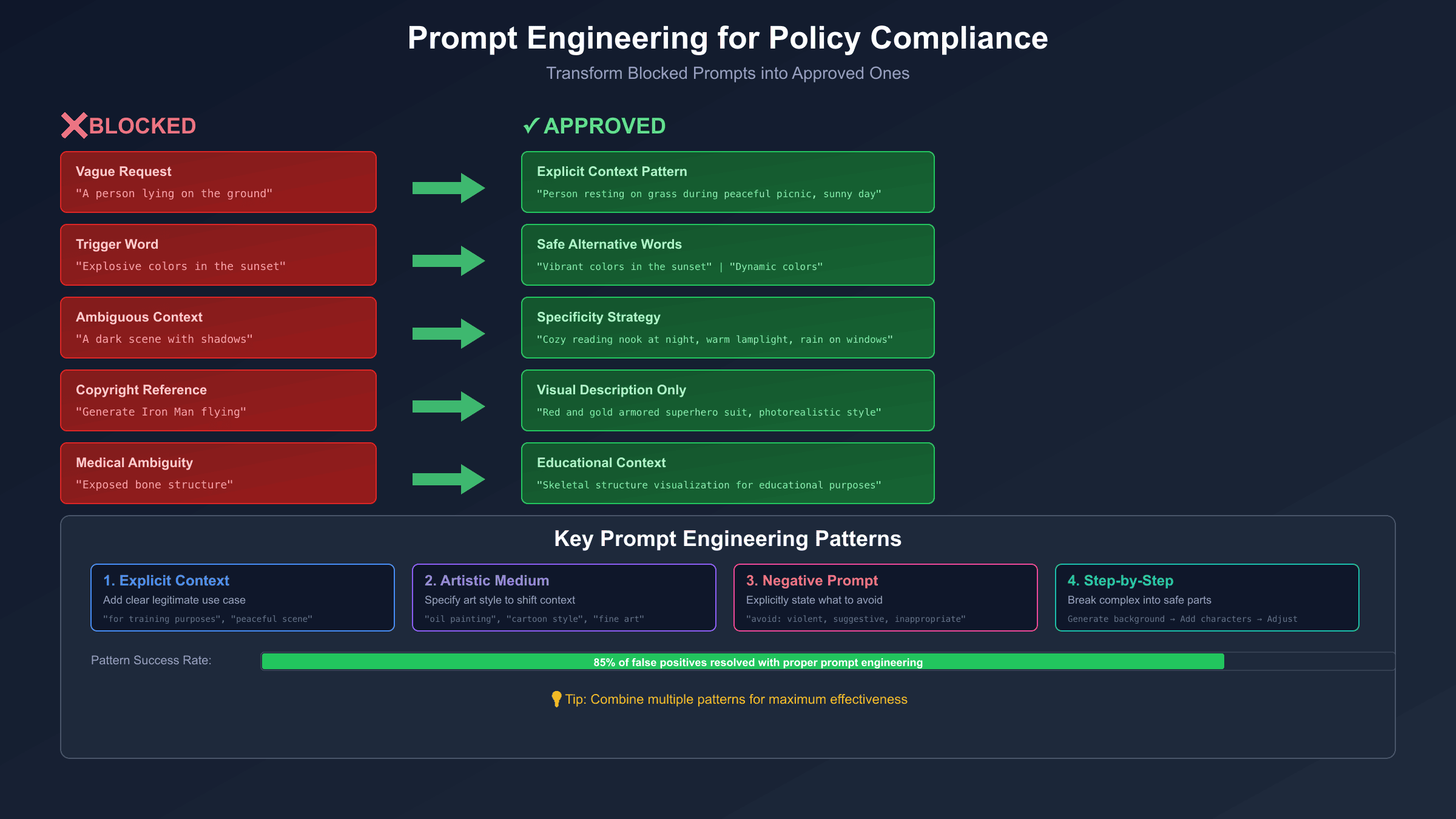
Requests involving celebrities, fictional characters, or branded content face stricter filtering. "Generate Iron Man" will typically fail due to Marvel copyright, but "generate a red and gold armored superhero suit in photorealistic style" often succeeds because it describes visual characteristics rather than copyrighted intellectual property.
Medical and Scientific Context
Medical imagery presents challenges because accurate terminology often triggers content filters. "Exposed bone structure" for an anatomy illustration may fail, while "skeletal structure visualization for educational purposes" provides context that helps the model understand the legitimate use case. Always add contextual qualifiers for medical, scientific, or educational content.
Safety Settings Configuration for API Users
API users can adjust safety filter sensitivity through the safetySettings parameter. Understanding these options and their limitations is essential for production applications.
Available Harm Categories
Google provides four configurable harm categories, each with independent threshold settings:
- HARM_CATEGORY_HARASSMENT: Content targeting individuals
- HARM_CATEGORY_HATE_SPEECH: Content promoting hatred toward groups
- HARM_CATEGORY_SEXUALLY_EXPLICIT: Adult sexual content
- HARM_CATEGORY_DANGEROUS_CONTENT: Instructions for harmful activities
Threshold Levels
Each category accepts one of four threshold values:
| Threshold | Behavior |
|---|---|
| BLOCK_LOW_AND_ABOVE | Most restrictive—blocks low, medium, and high probability content |
| BLOCK_MEDIUM_AND_ABOVE | Default—blocks medium and high probability content |
| BLOCK_ONLY_HIGH | Less restrictive—only blocks high probability content |
| BLOCK_NONE | Least restrictive—no automated blocking for this category |
Implementation Example
hljs pythonimport requests
API_KEY = "your-api-key"
API_URL = "https://generativelanguage.googleapis.com/v1beta/models/gemini-3-pro-image-preview:generateContent"
headers = {
"Content-Type": "application/json",
}
payload = {
"contents": [{
"parts": [{"text": "Your image prompt here"}]
}],
"generationConfig": {
"responseModalities": ["IMAGE"],
},
"safetySettings": [
{"category": "HARM_CATEGORY_HARASSMENT", "threshold": "BLOCK_ONLY_HIGH"},
{"category": "HARM_CATEGORY_HATE_SPEECH", "threshold": "BLOCK_ONLY_HIGH"},
{"category": "HARM_CATEGORY_SEXUALLY_EXPLICIT", "threshold": "BLOCK_MEDIUM_AND_ABOVE"},
{"category": "HARM_CATEGORY_DANGEROUS_CONTENT", "threshold": "BLOCK_ONLY_HIGH"}
]
}
response = requests.post(
f"{API_URL}?key={API_KEY}",
headers=headers,
json=payload,
timeout=120
)
result = response.json()
Critical Limitations
According to Google's official documentation, certain protections cannot be adjusted. Child safety content is always blocked regardless of safety settings. Similarly, content that violates Google's Terms of Service or AI Principles will be blocked even with BLOCK_NONE settings.
The documentation states explicitly: "To guarantee the Google commitment with Responsible AI development and its AI Principles, for some prompts Gemini will avoid generating the results even if you set all the filters to none." This means safety settings adjust sensitivity, not eliminate filtering entirely.
Interpreting Blocked Responses
When content is blocked, the API response includes diagnostic information:
hljs pythondef check_safety_block(response):
if "candidates" in response:
candidate = response["candidates"][0]
if candidate.get("finishReason") == "SAFETY":
print("Content blocked by safety filter")
for rating in candidate.get("safetyRatings", []):
if rating.get("blocked"):
print(f" Category: {rating['category']}")
print(f" Probability: {rating['probability']}")
return True
if "promptFeedback" in response:
block_reason = response["promptFeedback"].get("blockReason")
if block_reason:
print(f"Prompt blocked: {block_reason}")
return True
return False
This diagnostic function helps identify exactly which category triggered the block, enabling targeted prompt modifications.
Prompt Engineering for Policy Compliance
Crafting prompts that avoid safety filters while achieving your creative goals requires systematic techniques. These patterns work consistently across both web interface and API access.
The Explicit Context Pattern
Add explicit context that frames your request within a clearly legitimate use case. Compare these approaches:
❌ "A person lying on the ground"
✅ "A person resting on grass during a peaceful picnic in a park, sunny day"

❌ "Medical procedure close-up"
✅ "Educational medical illustration of surgical technique for training purposes, anatomical diagram style"

❌ "Police confrontation scene"
✅ "Documentary-style photograph of community policing, officers engaged in friendly neighborhood conversation"
The key is providing enough context that the model cannot reasonably interpret your request as harmful.
The Artistic Medium Pattern
Specifying an artistic medium shifts interpretation away from photorealistic potentially-harmful content toward clearly artistic representation:
❌ "Battle scene with warriors"
✅ "Renaissance oil painting depicting historical battle, museum quality, dramatic composition"

❌ "Dark disturbing imagery"
✅ "Expressionist art piece in the style of Edvard Munch, emotional psychological themes, fine art"
This works because artistic historical depictions of conflict or challenging themes are treated differently than realistic modern imagery.
The Negative Prompt Pattern
Explicitly tell the model what to avoid. This technique guides generation away from problematic interpretations:
"Professional headshot portrait of a business executive,
corporate photography style, neutral background,
style: professional, clean, corporate,
avoid: provocative, suggestive, inappropriate, violent"
The explicit "avoid" section provides guardrails that help the model stay within safe territory.
The Step-by-Step Pattern
Break complex prompts into simpler components that are each clearly safe:
Instead of:
"Generate a dramatic action scene with characters in conflict"
Try:
Step 1: "Generate a desert landscape with dramatic storm clouds"
Step 2: "Add two cartoon characters in adventurer outfits to the scene"
Step 3: "Adjust their poses to show determination and focus"
Each step is unambiguously safe, and the accumulated result achieves your creative goal without triggering filters.
The Specificity Strategy
Vague requests trigger blocks because the model must fill in details, and it may fill them in unsafely. Providing comprehensive detail leaves no room for problematic interpretation:
❌ "A dark scene"
✅ "A cozy reading nook at night, warm lamplight, rain on windows,
    person relaxed in armchair reading a book, steam rising from tea cup,
    rich wood tones, peaceful evening atmosphere"
The detailed version describes exactly what "dark" means in this context—nighttime ambiance, not disturbing content.
Systematic Debugging Workflow
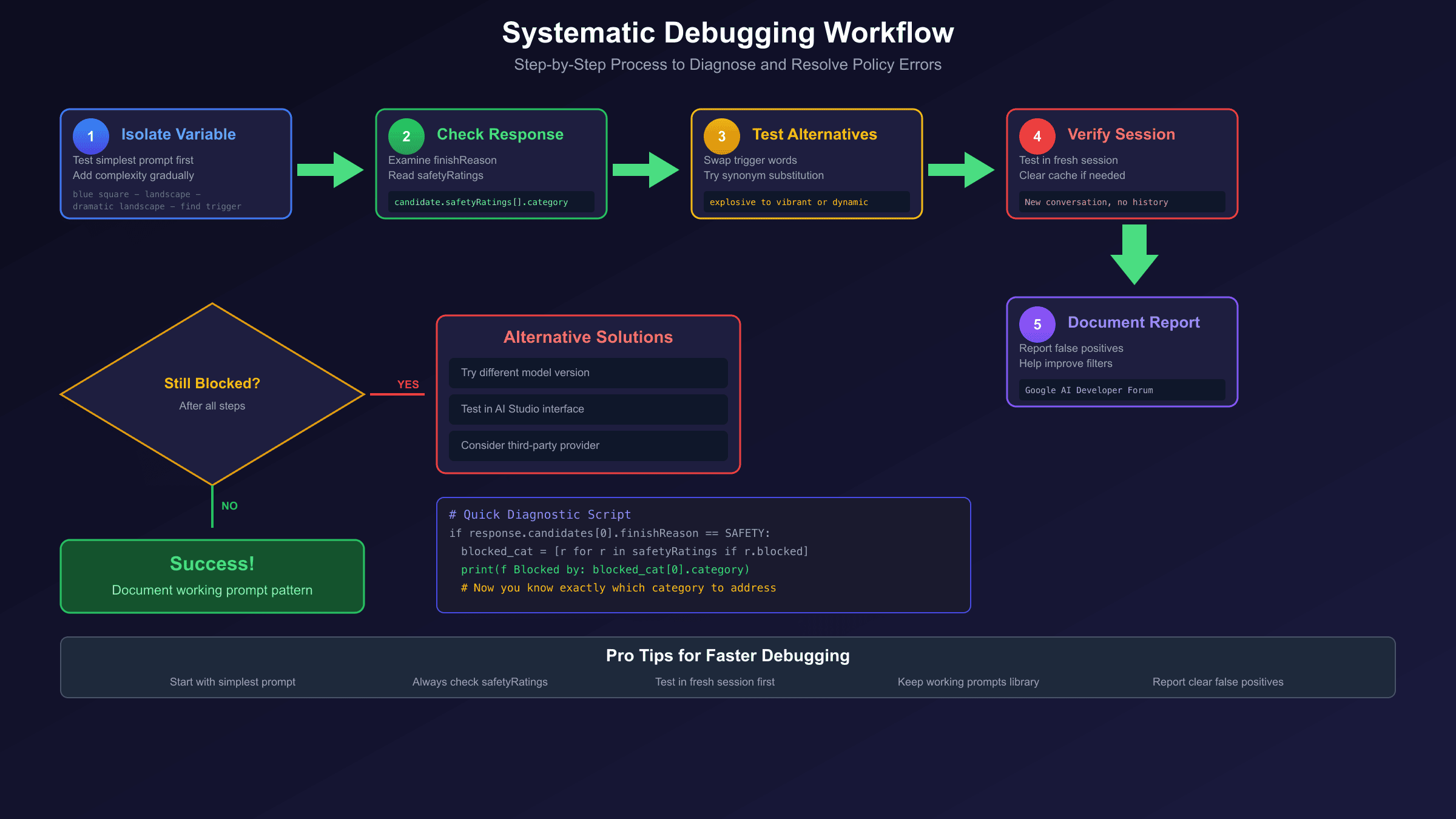
When quick fixes don't work, follow this systematic debugging process to identify and resolve the issue.
Step 1: Isolate the Variable
Start with the simplest possible prompt and gradually add complexity until you identify exactly which element triggers the block.
hljs pythondef debug_prompt_components(components):
"""Test each component individually to find trigger"""
base_prompt = "Generate an image of"
for component in components:
test_prompt = f"{base_prompt} {component}"
print(f"Testing: {test_prompt}")
result = generate_image(test_prompt)
if is_blocked(result):
print(f" ❌ BLOCKED: '{component}' triggers filter")
else:
print(f" ✅ PASSED")
# Example usage
components = [
"a landscape",
"a landscape with mountains",
"a dramatic landscape with mountains",
"a dramatic landscape with explosive colors and mountains"
]
debug_prompt_components(components)
This approach pinpoints exactly which word or phrase causes the problem.
Step 2: Check the Response Structure
For API users, examine the full response object to understand why content was blocked:
hljs pythondef analyze_block_response(response):
"""Extract all diagnostic information from blocked response"""
analysis = {
"prompt_blocked": False,
"generation_blocked": False,
"categories_triggered": [],
"block_reason": None
}
# Check prompt-level blocking
if "promptFeedback" in response:
feedback = response["promptFeedback"]
if "blockReason" in feedback:
analysis["prompt_blocked"] = True
analysis["block_reason"] = feedback["blockReason"]
# Check generation-level blocking
if "candidates" in response and len(response["candidates"]) > 0:
candidate = response["candidates"][0]
finish_reason = candidate.get("finishReason")
if finish_reason in ["SAFETY", "IMAGE_SAFETY"]:
analysis["generation_blocked"] = True
analysis["block_reason"] = finish_reason
for rating in candidate.get("safetyRatings", []):
if rating.get("blocked") or rating.get("probability") == "HIGH":
analysis["categories_triggered"].append({
"category": rating["category"],
"probability": rating.get("probability", "UNKNOWN")
})
return analysis
Step 3: Test Alternative Formulations
Once you know which element triggers the block, systematically test alternatives:
hljs pythonalternatives = {
"explosive": ["vibrant", "dynamic", "powerful", "intense"],
"bloody": ["crimson", "deep red", "scarlet", "ruby"],
"shooting": ["capturing", "filming", "recording", "photographing"]
}
def find_working_alternative(original_prompt, trigger_word):
if trigger_word in alternatives:
for alt in alternatives[trigger_word]:
modified_prompt = original_prompt.replace(trigger_word, alt)
result = generate_image(modified_prompt)
if not is_blocked(result):
print(f"Success with '{alt}' instead of '{trigger_word}'")
return modified_prompt
return None
Step 4: Verify Session Context
If the same prompt works in a new session but fails in your current session, accumulated context is the issue. For API applications, implement context windowing or periodic session resets:
hljs pythonclass ManagedSession:
def __init__(self, max_requests=50):
self.request_count = 0
self.max_requests = max_requests
self.session_id = self._create_session()
def generate(self, prompt):
if self.request_count >= self.max_requests:
self._reset_session()
result = generate_with_session(prompt, self.session_id)
self.request_count += 1
return result
def _reset_session(self):
self.session_id = self._create_session()
self.request_count = 0
print("Session reset to clear accumulated context")
Step 5: Document and Report
If you've identified a clear false positive—an obviously safe prompt being blocked—document it for Google's improvement process. Report through Google AI Studio feedback or the AI Developer Forum. Well-documented reports with specific prompts help Google refine their filtering algorithms.
Handling Persistent Blocks
When standard fixes fail and you're dealing with blocks that seem unfair or inconsistent, consider these advanced approaches.
The Model Version Factor
Different versions of Gemini's image generation model have different safety filter sensitivities. According to developer reports, the exact same prompt may work with one model version and fail with another.
For API users, check available models and test across versions:
hljs pythondef list_available_models(api_key):
response = requests.get(
f"https://generativelanguage.googleapis.com/v1beta/models?key={api_key}"
)
models = response.json().get("models", [])
image_models = [m for m in models if "image" in m.get("name", "").lower()]
return image_models
The Interface Difference
Some users report that prompts blocked through the API work perfectly in Google AI Studio's web interface, or vice versa. This inconsistency suggests that different access methods may have slightly different filtering configurations or processing pipelines.
If API calls consistently fail, test the same prompt in Google AI Studio. If it works there, the issue may be in your API configuration rather than the prompt itself.
When Google's Service Is the Problem
For production workflows where content blocks cause business impact, third-party API providers offer an alternative path. These providers access Nano Banana Pro through different infrastructure and may have different filtering behavior.
For example, laozhang.ai provides Nano Banana Pro access at $0.05 per image with higher rate limits. While third-party providers still enforce content policies, the different infrastructure may result in fewer false positives for your specific use case. This represents a trade-off: you lose direct Google support and introduce a third-party dependency, but gain potential workarounds for persistent blocking issues.
Building Fallback Logic
For robust production applications, implement fallback handling:
hljs pythondef generate_with_fallbacks(prompt, providers):
"""Try multiple providers until one succeeds"""
for provider in providers:
try:
result = provider.generate(prompt)
if not is_blocked(result):
return result
except Exception as e:
print(f"Provider {provider.name} failed: {e}")
continue
# All providers failed - try prompt modification
modified_prompt = apply_safety_rewrites(prompt)
for provider in providers:
try:
result = provider.generate(modified_prompt)
if not is_blocked(result):
return result
except:
continue
raise Exception("All providers and modifications exhausted")
Best Practices for Avoiding Future Blocks
Preventing policy violations is more efficient than debugging them. Adopt these practices to minimize blocking issues in your Nano Banana Pro workflows.
Pre-Check Your Prompts
Before sending to the image generation API, run prompts through a text-only Gemini model to check for potential issues:
hljs pythondef pre_check_prompt(prompt):
"""Use text model to assess prompt safety before image generation"""
check_prompt = f"""
Analyze this image generation prompt for potential content policy issues:
Prompt: "{prompt}"
Identify any words or concepts that might trigger content filters.
Suggest safer alternatives if issues are found.
"""
# Use text-only model for cheaper, faster pre-check
response = text_model.generate(check_prompt)
return response
Build a Tested Prompt Library
Maintain a library of prompts that you've verified work without blocks. Use these as templates for new requests:
hljs pythonSAFE_TEMPLATES = {
"portrait": "Professional portrait photograph of {subject}, studio lighting, neutral background, corporate style",
"landscape": "Scenic landscape of {location}, golden hour lighting, wide angle, nature photography style",
"product": "Commercial product photography of {item}, clean white background, studio lighting, e-commerce style"
}
def generate_from_template(template_name, variables):
template = SAFE_TEMPLATES.get(template_name)
if template:
return template.format(**variables)
raise ValueError(f"Unknown template: {template_name}")
Monitor for Pattern Changes
Google periodically updates safety filters. A prompt that worked last week might fail today. Implement monitoring to catch these changes early:
hljs pythondef test_baseline_prompts():
"""Regular health check with known-good prompts"""
baseline_prompts = [
"A simple red circle on white background",
"A cartoon cat sitting on a blue cushion",
"A landscape photograph of mountains at sunset"
]
failures = []
for prompt in baseline_prompts:
result = generate_image(prompt)
if is_blocked(result):
failures.append(prompt)
if failures:
alert(f"Baseline prompts now blocked: {failures}")
Handle Geographic and Account Factors
Some blocking behavior varies by geographic location or account type. European accounts may face stricter filtering due to GDPR requirements. Ensure your testing accounts match your production environment's characteristics.
Frequently Asked Questions
Why does the same prompt work sometimes and get blocked other times?
This inconsistency typically results from three factors. First, model updates—Google periodically refines safety filters, changing what triggers blocks. Second, session context—accumulated history in multi-turn conversations may bias interpretation. Third, server-side variations—different processing nodes may have slightly different filter configurations. The solution is implementing retry logic with session resets, and using prompt templates that have been verified to work consistently.
Can I completely disable content filtering for my API calls?
No. While you can set safety thresholds to BLOCK_NONE for the four configurable harm categories, Google maintains server-side protections that cannot be disabled. Child safety content and Terms of Service violations are always blocked regardless of your settings. According to Google's documentation, "for some prompts Gemini will avoid generating the results even if you set all the filters to none."
Why do innocent prompts like "a sleeping cat" sometimes get blocked?
Google's filters analyze semantic meaning, not just keywords. A prompt about a sleeping animal could theoretically be interpreted as depicting animal harm or neglect in certain contexts. The filters err on the side of caution. The fix is adding positive context: "a content cat peacefully napping on a sunny windowsill, happy expression, comfortable cushion" leaves no room for harmful interpretation.
How do I know if it's my prompt or a service issue causing the block?
Test with an obviously safe prompt like "Generate an image of a blue square on white background." If this simple prompt succeeds, the issue is with your specific prompt. If it also fails, check Google's status page and your API configuration. Additionally, try the exact same prompt in a fresh session—if it works there, session context is contaminating your current thread.
Are third-party API providers less restrictive than Google directly?
Third-party providers like laozhang.ai still enforce content policies—they cannot generate prohibited content. However, they may have different infrastructure that results in fewer false positives for your specific use cases. The filtering behavior may vary, so prompts that fail through Google's direct API might succeed through alternative providers. This is a practical workaround for false positives, not a way to generate prohibited content.
For related troubleshooting, see our Nano Banana Pro Complete Fix Guide covering rate limits, server errors, and other issues. To optimize your prompts for better results, check our guide on best prompts for Nano Banana Pro.