Sora 2 Character Creation API: Complete Guide to Consistent Characters with Code Examples
Master Sora 2 character creation API with this comprehensive guide covering both video URL and task ID methods, Python implementation, timestamp optimization, and production best practices for maintaining character consistency across video generations.
Nano Banana Pro
4K-80%Google Gemini 3 Pro · AI Inpainting
谷歌原生模型 · AI智能修图

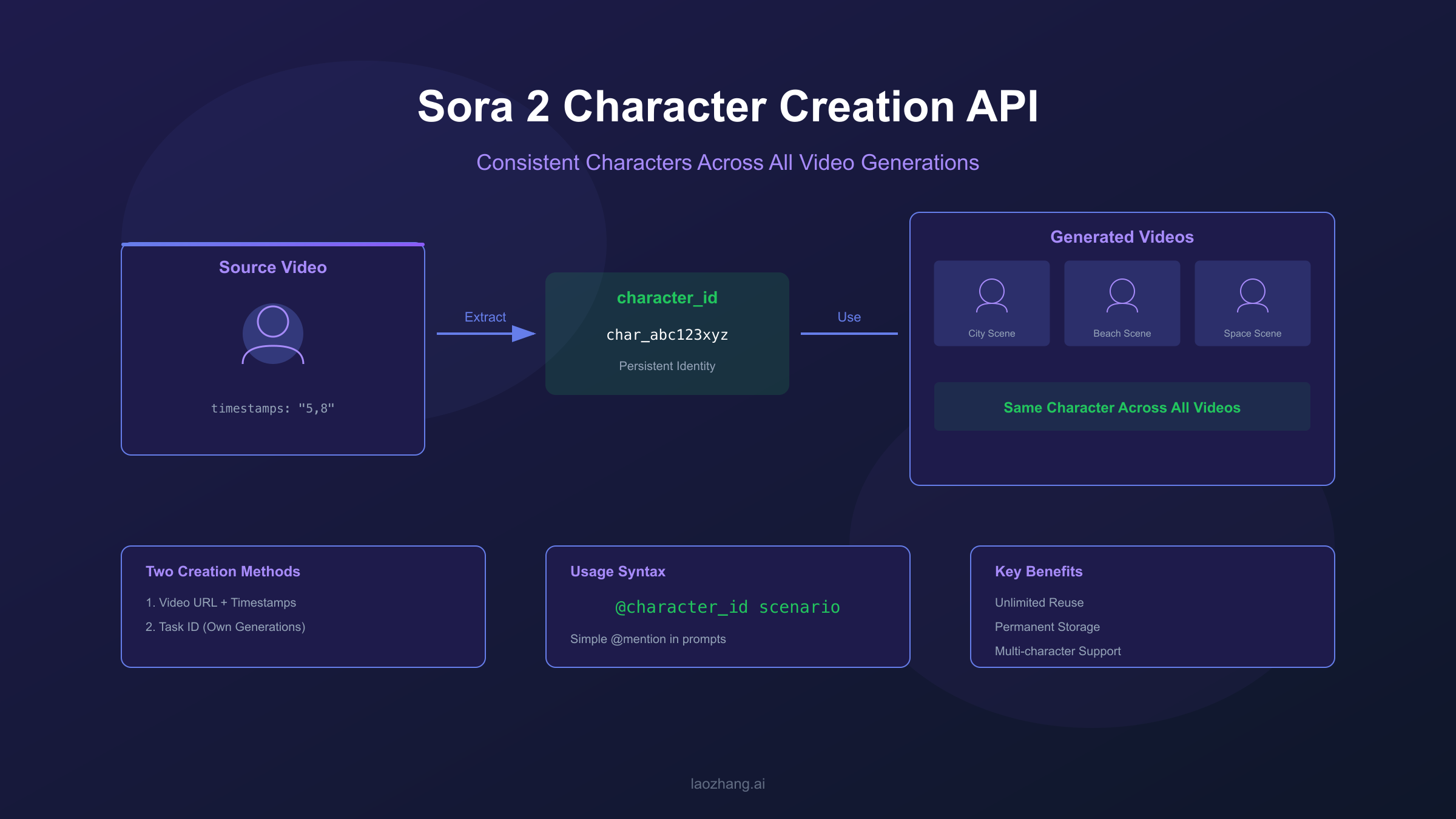
Creating consistent characters across multiple AI-generated videos has been one of the biggest challenges in video generation until now. You generate a perfect character in one video, but when you try to create a sequel or continuation, the character looks completely different. Sora 2 solves this problem with its character creation API, which allows you to extract character identities and reuse them across unlimited video generations while maintaining visual consistency.
The Sora 2 character system works through a unique identifier called character_id. Once you create a character from a source video, you receive this ID which can be referenced in any future video generation using a simple @mention syntax in your prompts. This guide covers everything you need to implement character creation in your applications, from basic API calls to production-ready Python code with proper error handling.
| Feature | Description |
|---|---|
| Creation Methods | Video URL extraction, Task ID reuse |
| Identifier Format | character_id (persistent across sessions) |
| Usage Syntax | @character_id in prompts |
| Reuse Limit | Unlimited generations |
Understanding Sora 2 Character System
The Sora 2 character creation API enables developers to maintain visual consistency by creating persistent character identities that work across all video generation requests. Unlike traditional approaches where you might describe a character in detail and hope for consistency, the character_id system guarantees that the same visual identity appears in every video where you reference it.
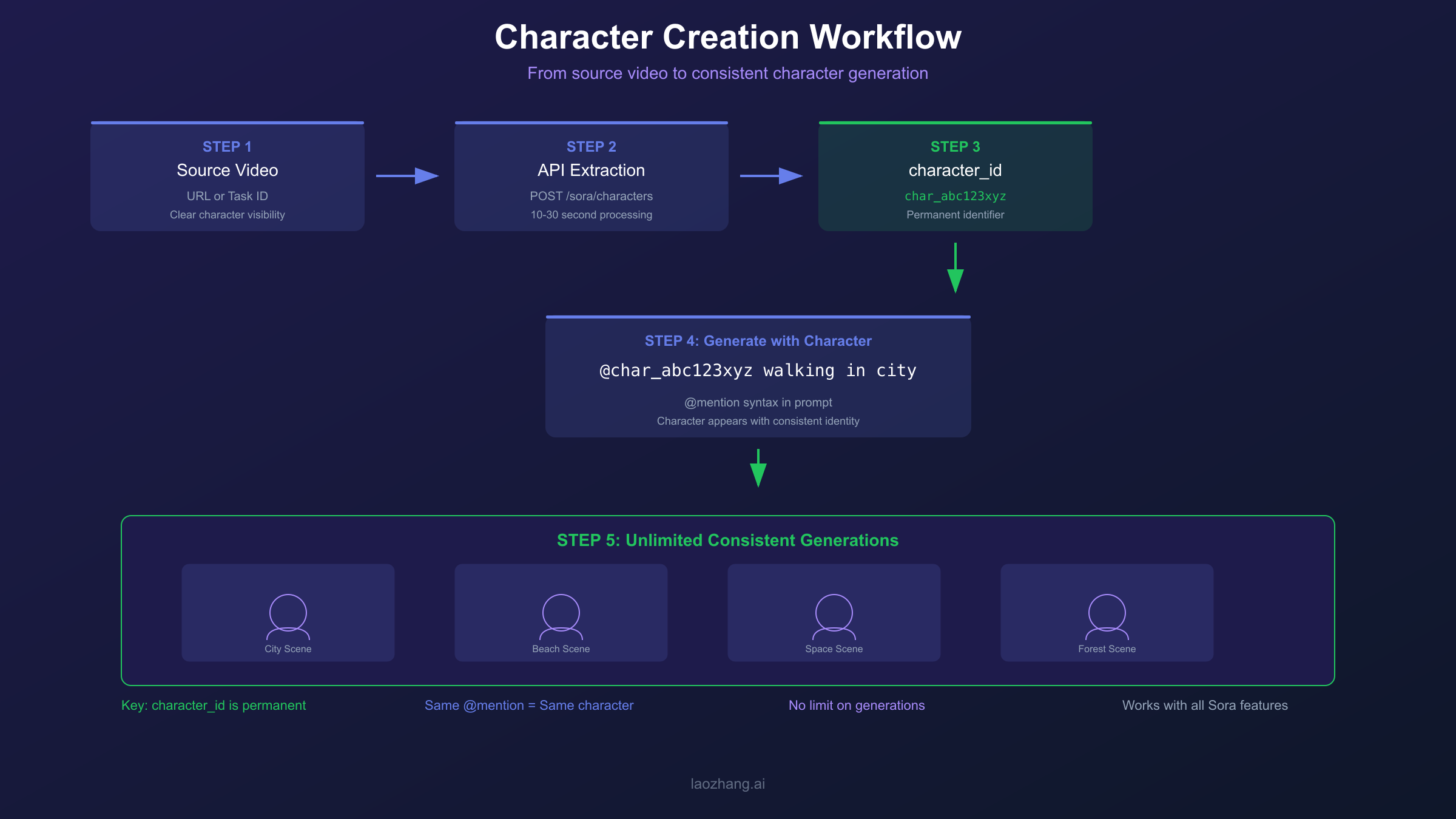
When you create a character, Sora 2 analyzes the source video frames during your specified timestamp range to extract distinctive visual features including facial structure, body proportions, clothing style, and other identifying characteristics. These features are encoded into a character profile associated with your character_id. This profile persists in the system indefinitely, meaning you can use the same character_id months later and get consistent results.
The API provides two distinct methods for character creation, each suited for different workflows. The video URL method allows you to extract characters from any publicly accessible video, making it ideal for working with existing content or reference materials. The task ID method leverages your own Sora-generated videos by referencing the generation task ID directly, which simplifies the workflow when building on your previous generations. Understanding when to use each method is crucial for efficient character management in production applications.
The character_id is stable and permanent once created. Store these IDs securely as they represent valuable assets for your video generation pipelines.
Creating Characters from Video URLs
To create a character from a video URL, you send a POST request to the /sora/characters endpoint with the model set to sora-2-character. This method works with any publicly accessible video URL and requires you to specify the timestamp range where the character appears clearly. The API analyzes those frames to build the character profile.
hljs pythonimport requests
import os
def create_character_from_url(video_url: str, timestamps: str) -> dict:
"""
Create a character from a video URL.
Args:
video_url: Publicly accessible URL to the video
timestamps: Frame range in format "start,end" (e.g., "5,8")
Returns:
Response containing character_id
"""
api_key = os.getenv("SORA_API_KEY")
base_url = "https://api.openai.com/v1/sora"
headers = {
"Authorization": f"Bearer {api_key}",
"Content-Type": "application/json"
}
payload = {
"model": "sora-2-character",
"url": video_url,
"timestamps": timestamps
}
response = requests.post(
f"{base_url}/characters",
headers=headers,
json=payload
)
if response.status_code == 200:
return response.json()
else:
raise Exception(f"Character creation failed: {response.text}")
# Usage example
result = create_character_from_url(
video_url="https://example.com/my-video.mp4",
timestamps="5,8" # Analyze frames from 5s to 8s
)
print(f"Created character: {result['character_id']}")
The timestamps parameter uses a simple comma-separated format where the first number is the start time and the second is the end time, both in seconds. For optimal results, select a 1-3 second range where the character is clearly visible, well-lit, and preferably facing the camera. The API response includes the character_id along with metadata about the analysis process.
| Parameter | Type | Required | Description |
|---|---|---|---|
| model | string | Yes | Must be "sora-2-character" |
| url | string | Yes | Publicly accessible video URL |
| timestamps | string | Yes | Format: "start,end" in seconds |
Supported video formats include MP4, MOV, and WebM with a maximum resolution of 1080p. The video URL must be publicly accessible without authentication, so cloud storage signed URLs or CDN links work well. Processing typically takes 10-30 seconds depending on the complexity of the source material and current API load.
Creating Characters from Task IDs
The task ID method provides a streamlined workflow when you want to extract characters from videos you have already generated with Sora. Instead of downloading the generated video, hosting it, and providing a URL, you simply reference the original generation task ID. This approach eliminates file handling overhead and reduces latency in character creation workflows.
hljs pythondef create_character_from_task(task_id: str) -> dict:
"""
Create a character from a previous Sora generation task.
Args:
task_id: The task ID from a completed video generation
Returns:
Response containing character_id
"""
api_key = os.getenv("SORA_API_KEY")
base_url = "https://api.openai.com/v1/sora"
headers = {
"Authorization": f"Bearer {api_key}",
"Content-Type": "application/json"
}
payload = {
"model": "sora-2-character",
"from_task": task_id
}
response = requests.post(
f"{base_url}/characters",
headers=headers,
json=payload
)
if response.status_code == 200:
return response.json()
else:
raise Exception(f"Character creation failed: {response.text}")
# Usage example
result = create_character_from_task(
task_id="task_abc123xyz789"
)
print(f"Created character: {result['character_id']}")
When using the task ID method, you do not need to specify timestamps. The API automatically analyzes the most prominent character in the generated video. If your video contains multiple characters and you need a specific one, the video URL method with precise timestamps gives you more control over which character is extracted.
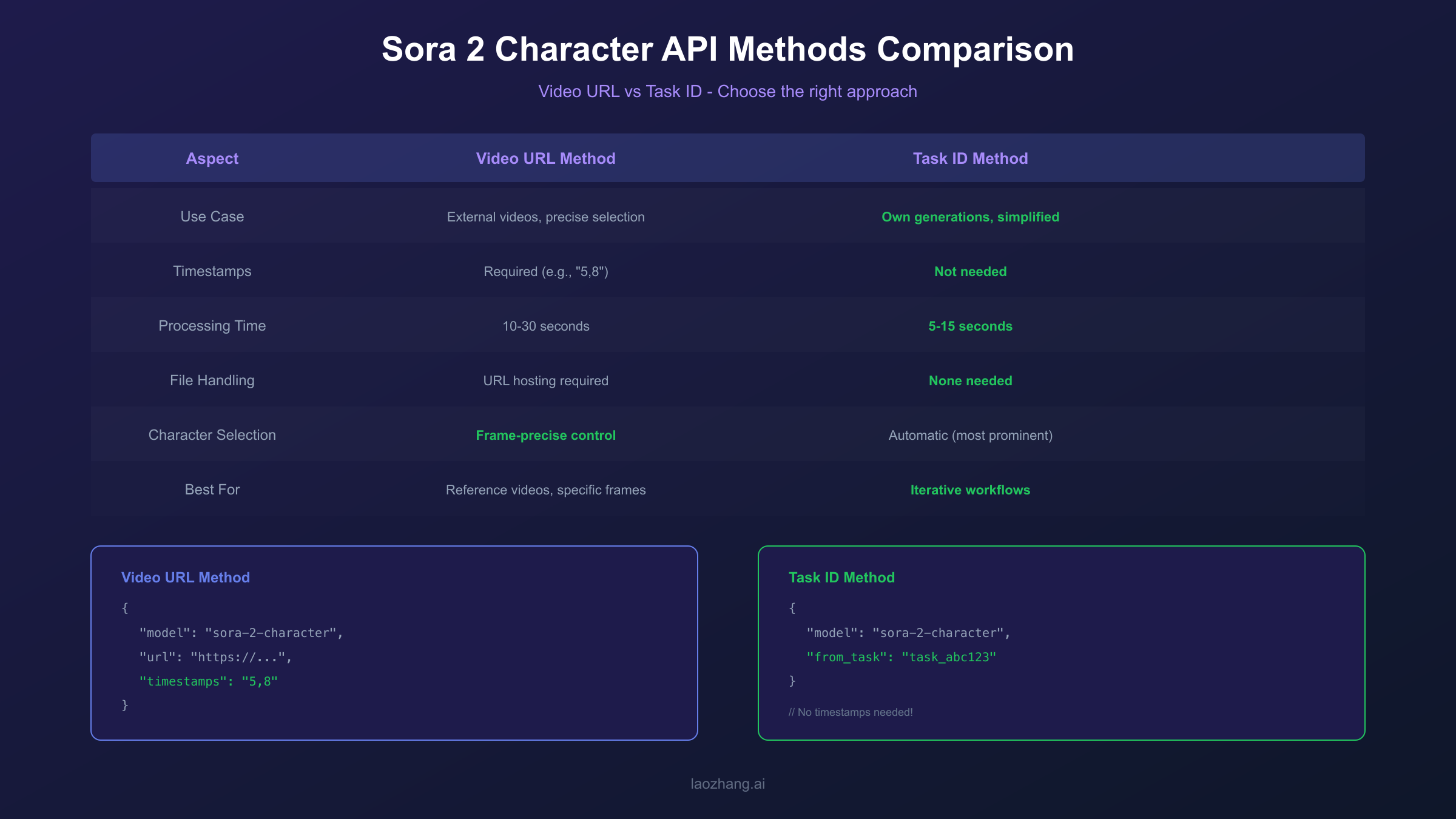
| Aspect | Video URL Method | Task ID Method |
|---|---|---|
| Use Case | External videos, precise selection | Own generations, simplified workflow |
| Timestamps | Required | Not needed |
| Processing Time | 10-30 seconds | 5-15 seconds |
| File Handling | URL hosting required | None |
| Character Selection | Frame-precise | Automatic (most prominent) |
The task ID method is particularly valuable when building iterative creative workflows. You generate an initial video, extract the character you like, then use that character in variations or sequels without any intermediate file management. This approach significantly speeds up the creative iteration cycle when developing character-driven content series.
Using Characters in Video Generation
Once you have a character_id, referencing it in video generation is straightforward using the @mention syntax. You simply include the character_id with an @ prefix at the beginning of your prompt, and Sora ensures that character appears with consistent visual identity in the generated video. This syntax integrates naturally with your creative prompts.
hljs pythondef generate_video_with_character(character_id: str, scenario: str) -> dict:
"""
Generate a video featuring a specific character.
Args:
character_id: The character_id to include
scenario: Description of the scene/action
Returns:
Video generation task response
"""
api_key = os.getenv("SORA_API_KEY")
base_url = "https://api.openai.com/v1/sora"
headers = {
"Authorization": f"Bearer {api_key}",
"Content-Type": "application/json"
}
# Construct prompt with @mention
prompt = f"@{character_id} {scenario}"
payload = {
"model": "sora-2",
"prompt": prompt,
"duration": 10,
"resolution": "1080p"
}
response = requests.post(
f"{base_url}/generations",
headers=headers,
json=payload
)
return response.json()
# Single character usage
result = generate_video_with_character(
character_id="char_abc123",
scenario="walking through a futuristic city at sunset, cinematic lighting"
)
For scenes involving multiple characters, include multiple @mentions at the start of your prompt. Each character maintains its individual identity while interacting in the scene. The order of @mentions does not affect their prominence in the video, which is determined by your scenario description and Sora's scene composition.
hljs python# Multiple characters in one video
prompt = "@char_hero @char_sidekick having a conversation in a coffee shop, warm natural lighting"
# Characters in action
prompt = "@char_villain confronting @char_hero in an abandoned warehouse, dramatic shadows"
The @mention syntax works with all Sora generation features including video sequences and variations. When using storyboards, you can specify different characters in different scenes while maintaining their consistent identities throughout the narrative. This enables complex multi-character stories with guaranteed visual continuity.
Complete Python Implementation
A production implementation should encapsulate character operations in a manager class with proper error handling, retry logic, and efficient session management. The following implementation provides a robust foundation that you can extend based on your specific requirements.
hljs pythonimport requests
import time
import os
from typing import Optional, Dict, Any
from dataclasses import dataclass
from enum import Enum
class CharacterCreationMethod(Enum):
VIDEO_URL = "video_url"
TASK_ID = "task_id"
@dataclass
class Character:
character_id: str
source_method: CharacterCreationMethod
created_at: float
metadata: Dict[str, Any]
class SoraCharacterManager:
"""Production-ready Sora 2 character management."""
def __init__(self, api_key: Optional[str] = None, base_url: Optional[str] = None):
self.api_key = api_key or os.getenv("SORA_API_KEY")
self.base_url = base_url or "https://api.openai.com/v1/sora"
self.session = requests.Session()
self.session.headers.update({
"Authorization": f"Bearer {self.api_key}",
"Content-Type": "application/json"
})
self._characters: Dict[str, Character] = {}
def create_from_url(
self,
video_url: str,
timestamps: str,
max_retries: int = 3
) -> Character:
"""Create character from video URL with retry logic."""
payload = {
"model": "sora-2-character",
"url": video_url,
"timestamps": timestamps
}
for attempt in range(max_retries):
try:
response = self.session.post(
f"{self.base_url}/characters",
json=payload,
timeout=60
)
if response.status_code == 200:
data = response.json()
character = Character(
character_id=data["character_id"],
source_method=CharacterCreationMethod.VIDEO_URL,
created_at=time.time(),
metadata={"url": video_url, "timestamps": timestamps}
)
self._characters[character.character_id] = character
return character
elif response.status_code == 429:
# Rate limited, wait and retry
wait_time = 2 ** attempt
time.sleep(wait_time)
continue
else:
raise Exception(f"API error: {response.status_code} - {response.text}")
except requests.exceptions.Timeout:
if attempt < max_retries - 1:
continue
raise Exception("Character creation timed out after retries")
raise Exception("Max retries exceeded")
def create_from_task(self, task_id: str, max_retries: int = 3) -> Character:
"""Create character from previous generation task."""
payload = {
"model": "sora-2-character",
"from_task": task_id
}
for attempt in range(max_retries):
try:
response = self.session.post(
f"{self.base_url}/characters",
json=payload,
timeout=60
)
if response.status_code == 200:
data = response.json()
character = Character(
character_id=data["character_id"],
source_method=CharacterCreationMethod.TASK_ID,
created_at=time.time(),
metadata={"from_task": task_id}
)
self._characters[character.character_id] = character
return character
elif response.status_code == 429:
wait_time = 2 ** attempt
time.sleep(wait_time)
continue
else:
raise Exception(f"API error: {response.status_code} - {response.text}")
except requests.exceptions.Timeout:
if attempt < max_retries - 1:
continue
raise Exception("Character creation timed out after retries")
raise Exception("Max retries exceeded")
def generate_with_character(
self,
character_id: str,
scenario: str,
duration: int = 10,
resolution: str = "1080p"
) -> Dict[str, Any]:
"""Generate video with specified character."""
prompt = f"@{character_id} {scenario}"
payload = {
"model": "sora-2",
"prompt": prompt,
"duration": duration,
"resolution": resolution
}
response = self.session.post(
f"{self.base_url}/generations",
json=payload,
timeout=120
)
if response.status_code == 200:
return response.json()
else:
raise Exception(f"Generation failed: {response.text}")
def get_character(self, character_id: str) -> Optional[Character]:
"""Retrieve cached character info."""
return self._characters.get(character_id)
def list_characters(self) -> list:
"""List all created characters in this session."""
return list(self._characters.values())
This implementation includes exponential backoff for rate limiting, timeout handling for long-running operations, and local caching of character metadata. The session-based approach improves performance by reusing HTTP connections across multiple API calls.
Timestamp Parameter Optimization
The quality of your extracted character depends significantly on the timestamp selection. The API analyzes the frames within your specified range to build a comprehensive character profile, so choosing frames where the character is clearly visible and well-represented is crucial for achieving consistent results in future generations.
The optimal timestamp duration is 1-3 seconds. Shorter durations may not capture enough visual information for a robust character profile, while longer durations increase processing time without proportional quality improvement. Within your selected range, the API samples multiple frames to build a composite understanding of the character's appearance.
| Factor | Optimal | Acceptable | Avoid |
|---|---|---|---|
| Duration | 1-3 seconds | 3-5 seconds | >5 seconds |
| Lighting | Even, natural | Studio lit | Heavy shadows, backlighting |
| Character Visibility | Full face + body | Face visible | Partial, obscured |
| Movement | Minimal | Walking | Fast action, motion blur |
| Camera Angle | Front-facing | 3/4 view | Extreme angles, profile only |
When selecting timestamps, look for moments where the character is relatively still, facing the camera, and well-illuminated. Avoid frames with heavy motion blur, extreme camera angles, or significant occlusion by other objects. If your source video has the character in multiple outfits or appearances, choose frames that represent the look you want to preserve in future generations.
For videos with multiple characters, precise timestamp selection becomes even more important. The API will attempt to identify the most prominent character in the frame, but providing a range where your target character is clearly the focus improves extraction accuracy. If you need to extract multiple characters from the same video, make separate character creation calls with timestamps specific to each character.
When building a character library, document which source video and timestamps you used for each character_id. This metadata helps troubleshoot consistency issues and allows you to recreate characters if needed.
API Access and Pricing
Sora 2 API access is available through OpenAI directly for approved developers. The character creation endpoints are included in the standard Sora API access tier, with character creation operations included in your overall API usage without separate per-character charges. Your character_ids persist indefinitely at no additional storage cost.
For developers in regions with connectivity challenges or those seeking lower latency, API proxy services provide an alternative access path. Services like laozhang.ai offer Sora 2 API access with competitive pricing and reliable connectivity. When using a proxy service, simply update your base_url while keeping your code structure identical:
hljs python# Using API proxy service
manager = SoraCharacterManager(
api_key="your_proxy_api_key",
base_url="https://api.laozhang.ai/v1/sora" # Proxy endpoint
)
# Rest of the code remains identical
character = manager.create_from_url(
video_url="https://example.com/video.mp4",
timestamps="5,8"
)
The API proxy approach works well when direct OpenAI access faces geographic restrictions or when you need additional features like unified billing across multiple AI services. The character_id system works identically regardless of which endpoint you use, and characters created through a proxy can be used in future requests through the same service.
| Access Method | Best For | Considerations |
|---|---|---|
| OpenAI Direct | Full official support | Geographic availability |
| API Proxy (laozhang.ai) | Regional access, unified billing | Verify Sora 2 support |
Rate limits apply to character creation operations. Current limits allow approximately 60 character creations per minute, though this may vary based on your account tier. The SoraCharacterManager implementation includes automatic retry with exponential backoff to handle rate limiting gracefully without failing your requests.
Best Practices and Troubleshooting
Building reliable character-based video generation pipelines requires attention to several operational considerations beyond the basic API integration. These best practices help you avoid common pitfalls and maintain consistent quality in production deployments.
Store character_ids persistently. While Sora maintains character profiles indefinitely, losing your character_id means losing access to that character. Implement a database or configuration file to map meaningful names to character_ids, making your codebase more maintainable and your creative workflow more organized.
Validate characters before batch processing. Before generating a large batch of videos with a character, create a single test generation to verify the character renders as expected. Character extraction quality can vary based on source material, and catching issues early saves processing time and API costs.
Handle API errors gracefully. Network timeouts, rate limits, and temporary service issues are normal in production environments. The SoraCharacterManager implementation provides a foundation, but consider adding alerting for repeated failures and circuit breaker patterns for batch processing jobs.
Common errors and solutions include:
| Error | Cause | Solution |
|---|---|---|
| 400: Invalid timestamps | Format error or out of range | Use "start,end" format, verify video duration |
| 404: Task not found | Invalid task_id or expired | Verify task_id, use recent generations |
| 429: Rate limited | Too many requests | Implement backoff, reduce concurrency |
| 500: Processing failed | Source video issues | Try different timestamps, verify video accessibility |
For additional error handling patterns specific to Sora API, refer to our guide on Sora API error handling which covers size-related issues and other common failure modes. You can also check our comprehensive Sora 2 API guide for complete setup instructions and our stable API channel guide for reliable access options. When debugging character consistency problems, first verify your timestamps capture clear, well-lit frames, then check if the generation prompt properly references the character_id with correct @mention syntax.
FAQ
How long does a character_id remain valid?
Character_ids persist indefinitely in the Sora system. Once created, you can reference a character_id in video generations months or years later with consistent results. There is no expiration or renewal requirement. However, you should maintain your own records of character_ids since there is currently no API endpoint to list previously created characters.
Can I use characters created by other users?
No, character_ids are scoped to your API account. Characters you create are only accessible with your API credentials. This ensures privacy and prevents unauthorized use of character profiles extracted from potentially private video content.
What happens if the source video is deleted after character creation?
The character profile exists independently of the source video. Once a character_id is created, the source video is no longer needed. The character profile contains extracted features, not a reference to the original video. You can safely delete or restrict access to source videos after character creation.
Can I modify a character after creation?
Character profiles are immutable once created. If you need a variation of a character (different outfit, hairstyle, etc.), you need to create a new character from source material showing that variation. This ensures character consistency by preventing unintended modifications.
What is the maximum number of characters I can use in one video?
While there is no hard technical limit, practical results are best with 2-3 characters per video. More characters increase scene complexity and may affect rendering quality. For videos requiring many characters, consider creating scenes with smaller character groups and editing them together post-production.