Sora 2 Video API: Complete Guide to Stable Access Methods (2026)
Comprehensive guide to stable Sora 2 video API access: official OpenAI pricing ($0.10-$0.50/sec), third-party alternatives at 85-95% savings, Runway and Veo comparisons, Python integration code, and production deployment strategies.
Nano Banana Pro
4K-80%Google Gemini 3 Pro · AI Inpainting
谷歌原生模型 · AI智能修图

Finding stable access to Sora 2 video generation can feel like navigating a maze. With OpenAI's recent policy changes, official API pricing that can quickly add up, and a growing ecosystem of third-party providers, developers need clear guidance on which path to take. This guide cuts through the confusion with real pricing data, working code examples, and practical recommendations for every use case.
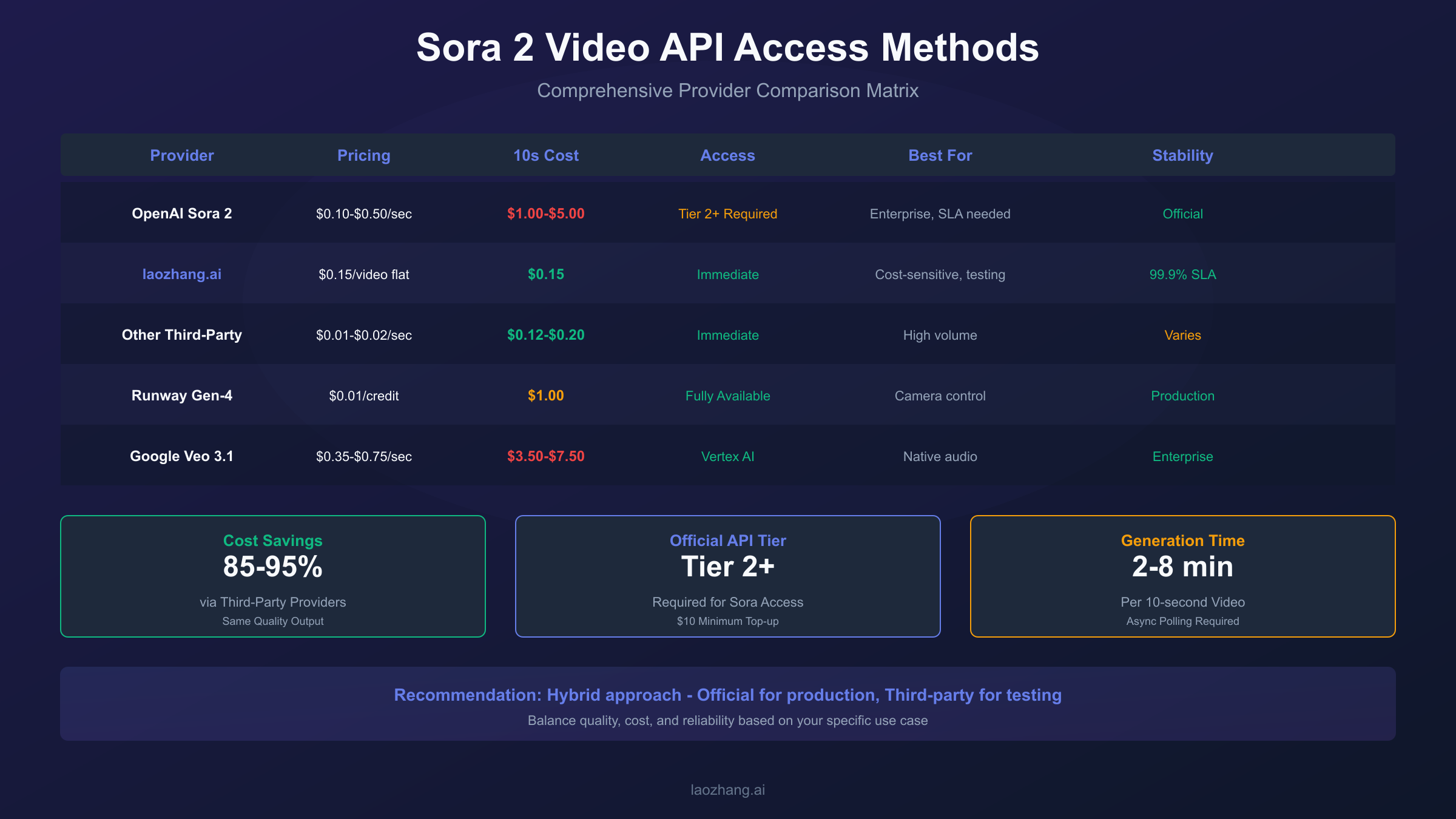
Quick Answer: For stable Sora 2 API access, you have three main options: Official OpenAI API ($0.10-$0.50 per second, requires Tier 2+ access), third-party aggregators like laozhang.ai ($0.15 per video flat-rate, 85-95% cheaper), or alternative APIs like Runway Gen-4 ($0.01/credit) and Google Veo 3.1 ($0.35-$0.75/sec). Third-party providers route through the same OpenAI infrastructure, delivering identical output quality at dramatically lower costs.
This comprehensive guide covers official and unofficial access methods, detailed pricing comparisons, Python integration examples, rate limit management, and a decision framework to help you choose the right solution for your specific needs.
Understanding the Sora 2 API Landscape
The AI video generation API market has matured significantly since Sora 2's public launch in September 2025. What was once an invite-only preview is now a production-ready service with multiple access paths, each with distinct trade-offs.
OpenAI's Sora 2 represents the current state-of-the-art in AI video generation, capable of producing richly detailed, dynamic video clips with synchronized audio from natural language prompts or images. The model comes in two variants: sora-2 (optimized for speed and iteration) and sora-2-pro (optimized for production quality). However, direct API access comes with meaningful barriers—tier requirements, per-second billing, and rate limits that scale with your spending history.
This has created space for third-party aggregators who wrap the official API in their own infrastructure, offering simpler access models and significant cost savings. Meanwhile, competing platforms like Runway and Google Veo have matured their own video APIs, providing viable alternatives depending on your specific requirements.
The January 2026 policy change that discontinued free Sora access for non-subscribers has further accelerated adoption of these alternative access methods. Understanding the full landscape helps you make an informed decision based on your actual needs rather than marketing claims.
Official OpenAI Sora API: Access and Pricing
The official Sora 2 API through OpenAI offers the most direct path to video generation, with guaranteed model access and enterprise support options. However, it comes with meaningful prerequisites and costs that may not suit every project.
To access the Sora API, you need an OpenAI account upgraded to at least Tier 2 status. This requires a minimum $10 account top-up and some usage history. New accounts start at Tier 1 with minimal video generation capabilities, and tier upgrades happen automatically as you maintain consistent usage and positive payment history.
The pricing model is per-second based, which can catch developers off guard when planning budgets. Here's the current pricing structure as of January 2026:
| Model | Resolution | Price per Second | 10-Second Video Cost |
|---|---|---|---|
| sora-2 | 720p | $0.10 | $1.00 |
| sora-2-pro | 720p | $0.30 | $3.00 |
| sora-2-pro | 1080p | $0.50 | $5.00 |
The sora-2 standard model is designed for rapid iteration and prototyping. It generates good quality results quickly, making it suitable for social media content, prototypes, and scenarios where turnaround time matters more than ultra-high fidelity. Generation typically completes in 2-4 minutes for a 10-second clip.
The sora-2-pro model produces higher quality, more polished results with better temporal coherence. It takes longer to render (4-8 minutes typical) and costs more, but delivers production-quality output suitable for marketing assets and cinematic footage.
Rate limits vary by tier and can significantly impact high-volume workflows. Tier 1 accounts are limited to 1-2 requests per minute (RPM), while Tier 5 accounts can achieve 20 RPM. Failed requests still count against your limit, so implementing proper retry logic with exponential backoff is essential. Enterprise customers can negotiate custom limits with dedicated infrastructure and guaranteed SLAs.
For developers who need reliable, officially supported access and have the budget to match, the official API remains the safest choice. The documentation is comprehensive, support is responsive, and you're not dependent on third-party infrastructure availability.
Third-Party Providers: Complete Comparison
Third-party API aggregators have emerged as a compelling alternative to direct OpenAI access, offering substantial cost savings while maintaining output quality. These providers route requests through OpenAI's infrastructure, meaning the actual video generation uses the same Sora 2 models—the difference lies in pricing structure, support, and access requirements.
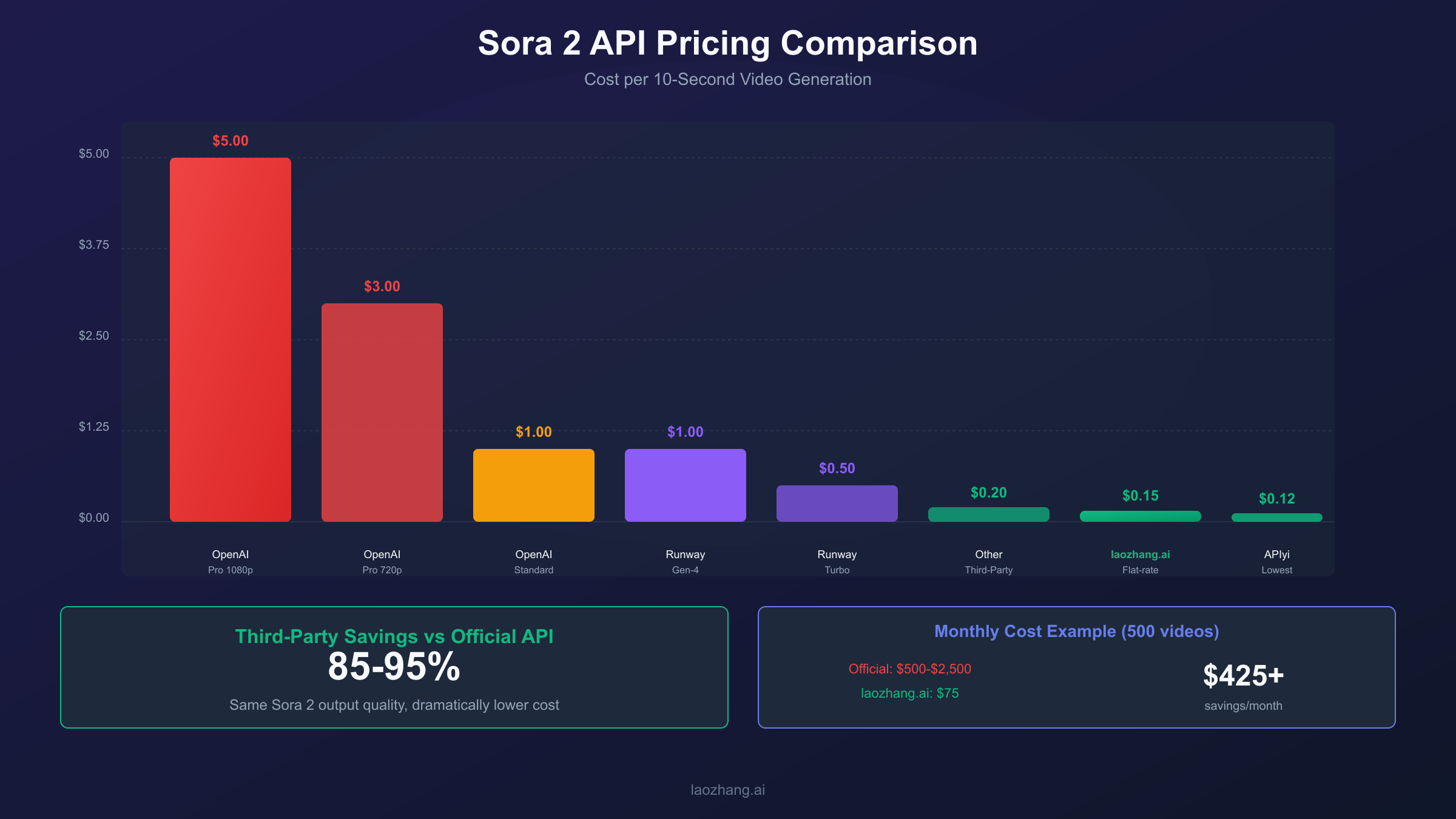
The cost savings are dramatic. Where a 10-second video might cost $1.00-$5.00 through official channels, third-party providers typically charge $0.12-$0.20 for the same output. This represents an 85-95% reduction in direct generation costs, which compounds significantly at scale.
Here's a comprehensive comparison of major third-party providers as of January 2026:
| Provider | Pricing Model | 10s Standard Cost | Minimum Deposit | Notable Features |
|---|---|---|---|---|
| laozhang.ai | Flat-rate | $0.15 | $5 | OpenAI SDK compatible, Alipay/WeChat support |
| Kie.ai | Per-second | $0.15 | $10 | Per-second billing |
| APIyi | Flat-rate | $0.12 | $5 | Stable during policy changes |
| Replicate | Per-second | $2.00-$3.50 | $20 | Enterprise-focused, premium infrastructure |
| fal.ai | Per-second | $1.00 | $20 | Higher pricing tier |
The flat-rate pricing model offered by providers like laozhang.ai eliminates the uncertainty of per-second billing. When you know each video generation costs exactly $0.15 regardless of rendering time, budgeting becomes straightforward. This is particularly valuable during the exploration phase when you're generating many test videos to dial in your prompts.
Beyond cost efficiency, these providers often offer advantages that matter for specific use cases. China-based developers benefit from significantly lower latency (20ms average versus 340ms+ through VPN routing). Payment flexibility through Alipay and WeChat Pay removes the friction of international payment methods. No tier requirements mean immediate access without building up a spending history first.
The trade-offs are real but manageable for most use cases. Third-party reliability depends on their infrastructure, though major providers advertise 99%+ uptime. Official OpenAI support doesn't extend to third-party integrations, so you're relying on provider documentation and community resources. Feature updates may take days or weeks to appear on third-party platforms after OpenAI releases them.
For internal testing, prototypes, and cost-sensitive production workloads, third-party aggregators deliver substantial value. The identical output quality means there's no visual difference in your generated videos—only in your API bill.
Alternative Video APIs: Runway, Veo, and Beyond
While Sora 2 leads in raw generation quality, competing video APIs offer distinct advantages that may better suit certain workflows. Understanding these alternatives helps you build a robust video generation strategy rather than depending on a single provider.
Runway Gen-4 stands out for production workflows and professional use. The API is fully available without waitlists, with well-documented endpoints and mature SDK support. Runway's pricing uses a credit system at $0.01 per credit, with a 10-second video costing approximately 100 credits ($1.00). The Gen-4 Turbo variant offers 50% cost reduction with 7x faster generation, making it attractive for high-volume scenarios.
What sets Runway apart is its camera control capabilities. In testing, Runway consistently delivered specific camera movements—dolly shots, pans, tracking—that other platforms struggle to reproduce reliably. For creators who need predictable, controllable output across multiple shots, this precision matters enormously. The platform also integrates well with existing post-production workflows, supporting detailed exports for VFX and motion graphics work.
Google Veo 3.1 represents another strong alternative, particularly for developers already invested in Google Cloud infrastructure. Available through both Vertex AI (enterprise) and the Gemini API (developers), Veo offers unique capabilities including native audio generation in a single pass and character consistency across scenes.
Veo pricing is higher than competitors at $0.35-$0.75 per second depending on configuration, but the native audio integration eliminates the need for separate audio generation or synchronization. For projects where dialogue or sound effects are integral, this workflow simplification has value beyond the raw pricing comparison.
| Platform | API Status | 10s Video Cost | Best For |
|---|---|---|---|
| OpenAI Sora 2 | Available (Tier 2+) | $1.00-$5.00 | Highest quality output |
| Runway Gen-4 | Fully Available | $1.00 | Camera control, production |
| Google Veo 3.1 | Available | $3.50-$7.50 | Native audio, enterprise |
| Pika Labs | No API | N/A | Web-only currently |
| Luma Dream Machine | Available | ~$0.80 | Realism, stable motion |
Pika Labs, despite its strong web interface, doesn't currently offer API access. This limits its usefulness for programmatic workflows, though it remains worth monitoring for future API announcements.
For production systems, consider a multi-provider strategy. Using Sora for highest-quality hero content, Runway for controlled shots, and cheaper third-party access for iteration creates a cost-effective pipeline that leverages each platform's strengths.
Integration Guide: Python Code Examples
Integrating video generation APIs into your application follows similar patterns across providers. Here's a practical guide with working code examples for the major platforms.
The official OpenAI Sora API uses familiar patterns if you've worked with their text or image APIs. Video generation is asynchronous—you submit a request and poll for completion rather than receiving an immediate response.
hljs pythonfrom openai import OpenAI
import time
client = OpenAI(api_key="your-api-key")
def generate_video(prompt: str, model: str = "sora-2", duration: int = 10):
"""Generate a video using OpenAI Sora API"""
# Start the generation job
response = client.videos.create(
model=model,
prompt=prompt,
size="1920x1080", # or "1280x720" for 720p
duration=duration
)
job_id = response.id
print(f"Generation started: {job_id}")
# Poll for completion with exponential backoff
wait_time = 10
max_wait = 120
while True:
status = client.videos.retrieve(job_id)
if status.status == "completed":
print(f"Video ready: {status.output_url}")
return status.output_url
elif status.status == "failed":
raise Exception(f"Generation failed: {status.error}")
print(f"Status: {status.status}, waiting {wait_time}s...")
time.sleep(wait_time)
wait_time = min(wait_time * 1.5, max_wait)
# Example usage
video_url = generate_video(
prompt="A golden retriever running through autumn leaves in slow motion",
model="sora-2-pro",
duration=10
)
For third-party providers that maintain OpenAI SDK compatibility, the integration is nearly identical—you simply change the base URL and API key:
hljs pythonfrom openai import OpenAI
# Using laozhang.ai as example (OpenAI SDK compatible)
client = OpenAI(
api_key="your-laozhang-api-key",
base_url="https://api.laozhang.ai/v1"
)
# Same code works with the third-party endpoint
response = client.videos.create(
model="sora-2",
prompt="Timelapse of a flower blooming in morning sunlight",
size="1280x720",
duration=8
)
Runway's API uses a different structure but follows similar asynchronous patterns:
hljs pythonimport runwayml
import os
client = runwayml.RunwayML(api_key=os.environ["RUNWAYML_API_SECRET"])
def generate_runway_video(prompt: str, image_url: str = None):
"""Generate video using Runway Gen-4"""
task = client.image_to_video.create(
model="gen4-turbo",
prompt_image=image_url, # Required for image-to-video
prompt_text=prompt,
duration=10,
ratio="16:9"
)
# Poll for completion
while task.status not in ["SUCCEEDED", "FAILED"]:
time.sleep(10)
task = client.tasks.retrieve(task.id)
if task.status == "SUCCEEDED":
return task.output[0]
raise Exception(f"Runway generation failed: {task.failure}")
Error handling deserves special attention. Rate limit errors (HTTP 429) are common during high-volume generation, and naive retry logic can actually worsen the situation by depleting your quota faster. Implement exponential backoff with jitter:
hljs pythonimport random
def retry_with_backoff(func, max_retries=5, base_delay=10):
"""Retry function with exponential backoff and jitter"""
for attempt in range(max_retries):
try:
return func()
except Exception as e:
if "429" in str(e) and attempt < max_retries - 1:
delay = base_delay * (2 ** attempt) + random.uniform(0, 1)
print(f"Rate limited, waiting {delay:.1f}s...")
time.sleep(delay)
else:
raise
For more complex API integration patterns, our Claude API error code guide covers handling strategies that apply across AI APIs.
Rate Limits and Quota Management
Understanding and working within rate limits is crucial for building reliable video generation systems. Unlike text APIs where requests complete in seconds, video generation jobs can run for minutes, making rate limit planning more complex.
OpenAI's Sora API enforces rate limits at multiple levels. Requests per minute (RPM) controls how many generation jobs you can start, while tokens per minute (TPM) isn't directly applicable to video generation. Your tier determines your limits:
| Tier | Requests per Minute | Typical Qualification |
|---|---|---|
| Tier 1 | 1-2 RPM | New accounts |
| Tier 2 | 5 RPM | $10+ spent |
| Tier 3 | 10 RPM | $50+ spent |
| Tier 4 | 15 RPM | $100+ spent |
| Tier 5 | 20 RPM | $500+ spent |
The practical impact depends on your generation duration. With Tier 2's 5 RPM limit, you can start 5 videos per minute, but if each takes 4 minutes to complete, you'll have approximately 20 concurrent jobs running. Plan your infrastructure accordingly.
A critical mistake: failed requests count against your rate limit. If you hit a 429 error and immediately retry, you're consuming quota without producing output. Implement proper backoff that actually waits before retrying.
For high-volume workflows, consider request queuing:
hljs pythonfrom collections import deque
import threading
import time
class VideoQueue:
def __init__(self, rpm_limit=5):
self.queue = deque()
self.rpm_limit = rpm_limit
self.request_times = deque()
self.lock = threading.Lock()
def can_make_request(self):
"""Check if we're within rate limits"""
now = time.time()
# Remove requests older than 60 seconds
while self.request_times and self.request_times[0] < now - 60:
self.request_times.popleft()
return len(self.request_times) < self.rpm_limit
def wait_for_slot(self):
"""Block until a request slot is available"""
while not self.can_make_request():
time.sleep(1)
with self.lock:
self.request_times.append(time.time())
Third-party providers typically have more relaxed rate limits or none at all, which is one reason they're attractive for batch processing and testing scenarios. However, this doesn't mean unlimited capacity—there are still infrastructure constraints that can cause delays during peak usage.
Monitoring your quota usage helps avoid surprise failures. Track generation success rates, average latency, and cost per successful video to identify when you're approaching limits or experiencing degraded service.
Production Deployment Strategies
Moving from prototype to production requires thoughtful architecture decisions. Video generation APIs have characteristics that differ significantly from traditional request-response services, and your infrastructure should account for these differences.
The fundamental challenge is that video generation is slow (minutes, not milliseconds) and expensive (dollars, not fractions of cents). This means you need robust handling for long-running jobs, cost controls to prevent runaway spending, and fallback strategies when primary providers experience issues.
A production-ready architecture typically includes several components working together. A request queue manages incoming generation requests and ensures you don't exceed rate limits. A job manager tracks in-progress generations and handles completion callbacks. A result cache stores successful generations to avoid regenerating identical content. A cost tracker monitors spending against budgets and can pause generation when limits are reached.
hljs pythonclass VideoGenerationService:
def __init__(self, providers, daily_budget=100):
self.providers = providers # Ordered by preference
self.daily_budget = daily_budget
self.daily_spend = 0
self.generation_cache = {}
async def generate(self, prompt: str, settings: dict) -> str:
# Check cache first
cache_key = self._cache_key(prompt, settings)
if cache_key in self.generation_cache:
return self.generation_cache[cache_key]
# Check budget
estimated_cost = self._estimate_cost(settings)
if self.daily_spend + estimated_cost > self.daily_budget:
raise BudgetExceededError("Daily budget limit reached")
# Try providers in order until one succeeds
for provider in self.providers:
try:
result = await provider.generate(prompt, settings)
self.daily_spend += provider.actual_cost
self.generation_cache[cache_key] = result
return result
except ProviderUnavailableError:
continue
raise AllProvidersFailedError("No providers available")
Multi-provider failover adds resilience at minimal cost. If your primary provider (perhaps official OpenAI for quality) experiences issues, requests can automatically route to a backup (perhaps a third-party aggregator). The output quality is identical for Sora-backed providers, so users won't notice the difference.
Content moderation adds latency but prevents policy violations that could result in account suspension. Both OpenAI and third-party providers have content policies, and violating them repeatedly can lead to permanent bans. Pre-screening prompts against known policy categories reduces this risk.
For teams with compliance requirements, logging every generation request with full provenance (prompt, settings, provider, cost, result URL) creates an audit trail. This also helps with debugging when users report issues with specific videos.
Cost Optimization: Real Pricing Scenarios
Understanding real-world costs helps you budget accurately and identify optimization opportunities. Let's walk through several common scenarios with actual pricing calculations.
Scenario 1: Marketing Team (50 videos/month)
A marketing team generating product showcase videos, social content, and ad variations might produce 50 10-second videos monthly at production quality.
| Provider | Cost Calculation | Monthly Total |
|---|---|---|
| Official (sora-2-pro 720p) | 50 × $3.00 | $150 |
| Official (sora-2 standard) | 50 × $1.00 | $50 |
| Third-party (laozhang.ai) | 50 × $0.15 | $7.50 |
The third-party route delivers 95% savings for identical output. For a marketing team iterating on concepts, starting with third-party for exploration and switching to official for final renders optimizes both quality and cost.
Scenario 2: Developer Testing (500 generations/month)
A developer building a video generation product needs to test extensively during development.
| Provider | Cost Calculation | Monthly Total |
|---|---|---|
| Official (sora-2 standard) | 500 × $1.00 | $500 |
| Third-party flat-rate | 500 × $0.15 | $75 |
| Runway Gen-4 Turbo | 500 × $0.50 | $250 |
For testing purposes where you're evaluating prompt effectiveness rather than final output quality, third-party access at $75/month versus $500/month significantly reduces iteration costs.
Scenario 3: Production Application (2000 videos/month)
A production application generating user-requested videos at scale.
| Strategy | Implementation | Monthly Total |
|---|---|---|
| All official | 2000 × $1.00 | $2,000 |
| All third-party | 2000 × $0.15 | $300 |
| Hybrid (80% third-party, 20% official) | (1600 × $0.15) + (400 × $1.00) | $640 |
The hybrid approach reserves official API for premium users or high-visibility content while serving most requests through cost-effective channels. At $640/month versus $2,000/month, the savings fund other infrastructure needs.
For detailed comparisons of API pricing structures across AI providers, see our API quota and limits guide.
Decision Framework: Choosing Your Provider
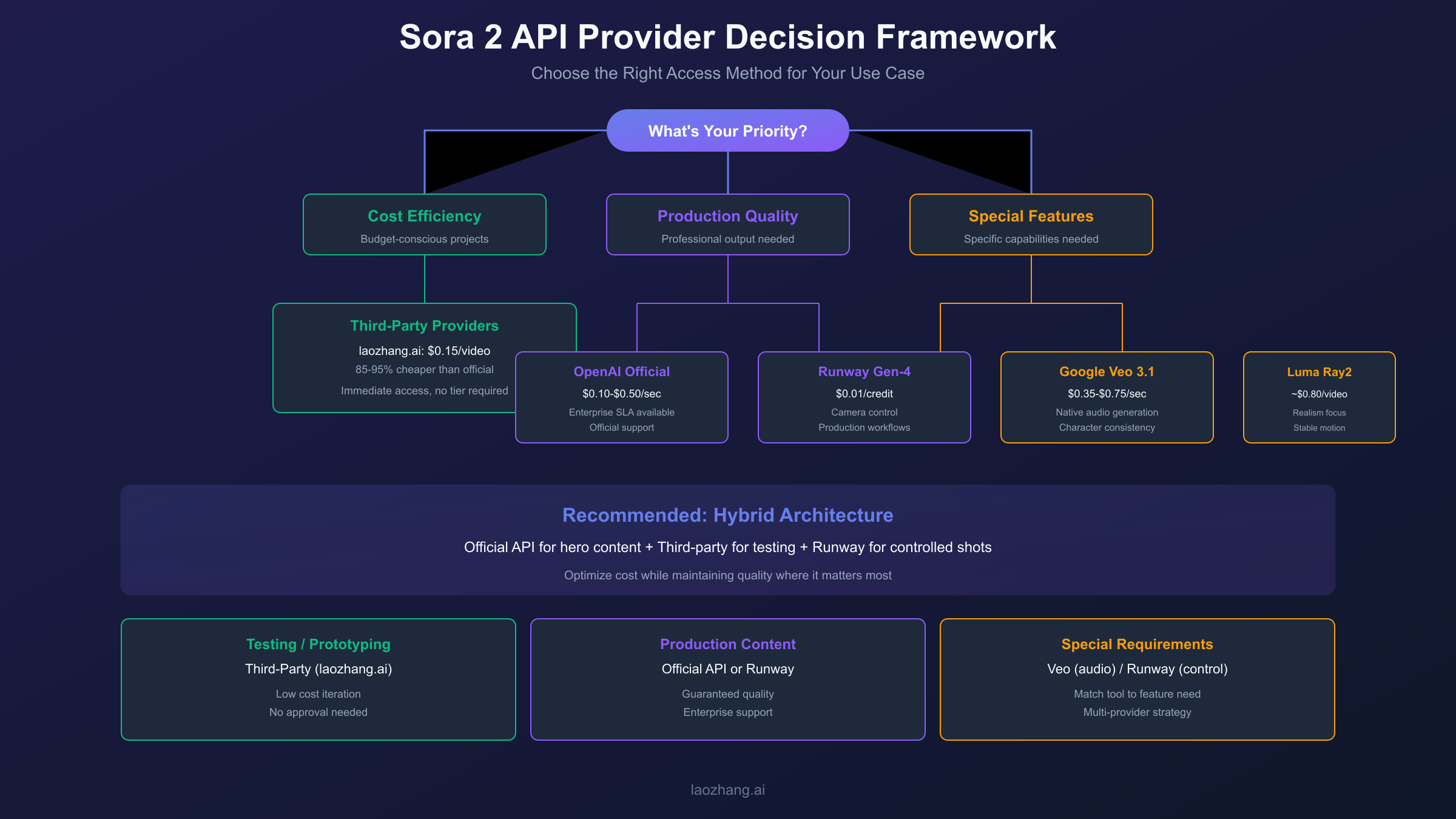
With multiple options available, selecting the right provider depends on your specific priorities. This framework helps you match your requirements to the best solution.
Choose Official OpenAI API when:
- You need enterprise SLAs and official support
- Compliance requirements mandate first-party relationships
- Budget is secondary to reliability guarantees
- You're building features that depend on latest Sora updates immediately
Choose Third-Party Aggregators (like laozhang.ai) when:
- Cost efficiency is a primary concern
- You're in testing, prototyping, or iteration phases
- You need simpler payment methods (Alipay, WeChat)
- Rate limits from official API constrain your workflow
- China-based development requires lower latency
Choose Runway when:
- Camera control and shot consistency matter
- You need integration with post-production workflows
- Image-to-video is your primary use case
- You want a stable, well-documented API
Choose Google Veo when:
- Native audio generation is required
- You're already on Google Cloud infrastructure
- Enterprise features and compliance matter
- Character consistency across scenes is important
Hybrid Approach (Recommended for Production):
Most production systems benefit from a multi-provider strategy. Use official API for hero content where quality is paramount. Route bulk generation and testing through third-party for cost efficiency. Keep Runway or Veo as fallback options for specific feature needs.
This approach optimizes cost while maintaining quality where it matters, and provides resilience against any single provider's outages.
FAQ: Sora 2 Video API Questions
Q1: Is the Sora 2 API publicly available now?
Yes, the Sora 2 API is publicly available through OpenAI as of September 2025. However, access requires a Tier 2+ account (minimum $10 top-up). Third-party providers offer immediate access without tier requirements.
Q2: What's the actual quality difference between official and third-party API access?
There is no quality difference. Third-party providers route requests through the same OpenAI Sora 2 infrastructure, so the generated videos are identical. The differences lie in pricing, support, and access requirements—not output quality.
Q3: How long does Sora video generation take?
Typical generation times range from 2-8 minutes depending on the model (sora-2 is faster than sora-2-pro), resolution, duration, and current API load. Implement polling with reasonable intervals (10-20 seconds) rather than waiting synchronously.
Q4: Can I use Sora 2 for commercial projects?
Yes, videos generated through the official API can be used commercially according to OpenAI's usage policies. Third-party providers typically pass through the same rights, but verify with each provider's terms of service for commercial use clarity.
Q5: What happens if I exceed rate limits?
Exceeding rate limits returns HTTP 429 errors. These requests still count against your quota, so immediate retries worsen the situation. Implement exponential backoff with jitter, and consider request queuing for high-volume applications. Upgrading tiers increases limits, or third-party providers often have more relaxed constraints.
The AI video generation landscape continues to evolve rapidly. While this guide reflects the state as of January 2026, providers regularly adjust pricing, add features, and change policies. Bookmark the official documentation for OpenAI, Runway, and Google Veo to stay current with the latest changes.
For developers seeking stable, cost-effective API access, the combination of understanding official pricing, leveraging third-party alternatives where appropriate, and building resilient multi-provider architectures provides the foundation for successful video generation applications.