When Anthropic released Claude Code version 2.0.74 in December 2025, they introduced a feature that fundamentally changes how developers interact with AI coding assistants: native Language Server Protocol (LSP) support. This integration transforms Claude Code from a sophisticated text processor into a tool that truly understands your code at a semantic level.
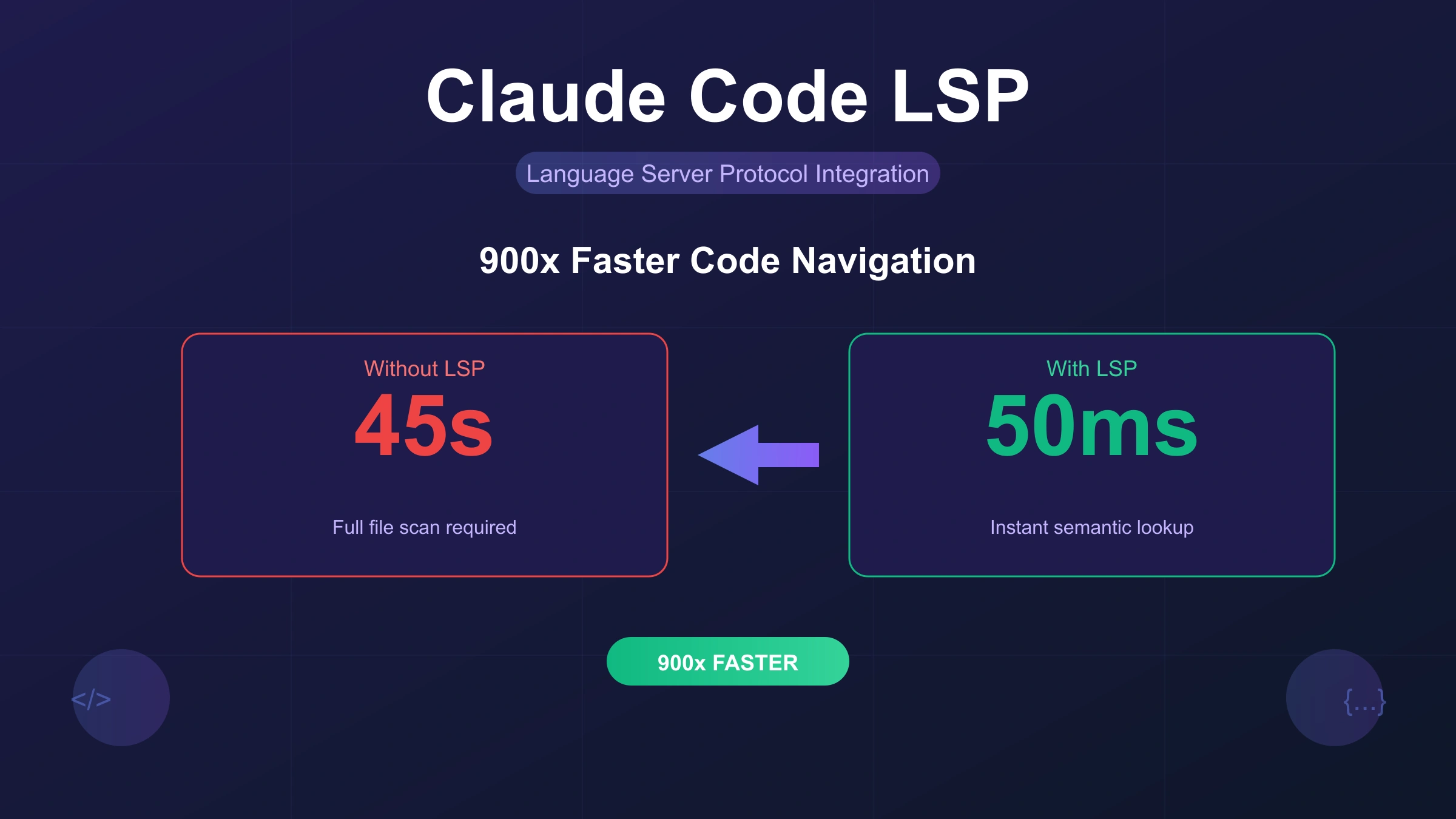
The difference is striking. Finding all call sites of a function now takes approximately 50ms with LSP compared to 45 seconds with traditional text search. That 900x performance improvement transforms not just speed but your entire development workflow. You can ask Claude to analyze dependencies, refactor code, or understand call hierarchies without the frustrating wait times that plagued earlier versions.
This guide walks you through everything you need to know about Claude Code LSP: from basic setup to mastering all nine LSP operations, troubleshooting common issues, and integrating LSP into your daily development practices.
What Is Claude Code LSP and Why It Matters
Answer Capsule: Claude Code LSP integrates Language Server Protocol into Anthropic's CLI coding assistant, providing IDE-level code intelligence including go-to-definition, find-references, and real-time diagnostics directly in your terminal conversations.
The Language Server Protocol, originally created by Microsoft in 2016, established a standardized communication protocol between development tools and language servers. Before LSP, every IDE had to implement language-specific support independently. LSP changed that by creating a universal interface that any tool can use to access code intelligence features.
When Claude Code gained LSP support, it fundamentally changed how the AI assistant navigates codebases. Previously, when Claude needed to find where a function was defined, it essentially performed advanced pattern matching on raw source files. A search for getUserById in a moderately sized project might return 500+ matches including comments, string literals, and similar function names. LSP's findReferences returns only the 23 actual call sites, eliminating noise and dramatically improving accuracy.
The practical implications extend beyond speed. With LSP enabled, Claude Code accesses the same code intelligence your IDE uses: type information, symbol hierarchies, and reference tracking. This represents a qualitative shift from text-based analysis to semantically-aware understanding. Claude can now distinguish between a function named process in your code versus the same string appearing in documentation or error messages.
For developers working with large codebases, this matters enormously. Refactoring operations that once required manual verification across dozens of files can now be performed with confidence. Claude understands not just what your code says, but what it means and how different parts connect.
The technical foundation matters for understanding why this improvement is so significant. LSP servers maintain persistent connections to your project, building and updating an Abstract Syntax Tree (AST) representation of your code. When you ask about a symbol, the language server consults this indexed structure rather than scanning files. The result is not just faster responses but fundamentally more accurate ones, because the server understands your code's grammar and semantics rather than treating it as plain text.
The 900x Performance Revolution: Before vs After LSP
Answer Capsule: LSP delivers transformative performance gains, reducing code navigation from 45 seconds to 50 milliseconds, enabling real-time exploration during development conversations.
The performance numbers tell a compelling story. Traditional text-based search requires scanning files, parsing content, and filtering results. For a function like handleAuthenticationRequest in a typical enterprise codebase with 100,000+ lines, text search might take 30-60 seconds to return results. Many of those results require manual filtering because text search cannot distinguish between actual code references and mentions in comments or strings.
With LSP enabled, the same operation completes in 50-100 milliseconds. The language server maintains an indexed understanding of your codebase, allowing instant symbol resolution. This 900x improvement transforms development workflows in several concrete ways.
Real-time code exploration becomes possible during conversations with Claude. You can ask about the implementation details of a function, request Claude to trace the call hierarchy, and receive immediate responses instead of waiting while the AI performs expensive text searches. This responsiveness changes how developers interact with AI coding assistants, enabling more iterative and exploratory coding sessions.
Token efficiency improves dramatically as well. Semantic searches consume approximately 75% fewer tokens than grep-style analysis because Claude no longer needs to process and filter large amounts of irrelevant text. This translates to cost savings for developers using Claude Code extensively and allows more complex queries within context limits.
Memory usage does increase with LSP enabled. For typical projects under 100,000 lines of code, expect 200-500MB additional memory usage as language servers maintain their indexed representations. Large monorepos with multiple languages may require more resources, but the performance gains typically justify this tradeoff.
The practical impact becomes apparent in daily development scenarios. Consider a common task: understanding how a critical function is used across a codebase before making changes. Without LSP, this might involve multiple grep searches, manual filtering of results, and careful verification that each match is actually a code reference rather than a comment or string. With LSP, a single findReferences call returns precisely the locations you need, often in under 100 milliseconds. Multiply this across dozens of such queries in a typical development session, and the cumulative time savings become substantial.
Quick Start: Enable LSP in 3 Steps
Answer Capsule: Enable Claude Code LSP by setting an environment variable, adding a plugin marketplace, and installing language-specific plugins. The entire process takes under five minutes.
Getting started with Claude Code LSP requires three straightforward steps. Before beginning, ensure you have Claude Code version 2.0.74 or later installed. You can verify your version by running claude --version in your terminal.
Step 1: Enable the LSP Tool
The LSP feature requires explicit enablement through an environment variable. Add this line to your shell configuration file (.bashrc, .zshrc, or equivalent):
hljs bashexport ENABLE_LSP_TOOL=1
After adding this line, restart your terminal or run source ~/.zshrc (or your configuration file) to apply the change. For temporary enablement without modifying configuration files, you can launch Claude with the environment variable inline:
hljs bashENABLE_LSP_TOOL=1 claude
Step 2: Add a Plugin Marketplace
Claude Code's plugin system provides centralized discovery and version tracking for LSP plugins. Add the official community marketplace:
hljs bash/plugin marketplace add boostvolt/claude-code-lsps
This marketplace contains plugins for 23 programming languages, maintained by the community with regular updates. Alternative marketplaces exist, including Piebald-AI/claude-code-lsps with slightly different language coverage.
Step 3: Install Language-Specific Plugins
Install the plugins for your programming languages. For example, to add Python and TypeScript support:
hljs bash/plugin install pyright@claude-code-lsps /plugin install vtsls@claude-code-lsps
After installing plugins, restart Claude Code to ensure they load correctly. This restart step is crucial—the most common setup problem is installing plugins without restarting.
Verification Test
To verify LSP is working, navigate to a project directory and ask Claude to find the definition of a symbol:
Find the definition of the main function in this project
If Claude responds with specific file locations and line numbers rather than performing text searches, LSP is working correctly. If you see grep-style output instead, check that all three steps completed successfully and that you restarted Claude Code.
Supported Languages and Installation Guide
Claude Code LSP supports 23 programming languages through community-maintained plugins. Each plugin requires both the Claude Code plugin and the underlying language server binary installed on your system.
| Language | Plugin Name | Language Server | Install Binary |
|---|---|---|---|
| Python | pyright@claude-code-lsps | Pyright | pip install pyright or npm install -g pyright |
| TypeScript/JavaScript | vtsls@claude-code-lsps | vtsls | npm install -g @vtsls/language-server typescript |
| Go | gopls@claude-code-lsps | gopls | go install golang.org/x/tools/gopls@latest |
| Rust | rust-analyzer@claude-code-lsps | rust-analyzer | rustup component add rust-analyzer |
| Java | jdtls@claude-code-lsps | Eclipse JDT.LS | Download from eclipse.org |
| C/C++ | clangd@claude-code-lsps | clangd | brew install llvm or package manager |
| C# | omnisharp@claude-code-lsps | OmniSharp | dotnet tool install -g omnisharp |
| PHP | phpactor@claude-code-lsps | Phpactor | composer global require phpactor/phpactor |
| Ruby | ruby-lsp@claude-code-lsps | Ruby LSP | gem install ruby-lsp |
| Kotlin | kotlin-lsp@claude-code-lsps | kotlin-language-server | Download from GitHub releases |
| Swift | swift-lsp@claude-code-lsps | SourceKit-LSP | Included with Xcode |
| Dart/Flutter | dart@claude-code-lsps | Dart Analysis Server | Included with Dart SDK |
| Elixir | elixir-ls@claude-code-lsps | ElixirLS | mix archive.install hex elixir_ls |
| Lua | lua-lsp@claude-code-lsps | lua-language-server | brew install lua-language-server |
| Zig | zls@claude-code-lsps | ZLS | zigup or download binary |
| HTML/CSS | html-css@claude-code-lsps | vscode-langservers | npm install -g vscode-langservers-extracted |
| Terraform | terraform@claude-code-lsps | terraform-ls | brew install terraform-ls |
| Bash/Shell | bash@claude-code-lsps | bash-language-server | npm install -g bash-language-server |
| YAML | yaml@claude-code-lsps | yaml-language-server | npm install -g yaml-language-server |
| Clojure | clojure@claude-code-lsps | clojure-lsp | brew install clojure-lsp |
| OCaml | ocaml@claude-code-lsps | ocaml-lsp | opam install ocaml-lsp-server |
| Nix | nix@claude-code-lsps | nil | nix profile install nixpkgs#nil |
| Gleam | gleam@claude-code-lsps | Gleam LSP | Included with Gleam compiler |
Installation Best Practices
Always install the language server binary before installing the Claude Code plugin. The plugin configuration tells Claude Code how to communicate with the language server, but the server itself must exist and be accessible in your system PATH.
Verify the binary installation by running the server command directly:
hljs bash# Python
pyright --version
# TypeScript
vtsls --version
# Go
gopls version
# Rust
rust-analyzer --version
If these commands fail, the corresponding plugin will not function. Install the missing binary using your preferred package manager before proceeding with plugin installation.
For multi-language projects, install plugins for all languages used in the codebase. Claude Code will automatically use the appropriate language server based on file extensions.
Master the 9 Core LSP Operations
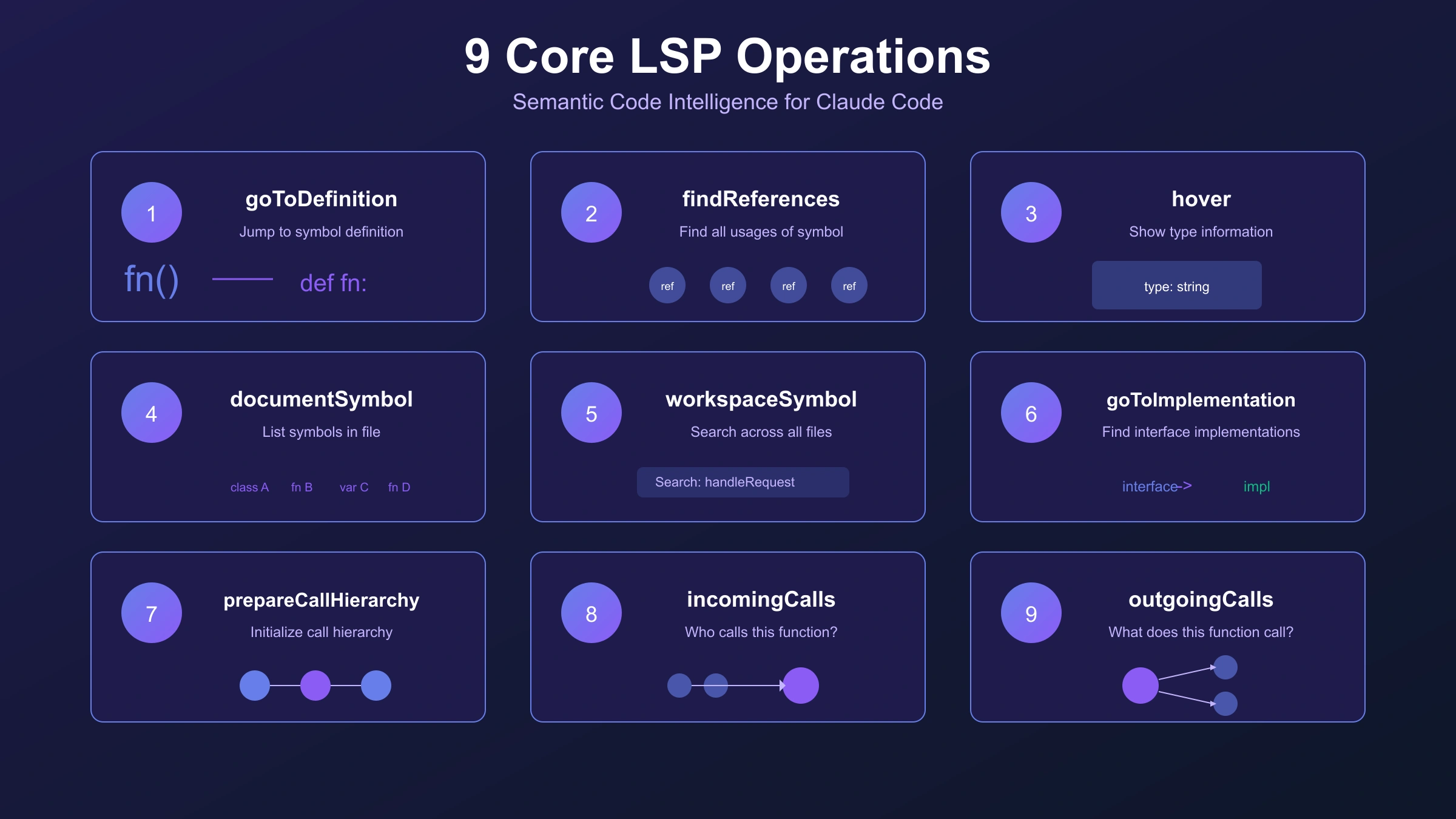
Answer Capsule: Claude Code LSP provides nine operations mapping to standard LSP commands: goToDefinition, findReferences, hover, documentSymbol, workspaceSymbol, goToImplementation, prepareCallHierarchy, incomingCalls, and outgoingCalls.
Understanding these nine operations unlocks the full potential of Claude Code LSP. Each operation serves a specific purpose in code navigation and understanding.
goToDefinition
This operation navigates directly to where a symbol is defined. When you ask Claude "where is this function defined?" or "show me the implementation of UserService," Claude uses goToDefinition to locate the exact file and line number.
Example usage:
Go to the definition of handleRequest, then show me its parent class definition
The operation resolves through abstraction layers automatically. If a function is defined in an interface, goToDefinition can navigate to the interface definition or, when asked, to the concrete implementation.
findReferences
Locates all code locations that reference a particular symbol. This operation proves essential for refactoring assessment and understanding code impact.
Example usage:
Find all references to the deprecated formatDate function so I can assess the refactoring scope
Unlike text search, findReferences returns only actual code references, excluding comments, strings, and coincidental text matches.
hover
Retrieves type signatures, documentation, and metadata for symbols. When you need to understand what a function accepts or returns without navigating to its definition, hover provides that information inline.
Example usage:
What are the parameter types for the processPayment function?
documentSymbol
Returns a hierarchical view of all symbols in a file. This operation helps understand file structure quickly, showing functions, classes, methods, and their relationships.
Example usage:
Show me all the exported functions in this module
workspaceSymbol
Searches for symbols across the entire workspace. Unlike documentSymbol which operates on a single file, workspaceSymbol finds definitions anywhere in the project.
Example usage:
Find all classes that implement the Repository interface in this project
goToImplementation
Specifically designed for navigating from interfaces or abstract methods to their concrete implementations. This operation proves invaluable in codebases using dependency injection or interface-based design.
Example usage:
Show me all implementations of the AuthenticationProvider interface
prepareCallHierarchy
Initializes call hierarchy analysis for a symbol, preparing data for incomingCalls and outgoingCalls operations. This operation sets up the context needed for deeper analysis. While less commonly used directly, it enables the powerful call hierarchy features that help trace execution paths through complex systems.
Example usage:
Prepare the call hierarchy for the authenticateUser function so I can trace its usage
incomingCalls
Finds all functions or methods that call the target function. This operation answers "who calls this function?" and helps understand how changes might propagate through the codebase.
Example usage:
What functions call the validateUser method?
outgoingCalls
The inverse of incomingCalls—finds all functions or methods that the target function calls. This operation maps dependencies and helps understand what a function relies on.
Example usage:
What external services does the checkout function depend on?
Troubleshooting Common LSP Issues
The most frequently reported Claude Code LSP issue is the "No LSP server available" error. Understanding why this happens helps resolve it quickly.
Race Condition in Plugin Loading
Versions 2.0.69 through 2.0.x contained a race condition where the LSP Manager initialized before plugin loading completed. Debug logs showed the LSP Manager completing with zero servers, then plugins loading 52ms later. This issue was fixed in version 2.1.0.
Solution: Update to Claude Code version 2.1.0 or later:
hljs bash# For Homebrew installations
brew upgrade claude-code
# For npm installations
npm update -g @anthropic-ai/claude-code
Plugin Installed But Not Recognized
The most common cause is not restarting Claude Code after plugin installation. Exit Claude Code completely and relaunch it to ensure plugins load correctly.
If the problem persists after restart, verify the plugin appears in the Installed tab:
/plugin
Navigate to the "Installed" tab and confirm your language plugins are listed.
Executable Not Found in PATH
If you see "Executable not found in $PATH" in the /plugin Errors tab, the language server binary is not installed or not accessible.
Verify the binary exists:
hljs bashwhich pyright # Python
which gopls # Go
which rust-analyzer # Rust
which vtsls # TypeScript
If the command returns nothing, install the missing binary using the commands from the language support table above.
Server Crashes on Large Files
Some language servers struggle with very large files or complex codebases. You can increase timeout settings through the plugin configuration:
hljs json{
"startupTimeout": 30000,
"restartOnCrash": true,
"maxRestarts": 3
}
Clearing Plugin Cache
When troubleshooting persistent issues, clearing the plugin cache can resolve cached configuration problems:
hljs bashrm -rf ~/.claude/plugins/cache
After clearing the cache, restart Claude Code and reinstall affected plugins.
Debug Logging
For complex issues, check debug logs in ~/.claude/debug/. These logs provide detailed information about LSP server startup, communication, and errors that can help identify specific problems.
Version Compatibility Matrix
Understanding which versions work together helps avoid configuration issues:
| Claude Code Version | LSP Status | Notes |
|---|---|---|
| < 2.0.55 | Not available | Upgrade required |
| 2.0.55 - 2.0.68 | Experimental | Use ENABLE_LSP_TOOL=1 |
| 2.0.69 - 2.0.x | Broken | Race condition bug |
| 2.1.0+ | Stable | Recommended version |
If you encounter persistent issues, verify you are running version 2.1.0 or later where the race condition fix is included. The version check command claude --version confirms your installed version.
Claude Code LSP vs Cursor vs Copilot: Feature Comparison
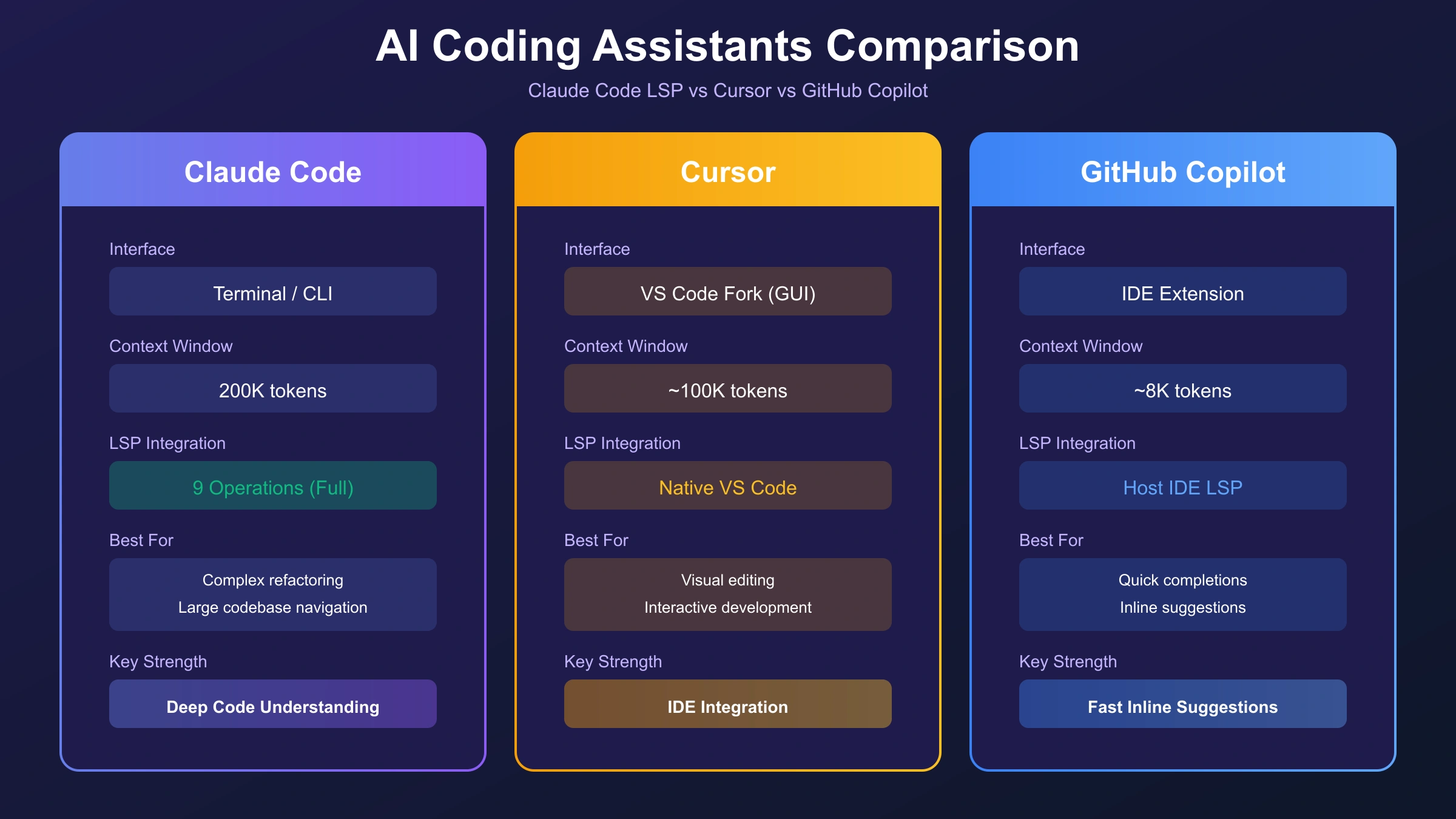
Developers choosing AI coding tools often compare Claude Code with Cursor and GitHub Copilot. Each tool approaches code intelligence differently, and understanding these differences helps make informed choices.
| Feature | Claude Code LSP | Cursor | GitHub Copilot |
|---|---|---|---|
| Interface | Terminal-first CLI | Standalone IDE (VS Code fork) | IDE extension |
| Context Window | 200,000 tokens | Varies by model | 8,192 tokens |
| LSP Integration | Native (v2.0.74+) | Built-in from start | Built-in |
| Best For | Large refactoring, codebase exploration | Building new projects | Inline completions |
| Pricing | API usage-based | $20/month | $10/month |
| Multi-file Understanding | Excellent | Excellent | Limited |
When to Choose Claude Code LSP
Claude Code excels at deep codebase exploration and multi-file refactoring tasks. Its 200,000 token context window allows maintaining awareness of large sections of code simultaneously. The terminal-first approach integrates naturally into existing development workflows without requiring IDE changes.
Developers working on existing large codebases, particularly those needing to understand unfamiliar code or perform significant refactoring, often find Claude Code's approach more effective than GUI-based alternatives.
When to Choose Cursor
Cursor provides a more visual, IDE-integrated experience. Developers who prefer working entirely within a GUI environment and want AI features tightly integrated with editing may prefer Cursor. The VS Code foundation means familiar keybindings and extension compatibility.
For building new projects from scratch, Cursor's real-time suggestions and visual feedback can accelerate initial development.
When to Choose GitHub Copilot
GitHub Copilot remains strong for inline code completion and teams deeply integrated with the GitHub ecosystem. The lower price point and seamless GitHub integration make it attractive for organizations already using GitHub extensively.
The 8,192 token context limit means Copilot works best for localized tasks rather than large-scale refactoring. Teams needing enterprise management features may find Copilot's organizational tools valuable.
The Convergence Trend
With Claude Code adding LSP support, the feature gap between these tools continues narrowing. The practical advantage now lies in token efficiency—deterministic LSP lookups are more cost-effective than burning context on LLM-generated navigation, regardless of which tool you choose.
For developers needing Claude Code API access with predictable pricing, aggregation platforms like laozhang.ai offer an alternative to direct API usage, with the same Claude models accessible through a simplified billing model. However, for most individual developers, direct Anthropic API access through the standard Claude Code setup provides the most straightforward experience.
Real-World Workflows and Best Practices
Effective use of Claude Code LSP involves developing consistent habits that leverage semantic understanding. Three behavioral rules form the foundation of productive LSP workflows.
Rule 1: Always goToDefinition Before Modifying Unfamiliar Code
Before changing any function, class, or module you did not write, use goToDefinition to understand its implementation. This practice prevents assumptions based on function names that may not reflect actual behavior.
Show me the definition of processPaymentQueue before I modify how it handles failures
This approach catches edge cases, error handling patterns, and dependencies that would otherwise require debugging to discover.
Rule 2: Always findReferences Before Renaming or Refactoring
Before renaming a symbol or changing a function's signature, assess the impact scope:
Find all references to the legacy formatTimestamp function
Understanding the full reference scope prevents breaking changes in unexpected locations. For large refactoring operations, this step can reveal the true complexity of seemingly simple changes.
Rule 3: Always Verify with LSP Diagnostics Before Claiming Success
After making changes, verify the codebase remains valid:
Check for any type errors or diagnostics in the files I modified
LSP diagnostics catch type mismatches, missing imports, and other issues immediately rather than at compile time or runtime.
Workflow Example: Understanding New Codebases
When joining a project or exploring unfamiliar code:
- Use workspaceSymbol to find entry points: "Show me all exported HTTP handlers"
- Use goToDefinition to trace from entry points to implementation
- Use incomingCalls and outgoingCalls to map dependencies
- Use hover to understand type signatures without navigation
This systematic approach builds understanding faster than reading files sequentially.
Developing LSP Habits
Claude develops habits based on your interaction patterns. Consistently using LSP operations teaches Claude to proactively use them. After several sessions where you explicitly request goToDefinition before modifications, Claude begins doing this automatically in future sessions.
Advanced Workflow: Dependency Analysis
For more sophisticated analysis, combine multiple LSP operations:
1. Show me the definition of the PaymentProcessor class
2. Now find all classes that implement PaymentProcessor
3. For each implementation, show me the outgoing calls to external services
This multi-step approach maps your application's architecture through targeted queries, building a mental model faster than reading documentation or code files sequentially.
Integration with IDE Extensions
While Claude Code LSP works independently in the terminal, developers often use both terminal Claude Code and IDE extensions. A practical workflow involves using the terminal for complex multi-file operations and analysis, while using IDE extensions for inline completions during active editing. The terminal's 200,000 token context window handles large-scale understanding tasks that would overflow IDE-based tools.
Frequently Asked Questions
Does Claude Code LSP work offline?
The LSP plugins and language servers run entirely locally and do not require internet connectivity. However, Claude Code itself requires API access for AI features. The LSP operations execute locally, but Claude's responses still require API communication.
How much memory does LSP consume?
For typical projects under 100,000 lines of code, expect 200-500MB additional memory usage per active language server. Large monorepos with multiple languages may require more resources. Memory usage scales with project size and the number of simultaneous language servers.
Can I use multiple language servers simultaneously?
Yes. Claude Code supports multiple language servers running concurrently for multi-language projects. Install plugins for all languages used in your codebase, and Claude automatically selects the appropriate server based on file extensions.
Why does my LSP plugin show errors after installation?
Most commonly, the underlying language server binary is not installed or not in your PATH. Verify the binary installation separately before troubleshooting the plugin. The plugin configuration only tells Claude Code how to communicate with the server; the server must exist independently.
Is LSP supported in Claude Code IDE extensions?
Claude Code's LSP integration works in the terminal application. IDE-specific extensions (VS Code, JetBrains) have their own LSP implementations. When using Claude Code through these extensions, you typically use the IDE's native LSP rather than Claude Code's built-in support.
How do I check if LSP is working correctly?
Ask Claude to find a symbol definition. If Claude responds with specific file paths and line numbers without performing visible text searches, LSP is functioning. Text-based responses with grep-style output indicate LSP is not active.
Conclusion
Claude Code LSP represents a significant advancement in AI-assisted development. The shift from text-based pattern matching to semantic code understanding delivers measurable improvements: 900x faster navigation, 75% reduction in token usage for code exploration, and dramatically improved accuracy in symbol resolution.
Setting up LSP requires three simple steps: enabling the environment variable, adding a plugin marketplace, and installing language-specific plugins. The investment of five minutes yields returns every time you explore code, refactor functions, or trace dependencies.
The nine LSP operations provide a complete toolkit for code navigation. Master goToDefinition and findReferences first—these two operations address the most common development needs. Add call hierarchy analysis as your workflows become more sophisticated.
For developers working with large codebases, the combination of Claude's 200,000 token context window and LSP's semantic understanding creates a uniquely powerful tool. Code that once required hours of manual exploration becomes accessible through natural language queries with instant responses.
Start with your primary programming language, verify the setup works, then expand to additional languages as needed. The Claude Code LSP ecosystem continues growing, with community contributors adding new language support regularly.
For more details on optimizing your Claude Code workflow, explore our guides on Claude Code best practices and usage limits.