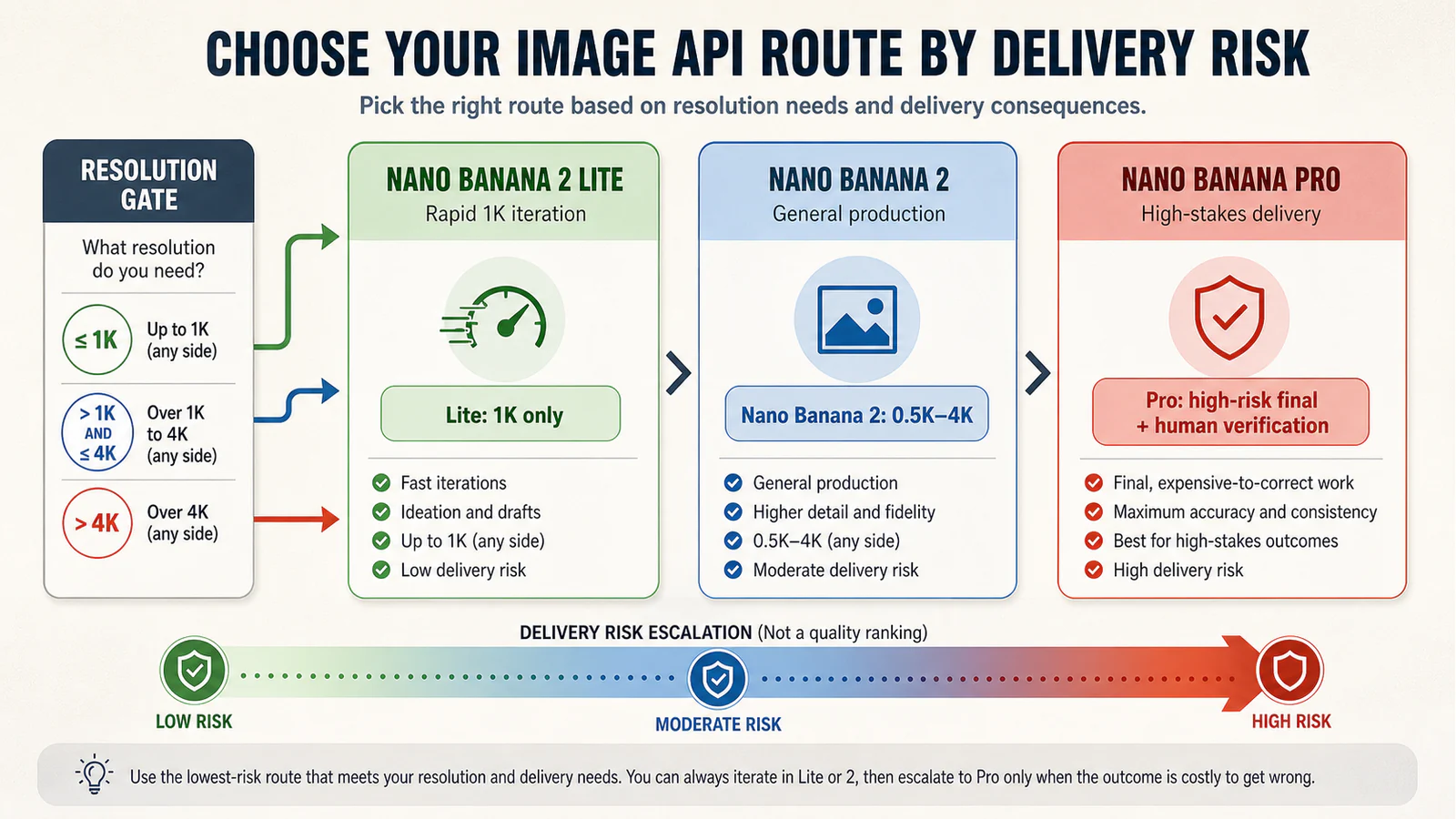
Choose Nano Banana 2 Lite when a 1K draft is enough and low latency or high iteration volume matters most. Choose Nano Banana 2 when the same job needs 2K or 4K output, search grounding, or a more flexible production default. Escalate to Nano Banana Pro when a costly final asset has dense text, a strict layout, multiple references, or a correction pass that would cost more than the higher generation price. That is a routing rule, not a universal quality ranking: test the exact input and count retries plus human correction before committing a batch.
Pick your route
Use the official API IDs when you configure the route: gemini-3.1-flash-lite-image for Lite, gemini-3.1-flash-image for Nano Banana 2, and gemini-3-pro-image for Pro. App plans, regional availability, quotas, and third-party bundles are separate contracts; do not infer them from the API documentation.
Route 1: Lite for fast 1K iteration
Pick Lite when the deliverable is a disposable 1K concept, variation set, sticker, background adjustment, or an interactive draft where speed matters more than a high-resolution handoff. Google documents 1K as Lite's supported image_size; 2K and 4K are unsupported. Its documentation also says SynthID and C2PA watermarking are always on, so a workflow that requires a different disclosure treatment needs a separate policy decision rather than a model switch.
Lite is a poor fit when the final output must be 2K or 4K, when the asset has unusually demanding text or layout, or when each failed result requires expensive retouching. A low per-image price does not make it the low-cost choice if it raises the number of accepted-output retries.
Route 2: Nano Banana 2 for general production
Pick Nano Banana 2 when you need a production default that can move beyond 1K. Google lists 0.5K, 1K, 2K, and 4K output options for gemini-3.1-flash-image, plus image generation, editing, and Search grounding. That makes it the practical middle route for teams that need throughput but cannot lock the brief to a 1K draft.
Use this route for product concepts, social graphics, image edits, and general-purpose batches only after your test confirms that the chosen size, text, reference handling, and correction load meet the delivery target. Search grounding is an API capability, not a promise that an image is factually correct; verify any important claim or label in the finished asset.
Route 3: Pro for expensive mistakes
Pick Pro when the image is a high-stakes final: a regulated claim, dense readable text, a layout where one misplaced element breaks the handoff, a brand asset with strict references, or a 4K deliverable that would be slow to repair manually. Google positions gemini-3-pro-image for professional image editing and generation, including complex graphic design, high-fidelity product mockups, and data visualizations that need accurate text rendering and Search grounding.
Pro is not an automatic substitute for review. A single impressive output does not establish that the route will preserve every logo, disclaimer, count, price, or factual label across a batch. Keep human verification and a stop condition for work where a wrong delivery creates legal, safety, or brand risk.
Run the same-input acceptance-cost test
Run this card before you choose a model for a real delivery. Keep the prompt, reference files, aspect ratio, requested size, and acceptance checklist identical for all three routes. The point is to measure the cost of an accepted output, not to declare a winner from one sample.
| Test field | Lite | Nano Banana 2 | Pro |
|---|---|---|---|
| Route ID | gemini-3.1-flash-lite-image | gemini-3.1-flash-image | gemini-3-pro-image |
| Requested resolution | 1K only | 0.5K, 1K, 2K, or 4K | 1K, 2K, or 4K as supported by the API route |
| Attempts started | ____ | ____ | ____ |
| Outputs accepted | ____ | ____ | ____ |
| Retries before acceptance | ____ | ____ | ____ |
| Human correction minutes | ____ | ____ | ____ |
| Text and layout pass? | yes / no | yes / no | yes / no |
| Reference consistency pass? | yes / no | yes / no | yes / no |
| Stop condition reached? | yes / no | yes / no | yes / no |
For each route, calculate:
accepted-output cost = API generation spend for all attempts + (human correction minutes × your internal minute cost) + rework or delivery risk you can price honestly
Record the price row, consumption option, and requested resolution used in the test. On Google's current standard API rows, Lite is listed at $0.0336 per 1K image, Nano Banana 2 ranges from $0.045 at 0.5K to $0.151 at 4K, and Pro is listed at $0.134 for 1K or 2K and $0.24 for 4K. Those are API figures, not a price quote for Gemini apps, AI Studio, Vertex, a country, or a reseller. Batch and other consumption options have different rows.
Apply the stop condition before scaling
Stop a route instead of increasing the batch when the same-input test repeatedly fails a required text string, a reference identity, a layout constraint, or a factual label. Also stop when correction time erases the apparent price advantage, or when the task needs a resolution Lite cannot produce. For a regulated, brand-sensitive, or final-delivery asset, pause for human approval even when the test card passes.
Match the resolution and API price to the real handoff
Resolution is a hard gate before taste or speed. Lite cannot serve a 2K or 4K handoff. Nano Banana 2 supports 0.5K through 4K, while Pro's API price changes at 4K. If the delivered file will be resized, printed, cropped, or passed into another design system, specify the final pixel requirement before you compare results.
The pricing page is useful for budgeting a controlled test, but it cannot tell you whether a consumer product, a region, a quota tier, or a provider package gives you the same access. Confirm those separately with the surface through which you actually buy and run the model.
A short decision checklist
- Need only rapid 1K drafts at high volume? Start with Lite and measure acceptance rate.
- Need 2K or 4K, or a versatile image-production route? Start with Nano Banana 2.
- Is a failed text, layout, reference, or final-delivery asset expensive to correct? Put Pro in the same-input test and retain human review.
- Are you comparing prices? Label the exact API pricing row, resolution, and consumption option; do not generalize it to an app or regional offer.
- Is the task safety-, policy-, brand-, or legally sensitive? Stop automated delivery until a human validates the final asset and its required disclosures.