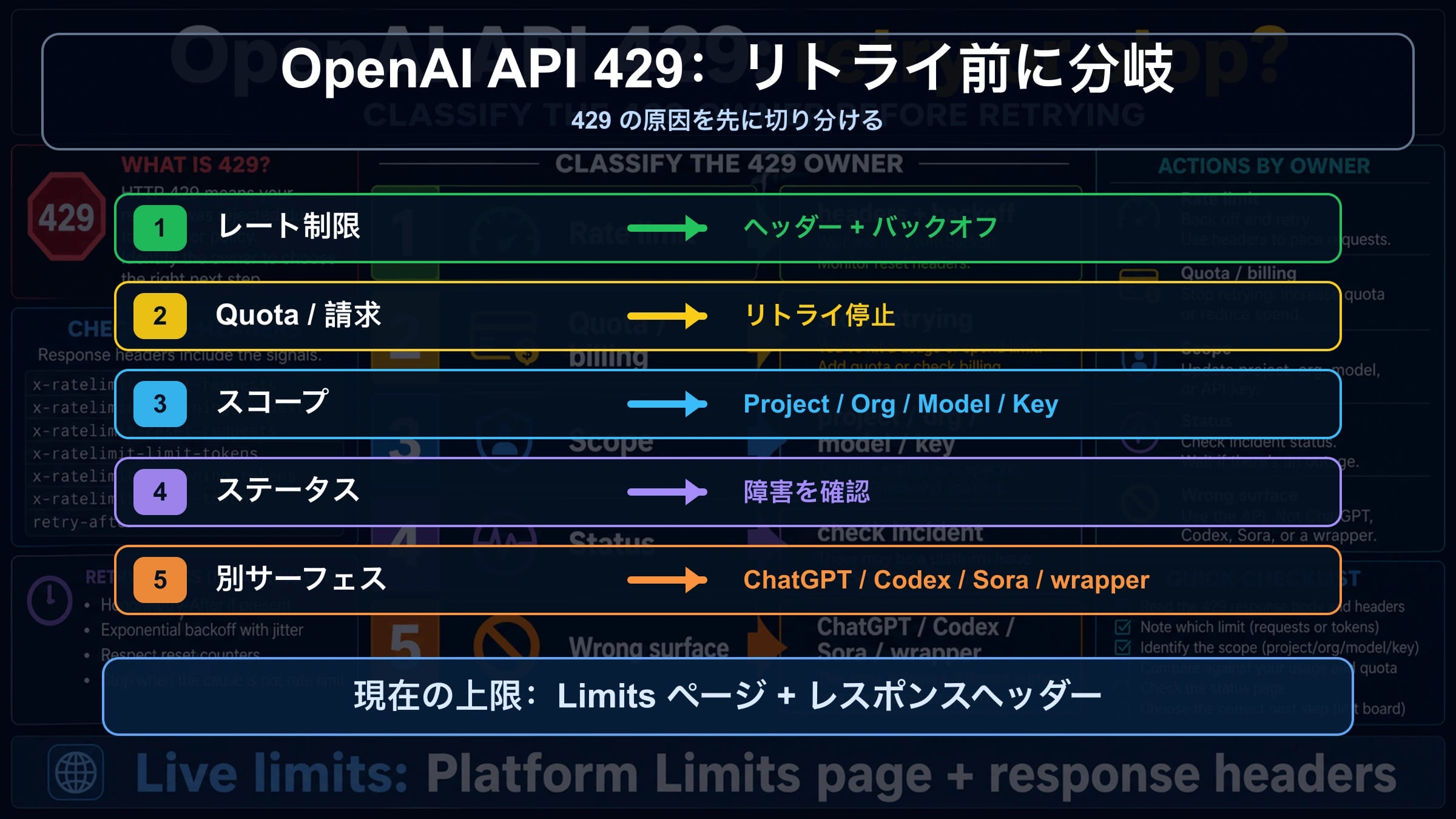
OpenAI Platform APIがquota exceeded、insufficient_quota、または429を返したら、まずretry回数を増やさず、エラー本文を読みます。rate limitならbackoff、throttling、queueが候補です。しかしquota、billing、project scope、model access、status incident、wrapper limitなら確認先が変わります。
| 手がかり | 主な原因 | 最初に見るもの | retryかstopか |
|---|---|---|---|
rate limit reached、too many requests、remaining headersが低い | request/token rate limit | headers、Limits、model family、reset window | backoffとjitter、その後throttleまたはqueue |
You exceeded your current quota、insufficient_quota | quota、billing、spend cap | Billing、Usage、Limits、account state | account stateが変わるまでstop |
| 新しいkeyでも同じ、または一部project/modelだけ失敗 | project、organization、model、key scope | project、organization、model access | scopeを直してからtrafficを変える |
| 多くのcallが失敗しStatusにincident | platform status/capacity | OpenAI Status、timestamp、request id | 待つ、証跡を残す |
| ChatGPT、Codex、Sora、Azure、wrapperからのエラー | wrong surface | product surface、provider docs、route、headers | その契約へ切り分ける |
停止ルールは単純です。request/token pressureでreset signalがある場合だけretryします。quota、billing、wrong project、wrong model、wrong surface、status incidentなら同じリクエストの反復は修復になりません。
429本文を読んでからコードを変える
OpenAIの公式ドキュメントでは、429は少なくとも「trafficが速すぎる」系と「current quotaが尽きた」系に分かれます。現場ではどちらも429エラーと呼ばれがちなので、最初の判断はタイトルではなくエラー本文に任せます。retry policyを変える前に、message、code、type、endpoint、model、project、organization、timestamp、request idを記録してください。
安全な分類は保守的であるべきです。insufficient_quotaやcurrent quotaの文言があれば、quotaまたはbillingの停止分岐として扱います。本文がrate limitやtoo many requestsを示し、headersにremaining/resetが出ているなら、一時的なpressureとしてretry対象にできます。どちらか不明な場合は、一度に複数の変数を変えず、同じrequest routeを保って証拠を集めます。
これは運用上重要です。曖昧な429は誤った修復に誘導します。短いretry loopは分単位のcapacityをさらに消費し、新しいkeyは同じprojectがブロックされている事実を隠し、違うorganizationでbillingを直してもproduction requestには届きません。
10分で復旧ルートを決める
最初の10分は、ランダムな実験ではなく原因の所有者を分類する時間です。raw bodyとheadersをコピーし、同じprojectとorganizationのLimits、Billing、Usageを開き、model familyを確認し、OpenAI Statusを見てから、小さなcontrolled requestを1回送ります。この順序なら証拠が読みやすいまま残ります。
| 時間 | 行動 | 確認できること |
|---|---|---|
| 0-1 | bodyとheadersを保存 | rate、quota、billing、unknownのどれか |
| 1-3 | Limits、Usage、Billingを確認 | accountにcapacityまたはbilling stateの問題があるか |
| 3-5 | modelとendpointを比較 | 厳しいmodel familyや共有limitが関係するか |
| 5-7 | OpenAI Statusを確認 | public incidentで対応が変わるか |
| 7-10 | 小さなcontrolled requestを送る | workload sizeかaccount stateか |
小さなrequestが通るなら、concurrency、token size、image throughput、fan-outを調べます。同じquota wordingで失敗するならretryを止めます。declared incident中に無関係なendpointsも落ちるなら、accountを回すより証拠を保存して待つ方が有効です。
retryとbackoffが正しい場合
Retryとbackoffが正しいのは、一時的なrequest/token pressureの場合だけです。使える信号は、rate-limit wording、低いremaining value、reset timing、現在のproject/model budgetを超えるtraffic patternです。retryは魔法の修復ではなく、送信ペースを整える道具です。
exponential backoffにjitterを入れ、retry回数に上限を置き、projectとmodel familyごとにcentral limiterを置きます。worker同士が状態を共有しないなら、各worker内のlimiterだけでは足りません。dispatch前にtoken sizeを見積もれば、prompt sizeやmax outputを下げるだけでAPIに拒否される前にTPM pressureを減らせます。
失敗したrequestsもminute limitsに数えられる場合があります。fleet全体が毎秒retryすると、自分でfailure windowに居続けます。よいシステムは速度を落とし、queueに逃がし、緊急でない仕事を落とし、async workにはBatchを使います。
retryしてはいけない場合
エラーがinsufficient_quota、current quota、billing、monthly spend、account stateを示すなら、retryは間違いです。数秒待ってもquotaは増えません。正しい確認先はBilling、Usage、Limits、spend cap、organization、project、model accessです。
「creditsがあるのに429になる」ケースの多くはscope問題です。creditが別organizationにある、requestが別projectを使っている、monthly spend capが残っている、modelがそのprojectで使えない、wrapperが独自poolを適用している、といった可能性があります。各scopeを確認する間は、最小requestを1つ固定してください。
新しいAPI keyで直らない理由
API keyは独立したcapacity bucketではありません。新しいkeyが役立つのは、古いkeyがrevoke済み、漏えい済み、制限付き、またはwrong projectに紐づいている場合です。organization、project、model family、billing ownerが同じなら、capacityは増えません。
| Scope | 確認するもの | 失敗パターン |
|---|---|---|
| Organization | requestが意図したorgを使うか | personal orgとteam orgでbillingやlimitsが違う |
| Project | keyが確認したprojectに属するか | Limitsは別projectで見て、trafficは別projectから出ている |
| Model family | selected modelにaccessとheadroomがあるか | 厳しい、または共有のfamily limitが尽きている |
| Team workload | 他サービスとcapacityを共有しているか | batch jobや別appがpoolを消費している |
1つのmodelだけ失敗するなら、そのprojectで確実に使えるmodelに小さなrequestを送ります。すべてのmodelがquota wordingで失敗するなら、先にaccount stateを見ます。同じkeyが別サービスで動くなら、落ちているサービスのconcurrencyとrequest shapeを調べます。
headersとLimitsをライブ証拠にする
live evidenceはresponseとaccountの両方にあります。bodyは分岐を示し、headersはlimit、remaining、reset timingを示すことがあります。Limitsページは現在のproject、organization、model contextを示します。固定の公開表より、自分のaccountで見える証拠の方が強いです。
| 証拠 | 使い道 |
|---|---|
| statusとbody | retry可能なrate pressureとquota/billingを分ける |
| request id | supportのlookup handleになる |
| rate-limit headers | limit、remaining、reset timingを示す |
| projectとorganization | requestの所有者を確認する |
| modelとendpoint | 厳しいmodel limitやwrong endpointを見つける |
| LimitsとUsage state | failure時のaccount stateを残す |
| Status snapshot | incidentとaccount-local failureを分ける |
2026年4月29日のpublic OpenAI Status確認では、広範なactive incidentは表示されていませんでした。これは将来の正常性を保証しません。自分のincident中はStatusをliveで確認し、greenならaccount scope、headers、workload shapeの確認へ進みます。
productionで次の429を減らす
目の前の復旧が終わったら、その学びをproduction controlsに移します。OpenAIに拒否される前に、アプリ側が自分のbudgetを知るべきです。project/model limiters、tenant budgets、token estimates、queue alerts、retry counters、reset-window observationsを持たせます。
interactive trafficとbackground jobsを無差別に競合させないでください。緊急でないjobはqueueに入れ、tenantを分け、可能ならprompt sizeを減らします。product decisionとして妥当なら、単純な処理を安い、またはpressureの低いmodelへ回します。latencyが重要でなくworkloadに合うならBatchを使います。
別surfaceを先に切り分ける
「OpenAI API 429」は、コードから送ったPlatform API callを指すべきです。ChatGPT、Codex、Sora、Azure OpenAI、wrappersもlimit messagesを出しますが、所有者と直し方は違います。
| Surface | 想定してはいけないこと | 代わりに確認すること |
|---|---|---|
| ChatGPT | consumer planでAPI quotaが変わる | ChatGPT product limitsとaccount state |
| Codex | coding-agent limitsがAPI RPM/TPMと同じ | Codex product contractとstatus |
| Sora | video capacityがtext API limitsと同じ | Sora route、queue、plan、video status |
| Azure OpenAI | OpenAI Platform Limitsがdeploymentを管理する | Azure quota、deployment、region、subscription |
| Wrapper | OpenAI headersが必ずそのまま通る | provider dashboard、docs、route id、upstream evidence |
requestがapi.openai.comへ直接送られていないなら、先にprovider boundaryを特定します。wrapper側のpoolが満杯、upstream 429をlocal errorに変換している、または独自のaccount capをかけている可能性があります。
証拠をそろえてエスカレーションする
分岐が安定し、secretsを取り除いてからエスカレーションします。短いpacketにはtimestamp、timezone、request id、endpoint、model、SDK version、organization、project、billing owner、安全なbody、安全なheaders、Limits/Usage state、Status state、retry count、concurrency、prompt size、queue depth、recent changesを入れます。
API keys、bearer tokens、card details、private prompts、user dataを公開場所に貼らないでください。整理されたevidenceはsupportにとって速く、usersにとって安全です。
よくある質問
OpenAI API 429は全部retryできますか?
できません。本文とheadersが一時的なrequest/token pressureを示すときだけretryします。insufficient_quotaはBilling、Usage、Limits、project、organization、model accessを見ます。
insufficient_quotaとは?
quota、billing、spend cap、account stateの問題です。短い待機では解決しないため、同じproject/orgで確認します。
クレジットがあるのに429が出る理由は?
別organization/project、monthly spend cap、billing反映待ち、model access、shared family limit、wrapper poolなどがあります。
API keyを増やすと制限は増えますか?
同じproject/orgなら増えません。keyはcredential問題を直せてもquota poolは作りません。
どのheadersを見るべきですか?
limit、remaining、resetを示すrate-limit headersです。必ずLimitsページと合わせて読みます。
OpenAI Statusは見るべきですか?
はい。incidentがあれば待機と証跡保存、greenならaccount、headers、Limits、workloadの確認へ進みます。
ChatGPT PlusはAPI quotaと同じですか?
違います。ChatGPTのconsumer planとOpenAI Platform API billingは別です。
supportには何を送りますか?
timestamp、timezone、request id、endpoint、model、project、organization、error body、safe headers、Limits/Usage、Status、retry count、workload、recent changesです。