メインコンテンツへ移動

Nano Banana 2.1 をオンラインで:Google の最新 Nano Banana、1 枚 $0.045

Nano Banana 2.1(gemini-nano-banana-2.1)をブラウザで。1 枚 $0.045 で Nano Banana 2 より安く、1K〜4K、8:1 までの比率。Nano Banana 2・Pro と同じプロンプトで比べた作例付き。

バランス料金 $0.045/ 枚1K / 2K / 4K画像編集:対応新規ユーザーに $0.1

Nano Banana 2.1 は Google の最新の Nano Banana モデル(API モデル ID gemini-nano-banana-2.1)です。YingTu では 1 枚 $0.045 で、Nano Banana 2($0.055)より安く、1K・2K・4K を 8:1 までの 14 種類の比率で出力し、最大 5 枚の参照画像で編集できます。2026 年 10 月 9 日からスタジオの標準モデルです。

1K-4K画像編集
モデル ID
gemini-nano-banana-2.1
料金
$0.045/ 枚
出力サイズ
1K / 2K / 4K
API 形式
Gemini native
画像編集
対応
アスペクト比
auto · 1:1 · 16:9 · 9:16 · 4:3 · 3:4 · 21:9 · 3:2 · 2:3 · 5:4 · 4:5 · 1:4 · 4:1 · 1:8 · 8:1

主な仕様(2026 年 10 月 12 日時点)

  • Nano Banana 2.1(モデル ID gemini-nano-banana-2.1)は Google の画像生成・編集モデルで、Google DeepMind のモデルカードによると Gemini 3.6 Flash がベースです。Google は 2026 年 10 月 6 日に公開しました。YingTu は LaoZhang API 経由で使う独立したサイトです。
  • 料金:1K・2K・4K とも 1 枚 $0.045、比率は 1:8〜8:1 の 14 種類。Nano Banana 2($0.055)より安く、Nano Banana Pro($0.09)の半額です。サブスクはなく、LaoZhang が 1 枚ごとに課金します。
  • Gemini アプリでは、Nano Banana 2.1 は Google AI Pro・Plus・Ultra プラン向けで、無料ユーザーは Nano Banana 2 を使います。ここでは Google のプランなしで 1 枚ごとに払えます。
  • 実測時間:YingTu での実際の生成 10 回の中央値 20 秒(最速 15 秒、最遅 26 秒)。Nano Banana 2 の中央値は 14 秒。
  • 画像編集:参照画像は最大 5 枚、1 枚 20 MB まで。Gmail でログインした新規ユーザーには $0.1(Nano Banana 2.1 約 2 枚分)。

すぐ使えるプロンプト

押すと、そのプロンプトと比率が入った状態で画像スタジオが開きます。

文字入りポスター

3:4

A clean poster for a weekend farmers market: the headline "HARVEST MARKET" and the line "Saturday 9 AM – 1 PM · Riverside Park", wooden crates of pumpkins and apples, warm autumn palette, crisp legible text.

商品を別の場面に

4:5

Keep the product from the reference image exactly, including its shape, color and label, and place it on a sunlit marble kitchen counter next to a few fresh herbs, soft morning light, natural shadows.

超横長バナー

21:9

An ultra-wide website banner of a quiet coastal town at dusk, warm window lights, calm sea, a wide empty sky on the left for a headline.

YingTu で Nano Banana 2.1 を使って作った例

プロンプト集の実際の出力です。プロンプトと、その生成にかかった時間を添えています。開くと同じプロンプトで生成できます。

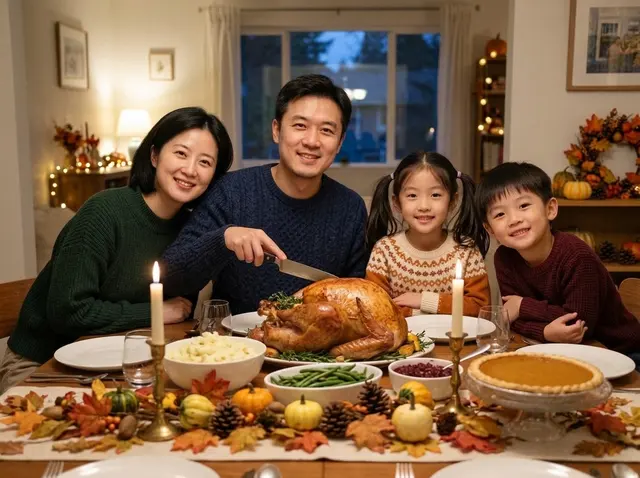
感謝祭の家族ディナー写真 · Nano Banana 2.1
感謝祭の家族ディナー写真 · 17 秒
プロンプト

Place the family in the reference image around a Thanksgiving dinner table at home: a golden roast turkey in the center, mashed potatoes, green beans, cranberry sauce and a pumpkin pie, taper candles and a table runner of autumn leaves and small gourds. Everyone wears a cozy fall sweater and smiles at the camera, the father holding the carving knife. Warm evening window light, soft string lights behind, a natural family-photo look. Keep each person's face, hairstyle and age.

このプロンプトを使う
ビジネス用プロフィール写真 · Nano Banana 2.1
ビジネス用プロフィール写真 · 16 秒
プロンプト

Turn the person in the reference image into a professional headshot: beige blazer, chest-up framing, body slightly angled and smiling at the camera. Blurred modern office background, soft key light from the left with a rim light, 85mm lens look, natural skin tones, same facial features. Suitable for LinkedIn and a résumé.

このプロンプトを使う
図解カード · Nano Banana 2.1
図解カード · 26 秒
プロンプト

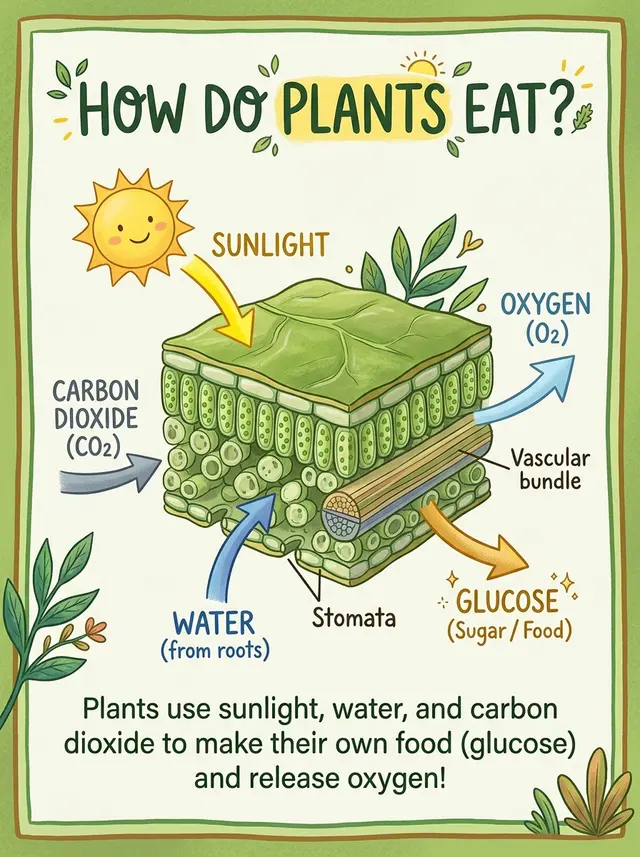
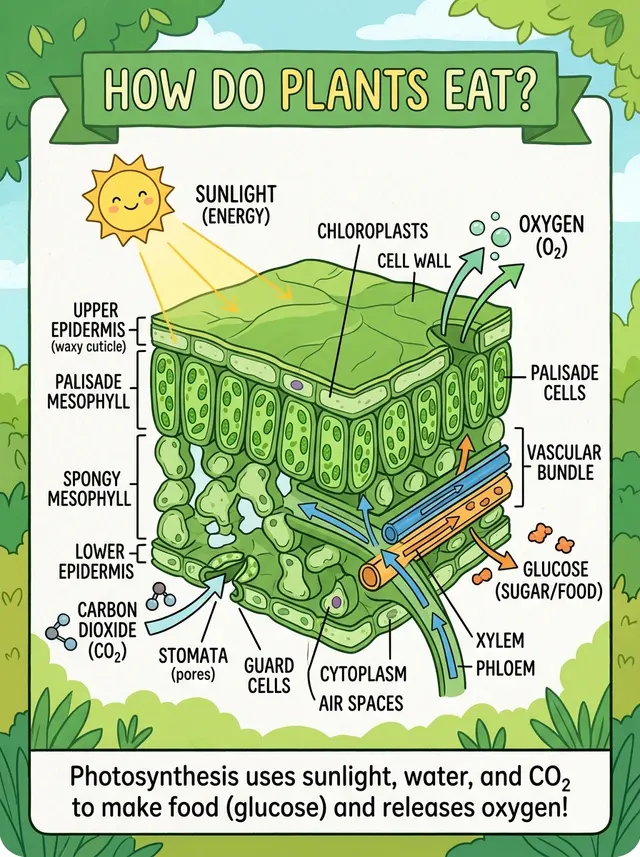
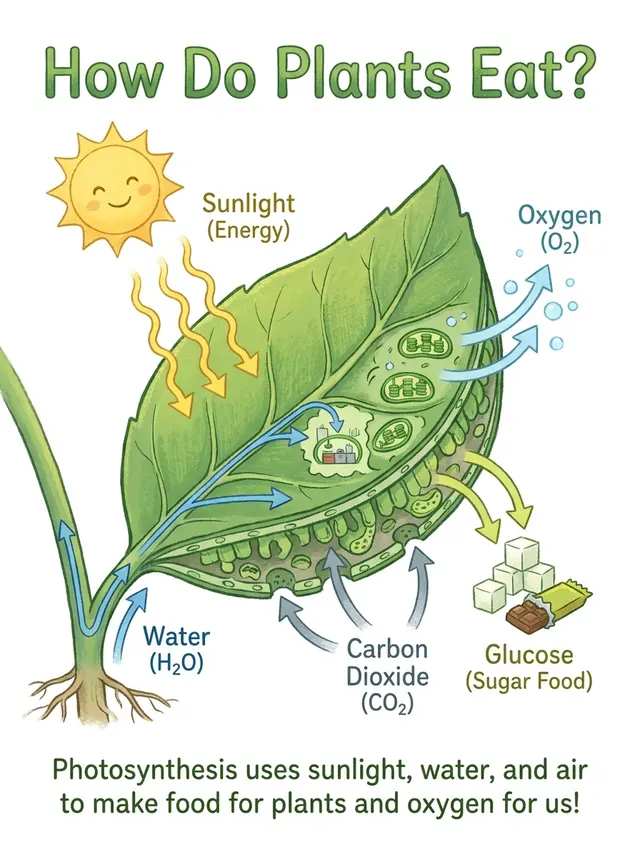
An explainer card about photosynthesis: a cross-section illustration of a leaf in the middle, with arrows showing sunlight, carbon dioxide and water going in, and oxygen and glucose coming out. Title at the top "How Do Plants Eat?", a one-line summary at the bottom. Fresh green palette, children's science book style, clear and accurate labels.

このプロンプトを使う
古い写真の修復とカラー化 · Nano Banana 2.1
古い写真の修復とカラー化 · 20 秒
プロンプト

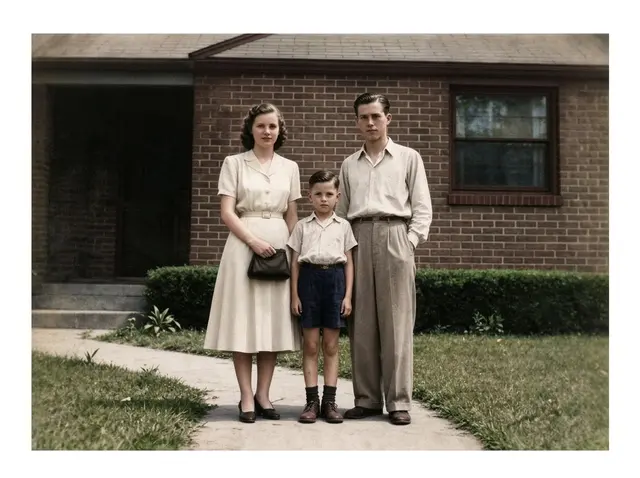
Restore this old photo: remove scratches, creases, mold spots and noise, fill in missing areas, sharpen it, then colorize it naturally with period-accurate skin, clothing and background colors. Keep every face, expression, pose and the composition exactly the same, no beautifying, so it looks like it was shot on color film at the time.

このプロンプトを使う

Nano Banana 2.1・Nano Banana 2・Nano Banana Pro:同じプロンプト・同じ入力画像

4 つのプロンプトを YingTu で 3 モデルに実行しました。各 1 例なので、ベンチマークではなく参考として見てください。

図解カード

子ども向け図鑑風のシンプルな解説を指定。Nano Banana 2.1 はラベルをいくつか付けた葉の断面を描き、Nano Banana 2 の細かい解剖図よりはシンプル、Pro よりは描き込みが多めです。ラベルと最後の一文の綴りはすべて正確でした。

図解カード · Nano Banana 2.1
Nano Banana 2.1 · 26 秒
図解カード · Nano Banana 2
Nano Banana 2 · 18 秒
図解カード · Nano Banana Pro
Nano Banana Pro
プロンプト

An explainer card about photosynthesis: a cross-section illustration of a leaf in the middle, with arrows showing sunlight, carbon dioxide and water going in, and oxygen and glucose coming out. Title at the top "How Do Plants Eat?", a one-line summary at the bottom. Fresh green palette, children's science book style, clear and accurate labels.

アイソメトリックのミニチュア都市

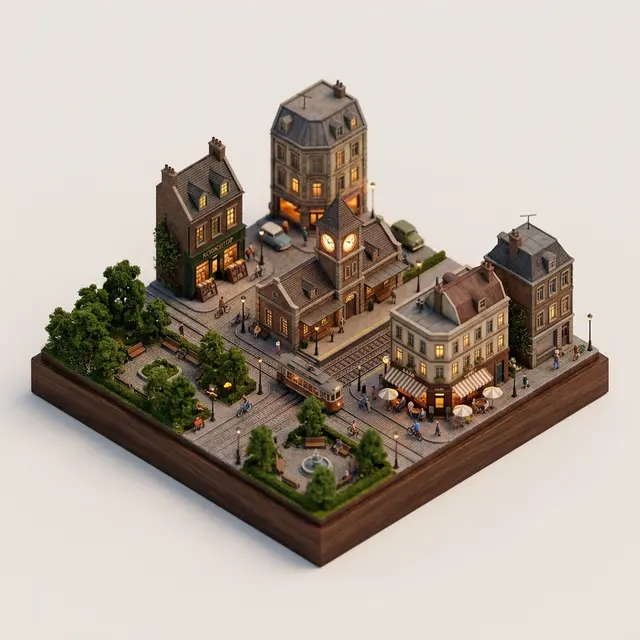
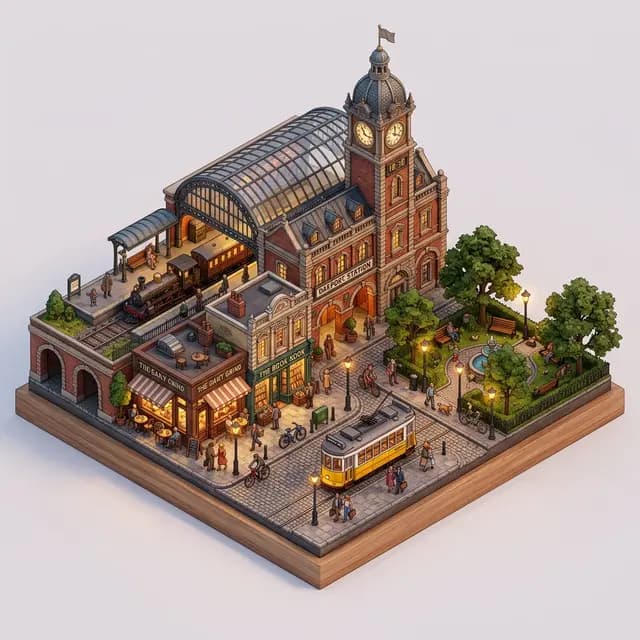
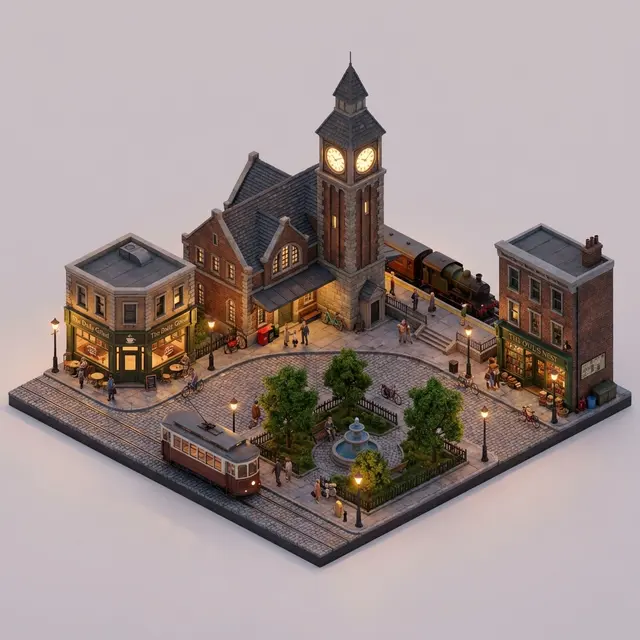
3 モデルとも駅の時計塔・カフェ・本屋・公園・路面電車を描きました。Nano Banana 2.1 は Nano Banana 2 と同じく街区を木の台座に載せ、Pro は無地の背景のままです。

アイソメトリックのミニチュア都市 · Nano Banana 2.1
Nano Banana 2.1 · 16 秒
アイソメトリックのミニチュア都市 · Nano Banana 2
Nano Banana 2 · 13 秒
アイソメトリックのミニチュア都市 · Nano Banana Pro
Nano Banana Pro
プロンプト

A 45° isometric miniature city block: an old train station with a clock tower in the middle, surrounded by a café, a bookshop, a small park and a tram, with people and bikes on the streets. Detailed 3D render, soft evening light, warm streetlights just turning on, plain light background, like a fine tabletop model.

ビジネス用プロフィール写真

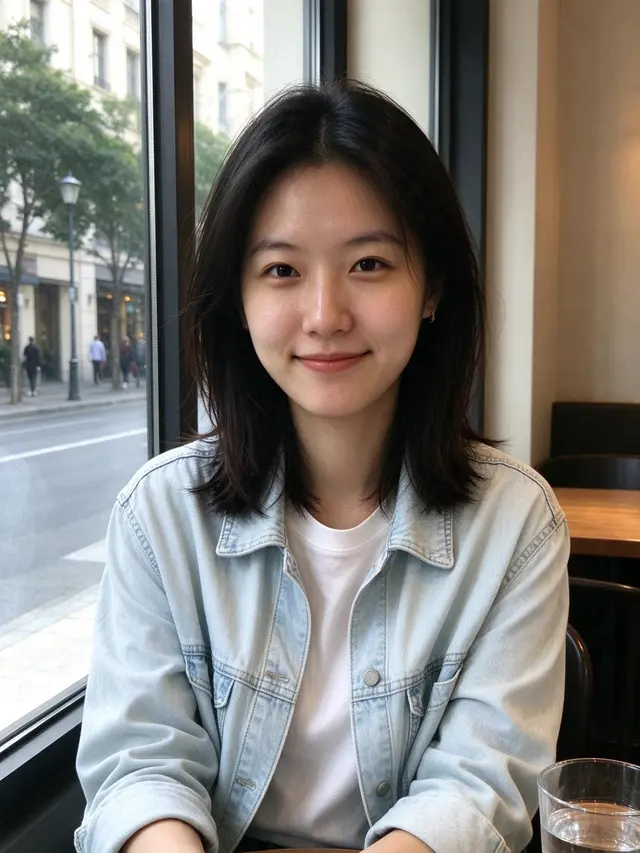
3 モデルとも顔を保ちました。Nano Banana 2.1 は背景のオフィスが多めに写っていますが、ほかはほぼ同じです。

入力画像(AI 生成)
入力画像(AI 生成)
ビジネス用プロフィール写真 · Nano Banana 2.1
Nano Banana 2.1 · 16 秒
ビジネス用プロフィール写真 · Nano Banana 2
Nano Banana 2 · 14 秒
ビジネス用プロフィール写真 · Nano Banana Pro
Nano Banana Pro
プロンプト

Turn the person in the reference image into a professional headshot: beige blazer, chest-up framing, body slightly angled and smiling at the camera. Blurred modern office background, soft key light from the left with a rim light, 85mm lens look, natural skin tones, same facial features. Suitable for LinkedIn and a résumé.

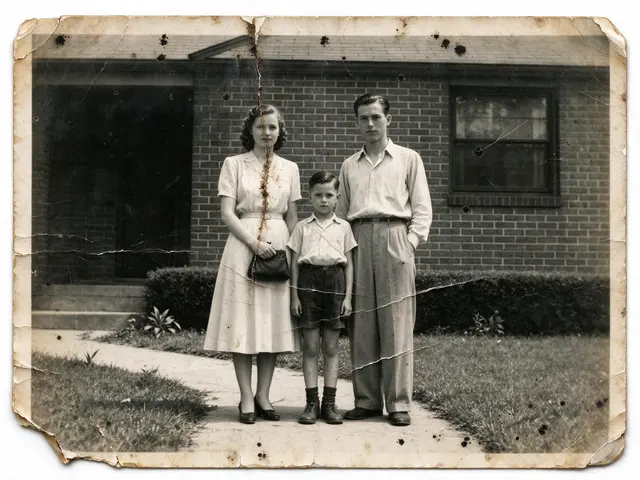
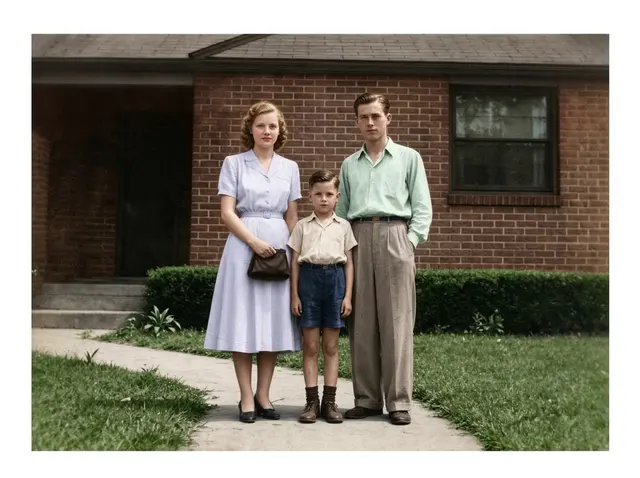
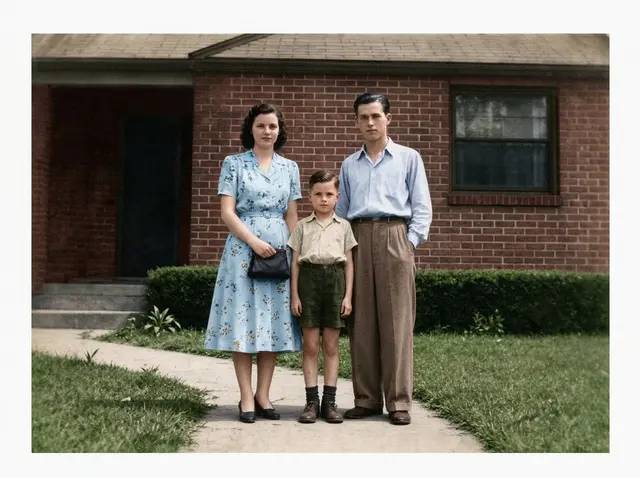
古い写真の修復とカラー化

プロンプトは「顔はそのまま、当時らしい色で」。Nano Banana 2.1 は女性の黒髪と、元写真の淡い色のワンピースやシャツを保ち、色づけはいちばん控えめでした。Pro は髪は保ったものの青い花柄のワンピースに、Nano Banana 2 は髪を明るい赤茶色に変えました。

入力画像(AI 生成)
入力画像(AI 生成)
古い写真の修復とカラー化 · Nano Banana 2.1
Nano Banana 2.1 · 20 秒
古い写真の修復とカラー化 · Nano Banana 2
Nano Banana 2 · 18 秒
古い写真の修復とカラー化 · Nano Banana Pro
Nano Banana Pro
プロンプト

Restore this old photo: remove scratches, creases, mold spots and noise, fill in missing areas, sharpen it, then colorize it naturally with period-accurate skin, clothing and background colors. Keep every face, expression, pose and the composition exactly the same, no beautifying, so it looks like it was shot on color film at the time.

Nano Banana 2.1・Nano Banana 2・Nano Banana Pro・GPT Image 2 の選び方

モデル料金こんなときに
Nano Banana 2.1$0.045普段の画像生成と編集はまずこれ。4K が出せる Nano Banana でいちばん安く、中央値 20 秒。古い写真の修復例では変化がいちばん少なめでした。
Nano Banana 2$0.055512px の下書きが欲しいとき、またはすでにうまくいっているプロンプトがあるとき。中央値 14 秒。
Nano Banana Pro$0.09Nano Banana 2.1 で細かい指示が反映されないとき。料金は 2 倍($0.09)。中央値 21 秒。
GPT Image 2 VIP$0.03正確なピクセルサイズ、そのまま印刷できる平面のカードやポスター、最安の料金($0.03)が必要なとき。

設定

ここにある設定はすべて YingTu の画像スタジオで使え、新規ユーザーは $0.1 分を無料で試せます。

向いている用途

  • • Nano Banana 2 より安い普段の画像生成
  • • 元の写真の雰囲気を残したい編集
  • • 文字を正確に入れたいカード・メニュー・ポスター

使う前に

  • • 512px の下書きサイズはなく、最小は 1K です。
  • • Google のモデルカードによると、1K では小さな文字がぼやけやすく、長い文章は苦手です。細かい文字は 2K か 4K で作り、1 文字ずつ確認してください。
  • • マスクや落書きでの部分編集は指示の一部しか反映されないことがあります(モデルカード)。変えたい内容は文章でも書いてください。
画像編集: 対応

API クイックスタート

画像スタジオと同じリクエスト形式です。コピーしてそのまま動きます。

Pythongemini-nano-banana-2.1
import base64
import mimetypes
import os
import sys

import requests

API_KEY = os.environ.get("LAOZHANG_API_KEY")
if not API_KEY:
    raise RuntimeError("Set the LAOZHANG_API_KEY environment variable before running this example.")

API_URL = "https://api2.laozhang.ai/v1beta/models/gemini-nano-banana-2.1:generateContent"
REQUEST_TIMEOUT_SECONDS = 500

headers = {
    "Authorization": f"Bearer {API_KEY}",
    "Content-Type": "application/json",
}

payload = {
    "contents": [{
        "parts": [
            {"text": "A clean poster for a weekend farmers market: the headline \"HARVEST MARKET\" and the line \"Saturday 9 AM – 1 PM · Riverside Park\", wooden crates of pumpkins and apples, warm autumn palette, crisp legible text."}
        ]
    }],
    "generationConfig": {
        "responseModalities": ["IMAGE"],
        "imageConfig": {
            "imageSize": "2K"
        }
    }
}

try:
    response = requests.post(
        API_URL,
        headers=headers,
        json=payload,
        timeout=REQUEST_TIMEOUT_SECONDS,
    )
except requests.Timeout as error:
    print(
        "Request timed out after 500 seconds. The result status may be unknown; "
        "check call and billing logs before retrying.",
        file=sys.stderr,
    )
    raise SystemExit(1) from error

if response.status_code != 200:
    print(f"API error {response.status_code}: {response.text}", file=sys.stderr)
    raise SystemExit(1)

try:
    result = response.json()
except ValueError as error:
    print("API returned a non-JSON response.", file=sys.stderr)
    raise SystemExit(1) from error

if not isinstance(result, dict):
    print("API returned an unexpected JSON shape.", file=sys.stderr)
    raise SystemExit(1)

image_part = None
for candidate in result.get("candidates", []):
    for part in candidate.get("content", {}).get("parts", []):
        inline_data = part.get("inlineData") or part.get("inline_data")
        if inline_data and inline_data.get("data"):
            image_part = inline_data
            break
    if image_part:
        break

if not image_part:
    response_id = result.get("responseId", "not provided")
    print(f"No image data in response. responseId={response_id}", file=sys.stderr)
    raise SystemExit(1)

mime_type = image_part.get("mimeType") or image_part.get("mime_type") or "image/png"
encoded_image = image_part["data"]
if encoded_image.startswith("data:"):
    header, encoded_image = encoded_image.split(",", 1)
    mime_type = header[5:].split(";", 1)[0] or mime_type

extension_by_mime = {
    "image/jpeg": "jpg",
    "image/png": "png",
    "image/webp": "webp",
    "image/gif": "gif",
}
extension = extension_by_mime.get(mime_type, "bin")
output_path = f"output.{extension}"

with open(output_path, "wb") as output_file:
    output_file.write(base64.b64decode(encoded_image, validate=True))

print(f"Image saved: {output_path} ({mime_type})")

よくある質問

Nano Banana 2.1 とは?

Nano Banana 2 の後継にあたる Google の画像生成・編集モデルで、Google DeepMind のモデルカードによると Gemini 3.6 Flash がベースです。API のモデル ID は gemini-nano-banana-2.1、公開は 2026 年 10 月 6 日。テキストから画像を作れるほか、参照画像で写真を編集できます。

ここは Nano Banana 2.1 の公式サイトですか?

いいえ。Google 公式の入口は Gemini アプリ、Google AI Studio、Gemini API です。YingTu は LaoZhang API で同じモデル(gemini-nano-banana-2.1)を呼び出す独立したスタジオで、1 枚ごとに課金します。

Nano Banana 2.1 は無料で使えますか?

Gemini アプリでは無料ではありません。Google AI Pro・Plus・Ultra プラン向けで、無料ユーザーは Nano Banana 2 を使います。ここでは Gmail でログインした新規ユーザーに $0.1(Nano Banana 2.1 約 2 枚分)があり、その後は 1 枚 $0.045、サブスクはありません。

Nano Banana 2.1 の料金はいくら?

YingTu では 1K・2K・4K とも 1 枚 $0.045。Nano Banana 2 は $0.055、Nano Banana Pro は $0.09、GPT Image 2 は $0.03 です。

Nano Banana 2.1 と Nano Banana 2 の違いは?

ここでは 2.1 のほうが安く($0.045 対 $0.055)、512px のサイズはありません。このページの 4 つの比較では、2.1 のほうがプロンプトに忠実でした。解説カードはよりシンプルに、古い写真の修復では元の髪色と服を保ちました。中央値は 20 秒対 14 秒。

Nano Banana 2.1 と Pro はどちらを使えばいい?

まずは Nano Banana 2.1 を。料金は Pro の半分($0.045 対 $0.09)で、今回の例では顔の保ち方も Pro と同等でした。細かい指示が反映されないときに Pro へ。子ども向け解説カードでは Pro がいちばんシンプルに描きました。

対応するサイズと比率は?

1K・2K・4K(1:1 で 1024・2048・4096px)、比率は 1:8〜8:1 の 14 種類で、21:9 や 4:1 も選べます。8:1 は 2928 × 352px で出力されます。512px はありません。

文字はきれいに書けますか?

今回の作例では、感謝祭のカード、ディナーのメニュー、解説カードの文字をすべて正しく書きました。Google のモデルカードでは 1K だと小さな文字がぼやけやすいとあるので、細かい文字は 2K か 4K で。カードを「撮影したカード」として描きがちなので、印刷用なら「平面のデザイン」と指定してください。

自分の写真を編集できますか?

できます。参照画像を最大 5 枚(1 枚 20 MB まで)アップロードして、変えたい内容を書いてください。使う前に顔・ロゴ・文字を拡大して確認してください。

API から使えますか?

使えます。このページのコードはスタジオが送るものと同じ LaoZhang API のリクエストで、モデルに gemini-nano-banana-2.1 を指定します。Nano Banana API のページに cURL と Node.js の例があります。

更新日 2026-10-12