Nano Banana Pro is Google's Gemini 3 Pro Image model for professional image generation and editing. The current API model code is gemini-3-pro-image, and Google's current image-generation docs recommend the generally available Interactions API for the latest image features and models. If you learned from older preview-era examples, update your code before copying those snippets into production.
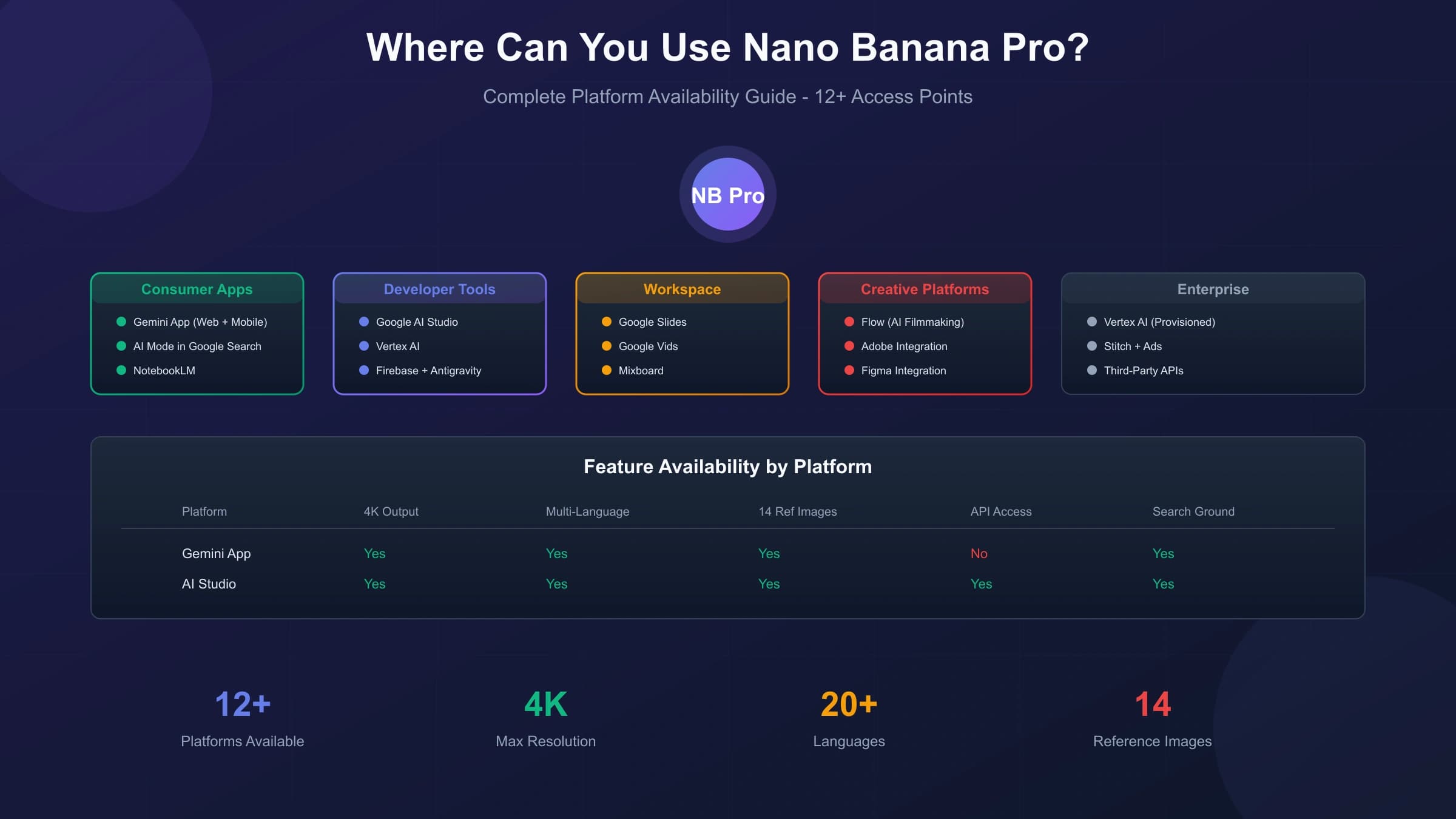
The practical learning curve is not about memorizing prompts. It is about choosing the right route: Gemini app for quick visual work, Google AI Studio for account-side testing, and the Gemini API when you need logs, retries, billing controls, repeatable model IDs, and integration into a product workflow.
What is Nano Banana Pro? Understanding Google's Best Image Model
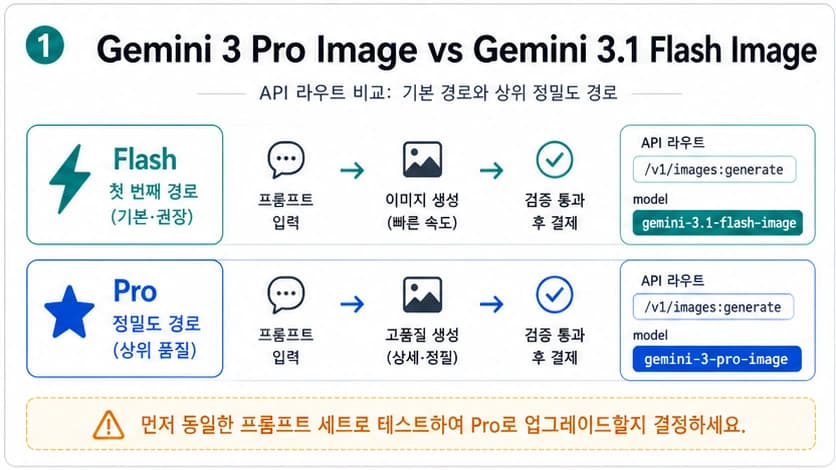
Nano Banana Pro is the public nickname for Gemini 3 Pro Image. In the Gemini API, use the model code gemini-3-pro-image. Google's broader Nano Banana image-generation docs now describe a family of image models, including Gemini 3.1 Flash Image for speed and Gemini 3 Pro Image for the most complex professional asset tasks.
The technical architecture of Nano Banana Pro differs fundamentally from previous generation models like DALL-E 3 or even its predecessor Nano Banana (Gemini 2.5 Flash Image). While earlier models processed prompts through relatively straightforward text-to-image pipelines, Nano Banana Pro incorporates a multi-stage workflow with internal plan-generate-review-correct capabilities. This means the model doesn't just interpret your prompt and produce an image—it actually reasons through the request, plans the composition, generates initial concepts, reviews them against your specifications, and corrects issues before delivering the final output. According to Google DeepMind's official documentation, this reasoning approach enables the model to handle complex prompts that would confuse simpler systems.
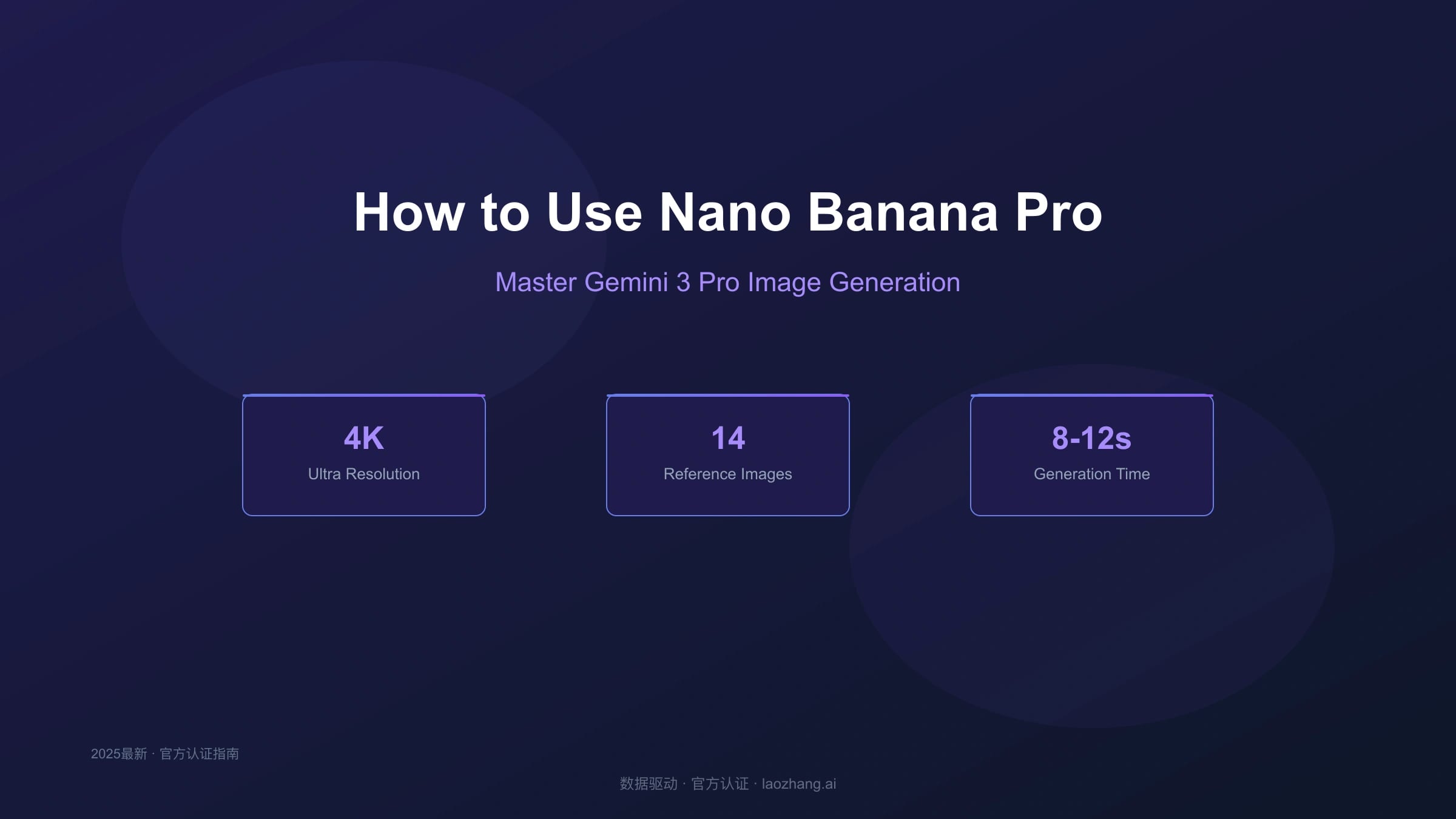
The practical implications are substantial. Gemini 3 Pro Image is designed for high-resolution outputs, advanced text rendering, Google Search grounding, thinking-assisted composition, and multi-reference workflows. Google documents up to 14 total reference images, with different fidelity limits for objects, characters, and style references, so treat the official docs as the source of truth before designing a production input contract.
Nano Banana Pro vs Nano Banana: Key Differences Explained
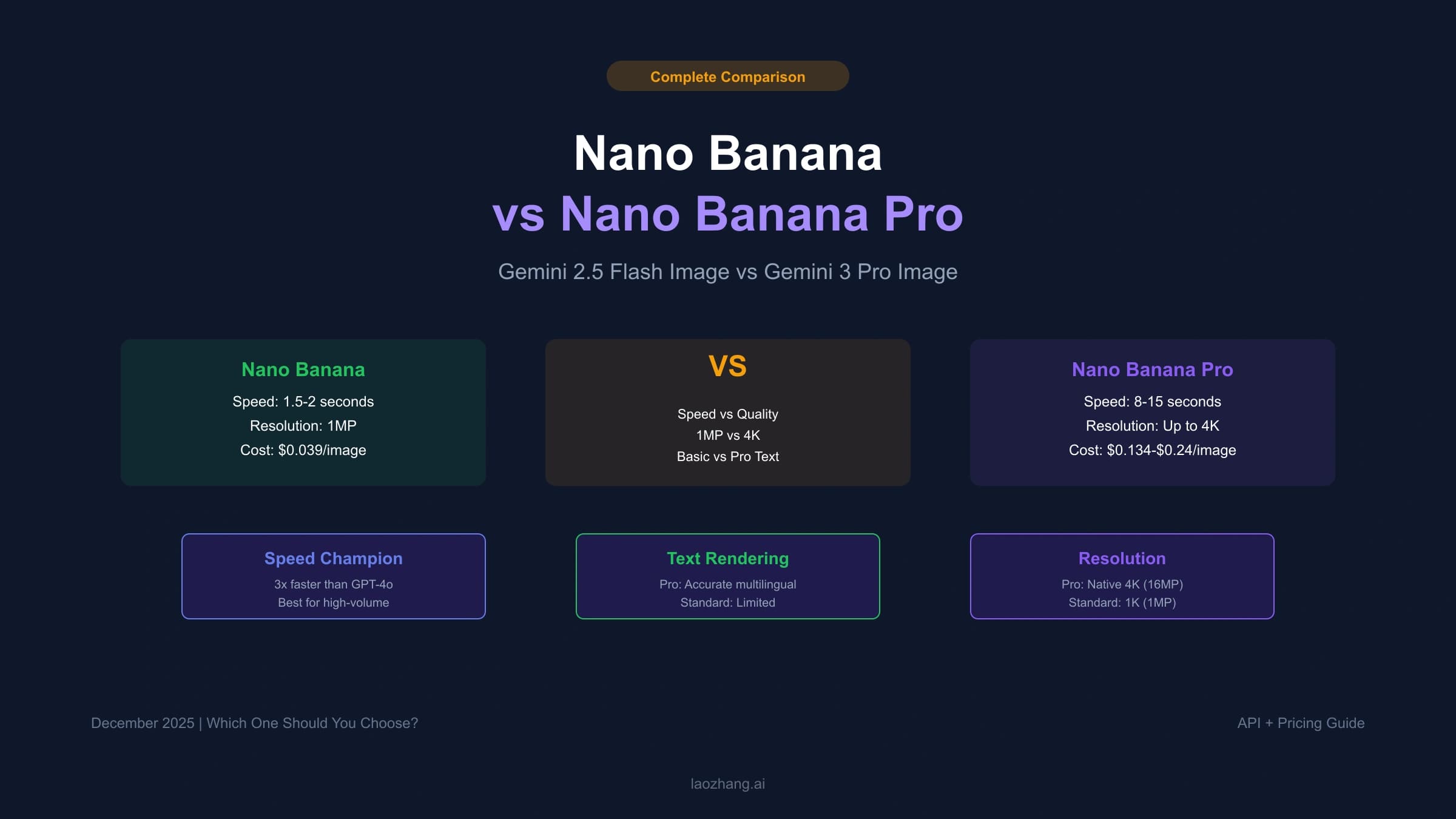
Understanding when to use Nano Banana Pro versus the original Nano Banana (powered by Gemini 2.5 Flash) determines whether you're optimizing for speed, quality, or cost. Both models serve legitimate use cases, and choosing incorrectly wastes either money or time depending on your requirements. The original Nano Banana excels at rapid iteration and simple image generation tasks, while Nano Banana Pro targets professional asset production where quality justifies the additional processing time and cost.
| Feature | Nano Banana (Gemini 2.5 Flash) | Nano Banana Pro (Gemini 3 Pro) |
|---|---|---|
| Resolution | 1K class | Up to 4K |
| Generation Speed | Optimized for faster iteration | Optimized for complex assets |
| Text Rendering | Better for drafts and simple images | Stronger for stylized, legible text |
| Reference Images | Best for lighter reference workflows | Up to 14 total reference images |
| Character Consistency | Lighter workflows | Up to 5 character references |
| Search Grounding | No | Yes |
| API Pricing | Lower official image price | Higher official image price |
| Best For | Quick drafts, iteration | Final assets, professional work |
The speed difference matters operationally, but do not build a production SLA from old blog timing claims. Use faster image models for exploration, prompt shaping, and quick drafts. Use Gemini 3 Pro Image when the final asset needs stronger reasoning, text, grounding, reference handling, or 4K output.
Text rendering is one of the clearest reasons to use Nano Banana Pro. Google recommends Gemini 3 Pro Image for professional asset production, especially when the image needs legible, stylized text for infographics, menus, diagrams, labels, and marketing assets. For production work, still review the generated text before publishing; image models can improve text handling without making proofing optional.
How to Access Nano Banana Pro (Consumer App + API)
Accessing Nano Banana Pro requires understanding two distinct pathways: the consumer-facing Gemini app for casual users and the developer API for programmatic access. Each pathway has different requirements, limitations, and cost structures. The Gemini app provides the fastest route to generating your first image, while the API offers the flexibility and scalability needed for application development or high-volume production.
Consumer App Access
The Gemini app at gemini.google.com is the fastest route for a person who wants to generate or edit a few images in a browser. Availability, plan labels, image limits, and fallback behavior can change by account and region, so use the model or mode shown in your own Gemini app rather than relying on a fixed quota from an old guide.
For client or commercial work, screenshot the visible route and keep the downloaded output, prompt, and account context with the job record. Consumer app limits are useful for creative testing, but they are not a substitute for API-side logs, billing controls, retries, and project ownership.
API Access for Developers
Developers requiring programmatic access can use the Gemini API with the model identifier gemini-3-pro-image. This route gives you project ownership, request logs, retries, rate-limit visibility, billing controls, Batch/Flex/Priority options when appropriate, and a clearer integration contract than a browser-only workflow.
To begin API development, first obtain an API key from Google AI Studio. This requires a Google account and agreement to the API terms of service. Once you have your key, install the Google GenAI SDK for your programming language. The Python installation uses pip:
hljs bashpip install google-genai
For JavaScript/Node.js projects, use npm:
hljs bashnpm install @google/genai
The Interactions API is generally available and is Google's recommended path for the latest Gemini image models. Older preview-era snippets can still appear in search results and old articles, but they should not be your default starting point for Gemini 3 Pro Image work.
Step-by-Step Guide: Your First Nano Banana Pro Image
Creating your first Nano Banana Pro image through the API demonstrates the model's capabilities while establishing patterns you'll use for more complex generations. This workflow covers the essential elements: client initialization, prompt construction, response handling, and image extraction. Understanding each component ensures you can troubleshoot issues and customize behavior for your specific needs.
Python API Implementation
The following current Interactions API example generates a 16:9 image at 2K and saves it to disk:
hljs pythonfrom google import genai
import base64
import os
client = genai.Client(api_key=os.environ["GEMINI_API_KEY"])
prompt = """Create a professional product photograph of a sleek wireless
headphone on a marble surface. The headphones are matte black with
rose gold accents. Dramatic side lighting creates subtle shadows.
The background is a soft gradient from dark gray to pure black.
Ultra-high detail."""
interaction = client.interactions.create(
model="gemini-3-pro-image",
input=prompt,
response_format={
"type": "image",
"aspect_ratio": "16:9",
"image_size": "2K",
},
)
with open("headphones.png", "wb") as f:
f.write(base64.b64decode(interaction.output_image.data))
The response_format object controls the image output contract. Use aspect_ratio for the final layout and image_size for the resolution tier. For more complex outputs that interleave text and multiple images, do not rely only on interaction.output_image; iterate through interaction.steps and save each image block explicitly.
Understanding the Response Structure
For a simple text-to-image request, interaction.output_image returns the last generated image block as base64 data. For stories, instructional guides, or other interleaved outputs, convenience properties can miss content; iterate over interaction.steps and handle text and image blocks separately.
When errors occur, the response may not include an image block. Common error conditions include content policy violations, rate limits, malformed request shape, unsupported model alias, or project billing limits. Robust production code should check for an image before writing a file:
hljs pythonif not getattr(interaction, "output_image", None):
raise RuntimeError("No image returned; inspect the response and request logs.")
with open("output.png", "wb") as f:
f.write(base64.b64decode(interaction.output_image.data))
Mastering Text Rendering and Logo Creation
Text rendering represents Nano Banana Pro's most significant advancement over previous AI image generators, transforming the model from a creative tool into a practical asset production system. The ability to accurately render legible, stylized text opens use cases that were previously impossible: product mockups with real labels, social media graphics with headlines, infographics with data callouts, and branded materials with consistent typography. Mastering text prompting techniques ensures your outputs meet professional standards rather than requiring post-processing in traditional design software.
Effective text prompts require explicit specification of multiple attributes that simpler prompts leave to chance. Rather than hoping the model interprets your intent correctly, directly state the text content, font characteristics, color, size relative to other elements, and precise placement within the composition. The model responds dramatically better to detailed text instructions than to vague requests, often producing publication-ready results when given sufficient guidance.
Text Prompting Formula
The optimal structure for text-heavy prompts follows this pattern: specify the text content in quotation marks, describe the typography style, indicate the placement and hierarchy, then provide the surrounding visual context. Consider this example for a promotional banner:
Create a modern promotional banner with the headline "WINTER SALE" in
bold condensed sans-serif font, white text with a subtle drop shadow,
centered in the upper third of the image. Below, smaller text reads
"Up to 50% Off Everything" in light weight of the same font family.
The background is a gradient from deep blue to teal with subtle
snowflake patterns. The overall style is clean and contemporary,
suitable for retail advertising.
This prompt explicitly defines: the exact text strings, the font weight and style, the color and effects, the relative positioning, the size hierarchy between headline and subhead, and the background context. Each specification reduces ambiguity and increases the likelihood of a usable first generation.
Logo Creation Techniques
Logo generation with Nano Banana Pro requires balancing creative direction with technical precision. The model excels at producing logo concepts but performs best when you provide clear constraints about style, color, and format. Effective logo prompts specify the brand name, desired aesthetic (minimalist, playful, corporate, etc.), color palette, and any symbolic elements to incorporate or avoid.
Here are tested prompts that consistently produce professional-quality logos:
Minimalist Tech Logo:
Design a minimalist logo for "NEXUS AI" featuring clean geometric
sans-serif typography. The letters should have sharp, precise edges
with a subtle gradient from electric blue to cyan. Include a small
abstract node/connection symbol integrated with the letter X.
White background, suitable for both digital and print use.
Organic Brand Logo:
Create a logo for "Green Harvest Market" in a warm, organic style.
The text should use a rounded, friendly serif font in forest green.
Incorporate a stylized leaf or plant element that flows naturally
into the letterforms. The overall feel should be welcoming and
sustainable-minded. Cream or natural white background.
For multi-language text rendering, explicitly specify the language and script requirements. Nano Banana Pro handles Chinese characters, Japanese kanji/hiragana/katakana, Arabic script, and other complex writing systems, but performs best when you indicate the language context:
Create a restaurant menu header with "美食天堂" (Paradise of Cuisine)
in elegant Chinese calligraphy style, gold text on a deep red
background with subtle traditional cloud patterns.
Multi-Image Workflows and Character Consistency
Nano Banana Pro's ability to blend multiple reference images while maintaining consistency transforms it from an image generator into a complete visual production system. This capability enables workflows like maintaining a character's appearance across a comic series, compositing elements from different photos into cohesive scenes, or creating product variations that share visual DNA. Understanding the mechanics of multi-image inputs and multi-turn editing unlocks these advanced production techniques.
The model accepts up to 14 reference images per request, with specific allocations for different purposes: up to 6 images for object references with high-fidelity matching, and up to 5 images of humans for character consistency across generations. These aren't hard constraints but guidelines—the model balances reference adherence with creative interpretation based on how you frame the request. Explicit instructions about which elements to preserve versus modify produce more predictable results than vague blending requests.
Reference Image Best Practices
When providing reference images, follow these guidelines for optimal results. First, ensure your reference images are high-quality (at least 1080p) and clearly show the elements you want preserved. Blurry or low-resolution references produce correspondingly degraded outputs. Second, use consistent lighting and style across references when creating composite images—mixing dramatically different visual styles confuses the model about your intent. Third, explicitly describe what aspects of each reference to incorporate:
Using the uploaded reference images:
- From image 1: preserve the character's face, hair color, and
  approximate proportions
- From image 2: use this architectural style for the background
- From image 3: match this lighting setup and color grading

Create a portrait of the character from image 1 standing in front
of a building matching image 2's style, with dramatic lighting
matching image 3.
Multi-Turn Editing
For multi-turn work, keep the prior interaction context instead of treating every edit as a fresh image request. With the Interactions API, pass the previous interaction ID when you want the model to revise an earlier output:
hljs pythonedit = client.interactions.create(
model="gemini-3-pro-image",
input="Change the background to a sunset scene, but keep the subject and pose.",
previous_interaction_id=interaction.id,
response_format={"type": "image", "image_size": "2K"},
)
If you ignore the previous interaction and send only a new text prompt, the model may reinterpret the whole scene rather than preserving the subject, layout, and style you wanted to keep.
Advanced Techniques: Search Grounding and Professional Assets
Search grounding represents one of Nano Banana Pro's most distinctive capabilities, allowing the model to incorporate real-world information from Google Search into image generation. When enabled, the model can accurately depict specific locations, current products, recent events, and factual content by verifying information against live search results. This feature transforms Nano Banana Pro from a purely generative tool into a research-assisted creative system.
To enable search grounding, include the Google Search tool in the Interactions API call:
hljs pythoninteraction = client.interactions.create(
model="gemini-3-pro-image",
input="Create an accurate weather-aware isometric scene of London today.",
tools=[{"type": "google_search"}],
response_format={"type": "image", "image_size": "2K"},
)
With search grounding enabled, the model can use Google Search as a tool for real-world context such as locations, current weather, market visuals, or recent events. Do not treat grounding as a legal or factual review layer: verify visible text, maps, product labels, and claims before publishing the image.
Professional Asset Production
Professional asset production with Nano Banana Pro requires attention to specifications that casual usage ignores: exact resolution requirements, color space considerations, file format optimization, and consistency across asset families. For print production, generate at 4K resolution and specify CMYK-friendly color palettes in your prompts. For web assets, optimize for specific dimensions and consider how images will compress.
Creating consistent asset families—product shots that share visual language, character illustrations for a brand, or themed social media graphics—requires establishing a style guide within your prompts. Document the specific descriptors that produce your desired aesthetic, then include them consistently across generations:
STYLE GUIDE: Ultra-clean white background, diffused natural
lighting from upper left, subtle shadow anchor below subject,
color palette limited to navy blue (#1a237e), white, and gold
accents. Photorealistic rendering at 4K resolution.

[Include this style guide prefix before each product description]
Troubleshooting Common Issues
Even with careful prompting, Nano Banana Pro occasionally produces unexpected results or fails to generate entirely. Understanding common failure modes and their solutions accelerates your debugging process and reduces wasted generation credits. The following troubleshooting guide addresses the issues users encounter most frequently, based on patterns from community forums and official documentation.
| Issue | Likely Cause | Solution |
|---|---|---|
| Blurry/Low-Quality Output | Viewing compressed preview | Download full-size image using download button |
| Text Rendering Errors | Insufficient text specifications | Add font, size, placement, and style details |
| Wrong Aspect Ratio | Default square output | Explicitly specify aspect ratio in prompt |
| Character Inconsistency | Missing prior interaction context | Continue from the previous interaction when editing |
| Generation Refused | Content policy trigger | Rephrase to avoid sensitive terms |
| Very Slow Generation | Server congestion | Try off-peak hours or reduce resolution |
| "Model Not Found" Error | Wrong model name or unavailable route | Use gemini-3-pro-image and check model access in AI Studio |
Quality Degradation Solutions
When generated images appear lower quality than expected, the most common cause is viewing the compressed preview rather than the full-resolution output. The Gemini web interface displays smaller, compressed versions to optimize page loading. Hover over any generated image and click the download button (typically a downward arrow icon) to retrieve the full-quality file. This downloaded version reflects the actual 2K or 4K resolution you requested.
If downloads still show quality issues, examine your source materials. Low-resolution reference images (under 1080p) constrain output quality regardless of resolution settings. The model interpolates from your references, so starting with high-quality inputs produces dramatically better results. Additionally, verify you've selected the appropriate resolution setting—defaulting to "1K" during testing and forgetting to increase it for final production is a common oversight.
Access and Rate Limit Issues
Rate limiting manifests as failed requests, throttling, or 429 RESOURCE_EXHAUSTED. Google applies limits at the project level, and active limits can vary by model, usage tier, billing state, and temporary capacity. Inspect AI Studio and your project quota before changing code. Implementing exponential backoff with jitter prevents request storms:
hljs pythonimport time
def generate_with_retry(prompt, max_retries=3):
for attempt in range(max_retries):
try:
interaction = client.interactions.create(
model="gemini-3-pro-image",
input=prompt,
response_format={"type": "image", "image_size": "2K"},
)
return interaction
except Exception as e:
if "rate" in str(e).lower() or "429" in str(e):
wait_time = (2 ** attempt) * 10 # 10, 20, 40 seconds
time.sleep(wait_time)
else:
raise
raise Exception("Max retries exceeded")
Pricing and Cost Optimization
Understanding Nano Banana Pro's pricing structure enables budget planning and cost optimization for both individual projects and ongoing production workflows. For the canonical route-choice page, use the Nano Banana Pro API cost guide. The official Gemini API pricing page is the source of truth; check it again before publishing a calculator, quote, or procurement recommendation.
Official Pricing Breakdown
| Operation | Token Consumption | Approximate Cost |
|---|---|---|
| Image Input (per image) | 560 tokens | $0.0011 |
| Image Output 1K-2K | Published per-image equivalent | $0.134 |
| Image Output 4K | Published per-image equivalent | $0.24 |
| Text Input (per 1M tokens) | - | $2.00 |
| Text Output (per 1M tokens) | - | $12.00 |
For production budgeting, treat $0.134 to $0.24 as a standard official API reference checked on July 8, 2026, not a permanent quote. A project generating 1,000 accepted 2K images would be about $134 before any additional text, grounding, retries, failed requests, storage, or provider-specific charges. Build dashboards from actual accepted-image cost, not just request count.
Cost Optimization Strategies
Several strategies reduce waste without making risky promises. First, use a faster or cheaper image model for exploration, then switch to Nano Banana Pro only for final production versions. Second, generate at 2K when the final surface does not need 4K. Third, use Batch or Flex only when their timing tradeoffs fit the workflow.
Third-party gateways can help when local payment, account setup, backup routing, or integration compatibility is the real blocker. Do not assume a gateway is cheaper, faster, or equivalent from a stale article. Verify current model coverage, response schema, per-call pricing, failed-call billing, refunds, logs, latency, support owner, and terms in your current account before sending production traffic through it.
Nano Banana Pro vs Midjourney vs DALL-E 3
Choosing between image generators depends on your requirements for quality, speed, control, cost, licensing, and automation. Each platform changes quickly, so use this as a route-selection frame rather than a frozen benchmark table.
| Capability | Nano Banana Pro | Midjourney v7 | DALL-E 3 |
|---|---|---|---|
| Max Resolution | 4K (8MP) | 4K (upscaled) | 1024×1024 native |
| Text Rendering | Excellent | Good | Moderate |
| Speed | Depends on route and load | Depends on subscription and queue | Depends on route and quality setting |
| API Access | Full API | Limited API | Full API |
| Search Grounding | Yes | No | No |
| Reference Images | Up to 14 | Up to 5 | Limited |
| Character Consistency | 5 humans | 4 humans | Basic |
| Pricing (approx) | Official API price varies by size | Subscription-based | API price varies by model and quality |
*Midjourney pricing based on subscription tiers, not pure per-image cost
Nano Banana Pro is strongest when the job needs professional image reasoning, text-heavy assets, high-resolution output, Google Search grounding, or multiple references. It is not automatically the best choice for every creative job; a browser-native art workflow, a subscription tool, or a faster draft model can be better when aesthetics or iteration speed matter more than API control.
Midjourney maintains advantages in aesthetic stylization, particularly for artistic and fantastical imagery where photorealism isn't the goal. The platform's community-trained aesthetic tendencies produce distinctively appealing results for certain creative styles. However, Midjourney's lack of robust API access limits its utility for automated workflows or application integration.
DALL-E 3 offers tight integration with ChatGPT and strong natural language understanding, making it excellent for casual users who prefer conversational interaction over technical prompting. However, its lower native resolution and moderate text rendering make it less suitable for professional production compared to Nano Banana Pro.
20 Ready-to-Use Prompts for Nano Banana Pro
The following prompts illustrate durable prompt structure rather than fixed output quality. For an even larger collection, use the dedicated guide on Nano Banana Pro best prompts. Customize these templates by changing the subject, format, text, and production constraints while keeping the model's task explicit.
Portrait and Character Prompts
1. Professional Headshot:
Create a professional LinkedIn-style headshot of a confident
business professional in their 30s. They wear a navy blazer
over a white shirt. Soft studio lighting, neutral gray
background with subtle gradient. Sharp focus on eyes,
natural skin texture, 4K resolution.
2. Stylized Character Portrait:
Portrait of a cyberpunk street samurai with neon-lit face
tattoos and chrome optical implants. Rain-slicked hair,
leather jacket with holographic patches. Background shows
blurred neon signs in pink and blue. Cinematic lighting,
moody atmosphere.
Product Photography Prompts
3. Minimalist Product Shot:
Ultra-clean product photograph of wireless earbuds case
on pure white background. Matte white case with rose gold
hinge accent. Single soft shadow anchor. Studio lighting,
e-commerce style, sharp detail at 4K.
4. Lifestyle Product Context:
Luxury watch on weathered wooden surface with morning
coffee and leather-bound journal. Natural window light
from left, warm golden hour tones. Shallow depth of
field focusing on watch face. Editorial style.
Text and Logo Prompts
5. Modern Event Poster:
Event poster with bold headline "TECH SUMMIT 2025" in
condensed sans-serif, white on gradient blue to purple
background. Subtext "Innovation · Connection · Growth"
in thin weight. Abstract geometric shapes float behind
text. Clean, contemporary corporate style.
6. Vintage Typography:
Retro diner sign reading "BEST COFFEE IN TOWN" in
classic Americana neon style. Warm red tubes against
dark blue night sky. Subtle glow effect on letters.
1950s aesthetic, nostalgic mood.
Landscape and Environment Prompts
7. Dramatic Landscape:
Vast mountain landscape at golden hour with low clouds
threading between peaks. Alpine lake in foreground
reflecting orange sky. Lone hiker silhouette on ridge
for scale. National Geographic photography style,
epic composition.
8. Urban Architecture:
Modern glass skyscraper reflecting sunset clouds.
Strong geometric lines, brutalist concrete elements
at base. Blue hour lighting, city lights beginning
to glow. Architectural photography style with
tilt-shift sharpness.
Creative and Artistic Prompts
9. Surreal Composition:
Giant vintage radio floating in a sea of clouds,
broadcasting musical notes that transform into
colorful birds. Salvador Dali meets Studio Ghibli.
Warm lighting, dreamy atmosphere, highly detailed
whimsical illustration.
10. Abstract Art:
Abstract expressionist composition in the style of
Kandinsky. Bold primary colors, dynamic geometric
shapes, strong diagonal movement. Museum quality
fine art, suitable for gallery print.
For the complete collection of 20 prompts including food photography, fashion, interior design, and scientific illustration, see our companion article on Gemini AI Photo Prompts.
Frequently Asked Questions
Q1: Is Nano Banana Pro free to use?
Nano Banana Pro access depends on the route. The Gemini app may expose image generation through consumer plans and account-specific limits. The Gemini API pricing page currently lists Gemini 3 Pro Image free tier as not available and paid image output at published per-image equivalents. Check your visible Gemini app plan, AI Studio limits, and current pricing before calling a route "free."
Q2: What's the difference between Thinking and Fast mode in Gemini?
The mode labels in the Gemini app can change, but the route logic is stable: faster modes are better for drafts and exploration, while thinking-oriented or Pro image routes are better for complex instructions, accurate text, grounding, references, and final assets. Use the model name or route owner visible in your account rather than assuming the app label maps permanently to one model.
Q3: How do I remove the watermark from Nano Banana Pro images?
Google states that generated Gemini images include SynthID. Treat that as provenance infrastructure, not a visible logo to crop away. Do not promise watermark removal or build workflows around bypassing disclosure, provenance, or platform policy requirements.
Q4: Can I use Nano Banana Pro images for commercial projects?
Commercial use depends on Google's current terms, your account route, the uploaded references, the prompt, and the final use case. Make sure you have rights to any uploaded material, avoid trademark or copyright infringement, and review the Gemini API Terms of Service and prohibited-use policies before using outputs in client or regulated work.
Q5: Why are my Nano Banana Pro images blurry or low quality?
Blurry outputs usually come from one of three causes. First, you may be viewing a compressed preview rather than the downloaded file. Second, your image_size may be set to 1K when the final surface needs 2K or 4K. Third, low-quality reference images constrain output quality. If the downloaded image is still wrong, log the request, confirm the model and response_format, and regenerate with a clearer production constraint.
Conclusion
Nano Banana Pro is best understood as the professional Gemini image route for complex visual tasks: high-resolution assets, text-heavy images, reference-driven work, grounded visuals, and repeatable API workflows. The strongest results come from matching the route to the job, not from forcing every image task through the most expensive model.
The workflow fundamentals covered in this guide, from basic access and first-image generation through advanced techniques like multi-turn editing and search grounding, provide the foundation for increasingly sophisticated usage. As you develop familiarity with the model's strengths and limitations, you'll discover prompt patterns and techniques specific to your creative needs that extend beyond any tutorial's scope. The key is consistent practice with intentional experimentation, treating each generation as both a creative output and a learning opportunity.
For developers building applications that require reliable, high-volume image generation, the API approach offers control that consumer interfaces cannot provide. Start with the official Interactions API, measure accepted-image cost and failure modes, then evaluate gateways only when they solve a concrete access, payment, latency, backup, or integration problem that you can verify in logs.