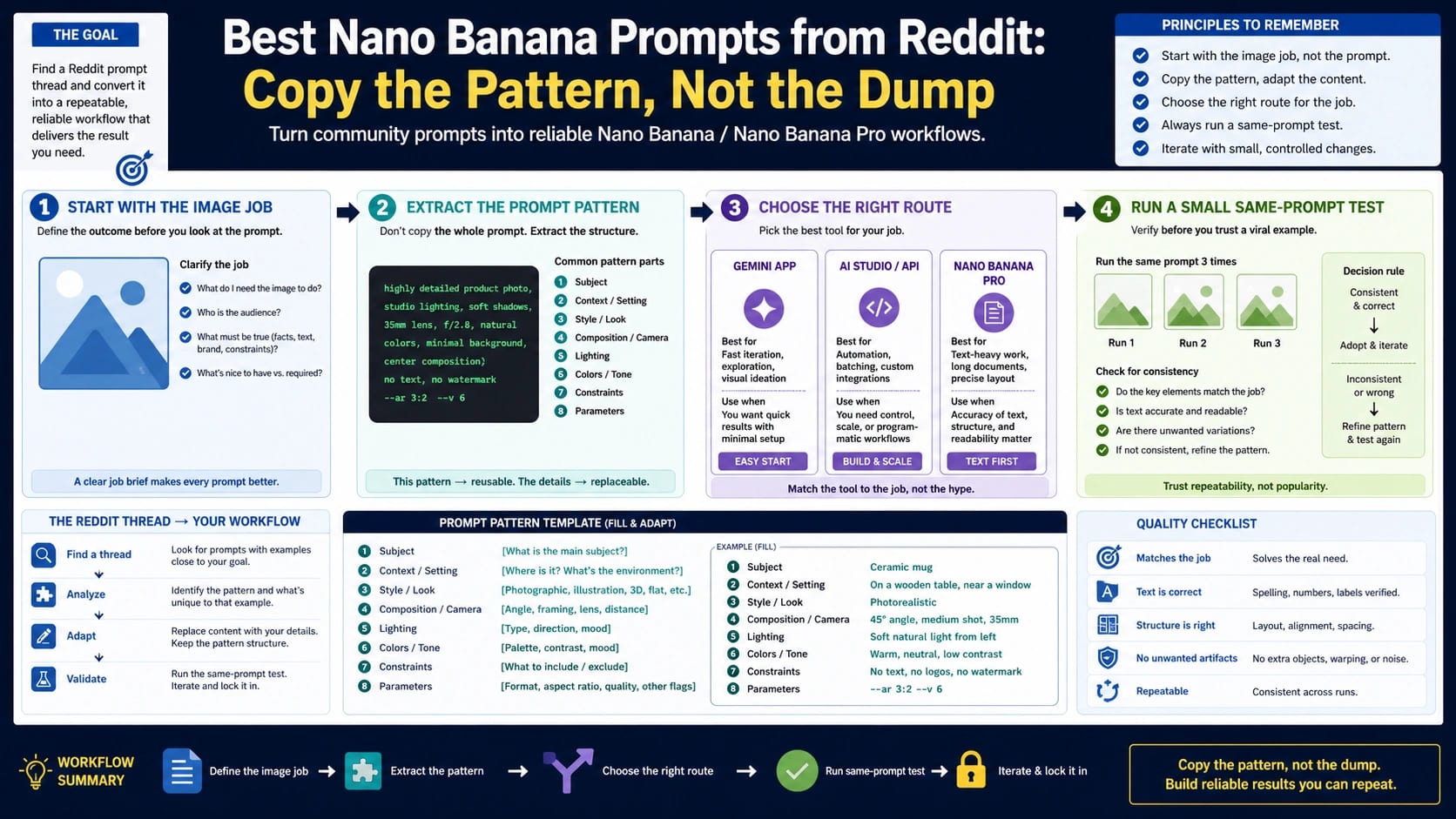
The most useful Nano Banana prompt is a small production brief: state the operation, define the image job, replace the project-specific fields, protect what must stay fixed, and name the check that decides whether the result passes.
hljs text[Create or edit] [the image job]. Input or reference: [describe the source image(s), or write none]. Context: [subject, setting, and purpose]. Composition: [framing, camera, hierarchy, light, and style]. Replace: [the fields that belong to this project]. Protect: [identity, product shape, exact text, layout, or other must-keep details]. Output: [aspect ratio, format, and intended use]. Pass if: [the visible result that makes this usable].
Replace five things first: the operation, subject and context, composition, output, and pass check. Keep the required input and protected details explicit. A prompt is copy-ready when it can be adapted quickly; it is test-ready only when you can tell whether the output passed.
If the image needs Tamil, make one more decision before styling: use Tamil script, transliterated Tamil, or a bilingual hierarchy, then put the approved Tamil words in their own exact-copy field. The Tamil adapter below adds the cultural variables and literal review step.
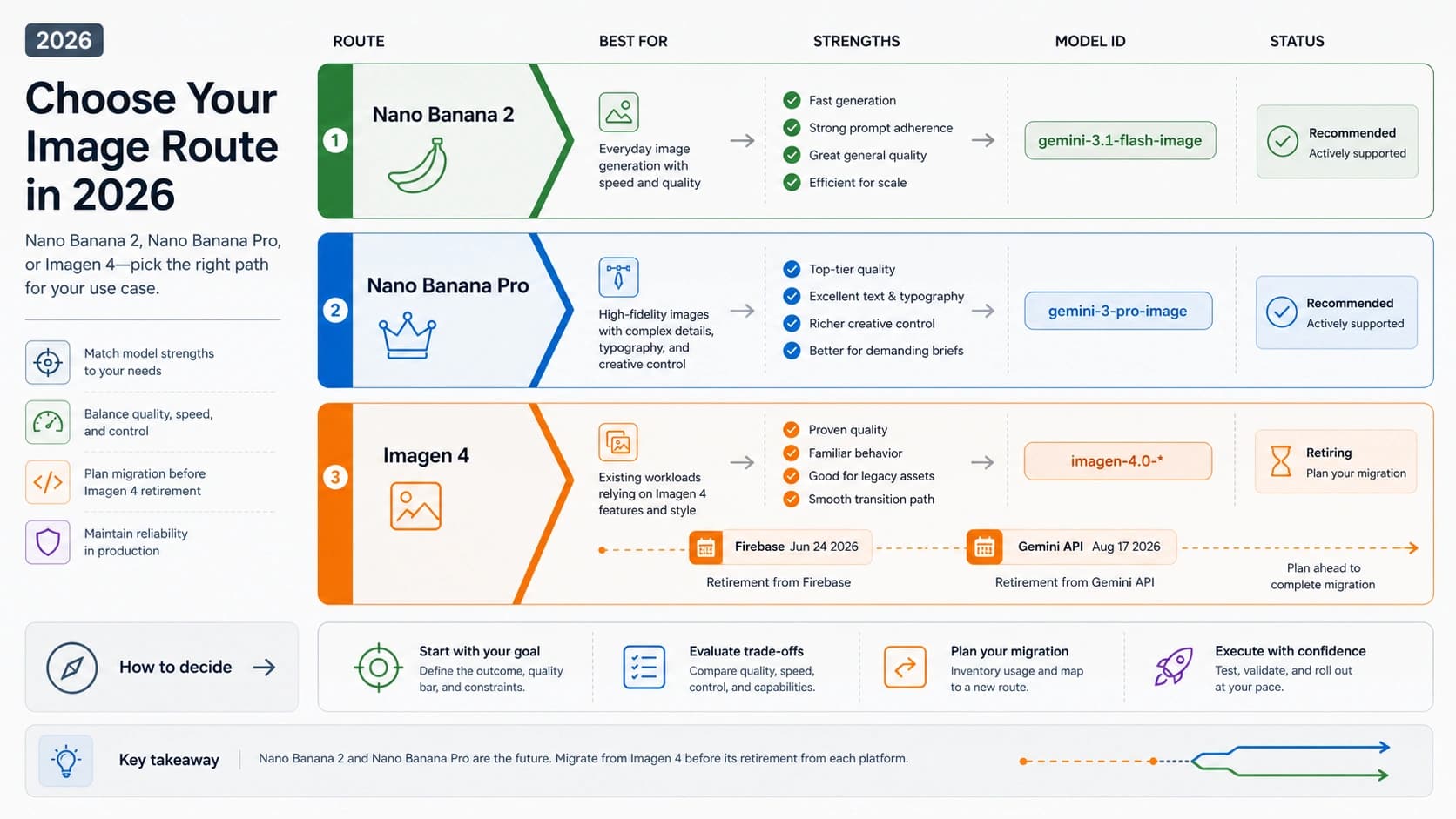
As of July 16, 2026, choose the route by workload: Nano Banana 2 Lite (gemini-3.1-flash-lite-image) for high-volume drafts, Nano Banana 2 (gemini-3.1-flash-image) as the everyday default, Nano Banana Pro (gemini-3-pro-image) for precision or text-heavy layouts, and the original Nano Banana (gemini-2.5-flash-image) only for legacy compatibility.
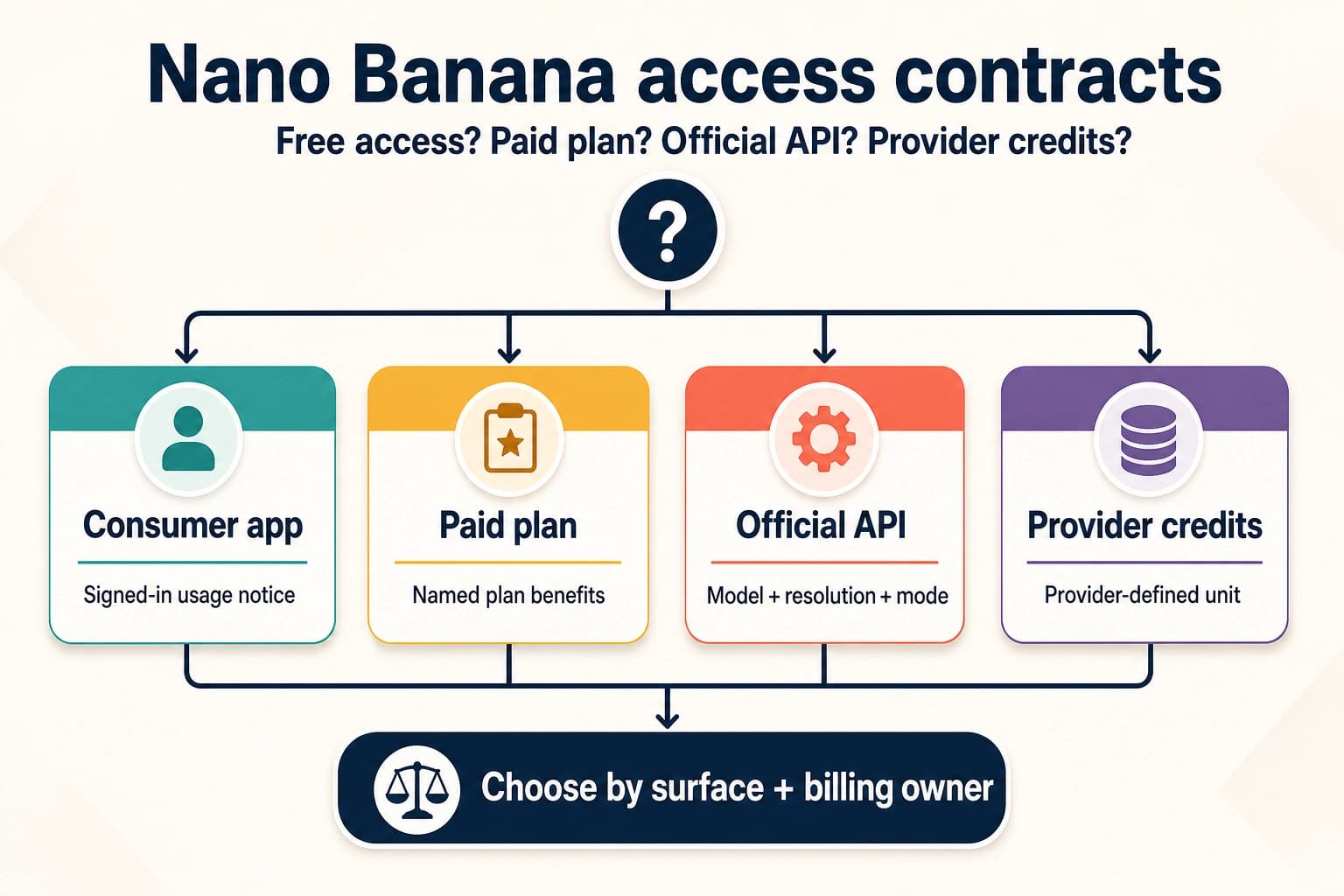
These templates are free to copy, but that does not make Pro free to run. As of July 16, 2026, Google's Gemini Developer API pricing lists no Free Tier for gemini-3-pro-image, while Gemini Apps Help says paid subscribers can use Redo with Pro after generating with Nano Banana 2.
Copy-ready does not mean proven across every job or route. Public galleries are useful discovery sources, not repeatability evidence, so judge each result against the prompt's protected details and pass check.
If two controlled attempts fail the same protected detail and you cannot name one prompt field to change, stop adding adjectives. Reconsider the input or route, or discard the pattern.
How to use the prompt cards
Every card below has six fields. Use when defines the image job. Route names the first model to try, not a permanent winner. Prompt is complete enough to paste after replacing brackets. Replace isolates project variables. Protect states what must not drift. Pass check gives you an observable decision instead of a vague feeling that the output looks good.
This structure matters because generation, editing, enhancement, reference, and layout work have different requirements. A new-image prompt can invent a scene. An edit prompt must specify both the change and the frozen remainder. A reference prompt must assign each input a role. A text-heavy layout needs exact copy, hierarchy, and a rejection rule for extra or misspelled text.
Google's current image-generation guide separates text-to-image work from image-and-text editing, iterative editing, and multi-reference composition. Google's Nano Banana prompting guide also emphasizes clear intent, specific visual direction, camera language, positive instructions, and iteration. Those principles support the cards; they do not prove that any one template will repeat unchanged for every image.
One final distinction prevents wasted rerolls: settings are not prose. Select the model, input assets, output size, and supported aspect ratio in the interface or request shape when those controls exist. Put the creative brief and must-preserve requirements in the prompt. Repeating “16:9, 16:9, 16:9” inside the prose cannot repair a route that does not support the required output.
Pick the current Nano Banana route
Nano Banana is a family label. The useful choice is the first route that fits the job.
| Route | Start here when | Escalate or switch when |
|---|---|---|
| Nano Banana 2 Lite / gemini-3.1-flash-lite-image | You need many early drafts, simple compositions, or a low-friction first pass | The job becomes reference-sensitive, text-heavy, layout-critical, or expensive to reject |
| Nano Banana 2 / gemini-3.1-flash-image | You need the everyday starting point for generation or bounded edits | Protected details keep drifting, exact text matters, or the composition has dense hierarchy |
| Nano Banana Pro / gemini-3-pro-image | You need precision, dense text, structured layout, multiple references, or a higher-cost review step | The job is actually simple draft exploration, or repeated failures point to bad inputs rather than route capability |
| Original Nano Banana / gemini-2.5-flash-image | You are maintaining an older workflow or comparing a legacy prompt record | You are starting new work without a compatibility reason |
This table routes work; it is not a speed or quality ranking. The access note above separates free-to-copy prompts from current Pro surfaces; it is not a pricing guide. Exact price, quota, regional availability, and third-party-provider claims come from different current source pages and change independently. Use Google's developer documentation for model IDs and route behavior; the same documentation says Gemini-generated images include SynthID.
If your real decision is between model families rather than between Nano Banana routes, use the separate GPT Image 2 vs Nano Banana Pro comparison. Do not make a prompt page carry an unrelated provider decision.
Make any Nano Banana prompt Tamil-ready
A “Tamil prompt” can mean three different things. You may want to write the instruction in Tamil, depict a specific Tamil setting or event, or render Tamil letters inside the image. Those jobs should not be collapsed into one style label. The model can understand a scene brief without printing it, while visible Tamil copy needs its own literal acceptance test.
Choose the on-image language format before filling a prompt card:
- Tamil script: The on-image words use Tamil characters. Keep the approved string isolated and require a character-for-character match.
- Transliterated Tamil: Tamil speech is written with Latin characters. There is no single default spelling for every audience, so supply the exact approved transliteration and intended audience; do not ask the model to invent one.
- Bilingual hierarchy: Tamil and another language both appear. State which line is primary, which is secondary, and whether either line may be translated.
This neutral fixture shows how the exact-copy field works: வணக்கம் (“Hello” or “Greetings”). It is a typography test, not a shorthand for one region, religion, or Tamil culture as a whole. Replace it with copy checked by a fluent Tamil reader before production. Do not use a machine-generated translation as final campaign copy simply because it looks plausible.
Start with this adapter, then append the job-specific body from the relevant card:
hljs text[Create or edit] [the image job]. Language mode: [Tamil script / transliterated Tamil / bilingual]. Exact on-image copy: "வணக்கம்" Render the quoted copy character for character. Do not translate it, romanize it, add words, repeat it, or imitate it with decorative marks. Tamil line role: [headline / label / caption / none]. Secondary language and hierarchy: [exact copy and size relationship / none]. Context: [specific region or diaspora setting, event, audience, and purpose]. Cultural details to include: [verified garment, object, food, architecture, festival element, color, or local environmental cue]. Do not infer religion, caste, politics, celebrity identity, or ceremonial meaning from the word “Tamil”; include only the details named above. Protect: [identity, product geometry, approved logo, exact copy, or layout]. Output: [aspect ratio, format, and placement]. Pass if the Tamil copy matches exactly, no extra text appears, and every protected detail survives.
The quoted line is a fixture, not magic syntax. Exact Tamil text still needs inspection at full size. Use Nano Banana 2 for a simple label or early layout; start with Pro when several text blocks, tight hierarchy, or costly rejection makes text precision the main workload. A stronger route can improve the starting odds, but it is not a spelling guarantee.
Patch 1: Tamil poster or thumbnail
Use this patch when the visible words carry the message. It works for event posters, social thumbnails, invitations, and storefront announcements.
hljs textCreate a [poster / thumbnail / invitation] for [audience and purpose]. Exact Tamil headline: "வணக்கம்" Render that headline once, character for character, as the primary text. Do not translate, transliterate, abbreviate, duplicate, or add a subtitle. Reserve the top [percentage] for the headline with high contrast and clear spacing. Scene: [specific subject, action, place, and time]. Cultural details: [only the verified items relevant to this project]. Visual direction: [palette, light, camera, texture, and mood]. Protect: [identity / event symbol / product / logo / required empty area]. Output: [aspect ratio and placement]. Pass if the headline matches the approved Tamil string exactly at full size, reads first, appears only once, and no invented cultural symbol is present.
For a bilingual poster, add the second line as another exact string and state its rank—for example, “Tamil headline at 100% scale; English translation at 45% scale.” Do not write “make it bilingual” and let the model choose the translation, order, or emphasis.
Patch 2: Tamil couple or portrait edit
For a real-person edit, the first requirements are permission and identity preservation. “Tamil couple” is not a complete visual brief: name the actual setting, garment, color, event, and allowed change instead of asking for a generic cultural makeover.
hljs textEdit the attached portrait with the subject's permission. Change only [background / wardrobe / lighting / approved caption]. Keep both faces, skin tones, ages, hairlines, body proportions, expressions, pose, hand position, and relationship between the subjects unchanged. Setting: [specific real place or event context]. Approved clothing or objects: [concrete, verified details]. Optional exact Tamil caption: "வணக்கம்" If the caption is used, reproduce it once without translation or added words. Do not infer or add religious, caste, ethnic, political, wedding, celebrity, or socioeconomic markers that are not explicitly supplied. Do not change skin tone, age, body shape, or facial features. Output: [aspect ratio and intended use]. Pass if the people remain recognizably the same, only the approved change occurs, and every cultural or text detail can be traced to this brief.
If the people drift, remove styling language and strengthen the reference roles and facial anchors. If identity holds but the context feels generic, replace “Tamil style” with two or three concrete, reviewed details; do not compensate with a longer list of stereotypes.
Patch 3: Tamil product card or infographic
Product and information layouts combine two failure risks: fabricated product details and misspelled copy. Assign every reference a single role, lock the product before describing the background, and keep each approved Tamil string separate.
hljs textCreate a [product card / comparison panel / infographic] for [use]. Reference 1 controls product shape, materials, logo, and packaging. Reference 2 controls only [palette / layout rhythm / lighting]. Exact Tamil heading: "வணக்கம்" Other approved labels: [one quoted string per label / none]. Render each approved string once and do not invent benefits, prices, badges, ingredients, specifications, footnotes, or translated copy. Hierarchy: [heading, product, evidence, action, and reserved empty space]. Protect the product silhouette, control placement, material boundaries, approved logo, SKU, numbers, currency, units, label order, and all exact text. Output: [aspect ratio, dimensions, and placement]. Pass if the product matches reference 1, every Tamil label is exact, the reading order is obvious, and no unsupported claim appears.
An infographic needs source-checked facts as well as source-checked Tamil. A correct-looking diagram is still unusable if the numbers or labels were invented.
Repair the failed field, not the whole prompt
Inspect visible Tamil copy at full resolution. Compare spelling, punctuation, spacing, word order, missing or added characters, and the final rendered glyphs with the approved string; Tamil does not need an English-style capitalization check. Then change one field at a time:
| Failure | First repair | Stop or switch when |
|---|---|---|
| A glyph is wrong, missing, fused, or replaced | Re-paste the reviewed string as a standalone quoted field; shorten surrounding copy and enlarge its reserved area | Two controlled attempts fail the same text; generate the visual without text and place native-reviewed copy in a design tool |
| The model translates, duplicates, or adds words | State “render once; do not translate, transliterate, repeat, or add text,” and remove competing copy | The layout requires more text blocks than you can verify reliably |
| A face or product drifts | Strengthen reference roles and list the few protected anchors that visibly changed | A source image is too weak, conflicting, or unlicensed for the job |
| The scene feels culturally generic or inaccurate | Replace “Tamil style” with a specific place, event, object, garment, food, or architectural cue reviewed for this job | You cannot verify the cultural detail or have no permission to imply it |
| Text overflows or loses hierarchy | Reduce the number of lines, state primary and secondary scale, and reserve a larger text area | Legibility depends on shrinking the copy below its real placement size |
The design-tool fallback is not a hidden success for the generation step. Record it as a production handoff: the model supplied the visual, a fluent reviewer approved the copy, and the final layout—not the raw generation—became the deliverable. For public-facing work, also confirm that you have the right to upload and edit every real-person image, rights for source images and logos, and the cultural meaning of any event-specific detail. A generic consent line is not sufficient authorization for images involving minors, public figures, or deceased people.
Six Nano Banana prompts for creating images from scratch
These six prompts begin without a source image. Each still carries a must-preserve list, because product shape, visual hierarchy, exact copy, and negative space can drift even when identity preservation is not involved.
1. Cinematic scene prompt
Use when: You need a film-still-style scene with a clear action, environment, camera position, and light source.
Route: Start with Nano Banana 2. Use Pro only when the frame also contains difficult text, multiple references, or layout-critical elements.
Prompt:
hljs textCreate a cinematic still of [subject] [specific action] in [setting and time]. The story beat is [what has just happened or is about to happen]. Frame it as a [wide / medium / close] shot from [camera height and angle], using [lens feel] with [foreground, middle ground, and background relationship]. Lighting comes from [motivated light source], with [shadow and color behavior]. The mood is [two precise qualities], expressed through the scene rather than text. Keep [must-keep wardrobe, prop, architecture, or color detail] unchanged. Do not add captions, logos, borders, or unrelated people. Output: [aspect ratio and intended placement]. Pass if the action reads immediately, the subject is clearly separated, and every must-keep detail remains visible and coherent.
Replace: Subject, action, setting, story beat, shot, lens feel, light, mood, and output.
Protect: Recurring wardrobe, hero prop, architecture, brand color, and any continuity anchor.
Pass check: A viewer can name the action and focal subject in one sentence; protected details remain consistent; no accidental caption or extra character appears.
The story beat does more work than adding “epic” or “cinematic” five times. It tells the system what relationship the frame must communicate. If the scene looks polished but static, change the action or camera relationship before changing the route.
2. Product hero image prompt
Use when: You need a product-centered ecommerce or campaign image with a controlled surface, scale, and light.
Route: Start with Nano Banana 2 for concept exploration. Start with Pro when exact packaging text, product geometry, or a reference-sensitive brand review makes rejection costly.
Prompt:
hljs textCreate a hero product photograph of [product] using the uploaded product image as the shape and material reference. Place it on [surface] in [brand-relevant environment], at [camera angle and crop]. Use [key light], [fill or bounce], and [shadow behavior] to reveal [important material qualities] without changing the product design. Leave [location and amount] of negative space for later copy. Protect the exact silhouette, control placement, material transitions, packaging proportions, approved logo, and the text “[exact verified text]”. Do not invent ports, labels, accessories, reflections, or product claims. Output: [aspect ratio and campaign placement]. Pass if the product can be matched to the reference at a glance, the approved text is exact, and the negative space is usable.
Replace: Product, surface, environment, camera, lighting, material emphasis, negative space, exact verified text, and placement.
Protect: Silhouette, controls, seams, material boundaries, approved logo, verified label copy, and packaging proportions.
Pass check: The reference and result describe the same object; no feature is invented; the reserved copy area is clean.
If you do not have a product reference, call the output a concept rather than a faithful product image. A vivid text description cannot prove that a real object's geometry, label, or controls are correct.
3. Professional portrait prompt
Use when: You need an editorial or business portrait with deliberate expression, wardrobe, background, and camera language.
Route: Start with Nano Banana 2 for a new fictional subject. Use Pro when several references must preserve one real person's identity or when the frame includes exact text and layout.
Prompt:
hljs textCreate a professional portrait of [person or fictional subject] for [use]. If references are attached, use reference 1 only for identity, reference 2 only for [wardrobe or color], and ignore their backgrounds. Expression: [specific expression and gaze]. Wardrobe: [garment, fit, texture, and color]. Background: [simple environment and depth relationship]. Camera: [headshot / half body / environmental portrait], [eye-level or angle], with [lens feel] and [depth-of-field behavior]. Lighting: [key direction and softness] plus [subtle separation light]. Protect facial structure, skin tone, hairline, distinguishing features, body proportions, and any approved accessory. Do not beautify into a different person, add jewelry, or change age. Pass if the identity is stable, the expression fits the use, and the face, hair, and hands remain anatomically coherent.
Replace: Subject, use, reference roles, expression, wardrobe, background, framing, lens feel, and light.
Protect: Identity, age, skin tone, facial structure, hair, body proportions, and approved accessories.
Pass check: The portrait serves the stated use and keeps identity anchors without unrequested beautification or accessory drift.
“Photorealistic” does not preserve identity. If the face changes, strengthen reference roles and protected features. If the face is stable but the portrait feels wrong, change expression, camera distance, or background—not the identity instructions.
4. Food editorial prompt
Use when: You need an appetizing dish or ingredient story with believable texture, portion structure, and table context.
Route: Start with Nano Banana 2. Pro is useful when the composition also carries exact menu text or a dense editorial layout.
Prompt:
hljs textCreate an editorial food photograph of [dish] at [serving moment]. Show the dish structure clearly: [layers, cut surface, garnish, sauce, or steam]. Place it on [plate or vessel] over [table surface], with only [two or three supporting objects] in the scene. Frame from [overhead / 45-degree / table-level] at [crop]. Use [window / studio / restaurant] light from [direction], with [shadow softness] and natural highlights on [key texture]. Protect the recipe-defining ingredients, portion count, plate shape, and the relative position of [important elements]. Do not invent extra garnish, duplicate utensils, plastic-looking texture, or text inside the image. Pass if the dish structure is legible, textures look edible, and the supporting objects do not compete with the food.
Replace: Dish, serving moment, structural details, vessel, table, supporting objects, camera, light, and key texture.
Protect: Ingredient count, layers, portion, plate shape, cultural presentation details, and hero garnish.
Pass check: The food remains structurally plausible, the hero texture is visible, and no extra ingredient changes the dish.
Food prompts often fail because “delicious” is doing the job that structure should do. Name the cut surface, gloss, steam, crumb, char, or sauce behavior you need to see.
5. Interior design prompt
Use when: You need a room concept with coherent geometry, materials, furniture relationships, and daylight.
Route: Start with Nano Banana 2 for a single-room concept. Consider Pro when you must combine several references or preserve a detailed plan-like hierarchy.
Prompt:
hljs textCreate an interior visualization of [room type] for [occupant and use]. The room dimensions and openings are [brief geometry description]. Place [primary furniture] in [relationship to window, door, and circulation], then add [secondary pieces] without blocking the walking path. Materials: [floor], [walls], [joinery], and [textile]. Daylight enters from [direction and opening], supported by [practical lights]. Camera is at [height] from [corner or axis], showing [priority relationships]. Protect the number and position of doors and windows, the room proportions, built-in elements, and required furniture count. Do not create impossible corners, duplicate openings, floating objects, or a wider room than the stated geometry allows. Pass if the circulation works, openings remain fixed, and each major material is distinguishable without visual clutter.
Replace: Room, occupant, geometry, furniture, materials, light, camera, and priority relationships.
Protect: Door/window count and placement, built-ins, room proportions, required furniture, and circulation.
Pass check: The room could plausibly be built and walked through; fixed openings and required furniture are all present once.
If the first result breaks the room, do not add style adjectives. Reduce the camera field of view, restate the fixed openings, and test one composition change.
6. Icon or logo concept prompt
Use when: You need a simple visual direction for an original icon or logo concept, not a finished trademark clearance or vector deliverable.
Route: Start with Nano Banana 2 for silhouette exploration. Use Pro when exact wordmark text or a structured identity board is part of the image.
Prompt:
hljs textCreate an original icon concept for [brand or feature] that communicates [single idea] through [chosen metaphor]. Use one dominant silhouette, [number] supporting shapes at most, and a limited palette of [colors] on [background]. The form should remain recognizable at a small app-icon preview. Use [geometric / organic / monoline / cut-paper] construction, with [corner, stroke, and negative-space behavior]. Protect the intended metaphor, silhouette balance, palette, and required empty space around the mark. Do not imitate an existing trademark, add mockup scenery, or include letters unless the exact approved wordmark is supplied. Pass if the idea reads without explanation at small size and no extra symbol or accidental letter appears.
Replace: Brand or feature, single idea, metaphor, shape limit, palette, background, and construction.
Protect: Core metaphor, silhouette, limited palette, negative space, and exclusion of unapproved letters.
Pass check: The concept is recognizable at small size and visually distinct from the references you provided. Human trademark review and vector redrawing remain separate steps.
Three Nano Banana prompts for editing and enhancement
Editing starts by bounding the change. The prompt must name the source image, the allowed change, and the frozen remainder. “Make it better” gives the model permission to redesign details you may need to keep.
7. Targeted single-element edit prompt
Use when: You need to change one object, color, material, or localized region while preserving the rest of the source.
Route: Start with Nano Banana 2. Consider Pro when the edited region contains text, brand geometry, or several tightly related references.
Prompt:
hljs textEdit the uploaded image. Change only [target element] from [current state] to [new state]. Match the existing camera perspective, focal depth, light direction, shadow softness, reflections, grain, and color response. Keep every other pixel-level relationship conceptually unchanged: [subject identity], [pose], [product geometry], [background], [crop], [text], and [unaffected objects]. Do not restyle the image, move the camera, add props, or improve unrelated areas. Pass if the requested change is visible and the unedited regions still match the source in position, identity, lighting, and composition.
Replace: Target element, current state, new state, and the source-specific keep list.
Protect: Everything outside the target, especially identity, camera, crop, text, product geometry, shadows, and background.
Pass check: You can describe exactly one intentional difference between source and result.
If multiple unrelated changes are needed, make them sequentially when the workflow allows. A single prompt that changes wardrobe, location, camera, season, and lighting makes failure attribution almost impossible.
8. Restoration and enhancement prompt
Use when: You need to reduce visible damage, noise, color cast, or exposure problems without inventing identity or product detail.
Route: Start with Nano Banana 2. Use Pro when exact facial, packaging, or document details call for a more structured must-preserve list.
Prompt:
hljs textRestore and enhance the uploaded [photo or scan]. Correct [specific damage: dust, scratches, fading, noise, color cast, or exposure] while preserving the original composition, era, identity, facial structure, clothing, product features, printed text, and natural texture. Recover only details supported by the source image. Keep realistic skin, fabric, paper, or material grain; avoid waxy smoothing, invented eyelashes, new jewelry, fake logos, sharpening halos, or reconstructed text that cannot be read in the source. Output: [intended display or archive use]. Pass if the damage is less distracting but the image still depicts the same person, object, moment, and documented details.
Replace: Source type, visible damage, protected historical or product details, and intended use.
Protect: Identity, era, original composition, clothing, material texture, readable source text, and uncertainty where detail is missing.
Pass check: The image is cleaner without looking newly invented; ambiguous areas remain conservative rather than confidently fabricated.
Enhancement cannot recover evidence that is absent. If a face, label, or document line is unreadable, describe the result as a reconstruction only when that is the explicit creative job.
9. Wardrobe and background change prompt
Use when: You need two bounded changes while preserving the person, pose, camera, and body proportions.
Route: Start with Nano Banana 2 for a single source. Consider Pro when several identity or wardrobe references must be coordinated.
Prompt:
hljs textEdit the uploaded portrait with exactly two changes: 1. Replace [current wardrobe] with [new wardrobe, fit, material, and color]. 2. Replace the background with [new setting and depth behavior]. Preserve the person's identity, facial structure, skin tone, hair, body proportions, pose, hands, gaze, camera position, crop, and expression. Make the new wardrobe follow the existing pose and lighting; make the background perspective and light direction agree with the subject. Do not change age, body shape, makeup, jewelry, or facial features. Pass if the same person and pose remain obvious, the clothing fits naturally, and the new background shares one light logic.
Replace: Current and new wardrobe, material, color, setting, and depth behavior.
Protect: Identity, age, face, body proportions, pose, hands, expression, camera, crop, and unrequested accessories.
Pass check: Only wardrobe and background changed; the subject still looks photographed in one coherent scene.
Three Nano Banana prompts for references and layout
Reference and layout work succeeds when every input has an assigned role. “Use these images” is not enough: one reference may supply identity, another wardrobe, another composition, and another visual language. Resolve conflicting roles in the prompt before generation.
10. Consistent character prompt
Use when: You need one character to remain identifiable across a new pose, action, or setting.
Route: Start with Nano Banana 2 for a small reference set. Use Pro when several references, props, or panels must be reconciled with higher review cost.
Prompt:
hljs textCreate a new image of the character using the attached references by role: - Reference 1 supplies face, age, skin tone, and hair. - Reference 2 supplies outfit, materials, and color placement. - Reference 3 supplies only [prop or pose language], not identity. Show the character [new action] in [new setting], framed as [shot and angle]. Preserve facial structure, hairline, body silhouette, outfit construction, signature color blocks, and [character-specific anchor]. Allow the pose, expression, environment, and camera to change as specified. Do not blend faces, borrow background elements from the references, change the number of costume parts, or add a new accessory. Pass if the character is identifiable without the references and every reference role is followed without cross-contamination.
Replace: Reference roles, action, setting, shot, and character-specific anchor.
Protect: Face, hair, silhouette, costume construction, signature colors, prop identity, and number of costume parts.
Pass check: A reviewer can map each preserved feature to the intended reference and see no accidental role swapping.
11. Exact-text poster prompt
Use when: You need an image whose copy, hierarchy, and reading order are part of the deliverable.
Route: Start with Nano Banana Pro because exact text and layout are the main rejection risks. A simpler route is appropriate only if the text will be added later outside the generated image—which is a different workflow.
Prompt:
hljs textCreate a [poster / event card / social graphic] for [purpose]. Use exactly this visible copy and no other words: Headline: “[exact headline]” Subhead: “[exact subhead]” Details: “[exact date, time, or CTA]” Hierarchy: headline first, [hero image or concept] second, subhead third, details last. Use [visual direction] with [palette], [type mood], and [spacing behavior]. Reserve [safe margin or crop requirement] for [placement]. Protect spelling, punctuation, capitalization, line order, brand colors, required logo placement, and the reading sequence. Do not invent labels, pseudo-text, badges, prices, or extra calls to action. Pass if every character matches the supplied copy and the reading order remains clear at the intended display size.
Replace: Format, purpose, exact copy, hero concept, hierarchy, visual direction, palette, type mood, and placement.
Protect: Every character, punctuation mark, capitalization choice, line order, logo placement, palette, and safe margin.
Pass check: Compare the rendered copy character by character; reject extra, missing, or misspelled text even if the design looks attractive.
Exact-text generation still needs proofreading. If one line keeps failing, shorten the generated copy or move text composition into a deterministic design tool rather than calling an incorrect image “close enough.”
12. Infographic or multi-reference composition prompt
Use when: You need a structured information board or composition that combines several visual sources without confusing their roles.
Route: Start with Nano Banana Pro when hierarchy, exact labels, and multiple references are core requirements.
Prompt:
hljs textCreate a [technical infographic / comparison board / multi-reference composition] for [audience and decision]. Assign the attached references by role: - Reference 1: [subject or product truth] - Reference 2: [style or color language only] - Reference 3: [diagram structure or composition only] Build the reading order as [first], [second], [third], then [decision or takeaway]. Use only these verified labels: “[label 1]”, “[label 2]”, “[label 3]”. Show [relationships, sequence, or contrast] without adding unsupported numbers. Protect source identity, approved labels, relative hierarchy, brand colors, and the distinction between fact and illustration. Do not merge reference roles, invent statistics, or add decorative claims. Pass if the audience can state the decision path, all labels are exact, and every factual element can be traced to supplied input.
Replace: Format, audience, decision, reference roles, reading order, verified labels, relationships, and brand requirements.
Protect: Factual labels, source identity, hierarchy, reference boundaries, brand colors, and evidence-versus-illustration distinction.
Pass check: The reading order is unambiguous, labels are exact, and a human reviewer can verify every factual element.
An image model can organize supplied facts; it should not become the source of those facts. Check all numbers, claims, and labels against their authoritative sources before publishing the visual.
Why a Nano Banana prompt fails
When the first result misses, label the failure before rewriting. The useful order is requirements first, adjectives last.
| Failure source | What it looks like | First repair |
|---|---|---|
| Wrong operation | A requested edit becomes a new image, or a restoration redesigns the source | Start with an explicit verb: create, edit, replace, restore, combine, or lay out |
| Missing input | Identity, product shape, text, or layout cannot be preserved because no reference or exact copy was supplied | Add the missing source asset or quoted text; do not compensate with style words |
| Weak protection | The requested change works, but face, product geometry, crop, or background drifts | Name the must-keep list and the frozen remainder |
| Conflicting instructions | The prompt asks for incompatible camera, light, style, text, or spatial outcomes | Keep one unambiguous requirement per field and remove the conflict |
| Wrong route | Dense text, multi-reference work, or layout keeps failing on a draft-oriented route | Move to a route suited to the harder requirement, then rerun the same baseline |
| Unrealistic or unsafe demand | The result would require invented evidence, deceptive use, disallowed content, or unsupported certainty | Stop, narrow the job, or choose a legitimate production method |
Do not change five fields at once. If you rewrite subject, camera, light, palette, and route together, a better result teaches you nothing about which repair worked. If the issue looks like a live service or request failure rather than a prompt failure, switch to the Nano Banana Pro troubleshooting guide instead of endlessly rewriting prose.
Run a same-prompt test
A useful prompt record needs one baseline and one controlled variant. The goal is not a universal benchmark; it is to make your own next decision explainable.
- Freeze the job and route. Keep the operation, input assets, aspect ratio, must-keep list, and pass check unchanged.
- Generate the baseline. Record the visible failure in plain language: “logo letters changed,” “window moved,” or “face no longer matches.”
- Change one field. Tighten the target edit, assign reference roles, simplify a conflict, or strengthen one protection line.
- Compare the same criteria. Score subject, layout, protected details, and the stated pass check—not overall vibes.
- Make one decision. Save when the variant passes; rewrite only the failing field when the cause is identifiable; discard when the pattern repeatedly violates a protected detail.
The two-failure rule is a budget boundary. Two controlled failures do not prove that a model can never do the job. They do show that the current prompt-input-route combination is not earning another blind reroll. At that point, change the input, change the route, split the job into stages, or choose a deterministic editing step.
Save the prompt only after it passes
A prompt library should store the task requirements and result, not just the final paragraph. This compact JSON shape works for a personal note, spreadsheet row, or production database:
hljs json{
"name": "product-hero-soft-window-light",
"job": "product hero image",
"route": "gemini-3.1-flash-image",
"inputs": ["approved product reference"],
"prompt": "Create a hero product photograph...",
"replace": ["surface", "environment", "camera", "light"],
"protect": ["silhouette", "controls", "approved label"],
"pass_check": "reference match, exact label, clean negative space",
"test": {
"baseline_failure": "label changed",
"single_change": "quoted the approved label and prohibited extra text",
"decision": "save"
},
"source_note": "original template; not a cross-route performance claim",
"checked_on": "2026-07-16"
}
Keep volatile facts out of the creative prompt record unless they affect execution. Model IDs, route status, aspect-ratio support, output controls, and API request shape should have a date and an official source. Pricing, quota, free access, region, privacy, and commercial-use terms need their own current evidence; a public prompt card cannot establish them.
Public collections—from galleries and GitHub packs to forum threads and videos—are still useful. Browse them for subject language, camera phrasing, lighting relationships, edit verbs, and composition ideas. Save the source link for attribution or context, but do not let likes, stars, copied screenshots, or “works every time” captions become your pass check.
Frequently asked questions
Can I copy and paste these Nano Banana prompts as written?
Yes, after replacing every bracketed field and supplying the required input assets. The templates are complete enough to test, but the protected details and pass check must match your project. A product prompt without the real product reference or a poster prompt without exact copy is not actually ready.
What is the best Nano Banana prompt for editing a photo?
Use a tightly scoped edit instruction: “Edit the uploaded image. Change only [target] from [current state] to [new state], then preserve [identity, pose, camera, crop, lighting, background, and text].” The best first prompt is the narrowest prompt that names both the change and the frozen remainder.
How do I prompt Nano Banana to improve image quality?
Name the visible defect—noise, exposure, color cast, scratch, blur, or compression—then state what must not be invented. “Improve quality” is too broad. For restoration, protect identity, source-era detail, material texture, printed text, and uncertainty in unreadable regions.
How do I make Nano Banana render Tamil text?
Supply native-reviewed Tamil as a separate quoted string, forbid translation and extra words, reserve enough space for it, and inspect spelling, spacing, word order, and glyph rendering at full size. For transliterated Tamil, supply the approved Romanized copy and audience rather than asking the model to choose a spelling. Pro is a sensible first route for a dense text layout, but it is not a spelling guarantee; after two controlled failures, generate the visual without text and add reviewed copy in a design tool.
Should I use Nano Banana 2 Lite, Nano Banana 2, or Nano Banana Pro?
Use Nano Banana 2 as the everyday first route. Use Lite for high-volume drafts and simple early exploration. Use Pro when exact text, dense layout, multiple references, brand precision, or high rejection cost defines the job. Keep the original model for legacy compatibility rather than as the default for new work.
Should a Nano Banana prompt be written as JSON?
Usually not for creative prose. Natural language is easier to read and refine. JSON is useful when your application needs named fields, logs, or repeatable storage. Keep model selection and supported request settings in the API request; keep the visual brief, protected details, and pass check in the prompt payload.
Are public Nano Banana prompt libraries reliable?
They are reliable as discovery surfaces only to the extent that they show the prompt and its claimed result. They usually do not prove the route, hidden settings, input references, selection process, or repeatability. Copy the idea, rewrite it for your task, and run your own baseline.
What should I do when the same prompt fails twice?
Stop blind rerolls. Name the repeated failure, then decide whether one prompt field, missing input, or route change can address it. If not, discard the pattern, split the workflow, or use a deterministic editing step. More adjectives are not a diagnosis.
The durable unit is not a clever sentence. It is a prompt-check pair: a clear operation, the right inputs, explicit variables, protected details, a fitting route, and a result you can accept or reject.