Is ChatGPT Plus Worth It in 2025? Complete Free vs Paid Comparison
Honest analysis of ChatGPT Plus ($20/month) vs the Free plan. Compare exact message limits, features like DALL-E 3 and Deep Research, and decide if upgrading makes sense for your specific needs.
Nano Banana Pro
4K-80%Google Gemini 3 Pro · AI Inpainting
谷歌原生模型 · AI智能修图

Is ChatGPT Plus worth $20 per month, or should you stick with the free plan? This is one of the most common questions among ChatGPT users in 2025, and the answer genuinely depends on how you use the platform. The free tier has improved significantly—you now get access to GPT-4o, voice mode, and even limited image generation. But Plus still offers meaningful advantages for users who rely on ChatGPT daily.
The quick answer: ChatGPT Plus is worth it if you send more than 10 messages every few hours, need reliable image generation with DALL-E 3, or want access to advanced features like Deep Research and Agent Mode. If you use ChatGPT occasionally for basic questions and rarely hit usage limits, the free plan will likely serve you well.
Let me break down exactly what you get with each plan, share specific usage limits most articles gloss over, and help you make an informed decision based on your actual needs.
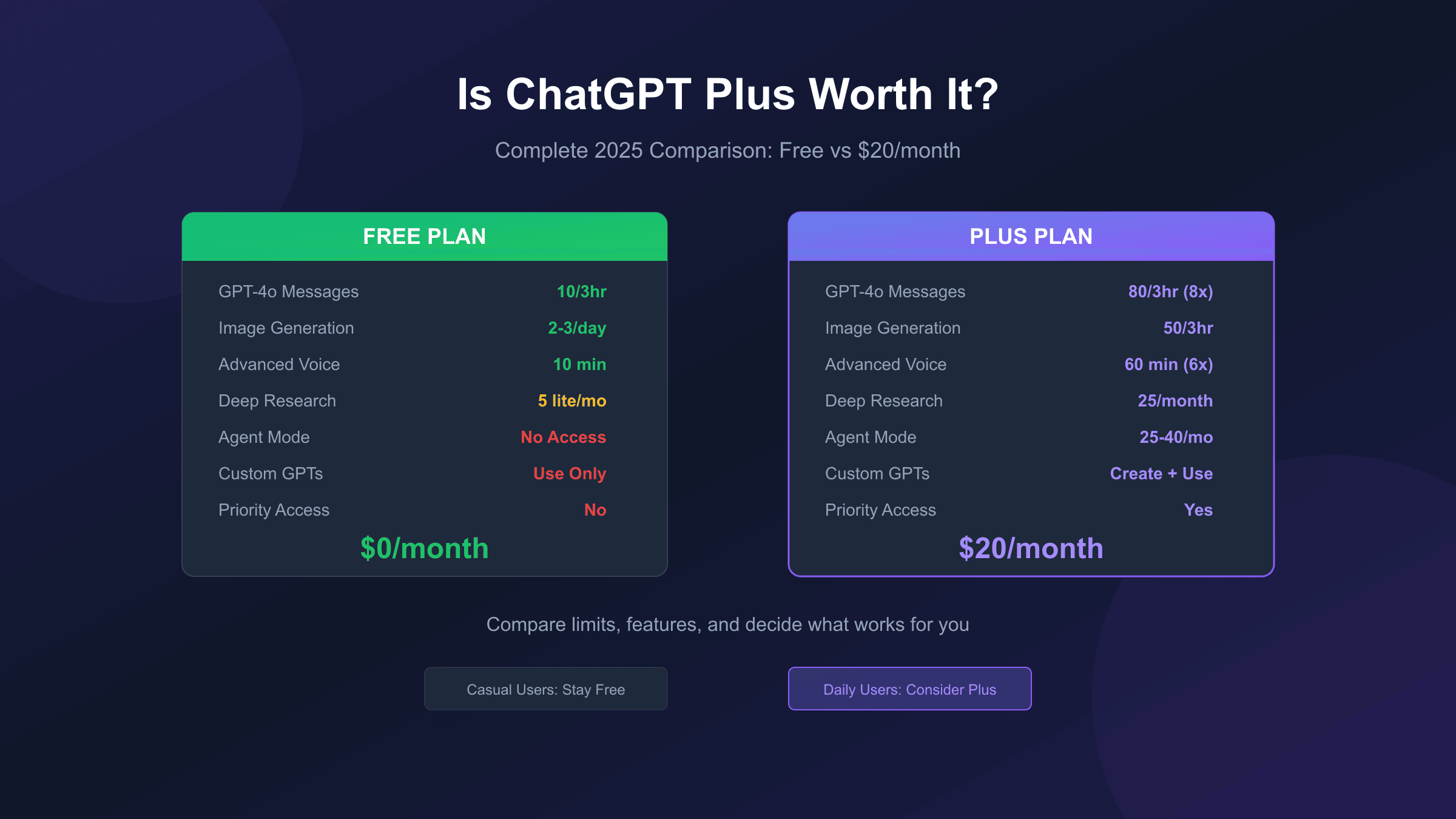
ChatGPT Plus Pricing: What You're Actually Paying For
ChatGPT Plus costs $20 per month with no annual discount option available. OpenAI bills monthly, and you can cancel anytime without penalty. In the United States, expect to pay around $21-22 after sales tax depending on your state. European users typically pay €20 per month, which includes VAT ranging from 19% to 25%.
For context, this puts ChatGPT Plus in the same price range as other premium subscriptions like Spotify Premium ($11.99), YouTube Premium ($13.99), or Netflix Standard ($15.49). The question is whether you'll get comparable value from your AI assistant.
OpenAI also offers higher tiers if Plus doesn't meet your needs:
| Plan | Monthly Cost | Best For |
|---|---|---|
| Free | $0 | Casual users, occasional queries |
| Plus | $20 | Daily users, professionals, creators |
| Pro | $200 | Heavy users, researchers, enterprises |
| Team | $25/user | Small business collaboration |
The Pro tier at $200/month provides unlimited access to all features, but most users find Plus sufficient. According to OpenAI's pricing page, Pro only becomes necessary when you consistently hit Plus limits or need extensive Deep Research capabilities.
Free vs Plus: Complete Feature Comparison
The gap between free and paid has narrowed considerably since OpenAI made GPT-4o available to everyone. However, significant differences remain in how much you can use each feature and which advanced capabilities you can access.
| Feature | Free Plan | Plus ($20/mo) |
|---|---|---|
| GPT-4o Access | Limited (10/3 hours) | Extended (80/3 hours) |
| GPT-5 Access | Limited (10/5 hours) | 3,000 messages/week |
| Image Generation | 2-3 per day | 50 per 3 hours |
| Advanced Voice | ~10 minutes/day | ~60 minutes/day |
| Deep Research | 5 lite queries/month | 25 full queries/month |
| Agent Mode | No access | 25-40 tasks/month |
| Custom GPT Creation | No | Yes |
| Sora Video | No access | Limited (5s clips) |
| Priority Access | No | Yes (peak hours) |
| Response Speed | Standard | 2-3x faster |
The practical impact of these differences depends entirely on your usage pattern. A student researching a paper might hit the free tier's GPT-4o limit within an hour of intensive work. A casual user asking a few questions per week might never notice any restrictions.
Message Limits: The Numbers That Actually Matter
Here's where most comparison articles fail you—they mention "higher limits" without specifying exact numbers. Understanding these limits helps you calculate whether you'll actually benefit from upgrading.
Free tier messaging limits:
- Approximately 10 GPT-4o messages every 3 hours
- After hitting the limit, you're switched to GPT-4o-mini
- No notification of remaining messages—you only find out when you've reached the cap
Plus tier messaging limits:
- Approximately 80 GPT-4o messages every 3 hours (8x more than free)
- 3,000 GPT-5 messages per week with thinking mode
- Falls back to lighter models after hitting limits, but thresholds are much higher
The rolling window system matters here. Your limit resets based on when you sent each message, not at a fixed daily time. If you send 10 messages at 9 AM on the free tier, you can send more at 12 PM when those slots free up.
For heavy users, here's a realistic calculation: at 80 messages per 3-hour window, Plus users can theoretically send around 640 messages per day. Even power users rarely hit this ceiling. The free tier's 10 messages per 3 hours translates to roughly 80 messages daily—still usable, but easy to exhaust during focused work sessions.
In practical testing, the difference becomes apparent during intensive work sessions. When working on a complex coding project or drafting a detailed document, hitting the free tier's limit within 30-45 minutes of focused work is common. Plus subscribers can work uninterrupted for hours without encountering restrictions, which makes a noticeable difference for professional workflows. For a detailed breakdown of these limits, see our guide on ChatGPT free tier image generation limits.
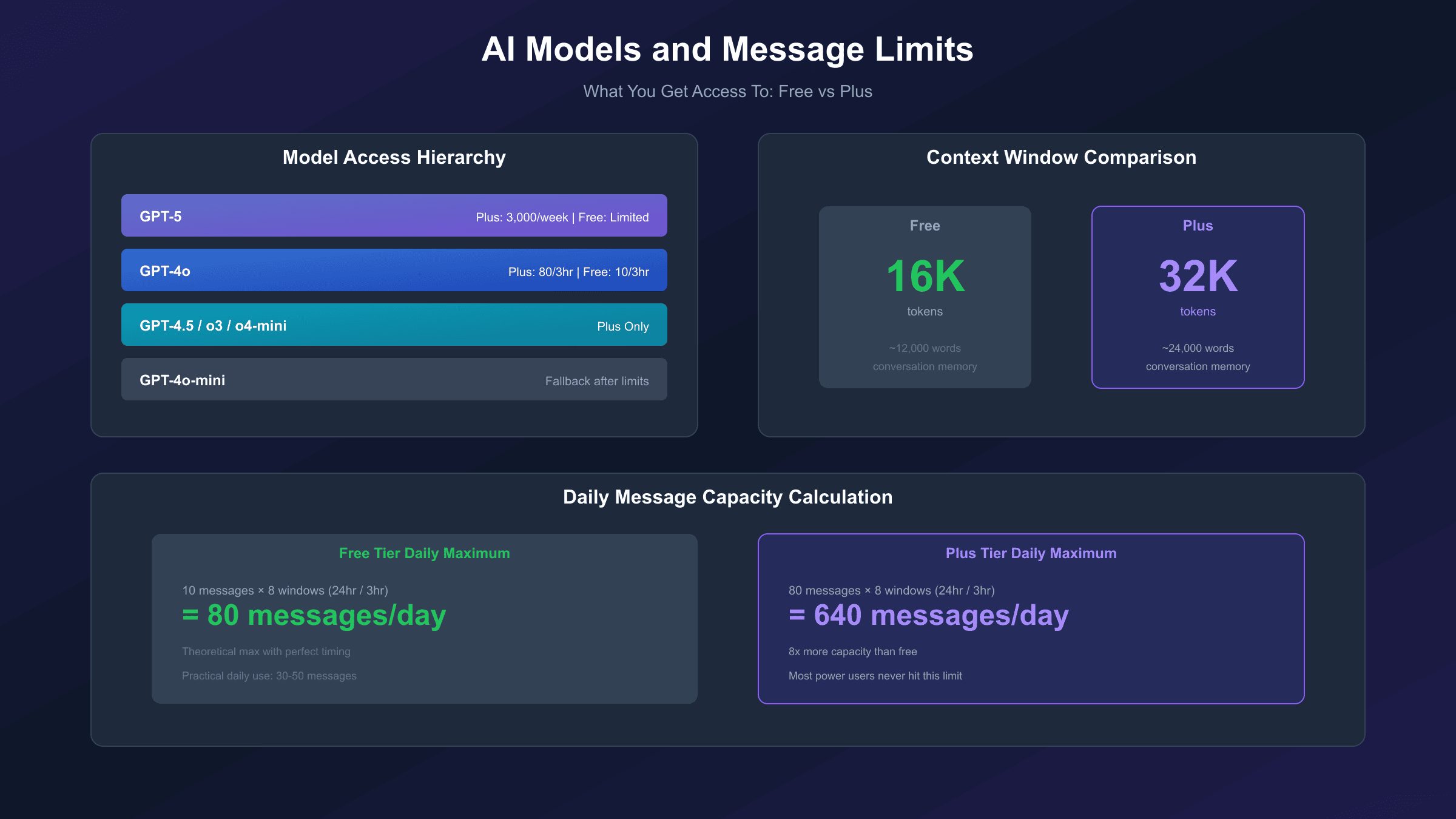
AI Models: What You Actually Get Access To
Both free and Plus users can access GPT-4o, but Plus subscribers get access to additional models and features that free users cannot use at all.
Models available to Plus users:
- GPT-4o: The flagship multimodal model for everyday tasks
- GPT-5: The latest reasoning model with enhanced capabilities
- GPT-4.5: A research preview optimized for creative tasks
- o3 and o4-mini: Advanced reasoning models for complex problems
- GPT-4.1: Code-optimized model for developers
Free users primarily work with GPT-4o and GPT-4o-mini. When limits are reached, the system automatically switches to the lighter mini model, which handles simple queries well but lacks the depth and nuance of full GPT-4o responses.
The context window also differs between tiers. Free users work with approximately 16,000 tokens (roughly 12,000 words of conversation history), while Plus users get 32,000 tokens. This matters for long documents, extended conversations, or when you need the AI to remember earlier context in a session.
Speed and Priority Access: Does Plus Feel Faster?
OpenAI claims Plus users experience faster response times, and testing confirms this is accurate during peak usage hours. Free tier responses can take 5-10 seconds during busy periods, while Plus responses typically arrive in 2-3 seconds.
More importantly, Plus subscribers get priority access during high-traffic times. When OpenAI's servers are under heavy load, free users may see "ChatGPT is at capacity" messages or experience degraded performance. Plus users rarely encounter these issues.
The speed difference matters most for:
- Iterative work: When you're refining prompts and need quick feedback loops
- Time-sensitive tasks: When you're on deadline and can't wait for slow responses
- Extended sessions: When you're working with ChatGPT for hours at a time
For casual users who send a few messages and walk away, the speed advantage is less noticeable. For professionals integrating ChatGPT into their workflow, the responsiveness improvement feels significant.
Image Generation: DALL-E 3 Access Breakdown
Both free and Plus users can generate images through ChatGPT, but the limits differ dramatically.
Free tier image generation:
- 2-3 images per day (hard cap as of July 2025)
- Longer generation times (~30 minutes during peak hours)
- Each image slot resets independently (24-hour rolling window)
- Automatic model selection based on server availability
Plus tier image generation:
- 50 images per 3-hour rolling window
- Fast generation (2-3 minutes typically)
- Strategic timing allows up to 400 images daily
- Access to both DALL-E 3 and GPT-4o native image generation
The 50-image limit uses a rolling window, not a fixed reset. Each image you generate starts its own 3-hour timer. Generate 10 images at 1 PM, and those 10 slots become available again at 4 PM. This allows high-volume creators to work efficiently without hitting walls.
One important detail: DALL-E 3 and GPT-4o's native image generation share the same quota. You don't get 50 of each—you get 50 total across both methods.
Advanced Voice Mode: Beyond Basic Speech
Voice interaction exists on both tiers, but the capabilities differ substantially.
Free tier voice:
- Approximately 10 minutes of advanced voice per day
- Powered by GPT-4o-mini after limit is reached
- Basic voice input/output functionality
Plus tier voice:
- Approximately 60 minutes of advanced voice per day (6x more)
- Full GPT-4o for voice conversations
- Video and screen sharing capabilities
- Custom voice speed adjustments (0.5x to 2.0x)
- Remembers preferred interaction styles
Recent updates in 2025 integrated voice mode directly into the chat interface. You can now switch between text and voice within the same conversation without losing context—a significant improvement for users who work across multiple modalities.
Plus subscribers also get video and screen sharing in voice mode, allowing ChatGPT to see what you're looking at and provide contextual assistance. This feature works per-conversation with daily limits, making it useful for troubleshooting, design feedback, or guided learning sessions.
Deep Research and Agent Mode: The Premium Features
These two features represent the biggest capability gap between free and Plus plans, and they're often the deciding factor for professionals considering an upgrade.
Deep Research is an autonomous research agent that browses the internet, analyzes sources, and creates comprehensive reports. Give it a topic, and it will spend 5-30 minutes gathering information from hundreds of sources before synthesizing everything into a detailed document with citations.
| Plan | Deep Research Quota |
|---|---|
| Free | 5 lightweight queries/month |
| Plus | 10 full + 15 lightweight/month |
| Pro | 125 full + 125 lightweight/month |
The lightweight version (powered by o4-mini) handles simpler research tasks. The full version can produce 30+ page reports with 25+ sources, making it genuinely useful for academic research, market analysis, and competitive intelligence.
Agent Mode takes this further by allowing ChatGPT to complete tasks autonomously. It can browse websites, fill out forms, analyze files, and execute multi-step workflows. Plus users get 25-40 agent tasks per month—enough for regular use but not unlimited.
Practical agent mode applications include:
- Analyzing competitor websites and creating comparison documents
- Planning travel by researching and booking across multiple sites
- Processing uploaded data files and creating presentations
- Managing calendar integration and meeting preparation
Free users have no access to Agent Mode, which is one of the clearest value differentiators for the Plus tier. For a deeper exploration of these advanced capabilities, our ChatGPT Plus Agent Mode research guide provides detailed walkthroughs of what's possible with autonomous AI agents.

Who Should Upgrade to ChatGPT Plus?
Based on usage patterns and feature requirements, certain user profiles consistently benefit from the Plus subscription.
Daily professional users: If you use ChatGPT for work tasks every day—writing, coding, analysis, or research—the higher limits and faster responses translate directly into productivity. A Harvard/MIT study found that workers using GPT-4 completed tasks 12.2% faster and produced 40% higher quality work compared to those without AI assistance.
Content creators: Writers, marketers, and social media managers who need image generation, extended conversation memory, and reliable access throughout the day get clear value from Plus. One freelance writer reported saving roughly 20 hours per week using Plus features across 200+ articles over 18 months.
Researchers and students with heavy workloads: The Deep Research feature alone can save hours on literature reviews and background research. If you're writing a thesis, preparing reports, or doing competitive analysis regularly, 25 research queries monthly represents significant value.
Developers building with AI: While the OpenAI API might be more cost-effective for programmatic access, developers who also need the ChatGPT interface for ideation, debugging, and exploration benefit from Plus access.
Business expense justification: At $20/month, if Plus saves you even one hour of work monthly and your time is worth more than $20/hour, the subscription pays for itself. Most professionals report saving 5+ hours weekly.
The difference becomes particularly noticeable when you consider the compounding effect of productivity gains. A marketing manager using ChatGPT Plus for content drafts, email responses, and research might save 30 minutes per day. Over a month, that translates to roughly 10 hours of recovered time. At typical professional billing rates, the $20 subscription generates hundreds of dollars in productivity value.
Enterprise studies support these individual experiences. Research from organizations deploying ChatGPT at scale shows that employees save an average of 40-60 minutes daily, with heavy users reporting time savings exceeding 10 hours weekly. While individual results vary based on workflow integration, the trend consistently favors productivity gains that far exceed the subscription cost for regular users.
Who Should Stay on the Free Plan?
The free tier is genuinely capable in 2025, and many users don't need to upgrade.
Occasional users: If you send fewer than 10 messages most days and don't need advanced features, the free tier handles your needs. There's no point paying $240 annually for capacity you won't use.
Casual researchers: For occasional fact-checking, quick questions, or light brainstorming, free tier GPT-4o access is sufficient. You'll only hit limits during intensive sessions.
Budget-conscious students: Unless you're doing heavy research work, the free tier supports studying, homework help, and learning. Save the $20 for other priorities.
Users exploring alternatives: If you're testing multiple AI assistants (Claude, Gemini, Copilot), keeping ChatGPT free while you evaluate makes sense. You can always upgrade later.
Non-power users: If you primarily use ChatGPT as a search engine replacement for quick answers, you don't need Plus features. The free tier excels at basic Q&A.
The key question: do you regularly hit the free tier's 10-message-per-3-hour limit? If not, upgrading solves a problem you don't have.
There's no shame in staying on the free tier. OpenAI has deliberately made it capable enough for casual use, and paying for features you won't use doesn't make financial sense. The best approach is to start free, push the limits for a week or two, and only upgrade if you consistently encounter restrictions that affect your workflow.
Many users find the free tier perfectly adequate after initial experimentation. The key is honest self-assessment: how often do you actually use ChatGPT, and what do you need it for? If your answer involves occasional queries and basic assistance, save the $20 monthly and put it toward something you'll use more.
Alternatives Worth Considering
Before committing to Plus, consider whether other options might better fit your needs.
Claude (Anthropic): Claude 3.5 Sonnet offers comparable capabilities to GPT-4o, with a free tier and Pro subscription at $20/month. Many users find Claude superior for writing and coding tasks, with a more nuanced conversational style.
Google Gemini: Gemini Advanced costs $19.99/month and includes Gemini 2.0 Flash, deep integration with Google Workspace, and 1TB of storage. If you're already in the Google ecosystem, this might be more valuable than ChatGPT Plus.
OpenAI has also introduced ChatGPT Go, a middle-tier option priced at around $4-5/month in select regions like India, which provides more access than free but less than Plus. This tier bridges the gap for users who need slightly more than free offers but don't require the full Plus package. For a comparison, see our ChatGPT Go vs Plus analysis.
Microsoft Copilot: Copilot Pro costs $20/month and includes GPT-4 access plus integration with Microsoft 365 apps. For users heavily invested in Word, Excel, and Outlook, this combination provides more practical value.
OpenAI API access: For developers and technical users, direct API access can be more cost-effective than the Plus subscription. Typical users spend $5-10/month on API usage, and you get more flexibility in how you interact with the models. API aggregation platforms like laozhang.ai offer multi-model access through a single interface, which can simplify development workflows while potentially reducing costs compared to managing multiple API subscriptions.
Free alternatives: Microsoft Copilot (free tier), Google Gemini (free tier), and Claude (free tier) all provide capable AI assistance without cost. If you're not committed to OpenAI's models specifically, try these before paying for any subscription.
Is It Worth Your Money? An ROI Analysis
Let's do the math on whether Plus pays for itself.
The productivity calculation:
- Plus cost: $20/month ($240/year)
- Average time saved: 5.2 hours/week (professional user surveys)
- Monthly time saved: ~21 hours
If your work time is worth $20/hour, Plus saves you $420/month in productivity value while costing $20. Even at $10/hour, the ROI is positive if you're saving 2+ hours monthly.
The feature calculation:
| Feature | Standalone Value | Plus Provides |
|---|---|---|
| Image generation (Midjourney) | $10-30/month | Included |
| Research tools | $20-50/month | Included |
| Coding assistance | $20/month | Included |
| Voice transcription | $10/month | Included |
Users who would otherwise pay for multiple tools find Plus consolidates several subscriptions into one.
The opportunity cost: The counterargument is that $20/month equals $240/year—enough for a nice dinner, a book collection, or savings toward larger purchases. If you're not actively using Plus features, that money has better uses.
Honest assessment: Plus is worth it for users who integrate ChatGPT into their daily workflow. It's not worth it for casual users who check in occasionally.
Final Verdict: How to Make Your Decision
Here's a practical framework for deciding.
Upgrade to Plus if any of these apply:
- You hit the 10-message GPT-4o limit more than twice weekly
- You need reliable image generation for work or projects
- Deep Research or Agent Mode would save you significant time
- You're a professional who can expense the subscription
- ChatGPT is central to your daily workflow
Stay on Free if these describe you:
- You rarely hit usage limits
- You don't need advanced features (images, research, agents)
- Budget is a constraint
- You use ChatGPT occasionally, not daily
- Free alternatives meet your needs
Consider alternatives if:
- You're a developer who needs programmatic access (API)
- You're in the Google or Microsoft ecosystem (Gemini/Copilot)
- You prefer Claude's writing style
- You want to test before committing
The free tier in 2025 is genuinely capable—far better than what was available even a year ago. OpenAI has made GPT-4o access universal, which means the barrier to upgrade is now about quantity and advanced features, not basic model access.
If you're still unsure, try the free tier intensively for a week. Track how often you hit limits and which features you wish you had. That practical experience will give you a clearer answer than any article can provide.
Frequently Asked Questions
Can I try Plus before committing? OpenAI occasionally offers free trials, but there's no consistent trial program. However, since billing is monthly with no annual commitment, you can subscribe for one month to test features, then cancel if it doesn't meet your needs.
What happens if I cancel Plus? You retain access to Plus features until your current billing period ends. After that, you revert to the free tier with its associated limits. Any Custom GPTs you created remain saved but become read-only. If you need help with the cancellation process, our step-by-step guide to canceling ChatGPT Plus walks through every option.
Is ChatGPT Pro worth $200/month? For most users, no. Pro makes sense only if you consistently hit Plus limits, need unlimited Deep Research, or require maximum priority access. Start with Plus—you can always upgrade if you find yourself constrained. For developers comparing the two tiers, our ChatGPT Plus vs Pro for developers guide provides a detailed technical comparison.
Do free users get GPT-4o? Yes, since May 2024, free users have access to GPT-4o with usage limits. This was a significant change that made the free tier much more capable than before.
Can I switch between plans? Yes. You can upgrade from Free to Plus anytime, and downgrade from Plus to Free by canceling your subscription. Changes take effect at the next billing cycle.