Gemini 3 Pro Image API Pricing & Cost Calculator (2026 Complete Guide)
Complete pricing breakdown for Gemini 3 Pro Image (Nano Banana Pro) API: official Google rates, third-party alternatives, free tier options, and interactive cost calculator. Compare providers and save up to 79% on image generation.
Nano Banana Pro
4K-80%Google Gemini 3 Pro · AI Inpainting
谷歌原生模型 · AI智能修图

"How much does Gemini 3 Pro Image actually cost per image?" This is the first question every developer asks before integrating Google's most advanced image generation model into their workflow. The answer, as it turns out, depends heavily on where you get your API access.
Pricing for Gemini 3 Pro Image (also known as Nano Banana Pro) ranges from $0.05 to $0.24 per image depending on resolution and provider. This guide breaks down every pricing option, from Google's official API to third-party alternatives, includes a practical cost calculator, and reveals strategies that can reduce your costs by up to 79%.
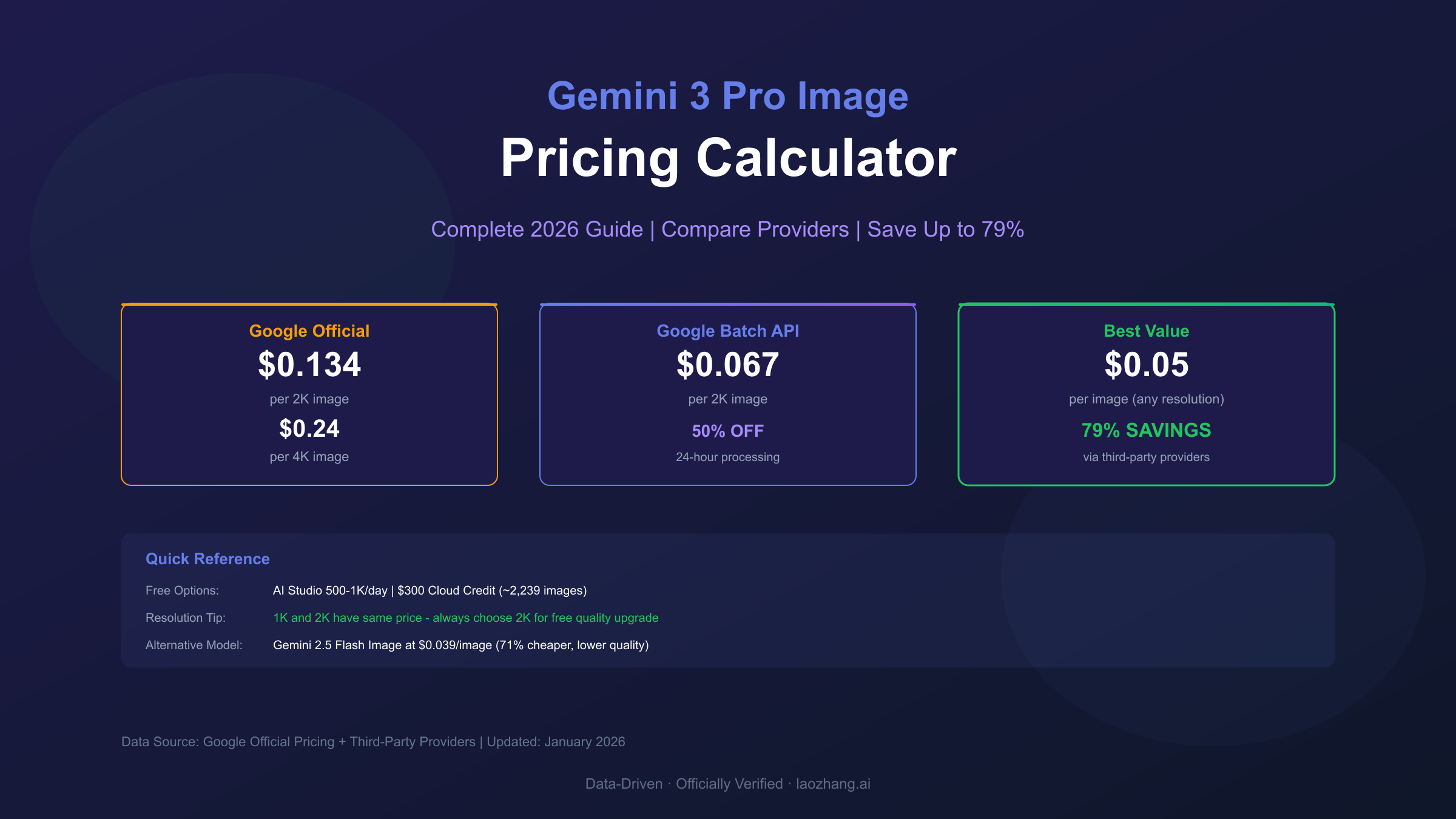
Pricing Quick Reference Table
Before diving into details, here's the complete pricing landscape at a glance:
| Provider | 1K-2K Resolution | 4K Resolution | Free Tier | Best For |
|---|---|---|---|---|
| Google Official | $0.134/image | $0.24/image | None (billing required) | Production apps |
| Google Batch API | $0.067/image | $0.12/image | None | Non-urgent batch jobs |
| fal.ai | $0.15/image | $0.30/image | None | Easy integration |
| OpenRouter | $0.15-0.26/image | ~$0.30/image | None | Multi-model access |
| PiAPI | $0.105/image | $0.18/image | None | Budget option |
| laozhang.ai | $0.05/image | $0.05/image | None | Maximum savings |
Key Finding: The unusual Google pricing where 1K and 2K share the same rate ($0.134) means you should always choose 2K—it's essentially a free quality upgrade.
Google Official API Pricing
Google's Gemini 3 Pro Image API uses token-based pricing for image generation. Understanding this structure is essential for accurate cost estimation.
Standard API Pricing
Image output tokens are priced at $120 per million tokens. Here's how that translates to per-image costs:
| Resolution | Pixels | Tokens Consumed | Cost Per Image |
|---|---|---|---|
| 1K (1024×1024) | 1 megapixel | 1,120 tokens | $0.134 |
| 2K (2048×2048) | 4 megapixels | 1,120 tokens | $0.134 |
| 4K (4096×4096) | 16 megapixels | 2,000 tokens | $0.240 |
Input costs are negligible: A typical prompt consumes around 100 tokens ($0.0002), making image output the dominant cost factor. Image input for editing or style reference costs just $0.0011 per image regardless of resolution.
Batch API Pricing (50% Discount)
For workloads that can tolerate 24-hour processing delays, Google's Batch API offers 50% savings:
| Resolution | Standard Price | Batch Price | Savings |
|---|---|---|---|
| 1K-2K | $0.134 | $0.067 | 50% |
| 4K | $0.240 | $0.120 | 50% |
When to use Batch API:
- Background content generation
- Bulk asset creation
- Non-time-sensitive applications
- Training dataset preparation
Billing Requirements
Important: Google requires an active billing account to access Gemini 3 Pro Image API. The free tier available for text models does not apply to image generation. However, new Google Cloud accounts receive $300 in free credits valid for 90 days, providing approximately:
- 2,239 images at standard 2K pricing ($0.134/image)
- 1,250 images at 4K pricing ($0.240/image)
- 4,478 images using Batch API at 2K
Third-Party Provider Comparison
Several third-party providers offer Gemini 3 Pro Image access, often at significant discounts. Here's a detailed breakdown:
fal.ai
fal.ai provides straightforward pay-per-use access with a focus on developer experience.
Pricing:
- Standard (1K-2K): $0.15/image
- 4K: $0.30/image (2× standard rate)
- Per $1.00: ~7 image generations
Pros: Easy integration, good documentation, reliable uptime Cons: Higher than Google official pricing, no free tier
OpenRouter
OpenRouter aggregates multiple AI providers through a unified API, including Gemini image models.
Pricing:
- Standard: $0.15-0.26/image (varies by demand)
- 4K: ~$0.30/image
Pros: Single API for multiple models, flexible routing Cons: Variable pricing, premium over official rates
PiAPI
PiAPI positions itself as a budget-friendly option for Gemini image generation.
Pricing:
- 1K-2K: $0.105/image
- 4K: $0.18/image
- Supports up to 14 images per request
Pros: Lower than official pricing, batch support Cons: Less established, limited documentation
laozhang.ai
For developers prioritizing cost efficiency, laozhang.ai offers the most aggressive pricing in the market.
Pricing:
- All resolutions: $0.05/image (flat rate)
- 4K: $0.05/image (no premium)
Savings vs Official:
- 2K: 63% savings ($0.05 vs $0.134)
- 4K: 79% savings ($0.05 vs $0.24)
Key Features:
- Per-image billing (no token complexity)
- Native Gemini format support
- High concurrency, no rate limiting
- Stable connections for Asia-Pacific users
hljs python# laozhang.ai API Example
import requests
import base64
API_KEY = "sk-your-api-key" # Get from laozhang.ai
API_URL = "https://api.laozhang.ai/v1beta/models/gemini-3-pro-image-preview:generateContent"
payload = {
"contents": [{"parts": [{"text": "A futuristic cityscape at sunset, 4K quality"}]}],
"generationConfig": {
"responseModalities": ["IMAGE"],
"imageConfig": {"imageSize": "4K"}
}
}
response = requests.post(
API_URL,
headers={"Authorization": f"Bearer {API_KEY}"},
json=payload,
timeout=180
)
# Cost: $0.05 per image (vs $0.24 official for 4K)
Transparency Note: For production applications requiring official support and SLAs, Google's direct API remains the recommended choice. Third-party services are ideal for development, testing, and cost-sensitive applications.
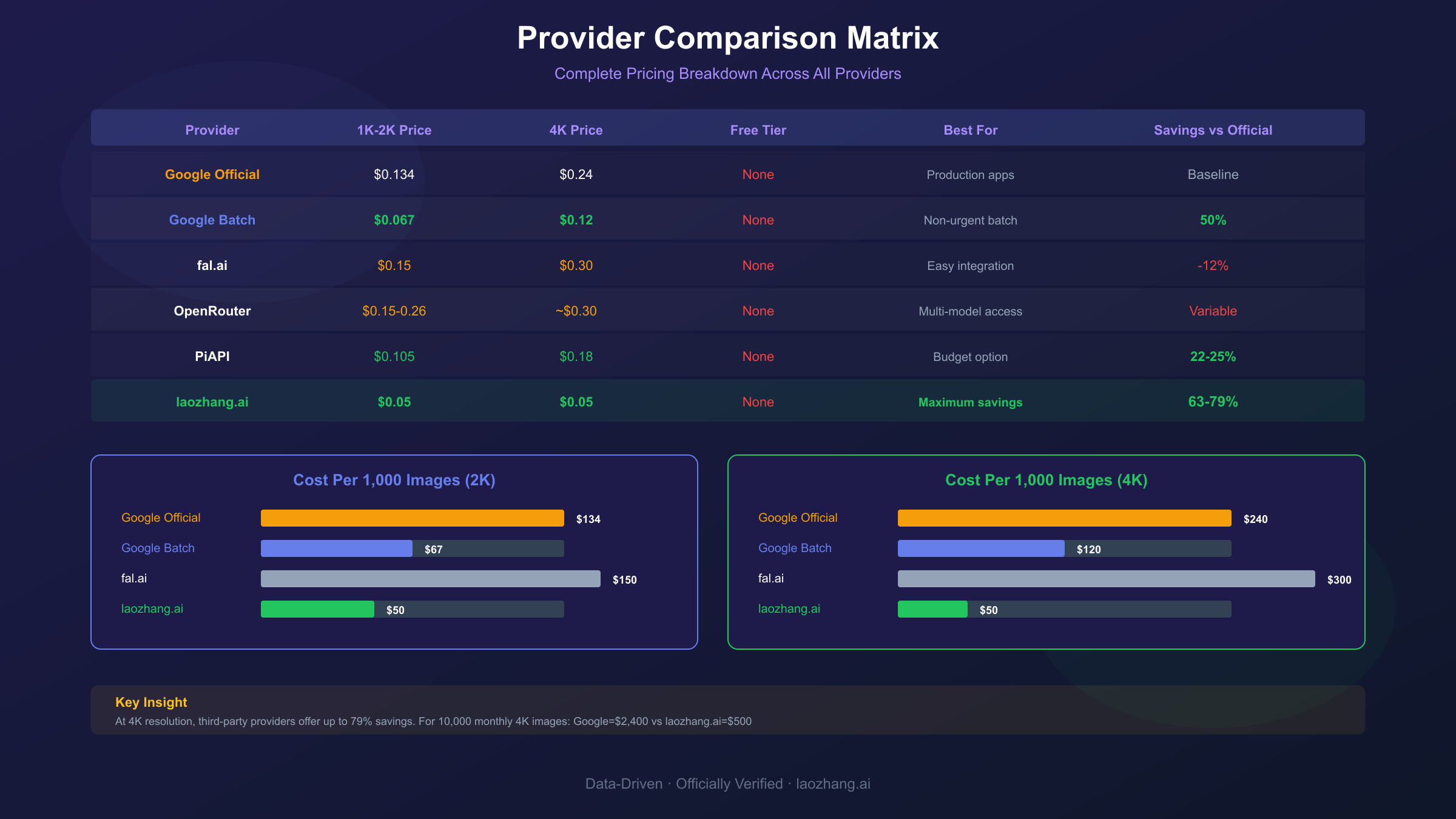
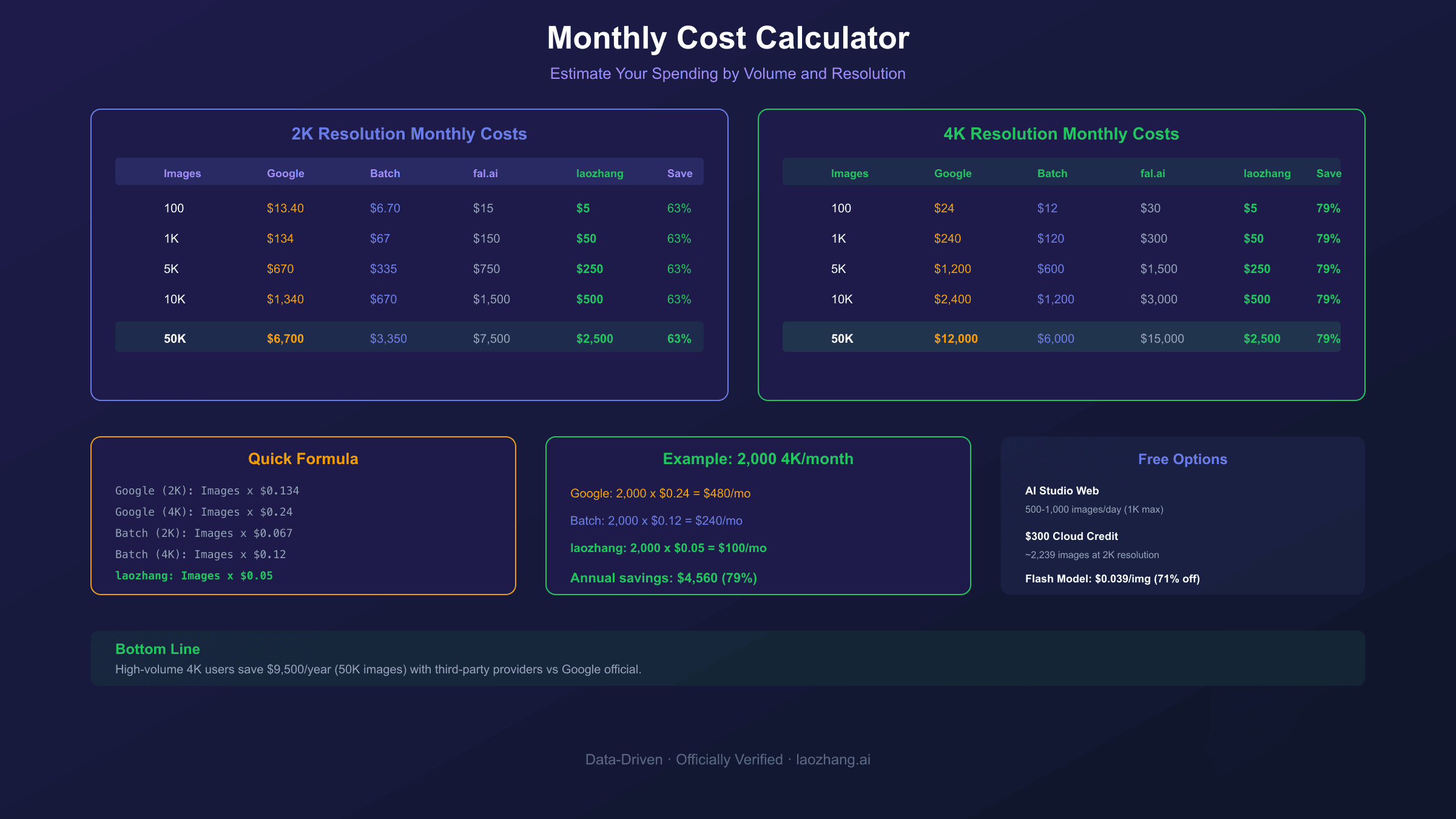
Cost Calculator: Estimate Your Monthly Spend
Use these tables to estimate your monthly costs based on generation volume:
Monthly Cost by Volume (Standard 2K)
| Images/Month | Google Official | Google Batch | fal.ai | laozhang.ai | Savings vs Official |
|---|---|---|---|---|---|
| 100 | $13.40 | $6.70 | $15.00 | $5.00 | 63% |
| 500 | $67.00 | $33.50 | $75.00 | $25.00 | 63% |
| 1,000 | $134.00 | $67.00 | $150.00 | $50.00 | 63% |
| 5,000 | $670.00 | $335.00 | $750.00 | $250.00 | 63% |
| 10,000 | $1,340.00 | $670.00 | $1,500.00 | $500.00 | 63% |
| 50,000 | $6,700.00 | $3,350.00 | $7,500.00 | $2,500.00 | 63% |
Monthly Cost by Volume (4K Resolution)
| Images/Month | Google Official | Google Batch | fal.ai | laozhang.ai | Savings vs Official |
|---|---|---|---|---|---|
| 100 | $24.00 | $12.00 | $30.00 | $5.00 | 79% |
| 500 | $120.00 | $60.00 | $150.00 | $25.00 | 79% |
| 1,000 | $240.00 | $120.00 | $300.00 | $50.00 | 79% |
| 5,000 | $1,200.00 | $600.00 | $1,500.00 | $250.00 | 79% |
| 10,000 | $2,400.00 | $1,200.00 | $3,000.00 | $500.00 | 79% |
Quick Calculation Formula
For custom volume estimates:
Google Official (2K): Images × $0.134
Google Official (4K): Images × $0.24
Google Batch (2K): Images × $0.067
Google Batch (4K): Images × $0.12
laozhang.ai (any): Images × $0.05
Example: A marketing team generating 2,000 4K images monthly:
- Google Official: 2,000 × $0.24 = $480/month
- Google Batch: 2,000 × $0.12 = $240/month
- laozhang.ai: 2,000 × $0.05 = $100/month (79% savings)
Free Tier and Trial Options
While Gemini 3 Pro Image lacks a traditional free tier, several options exist for free or low-cost access:
Google AI Studio (Web Interface)
Daily Limit: 500-1,000 images (dynamic based on demand) Access: Free through aistudio.google.com Limitations:
- Web interface only (no API)
- 1K resolution maximum
- Resets at midnight Pacific Time
Google Cloud $300 Credit
Amount: $300 free credits for new accounts Validity: 90 days Image Count:
- ~2,239 images at 2K ($0.134 each)
- ~1,250 images at 4K ($0.24 each)
Requirements: Credit card required (no charges until credits exhausted)
Gemini 2.5 Flash Image (Budget Alternative)
For less demanding applications, Gemini 2.5 Flash Image offers significantly lower pricing:
| Model | Price/Image | Daily Free Limit |
|---|---|---|
| Gemini 2.5 Flash Image | $0.039 | 500/day (API) |
| Gemini 3 Pro Image | $0.134-0.24 | None |
Trade-offs: Flash offers 3.4× lower cost but with reduced quality for complex prompts, typography, and multi-character scenes.
Gemini App (Consumer)
Daily Limit: 2 images/day (free tier), 100-1,000/day (paid subscriptions) Resolution: 1K (free), up to 4K (paid) Best for: Personal use, quick experiments
Rate Limits and Quota Management
Understanding rate limits is crucial for production applications:
Google Official API Limits
| Tier | Requests/Minute | Requests/Day | Tokens/Minute |
|---|---|---|---|
| Free (text only) | 10 | 500 | 250,000 |
| Pay-as-you-go | 100-300 | Unlimited* | 1,000,000 |
| Enterprise | Custom | Custom | Custom |
*Subject to billing limits and usage policies
Rate Limit Headers
Monitor these response headers to track your quota:
x-ratelimit-limit-requests: 100
x-ratelimit-remaining-requests: 87
x-ratelimit-reset-requests: 2026-01-10T19:00:00Z
Handling 429 Errors
When rate limited, implement exponential backoff:
hljs pythonimport time
import random
def generate_with_retry(prompt, max_retries=5):
for attempt in range(max_retries):
try:
response = generate_image(prompt)
return response
except RateLimitError:
wait_time = (2 ** attempt) + random.uniform(0, 1)
time.sleep(wait_time)
raise Exception("Max retries exceeded")
Quota Reset Times
| Platform | Reset Time |
|---|---|
| Google API | Midnight UTC |
| AI Studio Web | Midnight Pacific Time |
| Gemini App | Midnight UTC |
Cost Optimization Strategies
Seven proven strategies to reduce your Gemini 3 Pro Image costs:
1. Use Batch API for Non-Urgent Work
Savings: 50%
Queue non-time-sensitive generations for Batch API processing. Ideal for:
- Content pipelines
- Asset libraries
- Training data
2. Always Choose 2K Over 1K
Savings: Free quality upgrade
Since 1K and 2K share identical pricing ($0.134), always select 2K for better quality at no extra cost.
3. Implement Caching
Savings: Variable (can exceed 90%)
Cache frequently requested images to avoid regeneration costs:
hljs pythonimport hashlib
def get_or_generate_image(prompt):
cache_key = hashlib.md5(prompt.encode()).hexdigest()
if cache_key in image_cache:
return image_cache[cache_key]
image = generate_image(prompt)
image_cache[cache_key] = image
return image
4. Optimize Prompts Before Generation
Savings: Prevents wasted spend
Failed generations still consume quota. Validate prompts before submission:
- Check for policy violations
- Verify prompt clarity
- Test with cheaper models first
5. Use Gemini 2.5 Flash for Drafts
Savings: 71% per draft
Generate initial concepts with Flash ($0.039) before finalizing with Pro ($0.134).
6. Consider Third-Party Providers
Savings: Up to 79%
For high-volume applications, services like laozhang.ai offer $0.05/image flat rate—significant savings at scale.
7. Monitor and Alert on Usage
Savings: Prevents budget overruns
Set up billing alerts in Google Cloud Console:
- Navigate to Billing → Budgets & Alerts
- Create budget with threshold alerts (50%, 80%, 100%)
- Configure email notifications
Frequently Asked Questions
Is there a free tier for Gemini 3 Pro Image API?
No, Google requires billing to be enabled for Gemini 3 Pro Image API access. However, new Google Cloud accounts receive $300 in free credits valid for 90 days (approximately 2,239 standard images).
Why does 1K and 2K have the same price?
Both resolutions consume 1,120 output tokens. Google's token-based pricing doesn't differentiate between these resolutions, making 2K always the better choice.
What's the cheapest way to access Gemini 3 Pro Image?
For lowest per-image cost: laozhang.ai at $0.05/image (79% savings vs official 4K pricing) For free access: Google AI Studio web interface (500-1,000 images/day) For official access: Google Batch API at $0.067-0.12/image
How do fal.ai prices compare to Google official?
fal.ai charges $0.15/image for standard resolution—approximately 12% more than Google's $0.134. The premium covers fal.ai's simplified API and infrastructure.
Do failed generations consume quota?
Yes, any generation attempt—successful, filtered, or failed—counts against your quota. This makes prompt validation essential for cost control.
What resolution should I use for social media?
For most social media platforms, 2K (2048×2048) is optimal:
- Instagram: 2K works perfectly
- Twitter/X: 2K exceeds requirements
- LinkedIn: 2K is more than sufficient
Use 4K only for print materials or large display contexts.
Can I use multiple providers simultaneously?
Yes, implementing a multi-provider strategy is recommended for:
- Redundancy during outages
- Cost optimization (route by priority)
- Rate limit management