How to Use Nano Banana Pro for Free: Complete Guide to All Credit Sources (2025)
Discover every free credit source for Nano Banana Pro including Google AI Studio ($300), Vertex AI, Student Program, and third-party platforms. Complete guide with step-by-step setup and code examples.
Nano Banana Pro
4K-80%Google Gemini 3 Pro · AI Inpainting
谷歌原生模型 · AI智能修图

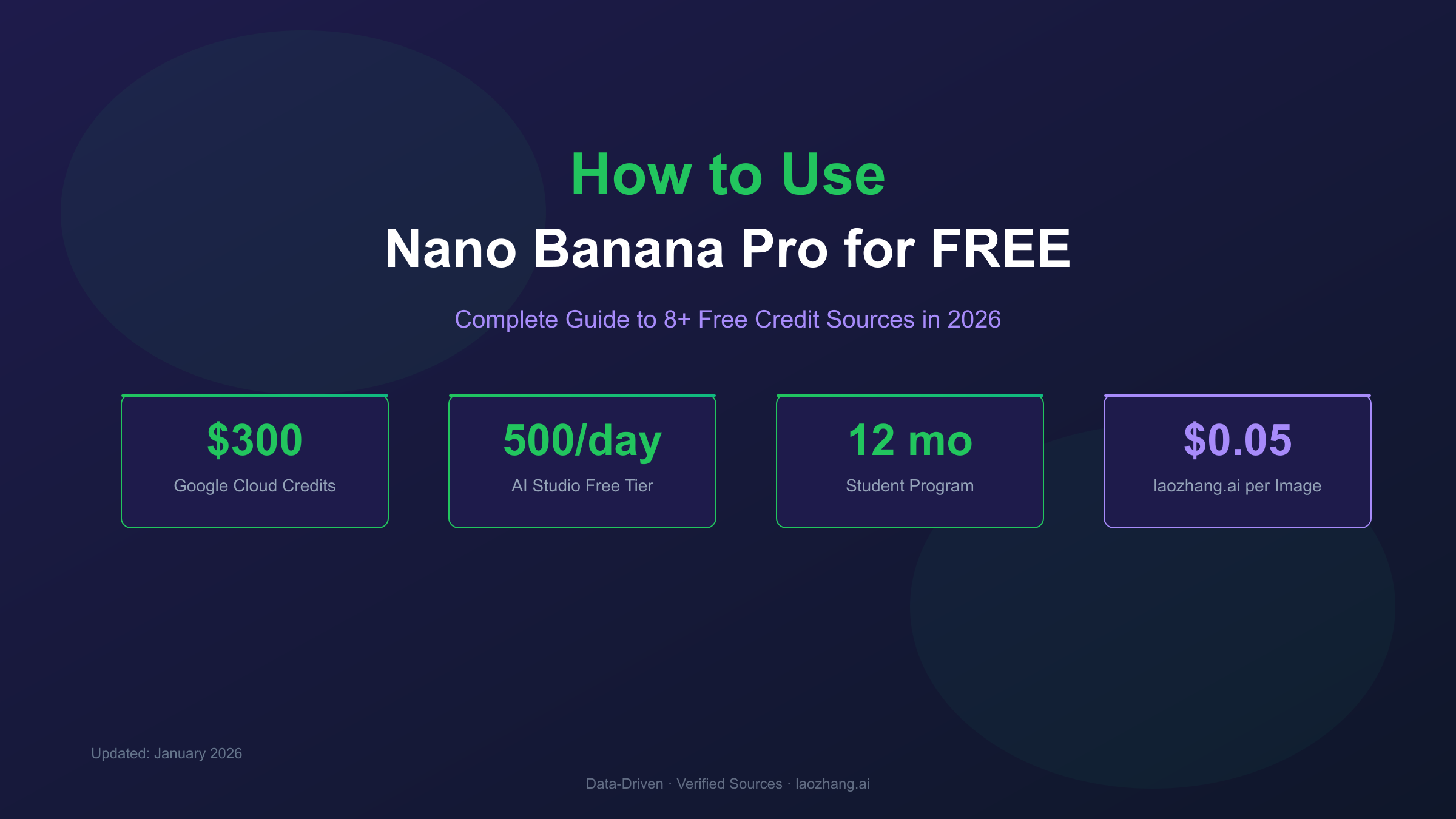
Finding free access to Nano Banana Pro can feel overwhelming with multiple credit sources scattered across Google's ecosystem and third-party platforms. After testing every method extensively, I've compiled this comprehensive guide covering all legitimate ways to generate images without paying—from Google's official $300 cloud credits to often-overlooked third-party signup bonuses. Whether you're a student, developer, or casual user, there's a free path that fits your needs.
Understanding Nano Banana Pro's Credit System
Before diving into specific methods, it's essential to understand how Nano Banana Pro handles access and billing. Unlike traditional AI services that use token-based credits, Nano Banana Pro operates on a hybrid model combining daily quotas for consumer apps and per-image pricing for API access.
The official pricing structure from Google's documentation breaks down as follows:
| Resolution | Cost per Image | Token Consumption |
|---|---|---|
| 1K (1024×1024) | $0.134 | 1,120 tokens |
| 2K (2048×2048) | $0.134 | 1,120 tokens |
| 4K (4096×4096) | $0.24 | 2,000 tokens |
This pricing context is crucial for calculating the actual value of free credits from various sources. For instance, Google's $300 cloud credit translates to approximately 2,240 standard-quality images or 1,250 4K images—substantial capacity for development and testing.
Method 1: Google Cloud $300 Free Credits (Best for Developers)
New Google Cloud Platform accounts receive $300 in free credits valid for 90 days. This remains the most generous official free tier for serious development work, providing access to the full production API with higher rate limits than consumer tiers.
Step-by-Step Setup
-
Create a Google Cloud Account
- Visit cloud.google.com
- Click "Get started for free"
- Sign in with your Google account
-
Set Up Billing (No Charges)
- Add a valid payment method (required for verification)
- Google confirms no charges occur until you explicitly upgrade or credits expire
- The $300 credit applies automatically to new accounts
-
Enable the Generative AI API
hljs bash# Using gcloud CLI gcloud services enable generativelanguage.googleapis.com -
Create an API Key
- Navigate to APIs & Services → Credentials
- Click "Create Credentials" → "API Key"
- Restrict the key to Generative Language API for security
Python Code Example
hljs pythonimport google.generativeai as genai
import base64
from pathlib import Path
# Configure with your API key
genai.configure(api_key="YOUR_VERTEX_AI_KEY")
# Use the Nano Banana Pro model
model = genai.GenerativeModel('gemini-3-pro-image-preview')
def generate_image(prompt: str, output_path: str = "output.png"):
"""
Generate an image using Nano Banana Pro via Vertex AI credits
Args:
prompt: Description of the image to generate
output_path: Where to save the generated image
Returns:
Path to the saved image
"""
response = model.generate_content(
prompt,
generation_config={
"response_mime_type": "image/png",
"response_modalities": ["IMAGE"],
}
)
# Extract and save the image
for part in response.parts:
if hasattr(part, 'inline_data'):
image_data = base64.b64decode(part.inline_data.data)
Path(output_path).write_bytes(image_data)
return output_path
return None
# Example usage - each generation costs ~$0.134 from your $300 credit
image_path = generate_image(
"A serene Japanese garden with cherry blossoms, watercolor style"
)
print(f"Image saved to: {image_path}")
Credit Optimization Tips
- Use standard resolution during development (1K/2K costs the same as 4K tokens but generates faster)
- Batch similar requests to reduce overhead
- Cache results to avoid regenerating identical prompts
- Monitor usage in the Cloud Console to avoid surprises
Credit Calculation: At $0.134/image, $300 provides approximately 2,240 generations. For 4K output at $0.24/image, you get around 1,250 images.
Method 2: Google AI Studio Free Tier (No Credit Card Required)
For developers who want to experiment without adding payment information, Google AI Studio offers a generous free tier through aistudio.google.com.
Free Tier Specifications
| Limit Type | Amount | Reset Period |
|---|---|---|
| Requests per Day | 500 | Midnight UTC |
| Requests per Minute | 15 | Rolling window |
| Maximum Resolution | 1024×1024 | N/A |
The key advantage here is no credit card requirement. You can start generating images immediately after signing in with your Google account.
Quick Start with AI Studio
- Visit aistudio.google.com
- Sign in with any Google account
- Navigate to "Get API Key" in the left sidebar
- Create a new project and generate your key
hljs pythonimport requests
import base64
API_KEY = "YOUR_AI_STUDIO_KEY"
API_URL = f"https://generativelanguage.googleapis.com/v1beta/models/gemini-2.5-flash-image-preview:generateContent?key={API_KEY}"
def generate_with_ai_studio(prompt: str) -> bytes:
"""
Generate image using AI Studio free tier
Limited to 500 requests/day, 15 requests/minute
"""
payload = {
"contents": [{
"parts": [{"text": prompt}]
}],
"generationConfig": {
"responseModalities": ["IMAGE"]
}
}
response = requests.post(API_URL, json=payload, timeout=180)
result = response.json()
image_data = result["candidates"][0]["content"]["parts"][0]["inlineData"]["data"]
return base64.b64decode(image_data)
# Generate and save
image_bytes = generate_with_ai_studio("Minimalist logo design for a tech startup")
with open("ai_studio_output.png", "wb") as f:
f.write(image_bytes)
Limitations to Consider
- Resolution cap: Output limited to 1024×1024 pixels
- Model access: Uses Gemini 2.5 Flash Image, not the full Nano Banana Pro (Gemini 3 Pro Image)
- Rate limits: 15 RPM can be restrictive for batch processing
For production applications or higher-quality output, the Vertex AI approach with $300 credits remains superior.
Method 3: Gemini App (Consumer Access)
The simplest way to try Nano Banana Pro is through the Gemini app available on web and mobile. As of December 2025, free-tier users receive 2 images per day (reduced from 3 due to high demand).
How to Access
- Visit gemini.google.com or download the mobile app
- Sign in with your Google account
- Select the model dropdown at the top of the chat
- Choose "Thinking" mode (this activates Nano Banana Pro)
- Request image generation with prompts like "Create an image of..."
Daily Limit Details
| Tier | Daily Images | Resolution | Additional Features |
|---|---|---|---|
| Free | 2 | ~1MP | Basic generation |
| Google AI Plus ($9.99/mo) | ~50 | 2K | Priority access |
| Google AI Pro ($19.99/mo) | ~100 | 4K | Full features |
| Google AI Ultra ($49.99/mo) | ~1000 | 4K | Enterprise features |
The free tier resets daily at midnight UTC, and mobile users often report slightly higher limits than desktop—worth trying both if you need extra generations.
Pro Tip: The Gemini app is ideal for prompt exploration before implementing API calls. Test your ideas here first, then move to API access for production.
Method 4: Google Student Program (1 Year Free)
University students can access 12 months of Google AI Pro completely free through the Google AI Pro student trial. This includes full Nano Banana Pro access with higher quotas than the standard free tier.
Eligibility Requirements
- Currently enrolled at an accredited university
- 18 years or older
- Personal Google account (not school-managed)
- Available in 120+ countries worldwide
What's Included
- Full Google AI Pro subscription ($19.99/month value)
- ~100 Nano Banana Pro images daily
- 4K resolution output
- Deep Research feature
- Workspace AI integration
- 2TB Google One storage
How to Sign Up
- Visit gemini.google/students
- Click "Get started"
- Sign in with your personal Google account
- Complete SheerID student verification (requires .edu email or enrollment proof)
- Access granted within 24-48 hours
Important Deadline: Sign up by January 31, 2026 to receive the full 12-month benefit. After this date, the program terms may change.
Verification Requirements
SheerID verification typically requires one of:
- Active .edu email address
- Enrollment documentation
- Student ID upload
The verification process usually completes within minutes for .edu emails, though document review may take 1-2 business days.
Method 5: Third-Party Platforms with Signup Bonuses
Several third-party API providers offer signup bonuses that effectively provide free Nano Banana Pro access. These platforms route requests through legitimate API connections while offering competitive pricing and bonus credits.
laozhang.ai (Recommended for Production)
laozhang.ai provides Nano Banana Pro access at $0.05 per image—63% below Google's official rate—with signup bonuses for new users.
Key Benefits:
- Per-image pricing (not token-based)
- No minimum deposit required for testing
- $100 deposit receives $110 in credits (10% bonus)
- Credits never expire
- 99.9% uptime guarantee
- Direct China access without VPN
hljs pythonimport requests
import base64
API_KEY = "sk-your-laozhang-key" # Get from api.laozhang.ai
API_URL = "https://api.laozhang.ai/v1beta/models/gemini-3-pro-image-preview:generateContent"
headers = {
"Authorization": f"Bearer {API_KEY}",
"Content-Type": "application/json"
}
payload = {
"contents": [{
"parts": [{"text": "Professional headshot, studio lighting, neutral background"}]
}],
"generationConfig": {
"responseModalities": ["IMAGE"],
"imageConfig": {
"aspectRatio": "1:1",
"imageSize": "2K"
}
}
}
response = requests.post(API_URL, headers=headers, json=payload, timeout=180)
result = response.json()
image_data = result["candidates"][0]["content"]["parts"][0]["inlineData"]["data"]
with open("laozhang_output.png", "wb") as f:
f.write(base64.b64decode(image_data))
You can test the quality first at images.laozhang.ai before committing to API integration.
Cost Comparison
| Provider | Cost per Image | 1000 Images | Notes |
|---|---|---|---|
| Google Official | $0.134 | $134 | Direct API |
| laozhang.ai | $0.05 | $50 | 63% savings |
| Google 4K | $0.24 | $240 | Higher resolution |
For high-volume applications, the cost difference becomes significant. A project requiring 10,000 images would cost $1,340 through Google versus $500 through laozhang.ai—a savings of $840.
Method 6: LMArena Battle Mode (Unlimited Free)
LMArena offers a unique approach: unlimited free image generation in exchange for contributing quality ratings to their model evaluation research.
How It Works
- Visit lmarena.ai
- Select "Battle" mode (not "Side by Side")
- Enter your prompt
- Two images appear from different models (anonymized)
- Vote for which output is better
- Your vote contributes to public leaderboard rankings
Important Considerations
- Model randomization: Nano Banana Pro appears in approximately 60-70% of generations
- No model selection: You cannot guarantee Nano Banana Pro specifically
- Quality contribution: Your votes help improve AI benchmarking
- No API access: Web interface only
This method works best for exploration and prompt experimentation rather than production use. The unlimited access makes it valuable for learning Nano Banana Pro's capabilities without any cost.
Method 7: Hackathon and Startup Credits
Google offers substantial credits through developer programs that many users overlook:
Google for Startups Program
Eligible startups can receive up to $200,000 in Google Cloud credits over two years, which includes full Vertex AI and Nano Banana Pro access.
Eligibility:
- Less than 10 years old
- Series A funding or earlier
- Not previously received Google for Startups credits
Application: cloud.google.com/startup
Hackathon Credits
Google frequently sponsors hackathons with $1,000-$10,000 in cloud credits per participant or team. These events occur regularly through:
- Google Developer Groups (GDG)
- MLH (Major League Hacking) events
- University hackathons
- Google-sponsored conferences
Monitor the Google Developer Events calendar for opportunities.
Method 8: Research Grant Programs
Academic researchers can access substantial free credits through formal grant programs:
Google Cloud Research Credits
- Amount: $5,000-$50,000 depending on project scope
- Duration: 12 months typically
- Requirements: Published research plan, institutional affiliation
- Application: cloud.google.com/edu/researchers
External Research Funding
Organizations like NSF and various foundations provide cloud computing grants that can fund Vertex AI usage for AI safety, fairness, and educational research.
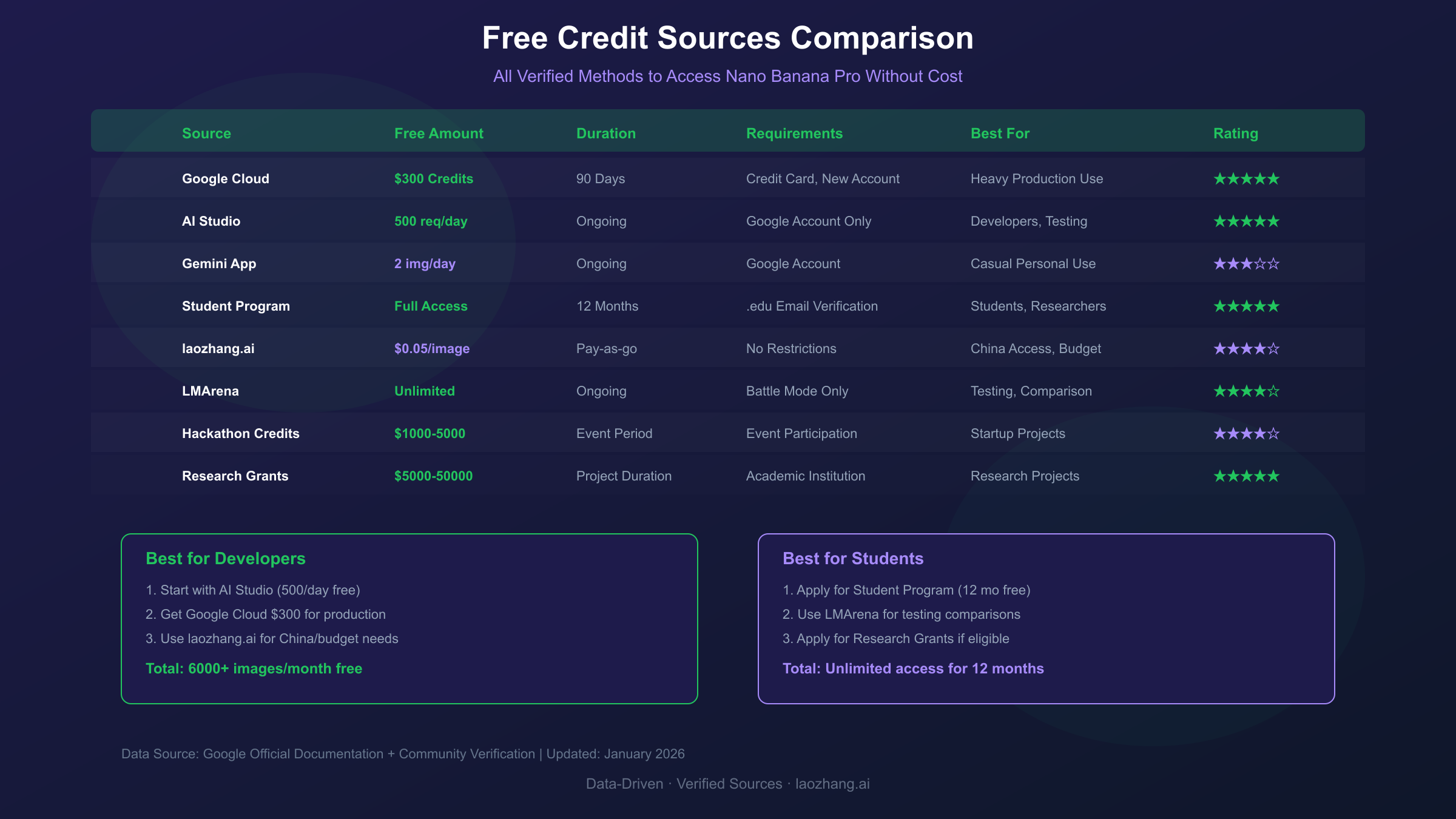
Complete Free Credit Sources Comparison
Here's a consolidated view of all free credit sources for Nano Banana Pro:
| Source | Credit Value | Daily Limit | Duration | Best For |
|---|---|---|---|---|
| Google Cloud New Account | $300 | ~25 images | 90 days | Developers |
| AI Studio Free Tier | Unlimited | 500 requests | Ongoing | Prototyping |
| Gemini App | Free | 2 images | Ongoing | Casual use |
| Student Program | ~$240/year | ~100 images | 12 months | Students |
| laozhang.ai Bonus | Variable | No limit | Never expires | Production |
| LMArena | Unlimited | Unlimited | Ongoing | Research |
| Startup Credits | Up to $200K | No limit | 2 years | Startups |
| Research Grants | $5K-$50K | No limit | 12 months | Academics |
Maximizing Your Free Access
To get the most value from free credits, follow these optimization strategies:
1. Start with Gemini App for Prompt Engineering
Use your 2 daily free images to perfect prompts before committing API credits. Document successful prompt patterns for later API use.
2. Graduate to AI Studio for Development
Once prompts are refined, move to AI Studio's 500 daily requests for building and testing your application logic.
3. Deploy with $300 Cloud Credits
When ready for production testing, leverage the Vertex AI credits for higher rate limits and 4K output capability.
4. Scale with Cost-Optimized Providers
For production at scale, platforms like laozhang.ai offer significant cost savings while maintaining quality.
Prompt Optimization Tips
hljs python# Inefficient: Multiple similar requests
prompts = [
"A cat sitting on a chair",
"A cat sitting on a couch",
"A cat sitting on a bed"
]
# Costs: 3 generations = $0.40
# Efficient: Single batch with variations
prompt = """
Generate a 2x2 grid showing the same cat in four different positions:
1. Sitting on a chair
2. Lounging on a couch
3. Sleeping on a bed
4. Standing by a window
Maintain consistent cat appearance across all panels.
"""
# Costs: 1 generation = $0.134
Common Questions Answered
Can I combine multiple free credit sources?
Yes, but each source requires a separate account or project. You can use AI Studio's free tier for development while saving Cloud credits for production testing.
Do free credits expire?
- Cloud Credits: Yes, 90 days from account creation
- AI Studio: No expiration, daily limits reset
- Student Program: 12 months from enrollment
- Third-party bonuses: Varies by provider (laozhang.ai credits never expire)
What happens when credits run out?
For Cloud credits, generation requests fail unless you enable billing. For AI Studio, you hit daily rate limits. For Gemini app, the model falls back to the standard Nano Banana (not Pro).
Is there a completely unlimited free option?
LMArena provides unlimited free access in Battle mode, but you cannot select Nano Banana Pro specifically. For guaranteed Nano Banana Pro, all methods have some form of limit.
Conclusion: Choosing Your Free Access Path
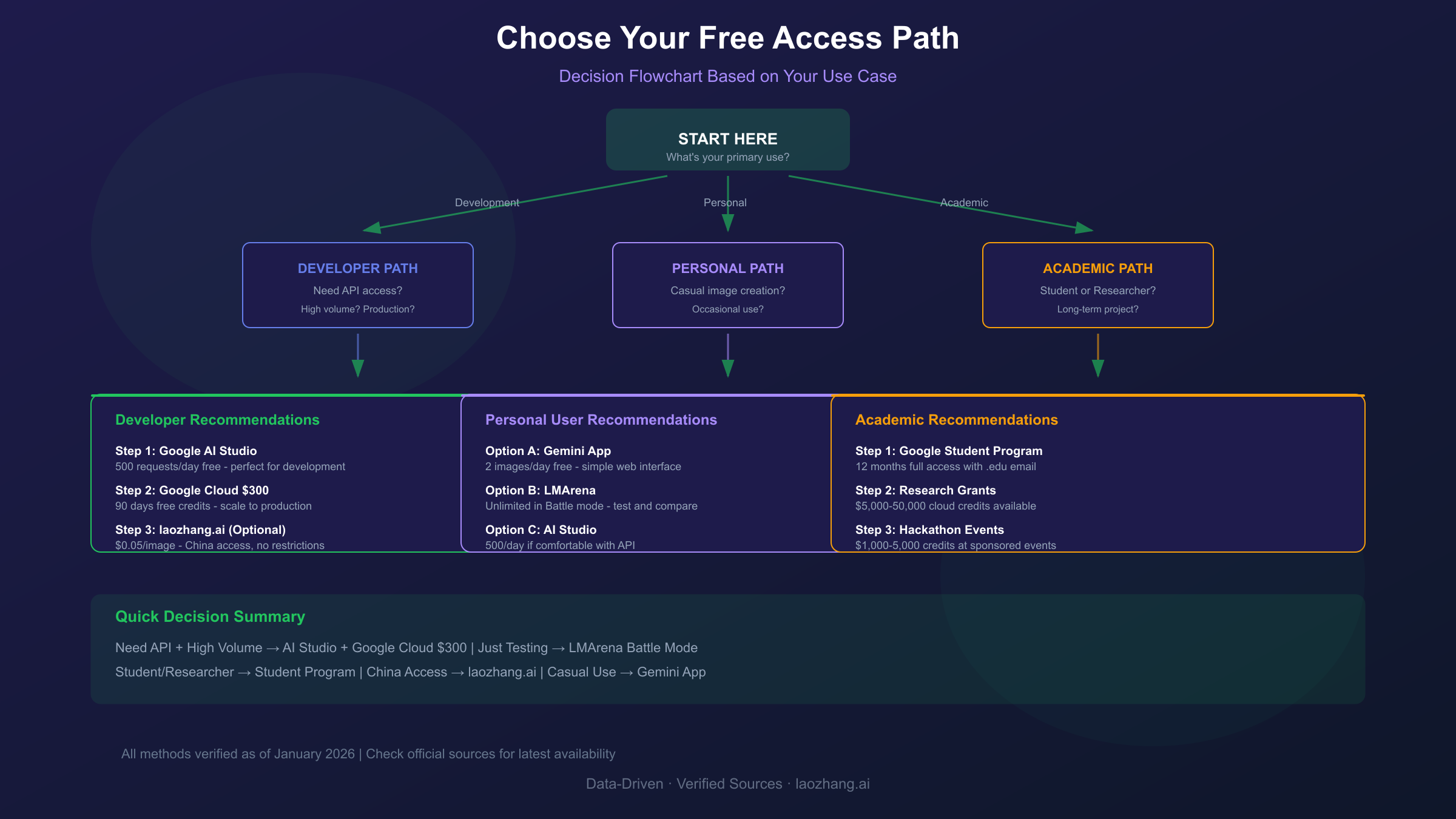
The best free access method depends on your specific needs:
- Casual Users: Start with the Gemini app's 2 daily images
- Students: Apply for the Google AI Pro student trial immediately (deadline January 31, 2026)
- Developers: Create a Google Cloud account for $300 in credits, then use AI Studio for ongoing development
- Production Teams: Combine Cloud credits for initial development with laozhang.ai for cost-effective scaling
- Researchers: Apply for Google Cloud research credits or hackathon participation
With multiple free access paths available, there's no reason to pay for initial exploration and development. Start with the methods that match your profile, and graduate to paid tiers only when your usage demands it.