Gemini 3 Pro Pricing & Free Tier Guide: Complete Cost Breakdown (2025)
Gemini 3 Pro pricing starts at $2/1M input tokens. Learn about free tier limits (Dec 2025 changes), Flash vs Pro costs, and how to optimize your API spending.
Nano Banana Pro
4K-80%Google Gemini 3 Pro · AI Inpainting
谷歌原生模型 · AI智能修图

Google's Gemini 3 Pro represents a significant leap in AI reasoning capabilities, but understanding its pricing structure can be challenging. With recent changes to free tier access and a complex tiered pricing model based on context length, developers and businesses need clear guidance on what they'll actually pay. This comprehensive guide breaks down every aspect of Gemini 3 Pro pricing, from the recent December 2025 free tier restrictions to practical cost optimization strategies that can reduce your API spending significantly.
Whether you're evaluating Gemini 3 Pro for a new project, comparing it against GPT-4o or Claude, or trying to understand if the upgrade from Gemini 2.5 Pro makes financial sense, this guide provides the concrete data and analysis you need to make an informed decision. We'll cover exact per-token costs, realistic usage scenarios with calculated expenses, and insider tips for maximizing value from your API budget.
Gemini 3 Pro Pricing Overview
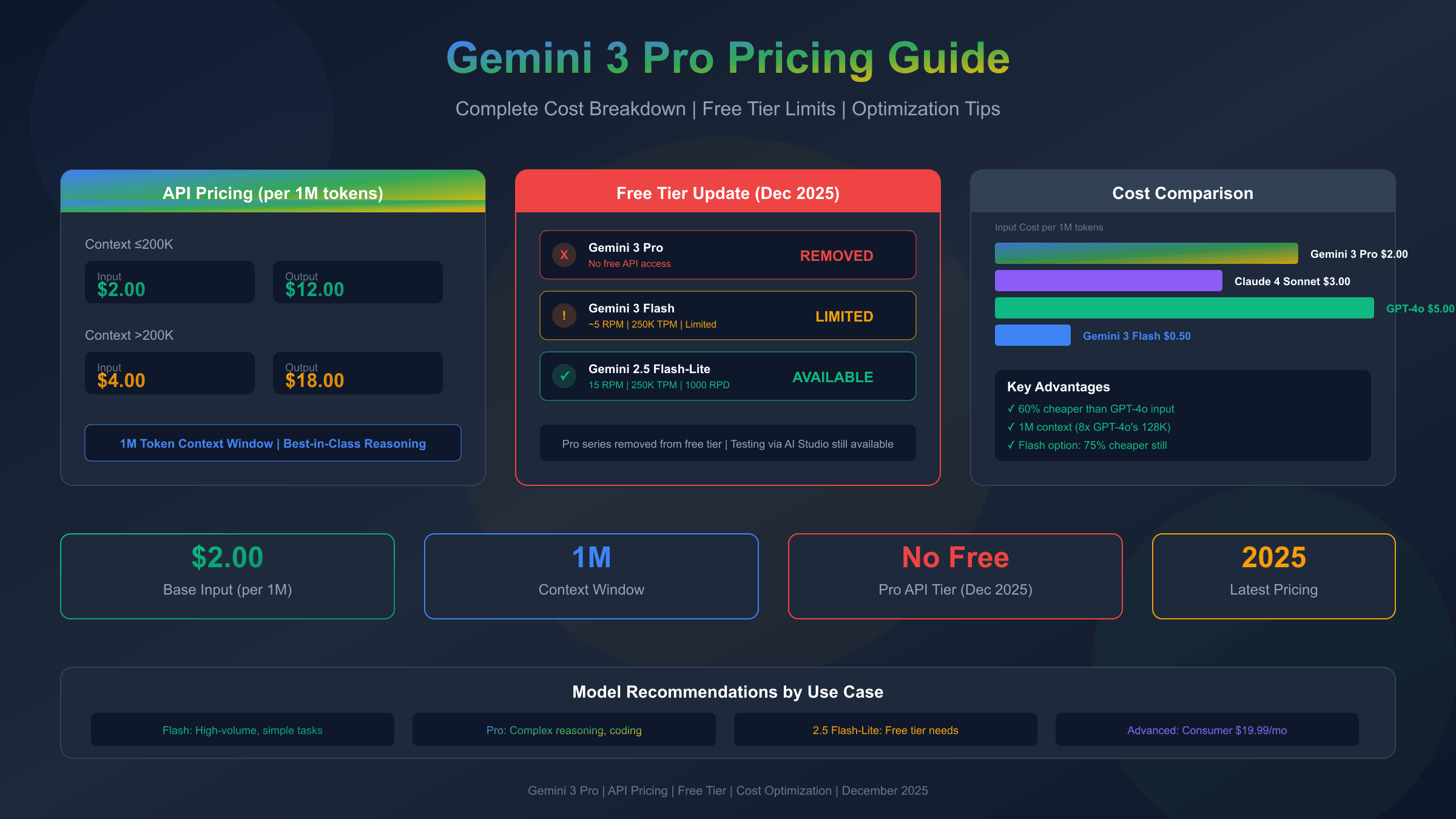
Gemini 3 Pro uses a tiered pricing structure that varies based on your context window usage, making cost prediction more nuanced than simple per-token rates. According to Google's official pricing documentation, the model charges different rates depending on whether your total context stays under or exceeds 200,000 tokens.
The base tier for contexts up to 200,000 tokens costs $2.00 per million input tokens and $12.00 per million output tokens. Once you exceed that threshold, prices increase to $4.00 per million input tokens and $18.00 per million output tokens. This structure rewards shorter interactions while providing flexibility for applications that genuinely need extended context.
| Context Length | Input Cost (per 1M tokens) | Output Cost (per 1M tokens) | Effective Cost Ratio |
|---|---|---|---|
| ≤200,000 tokens | $2.00 | $12.00 | 1x (baseline) |
| >200,000 tokens | $4.00 | $18.00 | 1.75x average |
Understanding the input-to-output ratio is crucial for cost planning. Gemini 3 Pro typically generates 3-5 output tokens for every input token in conversational use cases, meaning output costs often dominate your bill. For a typical 1,000-token input generating a 3,500-token response, you're looking at approximately $0.002 input plus $0.042 output, totaling about $0.044 per interaction within the standard context tier.
One aspect that catches many developers off guard is thinking tokens pricing. When Gemini 3 Pro uses its extended reasoning capabilities (similar to chain-of-thought processing), these internal reasoning tokens are billed at output rates even though they're not visible in the final response. For complex reasoning tasks, this can increase costs by 30-50% compared to simple question-answer interactions.
Free Tier Reality Check: What's Actually Free
The landscape of Gemini free tier access changed dramatically in late 2025. Google significantly tightened free API access, and developers who relied on generous free quotas for prototyping or low-volume applications faced unexpected restrictions. Understanding what's actually available without payment is essential before starting any project.
Critical update: As of December 2025, Gemini 3 Pro has no free API tier for direct API access. The free tier that previously allowed limited Pro model access through Google AI Studio has been removed. This marks a significant shift from Google's earlier approach of offering substantial free access to encourage adoption.
| Model | Free RPM | Free TPM | Free RPD | Current Status |
|---|---|---|---|---|
| Gemini 3 Pro | 0 | 0 | 0 | No free API access |
| Gemini 3 Flash | ~5 | 250,000 | ~50-100 | Limited free tier |
| Gemini 2.5 Pro | 0 | 0 | 0 | Removed from free tier |
| Gemini 2.5 Flash | 10 | 250,000 | 250 | Still available |
| Gemini 2.5 Flash-Lite | 15 | 250,000 | 1,000 | Best free option |
For developers seeking free access to test Gemini capabilities, the options have narrowed considerably. Gemini 3 Flash retains a limited free tier with approximately 5 requests per minute, 250,000 tokens per minute, and 50-100 requests per day. While this enables basic testing, it falls short of what's needed for production prototyping or development sprints. For more details on current limits, see our guide on Google Gemini API free tier limits.
The practical implication is clear: serious development with Gemini 3 Pro requires budget allocation from day one. Google AI Studio still allows interactive testing through the web interface, which doesn't count against API quotas, but programmatic access requires billing setup.
Gemini 3 Flash: The Budget Alternative
When Gemini 3 Pro's pricing exceeds your budget, Gemini 3 Flash offers a compelling middle ground with dramatically lower costs and surprisingly capable performance. Flash pricing stands at just $0.50 per million input tokens and $3.00 per million output tokens—representing a 75% reduction in input costs and similar savings on output compared to Pro.
The trade-offs are real but often acceptable. Flash maintains the same 1 million token context window as Pro, ensuring compatibility with long-document applications. Response latency is typically 40-60% faster due to the smaller model architecture, which can actually be advantageous for user-facing applications where perceived responsiveness matters more than peak reasoning quality.
For multimodal inputs, Flash handles images and video at the same $0.50 per million tokens rate as text, while audio processing costs slightly more at $1.00 per million tokens. This makes Flash particularly cost-effective for applications that process substantial visual or audio content alongside text.
When should you choose Flash over Pro? The decision hinges on task complexity. Flash excels at summarization, translation, content generation, and straightforward question-answering. Pro's advantages become apparent in multi-step reasoning, complex code generation, and tasks requiring nuanced understanding of ambiguous instructions. For many production applications, a hybrid approach works well: use Flash for high-volume, simpler tasks while reserving Pro for complex queries that justify the premium. Learn more in our Gemini Flash access guide.
Gemini 3 Pro vs 2.5 Pro: Is Upgrading Worth It?
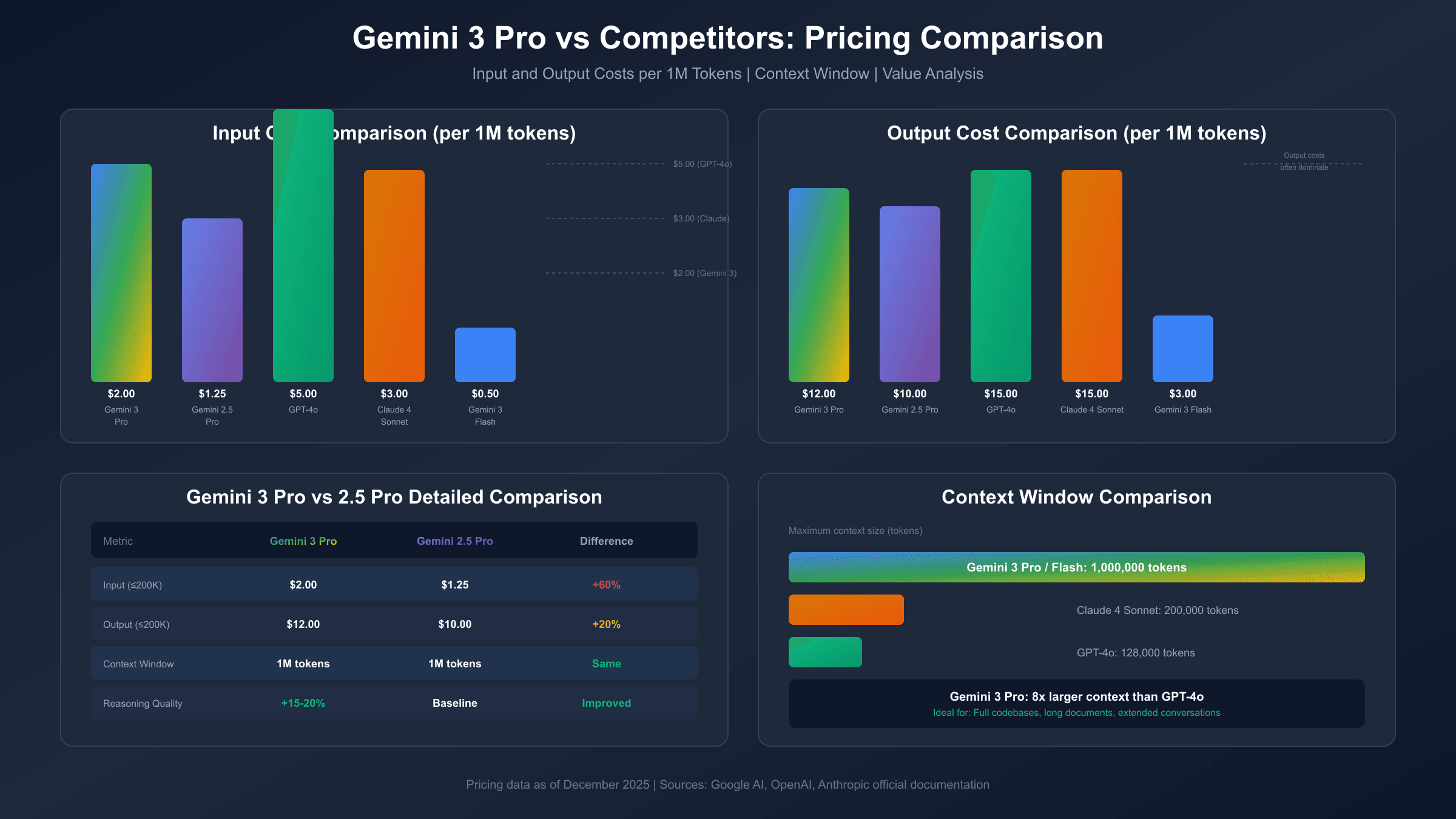
The pricing differential between Gemini 3 Pro and its predecessor Gemini 2.5 Pro raises an important question: does the newer model's performance justify a 60% increase in input costs? Let's examine the numbers alongside the capability improvements.
| Metric | Gemini 3 Pro | Gemini 2.5 Pro | Difference |
|---|---|---|---|
| Input (≤200K) | $2.00/1M | $1.25/1M | +60% |
| Output (≤200K) | $12.00/1M | $10.00/1M | +20% |
| Input (>200K) | $4.00/1M | $2.50/1M | +60% |
| Output (>200K) | $18.00/1M | $15.00/1M | +20% |
| Context Window | 1M tokens | 1M tokens | Same |
Performance benchmarks show Gemini 3 Pro achieving approximately 15-20% better scores on complex reasoning tasks compared to 2.5 Pro. For mathematical problem-solving, coding challenges, and multi-step logical reasoning, the improvement is often noticeable in real-world applications. However, for simpler tasks like summarization or translation, the quality difference becomes marginal.
The upgrade decision should factor in your specific use case. If your application primarily handles complex reasoning, code generation, or requires state-of-the-art performance, the 60% input cost increase may deliver disproportionate value through better results and potentially fewer retries. For applications where 2.5 Pro already delivers acceptable quality, the cost savings of staying on the older model can be substantial—especially at scale.
Migration from 2.5 Pro to 3 Pro is technically straightforward since both use the same API structure. The main consideration is budget adjustment and potentially updating your prompts to leverage 3 Pro's enhanced reasoning capabilities.
Competitor Comparison: GPT-4o, Claude, and More
Evaluating Gemini 3 Pro in isolation misses the bigger picture. Understanding how it stacks up against GPT-4o, Claude 4 Sonnet, and other major models helps you choose the right tool for your specific requirements and budget constraints.
| Model | Input/1M Tokens | Output/1M Tokens | Context Window | Notable Strength |
|---|---|---|---|---|
| Gemini 3 Pro | $2.00 | $12.00 | 1,000,000 | Largest context window |
| Gemini 3 Flash | $0.50 | $3.00 | 1,000,000 | Best value per token |
| GPT-4o | $5.00 | $15.00 | 128,000 | Broad capabilities |
| Claude 4 Sonnet | $3.00 | $15.00 | 200,000 | Strong coding |
| Claude 4.1 Opus | $15.00 | $75.00 | 200,000 | Premium quality |
For a deeper look at Claude pricing, see our Claude Opus 4.5 pricing guide.
On pure input pricing, Gemini 3 Pro undercuts GPT-4o by 60% and Claude 4 Sonnet by 33%. The output pricing tells a different story—Gemini 3 Pro's $12/1M sits between GPT-4o's $15 and what you might expect from budget models. The net effect depends heavily on your input/output ratio.
Context window differences create clear use-case separations. Gemini 3 Pro's 1 million token context dwarfs GPT-4o's 128K and Claude's 200K, making it the obvious choice for applications processing entire codebases, lengthy documents, or maintaining extended conversation history. For shorter interactions, context window size becomes irrelevant to the pricing calculation.
Value per dollar requires examining performance alongside cost. Gemini 3 Pro generally matches GPT-4o on reasoning benchmarks while costing less. Claude 4 Sonnet often edges ahead on coding tasks but lacks Gemini's context capacity and costs more on input. The "best" choice genuinely depends on your primary use case rather than any universal ranking.
Subscription Plans for Consumers
Not every user needs API access. Google offers consumer subscription plans that provide Gemini 3 Pro access through the Gemini app interface, which can be more economical for individual use cases that don't require programmatic integration.
Gemini Advanced at $19.99 per month includes full access to Gemini 3 Pro through the Gemini web and mobile applications. This plan suits individuals who want premium AI capabilities for personal productivity, writing assistance, research, and creative projects without managing API credentials or tracking token usage. The unlimited conversational access (within reasonable use limits) makes budgeting predictable.
Google AI Ultra at $124.99 per month targets power users and small teams requiring higher usage limits and priority access. This tier includes everything in Advanced plus enhanced rate limits, early access to new features, and workspace integrations that benefit professional workflows.
For organizations, Google Workspace AI at $249.99 per month integrates Gemini capabilities directly into Docs, Sheets, Gmail, and other Workspace applications, providing seamless AI assistance across the productivity suite.
The crossover point between subscription and API pricing depends on usage patterns. A user making 50-100 substantial queries daily would likely find the $19.99 subscription more economical than equivalent API costs, which could easily exceed $50-100 monthly for similar usage intensity.
Getting Started: API Access Guide
Setting up Gemini 3 Pro API access requires navigating Google's developer ecosystem, which differs from the more straightforward approaches of some competitors. Here's the practical path from zero to your first API call.
Start at Google AI Studio, Google's web-based interface for Gemini development. After signing in with your Google account, you can experiment with Gemini models interactively before committing to API integration. This free testing environment helps validate your use case without incurring charges.
To enable API access, create a project in the Google Cloud Console and enable the Generative AI API. Generate an API key through the credentials section, ensuring you store it securely and never expose it in client-side code or public repositories. If you encounter regional restrictions, our guide on fixing Gemini region issues provides workarounds.
A minimal Python integration looks like this:
hljs pythonimport google.generativeai as genai
genai.configure(api_key="YOUR_API_KEY")
model = genai.GenerativeModel("gemini-3-pro")
response = model.generate_content("Explain quantum computing briefly")
print(response.text)
For developers working with multiple AI models simultaneously, platforms like laozhang.ai offer OpenAI-compatible endpoints that unify access to Gemini, GPT-4, and Claude models through a single API interface. This approach simplifies integration when your application needs to leverage different models for different tasks, though it may not suit enterprise compliance requirements where direct vendor relationships are mandatory.
Cost Optimization Strategies
Reducing Gemini 3 Pro costs without sacrificing quality requires strategic approaches to how you structure prompts, manage context, and select models for different task types. These techniques can cut expenses by 40-60% in many applications.
Context caching is the most impactful optimization for applications with repeated system prompts or common context. When the same context prefix appears in multiple requests, Gemini can cache this portion, reducing input token billing for subsequent requests. For applications with substantial static instructions, this alone can reduce input costs by 50% or more.
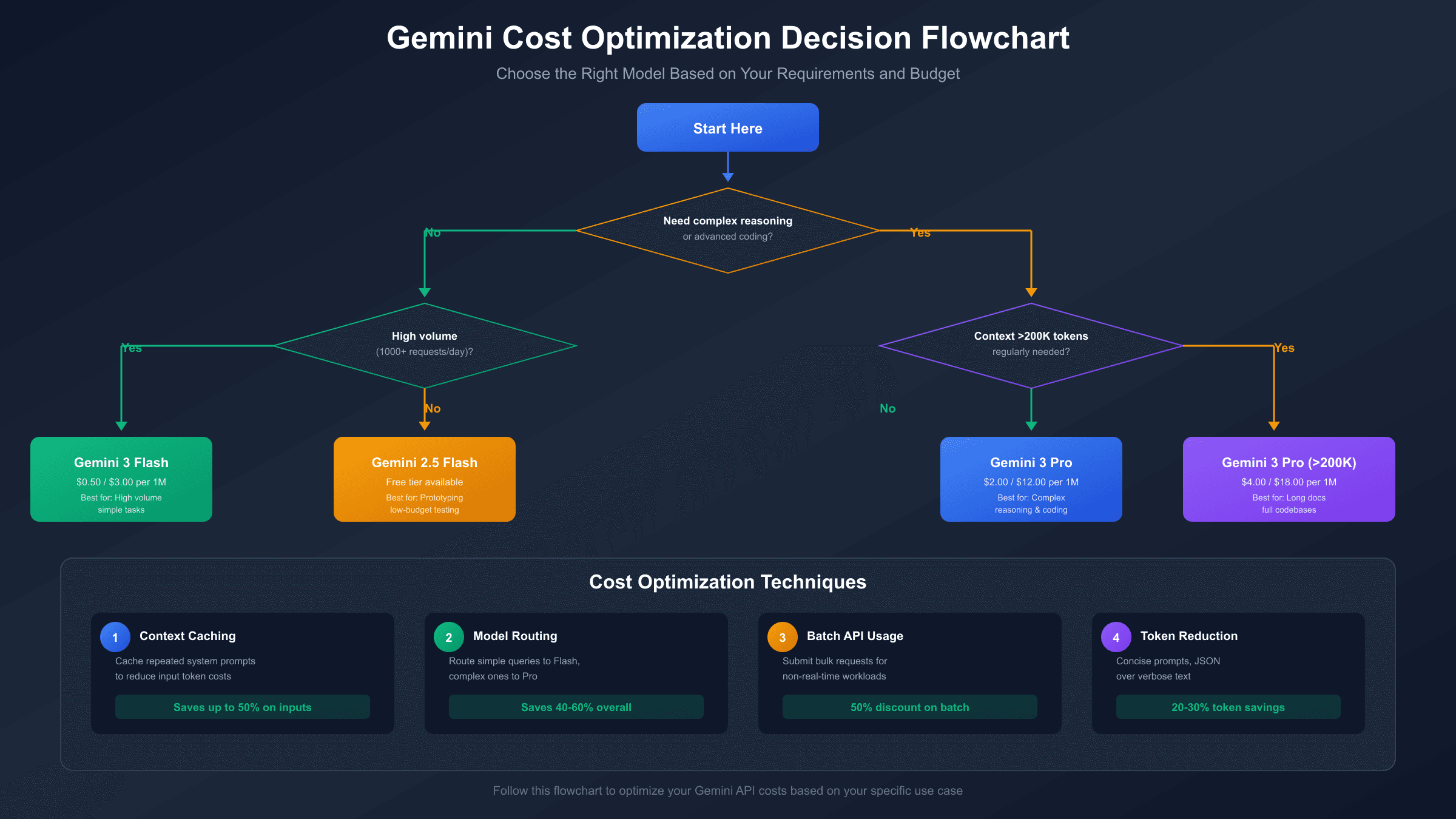
Token reduction techniques start with prompt engineering. Concise, well-structured prompts typically yield better results than verbose instructions while costing less. Avoid unnecessary repetition in system prompts, use efficient formatting (JSON over verbose text for structured data), and strip unnecessary whitespace and filler phrases.
Model selection routing applies the right tool to each task. Build logic that routes simple queries to Flash while reserving Pro for complex reasoning. A classification layer (which can itself use Flash cheaply) can analyze incoming queries and direct them appropriately, ensuring you only pay Pro prices when Pro quality matters.
Batch API usage offers approximately 50% cost savings for non-real-time workloads. If your application can tolerate 24-hour turnaround, batching requests together provides substantial savings for bulk processing tasks like content analysis, data extraction, or document summarization.
Understanding Rate Limits
Rate limits govern how quickly and how much you can use the Gemini API, and exceeding them results in 429 error responses that can disrupt applications. Understanding the quota structure helps you build resilient systems.
Gemini 3 Pro enforces limits across three dimensions: requests per minute (RPM), tokens per minute (TPM), and requests per day (RPD). For paid accounts, typical baseline limits start at 60 RPM, 4 million TPM, and 1,500 RPD, though these can vary based on account history and usage patterns.
When you hit rate limits, implementing exponential backoff with jitter provides the most reliable recovery strategy. Rather than immediately retrying failed requests, wait progressively longer between attempts with some randomization to avoid synchronized retry storms from multiple clients.
Requesting quota increases through the Google Cloud Console is straightforward for established accounts with legitimate high-volume needs. Approval typically requires demonstrating a business use case and may involve additional verification for significant increases.
Monitoring your quota usage through Google Cloud's dashboard helps you anticipate limits before hitting them. Setting up alerts at 70% and 90% thresholds gives you time to implement throttling or request increases before experiencing service disruptions.
FAQ: Common Pricing Questions
Is there any free way to use Gemini 3 Pro?
Direct API access to Gemini 3 Pro requires payment—the free tier was removed in late 2025. However, you can test Gemini 3 Pro through Google AI Studio's web interface for free, which doesn't consume API quota. For development and prototyping with minimal budget, Gemini 3 Flash offers a limited free tier and 75% lower paid pricing while maintaining reasonable quality for many use cases.
How does Gemini 3 Pro compare to GPT-4o on cost?
Gemini 3 Pro costs 60% less on input ($2 vs $5 per million tokens) and 20% less on output ($12 vs $15 per million tokens) compared to GPT-4o. Combined with Gemini's 1M token context window versus GPT-4o's 128K, Gemini offers better value for applications requiring long context. Performance is roughly comparable across most benchmarks, making Gemini 3 Pro the more cost-effective choice for many applications.
What happens when I exceed the 200K context threshold?
Once your total context (input plus accumulated conversation) exceeds 200,000 tokens, pricing increases from $2/$12 to $4/$18 per million tokens for input/output respectively. This applies to the entire request, not just tokens beyond the threshold. For cost control, consider summarizing or truncating older context when approaching this limit unless full history is essential.
Can I use my existing OpenAI code with Gemini?
While Gemini's native API differs from OpenAI's format, several adapter libraries and platforms provide OpenAI-compatible endpoints for Gemini. This allows code written for OpenAI to work with Gemini with minimal changes. However, prompt optimization may still be necessary since models respond differently to identical prompts.
How do thinking tokens affect my costs?
When Gemini 3 Pro uses extended reasoning (visible in some API responses as internal chain-of-thought), these "thinking tokens" are billed at output rates even though they don't appear in the final response. For complex reasoning tasks, this can add 30-50% to costs compared to simple queries. Monitor your token usage metrics to understand how thinking tokens impact your specific use case.
Summary: Making the Right Choice
Gemini 3 Pro's pricing positions it as a premium option with competitive rates—60% cheaper input than GPT-4o, industry-leading 1M context window, and strong reasoning capabilities. The removal of free tier access in late 2025 means budgeting is essential from the start, but the value proposition remains solid for applications that benefit from advanced AI capabilities.
| Use Case | Recommended Model | Monthly Cost (Moderate Use) |
|---|---|---|
| High-volume simple tasks | Gemini 3 Flash | $15-50 |
| Complex reasoning/coding | Gemini 3 Pro | $100-300 |
| Long document analysis | Gemini 3 Pro | $150-400 |
| Cost-sensitive development | Gemini 2.5 Flash | $10-30 |
| Personal productivity | Gemini Advanced | $19.99 flat |
For developers building applications that require flexibility across multiple AI providers, API aggregation platforms offer unified access to Gemini alongside GPT and Claude models through a single integration, which can reduce development complexity when your needs span multiple model capabilities.
The decision ultimately depends on your specific requirements: prioritize Pro for complex reasoning and long context, Flash for cost efficiency on simpler tasks, or consumer subscriptions for personal use. With the pricing data and optimization strategies covered in this guide, you're equipped to make an informed choice that balances capability with budget.