Gemini Pro vs Flash: Complete Speed and Cost Comparison Guide [2026]
Comprehensive comparison of Gemini 2.5 Pro vs 2.5 Flash covering pricing, speed benchmarks, and use case recommendations. Learn which model fits your needs with real cost calculations.
Nano Banana Pro
4K-80%Google Gemini 3 Pro · AI Inpainting
谷歌原生模型 · AI智能修图

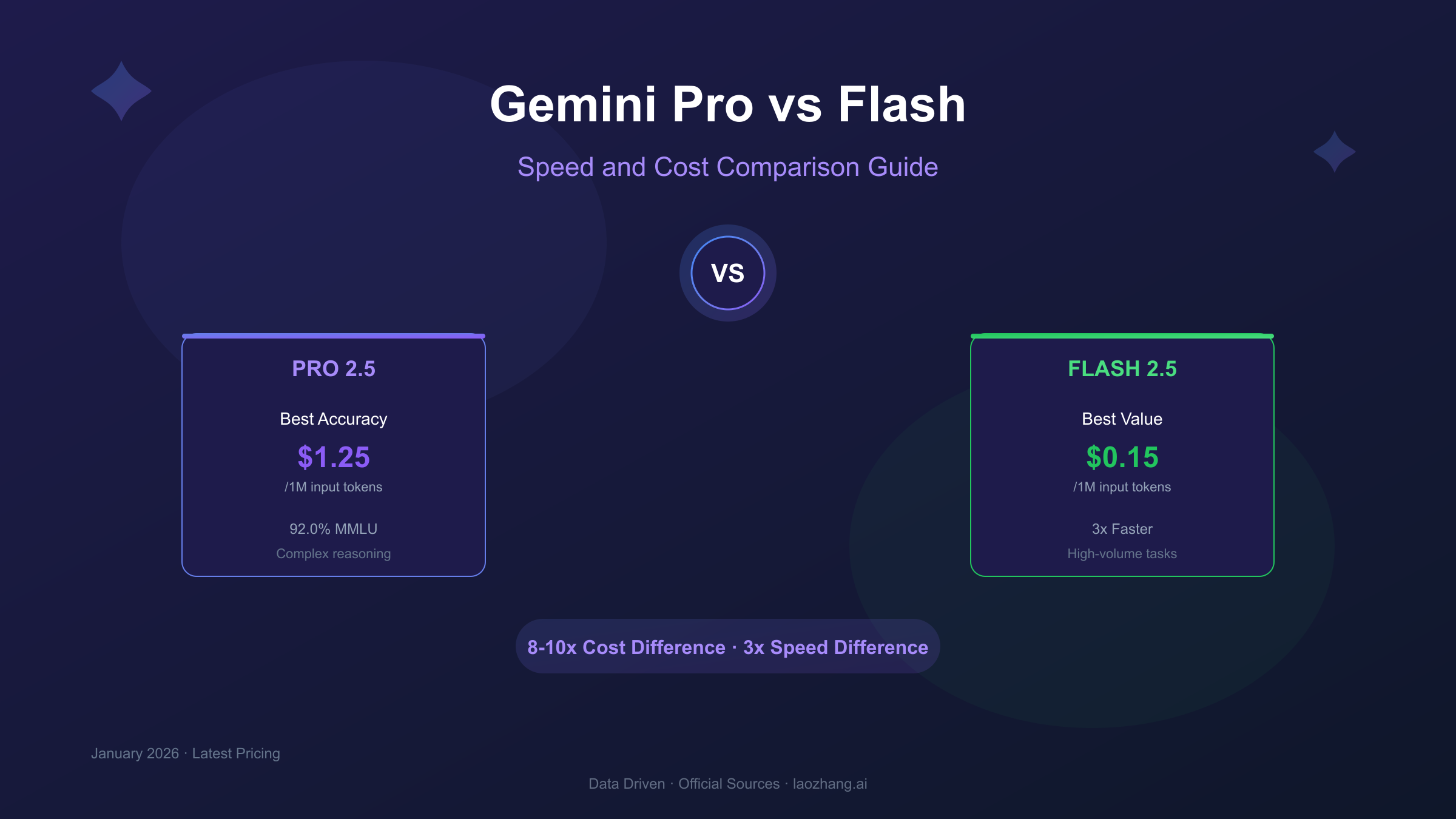
Choosing between Gemini Pro and Gemini Flash can significantly impact both your application's performance and your budget. With Flash being approximately 8-10x cheaper and 3x faster than Pro, while Pro maintains an edge in complex reasoning tasks, the right choice depends entirely on your specific use case. This guide breaks down the real numbers to help you make an informed decision.
Understanding Gemini Model Tiers
The Gemini model family is structured around a clear trade-off: Pro models prioritize capability and accuracy, while Flash models optimize for speed and cost-efficiency. This architectural distinction isn't arbitrary—it reflects Google's recognition that different applications have fundamentally different requirements.
The Pro tier represents Google's most capable general-purpose model, designed for tasks requiring deep reasoning, nuanced understanding, and comprehensive analysis. These models excel when quality cannot be compromised, such as in research assistance, complex code generation, or detailed content analysis where a single error could cascade into larger problems.
Flash models, in contrast, are engineered for high-throughput scenarios where response time and cost per query are primary concerns. They achieve this through architectural optimizations that maintain impressive quality while dramatically reducing computational requirements. The result is a model that can handle significantly more requests at a fraction of the cost—making it ideal for production applications with high query volumes.
Understanding this fundamental positioning is crucial because many developers default to the "more powerful" option without considering whether they actually need that capability. In practice, Flash models handle the vast majority of real-world tasks exceptionally well, and the cost savings can be substantial over time.
Gemini Model Versions Explained (2.0, 2.5, and Beyond)
If you're searching for "Gemini 3 Pro vs Gemini 3 Flash," you're likely looking for information on the latest versions—which are currently the Gemini 2.5 series. Google's model versioning can be confusing, so let's clarify the current landscape as of January 2026.
The current production models follow this hierarchy:
| Version | Status | Key Characteristics |
|---|---|---|
| Gemini 2.5 Pro | Latest Stable | Top-tier reasoning, 1M+ context window |
| Gemini 2.5 Flash | Latest Stable | Optimized speed, 1M context window |
| Gemini 2.0 Flash | Experimental | Previous generation, limited availability |
| Gemini 1.5 Pro/Flash | Legacy | Still available but superseded |
The 2.5 series represents a significant leap from previous versions. Gemini 2.5 Pro introduced enhanced reasoning capabilities with a "thinking" mode that allows the model to work through complex problems step-by-step before generating responses. This comes at additional cost but can dramatically improve accuracy for challenging tasks.
Gemini 2.5 Flash brought similar improvements to the speed-optimized tier, narrowing the capability gap with Pro while maintaining its cost and latency advantages. Notably, Flash 2.5 actually outperforms Pro on certain coding benchmarks—a reversal from previous generations where Pro dominated across all categories.
Google has not announced Gemini 3.0, though the natural progression suggests it will arrive in late 2026 or 2027. For now, focusing on the 2.5 series gives you access to Google's most capable and cost-effective models.
Pricing Comparison: Pro vs Flash Detailed Breakdown
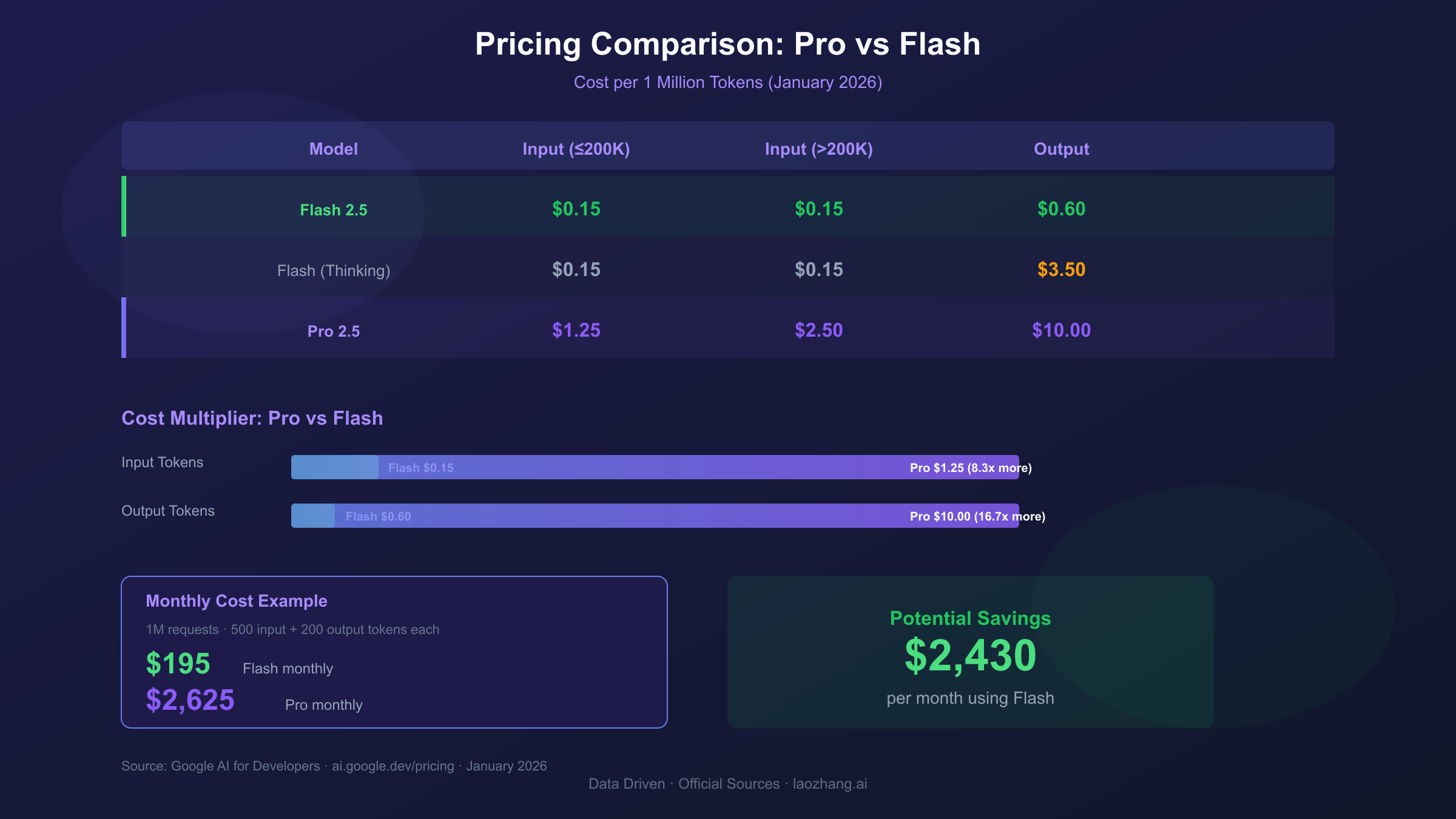
Gemini 2.5 Flash costs approximately 8-10x less than Pro for standard operations, with input tokens at $0.15/million versus Pro's $1.25-$2.50/million depending on context length.
Understanding the pricing structure is essential for accurate cost forecasting. Google employs a tiered pricing model that varies based on context window usage:
| Model | Input (≤200K context) | Input (>200K context) | Output (≤200K) | Output (>200K) |
|---|---|---|---|---|
| Gemini 2.5 Flash | $0.15/1M | $0.15/1M | $0.60/1M | $0.60/1M |
| Gemini 2.5 Flash (Thinking) | $0.15/1M | $0.15/1M | $3.50/1M | $3.50/1M |
| Gemini 2.5 Pro | $1.25/1M | $2.50/1M | $10.00/1M | $15.00/1M |
| Gemini 2.5 Pro (Thinking) | $1.25/1M | $2.50/1M | $10.00/1M | $15.00/1M |
Several pricing nuances deserve attention. First, Pro's context-tiered pricing means costs increase 2x when you exceed 200K tokens of context—a threshold that's easier to hit than you might expect with long documents or conversation histories.
Second, the "thinking" mode pricing differs between models. Flash thinking incurs a significant output cost increase (from $0.60 to $3.50/1M tokens), while Pro's thinking mode maintains the same pricing as standard mode. This makes Flash thinking an interesting middle-ground option for complex tasks that don't require Pro's full capabilities.
Let's calculate real-world costs for a typical application processing 1 million requests per month with average 500 input tokens and 200 output tokens per request:
Flash Cost Calculation:
- Input: 500M tokens × $0.15/1M = $75
- Output: 200M tokens × $0.60/1M = $120
- Monthly total: $195
Pro Cost Calculation:
- Input: 500M tokens × $1.25/1M = $625
- Output: 200M tokens × $10.00/1M = $2,000
- Monthly total: $2,625
The difference is stark: Pro costs 13.5x more for this usage pattern. For many applications, this cost differential makes Flash the obvious choice unless Pro's additional capabilities are specifically required.
For more detailed pricing analysis including context caching strategies, see our Gemini API pricing and limits guide.
Speed and Latency: Real-World Performance
Gemini 2.5 Flash delivers responses approximately 3x faster than Pro, with typical first-token latency under 200ms compared to Pro's 400-600ms range.
Speed matters differently depending on your application. For interactive chatbots, users perceive delays beyond 500ms as sluggish. For batch processing pipelines, throughput matters more than individual response latency. Flash excels in both scenarios but particularly shines in user-facing applications.
| Metric | Gemini 2.5 Flash | Gemini 2.5 Pro | Flash Advantage |
|---|---|---|---|
| First Token Latency | 150-250ms | 400-700ms | 2.5-3x faster |
| Tokens per Second | 150-200 | 50-80 | 2-3x faster |
| Time to 500 tokens | ~3 seconds | ~7 seconds | 2.3x faster |
| Concurrent Request Capacity | Higher | Lower | Depends on tier |
The speed advantage compounds in real applications. Consider a document analysis pipeline that needs to process 10,000 documents. With Flash completing each in 3 seconds versus Pro's 7 seconds, you're looking at 8.3 hours versus 19.4 hours of processing time—a difference of over 11 hours.
Flash's speed advantage comes from architectural optimizations that reduce model complexity while maintaining quality. Google achieved this through techniques like knowledge distillation (training Flash to mimic Pro's outputs) and efficient attention mechanisms that reduce computational overhead.
However, speed isn't everything. Pro's slower response time partially reflects additional "thinking" that produces more nuanced outputs for complex tasks. The question is whether your specific use case benefits from that additional processing.
Benchmark Analysis: Quality vs Speed Trade-offs
Counter-intuitively, Flash outperforms Pro on certain coding benchmarks (SWE-bench: 78% vs 76.2%) while Pro maintains advantages in complex reasoning tasks (GPQA Diamond: 91.9% vs 90.4%).
Benchmark results reveal a more nuanced picture than "Pro is better, Flash is faster." Different benchmarks test different capabilities, and the results don't uniformly favor either model:
| Benchmark | Tests | Flash 2.5 | Pro 2.5 | Winner |
|---|---|---|---|---|
| MMLU | General Knowledge | 90.7% | 92.0% | Pro (+1.3%) |
| GPQA Diamond | Graduate-level Science | 90.4% | 91.9% | Pro (+1.5%) |
| SWE-bench Verified | Real-world Coding | 78.0% | 76.2% | Flash (+1.8%) |
| HumanEval | Code Generation | 89.2% | 90.1% | Pro (+0.9%) |
| MATH | Mathematical Reasoning | 88.5% | 91.2% | Pro (+2.7%) |
The SWE-bench result is particularly noteworthy. This benchmark tests models against real GitHub issues—actual bugs that needed fixing in open-source projects. Flash's superior performance suggests that for practical coding assistance, it may actually be the better choice regardless of price considerations.
Pro's advantages appear most clearly in tasks requiring deep reasoning or specialized knowledge—graduate-level science questions, complex mathematics, and nuanced language understanding. For these domains, the ~1-3% accuracy improvement may justify the cost premium.
Interpreting these benchmarks requires understanding their limitations. They measure performance on specific test sets, not necessarily on your particular use case. A model that scores 2% higher on MMLU might perform identically or worse on your specific task if it falls outside the benchmark's coverage.
The practical recommendation: benchmark both models on your actual data before committing. The small differences in general benchmarks might not manifest—or might be reversed—in your specific domain.
Use Case Decision Matrix: Which Model for What Task
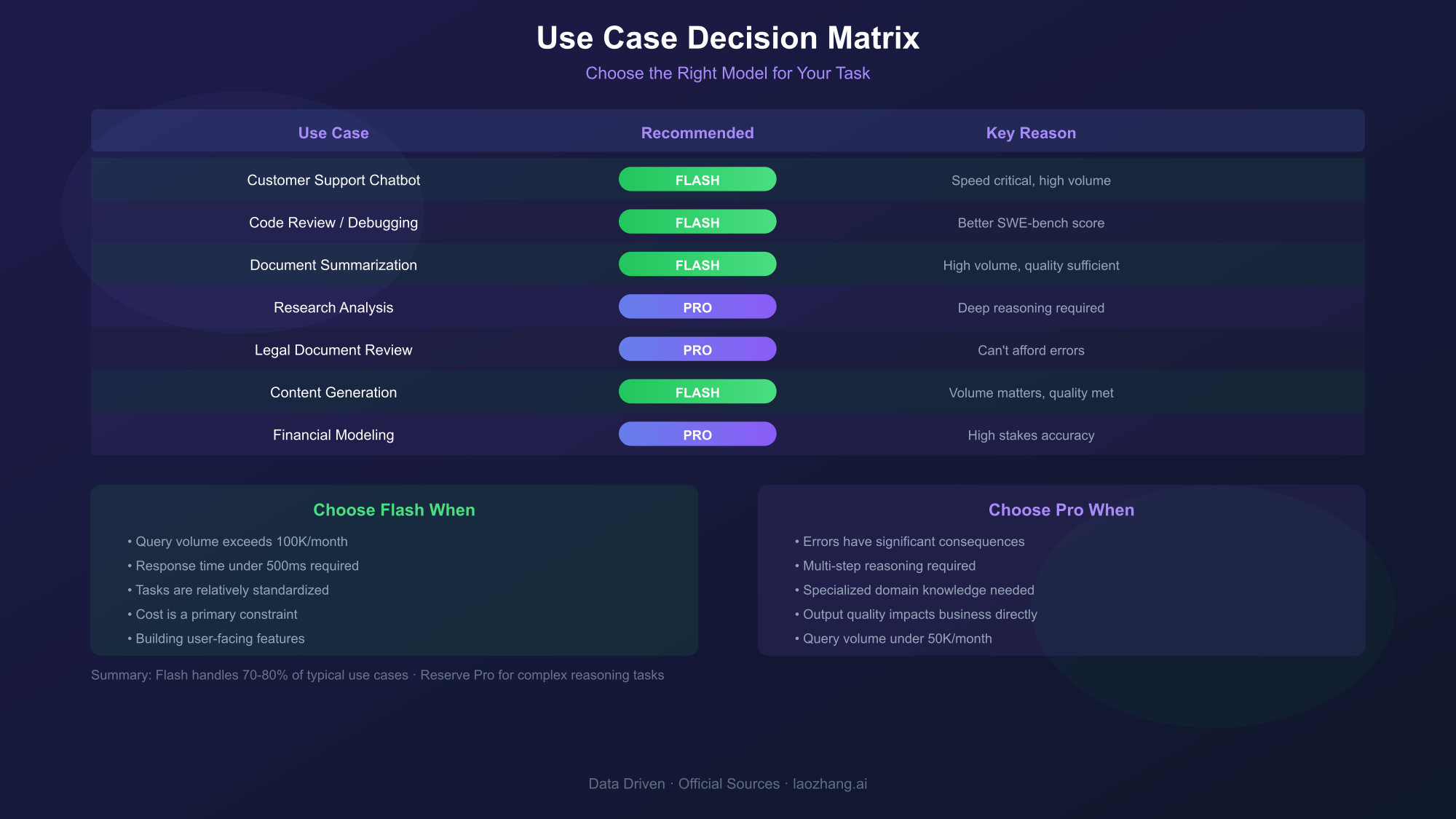
Choose Flash for high-volume tasks, real-time applications, and coding assistance. Reserve Pro for complex reasoning, research tasks, and situations where accuracy is paramount.
Rather than abstract guidelines, here's a specific decision matrix based on common use cases:
| Use Case | Recommended Model | Reasoning |
|---|---|---|
| Customer Support Chatbot | Flash | Speed critical, high volume, moderate complexity |
| Code Review/Debugging | Flash | SWE-bench performance, fast iteration |
| Document Summarization | Flash | High volume, consistent quality sufficient |
| Research Analysis | Pro | Deep reasoning required, accuracy paramount |
| Legal Document Review | Pro | Can't afford errors, complexity justifies cost |
| Content Generation (Blog/Marketing) | Flash | Volume matters, quality threshold met |
| Complex Data Analysis | Pro | Multi-step reasoning, accuracy critical |
| Translation Services | Flash | Speed important, quality consistent |
| Technical Documentation | Flash → Pro | Start Flash, escalate complex sections to Pro |
| Financial Modeling | Pro | Stakes too high for any accuracy compromise |
The hybrid approach in the last row deserves elaboration. Many sophisticated systems route requests dynamically—using Flash for straightforward tasks and escalating to Pro only when needed. This can capture 90%+ of Flash's cost savings while maintaining Pro-level quality for the subset of requests that truly require it.
Factors that should push you toward Flash:
- Query volume exceeds 100K/month
- Response time under 500ms required
- Tasks are relatively standardized
- Cost is a primary constraint
- You're building user-facing features
Factors that should push you toward Pro:
- Accuracy errors have significant consequences
- Tasks require multi-step reasoning
- Domain requires specialized knowledge
- Output quality directly impacts business outcomes
- Query volume is moderate (under 50K/month)
For detailed cost analysis of Flash specifically, our Gemini Flash API cost guide provides additional optimization strategies.
Cost Optimization Strategies
Batch API offers 50% discount for non-urgent processing, while context caching can reduce costs by up to 90% for repetitive prompts with similar context.
Beyond choosing between Pro and Flash, Google provides several mechanisms to further reduce costs:
Batch API Processing
The Batch API accepts asynchronous requests with 24-hour completion SLA in exchange for 50% cost reduction. This is ideal for:
- Nightly data processing pipelines
- Bulk content generation
- Dataset annotation tasks
- Any workload without real-time requirements
With batching, the earlier cost comparison shifts dramatically:
| Model | Standard Monthly | With Batching |
|---|---|---|
| Flash | $195 | $97.50 |
| Pro | $2,625 | $1,312.50 |
Context Caching
When your prompts share common context (system prompts, few-shot examples, document references), caching that context avoids reprocessing it for each request. Costs for cached tokens drop to 25% of standard input pricing, and for frequently accessed contexts, effective costs can be 90% lower.
Caching works best when:
- You have a substantial system prompt (>1000 tokens)
- Multiple requests share the same reference documents
- You're using few-shot examples consistently
- Your conversation history is reused across sessions
For a deep dive on combining these strategies, see our guide on Gemini API batch vs caching optimization.
Intelligent Model Routing
The most sophisticated optimization combines both models strategically. Implement a complexity classifier that routes simple requests to Flash and complex requests to Pro. With proper tuning, this can achieve 85-95% of Pro's accuracy at 30-40% of the cost.
A basic routing approach:
- Estimate task complexity from input characteristics
- Default to Flash for all requests
- Escalate to Pro when: query length >2000 tokens, certain keywords detected, or Flash returns low-confidence responses
API Integration: Getting Started with Both Models
Switching between Pro and Flash requires only changing the model identifier in your API calls—no code restructuring needed.
Both models use identical API interfaces, making it trivial to switch between them or implement routing logic. Here's how to get started:
hljs pythonfrom google.generativeai import GenerativeModel
import google.generativeai as genai
# Configure API key
genai.configure(api_key="YOUR_API_KEY")
# Initialize Flash model
flash_model = GenerativeModel('gemini-2.5-flash')
# Initialize Pro model
pro_model = GenerativeModel('gemini-2.5-pro')
# Generate with Flash
flash_response = flash_model.generate_content(
"Explain quantum computing in simple terms"
)
# Generate with Pro (identical interface)
pro_response = pro_model.generate_content(
"Analyze the implications of quantum supremacy for cryptography"
)
For the OpenAI-compatible interface (useful for migration from other providers):
hljs pythonfrom openai import OpenAI
client = OpenAI(
api_key="YOUR_API_KEY",
base_url="https://generativelanguage.googleapis.com/v1beta/"
)
# Using Flash
flash_response = client.chat.completions.create(
model="gemini-2.5-flash",
messages=[{"role": "user", "content": "Your prompt here"}]
)
# Using Pro - just change the model parameter
pro_response = client.chat.completions.create(
model="gemini-2.5-pro",
messages=[{"role": "user", "content": "Your prompt here"}]
)
If you prefer a unified API experience that simplifies model switching and provides additional cost management features, platforms like laozhang.ai offer OpenAI-compatible endpoints with straightforward pricing and multiple model support through a single integration.
Model Selection Best Practice
Rather than hardcoding model choices, implement configuration-driven selection:
hljs pythonimport os
MODEL_CONFIG = {
"simple_tasks": "gemini-2.5-flash",
"complex_reasoning": "gemini-2.5-pro",
"default": os.getenv("DEFAULT_GEMINI_MODEL", "gemini-2.5-flash")
}
def get_model_for_task(task_type: str) -> str:
return MODEL_CONFIG.get(task_type, MODEL_CONFIG["default"])
This pattern allows you to A/B test different routing strategies and adjust model assignments without code changes.
Free Tier Options: Testing Before Commitment
Google AI Studio provides free access to both Flash and Pro models with generous rate limits—enough for serious evaluation and low-volume production use.
Before committing budget, thoroughly test both models using Google's free tier:
| Feature | Free Tier Limits |
|---|---|
| Flash Requests | 1,500/day (15/minute) |
| Pro Requests | 50/day (2/minute) |
| Context Window | Full access (1M tokens) |
| Features | All features available |
The free tier is accessed through Google AI Studio and requires only a Google account. This provides a legitimate testing environment before committing to paid API usage.
What you can accomplish with free tier:
- Complete proof-of-concept development
- Benchmark both models on your actual use cases
- Build and test integrations
- Run limited production workloads (low volume)
- Evaluate thinking mode capabilities
The transition from free tier to paid API is seamless—the same code works with both, you just need to handle authentication differently for production (API key vs. browser-based auth).
For comprehensive details on maximizing free tier value, see our Google Gemini API free tier limits guide.
Frequently Asked Questions
Is Gemini 2.5 Flash good enough for production applications?
Yes, absolutely. Flash handles the majority of production use cases exceptionally well. Companies running millions of queries use Flash as their primary model, reserving Pro only for specific complex tasks. The 90%+ benchmark scores mean quality is enterprise-ready for most applications.
When should I definitely use Pro instead of Flash?
Use Pro when: (1) errors have significant business or safety consequences, (2) tasks require multi-step reasoning with intermediate validation, (3) you're working with specialized domains like legal, medical, or scientific analysis, or (4) accuracy improvements of 1-3% justify the cost premium in your context.
Can I switch between models mid-conversation?
Yes, but with caveats. You can send any conversation history to either model—the API accepts the same message format. However, mixing models mid-conversation can produce inconsistent results since each model has different "tendencies." Better practice: use Flash for entire conversations unless specific turns require Pro's capabilities.
How accurate are the benchmark comparisons?
Benchmarks provide directional guidance but don't guarantee performance on your specific task. MMLU tests general knowledge, GPQA tests scientific reasoning, SWE-bench tests coding—but your use case might not map cleanly to any benchmark. Always test both models on representative samples of your actual data.
What's the best strategy for cost optimization?
Layer multiple strategies: (1) Start with Flash as default, (2) Implement context caching for repetitive prompts, (3) Use Batch API for non-urgent workloads, (4) Route only truly complex tasks to Pro. This combination typically achieves 70-85% cost reduction versus naive Pro usage.
Will Gemini 3 change these recommendations?
When Gemini 3 releases (expected late 2026/2027), expect the same Pro vs Flash dynamic to continue. Google's consistent approach is offering capability-optimized and speed-optimized variants. The specific numbers will change, but the decision framework—matching model capabilities to use case requirements—remains valid.
How does Gemini compare to GPT-4 and Claude?
Brief comparison: Gemini 2.5 Pro competes directly with GPT-4o and Claude 3.5 Sonnet on capabilities. Flash competes with GPT-4o-mini and Claude 3 Haiku on the speed/cost spectrum. Gemini's advantages include generous context windows (1M tokens) and competitive pricing, particularly for Flash.
Is there a middle-ground option between Flash and Pro?
Yes—Flash with thinking mode enabled. This uses Flash's architecture but allows extended reasoning, producing outputs closer to Pro quality at ~4x the standard Flash output cost (still significantly cheaper than Pro). It's ideal for tasks that need more reasoning but don't justify Pro's full price.
Conclusion: Making the Right Choice
The Gemini Pro vs Flash decision ultimately comes down to understanding your specific requirements. Flash serves as an excellent default for most applications—it's fast, affordable, and surprisingly capable. Pro earns its premium for tasks where accuracy is non-negotiable or complex reasoning is essential.
Start with Flash, measure performance on your actual workload, and escalate to Pro only where data demonstrates the need. This pragmatic approach maximizes value while maintaining quality where it matters most.
For teams looking to streamline API management across multiple models, aggregation platforms can simplify the workflow. laozhang.ai provides unified access to Gemini alongside other major models, with OpenAI-compatible endpoints that make switching or comparison testing straightforward.
The key insight: in 2026's AI landscape, the "best" model isn't always the most capable—it's the one that delivers appropriate quality at sustainable cost for your specific use case. For most developers, that means Flash should be your starting point and Pro your escalation path.