How to Use Nano Banana Pro: Complete Guide to Gemini 3 Pro Image Generation (2025)
Master Nano Banana Pro with this comprehensive tutorial. Learn access methods, text rendering, multi-image workflows, API setup, troubleshooting, and cost optimization for Google Gemini 3 Pro Image.
Nano Banana Pro
4K-80%Google Gemini 3 Pro · AI Inpainting
谷歌原生模型 · AI智能修图

Nano Banana Pro has revolutionized AI image generation since its release in late 2025, offering capabilities that were previously impossible with any other model. This advanced image generation system, powered by Google's Gemini 3 Pro architecture, can create stunning 4K visuals, render accurate text in multiple languages, and maintain character consistency across dozens of images. Whether you're a designer looking to speed up your workflow, a developer building image-powered applications, or a creator exploring AI artistry, understanding how to properly use Nano Banana Pro will unlock creative possibilities that fundamentally change what you can achieve with artificial intelligence.
The learning curve for Nano Banana Pro isn't steep, but there's a significant difference between basic usage and truly mastering the platform. Many users generate their first image within minutes, only to discover weeks later that they've been missing powerful features like search grounding, multi-image blending, or thoughtSignature-based iterative refinement. This comprehensive guide walks you through everything from initial access to advanced professional techniques, ensuring you extract maximum value from Google's most sophisticated image generation model.
What is Nano Banana Pro? Understanding Google's Best Image Model
Nano Banana Pro represents the professional-grade evolution of Google's image generation capabilities, built on the Gemini 3 Pro foundation. The unusual name originated from Google's internal codename during development, which caught on so strongly in the AI community that Google officially embraced it. When you see references to "Nano Banana Pro," "Gemini 3 Pro Image," or the API model name gemini-3-pro-image-preview, they all refer to the same powerful system that launched in November 2025 and has since become the benchmark against which other image generators are measured.
The technical architecture of Nano Banana Pro differs fundamentally from previous generation models like DALL-E 3 or even its predecessor Nano Banana (Gemini 2.5 Flash Image). While earlier models processed prompts through relatively straightforward text-to-image pipelines, Nano Banana Pro incorporates a multi-stage workflow with internal plan-generate-review-correct capabilities. This means the model doesn't just interpret your prompt and produce an image—it actually reasons through the request, plans the composition, generates initial concepts, reviews them against your specifications, and corrects issues before delivering the final output. According to Google DeepMind's official documentation, this reasoning approach enables the model to handle complex prompts that would confuse simpler systems.
The practical implications of this architecture are substantial. Nano Banana Pro can accurately render text in dozens of languages including Chinese, Arabic, and Japanese—a capability that consistently eluded previous AI image generators. The model supports up to 14 reference images in a single prompt, allowing for sophisticated composition and blending that maintains visual coherence. Resolution capabilities extend to true 4K (approximately 8 megapixels), producing images suitable for professional print applications rather than just web usage. Perhaps most importantly, the model demonstrates world knowledge that allows it to accurately depict specific locations, products, and cultural contexts when grounded with Google Search integration.
Nano Banana Pro vs Nano Banana: Key Differences Explained
Understanding when to use Nano Banana Pro versus the original Nano Banana (powered by Gemini 2.5 Flash) determines whether you're optimizing for speed, quality, or cost. Both models serve legitimate use cases, and choosing incorrectly wastes either money or time depending on your requirements. The original Nano Banana excels at rapid iteration and simple image generation tasks, while Nano Banana Pro targets professional asset production where quality justifies the additional processing time and cost.
| Feature | Nano Banana (Gemini 2.5 Flash) | Nano Banana Pro (Gemini 3 Pro) |
|---|---|---|
| Resolution | ~1MP (1024×1024) | Up to 4K/8MP |
| Generation Speed | ~3 seconds | 8-12 seconds |
| Text Rendering | Basic, often errors | Advanced, multi-language |
| Reference Images | Limited | Up to 14 images |
| Character Consistency | Basic | Up to 5 humans maintained |
| Search Grounding | No | Yes |
| API Pricing | $0.039/image | $0.134-$0.24/image |
| Best For | Quick drafts, iteration | Final assets, professional work |
The speed difference between the two models matters more than the raw numbers suggest. Nano Banana's 3-second generation time enables rapid creative exploration where you might generate dozens of variations to find the right direction. At 10x faster than Midjourney and significantly faster than Nano Banana Pro's 8-12 seconds, this speed advantage compounds during brainstorming sessions. However, once you've established your creative direction, switching to Nano Banana Pro for final production ensures the output quality matches professional standards.
Text rendering capabilities represent the most dramatic improvement in Nano Banana Pro. The original Nano Banana frequently struggles with text accuracy, producing images where lettering is unclear, misspelled, or filled with character-substitution errors. This limitation effectively disqualifies it for any project involving signage, UI mockups, infographics, or branded content. Nano Banana Pro delivers a transformational upgrade in this regard, consistently rendering clear, correctly-spelled text across different languages, fonts, and styles. For creators working on marketing materials, product labels, or educational content, this capability alone often justifies using the Pro model despite the higher cost and slower speed.
How to Access Nano Banana Pro (Consumer App + API)
Accessing Nano Banana Pro requires understanding two distinct pathways: the consumer-facing Gemini app for casual users and the developer API for programmatic access. Each pathway has different requirements, limitations, and cost structures. The Gemini app provides the fastest route to generating your first image, while the API offers the flexibility and scalability needed for application development or high-volume production.
Consumer App Access
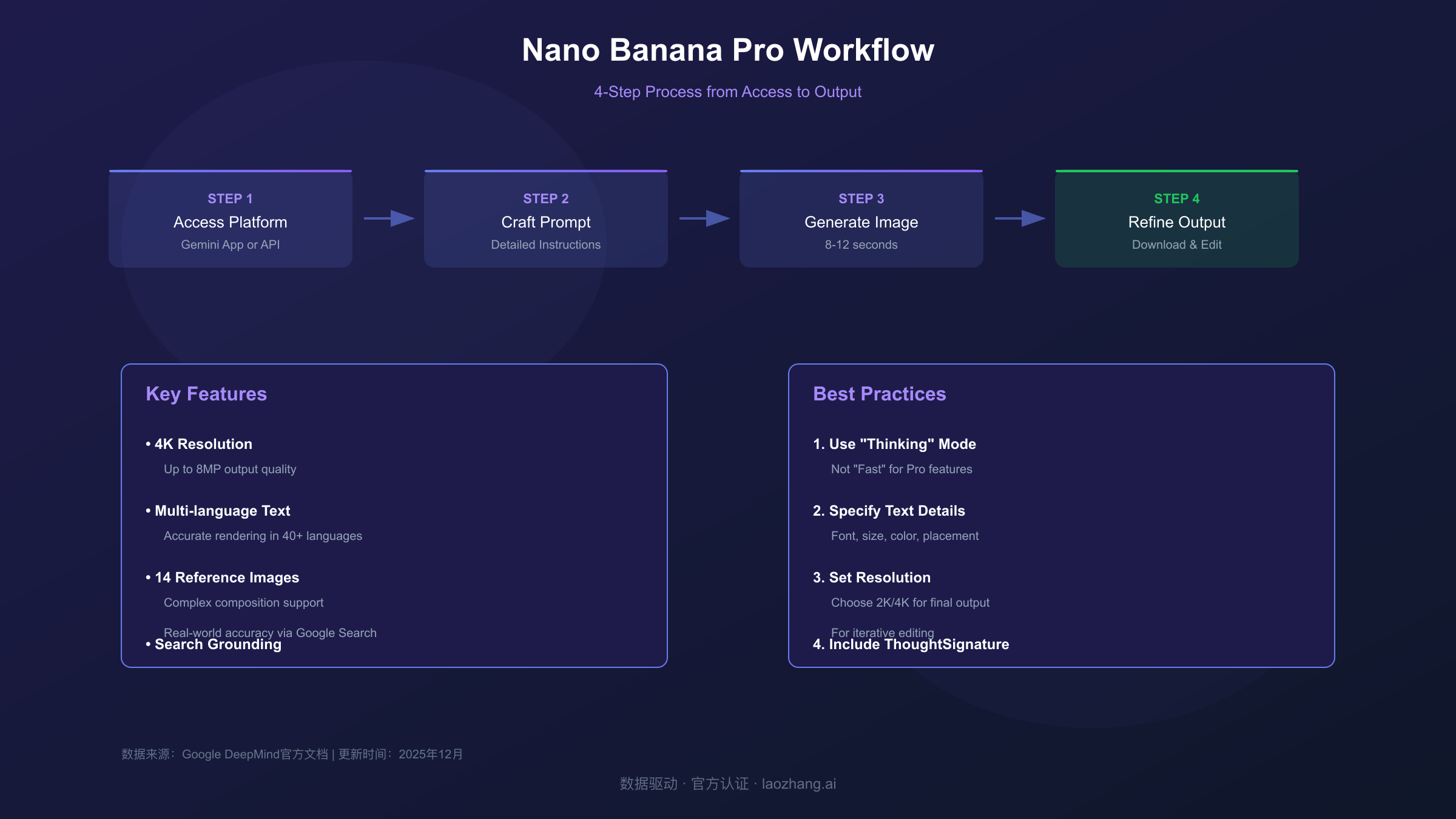
The Gemini app at gemini.google.com provides the most straightforward access to Nano Banana Pro, though it requires a paid subscription for full functionality. To access Nano Banana Pro through the consumer interface, you must select the correct combination of tools and model settings. Navigate to the tools menu and select "Create images," then crucially ensure the model menu is set to "Thinking" rather than "Fast." The "Fast" option uses the original Nano Banana model, while "Thinking" activates Nano Banana Pro's full capabilities including its reasoning architecture.
Subscription requirements vary based on your usage intensity. Google One AI Premium subscribers (approximately $20/month) receive access to Nano Banana Pro through the Gemini app, though with daily generation limits that vary based on server capacity. During off-peak hours, you might generate 20-30 images before hitting limits, while peak times may restrict you to 5-10 generations before the system temporarily reverts to the standard Nano Banana model. For users requiring consistent access without daily caps, the Gemini Ultra subscription tier provides priority access and higher quotas.
API Access for Developers
Developers requiring programmatic access can use the Gemini API with the model identifier gemini-3-pro-image-preview. This approach offers several advantages: no daily generation limits (beyond rate limits), integration with existing applications, batch processing capabilities, and cost structures that often prove more economical for high-volume usage. The API setup process involves obtaining credentials, installing the appropriate SDK, and configuring your client with the correct parameters.
To begin API development, first obtain an API key from Google AI Studio. This requires a Google account and agreement to the API terms of service. Once you have your key, install the Google GenAI SDK for your programming language. The Python installation uses pip:
hljs bashpip install google-genai
For JavaScript/Node.js projects, use npm:
hljs bashnpm install @google/genai
The API currently exists in preview status, meaning some features may change before general availability. However, the core image generation functionality remains stable and suitable for production applications with appropriate error handling.
Step-by-Step Guide: Your First Nano Banana Pro Image
Creating your first Nano Banana Pro image through the API demonstrates the model's capabilities while establishing patterns you'll use for more complex generations. This workflow covers the essential elements: client initialization, prompt construction, response handling, and image extraction. Understanding each component ensures you can troubleshoot issues and customize behavior for your specific needs.
Python API Implementation
The following complete example generates a high-quality image and saves it to disk. This code handles the full workflow from authentication through file output:
hljs pythonfrom google import genai
from google.genai import types
import base64
# Initialize the client with your API key
client = genai.Client(api_key="YOUR_API_KEY")
# Configure the generation parameters
config = types.GenerateContentConfig(
response_modalities=['TEXT', 'IMAGE'],
image_generation_config=types.ImageGenerationConfig(
output_image_resolution="2K", # Options: "1K", "2K", "4K"
)
)
# Create your prompt
prompt = """Create a professional product photograph of a sleek wireless
headphone on a marble surface. The headphones are matte black with
rose gold accents. Dramatic side lighting creates subtle shadows.
The background is a soft gradient from dark gray to pure black.
Ultra-high detail, 4K quality."""
# Generate the image
response = client.models.generate_content(
model="gemini-3-pro-image-preview",
contents=prompt,
config=config
)
# Extract and save the image
for part in response.candidates[0].content.parts:
if hasattr(part, 'inline_data') and part.inline_data:
image_data = base64.b64decode(part.inline_data.data)
with open("headphones.png", "wb") as f:
f.write(image_data)
print("Image saved successfully!")
The response_modalities parameter crucially includes both 'TEXT' and 'IMAGE' because Nano Banana Pro may return explanatory text alongside the generated image. The output_image_resolution setting controls the output size, with "4K" producing the highest quality at approximately 8 megapixels. Note that 4K generation takes longer and costs more per image, so use "1K" or "2K" during development and testing.
Understanding the Response Structure
Nano Banana Pro responses contain multiple parts that require iteration to extract. The image data arrives as base64-encoded bytes within an inline_data object, while text explanations (if any) appear in separate parts with a text attribute. For multi-turn conversations where you iteratively refine an image, responses also include thoughtSignature objects that must be preserved and returned in subsequent requests. This signature encodes the model's understanding of the composition and enables coherent editing across conversation turns.
When errors occur, the response structure changes to include error information rather than image data. Common error conditions include content policy violations, rate limit exceeded, or malformed requests. Robust production code should check for error conditions before attempting to extract image data:
hljs pythonif response.candidates[0].finish_reason == "SAFETY":
print("Content blocked due to safety filters")
elif response.candidates[0].finish_reason == "RECITATION":
print("Request too similar to training data")
else:
# Process successful response
pass
Mastering Text Rendering and Logo Creation
Text rendering represents Nano Banana Pro's most significant advancement over previous AI image generators, transforming the model from a creative tool into a practical asset production system. The ability to accurately render legible, stylized text opens use cases that were previously impossible: product mockups with real labels, social media graphics with headlines, infographics with data callouts, and branded materials with consistent typography. Mastering text prompting techniques ensures your outputs meet professional standards rather than requiring post-processing in traditional design software.
Effective text prompts require explicit specification of multiple attributes that simpler prompts leave to chance. Rather than hoping the model interprets your intent correctly, directly state the text content, font characteristics, color, size relative to other elements, and precise placement within the composition. The model responds dramatically better to detailed text instructions than to vague requests, often producing publication-ready results when given sufficient guidance.
Text Prompting Formula
The optimal structure for text-heavy prompts follows this pattern: specify the text content in quotation marks, describe the typography style, indicate the placement and hierarchy, then provide the surrounding visual context. Consider this example for a promotional banner:
Create a modern promotional banner with the headline "WINTER SALE" in
bold condensed sans-serif font, white text with a subtle drop shadow,
centered in the upper third of the image. Below, smaller text reads
"Up to 50% Off Everything" in light weight of the same font family.
The background is a gradient from deep blue to teal with subtle
snowflake patterns. The overall style is clean and contemporary,
suitable for retail advertising.
This prompt explicitly defines: the exact text strings, the font weight and style, the color and effects, the relative positioning, the size hierarchy between headline and subhead, and the background context. Each specification reduces ambiguity and increases the likelihood of a usable first generation.
Logo Creation Techniques
Logo generation with Nano Banana Pro requires balancing creative direction with technical precision. The model excels at producing logo concepts but performs best when you provide clear constraints about style, color, and format. Effective logo prompts specify the brand name, desired aesthetic (minimalist, playful, corporate, etc.), color palette, and any symbolic elements to incorporate or avoid.
Here are tested prompts that consistently produce professional-quality logos:
Minimalist Tech Logo:
Design a minimalist logo for "NEXUS AI" featuring clean geometric
sans-serif typography. The letters should have sharp, precise edges
with a subtle gradient from electric blue to cyan. Include a small
abstract node/connection symbol integrated with the letter X.
White background, suitable for both digital and print use.
Organic Brand Logo:
Create a logo for "Green Harvest Market" in a warm, organic style.
The text should use a rounded, friendly serif font in forest green.
Incorporate a stylized leaf or plant element that flows naturally
into the letterforms. The overall feel should be welcoming and
sustainable-minded. Cream or natural white background.
For multi-language text rendering, explicitly specify the language and script requirements. Nano Banana Pro handles Chinese characters, Japanese kanji/hiragana/katakana, Arabic script, and other complex writing systems, but performs best when you indicate the language context:
Create a restaurant menu header with "美食天堂" (Paradise of Cuisine)
in elegant Chinese calligraphy style, gold text on a deep red
background with subtle traditional cloud patterns.
Multi-Image Workflows and Character Consistency
Nano Banana Pro's ability to blend multiple reference images while maintaining consistency transforms it from an image generator into a complete visual production system. This capability enables workflows like maintaining a character's appearance across a comic series, compositing elements from different photos into cohesive scenes, or creating product variations that share visual DNA. Understanding the mechanics of multi-image inputs and thoughtSignature handling unlocks these advanced production techniques.
The model accepts up to 14 reference images per request, with specific allocations for different purposes: up to 6 images for object references with high-fidelity matching, and up to 5 images of humans for character consistency across generations. These aren't hard constraints but guidelines—the model balances reference adherence with creative interpretation based on how you frame the request. Explicit instructions about which elements to preserve versus modify produce more predictable results than vague blending requests.
Reference Image Best Practices
When providing reference images, follow these guidelines for optimal results. First, ensure your reference images are high-quality (at least 1080p) and clearly show the elements you want preserved. Blurry or low-resolution references produce correspondingly degraded outputs. Second, use consistent lighting and style across references when creating composite images—mixing dramatically different visual styles confuses the model about your intent. Third, explicitly describe what aspects of each reference to incorporate:
Using the uploaded reference images:
- From image 1: preserve the character's face, hair color, and
  approximate proportions
- From image 2: use this architectural style for the background
- From image 3: match this lighting setup and color grading

Create a portrait of the character from image 1 standing in front
of a building matching image 2's style, with dramatic lighting
matching image 3.
ThoughtSignature for Iterative Editing
For multi-turn conversations where you refine an image across several exchanges, Nano Banana Pro uses thoughtSignature objects to maintain context. These encrypted representations encode the model's understanding of your previous images and must be preserved in subsequent requests. When the model generates an image, the response includes thoughtSignatures on the first part after any reasoning content. For editing workflows, extract these signatures and include them in your next request:
hljs python# Store the thoughtSignature from previous generation
previous_signature = response.candidates[0].content.parts[0].thought_signature
# Include in subsequent editing request
edit_response = client.models.generate_content(
model="gemini-3-pro-image-preview",
contents=[
{"text": previous_signature}, # Include the signature
{"text": "Now change the background to a sunset scene"}
],
config=config
)
Failing to include thoughtSignatures during iterative editing causes the model to treat each request independently, losing the context of previous generations and often producing inconsistent results.
Advanced Techniques: Search Grounding and Professional Assets
Search grounding represents one of Nano Banana Pro's most distinctive capabilities, allowing the model to incorporate real-world information from Google Search into image generation. When enabled, the model can accurately depict specific locations, current products, recent events, and factual content by verifying information against live search results. This feature transforms Nano Banana Pro from a purely generative tool into a research-assisted creative system.
To enable search grounding, include the Google Search tool in your API configuration:
hljs pythonconfig = types.GenerateContentConfig(
response_modalities=['TEXT', 'IMAGE'],
tools=[{"google_search": {}}] # Enable search grounding
)
With search grounding enabled, prompts like "Create an accurate depiction of Times Square on New Year's Eve" produce recognizable representations with correct building placement, actual billboard content, and authentic architectural details. Without grounding, the model generates plausible but generic busy urban scenes that don't match real-world specifics. For projects requiring factual accuracy—educational content, documentary illustration, or location-specific marketing—search grounding dramatically improves output quality.
Professional Asset Production
Professional asset production with Nano Banana Pro requires attention to specifications that casual usage ignores: exact resolution requirements, color space considerations, file format optimization, and consistency across asset families. For print production, generate at 4K resolution and specify CMYK-friendly color palettes in your prompts. For web assets, optimize for specific dimensions and consider how images will compress.
Creating consistent asset families—product shots that share visual language, character illustrations for a brand, or themed social media graphics—requires establishing a style guide within your prompts. Document the specific descriptors that produce your desired aesthetic, then include them consistently across generations:
STYLE GUIDE: Ultra-clean white background, diffused natural
lighting from upper left, subtle shadow anchor below subject,
color palette limited to navy blue (#1a237e), white, and gold
accents. Photorealistic rendering at 4K resolution.

[Include this style guide prefix before each product description]
Troubleshooting Common Issues
Even with careful prompting, Nano Banana Pro occasionally produces unexpected results or fails to generate entirely. Understanding common failure modes and their solutions accelerates your debugging process and reduces wasted generation credits. The following troubleshooting guide addresses the issues users encounter most frequently, based on patterns from community forums and official documentation.
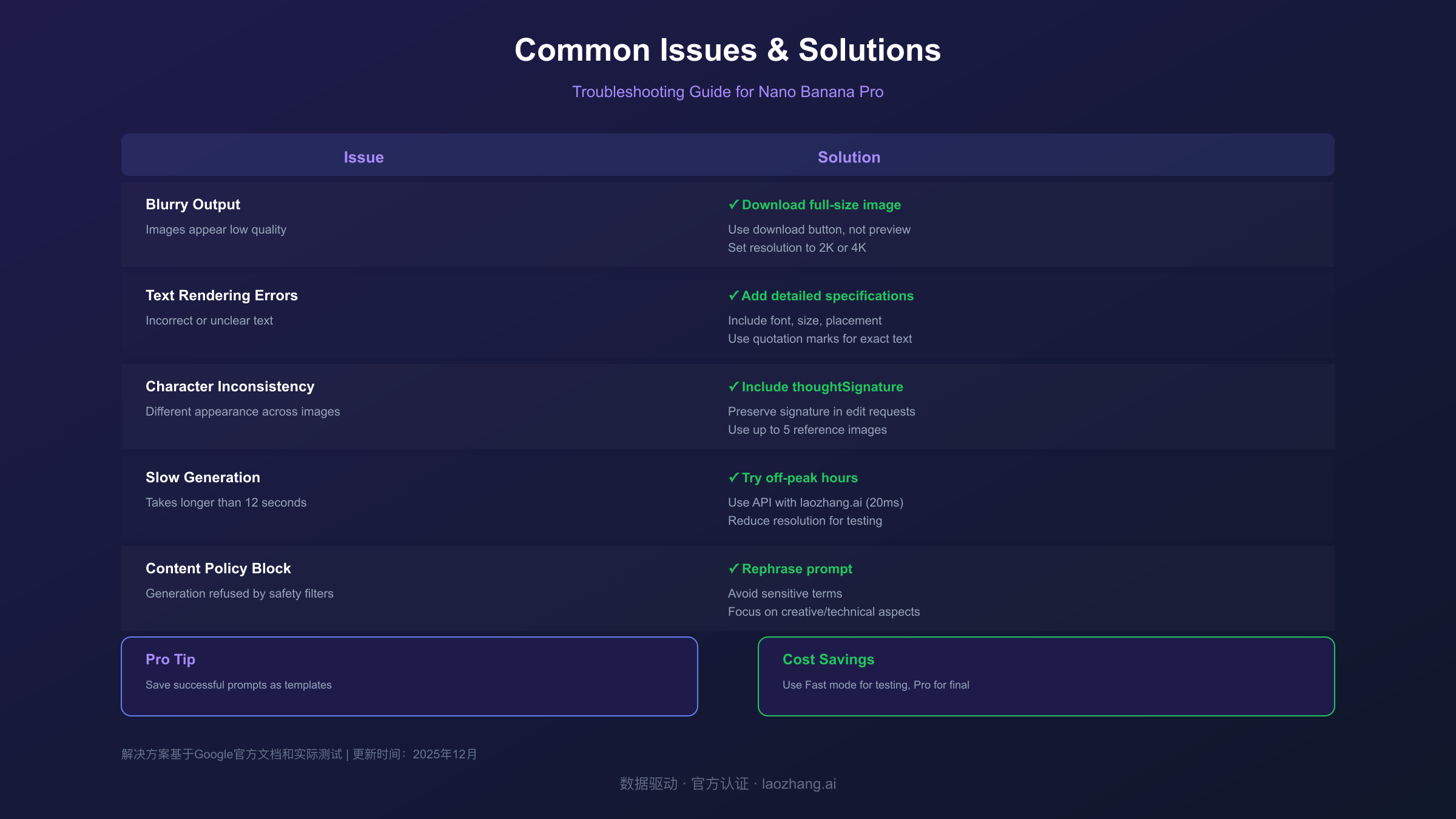
| Issue | Likely Cause | Solution |
|---|---|---|
| Blurry/Low-Quality Output | Viewing compressed preview | Download full-size image using download button |
| Text Rendering Errors | Insufficient text specifications | Add font, size, placement, and style details |
| Wrong Aspect Ratio | Default square output | Explicitly specify aspect ratio in prompt |
| Character Inconsistency | Missing thoughtSignature | Include previous signature in edit requests |
| Generation Refused | Content policy trigger | Rephrase to avoid sensitive terms |
| Very Slow Generation | Server congestion | Try off-peak hours or reduce resolution |
| "Model Not Found" Error | Wrong model name | Use gemini-3-pro-image-preview exactly |
Quality Degradation Solutions
When generated images appear lower quality than expected, the most common cause is viewing the compressed preview rather than the full-resolution output. The Gemini web interface displays smaller, compressed versions to optimize page loading. Hover over any generated image and click the download button (typically a downward arrow icon) to retrieve the full-quality file. This downloaded version reflects the actual 2K or 4K resolution you requested.
If downloads still show quality issues, examine your source materials. Low-resolution reference images (under 1080p) constrain output quality regardless of resolution settings. The model interpolates from your references, so starting with high-quality inputs produces dramatically better results. Additionally, verify you've selected the appropriate resolution setting—defaulting to "1K" during testing and forgetting to increase it for final production is a common oversight.
Access and Rate Limit Issues
Rate limiting manifests as slowed generation times, failed requests, or temporary access blocks. The Gemini API implements both per-minute and per-day rate limits that vary by subscription tier and current server load. When you encounter rate limits, the response typically includes a Retry-After header indicating when you can resume. Implementing exponential backoff in your code handles temporary rate limiting gracefully:
hljs pythonimport time
def generate_with_retry(prompt, max_retries=3):
for attempt in range(max_retries):
try:
response = client.models.generate_content(
model="gemini-3-pro-image-preview",
contents=prompt,
config=config
)
return response
except Exception as e:
if "rate limit" in str(e).lower():
wait_time = (2 ** attempt) * 10 # 10, 20, 40 seconds
time.sleep(wait_time)
else:
raise
raise Exception("Max retries exceeded")
Pricing and Cost Optimization
Understanding Nano Banana Pro's pricing structure enables budget planning and cost optimization for both individual projects and ongoing production workflows. For a detailed breakdown of all pricing tiers and cost calculations, see our comprehensive guide on Nano Banana Pro API pricing per image. The API uses a token-based pricing model where image inputs and outputs consume tokens at different rates than text. As of the current pricing documentation from Google AI for Developers, image costs vary significantly based on output resolution.
Official Pricing Breakdown
| Operation | Token Consumption | Approximate Cost |
|---|---|---|
| Image Input (per image) | 560 tokens | $0.0011 |
| Image Output 1K-2K | 1,120 tokens | $0.134 |
| Image Output 4K | ~2,000 tokens | $0.24 |
| Text Input (per 1M tokens) | - | $2.00 |
| Text Output (per 1M tokens) | - | $12.00 |
For production budgeting, the per-image cost of $0.134 to $0.24 compares favorably to hiring human designers but requires volume to justify API integration development. A project generating 1,000 images at 2K resolution costs approximately $134, while the same volume at 4K resolution runs approximately $240. These costs assume successful generations—failed attempts due to content policy triggers or errors still consume some tokens.
Cost Optimization Strategies
Several strategies reduce per-image costs without sacrificing quality. First, use the original Nano Banana model (Gemini 2.5 Flash at $0.039/image) for initial concept exploration, then switch to Nano Banana Pro only for final production versions. This hybrid approach can reduce exploration costs by 70% while maintaining quality where it matters. Second, generate at 2K resolution when 4K isn't specifically required—the quality difference is minimal for web usage, but the cost difference is substantial.
For developers seeking even lower costs, third-party API providers offer Nano Banana Pro access at reduced rates. Services like laozhang.ai provide the same API functionality at approximately $0.05 per image—roughly 60% savings compared to direct Google pricing. These providers aggregate demand and negotiate volume discounts, passing savings to individual developers. The tradeoff involves routing requests through an intermediary, which may affect latency or availability for some use cases. For cost-sensitive projects where official Google support isn't required, third-party access provides a practical alternative to direct API usage.
Nano Banana Pro vs Midjourney vs DALL-E 3
Choosing between leading AI image generators depends on your specific requirements for quality, speed, control, and cost. Each platform excels in different areas, and many professional workflows incorporate multiple tools rather than committing exclusively to one. This comparison focuses on current capabilities as of late 2025, though all platforms continue rapid development.
| Capability | Nano Banana Pro | Midjourney v7 | DALL-E 3 |
|---|---|---|---|
| Max Resolution | 4K (8MP) | 4K (upscaled) | 1024×1024 native |
| Text Rendering | Excellent | Good | Moderate |
| Speed | 8-12 seconds | 30+ seconds | 15-20 seconds |
| API Access | Full API | Limited API | Full API |
| Search Grounding | Yes | No | No |
| Reference Images | Up to 14 | Up to 5 | Limited |
| Character Consistency | 5 humans | 4 humans | Basic |
| Pricing (approx) | $0.134-0.24/image | $0.04/image* | $0.04-0.12/image |
*Midjourney pricing based on subscription tiers, not pure per-image cost
Nano Banana Pro leads in text rendering accuracy, resolution capabilities, and reference image handling. These strengths make it the clear choice for professional asset production requiring accurate typography, high print resolution, or complex multi-source composition. The search grounding feature provides unique advantages for factually-grounded content that other platforms simply cannot match.
Midjourney maintains advantages in aesthetic stylization, particularly for artistic and fantastical imagery where photorealism isn't the goal. The platform's community-trained aesthetic tendencies produce distinctively appealing results for certain creative styles. However, Midjourney's lack of robust API access limits its utility for automated workflows or application integration.
DALL-E 3 offers tight integration with ChatGPT and strong natural language understanding, making it excellent for casual users who prefer conversational interaction over technical prompting. However, its lower native resolution and moderate text rendering make it less suitable for professional production compared to Nano Banana Pro.
20 Ready-to-Use Prompts for Nano Banana Pro
The following prompts have been tested extensively with Nano Banana Pro and consistently produce high-quality results. For an even larger collection of optimized prompts, check out our dedicated guide on Nano Banana Pro best prompts. Customize these templates by modifying specific details while maintaining the structural elements that ensure clear model interpretation.
Portrait and Character Prompts
1. Professional Headshot:
Create a professional LinkedIn-style headshot of a confident
business professional in their 30s. They wear a navy blazer
over a white shirt. Soft studio lighting, neutral gray
background with subtle gradient. Sharp focus on eyes,
natural skin texture, 4K resolution.
2. Stylized Character Portrait:
Portrait of a cyberpunk street samurai with neon-lit face
tattoos and chrome optical implants. Rain-slicked hair,
leather jacket with holographic patches. Background shows
blurred neon signs in pink and blue. Cinematic lighting,
moody atmosphere.
Product Photography Prompts
3. Minimalist Product Shot:
Ultra-clean product photograph of wireless earbuds case
on pure white background. Matte white case with rose gold
hinge accent. Single soft shadow anchor. Studio lighting,
e-commerce style, sharp detail at 4K.
4. Lifestyle Product Context:
Luxury watch on weathered wooden surface with morning
coffee and leather-bound journal. Natural window light
from left, warm golden hour tones. Shallow depth of
field focusing on watch face. Editorial style.
Text and Logo Prompts
5. Modern Event Poster:
Event poster with bold headline "TECH SUMMIT 2025" in
condensed sans-serif, white on gradient blue to purple
background. Subtext "Innovation · Connection · Growth"
in thin weight. Abstract geometric shapes float behind
text. Clean, contemporary corporate style.
6. Vintage Typography:
Retro diner sign reading "BEST COFFEE IN TOWN" in
classic Americana neon style. Warm red tubes against
dark blue night sky. Subtle glow effect on letters.
1950s aesthetic, nostalgic mood.
Landscape and Environment Prompts
7. Dramatic Landscape:
Vast mountain landscape at golden hour with low clouds
threading between peaks. Alpine lake in foreground
reflecting orange sky. Lone hiker silhouette on ridge
for scale. National Geographic photography style,
epic composition.
8. Urban Architecture:
Modern glass skyscraper reflecting sunset clouds.
Strong geometric lines, brutalist concrete elements
at base. Blue hour lighting, city lights beginning
to glow. Architectural photography style with
tilt-shift sharpness.
Creative and Artistic Prompts
9. Surreal Composition:
Giant vintage radio floating in a sea of clouds,
broadcasting musical notes that transform into
colorful birds. Salvador Dali meets Studio Ghibli.
Warm lighting, dreamy atmosphere, highly detailed
whimsical illustration.
10. Abstract Art:
Abstract expressionist composition in the style of
Kandinsky. Bold primary colors, dynamic geometric
shapes, strong diagonal movement. Museum quality
fine art, suitable for gallery print.
For the complete collection of 20 prompts including food photography, fashion, interior design, and scientific illustration, see our companion article on Gemini AI Photo Prompts.
Frequently Asked Questions
Q1: Is Nano Banana Pro free to use?
Nano Banana Pro offers limited free access through the Gemini app, but with significant restrictions. Free tier users can generate approximately 3-10 images per day depending on server load, with the system automatically falling back to the standard Nano Banana model when quotas are reached. The free tier also includes visible watermarks on all outputs. For reliable, watermark-free access with higher daily limits, a Gemini Pro or Ultra subscription is required, costing approximately $20-30 per month. API access for developers requires a Google AI Studio account and incurs per-image costs of $0.134-$0.24 with no free tier currently available for the Pro model.
Q2: What's the difference between Thinking and Fast mode in Gemini?
The mode selection in the Gemini app determines which underlying model processes your request. "Fast" mode uses Nano Banana (Gemini 2.5 Flash Image), optimized for speed at approximately 3 seconds per generation with lower resolution output around 1MP. "Thinking" mode activates Nano Banana Pro (Gemini 3 Pro Image), which takes 8-12 seconds but produces up to 4K resolution with superior text rendering and advanced features like search grounding. Always select "Thinking" when you need professional-quality outputs, accurate text, or high-resolution images. Use "Fast" for quick drafts and creative exploration where speed matters more than final quality.
Q3: How do I remove the watermark from Nano Banana Pro images?
All images generated by Nano Banana Pro include a SynthID watermark, which is an invisible digital signature embedded in the image data rather than a visible overlay. This watermark persists through most image editing operations and cannot be removed through cropping or filtering. The purpose is to enable detection of AI-generated content for authenticity verification. For professional use requiring unmarked images, you must use the paid API tier and agree to Google's terms regarding disclosure of AI-generated content. Note that attempting to remove or circumvent the watermark may violate Google's terms of service.
Q4: Can I use Nano Banana Pro images for commercial projects?
Yes, images generated through Nano Banana Pro can be used for commercial purposes, subject to Google's terms of service and usage policies. You retain usage rights to images you create with your own prompts, but cannot claim copyright over AI-generated content in many jurisdictions. Commercial usage requires ensuring your prompts don't infringe on existing trademarks or copyrights, and that generated content complies with applicable advertising and disclosure regulations. Some industries have specific requirements for disclosing AI-generated content in marketing materials. Review the Gemini API Terms of Service for complete details on commercial usage rights and restrictions.
Q5: Why are my Nano Banana Pro images blurry or low quality?
Blurry outputs typically result from one of three causes. First, you may be viewing the compressed web preview rather than the full-resolution file—always download images using the download button to get actual quality. Second, your output resolution setting may be configured to "1K" rather than "2K" or "4K"—verify your generation settings in the API configuration or app preferences. Third, low-quality reference images (under 1080p) constrain output quality regardless of settings—the model interpolates from your inputs, so higher-quality references produce better results. If issues persist after addressing these factors, try generating during off-peak hours when server load is lower, as high demand can occasionally affect processing quality.
Conclusion
Nano Banana Pro represents a genuine leap forward in AI image generation, combining the reasoning capabilities of Gemini 3 Pro with specialized image synthesis optimized for professional production. The ability to accurately render text, maintain character consistency across images, and ground outputs in real-world knowledge through search integration creates possibilities that previous AI image tools couldn't achieve. Whether you're creating marketing assets, developing applications with AI-generated visuals, or exploring creative directions, mastering Nano Banana Pro's capabilities positions you at the forefront of generative AI applications.
The workflow fundamentals covered in this guide—from basic access and first-image generation through advanced techniques like thoughtSignature handling and search grounding—provide the foundation for increasingly sophisticated usage. As you develop familiarity with the model's strengths and limitations, you'll discover prompt patterns and techniques specific to your creative needs that extend beyond any tutorial's scope. The key is consistent practice with intentional experimentation, treating each generation as both a creative output and a learning opportunity.
For developers building applications that require reliable, high-volume image generation, the API approach offers the control and scalability that consumer interfaces cannot provide. Whether accessing directly through Google's API at standard pricing or through cost-optimized providers like laozhang.ai for budget-conscious projects, programmatic access unlocks Nano Banana Pro's full potential for production workflows. Start with the code examples provided, customize for your specific use case, and scale confidently knowing the underlying model represents the current state of the art in AI image generation.