Nano Banana Pro Pricing & Subscription Plans 2025: Complete Guide to Every Tier (Free to Ultra) + 79% Savings
Complete breakdown of Nano Banana Pro pricing across all tiers—from free to $249.99/month Ultra. Learn API costs ($0.134-$0.24/image), subscription comparisons, and proven strategies to save up to 79%.
Nano Banana Pro
4K-80%Google Gemini 3 Pro · AI Inpainting
谷歌原生模型 · AI智能修图

Navigating Nano Banana Pro pricing can feel overwhelming when you encounter multiple subscription tiers, API token calculations, resolution-based costs, and third-party alternatives all claiming different price points. The official Google documentation spreads pricing information across Gemini API docs, Vertex AI pages, and subscription tier comparisons—making it difficult to understand what you will actually pay for the image generation capabilities you need.
This guide consolidates every Nano Banana Pro subscription plan and pricing option into one comprehensive resource. Whether you are a developer calculating API costs for a production application, a content creator comparing monthly subscriptions, or a business decision-maker evaluating ROI, you will find verified pricing data from official sources alongside practical cost-saving strategies that can reduce your expenses by up to 79%. The pricing landscape changed significantly in late 2025 when Google reduced the free tier from 3 to 2 daily generations and introduced new subscription tiers—this guide reflects those current realities rather than outdated information still circulating online.
By the end of this article, you will understand exactly how much Nano Banana Pro costs across every access method, which tier matches your usage pattern, and how to optimize your spending whether you generate 10 images per month or 10,000.
What is Nano Banana Pro and Why Pricing Varies
Nano Banana Pro (officially Gemini 3 Pro Image) represents Google DeepMind's most advanced image generation model, launched in November 2025 as the successor to the original Nano Banana. Understanding why its pricing structure is more complex than competitors like DALL-E or Midjourney requires understanding what differentiates this model technically and commercially.
The model generates images at resolutions up to 4K (4096×4096 pixels)—the highest native resolution among current AI image generators. This capability comes from direct pixel generation through the diffusion model rather than post-generation upscaling, which explains why 4K images cost significantly more than 1K or 2K outputs. According to Google's official announcement, Nano Banana Pro achieves 94% text rendering accuracy compared to approximately 70% for DALL-E 3 and 82% for the latest Stable Diffusion models, making it particularly valuable for infographics, marketing materials, and any use case requiring readable text within generated images.
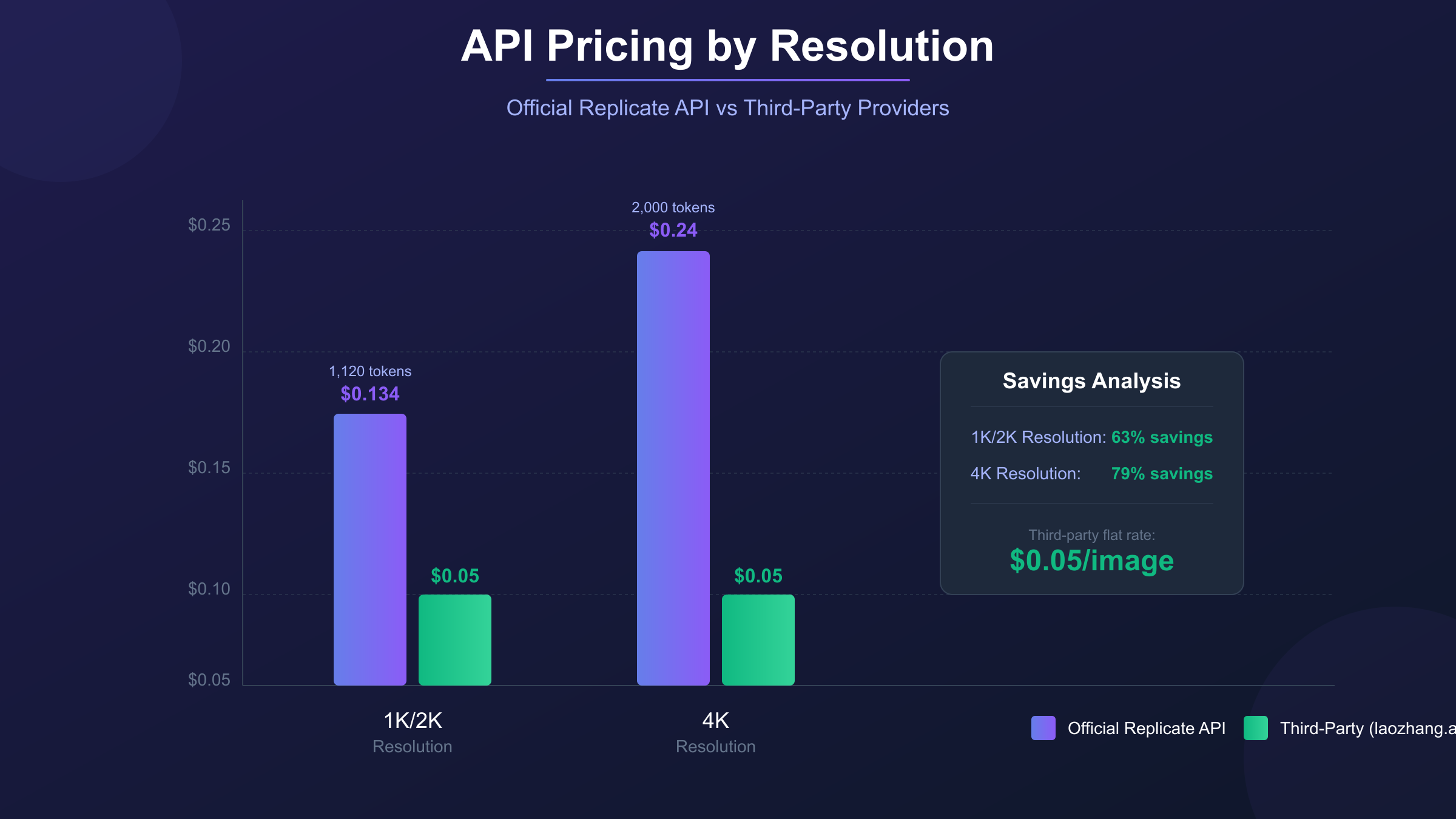
Pricing varies based on three primary factors: access method (consumer subscription versus API), resolution tier (1K/2K versus 4K), and processing priority (standard versus batch). Consumer subscriptions bundle Nano Banana Pro with other Google AI features at fixed monthly rates, while API access charges per image based on the output tokens consumed. A single 4K image requires approximately 2,000 output tokens at $120 per million tokens, translating to $0.24 per image—nearly double the $0.134 cost for 1K/2K images that consume only 1,120 tokens.
This token-based pricing model means developers and enterprises can precisely calculate costs based on their resolution requirements, while casual users benefit from predictable monthly subscription fees regardless of output resolution.
Official Google Subscription Tiers Explained
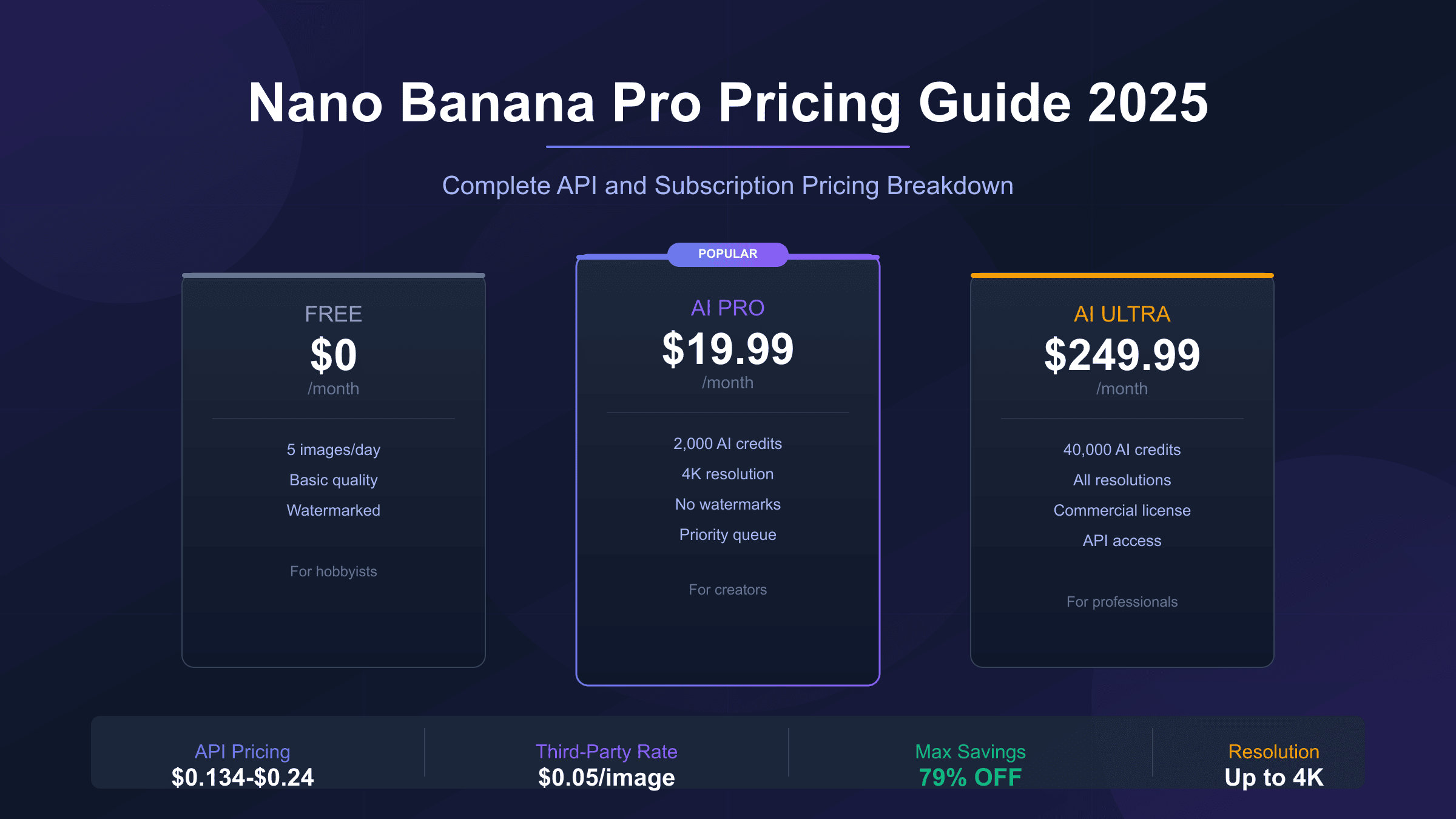
Google offers Nano Banana Pro through three primary subscription tiers, each designed for different usage intensities and feature requirements. Understanding these tiers requires looking beyond the headline prices to examine daily limits, resolution access, watermark policies, and bundled features.
| Feature | Free Tier | Google AI Pro | Google AI Ultra |
|---|---|---|---|
| Monthly Price | $0 | $19.99 | $249.99 |
| Daily Image Limit | 2 images | ~100 images | ~1,000 images |
| Maximum Resolution | 1 MP (1024×1024) | Up to 4K | Up to 4K |
| Visible Watermark | Yes (Gemini sparkle) | Yes (Gemini sparkle) | No (SynthID only) |
| Processing Priority | Lowest | Standard | Highest |
| Advanced Features | Basic generation | Localized editing, blending | Full studio controls |
| Commercial License | No | Limited | Full commercial rights |
The Free Tier provides the most restricted access, limited to 2 generations per day at 1-megapixel resolution (approximately 1024×1024 pixels). Google reduced this from 3 daily generations in November 2025 to manage GPU demand during peak periods. All free-tier images include a visible Gemini sparkle watermark that cannot be removed, and failed generations—including those blocked by safety filters—count against your daily quota. The quota resets at midnight Pacific Time with no rollover for unused generations.
Google AI Pro at $19.99/month represents the most popular option for regular creators, offering approximately 100 daily generations at resolutions up to 4K. This tier unlocks advanced features including localized editing, multi-image blending with up to 14 reference images, and sophisticated color grading controls. The visible watermark remains on Pro-tier images, which limits commercial use cases where brand presentation matters. For users previously subscribed to Google One AI Premium, this tier represents a direct continuation under the rebranded Google AI Pro naming.
Google AI Ultra at $249.99/month targets professionals and agencies requiring the highest output volumes and quality. The approximately 1,000 daily generation limit accommodates heavy production workflows, while the removal of visible watermarks (replaced by invisible SynthID digital watermarks only) enables seamless commercial deployment. Ultra subscribers also receive highest processing priority, meaning faster generation times during peak demand periods, and access to experimental features before general availability.
For most individual creators and small teams, the $19.99 Pro tier delivers the best value—100 daily 4K images translates to roughly $0.20 per image, significantly cheaper than API access for typical usage volumes.
Free Tier Deep Dive: What You Actually Get
The Nano Banana Pro free tier attracts many users exploring AI image generation, but understanding its precise limitations prevents frustration and helps you decide whether upgrading makes sense for your use case. Based on extensive testing and community feedback, here is what the free tier actually provides versus what the marketing suggests.
Your daily allocation consists of exactly 2 image generations, reset at midnight Pacific Time (UTC-8). This represents a reduction from the previous 3-image limit implemented in November 2025. Critically, any generation attempt counts against this quota—whether successful, failed due to safety filters, or errored due to technical issues. If your prompt triggers content moderation or the system experiences an outage mid-generation, you still lose one of your precious daily attempts. There is no accumulation mechanism: generating 0 images today does not give you 4 tomorrow.
Resolution caps at 1 megapixel, which practically means outputs around 1024×1024 pixels. You cannot request 2K or 4K resolution on the free tier regardless of prompt specifications. All outputs include the visible Gemini sparkle watermark embedded in the image, which cannot be removed through editing without obvious artifacts. Additionally, every free-tier image contains invisible SynthID metadata that can identify it as AI-generated—though this invisible watermark exists on all tiers.
Feature access on the free tier excludes several capabilities that define Nano Banana Pro's competitive advantages. You cannot use multi-image reference blending (combining up to 14 input images), advanced localized editing, or the sophisticated lighting and camera controls available to paid subscribers. The text rendering capability exists but at lower accuracy than paid tiers due to reduced computational allocation.
When your daily quota depletes, the system may silently fall back to the standard Nano Banana model (Gemini 2.5 Flash Image) rather than the Pro version, without explicit notification. This fallback produces noticeably lower quality outputs, particularly for complex scenes and text rendering.
For users needing more than 60 images monthly, the math clearly favors the $19.99 Pro subscription. At free-tier rates of 2 images daily, you generate approximately 60 images monthly—the same volume costs just $8.04 at Pro-tier effective rates ($0.134 × 60) while gaining access to 4K resolution, advanced features, and higher daily limits. Learn more about Gemini API free tier limits for developer-focused options.
API Pricing Breakdown for Developers
Developers accessing Nano Banana Pro through the Gemini API encounter a fundamentally different pricing structure than consumer subscriptions. Rather than daily limits, API pricing operates on a per-image basis calculated from output token consumption. Understanding this token-based model enables precise cost forecasting for production applications.
According to Google's official API pricing documentation, Nano Banana Pro (model ID: gemini-3-pro-image-preview) charges $120 per million output tokens for image generation. The practical per-image cost depends entirely on output resolution:
| Resolution | Dimensions | Output Tokens | Cost Per Image |
|---|---|---|---|
| 1K | 1024×1024 | 1,120 tokens | $0.134 |
| 2K | 2048×2048 | 1,120 tokens | $0.134 |
| 4K | 4096×4096 | 2,000 tokens | $0.24 |
The token calculation reveals an important optimization: 1K and 2K images cost exactly the same because they consume identical token counts. For web-optimized content where 2K resolution suffices, you receive double the pixel density at no additional cost compared to 1K outputs. Only 4K generation incurs the premium pricing due to its 2,000-token requirement.
Text prompts incur separate charges at $2.00 per million input tokens, but this cost remains negligible in practice. A typical 100-token prompt costs $0.0002, adding less than 0.2% to your per-image expense. Reference image inputs for style transfer or editing cost approximately $0.0011 per image regardless of resolution.
The following diagram illustrates how resolution choices impact monthly costs at different usage volumes:
For production implementations, here is how official API integration looks:
hljs pythonimport google.generativeai as genai
# Official Gemini API - Standard Pricing
# Cost: $0.134/image (1K-2K) or $0.24/image (4K)
# Docs: https://ai.google.dev/gemini-api/docs/pricing
genai.configure(api_key="YOUR_GOOGLE_API_KEY")
model = genai.GenerativeModel("gemini-3-pro-image-preview")
response = model.generate_content(
contents=[{"text": "A professional product photo of wireless headphones on white background, 4K quality"}],
generation_config={
"response_modalities": ["IMAGE"],
"image_config": {
"aspect_ratio": "1:1",
"image_size": "2K" # Use 2K instead of 4K to save 44%
}
}
)
# Extract base64 image data
image_data = response.candidates[0].content.parts[0].inline_data.data
# Per-image cost: $0.134 at 2K resolution
Google's Batch API offers a compelling 50% discount for workloads that can tolerate up to 24-hour processing delays. Batch pricing reduces 4K images to $0.12 each and 1K/2K images to $0.067. This makes batch processing ideal for catalog generation, content pipelines, and any scenario where real-time results are not required. For comprehensive API setup guidance, see our Nano Banana Pro API guide.
Hidden Costs You Need to Know
Beyond headline per-image pricing, several additional cost factors affect your total Nano Banana Pro expenditure. Understanding these hidden costs prevents budget surprises and enables more accurate financial planning for image generation projects.
Computation scaling by prompt complexity represents the most significant hidden cost. While official pricing assumes standard prompts, certain request types consume additional GPU resources that Google may throttle or charge premium rates for during high-demand periods. Requests involving multilingual text rendering, consistent character faces across multiple generations, complex infographic layouts, or reference image processing with 10+ input images trigger higher computational loads. During testing, complex prompts occasionally experience queue delays of 30-60 seconds compared to 3-5 seconds for standard requests, effectively reducing throughput for time-sensitive applications.
Reference image costs add up quickly for style transfer and editing workflows. Each reference image uploaded costs approximately $0.0011 regardless of resolution, but workflows frequently requiring 5-10 reference images per generation add $0.005-$0.011 to each output. For high-volume editing operations using Nano Banana Pro's multi-image blending capabilities (up to 14 reference images), this overhead reaches $0.015 per generation before accounting for output costs.
Failed generation charges catch many developers by surprise. API requests that fail due to content policy violations, malformed prompts, or safety filter triggers still consume partial token allocations and may incur charges. While Google does not publish exact rates for failed requests, community testing suggests approximately 20-30% of the standard rate applies to blocked generations. Robust prompt validation before API submission reduces this waste.
Rate limit overage impacts high-volume applications. The standard API tier allows 1,000 requests per minute, but exceeding this triggers automatic throttling rather than rejection. Applications designed around maximum throughput may need to implement backoff strategies or upgrade to enterprise tiers with higher limits, adding implicit costs to capacity planning.
Storage and transfer costs through Google Cloud Platform apply to Vertex AI integrations. While Gemini API standalone access avoids these, enterprise deployments routing through Vertex AI incur standard GCP storage and bandwidth charges for generated images, evaluation pipelines, and model tuning experiments.
Accounting for these factors, realistic budgeting should add 15-25% to base per-image calculations for typical production workloads.
Competitor Pricing Comparison
Evaluating Nano Banana Pro's value requires comparing its pricing against alternative AI image generators. Each platform uses different pricing models—per-image, subscription-based, or hybrid—making direct comparisons challenging without normalization.
| Model | Pricing Model | Standard Cost | 4K/HD Cost | Text Accuracy | Best For |
|---|---|---|---|---|---|
| Nano Banana Pro | Per-image API | $0.134/image | $0.24/image | 94% | Photorealism, text rendering |
| DALL-E 3 | Per-image API | $0.04/image | $0.08/image (HD) | ~70% | Creative compositions |
| GPT Image 1 | Per-image API | $0.04/image | $0.17/image | ~85% | ChatGPT integration |
| Midjourney | Subscription | ~$0.06-0.60/image | N/A (limited) | ~71% | Artistic styles |
| Imagen 4 | Per-image API | $0.06/image | $0.08/image | ~60% | Speed, volume |
DALL-E 3 emerges as the cost winner for standard usage at $0.04 per image—nearly 70% cheaper than Nano Banana Pro's $0.134 rate. However, DALL-E 3's maximum resolution caps at 1792×1024 pixels (approximately 1.8 MP) compared to Nano Banana Pro's native 4K (16 MP). For applications where text rendering accuracy matters—infographics, marketing materials, educational content—Nano Banana Pro's 94% accuracy versus DALL-E 3's ~70% justifies the premium for many use cases.
Midjourney operates on a fundamentally different subscription model. The $30/month Pro tier provides 30 "fast hours" of GPU time, translating to roughly 900-1,800 images depending on complexity settings. This yields an effective cost of $0.017-0.033 per image for heavy users—significantly cheaper than Nano Banana Pro API rates. However, Midjourney's unlimited "relax mode" (slower processing) for Pro+ subscribers ($60/month) enables even lower per-image costs for patient users. The trade-off: Midjourney V7 consumes 2× the GPU time of V6, effectively halving your generation allocation for the newest model.
Imagen 4 from Google offers a budget alternative at $0.06 per image, but with substantially lower text rendering accuracy (~60%) and more limited style capabilities. For volume workloads where photorealism matters less than throughput, Imagen 4 provides a middle ground.
The pricing hierarchy becomes clearer when considering specific use cases: DALL-E 3 wins on cost for creative and conceptual work; Midjourney dominates for artistic styles and heavy volume; Nano Banana Pro justifies its premium for professional commercial work requiring text accuracy, photorealistic quality, and 4K resolution.
Third-Party API Alternatives: Achieving 79% Savings
Beyond official Google pricing, third-party API providers offer Nano Banana Pro access at dramatically reduced rates. These services function as infrastructure aggregators, achieving lower per-image costs through volume purchasing agreements and optimized routing—savings they pass to developers.
The most established third-party option provides access at $0.05 per image regardless of resolution, representing 63% savings versus Google's $0.134 standard rate and 79% savings versus the $0.24 4K rate. This flat-rate model eliminates resolution-based pricing complexity while delivering the same underlying Gemini 3 Pro Image model capabilities.
| Comparison | Official Google API | Third-Party (laozhang.ai) | Savings |
|---|---|---|---|
| 1K/2K per image | $0.134 | $0.05 | 63% |
| 4K per image | $0.24 | $0.05 | 79% |
| 1,000 images/month | $134-240 | $50 | $84-190 |
| 10,000 images/month | $1,340-2,400 | $500 | $840-1,900 |
| Annual (10K/month) | $16,080-28,800 | $6,000 | $10,080-22,800 |
For production implementations, laozhang.ai offers both Gemini-native and OpenAI-compatible API formats. The native format enables full 4K parameter configuration:
hljs pythonimport requests
import base64
# Third-Party API - 79% Savings vs Official
# Cost: $0.05/image (all resolutions)
# Supports native Gemini format with full 4K parameters
API_KEY = "sk-your-laozhang-api-key"
API_URL = "https://api.laozhang.ai/v1beta/models/gemini-3-pro-image-preview:generateContent"
headers = {
"Authorization": f"Bearer {API_KEY}",
"Content-Type": "application/json"
}
payload = {
"contents": [{
"parts": [{"text": "Professional headshot of a business executive, photorealistic, 4K quality"}]
}],
"generationConfig": {
"responseModalities": ["IMAGE"],
"imageConfig": {
"aspectRatio": "1:1",
"imageSize": "4K" # Full 4K at $0.05, same as 1K
}
}
}
response = requests.post(API_URL, headers=headers, json=payload, timeout=180)
result = response.json()
# Extract and save image
image_data = result["candidates"][0]["content"]["parts"][0]["inlineData"]["data"]
with open("output.png", "wb") as f:
f.write(base64.b64decode(image_data))
# Total cost: $0.05 (vs $0.24 official for 4K)
Trade-offs to consider: Third-party providers may experience occasional latency variability during peak demand periods, whereas Google's official API includes guaranteed uptime SLAs. For enterprise deployments with strict compliance requirements or needing direct technical support from Google, the official API remains the appropriate choice despite higher costs. Third-party services suit developers and teams prioritizing cost optimization over enterprise support guarantees.
You can test image quality before committing at images.laozhang.ai to verify output meets your standards. For detailed API integration patterns, see our Nano Banana Pro API guide.
6 Proven Money-Saving Strategies
Beyond choosing the right pricing tier, specific optimization strategies can compound your savings significantly. These techniques work whether you use official Google APIs or third-party alternatives.
Strategy 1: API Relay Services (60-79% savings) Third-party API providers offer the largest single cost reduction. At $0.05 per image versus Google's $0.134-0.24 rates, high-volume users save thousands annually. A project generating 5,000 images monthly spends $250 through third-party access versus $670-1,200 officially—annual savings of $5,040-11,400. This strategy suits developers and teams without enterprise compliance requirements.
Strategy 2: Batch API Processing (50% savings) Google's official Batch API reduces costs by exactly 50% for workloads accepting 24-hour processing delays. At $0.067 for 1K/2K images and $0.12 for 4K, batch processing suits content pipelines, catalog generation, and scheduled publishing workflows. Combine with prompt queuing systems to maximize batch efficiency.
Strategy 3: Resolution Optimization (44% savings) Since 1K and 2K images cost identically ($0.134), always request 2K when possible—you receive 4× the pixels at no additional cost. Reserve 4K ($0.24) exclusively for print materials, hero images, and large-format displays. For web content, 2K resolution exceeds most display requirements while saving 44% versus 4K.
Strategy 4: Intelligent Caching (60-80% savings) Implement prompt-based caching to avoid regenerating similar images. Hash your prompts and store outputs in a CDN or object storage. For product catalogs, marketing templates, and recurring image types, caching eliminates redundant API calls entirely. A robust caching layer typically reduces API spend by 60-80% for applications with repetitive generation patterns.
Strategy 5: Prompt Optimization (30-40% savings) Well-crafted prompts succeed on the first attempt more frequently, reducing wasted generations. Test prompts with free-tier access before production deployment. Avoid safety filter triggers by reviewing Google's content policies. First-try success rate improvements from 70% to 95% effectively reduce per-usable-image costs by 35%.
Strategy 6: Hybrid Tier Strategy (Variable savings) Combine multiple access methods based on urgency and volume. Use subscription tiers for daily creative work, batch API for bulk processing, and third-party access for overflow demand. This tiered approach optimizes cost-per-image across different usage patterns.
Combined strategy example: A design agency generating 10,000 images monthly might use Google AI Pro subscription (100/day, ~3,000/month) for time-sensitive work at ~$0.20/image effective, batch API for 4,000 scheduled generations at $0.067/image, and third-party relay for 3,000 overflow images at $0.05/image. Blended cost: approximately $0.10/image versus $0.134+ using any single method—25% additional savings through strategic tier allocation.
Which Tier is Right for You? Decision Guide
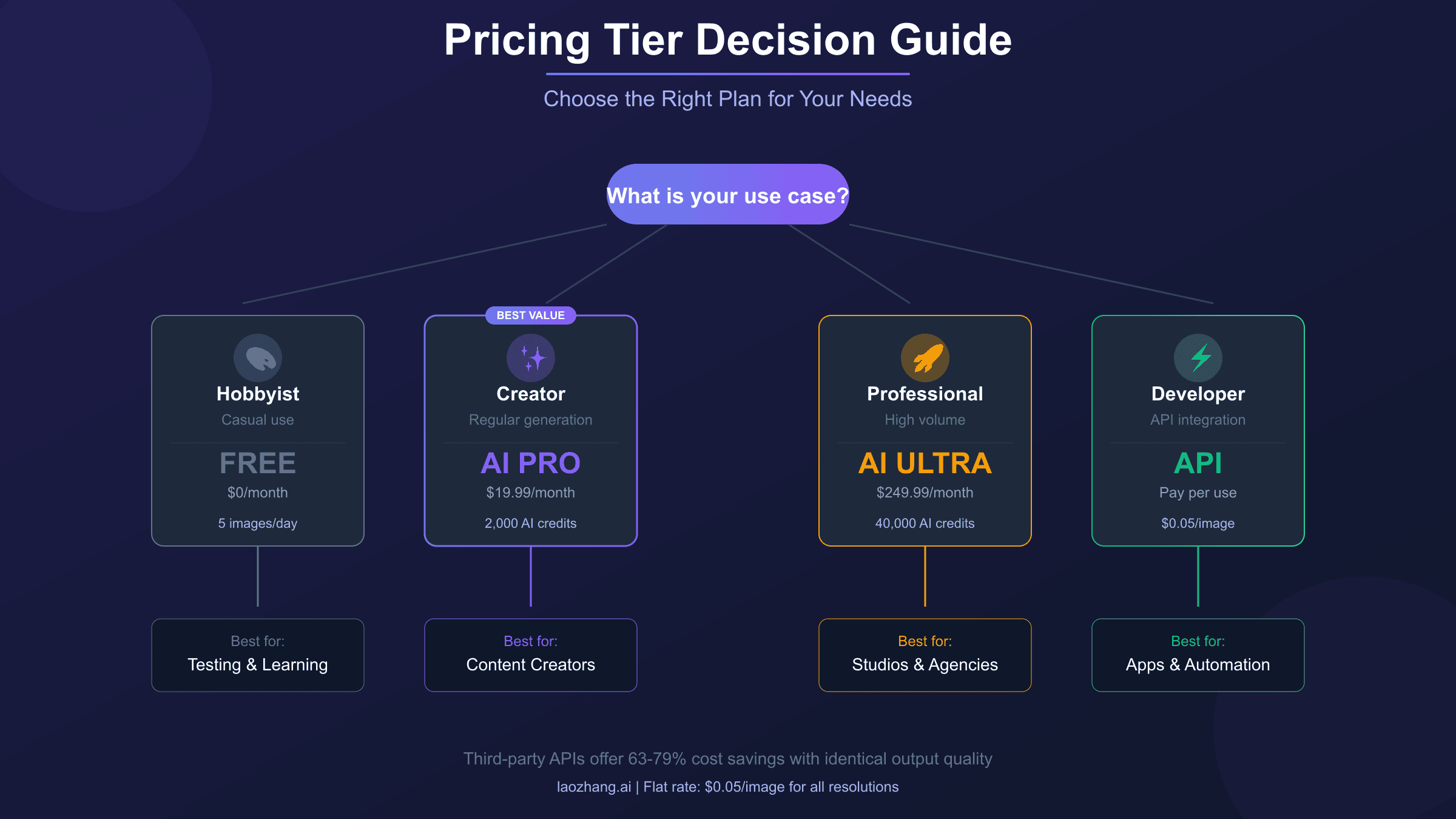
Selecting the optimal Nano Banana Pro pricing tier depends on your generation volume, quality requirements, and workflow constraints. The following framework matches user personas to recommended access methods.
| User Profile | Monthly Volume | Key Requirements | Recommended Tier | Estimated Cost |
|---|---|---|---|---|
| Hobbyist/Student | 1-60 images | Basic exploration, learning | Free Tier | $0 |
| Content Creator | 60-500 images | Social media, blog images | Google AI Pro | $19.99/month |
| Professional Designer | 500-3,000 images | Commercial work, no watermarks | Google AI Ultra | $249.99/month |
| Developer (Light) | 100-1,000 images | App integration, testing | Official API | $13-134/month |
| Developer (Heavy) | 1,000-10,000 images | Production applications | Third-Party API | $50-500/month |
| Enterprise | 10,000+ images | SLA requirements, support | Vertex AI Enterprise | Custom pricing |
Choose Free Tier if: You generate fewer than 60 images monthly, watermarks are acceptable, and you prioritize zero cost over features. The 2 daily limit suffices for casual exploration and prompt testing.
Choose Google AI Pro ($19.99/month) if: You need 100+ daily generations at 4K resolution with advanced editing features. This tier offers the best value for regular creators who accept visible watermarks. At 3,000 monthly images, effective cost drops to $0.007/image—cheaper than any API option.
Choose Google AI Ultra ($249.99/month) if: You require watermark-free commercial outputs, highest processing priority, and maximum daily limits (1,000+ images). The effective per-image cost of ~$0.25 suits agencies and professionals where visible watermarks are unacceptable.
Choose Official API if: You need programmatic access, variable volume control, or integration with existing developer workflows. Best for 100-1,000 monthly images where subscription limits feel constraining but enterprise features are unnecessary.
Choose Third-Party API if: Cost optimization is primary and you can accept potential latency variability. Developers generating 1,000+ monthly images save significantly—$1,340 official versus $500 third-party for 10,000 images.
When to use official Google API despite higher costs: Enterprise compliance requirements, need for Google technical support, guaranteed SLA uptime requirements, or organizational policies restricting third-party data processing.
How to Access Nano Banana Pro
Accessing Nano Banana Pro varies depending on your chosen pricing tier. Here are the specific pathways for each access method, with direct links and setup requirements.
Consumer Access via Gemini App The simplest access method uses the Gemini app at gemini.google.com. After signing in with your Google account, initiate an image generation request and select "Thinking with 3 Pro" in the model selector (bottom-right of the input box). Free users receive 2 daily generations; subscribers to Google AI Pro or Ultra access higher limits automatically. No API keys or developer setup required.
Developer Access via Google AI Studio
For API integration, start at Google AI Studio. Create a project, enable billing (even for free-tier API access), and generate an API key. The free API tier provides 500 requests daily—significantly more generous than the 2-image consumer limit. Install the Python SDK with pip install google-generativeai and configure your key to begin programmatic generation. Detailed setup instructions appear in our API documentation guide.
Enterprise Access via Vertex AI Organizations requiring enterprise controls, consolidated GCP billing, and custom licensing access Nano Banana Pro through Vertex AI. This pathway adds compliance certifications, audit logging, and dedicated support unavailable through consumer or standard API tiers. Contact Google Cloud sales for custom pricing based on projected volumes.
Third-Party Platform Access Alternative platforms provide Nano Banana Pro at reduced rates through aggregated API access. Registration at laozhang.ai takes approximately 2 minutes, after which you receive an API key compatible with both Gemini-native and OpenAI-format requests. No Google Cloud account or billing setup required—usage is prepaid through the platform's credit system.
Integrated Platform Access Several creative tools bundle Nano Banana Pro access within their subscriptions. Adobe Creative Cloud subscribers can access Nano Banana Pro through a Photoshop plugin (currently available through late 2025). Platforms like ImagineArt, GlobalGPT, and others offer multi-model access including Nano Banana Pro as part of their subscription packages—often at lower effective per-image costs than direct API access.
For users in regions with access restrictions, our Nano Banana Pro access guide provides detailed workarounds and alternative access methods.
Frequently Asked Questions
How much does Nano Banana Pro cost per image?
Official API pricing is $0.134 per image for 1K/2K resolution and $0.24 per image for 4K resolution, based on token consumption at $120 per million output tokens. Subscription tiers offer different effective per-image costs: Google AI Pro at $19.99/month translates to approximately $0.20/image at 100 daily generations, while Google AI Ultra at $249.99/month reduces to ~$0.25/image at 1,000 daily generations. Third-party API providers offer rates as low as $0.05/image regardless of resolution—a 63-79% savings versus official pricing.
Is the Nano Banana Pro free tier worth using?
The free tier suits casual exploration and prompt testing but has significant limitations: only 2 generations daily (reduced from 3 in November 2025), capped at 1-megapixel resolution, includes visible watermarks, and failed generations count against your quota. For users needing more than 60 images monthly or requiring 4K resolution, upgrading to Google AI Pro ($19.99/month) or using API access provides substantially better value. The free API tier offers 500 daily requests—far more generous than consumer free tier limits.
Can I remove watermarks from Nano Banana Pro images?
Visible Gemini sparkle watermarks appear on Free and Google AI Pro tier images and cannot be legitimately removed. Only Google AI Ultra subscribers ($249.99/month) and API/AI Studio users receive watermark-free outputs. All Nano Banana Pro images include invisible SynthID digital watermarks for AI-generated content identification—this metadata persists across all tiers and cannot be removed, though it does not affect visual appearance.
What is the cheapest way to access Nano Banana Pro at scale?
For high-volume usage (1,000+ images monthly), third-party API providers offer the lowest per-image costs at approximately $0.05/image regardless of resolution. This represents 79% savings versus official 4K API pricing ($0.24). For moderate volumes (100-500 monthly), Google's Batch API at 50% discount ($0.067-0.12/image) provides an official alternative with acceptable 24-hour processing delays. Google AI Pro subscription remains most economical only if you consistently use near the 100 daily generation limit.
How does Nano Banana Pro pricing compare to Midjourney?
Midjourney operates on subscription-based pricing ($10-60/month) rather than per-image charges. At the $30/month Pro tier, heavy users achieve effective costs of $0.02-0.03/image—significantly cheaper than Nano Banana Pro API rates. However, Midjourney caps at approximately 1024×1024 resolution, offers ~71% text accuracy versus Nano Banana Pro's 94%, and provides less control over photorealistic outputs. For artistic styles and high volume, Midjourney wins on cost; for commercial photography, text-heavy content, and 4K requirements, Nano Banana Pro justifies its premium.
Does Google offer discounts for Nano Banana Pro?
Google provides several discount pathways: the Batch API offers 50% off for asynchronous processing, new Google Cloud Platform accounts receive $300 in free credits (approximately 2,240 images at standard rates), and occasional promotional pricing during product launches. No published volume discounts exist for standard API access, though enterprise customers negotiating through Google Cloud sales may secure custom pricing based on committed volumes.
Conclusion
Nano Banana Pro pricing spans a wide range depending on how you access the model—from completely free (2 images/day at 1MP) through $249.99/month subscriptions and variable API rates from $0.05 to $0.24 per image. The key to optimizing your costs lies in matching access method to usage pattern rather than defaulting to a single tier.
For casual users exploring AI image generation, the free tier provides sufficient access despite its 2-image daily limit. Content creators generating dozens to hundreds of images monthly find best value in Google AI Pro at $19.99/month. Professional designers and agencies requiring watermark-free commercial outputs should consider Google AI Ultra or direct API access. Developers and businesses with high-volume requirements achieve maximum savings through third-party API providers at $0.05/image—representing up to 79% reduction versus official rates.
The most effective strategy combines multiple access methods: subscriptions for predictable daily workflows, batch API for scheduled bulk processing, and third-party access for cost-sensitive overflow. This hybrid approach optimizes cost-per-image across different usage patterns while maintaining access to Nano Banana Pro's industry-leading 4K resolution and 94% text rendering accuracy.
Whatever tier you choose, understanding the full pricing landscape—including hidden costs like computation scaling, reference image charges, and failed generation fees—enables accurate budgeting and informed decisions. For ongoing API cost optimization techniques, explore our complete Nano Banana Pro API guide.