Nano Banana Pro Quotas and Limits: Free vs Paid Tiers Explained (2025)
Complete guide to Nano Banana Pro quotas: free tier (2 images/day), paid plans (100-1000/day), API pricing ($0.05-$0.24/image), and rate limits (RPM/TPM/RPD). Updated December 2025.
Nano Banana Pro
4K-80%Google Gemini 3 Pro · AI Inpainting
谷歌原生模型 · AI智能修图

Understanding Nano Banana Pro's quota system is essential for any developer planning to integrate this powerful image generation API into their workflow. With Google's tiered approach ranging from completely free access to enterprise-grade paid plans, the pricing structure can seem complex at first glance. However, once you understand the four main quota dimensions—requests per minute (RPM), tokens per minute (TPM), requests per day (RPD), and images per minute (IPM)—selecting the right tier becomes straightforward.
This guide provides a comprehensive breakdown of every quota and limit across all Nano Banana Pro tiers, helping you make an informed decision based on your actual usage requirements. Whether you're experimenting with AI image generation for a personal project or building a commercial application that needs thousands of images daily, you'll find the exact numbers and cost calculations you need.
Free Tier Quotas: What You Get Without Paying
The free tier of Nano Banana Pro offers a surprisingly generous allocation for developers who want to test the API's capabilities before committing to a paid plan. Google provides this tier through Google AI Studio and the Gemini API, making it accessible to anyone with a Google account.
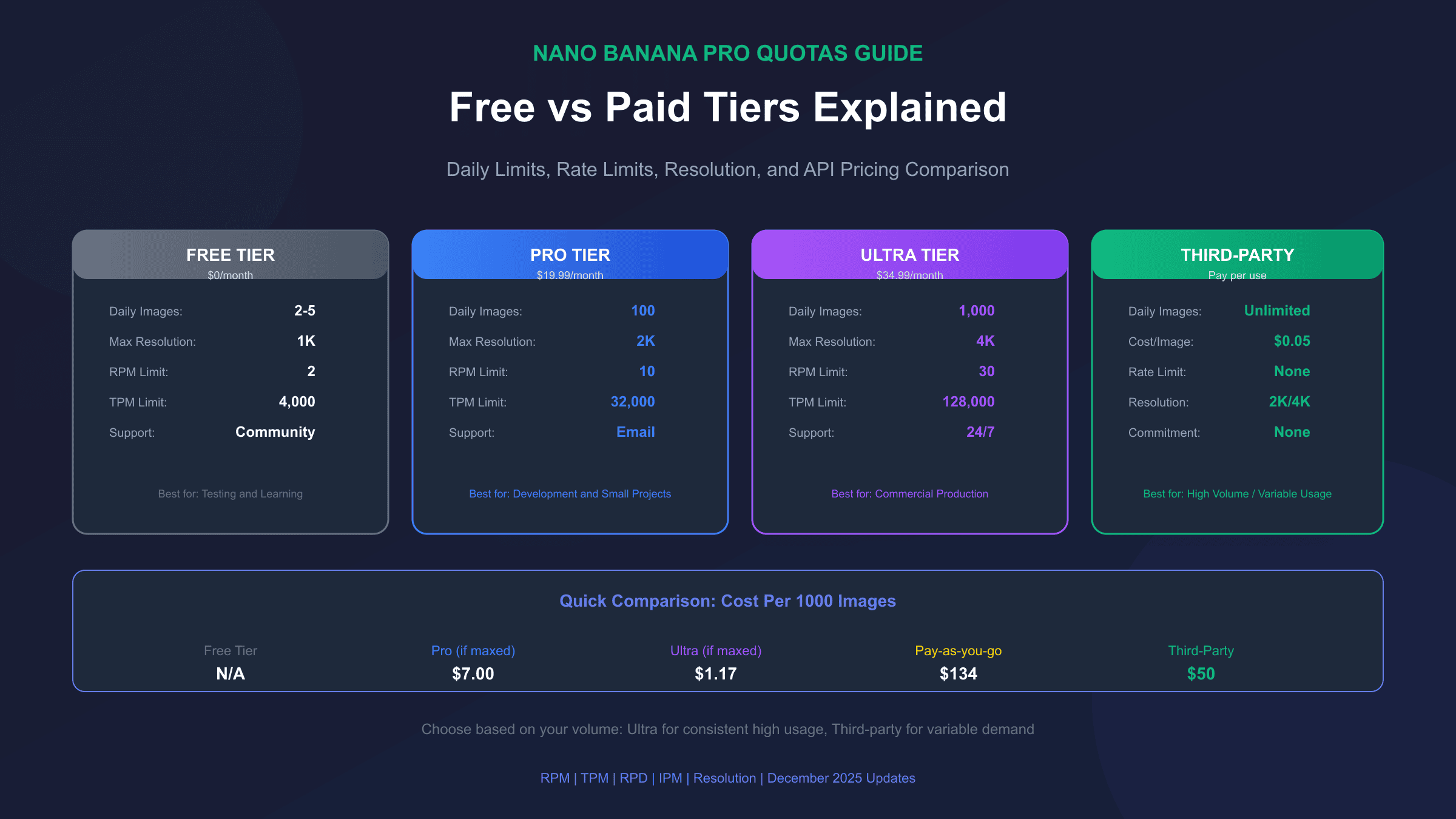
The primary limitation on the free tier is the daily image generation quota, which allows approximately 2-5 images per day depending on the specific endpoint you're using. This quota resets every 24 hours at midnight Pacific Time, giving you a fresh allocation each day. For simple prototyping or learning purposes, this is often sufficient to understand the API's behavior and output quality.
Resolution restrictions represent another significant limitation on the free tier. While paid users can generate images at resolutions up to 4K (3840×2160), free tier users are limited to 1K resolution (approximately 1024×1024 pixels). This means generated images are suitable for web thumbnails and social media but may appear pixelated when printed or displayed on high-resolution screens.
| Quota Dimension | Free Tier Limit | Notes |
|---|---|---|
| Images per day | 2-5 | Varies by endpoint |
| Maximum resolution | 1K (1024px) | No 2K/4K access |
| Requests per minute | 2 | Strict rate limiting |
| Tokens per minute | 4,000 | Shared with text requests |
| Images per minute | 2 | Matches RPM limit |
| Content types | Limited | Some style restrictions |
Rate limiting on the free tier is particularly aggressive. With only 2 requests per minute (RPM), you'll need to implement proper request spacing in your code. Attempting to exceed this limit results in 429 Too Many Requests errors, which can disrupt your application flow if not handled properly. The token per minute (TPM) limit of 4,000 is shared across all request types, meaning text prompts consume from the same pool as image generation requests.
Paid Tier Options: Pro and Ultra Plans Compared
Google offers two main paid tiers for Nano Banana Pro API access: the Pro plan at $19.99/month and the Ultra plan at $34.99/month. Both plans significantly expand your quotas compared to the free tier, but they target different use cases and scales of operation.
The Pro plan is designed for individual developers and small teams who need consistent access without the daily image limit frustration. At $19.99 per month, you receive 100 images per day—a 20x increase over the free tier. This allocation is sufficient for most development workflows, content creation pipelines, and small-scale production applications. The Pro plan also unlocks 2K resolution output, allowing you to generate higher-quality images suitable for professional use.
| Feature | Free | Pro ($19.99/mo) | Ultra ($34.99/mo) |
|---|---|---|---|
| Images per day | 2-5 | 100 | 1,000 |
| Max resolution | 1K | 2K | 4K |
| RPM limit | 2 | 10 | 30 |
| TPM limit | 4,000 | 32,000 | 128,000 |
| Priority support | No | 24/7 | |
| SLA guarantee | None | 99.5% | 99.9% |
The Ultra plan at $34.99/month is positioned for commercial applications and teams with high-volume requirements. With 1,000 images per day—10x the Pro allocation—this tier supports production workloads at scale. The standout feature is 4K resolution support, generating images at 3840×2160 pixels that meet broadcast and print-quality standards. Additionally, Ultra subscribers receive 30 RPM and 128,000 TPM limits, enabling burst operations without hitting rate limits.
When calculating cost-effectiveness, the Ultra plan delivers significantly better value per image. At $34.99 for 1,000 daily images, you're paying approximately $0.001 per image if you maximize your allocation—compared to $0.007 per image on Pro and effectively unlimited cost on free tier due to its restrictive limits.
Rate Limits Deep Dive: RPM, TPM, RPD, and IPM Explained
Understanding the four main rate limit dimensions is crucial for building reliable applications with Nano Banana Pro. Each dimension serves a different purpose in preventing abuse while ensuring fair resource distribution across all API users.
Requests Per Minute (RPM) controls how many API calls you can make within a 60-second window. This is the most commonly encountered limit, especially during development when you might be testing rapidly. Free tier allows only 2 RPM, which means you must wait at least 30 seconds between requests to avoid throttling. Pro tier increases this to 10 RPM, while Ultra provides 30 RPM—sufficient for most real-time applications.
Tokens Per Minute (TPM) measures the total input and output tokens processed across all requests within a minute. For image generation, your prompt tokens count against this limit, as does any text response accompanying the generated image. The free tier's 4,000 TPM limit can be exhausted quickly with detailed prompts, while Pro's 32,000 TPM and Ultra's 128,000 TPM provide comfortable headroom.
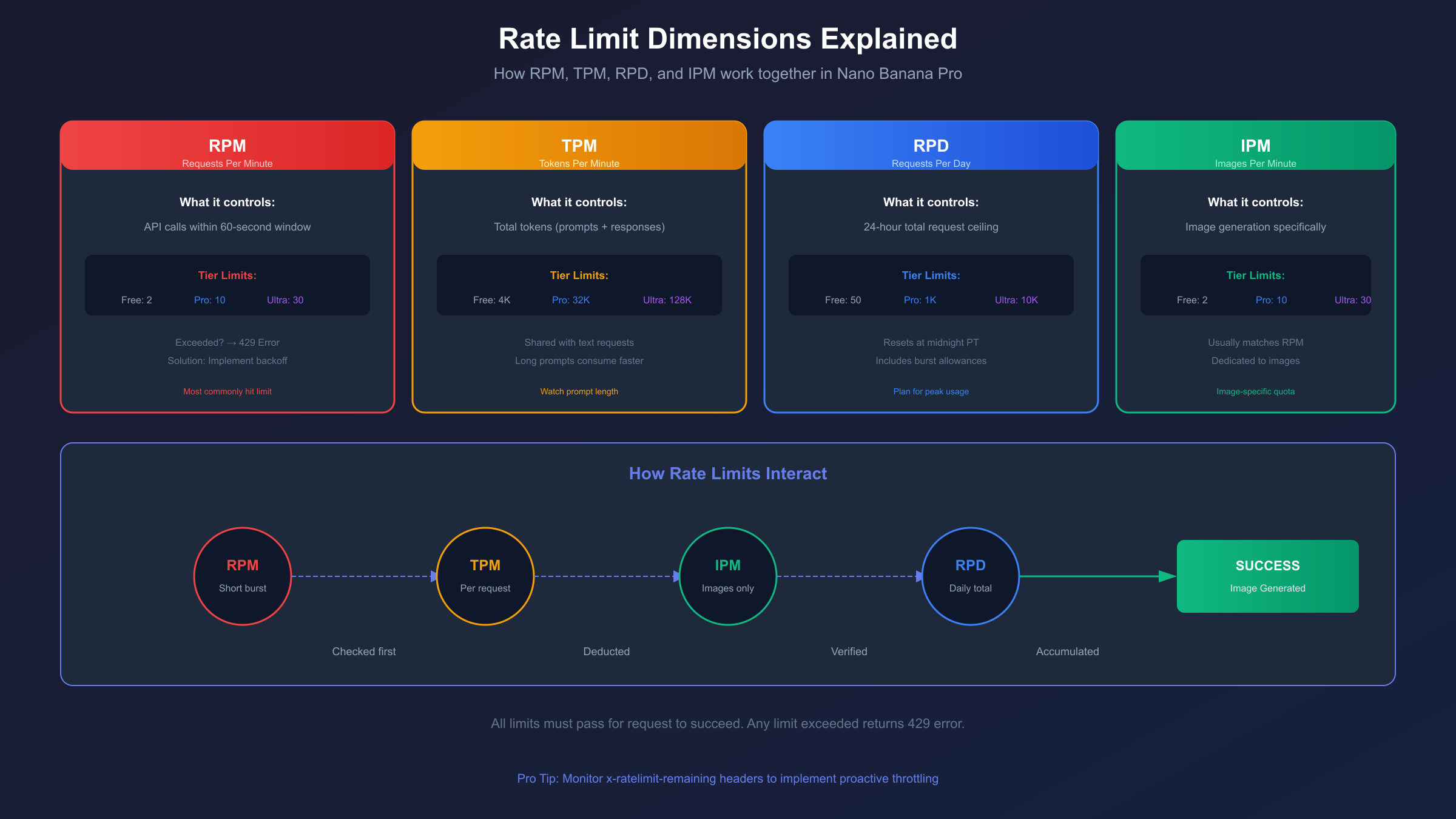
Requests Per Day (RPD) establishes your 24-hour ceiling, preventing sustained high-volume usage from consuming shared infrastructure resources. This limit is often higher than you might calculate from RPM alone—for example, Pro tier allows substantially more daily requests than simply multiplying 10 RPM × 60 minutes × 24 hours would suggest, because Google implements burst allowances.
Images Per Minute (IPM) is specific to image generation endpoints and typically mirrors or closely tracks your RPM limit. This dedicated quota ensures that image-heavy workloads don't crowd out text-based API users sharing the same infrastructure.
hljs python# Implementing rate limit handling for Nano Banana Pro
import time
import requests
from functools import wraps
class RateLimiter:
def __init__(self, rpm_limit=10, safety_margin=0.8):
self.rpm_limit = rpm_limit
self.interval = 60 / (rpm_limit * safety_margin)
self.last_request = 0
def wait_if_needed(self):
elapsed = time.time() - self.last_request
if elapsed < self.interval:
time.sleep(self.interval - elapsed)
self.last_request = time.time()
def __call__(self, func):
@wraps(func)
def wrapper(*args, **kwargs):
self.wait_if_needed()
return func(*args, **kwargs)
return wrapper
# Usage with Pro tier limits
limiter = RateLimiter(rpm_limit=10)
@limiter
def generate_image(prompt):
# Your API call here
pass
Resolution Restrictions: 1K vs 2K vs 4K Quality
Resolution capabilities vary dramatically across Nano Banana Pro tiers, and understanding these differences is essential for matching your subscription to your output requirements. The quality gap between tiers is not merely a matter of pixel count—it affects use case viability.
1K Resolution (Free Tier) outputs images at approximately 1024×1024 pixels or equivalent aspect ratios. These images are suitable for social media posts, website thumbnails, and rapid prototyping. However, they show visible artifacts when enlarged and lack the detail required for print production or high-resolution displays. If you're building a proof-of-concept or learning the API, 1K resolution is perfectly adequate.
2K Resolution (Pro Tier) doubles the linear dimensions to approximately 2048×2048 pixels, resulting in 4x the total pixel count. This resolution meets the requirements for most web applications, presentation graphics, and standard-definition video content. The additional detail allows for cropping and minor enlargement without significant quality loss. For most commercial web applications, 2K represents the sweet spot between quality and generation cost.
4K Resolution (Ultra Tier) pushes output to 3840×2160 pixels—the same resolution as modern televisions and high-end monitors. Images generated at 4K are suitable for print production (magazines, posters), broadcast media, and professional content creation workflows. The detail level allows for substantial cropping while maintaining quality, making it valuable for content that needs to work across multiple formats.
| Resolution | Pixel Dimensions | File Size (typical) | Best Use Cases |
|---|---|---|---|
| 1K | 1024×1024 | 500KB-1MB | Prototypes, thumbnails |
| 2K | 2048×2048 | 2-4MB | Web content, social media |
| 4K | 3840×2160 | 8-15MB | Print, broadcast, professional |
Generation time increases with resolution. While 1K images typically complete in 10-15 seconds, 4K images may require 30-45 seconds or more. When planning your application architecture, factor in these timing differences for user experience considerations.
API Pricing Per Tier: Cost Calculations
Direct API pricing through Google Cloud follows a per-image model that varies by resolution and volume. Understanding these costs helps you determine whether a subscription plan or pay-as-you-go pricing better suits your needs.
For pay-as-you-go API access without a subscription, Google charges approximately $0.134 per image at 1K-2K resolution and $0.24 per image at 4K resolution. These rates assume you're accessing the API through Google Cloud's Vertex AI platform rather than Google AI Studio. Volume discounts apply at higher usage levels, reducing per-image costs by 10-20% when generating over 10,000 images monthly.
When comparing subscription versus pay-as-you-go economics, the breakeven point depends on your usage pattern. For the Pro plan at $19.99/month with 100 daily images (3,000 monthly), you'd pay $402 in pay-as-you-go fees for equivalent volume—making Pro approximately 20x more cost-effective if you consistently use your allocation. Similarly, Ultra's 30,000 monthly images would cost $4,020 at standard rates versus $34.99 with subscription.
For developers seeking maximum cost efficiency, third-party API services offer compelling alternatives. Services like laozhang.ai provide Nano Banana Pro access at $0.05 per image—62% less than Google's standard rate. These services aggregate demand to negotiate volume pricing, passing savings to individual developers. The trade-off is indirect access rather than a direct Google relationship, which may affect support channels and SLA guarantees.
hljs javascript// Cost calculation helper for different tiers
function calculateMonthlyCost(imagesNeeded, tier = 'payg') {
const pricing = {
free: { monthly: 0, included: 150, overage: 0.134 },
pro: { monthly: 19.99, included: 3000, overage: 0.134 },
ultra: { monthly: 34.99, included: 30000, overage: 0.20 },
payg: { monthly: 0, included: 0, overage: 0.134 },
thirdParty: { monthly: 0, included: 0, overage: 0.05 }
};
const plan = pricing[tier];
const overageImages = Math.max(0, imagesNeeded - plan.included);
const overageCost = overageImages * plan.overage;
return {
tier,
baseCost: plan.monthly,
overageCost,
totalCost: plan.monthly + overageCost,
costPerImage: (plan.monthly + overageCost) / imagesNeeded
};
}
// Example: 5000 images/month
console.log(calculateMonthlyCost(5000, 'pro'));
// { tier: 'pro', baseCost: 19.99, overageCost: 268, totalCost: 287.99, costPerImage: 0.058 }
console.log(calculateMonthlyCost(5000, 'thirdParty'));
// { tier: 'thirdParty', baseCost: 0, overageCost: 250, totalCost: 250, costPerImage: 0.05 }
December 2025 Quota Changes: What's New
Google implemented several quota adjustments in December 2025 that affect both new and existing Nano Banana Pro users. These changes reflect Google's evolving infrastructure capacity and competitive positioning in the AI image generation market.
The most significant change is the introduction of rollover credits for paid subscribers. Previously, unused daily images simply expired at midnight. Now, Pro and Ultra subscribers can accumulate up to 7 days of unused quota, providing more flexibility for burst usage patterns. If you typically use 50 images daily but need 400 for a specific project, your accumulated credits can cover the spike without overage charges.
Free tier adjustments in December 2025 reduced the daily image limit from 5 to 2-3 images in some regions, while simultaneously improving rate limits from 1 RPM to 2 RPM. This trade-off prioritizes quality of access over quantity, reducing server strain while providing a smoother experience for those testing within the limits.
| Change | Before Dec 2025 | After Dec 2025 | Impact |
|---|---|---|---|
| Free daily images | 5 | 2-3 | Reduced testing capacity |
| Free RPM | 1 | 2 | Faster iteration |
| Pro rollover | None | 7 days | Better burst handling |
| Ultra 4K speed | 45s avg | 30s avg | Faster generation |
| New tier: Team | N/A | $99/month | 5 seats, shared quota |
Google also introduced a new Team tier at $99/month, providing 5 developer seats sharing a combined quota of 500 images daily. This tier targets small studios and agencies where multiple team members need API access without managing separate subscriptions. The shared quota model encourages coordination but requires internal tracking to prevent team members from exhausting the allocation.
How to Extend or Bypass Limits
While quotas exist to ensure fair resource distribution, several legitimate strategies allow you to maximize your effective capacity within Nano Banana Pro's framework.
Caching and deduplication represent the most impactful optimization. Before generating a new image, hash your prompt and check whether you've previously generated the same or highly similar content. Implementing a prompt similarity check can reduce redundant API calls by 20-40% in typical applications. Store generated images with their prompts in a database, serving cached results for repeat requests.
Request batching helps maximize throughput within RPM limits. Instead of making individual requests, accumulate prompts and submit them in controlled bursts that stay within your rate limits. This approach works particularly well for background processing workflows where immediate response isn't required.
Multi-account strategies are permitted under Google's terms for legitimate business use cases where you're genuinely operating separate projects or products. Each Google Cloud project receives its own quota allocation, allowing organizations to isolate quotas between different applications. However, creating multiple accounts solely to circumvent personal usage limits violates terms of service.
For developers requiring quotas beyond what Google's paid tiers provide, third-party aggregation services offer a scalable alternative. laozhang.ai's Nano Banana Pro API provides unlimited request volume at $0.05/image with no daily caps—making it particularly attractive for high-volume production workloads. The service maintains Gemini-native API format compatibility, meaning you can switch endpoints without code changes.
hljs python# Implementing caching to reduce API calls
import hashlib
import json
from pathlib import Path
class PromptCache:
def __init__(self, cache_dir="./image_cache"):
self.cache_dir = Path(cache_dir)
self.cache_dir.mkdir(exist_ok=True)
self.index_file = self.cache_dir / "index.json"
self.index = self._load_index()
def _load_index(self):
if self.index_file.exists():
return json.loads(self.index_file.read_text())
return {}
def _save_index(self):
self.index_file.write_text(json.dumps(self.index, indent=2))
def get_cache_key(self, prompt, resolution="2K"):
content = f"{prompt}|{resolution}"
return hashlib.sha256(content.encode()).hexdigest()[:16]
def get(self, prompt, resolution="2K"):
key = self.get_cache_key(prompt, resolution)
if key in self.index:
image_path = self.cache_dir / self.index[key]
if image_path.exists():
return image_path.read_bytes()
return None
def set(self, prompt, resolution, image_data):
key = self.get_cache_key(prompt, resolution)
image_path = self.cache_dir / f"{key}.png"
image_path.write_bytes(image_data)
self.index[key] = f"{key}.png"
self._save_index()
# Usage: Check cache before API call
cache = PromptCache()
cached = cache.get("A sunset over mountains")
if cached:
print("Using cached image")
else:
# Make API call and cache result
image_data = generate_image("A sunset over mountains")
cache.set("A sunset over mountains", "2K", image_data)
Free vs Paid vs Third-Party: Complete Comparison
Choosing between Nano Banana Pro's native tiers and third-party alternatives requires evaluating multiple factors beyond simple per-image cost. Each option presents distinct trade-offs that align with different use cases and priorities.
Google Free Tier is ideal for learning and experimentation. The zero cost is attractive, but severe limitations make it unsuitable for any production use. The 2-5 daily images are consumed quickly during active development, and the 1K resolution limit produces images that often require upscaling for practical use. Consider the free tier a trial experience rather than a sustainable development environment.
Google Pro Tier ($19.99/month) serves individual developers and small projects well. The 100 daily images provide comfortable headroom for development cycles, and 2K resolution meets most web application needs. The fixed monthly cost makes budgeting predictable, and direct Google support provides peace of mind. However, cost-per-image remains high compared to alternatives if you're not maximizing your allocation.
Google Ultra Tier ($34.99/month) targets commercial applications requiring both volume and quality. The 1,000 daily images and 4K resolution support production workloads, while enhanced rate limits (30 RPM) enable real-time features. The 99.9% SLA guarantee is valuable for business-critical applications. The main limitation is the daily cap—if you need 2,000+ images daily, you'll face overage charges.
Third-Party Services (like laozhang.ai) offer a compelling alternative for cost-conscious developers. At $0.05/image with no monthly commitment and no daily limits, you pay only for what you use. The API maintains Gemini-native format compatibility, and many services provide additional features like request queuing and regional endpoints. The trade-off is operating outside Google's direct support ecosystem—if issues arise, you're working with the third-party provider rather than Google.
| Factor | Free | Pro | Ultra | Third-Party |
|---|---|---|---|---|
| Monthly cost | $0 | $19.99 | $34.99 | Pay per use |
| Cost per image | N/A | ~$0.007 | ~$0.001 | $0.05 |
| Daily limit | 2-5 | 100 | 1,000 | None |
| Max resolution | 1K | 2K | 4K | 2K/4K |
| Rate limits | Strict | Moderate | Generous | Unlimited |
| Support | Community | 24/7 | Provider-based | |
| SLA | None | 99.5% | 99.9% | Varies |
| Best for | Testing | Dev/Small | Production | High volume |
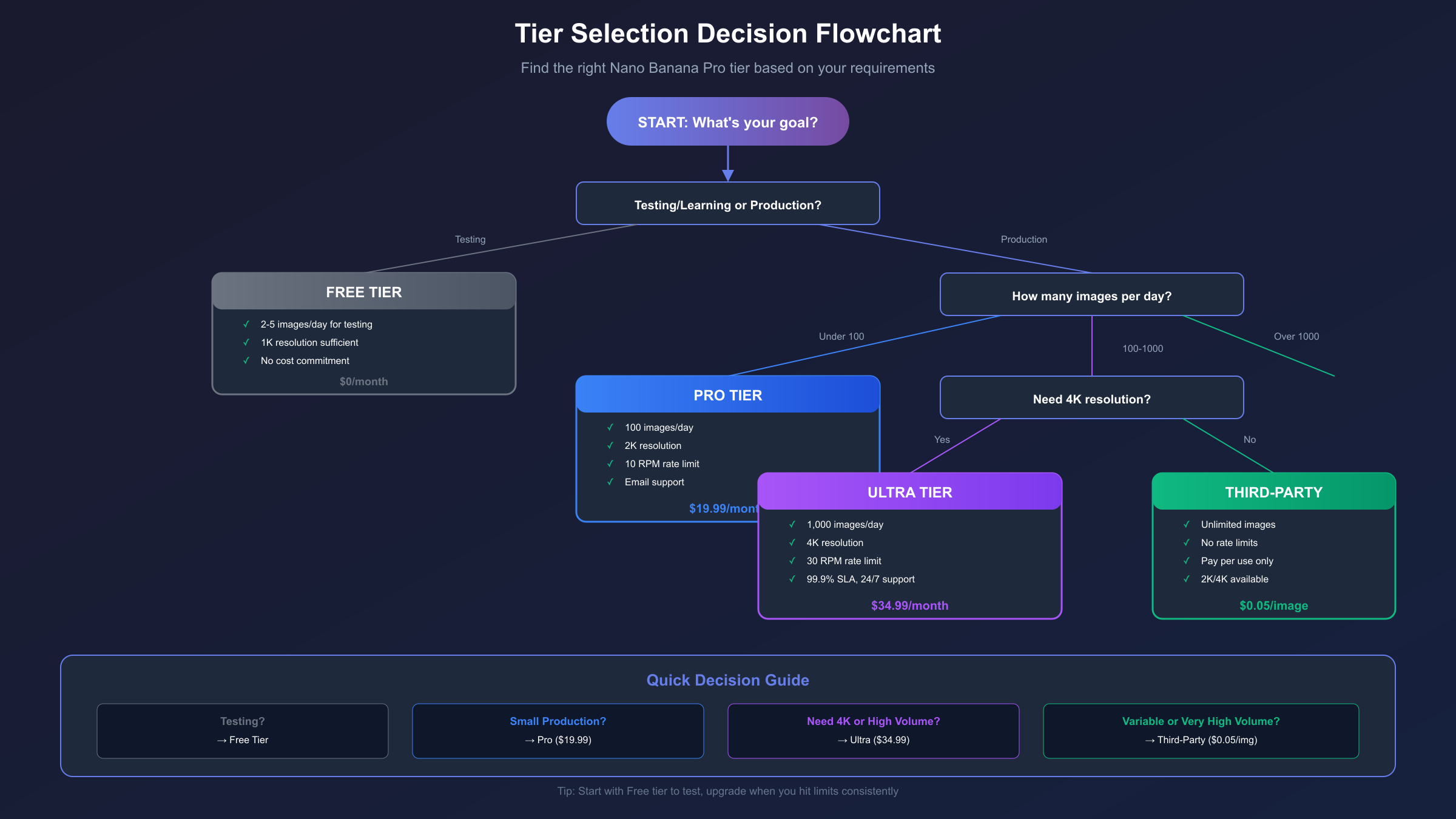
For most developers, the decision framework is straightforward: start with free tier to evaluate the technology, upgrade to Pro for active development, consider Ultra for commercial production with quality requirements, and evaluate third-party options if daily limits or per-image costs become constraints.
Monitoring Your Quota Usage
Effective quota management requires visibility into your consumption patterns. Google provides several tools for tracking usage, though third-party solutions often offer more detailed analytics.
Google Cloud Console provides real-time quota visibility through the APIs & Services dashboard. Navigate to your project, select the Gemini API, and view the Quotas tab to see current consumption against your limits. The interface shows daily usage graphs and allows you to set custom alerts when approaching thresholds. For basic monitoring needs, this built-in solution is sufficient.
API response headers include quota information that you can programmatically track. After each request, examine the x-ratelimit-remaining and x-ratelimit-reset headers to understand your current position within the rate limit window. Building dashboard telemetry from these headers provides granular, real-time visibility.
hljs python# Extracting quota info from API response headers
import requests
from datetime import datetime
def make_request_with_quota_tracking(endpoint, payload, headers):
response = requests.post(endpoint, json=payload, headers=headers)
# Extract quota headers
quota_info = {
'remaining_requests': response.headers.get('x-ratelimit-remaining', 'unknown'),
'limit': response.headers.get('x-ratelimit-limit', 'unknown'),
'reset_time': response.headers.get('x-ratelimit-reset', 'unknown'),
'daily_remaining': response.headers.get('x-daily-limit-remaining', 'unknown')
}
# Log for monitoring
print(f"[{datetime.now()}] Quota status: {quota_info}")
# Alert if running low
if quota_info['remaining_requests'] != 'unknown':
remaining = int(quota_info['remaining_requests'])
if remaining < 5:
print("⚠️ WARNING: Approaching rate limit!")
return response, quota_info
Third-party monitoring tools integrate with Google Cloud to provide enhanced analytics. Services like Datadog, New Relic, and custom Grafana dashboards can visualize quota consumption trends, predict exhaustion timing, and correlate usage with application events. For production applications, investing in proper observability pays dividends in preventing quota-related outages.
FAQ: Common Questions About Nano Banana Pro Quotas
Q1: Do unused daily images roll over to the next day?
As of December 2025, Google introduced limited rollover for paid subscribers. Pro and Ultra tier users can accumulate up to 7 days of unused quota, providing flexibility for burst usage patterns. Free tier images do not roll over—they expire at midnight Pacific Time each day. This means if you have a Pro subscription and use only 50 of your 100 daily images consistently, you'll accumulate up to 350 rollover credits that can be used during high-demand periods. However, rollover credits expire after 7 days, so you can't indefinitely stockpile allocation.
Q2: What happens when I exceed my rate limit?
Exceeding rate limits triggers HTTP 429 (Too Many Requests) responses from the API. The response includes a Retry-After header indicating how many seconds to wait before your next request will be accepted. Implementing exponential backoff in your code is the recommended approach—wait the indicated time, then retry with increasing delays for subsequent failures. Repeated rate limit violations within a short window may result in temporary IP-level throttling that extends beyond the standard reset period.
Q3: Can I upgrade mid-month and get prorated pricing?
Google prorates subscription upgrades based on remaining days in your billing cycle. If you upgrade from Pro to Ultra on day 15 of a 30-day month, you'll pay $19.99 for Pro (already charged) plus approximately $17.50 for 15 days of Ultra access. Your quota increases immediately upon upgrade confirmation, and the new limits apply for all subsequent requests. Downgrades take effect at the next billing cycle start rather than immediately.
Q4: How do API quotas differ from Google AI Studio quotas?
Google AI Studio and direct API access share the same underlying quota pool for free tier users. However, paid API subscriptions through Google Cloud are separate from any Google AI Studio usage. If you're using free tier and consuming images through both the web interface and API calls, both count against your 2-5 daily limit. Paid subscribers' API quotas are independent of Google AI Studio, meaning your 100/1000 daily images are exclusively for API access.
Q5: Are there educational or startup discounts available?
Google offers the Google for Startups Cloud Program providing up to $200,000 in cloud credits for qualifying startups. These credits apply to Gemini API usage including Nano Banana Pro. Educational institutions can access similar programs through Google Cloud for Education. Application requirements include incorporation documents for startups or institutional affiliation for educational programs. Processing typically takes 2-3 weeks, and approved credits remain valid for one year.
Conclusion: Choosing the Right Quota Tier
Selecting the appropriate Nano Banana Pro quota tier requires matching your usage patterns to pricing economics rather than simply choosing the plan with the highest numbers. For developers in the exploration phase, the free tier provides sufficient access to evaluate the technology without financial commitment—just plan your testing around the 2-5 daily image limit.
Active development projects benefit from the Pro tier's 100 daily images and 2K resolution, providing headroom for iteration cycles while keeping costs predictable at $19.99/month. If you're consistently using less than 50% of this allocation, you're likely overpaying and might consider pay-as-you-go or third-party alternatives. Conversely, if you're hitting the limit regularly, the Ultra upgrade delivers 10x more images for less than 2x the price.
Commercial production workloads requiring 4K output or volumes exceeding 100 images daily should evaluate Ultra tier alongside third-party options. At $34.99/month for 1,000 images, Ultra provides excellent per-image economics—but only if you're maximizing the allocation. For variable workloads or volumes exceeding Ultra's limits, third-party services like laozhang.ai at $0.05/image offer predictable per-use pricing without caps. Understanding your actual consumption patterns through monitoring is the key to ongoing cost optimization.
Related guides: Nano Banana Pro API Pricing Deep Dive | Free Tier Limits Explained | Paid Tier Complete Guide