Sora 2 Error Code List: Complete Troubleshooting Guide for All Errors (2025)
Nano Banana Pro
4K-80%Google Gemini 3 Pro · AI Inpainting
谷歌原生模型 · AI智能修图

Encountering an error while generating videos with Sora 2 can be frustrating, especially when the error message provides little context about what went wrong or how to fix it. Whether you're seeing "Error 1001: Generation Failed" after submitting a creative prompt, or facing a cryptic "sentinel_block" message that halted your video creation, understanding what these errors mean is the first step toward resolving them quickly.
This comprehensive guide documents every known Sora 2 error code, from the numbered system errors (1001-1008) to HTTP API responses and content moderation blocks. More importantly, we explain the root causes behind each error and provide tested solutions that actually work. By the end of this article, you'll have a complete reference for troubleshooting any Sora 2 error and strategies to prevent them from occurring in the first place.
Understanding Sora 2 Error Categories
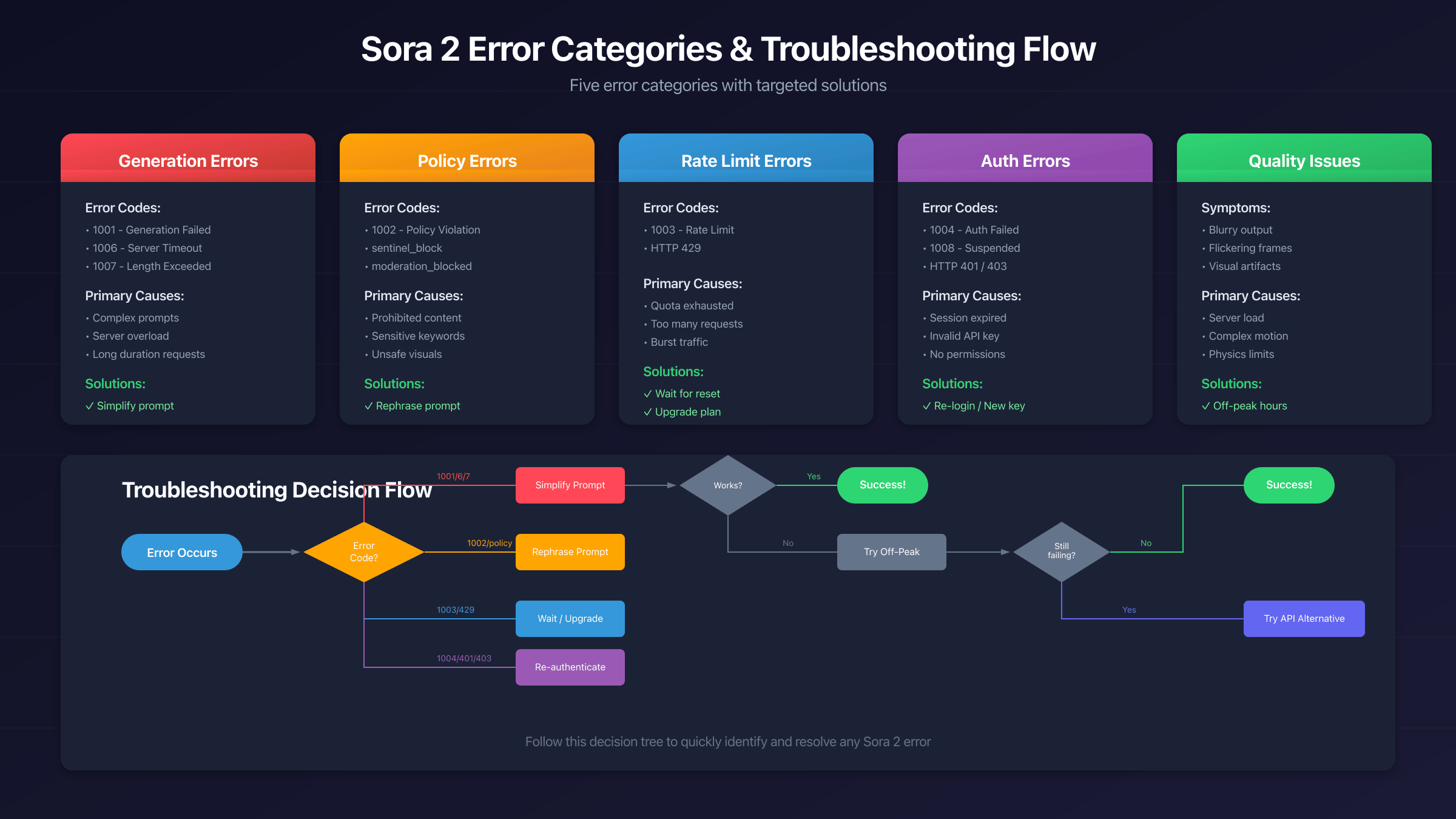
Sora 2 errors fall into five distinct categories, each requiring different troubleshooting approaches. Knowing which category your error belongs to helps you identify the solution faster.
Generation errors (1001, 1006, 1007) occur when the AI system cannot complete video creation due to technical limitations or resource constraints. These are often temporary and resolve with prompt modifications or timing adjustments. Policy errors (1002, sentinel_block, moderation_blocked) trigger when your prompt or the generated content conflicts with OpenAI's usage policies. Authentication errors (1004, 401, 403) relate to account access, session management, or API permissions. Rate limit errors (1003, 429) indicate you've exceeded your generation quota for the current period. Finally, quality issues aren't errors per se, but manifest as blurry outputs, artifacts, or flickering that make the generated video unusable.
Understanding this categorization matters because the solutions differ dramatically. A generation failed error might resolve simply by waiting and retrying, while a policy violation requires completely rethinking your prompt approach. The comprehensive reference table in the next section provides quick lookup for any error you encounter, while subsequent chapters dive deep into each category with detailed troubleshooting steps.
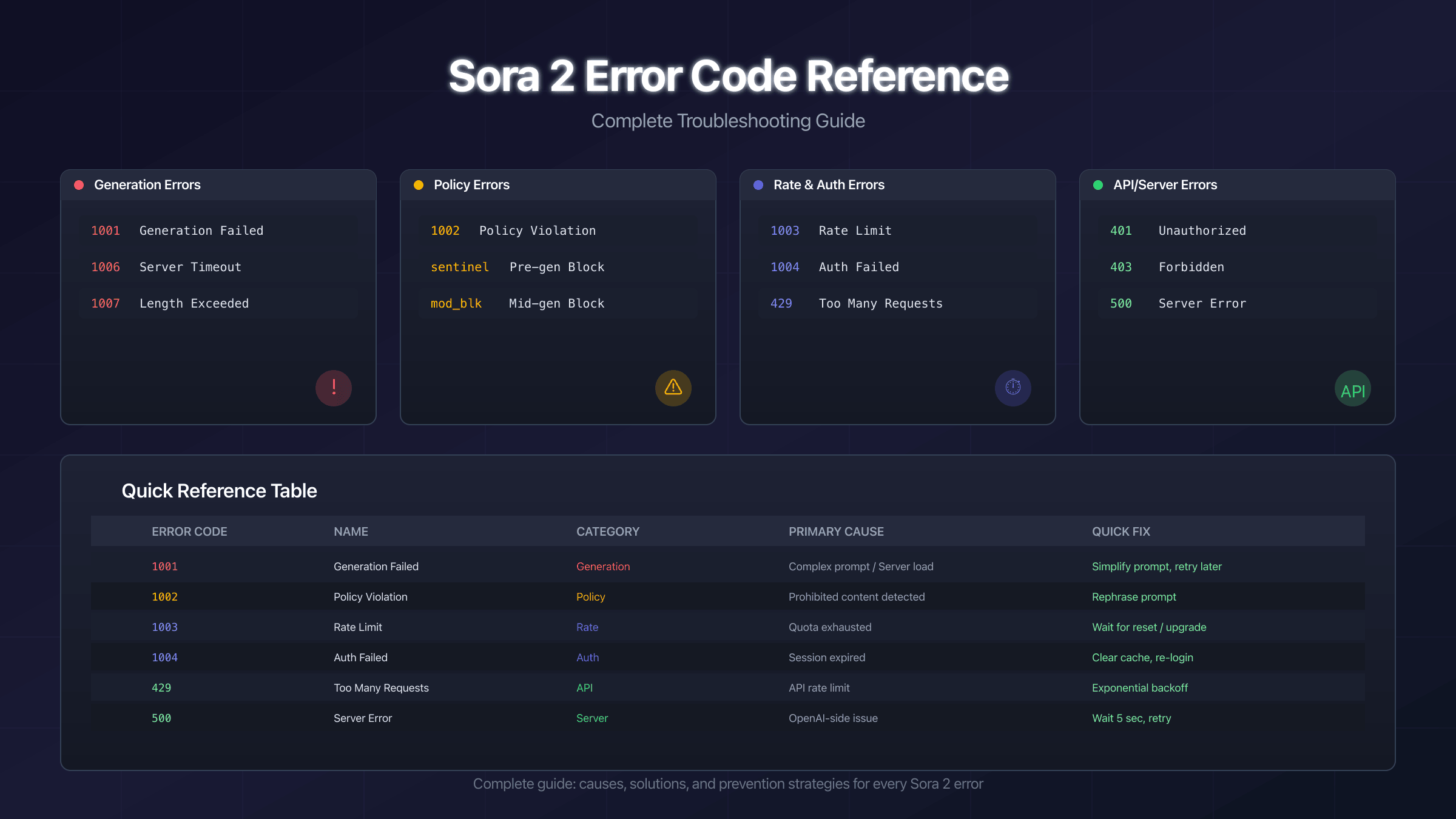
Complete Sora 2 Error Code Reference Table
This master reference table covers every documented Sora 2 error code with its primary cause and recommended solution. Bookmark this section for quick troubleshooting.
| Error Code | Name | Category | Primary Cause | Quick Solution |
|---|---|---|---|---|
| 1001 | Generation Failed | Generation | Complex prompt, server overload | Simplify prompt, retry later |
| 1002 | Policy Violation | Policy | Prohibited content detected | Rephrase prompt, review policies |
| 1003 | Rate Limit Exceeded | Rate Limit | Quota exhausted | Wait for reset, upgrade plan |
| 1004 | Authentication Failed | Auth | Session expired, cache issues | Clear cache, re-login |
| 1005 | Insufficient Credits | Billing | Payment or subscription issue | Check billing, add credits |
| 1006 | Server Timeout | Generation | Generation took too long | Reduce complexity, shorter duration |
| 1007 | Length Exceeded | Generation | Requested >20 seconds | Use maximum 20 seconds |
| 1008 | Account Suspended | Auth | Terms of Service violation | Contact OpenAI support |
| sentinel_block | Pre-Generation Block | Policy | Prompt flagged before generation | Rephrase with neutral language |
| moderation_blocked | Mid-Generation Block | Policy | Content flagged during generation | Modify visual elements in prompt |
| 401 | Unauthorized | API | Invalid or expired API key | Regenerate API key |
| 403 | Forbidden | API | Access denied, permissions issue | Check subscription, verify access |
| 429 | Too Many Requests | Rate Limit | API rate limit exceeded | Implement exponential backoff |
| 500 | Internal Server Error | Server | OpenAI-side issue | Wait 5+ seconds, retry |
| 502/503 | Service Unavailable | Server | Temporary outage | Check status.openai.com |
The error codes 1001-1008 appear in the Sora 2 web interface and ChatGPT integration, while HTTP status codes (401, 403, 429, 500) are primarily encountered when using the API directly. Content moderation errors (sentinel_block, moderation_blocked) can appear in both contexts but behave slightly differently regarding billing—sentinel_block never charges credits since it blocks before generation starts, while moderation_blocked may consume credits if the block occurs mid-generation.
For detailed troubleshooting steps, continue to the specific section for your error type. The following chapters provide in-depth analysis and proven solutions for each error category.
Error 1001: Generation Failed - Causes and Solutions
Error 1001 is the most common Sora 2 error, appearing when the AI system cannot successfully complete video generation. This error has multiple potential causes, making diagnosis important for finding the right solution.
The primary cause of Error 1001 is prompt complexity that exceeds Sora 2's current capabilities. When your prompt requests too many subjects, complex interactions, or physically impossible scenarios, the generation process may fail partway through. Server load also plays a significant role—during peak usage times, the system may struggle to allocate sufficient resources for computationally intensive generations, resulting in this error even for prompts that would normally succeed.
To resolve Error 1001, start by simplifying your prompt. Focus on one main subject with a single clear action rather than multiple characters with complex interactions. Replace abstract or physically challenging concepts with more straightforward visual descriptions. For example, change "a group of people dancing in zero gravity while fireworks explode around them" to "a single person floating gently in a white room." This dramatic simplification often resolves the error immediately.
If simplification doesn't work, timing matters. Sora 2 experiences peak load during US business hours (9 AM - 6 PM EST) when most users are active. Generating videos during off-peak hours—early morning, late evening, or weekends—significantly reduces the likelihood of encountering Error 1001. The system has more available resources during these times, allowing it to handle more complex generations successfully.
Another effective strategy is reducing the requested video duration. Start with 5-second generations to test whether your prompt works at all, then gradually increase to 10, 15, and finally 20 seconds. If Error 1001 appears consistently at longer durations, the prompt may simply be too complex for extended generation. Consider breaking your vision into multiple shorter clips that can be combined in post-production. This approach often yields better results than fighting with a single long generation that repeatedly fails.
Content Policy Errors: 1002, sentinel_block, and moderation_blocked
Content policy errors occur when Sora 2's safety systems detect potential policy violations in your prompt or generated content. Understanding the difference between these error types helps you respond appropriately and avoid repeated blocks.
Error 1002: Policy Violation is the general policy error that appears when your prompt contains explicit references to prohibited content categories. OpenAI's policies restrict content involving violence, explicit material, real public figures in certain contexts, and other sensitive categories. When Error 1002 appears, review your prompt for any terms that might trigger content filters, even if your intent was innocent. Words like "fight," "explosion," or names of real celebrities can sometimes trigger false positives.
sentinel_block represents a pre-generation safety check that prevents the video from being created at all. This is actually preferable to other policy errors because no credits are consumed—the system catches the issue before any GPU resources are used. When you see sentinel_block, the moderation system has determined that your prompt, as written, cannot produce policy-compliant output. The solution is to fundamentally rephrase your request rather than making minor word changes.
moderation_blocked occurs when content is flagged during the generation process itself. This error is more problematic because credits may be charged even though you don't receive a usable video. The block happens because something in the actual generated frames—not just your prompt—triggered the content filter. This can occur even with seemingly innocent prompts if the AI happens to generate imagery that crosses policy boundaries during the creative process.
To resolve policy errors effectively, adopt a cinematography-focused prompt style. Instead of describing what you want directly, frame it as a film professional would. Replace "person running from explosion" with "dramatic action sequence filmed with steadicam, featuring urban backdrop with atmospheric lighting effects." This professional framing often achieves similar visual results while avoiding trigger words. Additionally, use positive phrasing that describes what you want to see rather than what you want to avoid—the AI responds better to constructive direction.
For persistent policy blocks, consider whether your creative vision can be achieved through alternative approaches. Abstract representations, metaphorical imagery, or stylized animation might convey your message while staying within policy guidelines. The most successful Sora 2 users develop an intuitive sense of what the system can and cannot produce, adjusting their creative approach accordingly rather than fighting against the safety systems.
Rate Limit Errors: Error 1003 and HTTP 429
Rate limiting protects Sora 2's infrastructure from overload and ensures fair access across all users. When you hit these limits, understanding the mechanics helps you work within the system effectively.
Error 1003: Rate Limit Exceeded appears in the web interface when you've exhausted your generation quota for the current billing period. Your specific limits depend on your subscription tier: ChatGPT Plus users receive a set number of generations per month, while Pro subscribers get significantly higher quotas. The error message typically doesn't specify exactly how many generations remain or when limits reset, which can be frustrating when planning creative projects.
HTTP 429: Too Many Requests is the API equivalent of Error 1003, returned when your application exceeds the allowed request rate. Unlike the web interface error, HTTP 429 usually relates to request frequency rather than total volume—you're sending requests too quickly, even if you haven't hit your overall quota. This distinction matters for API developers who need to implement proper rate limiting in their applications.
To manage rate limits effectively, track your generation attempts manually. Since Sora 2 doesn't provide a real-time quota dashboard, keeping a simple log of your generations helps you avoid hitting limits unexpectedly during important projects. Plan your most important generations for the beginning of your billing cycle when your full quota is available.
Timing strategies can help you maximize your quota value. Instead of using generations for quick tests or experiments, compose your prompts carefully offline, review them thoroughly, and only submit when you're confident in the request. Each generation attempt counts against your limit regardless of whether it succeeds, so minimizing failed attempts effectively extends your quota.
For API developers, implement exponential backoff when encountering 429 errors. Start with a 1-second delay after the first 429, then double the delay for each subsequent 429 up to a maximum of 32 or 64 seconds. This approach respects the server while ensuring your requests eventually complete. Never implement tight retry loops that ignore rate limits—this can result in extended blocks or account restrictions.
If you consistently hit rate limits, consider whether upgrading your subscription makes economic sense. Pro tier subscriptions offer substantially higher quotas and may be cost-effective if you're regularly constrained by Plus-tier limits. For professional or commercial use, the official API access provides more predictable rate limits with clear documentation.
Authentication and API Errors: 1004, 401, and 403
Authentication errors prevent you from accessing Sora 2 even when the service itself is functioning normally. These errors relate to your account status, session state, or API credentials rather than your specific generation requests.
Error 1004: Authentication Failed typically indicates a session problem in the web interface. Your login session may have expired, your browser cache may contain corrupted authentication tokens, or there may be a conflict between multiple logged-in accounts. This error is usually temporary and resolves with standard authentication troubleshooting.
To fix Error 1004, start by clearing your browser cache and cookies for the OpenAI domain specifically. In Chrome, navigate to Settings > Privacy and Security > Cookies and Site Data > See all cookies and site data, then search for "openai" and remove all related entries. After clearing, close all browser windows completely (not just tabs), reopen your browser, and log in fresh to ChatGPT or the Sora interface.
If cache clearing doesn't work, try logging in from an incognito or private browsing window. This rules out browser extension conflicts that might interfere with authentication. Extensions that block trackers, modify cookies, or inject scripts can sometimes disrupt OpenAI's authentication flow. If incognito mode works, disable your extensions one by one to identify the culprit.
HTTP 401: Unauthorized appears when using the API with an invalid, expired, or incorrectly formatted API key. Double-check that your key is entered correctly with the "Bearer " prefix if required by your client library. API keys can be invalidated if you regenerate them in the OpenAI dashboard, so ensure you're using your current active key. Also verify that your API key has the necessary permissions for Sora 2 access—not all keys automatically include access to all models.
HTTP 403: Forbidden indicates that your account lacks permission to access Sora 2, even with valid authentication. This can occur if your subscription tier doesn't include Sora 2 access, if you're in a geographic region where the service isn't available, or if your account has been restricted for policy violations. Check your subscription status at account settings and verify that Sora 2 is included in your plan.
For persistent 403 errors when you believe you should have access, contact OpenAI support through the official help channels. Provide your account email and describe when the issue started—this helps support staff investigate whether there's an account-specific restriction or a broader access issue affecting your region or subscription tier.
Video Quality Issues: Blurry Output, Flickering, and Artifacts
Not all Sora 2 problems produce error codes. Quality issues—blurry videos, flickering frames, visual artifacts, or physically impossible movements—can make generations unusable even when they technically "succeed." Understanding why these issues occur helps you adjust your approach for better results.
Blurry or low-resolution output often results from server overload during generation. When Sora 2's infrastructure is under heavy load, the system may complete generations with reduced quality rather than failing outright. Videos generated during peak hours frequently exhibit softer details, less defined edges, and overall haziness compared to off-peak generations. The same prompt submitted at different times can produce noticeably different quality levels.
To improve sharpness, generate during off-peak hours when server resources are more available. Early morning (before 7 AM EST) and late evening (after 10 PM EST) consistently produce higher quality results. Additionally, reduce prompt complexity—the more the AI has to process, the more likely quality will suffer. A focused prompt with one subject and simple lighting tends to produce sharper results than elaborate multi-element scenes.
Flickering and temporal instability occur when frames don't maintain visual consistency throughout the video. Characters might subtly change appearance between frames, backgrounds might shift unexpectedly, or lighting might pulse unnaturally. This typically happens with prompts requesting rapid movement, complex scene transitions, or multiple interacting subjects where the AI struggles to maintain coherence.
Combat flickering by emphasizing stability in your prompt. Include phrases like "smooth motion," "consistent lighting," or "steady camera" to encourage temporal coherence. Avoid requesting rapid camera movements or quick cuts—these stress the temporal modeling and often produce unstable results. If you need dynamic footage, consider generating stable segments and combining them in video editing software rather than requesting complex motion in a single generation.
Visual artifacts and impossible physics appear when Sora 2's understanding of the physical world breaks down. You might see hands with extra fingers, objects passing through each other, gravity-defying motion, or textures that shimmer incorrectly. These issues are inherent limitations of current AI video technology and occur more frequently with certain prompt types.
Minimize artifacts by avoiding prompts that require precise physics simulation or anatomical accuracy. Close-ups of hands, faces in motion, or complex object interactions frequently produce artifacts. Instead, frame shots at medium distance where imperfections are less visible. Use stylistic framing—"artistic," "dreamlike," or "impressionistic"—to make slight imperfections feel intentional rather than erroneous.
Regional Access Issues and Solutions
Sora 2 availability varies by geographic region, with some areas having full access while others face restrictions. Understanding the regional landscape helps you know what to expect and what options exist.
Currently, Sora 2 is officially available in the United States and select other markets. The European Union, United Kingdom, and Switzerland face restrictions due to regulatory considerations around AI-generated content and data privacy requirements like GDPR. Users in restricted regions typically see access denied errors or cannot find Sora 2 in their ChatGPT interface at all, regardless of their subscription tier.
If you're in a supported region but still experiencing access issues, verify that your account's registered country matches your actual location. OpenAI uses multiple signals to determine regional eligibility, and mismatches can cause unexpected blocks. Check your account settings to confirm your location information is accurate and up to date.
For users in restricted regions, some have used VPN services to access Sora 2 from supported locations. However, this approach carries risks: it may violate OpenAI's Terms of Service, could result in account suspension if detected, and creates complications with billing and support. The service may also actively detect and block VPN usage, making this an unreliable long-term solution.
The more sustainable approach for users in restricted regions is to use alternative AI video generation tools that operate in their jurisdiction, or to access Sora 2 through official API channels when they become available for developer use. OpenAI has indicated plans to expand Sora 2 availability as regulatory frameworks mature, so restrictions may ease over time. Monitoring OpenAI's official announcements provides the most reliable information about regional expansion plans.
Error Prevention Best Practices
Preventing errors before they occur saves time, credits, and frustration. These proven strategies help you maintain a smooth Sora 2 workflow with minimal interruptions.
Develop prompts systematically rather than submitting the first description that comes to mind. Start by writing your ideal prompt, then review it for potential issues: are there any words that might trigger content filters? Is the scene complexity reasonable for AI generation? Could the request be misinterpreted in problematic ways? This pre-submission review catches many errors before they consume credits or time.
Track your usage patterns to avoid unexpected rate limits. Keep a simple log noting each generation attempt, whether it succeeded, and any errors encountered. This historical data helps you predict when you might approach limits and plan important projects accordingly. Spreadsheets work well for this, or simply a notes document updated after each session.
Test incrementally with new prompt approaches. Before committing to a full 20-second generation with a novel prompt style, test with 5-second versions first. This validates that the prompt works within Sora 2's capabilities at minimal credit cost. Once you've confirmed the prompt produces acceptable results at short duration, scale up to longer generations with confidence.
Maintain prompt templates for scenarios that work reliably. When you find a prompt structure that consistently produces good results without errors, save it as a template. Building a personal library of proven prompts lets you work more efficiently and reduces trial-and-error experimentation that might trigger errors.
Monitor OpenAI's status page at status.openai.com before starting major generation sessions. If there are ongoing incidents or degraded performance, wait until systems return to normal. Generating during service issues increases your likelihood of encountering errors that aren't related to your prompts or account.
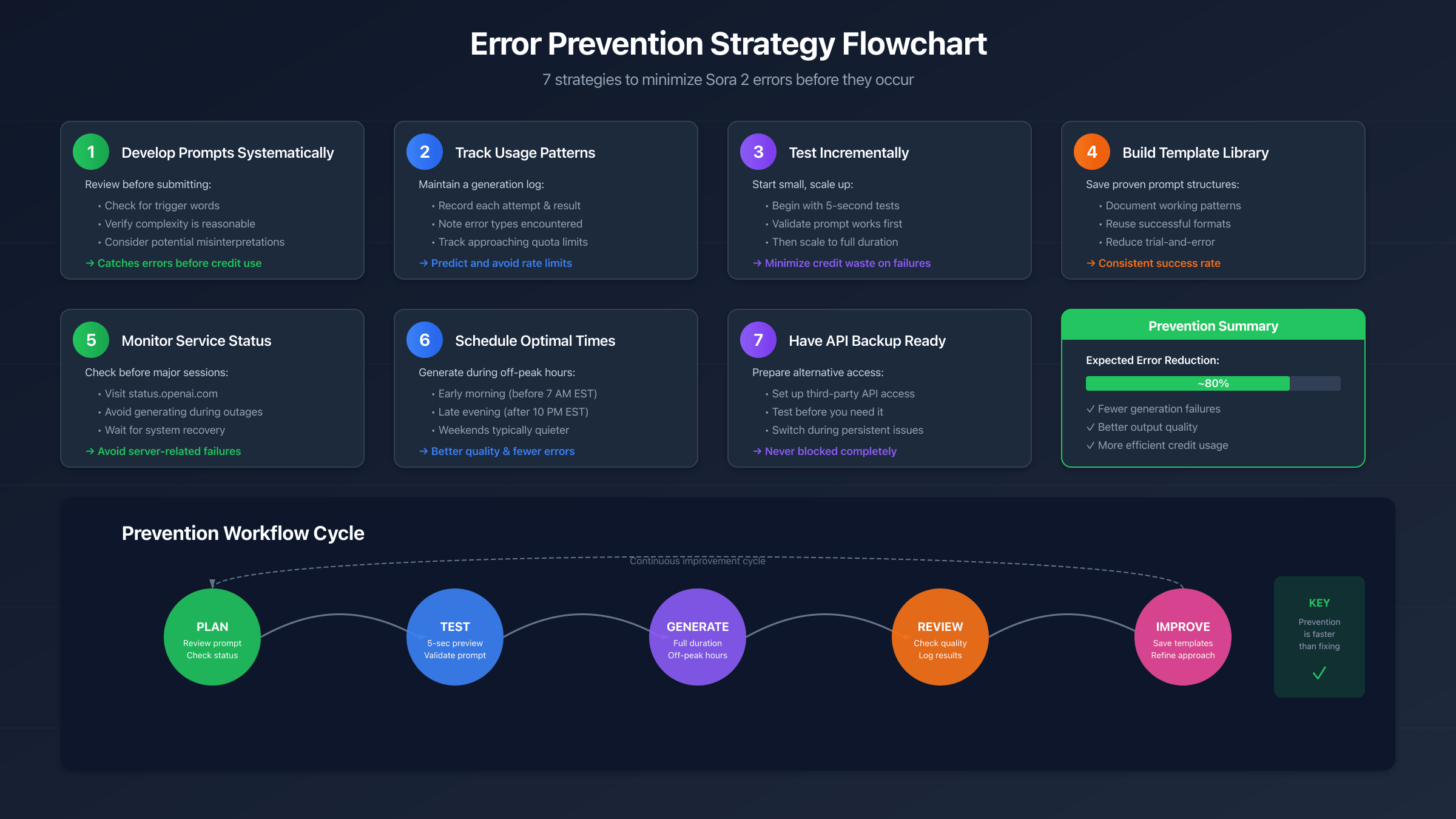
Schedule important work for optimal times by learning the service's usage patterns. Early mornings and late evenings in US time zones consistently offer better performance with fewer errors. If you have a deadline, plan to complete your generations during these windows rather than during peak afternoon hours when errors are more common.
API Alternatives for Persistent Errors
When Sora 2 errors persistently disrupt your workflow despite troubleshooting, alternative access methods may provide more stability. Third-party API services offer programmatic access with potentially different error characteristics than the direct consumer interface.
The official Sora API provides direct programmatic access but may have limited availability and requires developer credentials. For users who need consistent access with minimal errors, several API aggregation services provide access to Sora and similar video generation models through unified interfaces.
laozhang.ai offers API access to multiple AI video generation models including Sora-compatible endpoints. Users report lower error rates compared to direct web access, potentially due to optimized request handling and load balancing across infrastructure. The service provides transparent pricing without the subscription tier complexity of direct OpenAI access, which can be advantageous for variable workloads. For comparison, official Sora API access requires ChatGPT Pro ($200/month) while third-party services may offer pay-per-use pricing.
When evaluating API alternatives, consider several factors beyond just error rates. Pricing models vary significantly—some services charge per generation, others per second of video, and some offer subscription packages. Support responsiveness matters when you encounter issues, as does the service's track record for uptime and reliability. Read recent user reviews rather than relying solely on marketing claims.
For professional or commercial use, evaluate whether third-party access complies with your organization's requirements regarding data handling, content ownership, and vendor relationships. Some enterprises prefer direct OpenAI relationships for contractual and compliance reasons, even if third-party services offer technical advantages.
The step-by-step Sora 2 guide provides more detail on setting up both direct and API access methods.
Frequently Asked Questions
Why does Error 1001 appear even with simple prompts?
Error 1001 can occur due to server overload regardless of prompt complexity. During peak usage times, the system may fail to allocate sufficient resources even for straightforward generations. Try again during off-peak hours (early morning or late evening EST) when server load is typically lower. If the error persists with genuinely simple prompts, it may indicate a temporary service issue—check status.openai.com for current system status.
How do I know if my prompt will trigger a policy violation?
Policy violations are somewhat unpredictable because the content filters analyze both your text prompt and the potential generated content. However, certain patterns consistently trigger blocks: references to violence, weapons, explicit content, real public figures in sensitive contexts, and copyrighted characters. Using professional cinematography terminology instead of direct descriptions often avoids triggers while achieving similar creative results.
What's the difference between sentinel_block and moderation_blocked?
sentinel_block occurs before generation starts—the system determined your prompt cannot produce compliant content, so no GPU resources are used and no credits are charged. moderation_blocked occurs during generation when the actual visual content crosses policy boundaries, even if the prompt seemed acceptable. This mid-generation block may still consume credits since computation already occurred before the block triggered.
Can I get a refund for credits lost to errors?
OpenAI's refund policy for error-consumed credits varies by situation and subscription tier. For systematic errors affecting many users, OpenAI sometimes provides automatic credit restoration. For individual cases, contact support through the official help channels with details about the error, when it occurred, and your generation attempts. Providing specific error codes and timestamps helps support staff investigate your case.
Why are my videos blurry even when generation succeeds?
Blurry output typically results from high server load during generation. The system may reduce output quality to complete generations during peak times rather than failing outright. Generate during off-peak hours for consistently sharper results. Prompt complexity also affects quality—simpler scenes with fewer elements tend to render at higher fidelity than complex multi-subject compositions.
How often do rate limits reset?
Rate limit reset timing depends on your subscription tier and whether you're hitting frequency limits or volume limits. Web interface limits typically operate on monthly billing cycles, while API rate limits may reset hourly or daily depending on the specific limit type. OpenAI's documentation doesn't publish exact reset schedules, so tracking your own usage patterns provides the most reliable information for planning.
Is using a VPN to access Sora 2 from restricted regions allowed?
Using VPNs to circumvent geographic restrictions likely violates OpenAI's Terms of Service and risks account suspension if detected. The service may also actively detect and block VPN traffic. For long-term reliable access from restricted regions, waiting for official expansion or using properly licensed alternative services is more sustainable than VPN workarounds.
What should I do if none of the troubleshooting steps work?
If you've tried all relevant troubleshooting steps without success, contact OpenAI support with specific details: exact error codes, timestamps of when errors occurred, your prompt text (if shareable), and what troubleshooting you've already attempted. This information helps support staff diagnose account-specific issues that aren't covered by general troubleshooting guides. For time-sensitive projects, consider alternative API services that may provide more immediate solutions while you await support response.
Successfully troubleshooting Sora 2 errors requires understanding both the technical causes and the practical solutions. Keep this reference guide bookmarked for quick error code lookup, and remember that many errors resolve simply with timing adjustments or prompt modifications. For related guidance on prompt optimization and best practices, see our complete Sora 2 usage guide and API error handling article.