Sora Plus Credits Expire: Complete Guide to Credit Expiration, Reset Times & 7 Ways to Avoid Losing Unused Credits (2026)
Do Sora Plus credits expire? Yes - unused credits are forfeited at billing cycle end. Learn exactly when credits reset, how to check your balance, and 7 proven strategies to maximize your 1,000 monthly credits before they expire.
Nano Banana Pro
4K-80%Google Gemini 3 Pro · AI Inpainting
谷歌原生模型 · AI智能修图

If you are subscribed to ChatGPT Plus and using Sora for AI video generation, you have probably wondered whether your unused Sora credits expire at the end of the month. The short answer is yes, they do. Unlike some subscription services that let you accumulate unused credits, OpenAI's Sora operates on a strict use-it-or-lose-it policy that catches many subscribers off guard.
This guide explains exactly how Sora's credit expiration works, when your credits reset, and most importantly, seven proven strategies to ensure you never waste a single credit. Whether you are a Plus subscriber with 1,000 monthly credits or considering an upgrade to Pro, understanding these mechanics can save you significant money and frustration.
Do Sora Plus Credits Expire? The Complete Answer
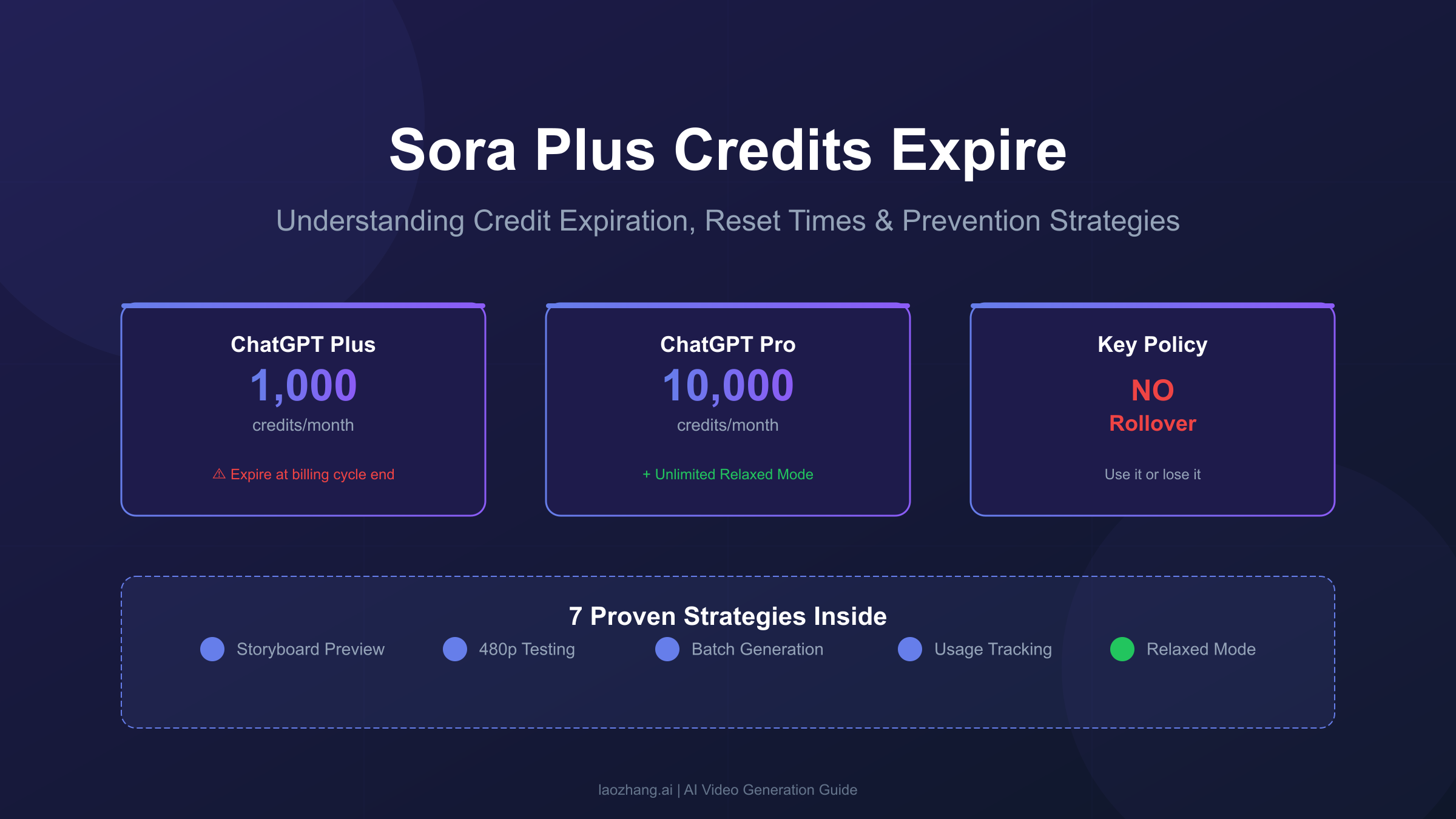
Yes, Sora credits expire at the end of each billing cycle with no rollover. According to OpenAI's official billing FAQ, unused credits are forfeited entirely when your subscription renews. If you have 500 unused credits on your renewal date, you lose them permanently.
This expiration policy represents one of the most significant limitations of OpenAI's Sora credit system. Unlike platforms that offer credit rollover or accumulation, Sora enforces a monthly reset that requires active planning to avoid waste. The policy applies equally to ChatGPT Plus subscribers receiving 1,000 credits and Pro subscribers with 10,000 credits.
The reasoning behind this policy relates to how OpenAI manages computational resources. Video generation requires substantial GPU capacity, and allowing credit accumulation could create unpredictable demand spikes. From a business perspective, it also encourages consistent platform usage rather than sporadic bulk generation.
However, it is worth noting that purchased credit packs operate differently. If you buy additional credits through OpenAI's top-up system, those credits remain valid for 12 months from the purchase date. This distinction matters because subscription credits expire monthly while purchased credits have a much longer validity window. Understanding this difference helps you plan your video generation strategy more effectively.
For creators who cannot predict their monthly video needs, this expiration policy creates a genuine challenge. You must either generate enough content to use your allocation or accept that unused credits simply disappear. This makes accurate planning essential, which we will address in the strategies section below.
When Exactly Do Sora Credits Reset?
Credits reset at midnight UTC on your billing renewal date, not the first of the month. Your billing date is determined by when you first subscribed to ChatGPT Plus or Pro, and your credits refresh precisely at 00:00 UTC on that date each month.
Understanding this timing is crucial because many users assume credits reset on the first of each month like traditional calendar-based subscriptions. In reality, if you subscribed on January 15th, your credits reset on the 15th of each subsequent month. This means your credit window is a rolling 30-day period tied to your subscription start date.
The UTC timezone specification is particularly important for international users. If you are in New York (EST/EDT), midnight UTC occurs at either 7:00 PM or 8:00 PM local time depending on daylight saving status. Users in Asia-Pacific regions might see their credits reset mid-morning or afternoon local time. Planning your end-of-cycle batch generation around this timing helps you maximize every credit before expiration.
Several scenarios can affect when your credits actually become available. If your payment is delayed due to card issues or bank processing, your credits may not activate until after the next UTC midnight following successful payment. This delay can create a gap of up to 24 hours where you have no available credits, which is frustrating if you have urgent video projects.
To find your exact billing date, navigate to your ChatGPT account settings and check the subscription section. The renewal date displays there, and you can calculate your credit expiration accordingly. Setting a calendar reminder 2-3 days before your renewal date helps ensure you have time to use any remaining credits.
One additional consideration involves subscription pauses or cancellations. If you pause your subscription mid-cycle, your remaining credits typically remain available until the original renewal date, then expire as normal. However, if you cancel outright, credits may be voided immediately depending on when you cancel relative to your billing cycle.
Understanding Sora Credit Costs by Resolution
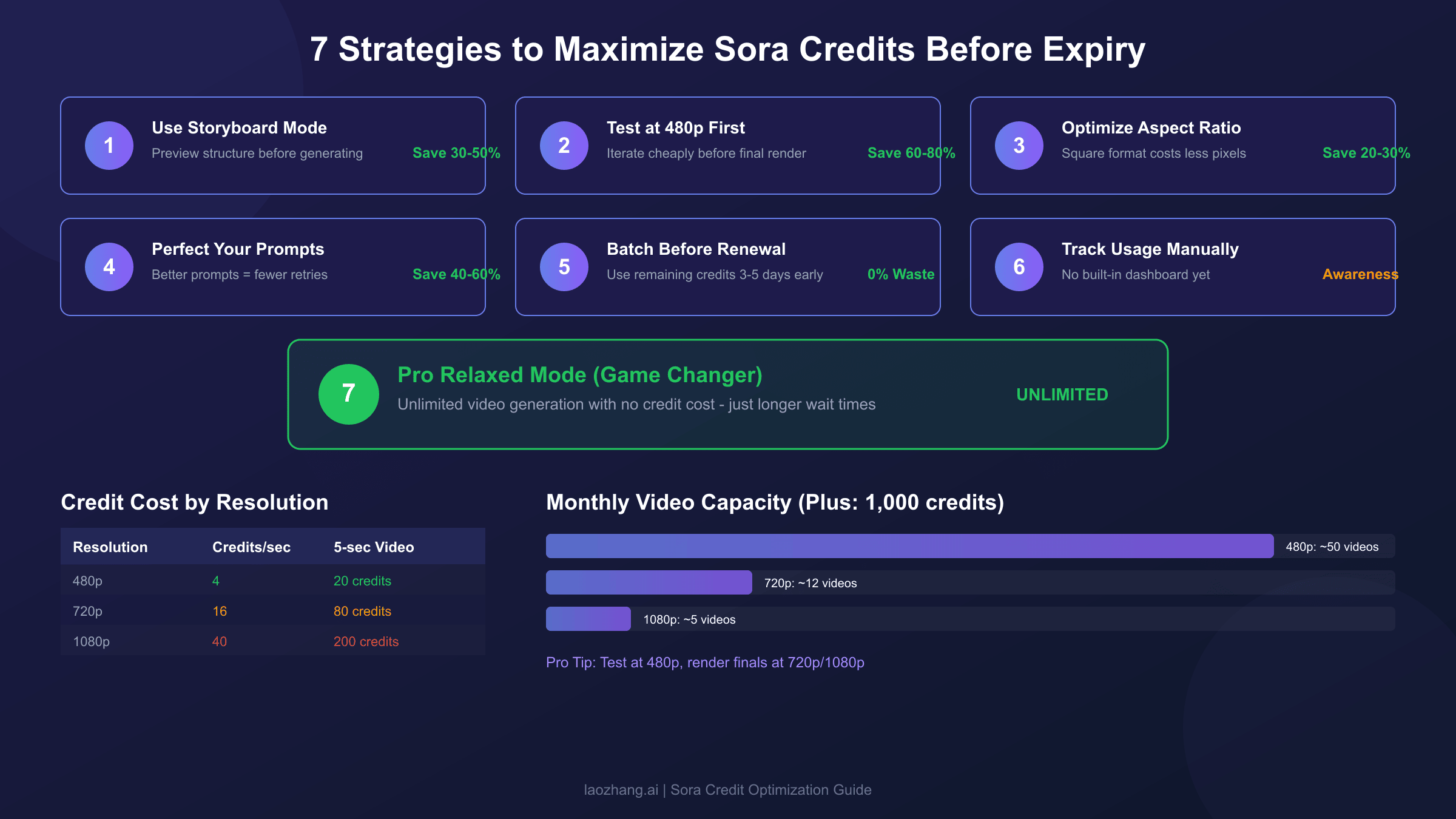
Video generation costs range from 20 credits for a basic 5-second 480p video to 800 credits for a 20-second 1080p production. The cost scales dramatically with both resolution and duration, making it essential to understand these multipliers before generating videos.
The credit consumption follows a straightforward formula based on resolution tier and video length. Here is the complete breakdown:
| Resolution | Credits per Second | 5-sec Video | 10-sec Video | 15-sec Video | 20-sec Video |
|---|---|---|---|---|---|
| 480p | 4 | 20 | 40 | 60 | N/A |
| 720p | 16 | 80 | 160 | 240 | N/A |
| 1080p | 40 | 200 | 400 | 600 | 800 |
These numbers reveal why credit management matters so much. A ChatGPT Plus subscriber with 1,000 monthly credits can generate approximately 50 basic 480p videos, but only 5 high-quality 1080p videos at 10 seconds each. The difference between resolution tiers is not linear; moving from 480p to 720p quadruples your cost, and 1080p costs 10 times more than 480p.
Aspect ratio also influences credit consumption, though less dramatically than resolution. Square formats (1:1) typically cost less than widescreen (16:9) or vertical (9:16) aspect ratios because they contain fewer total pixels. If your content does not require a specific aspect ratio, choosing square format can reduce credit consumption by 20-30% compared to widescreen.
To put this in practical terms, here is what a typical Plus subscriber can generate monthly:
| Quality Strategy | Resolution | Duration | Videos per Month |
|---|---|---|---|
| Maximum quantity | 480p | 5 sec | 50 videos |
| Balanced approach | 720p | 5 sec | 12 videos |
| Quality focus | 1080p | 5 sec | 5 videos |
| Mixed strategy | 480p + 720p | Various | 25-30 videos |
Most experienced Sora users adopt a mixed strategy: testing concepts and iterating at 480p, then re-rendering final versions at higher resolutions. This approach maximizes both quantity and quality within the same credit allocation. If you need help getting started with Sora, check out our step-by-step Sora 2 usage guide for detailed instructions.
7 Proven Strategies to Maximize Your Credits Before Expiry
The key to never losing credits lies in systematic planning, efficient testing workflows, and strategic batch generation. These seven strategies have been refined through extensive testing and community feedback to help you extract maximum value from every credit.
Strategy 1: Use Storyboard Mode for Pre-Generation Planning
The Storyboard feature lets you plan and preview your video structure before committing credits to generation. By defining scene beats, timing, and transitions in advance, you can identify potential issues and refine your vision without burning credits on failed attempts. This preview capability is particularly valuable for complex narratives or multi-scene videos where iteration would otherwise consume substantial credits.
Storyboard mode displays the estimated credit cost before you generate, allowing you to adjust duration or resolution to fit your remaining balance. Hover over the question mark icon in the generation interface to see exact costs. This transparency helps you make informed decisions about whether to proceed or modify your approach.
Strategy 2: Test at 480p Before Final Renders
Resolution selection represents the largest cost variable in Sora generation. Testing your prompts and concepts at 480p costs one-tenth of 1080p generation, allowing you to iterate extensively before committing to high-resolution final renders. A single 1080p test that does not meet expectations wastes credits equivalent to five 480p iterations.
The quality difference at 480p is sufficient to evaluate composition, motion, timing, and overall concept execution. Once you have confirmed the output matches your vision, regenerate at your target resolution. This workflow can reduce total credit consumption by 60-80% compared to testing directly at production resolution.
Strategy 3: Optimize Aspect Ratios for Your Platform
Different aspect ratios consume different amounts of credits due to pixel count variations. Square format (1:1) typically costs 20-30% less than widescreen (16:9) for equivalent resolution and duration. If your content destination does not require a specific format, choosing square or vertical formats optimizes credit efficiency.
Consider your distribution platform before selecting aspect ratio. Instagram Reels and TikTok use 9:16 vertical, YouTube prefers 16:9 widescreen, and LinkedIn tends to favor square formats. Generating in your final format from the start avoids the credit waste of regenerating in different ratios later.
Strategy 4: Refine Prompts Using OpenAI's Prompting Guide
Well-crafted prompts generate usable output more consistently than vague or generic descriptions. OpenAI's Sora Prompting Guide provides detailed recommendations for prompt structure, specificity, and cinematic language that improve first-attempt success rates.
Effective prompts include specific details about lighting, camera angles, movement, timing, and atmospheric conditions. Vague prompts force Sora to make assumptions that may not match your intent, leading to regeneration and credit waste. Investing time in prompt development before generation pays dividends in credit efficiency.
Strategy 5: Batch Generate 3-5 Days Before Renewal
If you are approaching your billing date with unused credits, plan a batch generation session 3-5 days before renewal. This timing provides buffer for any issues while ensuring you do not lose remaining credits. Generate content you might need for future projects, even if not immediately required.
Consider creating stock footage, B-roll clips, or experimental content during these end-of-cycle sessions. Having a library of pre-generated videos reduces pressure during future months and ensures no credits expire unused. The content remains available indefinitely once generated.
Strategy 6: Track Usage with a Manual Spreadsheet
OpenAI does not currently provide a real-time credit balance dashboard within the Sora interface. Users must manually track their generation history and calculate remaining credits. Creating a simple spreadsheet that logs each generation with resolution, duration, and credit cost helps you maintain awareness of your remaining balance.
This tracking becomes especially important as you approach your renewal date. Without active monitoring, you might underestimate remaining credits and miss the opportunity to use them. Set weekly check-in reminders to review your tracking spreadsheet and plan accordingly.
Strategy 7: Leverage Pro Relaxed Mode for Unlimited Generation
Pro subscribers ($200/month) have access to Relaxed mode, which offers unlimited video generation with no credit consumption. The only trade-off is longer generation times, typically 5-30 minutes compared to 1-2 minutes for priority generation. For non-urgent projects, Relaxed mode effectively eliminates credit expiration concerns entirely.
This makes Pro potentially better value for high-volume creators despite the 10x price increase. If you regularly exhaust your Plus credits and find yourself wanting more generation capacity, the unlimited Relaxed mode in Pro removes credit management overhead completely. We explore this option in detail in the next section.
How to Check Your Remaining Sora Credits
Check your credit balance through Settings → Usage in the Sora interface, or hover over the (?) icon before generating to see costs. Unfortunately, OpenAI has not yet implemented a persistent credit counter in the main interface, which creates visibility challenges for active users.
The primary method for checking credits involves navigating to your account settings within the Sora application or ChatGPT web interface. Look for the Usage section, which displays your current credit balance and recent generation history. This information updates after each generation but requires manual navigation to access.
Before initiating any video generation, you can preview the credit cost by hovering over the question mark icon adjacent to the generate button. This pre-generation cost display helps you confirm you have sufficient credits before committing to the operation. If the displayed cost exceeds your remaining balance, you will need to adjust resolution, duration, or wait for your next credit refresh.
The lack of a persistent, visible credit counter represents a significant UX limitation that many users have reported to OpenAI. Until this is addressed, maintaining a manual tracking spreadsheet remains the most reliable way to monitor your balance throughout the billing cycle. Record each generation immediately after completion to keep your tracking accurate.
Some users have reported discrepancies between expected and actual credit consumption. If you believe your credits are being consumed incorrectly, document your generation history and contact OpenAI support. The official billing FAQ notes that credits may occasionally take a few minutes to update after generation, so brief delays in balance updates are normal.
For those who want detailed analytics beyond basic tracking, third-party browser extensions and tools have emerged to help monitor Sora usage. However, be cautious about granting account access to unofficial tools, and always verify their security practices before installation.
Sora Plus vs Pro: Which Plan Handles Credits Better?
Pro offers 10x the credits (10,000 vs 1,000) plus unlimited Relaxed mode generation, making it significantly better for high-volume creators despite the 10x price increase. The decision depends on your monthly video generation needs and whether you value priority queue access.
Here is the complete comparison:
| Feature | ChatGPT Plus ($20/mo) | ChatGPT Pro ($200/mo) |
|---|---|---|
| Monthly Credits | 1,000 | 10,000 |
| Maximum Resolution | 720p | 1080p |
| Maximum Duration | 20 seconds | 25 seconds (storyboard) |
| Relaxed Mode | Not available | Unlimited |
| Priority Queue | Yes | Yes |
| Credit Rollover | No | No |
| Watermark | Present | Removable |
The credit allocation difference alone makes Pro more cost-effective for users who consistently exhaust their Plus credits. At 1,000 credits, Plus subscribers can generate approximately 50 basic videos or 12 mid-quality videos monthly. Pro's 10,000 credits support 500 basic or 125 mid-quality videos in priority mode, with unlimited additional capacity through Relaxed mode.
For cost-per-video analysis, Plus works out to approximately $2.00 per 720p/5-second video if you use your full allocation. Pro costs roughly $0.40 per equivalent video in priority mode, and approaches near-zero marginal cost when using Relaxed mode extensively. The break-even point occurs around 50 priority videos monthly.
The resolution difference matters for professional use cases. Plus limits you to 720p, which is adequate for social media but insufficient for larger displays or commercial production. Pro's 1080p access enables broadcast-quality output, though you can explore whether Sora can generate 4K videos for even higher quality needs.
If you are unsure which plan fits your needs, start with Plus to establish your actual usage patterns. You can upgrade to Pro at any time if you consistently hit credit limits or need higher resolution output. There is no penalty for upgrading mid-cycle beyond the prorated billing adjustment.
The Pro Relaxed Mode Loophole: Unlimited Videos Without Credit Cost
Pro's Relaxed mode offers genuinely unlimited video generation with no credit consumption, the same output quality as priority mode, and typical wait times of 5-30 minutes. This feature fundamentally changes the economics of AI video generation for serious creators.
Relaxed mode activates automatically once you have consumed your 10,000 priority credits, though you can also manually select it before reaching that threshold. The generated videos are identical in quality to priority mode; the only difference is queue position and wait time. During off-peak hours, Relaxed mode videos often complete within 5-10 minutes, while peak periods may extend waits to 30 minutes or more.
The strategic implications are significant. Pro subscribers can use their 10,000 priority credits for time-sensitive projects requiring immediate delivery, then switch to Relaxed mode for planned content, experiments, and stock footage creation. This hybrid approach effectively provides unlimited generation capacity with fast turnaround when needed.
Best practices for Relaxed mode include batching overnight generations, queuing multiple videos simultaneously, and scheduling production work for off-peak hours (typically 10 PM to 6 AM PST). Users report generating 50-100+ videos monthly in Relaxed mode with no credit impact, making Pro's $200 monthly cost potentially more economical than alternatives charging per-video fees.
For creators who worry about credit expiration, Relaxed mode eliminates the concern entirely. You can never waste Pro credits because any unused priority allocation simply shifts to Relaxed mode capacity. This peace of mind alone justifies the upgrade for many users who previously stressed about month-end credit management.
The quality consistency between priority and Relaxed mode has been verified extensively by the user community. There is no compression, resolution reduction, or quality degradation. The same models and parameters apply; only queue priority differs. This makes Relaxed mode a genuinely viable production workflow rather than a compromised fallback option.
API Alternatives: No Expiration, Pay-Per-Use Access
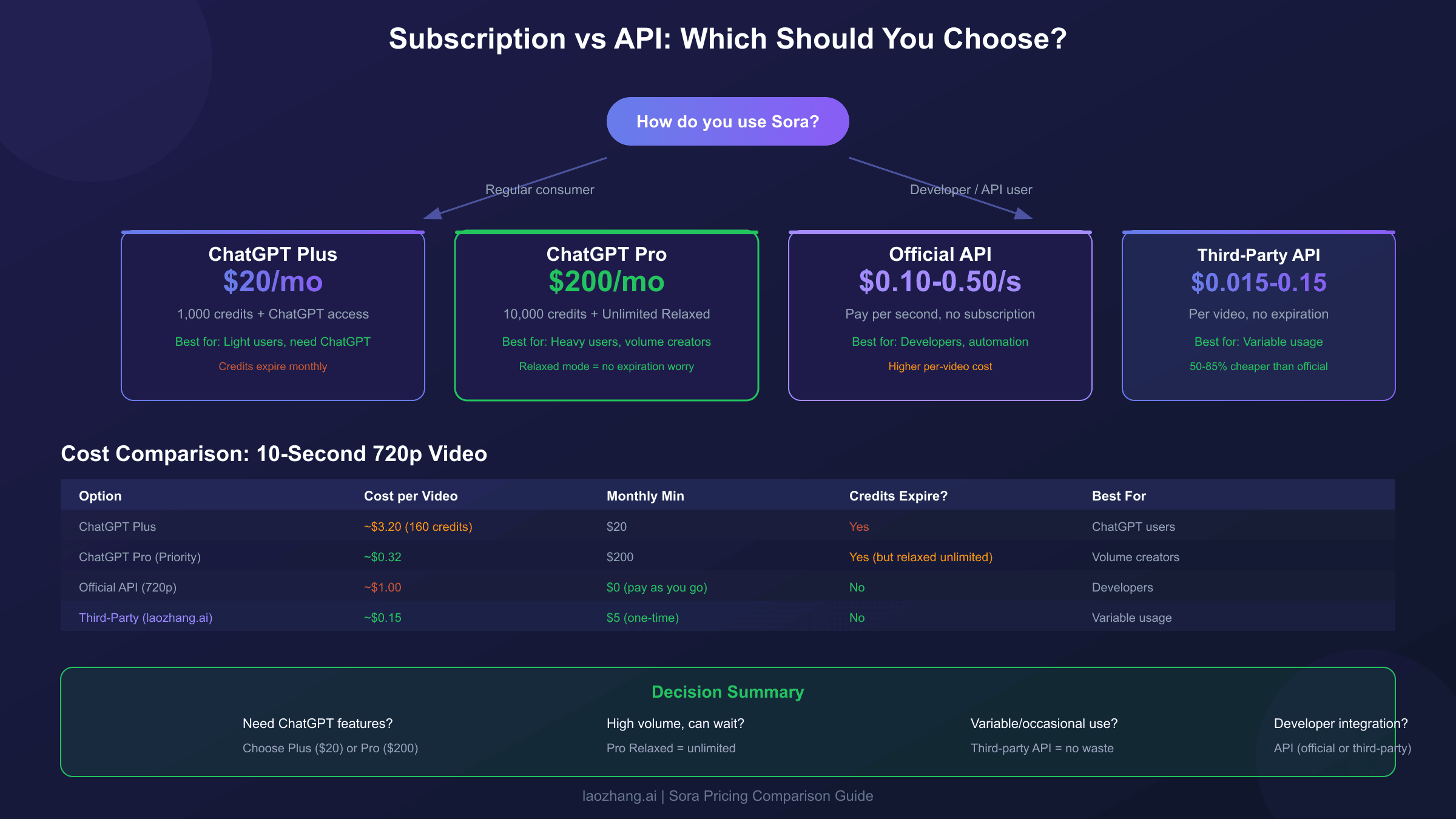
Third-party API providers offer Sora access at $0.015-0.15 per video with no monthly expiration, providing an alternative for users who prefer pay-as-you-go pricing. This approach eliminates credit waste entirely since you only pay for what you generate.
OpenAI's official Sora API pricing operates on a per-second basis: $0.10/second for standard quality (720p) and $0.30-0.50/second for Pro quality (1080p). A typical 10-second video costs $1.00-5.00 depending on resolution and model tier. While expensive compared to subscription credits, API access provides flexibility and programmatic integration capabilities.
Third-party providers have emerged offering significantly lower rates by aggregating demand and optimizing infrastructure. These services typically maintain OpenAI SDK compatibility, meaning your existing code works with just an endpoint URL change. Pricing ranges from $0.015/second at the low end to $0.10/second for premium tiers, representing 50-85% savings compared to official API rates.
For example, laozhang.ai offers Sora access at a flat $0.15 per video generation, with a minimum top-up of just $5 to get started. This predictable pricing simplifies budgeting compared to per-second calculations, and credits never expire since it operates on a pay-as-you-go model. The service maintains OpenAI SDK compatibility, requiring only a base URL and API key change to migrate existing integrations.
When choosing between subscription and API access, consider your usage patterns:
| Factor | Subscription (Plus/Pro) | API (Third-party) |
|---|---|---|
| Predictable monthly cost | Yes | No |
| Credit expiration | Yes (monthly) | No |
| Minimum commitment | $20-200/month | $5 one-time |
| Full ChatGPT access | Yes | No |
| Programmatic integration | Limited | Full |
| Ideal for | Regular consumers | Developers, variable needs |
If you need ChatGPT's conversational features alongside Sora, subscription makes sense. If you only need video generation and want maximum flexibility, API access through third-party providers offers better economics for irregular usage patterns. For more details on API pricing structures, see our Sora 2 API pricing comparison.
What Happens If You Cancel Your Subscription?
Canceling your ChatGPT Plus or Pro subscription immediately voids all remaining credits with no refund. OpenAI's policy does not provide prorated credit refunds or a grace period to use accumulated credits after cancellation.
This means strategic timing of cancellation is essential. If you decide to end your subscription, use your remaining credits before submitting the cancellation request. Once you confirm cancellation, access to Sora generation typically ends immediately, and any unused credits disappear permanently. There is no option to pause and retain credits for later use.
The no-refund policy applies regardless of how many credits remain. Whether you have 50 or 950 unused credits, the value is forfeited entirely upon cancellation. OpenAI's terms of service make this policy explicit, and support tickets requesting credit refunds are generally denied except in specific circumstances involving billing errors or service failures.
If you are considering cancellation, plan a final batch generation session to exhaust your remaining credits on useful content. Generate stock footage, experimental concepts, or project assets you might need later. The content remains accessible after cancellation even though generation capability ends.
For users who need temporary breaks rather than permanent cancellation, consider maintaining the subscription at the lowest tier (Plus at $20/month) rather than canceling outright. This preserves your account status, billing relationship, and the ability to upgrade seamlessly when your video needs resume. The monthly cost may be worthwhile compared to losing all flexibility.
Some users have reported that resubscribing after cancellation does not immediately restore the same billing date, which can affect credit timing relative to project schedules. If billing date consistency matters for your workflow, factor this into your cancellation decision.
Frequently Asked Questions
Do unused Sora credits roll over to the next month?
No. Sora credits expire at the end of each billing cycle and do not roll over. Any unused credits are forfeited when your subscription renews. This policy applies to both ChatGPT Plus and Pro subscribers. The only exception is separately purchased credit packs, which remain valid for 12 months from purchase.
Can I buy more credits if I run out?
Currently, OpenAI does not offer standalone credit purchases for Sora. The only way to access more credits is upgrading from Plus to Pro, which provides 10,000 credits monthly plus unlimited Relaxed mode. Third-party API providers offer pay-per-use alternatives without monthly limits.
What time zone does Sora use for credit resets?
Credits reset at midnight UTC (Coordinated Universal Time) on your billing renewal date. This is not local time. For reference, midnight UTC is 7:00 PM EST (winter) or 8:00 PM EDT (summer). International users should convert to their local timezone when planning end-of-cycle generation sessions.
Do credits expire if I pause my subscription?
If you pause your subscription, remaining credits typically stay available until your original renewal date, then expire normally. However, policies may vary, and pausing is not available in all regions. Check your account settings for specific pause options and their impact on credit validity.
Is there a way to transfer credits between accounts?
No. Sora credits are tied to individual accounts and cannot be transferred, shared, or gifted. Each subscription maintains separate credit allocations. Organizations requiring shared video generation should consider API access, which allows centralized billing across multiple users.
What happens to credits during a payment failure?
If your subscription payment fails, credit access is typically suspended until payment succeeds. Once payment processes, credits may not appear immediately; they often activate at the next midnight UTC. Keep your payment method updated to avoid interruptions, especially if you have time-sensitive video projects.
Can I get a refund for unused credits?
No. OpenAI does not offer refunds for unused Sora credits under normal circumstances. The terms of service explicitly state that credits are non-refundable. Exceptions may apply in cases of documented billing errors or extended service outages, but standard unused credits are not refundable.
How many videos can I make with 1,000 credits?
With 1,000 credits (ChatGPT Plus allocation), you can generate approximately 50 videos at 480p/5 seconds, 12 videos at 720p/5 seconds, or 5 videos at 1080p/5 seconds. Most users adopt a mixed strategy: testing at 480p and rendering finals at higher resolutions, which typically yields 25-30 videos of varying quality.
Conclusion
Understanding Sora's credit expiration policy is essential for maximizing your subscription value. Credits expire at billing cycle end with no rollover, but the seven strategies outlined above help ensure you never waste unused credits. Whether you stick with Plus, upgrade to Pro for unlimited Relaxed mode, or explore API alternatives, planning your video generation around these mechanics optimizes both cost and output.
For most users, the key actions are: track your credits manually, test at lower resolutions, batch generate before renewal, and consider Pro if you consistently hit limits. The Relaxed mode loophole makes Pro surprisingly economical for high-volume creators who can work with longer generation times.
If you need stable, expiration-free access to Sora, third-party API services like laozhang.ai offer pay-as-you-go alternatives starting at $0.15 per video with no monthly commitments. Visit the pricing documentation for current rates and integration guides.