Sora 2 vs Runway Gen-2: Complete 2025 Comparison Guide (Gen-4 Update)
Comprehensive comparison of OpenAI Sora 2 and Runway Gen-4 covering pricing, quality, speed, and use cases. Includes real cost calculations and API integration guide for content creators.
Nano Banana Pro
4K-80%Google Gemini 3 Pro · AI Inpainting
谷歌原生模型 · AI智能修图

If you searched for "Sora 2 vs Runway Gen-2," you're likely trying to choose between two of the most talked-about AI video generators. Here's what you need to know right away: Runway Gen-2 is now obsolete. Runway has since released Gen-3, Gen-4, and most recently Gen-4.5 in December 2025. Meanwhile, OpenAI's Sora 2 launched in late September 2025 and has quickly become the benchmark for cinematic AI video generation. This guide will give you the current, accurate comparison you actually need—covering pricing from $12 to $200 per month, quality differences that matter for your specific use case, and practical recommendations based on whether you're a content creator, marketer, or developer.
The AI video generation market reached $716.8 million in 2025 and is projected to hit $2.56 billion by 2032. More importantly for you, 52% of short-form content on TikTok and Instagram Reels now incorporates AI-generated elements. Choosing the right tool isn't just about features—it's about staying competitive in an increasingly AI-augmented creative landscape. By the end of this article, you'll have a clear understanding of which tool fits your workflow, budget, and quality requirements, along with specific cost calculations for different production scenarios.
Runway's Evolution: From Gen-2 to Gen-4.5
Understanding Runway's rapid evolution explains why "Gen-2" searches lead to outdated information and why the current Gen-4/4.5 models represent a fundamentally different capability level. When Runway released Gen-2 in June 2023, it was groundbreaking as the first commercially available text-to-video AI model. However, that model maxed out at just 4 seconds of video with noticeable artifacts and limited consistency. The company has released three major generations since then, each addressing specific limitations that frustrated early adopters.
Gen-3 Alpha, released in June 2024, brought the first significant leap in quality and duration. Video length extended to 10 seconds, temporal consistency improved dramatically (objects and scenes maintained stable appearance throughout clips), and the model demonstrated better understanding of real-world physics. Perhaps more importantly, Gen-3 introduced the Motion Brush feature that lets creators direct specific movements in their generations—a control mechanism that Sora 2 still lacks. The Turbo variant of Gen-3 offered the same quality at half the credit cost, making it accessible for iteration-heavy workflows.
Gen-4 arrived in March 2025 with three core improvements that professionals immediately noticed: enhanced fidelity with sharper textures and more accurate lighting, dynamic motion with more natural movement patterns, and unprecedented character consistency. Unlike Gen-2's tendency to morph faces and objects between frames, Gen-4 can maintain the same character across "endless lighting conditions, locations and treatments" using just a single reference image. Gen-4 Turbo followed in April 2025, generating 10-second videos in just 30 seconds—7x faster than Gen-3 Alpha. As of December 2025, Runway Gen-4.5 holds the top position in the Artificial Analysis Text to Video benchmark with 1,247 Elo points, surpassing both Google's Veo 3 and OpenAI's Sora 2 Pro (which ranks 7th).
| Generation | Release Date | Max Duration | Key Improvement |
|---|---|---|---|
| Gen-2 | June 2023 | 4 seconds | First commercial text-to-video |
| Gen-3 Alpha | June 2024 | 10 seconds | Motion Brush, temporal consistency |
| Gen-4 | March 2025 | 10 seconds | Character consistency, 4K output |
| Gen-4.5 | December 2025 | 10+ seconds | #1 benchmark ranking, refined motion |
Sora 2 vs Runway Gen-4: Core Feature Comparison
The fundamental difference between Sora 2 and Runway Gen-4 comes down to philosophy: Sora 2 prioritizes cinematic realism and physics simulation, while Runway prioritizes controllability and workflow integration. This isn't about which is "better"—it's about which approach matches your production needs. Sora 2 will give you more photorealistic output with superior physics (a basketball bouncing realistically off a backboard, water behaving with accurate fluid dynamics), but Runway gives you granular control over exactly how elements move and interact.
Sora 2 supports text-to-video, image-to-video, and video-to-video (remix) generation modes. Its standout feature is the Cameo capability—upload a short clip of yourself or another person, and Sora 2 can insert them into any generated scene with accurate lip-sync for dialogue. The model also generates synchronized audio including speech, ambient sounds, and sound effects, eliminating the need for separate audio production in many cases. However, Sora 2 cannot generate from text alone without significant wait times, and access remains limited to US and Canada via iOS app and sora.com as of late 2025.
Runway Gen-4 requires an input image for generation (no pure text-to-video in Gen-4 specifically, though Gen-3 Alpha still supports it). What Gen-4 offers instead is unprecedented control: Motion Brush lets you paint specific movement directions onto areas of your image, Director Mode recognizes cinematography terminology for camera control, and the References feature maintains character and style consistency across shots. Critically, Runway isn't just a generator—it's a production-ready creative suite where you can generate footage, then immediately mask, edit, color-grade, and composite within the same interface.
| Feature | Sora 2 | Runway Gen-4 |
|---|---|---|
| Text-to-Video | Yes | No (Gen-3 only) |
| Image-to-Video | Yes | Yes (required) |
| Native Audio | Yes (speech, ambient, SFX) | No |
| Motion Control | Limited | Motion Brush, Director Mode |
| Character Consistency | Good | Industry-leading |
| Max Resolution | 1080p | 4K (with upscaling) |
| Editing Suite | No | Yes (integrated) |
| Cameo Feature | Yes | No |
Video Quality and Realism Comparison
In side-by-side testing, Sora 2 consistently produces more natural micro-expressions and subtle details in close-up shots. Skin tones maintain subtle hue shifts under changing light conditions, and hand movements—historically problematic for AI video—render with solid accuracy even during complex interactions like gripping objects. Sora 2's physics simulation creates what testers describe as "heavier" ground contact, where objects interact with surfaces in ways that feel physically plausible rather than floaty or disconnected.
Runway Gen-4's quality approach differs: it prioritizes consistency over peak realism. In the same tests, Gen-4 faces held up well in mid-shots with believable skin texture and eye tracking, though reviewers noted "occasional micro-flicker on teeth highlights." Where Gen-4 excels is product scenes—the model respects font styles and keeps logos crisp across frames, making it superior for branded content. The trade-off is that Gen-4's movements sometimes appear "too smooth," and character performances can seem conservative compared to Sora 2's more dynamic output.
Resolution capabilities favor Runway on paper: Gen-4 supports 4K output through upscaling, while Sora 2 caps at 1080p (1920x1080) for Pro users and 720p for Plus subscribers. However, native resolution tells a different story. Sora 2 generates at 1080p natively at 24 or 30 FPS, producing 240 frames for a 10-second clip. Runway Gen-4's native resolution is 1280x768 (landscape) or 768x1280 (portrait), with 4K achieved through post-processing upscaling. For most social media and web use cases, both deliver sufficient quality; for broadcast or cinema work, neither currently replaces traditional production.
Generation Speed and Workflow
Speed is Runway's decisive advantage for iterative workflows. A 10-second Gen-4 video generates in approximately 90 seconds, and Gen-4 Turbo cuts that to just 30 seconds—delivering results before you finish writing your next prompt. For creators producing weekly content across multiple platforms, this speed difference compounds into hours saved per week. Sora 2, by contrast, takes 20-30 minutes for a 15-second high-resolution clip, with simpler generations still requiring 3-5 minutes. When you're iterating through variations to find the right output, Sora 2's render times become a significant bottleneck.
Workflow integration further separates the platforms. Runway's recent Aleph update expanded its capabilities beyond generation: you can modify live-action footage, relight environments, and reframe shots within the same interface. This means a workflow that previously required Runway for generation, then export to DaVinci or Premiere for editing, can now happen entirely within Runway. Sora 2 outputs MP4 files that require external editing software for any post-processing, adding friction to production pipelines.
For teams, Runway offers collaborative features including shared workspaces, asset libraries, and enterprise-tier custom policies. Sora 2's collaboration features remain limited—the platform was designed primarily for individual creators accessing via the iOS app or web interface. If your production involves multiple team members iterating on the same project, Runway's infrastructure supports that workflow while Sora 2 requires workarounds.
Pricing Deep Dive: Credit Systems Explained
Both platforms use credit-based pricing, but the systems work differently and understanding the math prevents budget surprises. OpenAI offers Sora 2 through ChatGPT subscriptions: Plus at $20/month includes 1,000 credits for 720p video up to 10 seconds, while Pro at $200/month provides 10,000 credits plus unlimited "relaxed" mode for 1080p video up to 20 seconds. Credit consumption scales with quality—480p uses 4 credits per second, 720p uses 16 credits per second, and 1080p uses 40 credits per second. A 5-second 1080p video costs 200 credits, meaning Pro subscribers can generate approximately 50 high-quality clips monthly at full resolution.
Runway's pricing tiers start lower but scale differently. The Standard plan at $12/month (billed annually) provides 625 credits monthly—enough for approximately 52 seconds of Gen-4 video or 125 seconds of Gen-4 Turbo. The Pro plan at $28-35/month increases to 2,250 credits with custom training capabilities. The Unlimited plan at $95/month offers 2,250 credits in standard mode plus unlimited generations in "Explore" mode (with rate restrictions). Credit costs per second: Gen-4 uses 12 credits/second, Gen-4 Turbo uses 5 credits/second, Gen-3 Alpha uses 10 credits/second, and Gen-3 Alpha Turbo uses 5 credits/second.
| Plan | Monthly Cost | Sora 2 Equivalent | Runway Equivalent |
|---|---|---|---|
| Entry | $12-20 | ~62 sec @ 720p | ~52 sec Gen-4 |
| Mid | $28-35 | N/A | ~188 sec Gen-4 |
| Pro | $95-200 | ~250 sec @ 1080p | Unlimited Explore |
For detailed breakdowns of Sora 2's credit system, see our complete Sora 2 credits and limits guide.
Cost Per Video: Real-World Calculations
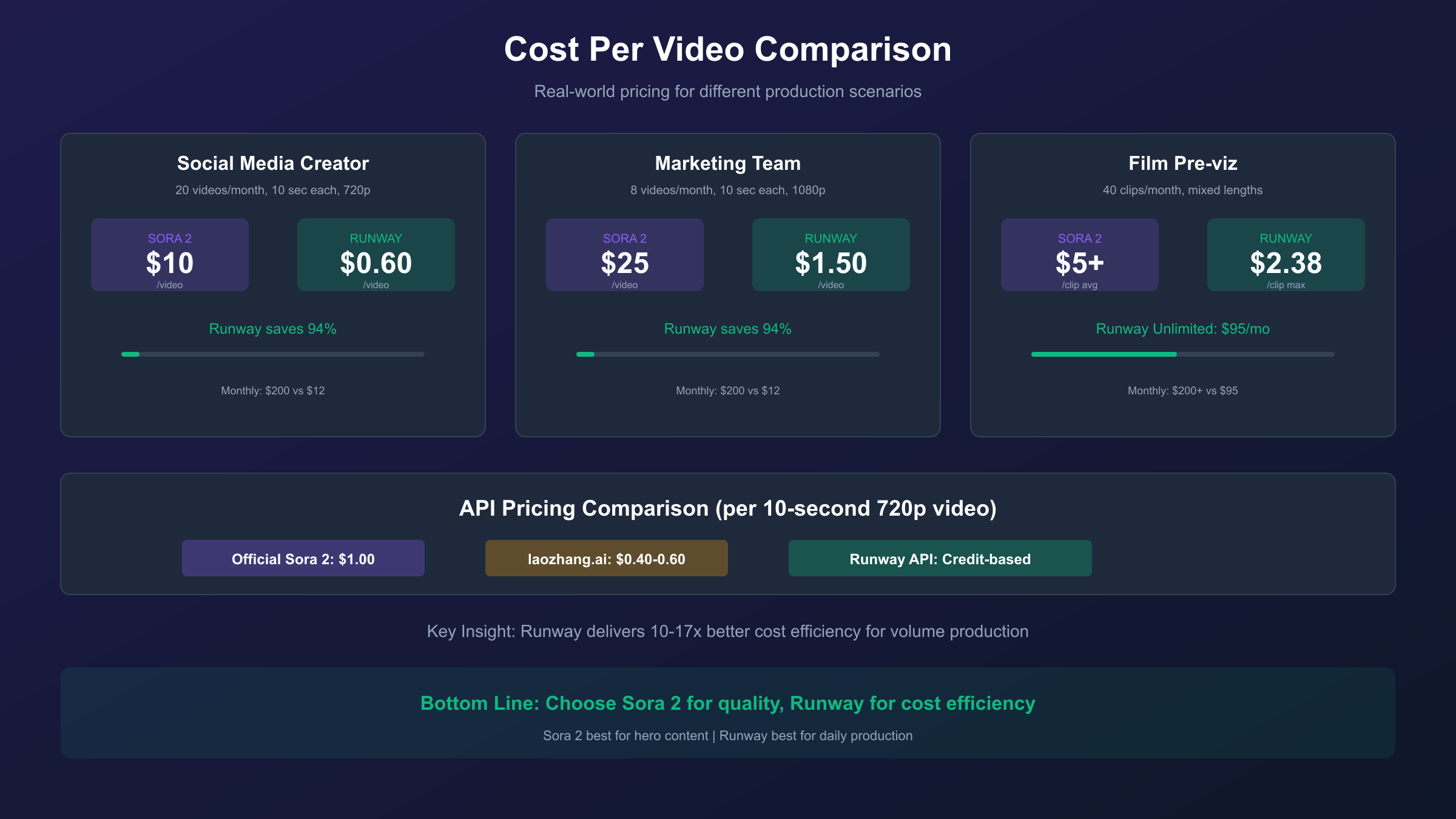
Abstract pricing tiers matter less than actual cost per deliverable. Let's calculate what different production scenarios actually cost on each platform, using current December 2025 rates. These calculations help you budget accurately and identify which platform delivers better value for your specific output volume.
Scenario 1: Social Media Content Creator (20 videos/month, 10 seconds each)
- Sora 2 (720p): 20 × 10s × 16 credits = 3,200 credits → Requires Pro plan ($200/month) = $10/video
- Runway Gen-4 Turbo: 20 × 10s × 5 credits = 1,000 credits → Standard plan sufficient ($12/month) = $0.60/video
Scenario 2: Marketing Team (8 videos/month, 10 seconds each, 1080p quality)
- Sora 2 (1080p): 8 × 10s × 40 credits = 3,200 credits → Requires Pro plan ($200/month) = $25/video
- Runway Gen-4: 8 × 10s × 12 credits = 960 credits → Standard plan sufficient ($12/month) = $1.50/video
Scenario 3: Film Pre-visualization (40 clips/month, mixed lengths)
- Sora 2: Variable, but likely $200+/month = $5+/clip average
- Runway Unlimited: $95/month with unlimited Explore mode = $2.38/clip maximum
For developers requiring API access, official pricing differs significantly. Sora 2 API costs $0.10/second for 720p and $0.30-0.50/second for higher resolutions—meaning a 10-second clip costs $1-5 through the API. Third-party platforms like laozhang.ai offer OpenAI-compatible endpoints at approximately 40-60% lower cost, which becomes significant for high-volume production. For reference:
| Provider | 10-second 720p Cost | Notes |
|---|---|---|
| Sora 2 Official API | $1.00 | Limited availability |
| laozhang.ai | ~$0.40-0.60 | OpenAI-compatible, stable access |
When official API access is limited or cost-prohibitive, third-party alternatives provide a viable path for production workloads. However, for enterprise compliance requirements or when you need OpenAI's direct technical support, the official API remains the appropriate choice.
Technical Specifications for Developers
For developers integrating AI video generation into applications, technical specifications determine feasibility. Sora 2's API follows OpenAI's v1 structure and is also available through Azure OpenAI. Current model snapshots include sora-2, sora-2-2025-10-06, and sora-2-2025-12-08. The API supports video durations of 4, 8, or 12 seconds for standard Sora 2, and 10, 15, or 25 seconds for Sora 2 Pro. Resolution options include multiple aspect ratios: 480x480, 480x854, 854x480, 720x720, 720x1280, 1280x720, and 1080x1080, with Pro adding 1792×1024 and 1024×1792 for cinematic formats.
Content restrictions on Sora 2's API are strict: no 18+ content (bypass option coming), no copyrighted characters or music, no real people generation (including public figures), and input images containing faces are currently rejected. All outputs include Content Credentials (C2PA) watermarking and provenance metadata for authenticity verification. These restrictions make Sora 2 unsuitable for certain commercial applications but provide built-in compliance for content moderation requirements.
Runway's API uses a credit-based system with enterprise options available. Unlike Sora 2's regional restrictions (US and Canada only as of late 2025), Runway's API is globally accessible. For developers needing broader access or cost optimization, third-party platforms provide alternatives:
hljs pythonfrom openai import OpenAI
# Option 1: Official OpenAI Sora 2 API (when available)
official_client = OpenAI(api_key="sk-your-openai-key")
# Option 2: laozhang.ai (OpenAI-compatible, broader availability)
laozhang_client = OpenAI(
api_key="sk-your-laozhang-key",
base_url="https://api.laozhang.ai/v1"
)
# Same code structure works with both providers
response = laozhang_client.chat.completions.create(
model="sora-2", # Or other supported models
messages=[{"role": "user", "content": "Generate a video of..."}]
)
For comprehensive API documentation and pricing details, see our Sora 2 API pricing guide or explore stable Sora 2 API options.
Best Use Cases: Matching Tool to Project
The right tool depends entirely on what you're producing. Sora 2 excels in scenarios where cinematic quality and physical realism justify longer render times and higher costs. High-end brand campaigns requiring photorealistic product interactions, film pre-visualization where accurate physics simulation prevents costly reshoots, and concept art exploration where the goal is maximum visual impact rather than volume—these are Sora 2's strengths. The native audio generation also makes Sora 2 superior for self-contained clips that don't require separate sound design.
Runway Gen-4 dominates production workflows requiring consistency, speed, and control. Social media teams producing daily content across TikTok, Reels, and Shorts benefit from Gen-4 Turbo's 30-second generation times and Runway's integrated editing suite. Advertising agencies maintaining brand consistency across campaigns leverage the References feature to ensure characters and visual styles remain identical across dozens of clips. Animation studios use Motion Brush and Director Mode for precise control that Sora 2 cannot match—specifying exactly how a character's hand should move or how the camera should pan.
| Use Case | Recommended Tool | Primary Reason |
|---|---|---|
| TikTok/Reels content | Runway Gen-4 Turbo | Speed, cost efficiency |
| Brand campaign hero video | Sora 2 | Cinematic quality |
| Product demonstrations | Runway Gen-4 | Logo/text consistency |
| Film pre-viz | Sora 2 | Physics accuracy |
| Character-driven series | Runway Gen-4 | Character consistency |
| Music video concepts | Sora 2 | Native audio, realism |
| Rapid prototyping | Runway Gen-4 Turbo | 30-second generations |
Beginner vs Professional: Which Tool Fits Your Level?
For beginners entering AI video generation, accessibility and learning curve matter as much as raw capability. Sora 2 offers the simpler starting experience: its iOS app and web interface require no technical setup, prompts can be natural language descriptions without specialized terminology, and the results—while slower to generate—require less iteration to achieve usable output. The caveat is cost: beginners experimenting with Sora 2 will quickly exhaust ChatGPT Plus credits, and the $200 Pro plan is steep for learning purposes.
Runway's learning curve is steeper but rewards investment. Understanding Motion Brush, Director Mode, and the References feature requires dedicated learning time, and getting consistent results means understanding how these controls interact. However, Runway's Standard plan at $12/month provides enough credits for substantial experimentation, and the integrated editing suite means beginners can complete entire projects without learning additional software. For creators planning to produce AI video content regularly, the time invested in learning Runway's controls pays dividends in production efficiency.
Professional users generally need both tools or favor Runway for daily work. The 65% of professional content creators who use Runway for daily production do so because of workflow integration, speed, and controllability—not because they believe it produces "better" video than Sora 2. Many professionals use Sora 2 for hero content and concept exploration while using Runway for volume production. The tools complement rather than replace each other at the professional level.
Alternative AI Video Generators Worth Considering
Sora 2 and Runway aren't the only options, and depending on your needs, alternatives may serve you better. Google's Veo 3 leads in native audio generation—it ended what DeepMind called "the silent era of video generation" by producing videos with coherent, contextually appropriate soundscapes. Veo 3 requires a Google AI Ultra subscription at $249.99/month, positioning it as a premium option, but for projects where audio-visual synchronization is critical, it may justify the cost.
Kling AI 2.1, developed by ByteDance (TikTok's parent company), excels at social media optimization. It generates 2-minute videos—significantly longer than both Sora 2 and Runway—with built-in lip-sync and facial motion capabilities. Pricing starts at $6.99/month for 660 credits, making it the most affordable option for high-volume social content. The trade-off is less control compared to Runway and less realism compared to Sora 2.
Pika Labs 2.5 delivers the best value for creators just starting with AI video. Its 10-second 1080p generations with keyframe control provide impressive capabilities at an accessible price point. For budget-conscious creators who need "good enough" quality rather than industry-leading output, Pika represents a reasonable entry point before investing in Sora 2 or Runway's premium tiers.
| Tool | Best For | Monthly Cost | Standout Feature |
|---|---|---|---|
| Veo 3 | Audio-critical projects | $249.99 | Native audio generation |
| Kling AI 2.1 | Social media volume | $6.99-25.99 | 2-minute videos, lip-sync |
| Pika Labs 2.5 | Budget creators | Affordable | Value, keyframe control |
Making Your Decision: Recommendation Framework
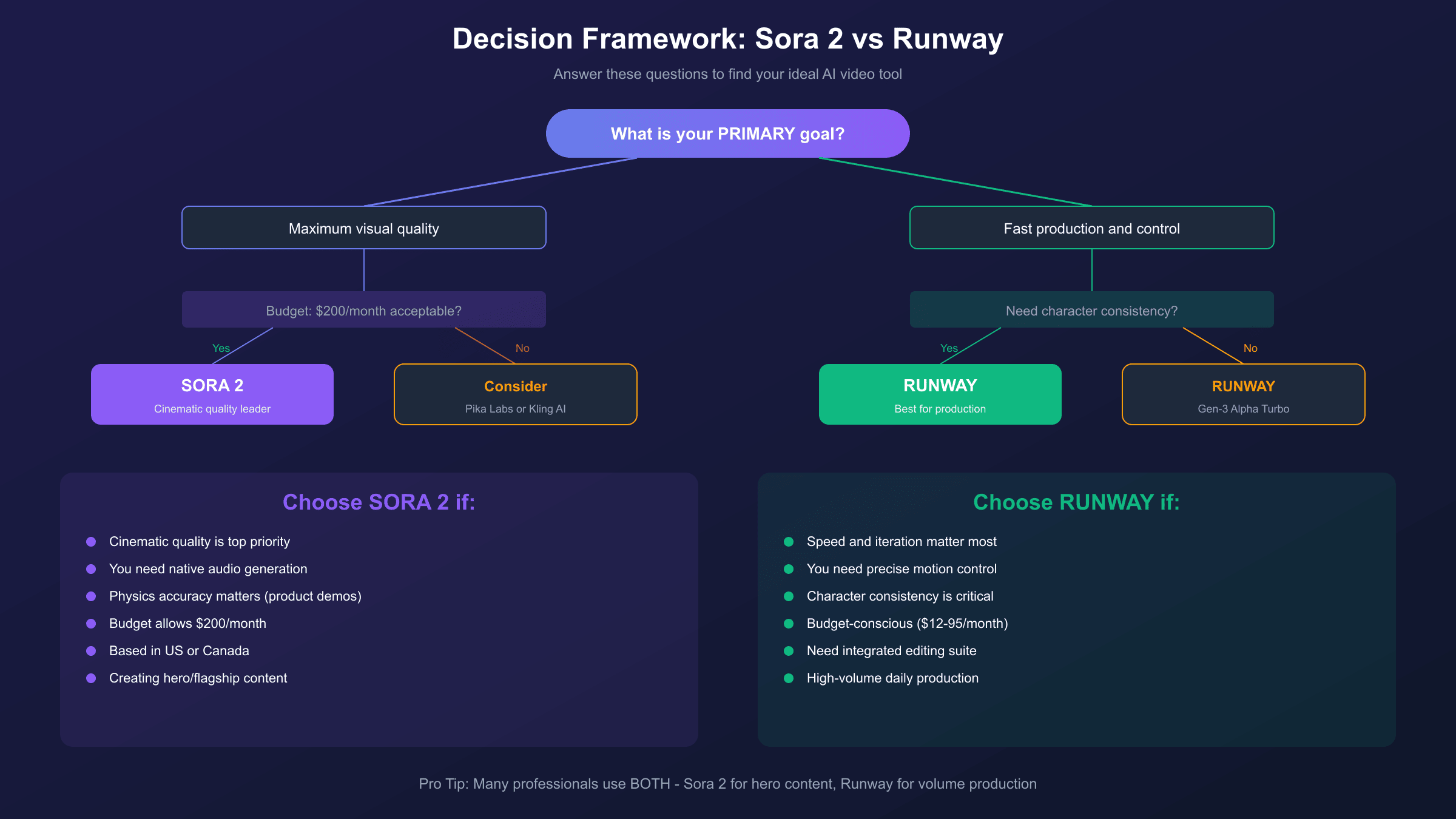
After analyzing features, pricing, performance, and use cases, the decision framework becomes clear. Choose Sora 2 if: you prioritize cinematic quality over production speed, you need native audio generation, your projects involve complex physics interactions, you're willing to pay premium pricing ($200/month) for top-tier realism, or you're primarily based in the US/Canada where access is available. Sora 2 is the "hero content" tool—use it when quality is the primary success metric.
Choose Runway Gen-4 if: you need fast iteration and high-volume production, precise control over motion and camera is essential, character consistency across multiple clips matters for your workflow, you want an integrated editing suite rather than switching between tools, or you need global API access without regional restrictions. Runway is the "production workhorse" tool—use it when efficiency, consistency, and control matter more than peak realism.
Consider alternatives if: budget is your primary constraint (Pika Labs), you need videos longer than 20 seconds (Kling AI), or audio-visual integration is critical (Veo 3). No single tool dominates every dimension, and many professional workflows incorporate multiple platforms for different purposes.
Frequently Asked Questions
Is Runway Gen-2 still available or should I use Gen-4?
Runway Gen-2 is technically still accessible but functionally obsolete for new projects. Gen-4 and Gen-4.5 offer dramatically better quality, longer durations, and more control options at the same or better credit efficiency. The only reason to use Gen-2 would be maintaining consistency with existing projects that started on that model. For any new work, Gen-4 Turbo provides the best balance of quality and cost, while Gen-4.5 delivers maximum quality when credits aren't a concern.
Can Sora 2 generate videos with sound, and how does it compare to adding audio separately?
Yes, Sora 2 generates synchronized audio including speech, ambient sounds, and sound effects directly within the video output. This is a significant workflow advantage—you get a complete audiovisual clip without needing to source or create separate audio. The quality is contextually appropriate (outdoor scenes get wind and ambient noise, dialogue gets lip-synced speech), though for professional productions, you may still want to replace or enhance the audio in post. Runway Gen-4 does not generate audio, requiring separate audio production or sourcing.
What are the actual video length limits for each platform?
Sora 2 generates clips from 4-12 seconds on the standard API, extending to 10-25 seconds with Sora 2 Pro. The ChatGPT Plus tier limits you to 5 seconds at 720p or 10 seconds at 480p, while Pro unlocks 10-second 1080p clips and up to 20 seconds with some limitations. Runway Gen-4 generates in 5 or 10-second increments, with Gen-3 Alpha supporting extensions up to 20+ seconds. Neither platform currently supports generating videos longer than about 25 seconds in a single generation—longer content requires stitching multiple clips.
Which platform is better for generating consistent characters across multiple videos?
Runway Gen-4 leads decisively in character consistency. Its References feature allows you to provide a single reference image and generate that same character across "endless lighting conditions, locations and treatments" with maintained identity. This is critical for branded content, ongoing series, or any workflow requiring visual continuity. Sora 2's character consistency is good but not at Runway's level—longer Sora 2 clips can experience subtle character drift, and the platform lacks an explicit mechanism for enforcing consistency across separate generations.
How do the free tiers compare between Sora 2 and Runway?
Runway's free tier provides 125 one-time credits (not refreshed monthly)—enough for approximately 25 seconds of Gen-4 Turbo video or 10 seconds of Gen-4, with watermarks and 720p resolution limit. Sora 2's free access through ChatGPT Free is extremely limited: 360p maximum quality with strict generation limits. Neither free tier supports production use, but Runway's free tier provides enough to meaningfully evaluate the platform. For actual testing, Runway's Standard plan at $12/month offers substantially more value than Sora 2's $20/month ChatGPT Plus tier.
Can I use these tools for commercial projects?
Yes, both platforms allow commercial use of generated content under their respective terms of service. Sora 2 includes Content Credentials (C2PA) watermarking for provenance tracking, and both platforms prohibit generating copyrighted characters, real people without consent, or content violating their policies. For commercial use, verify your specific use case against each platform's current terms—particularly around synthetic media disclosure requirements that vary by jurisdiction.
Conclusion
The "Sora 2 vs Runway Gen-2" comparison you searched for has evolved significantly. Runway Gen-2 is obsolete, replaced by Gen-4 and Gen-4.5, while Sora 2 represents OpenAI's most ambitious video generation model to date. The practical choice between them depends on your priorities: Sora 2 delivers superior cinematic realism and native audio at premium pricing ($200/month for Pro), while Runway Gen-4 offers faster generation, granular control, and better cost efficiency starting at $12/month.
For most content creators, Runway Gen-4 Turbo provides the best balance of quality, speed, and cost—particularly for social media and volume production. For premium brand campaigns, film pre-visualization, or projects where physics accuracy and photorealism are paramount, Sora 2 justifies its higher price point. Many professionals use both: Runway for daily production, Sora 2 for hero content.
If you're evaluating API integration for development projects, consider both official APIs and alternatives like laozhang.ai for cost optimization when official access is limited. For detailed pricing breakdowns, see our Sora 2 pricing guide or explore Sora 2 plan comparisons. The AI video generation landscape continues evolving rapidly—the tool that's right for you today may shift as new capabilities emerge, but understanding the fundamental trade-offs between realism and control will remain relevant regardless of which generation number appears in the product name.