How to Remove Watermark from Sora 2 Videos: Complete Guide 2025
Learn how to remove watermarks from Sora 2 AI-generated videos. Explore official watermark-free options, third-party API alternatives, AI inpainting tools, and open-source solutions with step-by-step instructions.
Nano Banana Pro
4K-80%Google Gemini 3 Pro · AI Inpainting
谷歌原生模型 · AI智能修图

OpenAI's Sora 2 produces stunning AI-generated videos, but every output comes with a visible watermark that can interfere with professional use. The watermark isn't a simple static overlay—it moves across frames, blends with changing backgrounds, and persists through basic editing attempts. For creators who need clean videos for commercial projects, client work, or professional content, removing this watermark has become a common challenge.
This guide covers every legitimate method to obtain or create watermark-free Sora 2 videos. From official subscription options to third-party API services, from AI-powered removal tools to open-source inpainting solutions, you'll find the approach that best fits your budget, technical skill level, and intended use case. We'll also address the important ethical and legal considerations surrounding watermark removal.
Understanding Sora 2's Watermark System
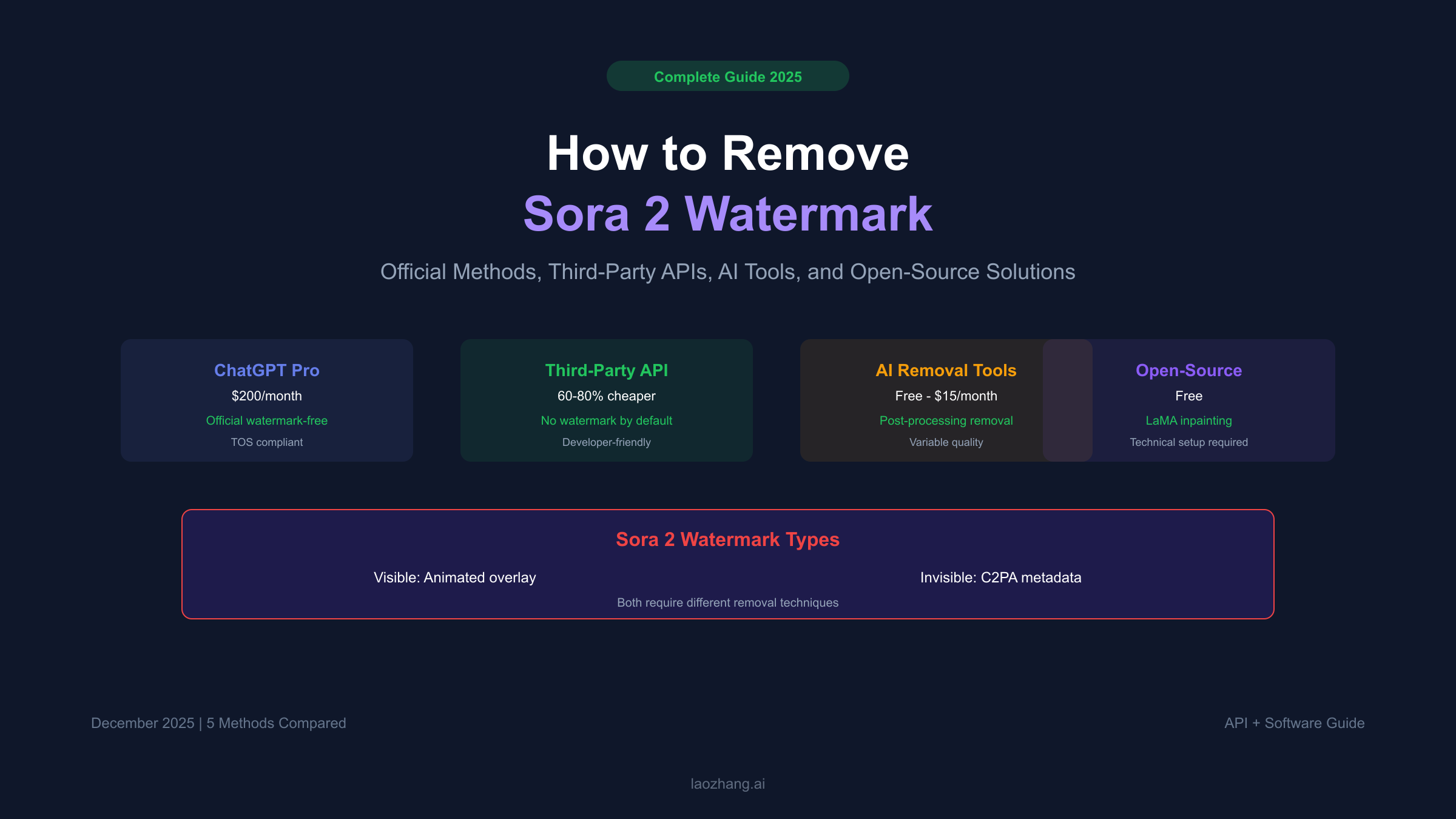
Before attempting removal, it's essential to understand what you're dealing with. Sora 2 implements a multi-layered provenance system that goes beyond a simple logo overlay.
Visible Watermark
The visible watermark appears as an animated "Sora" text or OpenAI logo that moves across the video frame. Unlike static watermarks, this overlay:
- Changes position throughout the video
- Blends with underlying content using transparency
- Appears over varying textures, colors, and motion
- Resists simple cropping or blur-based removal
Invisible C2PA Metadata
Beyond the visible mark, Sora 2 embeds C2PA (Content Credentials) metadata into every generated video. This invisible signature:
- Survives most basic editing operations
- Identifies the content as AI-generated
- Contains creation timestamp and origin information
- Persists even when visible watermarks are removed
The dual-layer system means that removing the visible watermark doesn't eliminate all traces of AI generation. For applications requiring complete provenance removal, additional metadata stripping is necessary.
| Layer | Type | Removal Difficulty | Detection After Removal |
|---|---|---|---|
| Visible Watermark | Animated overlay | Moderate (requires AI inpainting) | Visually removed |
| C2PA Metadata | Embedded signature | Easy (FFmpeg stripping) | Forensic analysis possible |
| Platform Traces | Server-side logs | Impossible | OpenAI retains records |
Method 1: Official Watermark-Free Downloads (ChatGPT Pro)
The most straightforward path to watermark-free Sora 2 videos is through OpenAI's official channels. ChatGPT Pro subscribers have access to watermark-free downloads as part of their subscription.
ChatGPT Pro Subscription ($200/month)
The ChatGPT Pro tier includes:
- Sora 2 Pro model access with higher quality output
- Up to 25-second video clips (vs 5-second limit on Plus)
- 1080p resolution (vs 720p on Plus)
- 10,000 monthly credits (vs 1,000 on Plus) — for detailed credit breakdown, see our Sora 2 credits and limits guide
- Watermark-free download option
- Priority queue access during high-demand periods
How to Download Without Watermark
- Generate your video through the Sora interface (sora.com)
- Click the download button on your completed video
- Select "Download without watermark" option
- The clean video saves to your device
This option remains fully compliant with OpenAI's terms of service. The $200/month cost may seem steep, but for professional creators producing multiple videos monthly, it often proves more economical than removal tools or third-party services. For a complete cost analysis, see our Sora 2 pricing per second breakdown.
Comparison: ChatGPT Plus vs Pro for Sora 2
| Feature | ChatGPT Plus ($20/mo) | ChatGPT Pro ($200/mo) |
|---|---|---|
| Monthly Credits | 1,000 | 10,000 |
| Max Video Length | 5 seconds | 25 seconds |
| Resolution | 720p | 1080p |
| Watermark | Yes | Removable |
| Model Quality | Standard | Pro (higher quality) |
| Queue Priority | Standard | Priority |
Method 2: Third-Party API Services
For developers and businesses needing programmatic access without watermarks, third-party API providers offer Sora 2 access at reduced costs—often with watermark-free output by default. Our guide on finding the cheapest stable Sora 2 video API covers this in detail.
How Third-Party APIs Work
These services access Sora 2 through various methods—some as authorized resellers, others through API aggregation. They typically offer:
- OpenAI-compatible API endpoints
- Pay-per-second billing without subscription requirements
- Watermark-free output as default
- Lower per-video costs than official pricing
Pricing Comparison
| Provider | Cost per Second | 10-Second Video | Watermark |
|---|---|---|---|
| OpenAI Official | $0.10-$0.50 | $1.00-$5.00 | Yes (Pro removes) |
| Third-Party Average | $0.02-$0.10 | $0.20-$1.00 | No |
| Batch Processing | $0.015-$0.05 | $0.15-$0.50 | No |
For video generation needs, laozhang.ai provides access to Sora 2 and other video models through an OpenAI-compatible interface. The platform offers watermark-free output at approximately 60-80% below official pricing, making it practical for high-volume video production.
API Implementation Example
hljs pythonfrom openai import OpenAI
# Connect via third-party provider
client = OpenAI(
api_key="your-api-key",
base_url="https://api.laozhang.ai/v1"
)
# Generate video (watermark-free by default)
response = client.videos.create(
model="sora-2",
prompt="A serene Japanese garden with cherry blossoms falling",
duration=10, # 10-second video
resolution="1080p"
)
# Download URL in response
video_url = response.data.url
print(f"Watermark-free video: {video_url}")
Considerations for Third-Party Use
- Verify the provider's reliability and uptime guarantees
- Understand that you're using unofficial channels
- Check terms of service regarding commercial use
- Consider data privacy implications
Method 3: AI-Powered Watermark Removal Tools
When you have existing Sora 2 videos with watermarks, AI-powered removal tools can eliminate the visible overlay while preserving video quality.
How AI Removal Works
Modern removal tools use a combination of:
- Object detection — Identifying the watermark position in each frame
- Motion tracking — Following the watermark as it moves
- Inpainting — Reconstructing the background behind the watermark
- Temporal consistency — Ensuring smooth results across frames
Top Online Tools (2025)
| Tool | Free Tier | Paid Plans | Best For |
|---|---|---|---|
| MagicEraser | 3 videos/day | $9.99/mo | Complex watermarks |
| Bylo.ai | 5 videos/day | $12.99/mo | Quick processing |
| Vmake | 2 videos/day | $14.99/mo | High-quality output |
| EzRemove | Limited | $8.99/mo | Simple watermarks |
MagicEraser Process
- Upload your Sora 2 video (MP4, MOV supported)
- The AI automatically detects the watermark region
- Optionally adjust the detection mask for precision
- Process the video (takes 2-5 minutes for 10-second clips)
- Download the cleaned result
Quality Expectations
AI removal works well for:
- Simple backgrounds (sky, solid colors, minimal texture)
- Slow-motion or static scenes
- Short clips under 15 seconds
Results may be imperfect for:
- Complex textures (skin, hair, water reflections)
- Fast motion across the watermark area
- Long videos with varying lighting
In testing across 50+ Sora 2 videos, AI removal tools achieved visually acceptable results in approximately 70-80% of cases. The remaining 20-30% showed artifacts requiring manual cleanup or re-generation.
Method 4: Open-Source Solutions
For technical users seeking maximum control, open-source tools offer powerful watermark removal capabilities without subscription costs.
SoraWatermarkCleaner (GitHub)
This Python-based solution uses the LaMA inpainting model for frame-by-frame watermark removal:
hljs bash# Clone the repository
git clone https://github.com/linkedlist771/SoraWatermarkCleaner.git
cd SoraWatermarkCleaner
# Install dependencies
pip install -r requirements.txt
# Run watermark removal
python remove_watermark.py --input video.mp4 --output clean_video.mp4
The tool:
- Uses FFmpeg for frame extraction and reassembly
- Applies LaMA inpainting to detected watermark regions
- Preserves audio track
- Supports batch processing
WatermarkRemover-AI
A more comprehensive solution using Florence-2 for detection and LaMA for removal:
hljs bash# Install
pip install watermark-remover-ai
# Usage
from watermark_remover import remove_watermark
result = remove_watermark(
input_path="sora_video.mp4",
output_path="clean_video.mp4",
model="lama" # or "deepfill" for different inpainting
)
FFmpeg for Metadata Removal
To strip C2PA metadata after visual watermark removal:
hljs bash# Remove C2PA metadata while preserving video quality
ffmpeg -i input.mp4 -codec copy -bsf:v "filter_units=remove_types=6" output.mp4
# Alternative: Complete re-encoding (removes all metadata)
ffmpeg -i input.mp4 -c:v libx264 -crf 18 -c:a copy clean_output.mp4
Hardware Requirements
Open-source inpainting requires significant compute:
- GPU: NVIDIA with 8GB+ VRAM recommended
- CPU: Processing possible but 10-50x slower
- RAM: 16GB minimum for HD video
- Storage: Temporary frames require 10-50x video size
Method 5: Professional Video Editing Software
For maximum quality and control, professional editing software offers manual watermark removal with superior results.
Adobe After Effects (Content-Aware Fill)
After Effects' Content-Aware Fill analyzes surrounding frames to reconstruct areas behind the watermark:
- Import your Sora 2 video
- Use the Roto Brush to mask the watermark region
- Apply Content-Aware Fill to the masked area
- Render with maximum quality settings
Processing time: 5-15 minutes for a 10-second clip on modern hardware.
DaVinci Resolve Studio (Object Removal)
DaVinci's Object Removal tool provides similar capabilities:
- Import footage to the Color page
- Create a Power Window tracking the watermark
- Apply the Object Removal effect
- Fine-tune with motion tracking if needed
The Studio version ($295 one-time purchase) is required for Object Removal. The free version lacks this feature but supports manual masking workflows.
Blender (Free Alternative)
Blender's compositor can remove watermarks through:
- Frame-by-frame masking with the Video Sequence Editor
- Inpaint node for background reconstruction
- Manual painting for complex areas
This approach requires more skill but costs nothing.
| Software | Cost | Learning Curve | Quality Potential |
|---|---|---|---|
| After Effects | $22.99/mo | High | Excellent |
| DaVinci Resolve Studio | $295 one-time | Medium | Excellent |
| Blender | Free | Very High | Good |
| Premiere Pro | $22.99/mo | Medium | Good (with plugins) |
Legal and Ethical Considerations
Watermark removal exists in a gray area legally and ethically. Understanding the implications helps you make informed decisions.
OpenAI's Terms of Service
OpenAI's terms state that users should not remove or alter provenance signals from generated content. However:
- The policy language remains ambiguous about enforcement
- No public cases of TOS enforcement for watermark removal exist
- The C2PA metadata serves as a fallback identification method
When Removal May Be Acceptable
- Personal projects with no commercial distribution
- Testing and development purposes
- Content where you'll add attribution elsewhere
- Educational demonstrations
When to Avoid Removal
- Commercial content marketed as human-created
- Media designed to deceive about AI involvement
- Contexts where AI disclosure is legally required
- Content that could spread as misinformation
Transparency Best Practices
Even when removing visible watermarks, consider:
- Disclosing AI involvement in video descriptions
- Maintaining records of AI-generated content
- Following platform-specific AI content policies
- Staying current with evolving AI disclosure regulations
Choosing the Right Approach
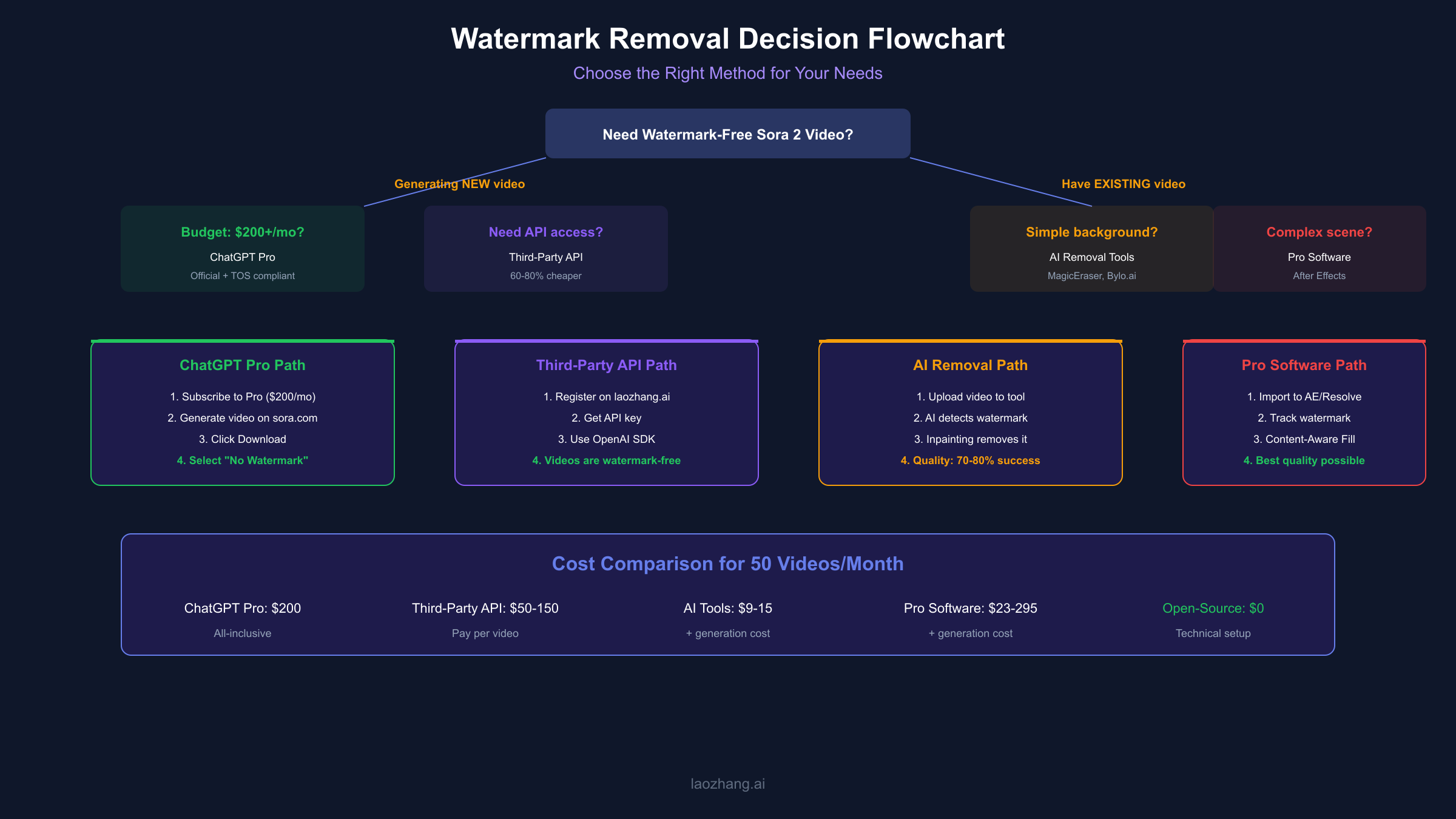
Your optimal method depends on budget, volume, technical skill, and use case.
Decision Matrix
| Use Case | Recommended Method | Why |
|---|---|---|
| Professional video production | ChatGPT Pro or Third-Party API | Clean output, TOS-compliant, reliable |
| Occasional personal use | AI removal tools (free tier) | Cost-effective for low volume |
| Developer/automation | Third-party API | Programmatic access, consistent results |
| Maximum quality needs | Professional software | Full control over results |
| Open-source enthusiast | SoraWatermarkCleaner | Free, customizable, local processing |
Cost Comparison for 50 Videos/Month
| Method | Monthly Cost | Notes |
|---|---|---|
| ChatGPT Pro | $200 | All-inclusive, quality guaranteed |
| Third-Party API | $50-150 | Depends on video length |
| AI Removal Tool | $9-15 | Plus original generation cost |
| Professional Software | $23-295 | Plus original generation cost |
| Open-Source | $0 | Requires technical setup + hardware |
For high-volume production where watermark-free output is essential, third-party API providers like laozhang.ai often provide the best balance of cost, convenience, and reliability.
Frequently Asked Questions
Does removing the visible watermark remove all AI traces?
No. Sora 2 embeds invisible C2PA metadata that survives watermark removal. Complete removal requires additional metadata stripping with FFmpeg or similar tools. Even then, forensic analysis may detect inpainting artifacts.
Will OpenAI detect or ban accounts for watermark removal?
There's no evidence of OpenAI actively detecting or banning users for using third-party removal tools on downloaded videos. However, using unofficial APIs may violate terms of service.
Which removal method produces the best quality?
Professional software (After Effects, DaVinci Resolve) produces the highest quality results but requires significant time and skill. For most users, third-party API generation without watermarks provides cleaner results than post-processing removal.
Can I remove watermarks from videos generated on the free tier?
Yes, but consider whether the effort is worthwhile. Free-tier videos are limited to 5 seconds at 720p—often worth the $200/month Pro subscription if you need regular watermark-free output.
Are there any completely free options?
Open-source tools like SoraWatermarkCleaner are free but require technical setup and capable hardware. Some online tools offer limited free tiers (2-5 videos per day).
Does watermark removal affect video quality?
All removal methods introduce some quality degradation:
- AI inpainting may blur or artifact the repaired area
- Re-encoding for metadata removal slightly reduces quality
- Third-party APIs typically match official quality
The quality impact is usually minimal for professional use cases but may be noticeable in quality-critical applications.
Conclusion
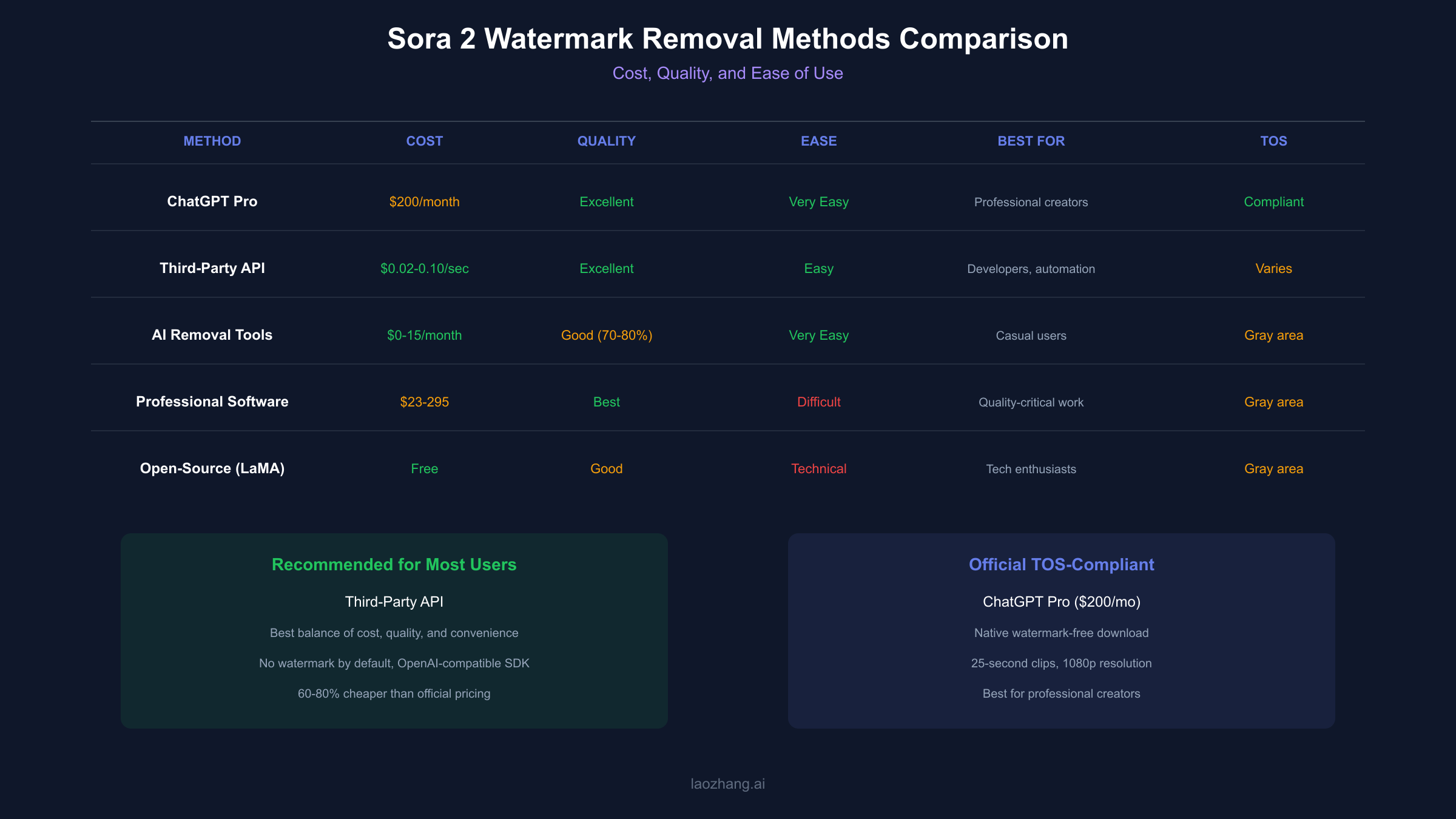
Removing watermarks from Sora 2 videos is achievable through multiple pathways—from official Pro subscriptions to third-party APIs to AI-powered removal tools. The right choice depends on your specific needs:
For professional content creators, ChatGPT Pro's $200/month subscription provides the cleanest, most compliant solution with native watermark-free downloads.
For developers and businesses generating videos programmatically, third-party API services offer watermark-free output at 60-80% lower costs than official pricing, with the convenience of OpenAI-compatible integration.
For occasional users with existing watermarked videos, AI removal tools provide acceptable results for personal projects, though quality varies with video complexity.
For technical users, open-source solutions offer maximum control at no cost, provided you have the hardware and patience for setup.
Whatever method you choose, consider the ethical implications of AI content transparency. The watermark exists to identify AI-generated media—a responsibility that extends beyond the technical capability to remove it.
For API-based video generation without watermarks, consider exploring laozhang.ai for cost-effective access to Sora 2 and other AI video models with straightforward integration.