Unlimited Nano Banana Pro: Complete Guide to Gemini 3 Image Generation Power (2025)
Unlock unlimited Nano Banana Pro access with 6 proven methods. Master Gemini 3 Pro Image generation with 4K output, 94% text accuracy, and save up to 80% on API costs. Complete guide with code examples.
Nano Banana Pro
4K-80%Google Gemini 3 Pro · AI Inpainting
谷歌原生模型 · AI智能修图

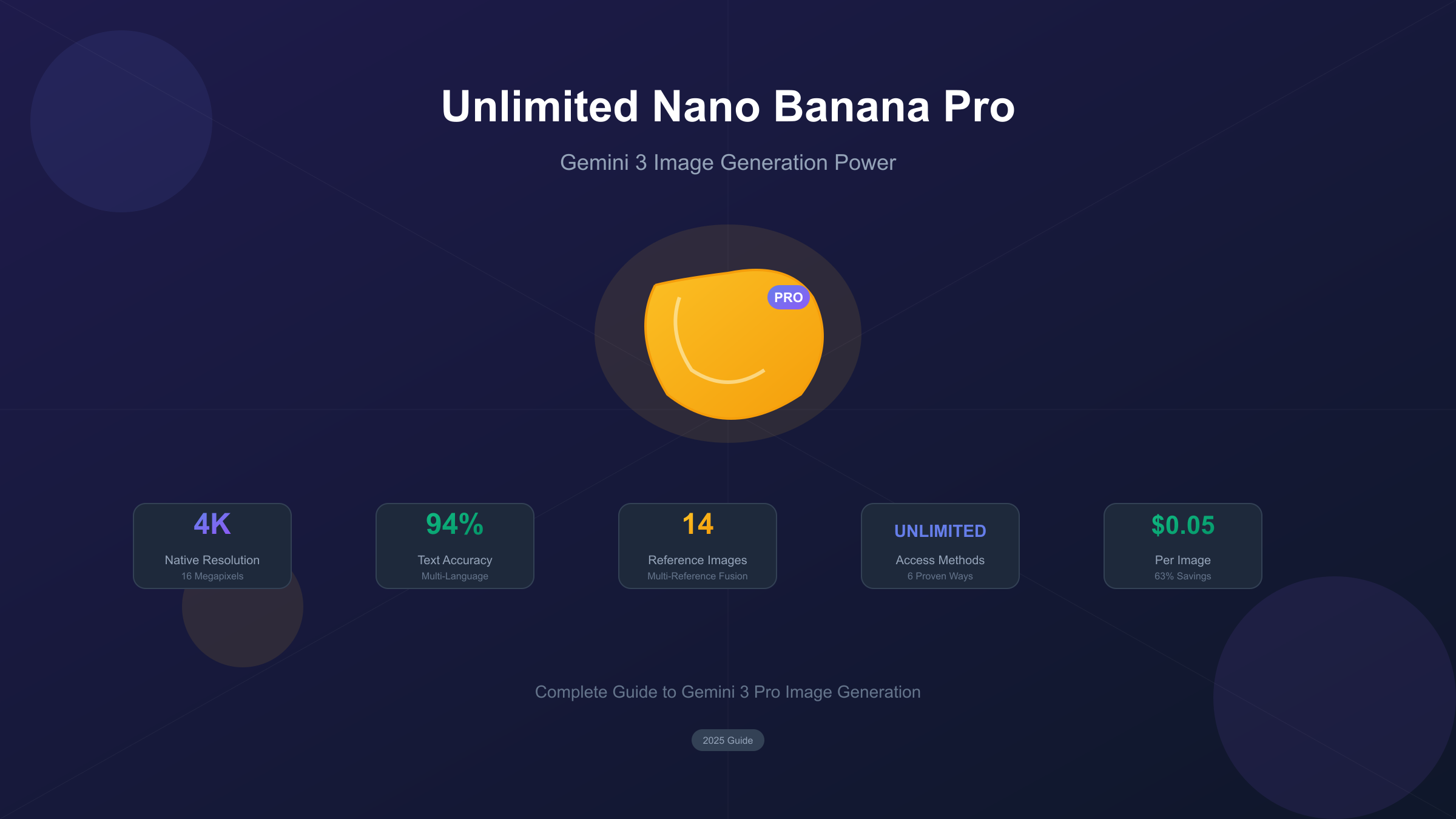
Google's Nano Banana Pro represents a fundamental shift in AI image generation capabilities. Released on November 20, 2025, this Gemini 3 Pro-powered model delivers native 4K resolution, 94% text rendering accuracy, and reasoning-driven image creation that competitors simply cannot match. The challenge for most users isn't capability—it's access and cost.
At $0.134 per 2K image and $0.24 per 4K image through official channels, production-scale usage quickly becomes expensive. However, multiple pathways exist for accessing Nano Banana Pro's power without breaking your budget—from generous free tiers to third-party providers offering 80% cost savings. Understanding these options transforms Nano Banana Pro from an aspirational tool into a practical daily driver.
This comprehensive guide reveals six proven methods for maximizing your Nano Banana Pro access, from truly unlimited developer solutions to cost-optimized API providers. You'll learn the technical specifications that make this model exceptional, master the API integration process with working code examples, and understand exactly when Nano Banana Pro outperforms alternatives like Midjourney and DALL-E 3.
What Is Nano Banana Pro? Understanding Gemini 3's Image Powerhouse
Nano Banana Pro is the commercial name for Google's gemini-3-pro-image-preview model—the most advanced image generation system in the Gemini family. Built on the Gemini 3 Pro foundation, it combines sophisticated reasoning capabilities with state-of-the-art image synthesis, creating outputs that demonstrate genuine understanding rather than pattern matching.
The naming hierarchy clarifies the relationship between models. Nano Banana (standard) runs on Gemini 2.5 Flash, optimized for speed with 1K resolution output in approximately 3 seconds. Nano Banana Pro runs on Gemini 3 Pro, sacrificing speed for quality—generation takes 20-60 seconds but produces up to 4K resolution with dramatically improved accuracy. The "Pro" designation reflects both the underlying model and the professional-grade output quality.
What distinguishes Nano Banana Pro from previous AI image generators is its "thinking" mode. Before generating the final image, the model engages in internal reasoning, considering composition, accuracy, and prompt adherence. This multi-step process produces results that more accurately reflect complex, multi-constraint prompts—essential for professional asset production where precision matters more than speed.
The model's release coincided with Google DeepMind's broader Gemini 3 launch, positioning it as the visual counterpart to Gemini 3's enhanced language capabilities. Enterprise availability through Vertex AI and consumer access through the Gemini app ensure the technology reaches both individual creators and large-scale production workflows.
Core Capabilities: Why Nano Banana Pro Changes Everything
Native 4K Resolution Output
Nano Banana Pro generates images at up to 4096×4096 pixels—16 megapixels of native resolution without upscaling artifacts. This represents a 16x increase over the standard Nano Banana's 1 megapixel output and directly addresses the resolution ceiling that limited AI image generation for professional print and display applications.
The resolution tiers provide flexibility for different use cases. 1K and 2K images consume 1,120 tokens at $0.134 per image, while 4K images consume 2,000 tokens at $0.24 per image. The 79% token increase for 4K delivers a 4x resolution increase—exceptional value for applications requiring maximum detail.
Breakthrough Text Rendering
Perhaps the most significant advancement is Nano Banana Pro's text rendering capability. Where previous AI image generators produced illegible or garbled text, Nano Banana Pro achieves approximately 94% accuracy across multiple languages. This breakthrough enables direct creation of marketing materials, infographics, social media graphics, and any visual content requiring readable typography.
The model handles complex text scenarios including multi-font compositions, stylized typography, and text integrated with visual elements. Code rendering with proper syntax highlighting and indentation works reliably, opening applications in technical documentation and educational content that were previously impossible.
Multi-Reference Image Fusion
Nano Banana Pro accepts up to 14 reference images in a single generation request: 6 object reference images for maintaining product or item consistency, plus 5 human reference images for character consistency. This capability enables brand-consistent asset production at scale, where every generated image adheres to established visual guidelines.
The practical application extends to product photography, where a single reference image of an actual product can spawn unlimited variations in different contexts. Fashion and apparel businesses use this for generating catalog imagery, while game developers leverage it for maintaining character consistency across marketing materials.
Google Search Grounding
Unique among image generators, Nano Banana Pro can access Google Search during generation to ground images in real-world information. Request a chart of current stock prices, a map reflecting recent weather patterns, or an infographic using the latest statistics—the model retrieves live data and incorporates it visually.
This grounding capability transforms Nano Banana Pro from a creative tool into an information visualization engine. Journalists, analysts, and researchers can generate data-driven visuals that reflect current reality rather than training data frozen in time.
Official Pricing and Rate Limits: The Baseline
Understanding Google's official pricing establishes the baseline against which all alternative access methods should be evaluated. For a detailed breakdown of per-image costs, see our comprehensive Nano Banana Pro pricing guide.
API Pricing Structure
| Resolution | Token Cost | Price Per Image |
|---|---|---|
| 1K (1024×1024) | 1,120 tokens | $0.134 |
| 2K (2048×2048) | 1,120 tokens | $0.134 |
| 4K (4096×4096) | 2,000 tokens | $0.24 |
| Image Input | 560 tokens | $0.0011 |
The pricing applies per generation, not per successful generation—failed attempts still consume tokens. For production applications generating thousands of images monthly, costs accumulate rapidly. A campaign requiring 10,000 2K images at official pricing costs $1,340; the same campaign at 4K costs $2,400.
Rate Limit Tiers
Google implements tiered rate limits based on account standing and spending history:
| Tier | Requests/Minute | Requests/Day | Qualification |
|---|---|---|---|
| Free | 15 | 1,500 | Default |
| Paid Tier 1 | 60+ | 10,000+ | Billing enabled |
| Tier 2 | Higher | Higher | $250+ spend, 30 days |
| Enterprise | Custom | Custom | Vertex AI contract |
The free tier's 1,500 daily requests through Google AI Studio provides substantial access for development and testing. However, December 2025 brought stricter enforcement—previously tolerated burst traffic now triggers 429 "Resource Exhausted" errors more consistently.
Consumer App Limits
The Gemini mobile and web app provides the simplest access but with severe restrictions. Free users receive only 2 images per day—reduced from 3 in November 2025 due to overwhelming demand. Gemini Advanced subscribers ($19.99/month) receive higher quotas but still face daily caps unsuitable for production work.
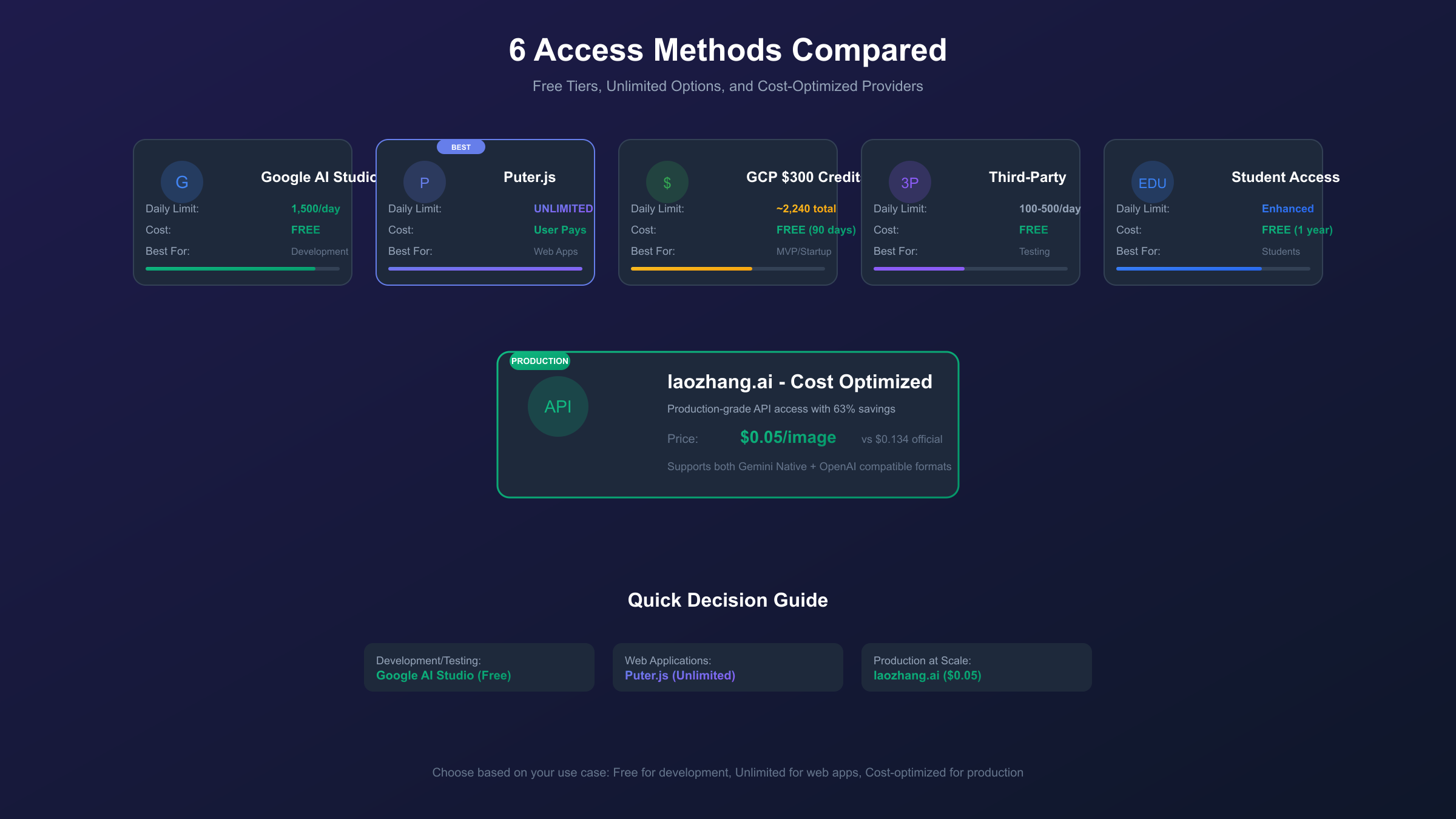
6 Methods for Unlimited or Extended Access
The gap between official pricing and production needs has spawned multiple alternative access pathways. Each method involves trade-offs between cost, reliability, features, and terms of service considerations.
Method 1: Google AI Studio Free Tier
The official free tier remains the most reliable starting point. No credit card required, 1,500 daily generations, and full API access through Google AI Studio. The limit resets at midnight UTC, and unused quota doesn't carry over. For step-by-step setup instructions, check our guide on how to use Nano Banana Pro.
Best for: Development, prototyping, moderate production needs
Limitations: Daily cap, rate limiting during peak hours, no SLA guarantees
Access: Sign up at ai.google.dev, create API key, integrate with SDK
Method 2: Puter.js User-Pays Model
Puter.js implements a revolutionary "User-Pays" architecture where end users cover their own API costs. Developers integrate a single script tag, and Puter's OAuth system handles billing directly to users. This enables truly unlimited scaling with zero developer costs.
hljs javascript// Add to your HTML
<script src="https://js.puter.com/v2/"></script>
// Generate images with Nano Banana Pro
puter.ai.txt2img("A futuristic cityscape at sunset, 4K quality", {
model: "gemini-3-pro-image-preview"
})
.then(imageElement => {
document.body.appendChild(imageElement);
});
Best for: Web applications, consumer-facing products, unlimited scaling
Limitations: Users must have Puter accounts, not suitable for backend-only applications
Access: developer.puter.com
Method 3: Google Cloud $300 Credits
New Google Cloud accounts receive $300 in free credits valid for 90 days. These credits apply to Vertex AI Gemini usage, enabling approximately 2,240 Nano Banana Pro generations at 2K resolution or 1,250 at 4K—substantial runway for evaluation and initial production.
Best for: Serious evaluation, startup MVPs, initial production launches
Limitations: 90-day expiration, one-time offer per organization, requires credit card on file
Access: cloud.google.com/free
Method 4: Third-Party Platforms with Generous Quotas
Several platforms wrap Nano Banana Pro access with generous free tiers:
| Platform | Daily Limit | Registration | Quality |
|---|---|---|---|
| felo.ai | Rate-limited | None | Full 4K |
| nano-banana.ai | 100-200 | Full | |
| nanobanana-pro.com | 500 | None | Full |
| LMArena | ~50 | Optional | Full |
Best for: Quick prototyping, comparison testing, casual use
Limitations: Variable reliability, potential rate changes, no SLA
Method 5: Student/Academic Access
Google's Gemini 3 student trial provides up to one year of enhanced access with higher quotas than standard free tiers. Verification requires a valid educational email address (.edu or equivalent) and takes 1-2 business days to process.
Best for: Students, researchers, academic projects
Limitations: Verification required, educational use expectations
Method 6: Cost-Optimized API Providers
For production workloads where free tiers prove insufficient, third-party API aggregators offer significant savings over official pricing. These providers maintain their own infrastructure and pass volume discounts to customers.
The most cost-effective option for Nano Banana Pro API access is laozhang.ai, offering approximately $0.05 per image—representing an 63% discount from official $0.134 pricing. The platform supports both Gemini native format and OpenAI-compatible endpoints, enabling drop-in replacement for existing integrations.
Best for: Production applications, batch processing, cost-sensitive projects
Limitations: Third-party dependency, potential latency differences
Puter.js Deep Dive: True Unlimited for Developers
The Puter.js integration deserves detailed examination because it solves a fundamental scaling problem. Traditional API models require developers to pay for all user consumption, creating a direct relationship between user growth and infrastructure costs. Puter inverts this by having users authenticate with their own accounts and pay their own way.
Implementation Steps
- Add the Puter.js script to your HTML head or before your application code:
hljs html<script src="https://js.puter.com/v2/"></script>
- Generate images using the txt2img method:
hljs javascriptasync function generateImage(prompt) {
try {
const imageElement = await puter.ai.txt2img(prompt, {
model: "gemini-3-pro-image-preview"
});
return imageElement;
} catch (error) {
console.error("Generation failed:", error);
throw error;
}
}
// Usage
const img = await generateImage("A vintage travel poster for Mars, retro style");
document.getElementById("output").appendChild(img);
- Handle image editing by providing base64 input:
hljs javascriptasync function editImage(base64Image, mimeType, prompt) {
const result = await puter.ai.txt2img(prompt, {
model: "gemini-3-pro-image-preview",
input_image: base64Image,
input_image_mime_type: mimeType
});
return result;
}
Available Models Through Puter
Beyond Nano Banana Pro, Puter.js provides access to multiple image generation models:
gemini-3-pro-image-preview(Nano Banana Pro)gemini-2.5-flash-image-preview(Nano Banana Flash)gpt-image-1.5,gpt-image-1,gpt-image-1-minidall-e-3,dall-e-2
This multi-model access enables A/B testing and fallback strategies within a single integration.
Cost-Effective API Integration with laozhang.ai
For applications requiring reliable, high-volume access without the per-user billing model, third-party API providers offer substantial savings. The following implementation demonstrates integration with laozhang.ai using Gemini native format—the recommended approach for accessing full 4K parameters.
Python Implementation
hljs pythonimport requests
import base64
from pathlib import Path
# Configuration
API_KEY = "sk-YOUR_API_KEY" # Get from laozhang.ai
API_URL = "https://api.laozhang.ai/v1beta/models/gemini-3-pro-image-preview:generateContent"
def generate_image(prompt: str, resolution: str = "2K") -> bytes:
"""
Generate an image using Nano Banana Pro via laozhang.ai
Args:
prompt: Text description of desired image
resolution: "1K", "2K", or "4K"
Returns:
Raw image bytes
"""
headers = {
"Authorization": f"Bearer {API_KEY}",
"Content-Type": "application/json"
}
payload = {
"contents": [{
"parts": [{"text": prompt}]
}],
"generationConfig": {
"responseModalities": ["IMAGE"],
"imageConfig": {
"aspectRatio": "auto",
"imageSize": resolution
}
}
}
response = requests.post(
API_URL,
headers=headers,
json=payload,
timeout=180 # Nano Banana Pro can take 60+ seconds
)
response.raise_for_status()
result = response.json()
image_b64 = result["candidates"][0]["content"]["parts"][0]["inlineData"]["data"]
return base64.b64decode(image_b64)
def save_image(image_bytes: bytes, filename: str) -> Path:
"""Save image bytes to file"""
path = Path(filename)
path.write_bytes(image_bytes)
return path
# Example usage
if __name__ == "__main__":
prompt = "A professional product photo of a sleek wireless headphone on white background, studio lighting, 4K quality"
image_data = generate_image(prompt, resolution="4K")
save_path = save_image(image_data, "headphone_product.png")
print(f"Image saved to: {save_path}")
# Cost: ~$0.05 per image vs $0.24 official 4K pricing
# Savings: 79% on 4K generation
Batch Processing Example
hljs pythonimport asyncio
import aiohttp
from typing import List, Tuple
async def generate_batch(prompts: List[str], resolution: str = "2K") -> List[bytes]:
"""Generate multiple images concurrently"""
async def generate_single(session: aiohttp.ClientSession, prompt: str) -> bytes:
headers = {
"Authorization": f"Bearer {API_KEY}",
"Content-Type": "application/json"
}
payload = {
"contents": [{"parts": [{"text": prompt}]}],
"generationConfig": {
"responseModalities": ["IMAGE"],
"imageConfig": {"imageSize": resolution}
}
}
async with session.post(API_URL, headers=headers, json=payload) as resp:
result = await resp.json()
return base64.b64decode(
result["candidates"][0]["content"]["parts"][0]["inlineData"]["data"]
)
async with aiohttp.ClientSession() as session:
tasks = [generate_single(session, p) for p in prompts]
return await asyncio.gather(*tasks)
# Generate 10 product variations
prompts = [
f"Product photo of headphones, {style}, studio lighting"
for style in ["minimalist", "dramatic", "warm", "cool", "natural",
"high contrast", "soft", "vibrant", "muted", "professional"]
]
images = asyncio.run(generate_batch(prompts))
# Cost: 10 × $0.05 = $0.50 total (vs $1.34 official)
The key advantage of using laozhang.ai over direct Google API access is cost predictability. At $0.05 per image regardless of resolution, budgeting becomes straightforward. The platform also handles rate limiting gracefully, implementing automatic retry logic that prevents 429 errors from disrupting batch operations.
4K Image Generation: Maximizing Quality Output
Achieving optimal 4K results requires understanding how Nano Banana Pro processes high-resolution requests and configuring prompts accordingly.
Resolution Selection Strategy
| Use Case | Recommended Resolution | Rationale |
|---|---|---|
| Web graphics | 1K | Fast, sufficient for screens |
| Social media | 2K | Balance of quality and cost |
| Print materials | 4K | Maximum detail for physical media |
| Product photography | 4K | Fine detail preservation |
| Thumbnails | 1K | Over-resolution wastes resources |
Prompt Engineering for 4K
High-resolution generation benefits from explicit quality indicators in prompts:
✅ Good: "A detailed macro photograph of a dewdrop on a rose petal,
extreme close-up, visible water refraction, 4K quality, sharp focus"

❌ Weak: "Water drop on flower"
The more specific your prompt about desired detail level, lighting conditions, and composition, the better Nano Banana Pro utilizes the additional resolution headroom.
Aspect Ratio Optimization
Nano Banana Pro supports ten aspect ratios, each suited to different applications:
| Ratio | Resolution @ 4K | Best For |
|---|---|---|
| 1:1 | 4096×4096 | Social media, products |
| 16:9 | 4096×2304 | Presentations, banners |
| 9:16 | 2304×4096 | Stories, mobile |
| 3:2 | 4096×2731 | Photography, prints |
| 21:9 | 4096×1755 | Cinematic, headers |
Selecting appropriate aspect ratios prevents wasted resolution on letterboxing or cropping.
Text Rendering Mastery: Typography in AI Images
Nano Banana Pro's text rendering capabilities enable applications previously impossible with AI image generation. Understanding the system's strengths and limitations maximizes successful typography integration.
Best Practices for Text Accuracy
- Be explicit about text content: Quote exact text in prompts
- Specify font characteristics: "bold sans-serif", "elegant script"
- Indicate placement: "centered at bottom", "along the left edge"
- Request legibility: "clearly readable", "high contrast text"
Example Text-Heavy Prompts
"A movie poster for 'MIDNIGHT HORIZON' with the tagline 'Where darkness
meets destiny' at the bottom, featuring a silhouetted figure against a
red sunset, bold title text in white, smaller tagline in gray"
"An infographic showing '5 STEPS TO SUCCESS' with numbered icons:
1. Plan 2. Execute 3. Measure 4. Adapt 5. Scale - each with a small
icon and brief description, modern flat design style"
Multi-Language Support
The model handles text in multiple languages with varying accuracy:
| Language | Accuracy | Notes |
|---|---|---|
| English | 94%+ | Best performance |
| Chinese | 90%+ | Improved significantly in Pro |
| Japanese | 88%+ | Handles mixed scripts |
| Arabic | 85%+ | Right-to-left supported |
| Hindi | 82%+ | Devanagari rendering |
For critical text, always verify output and regenerate if necessary—no AI model achieves 100% accuracy.
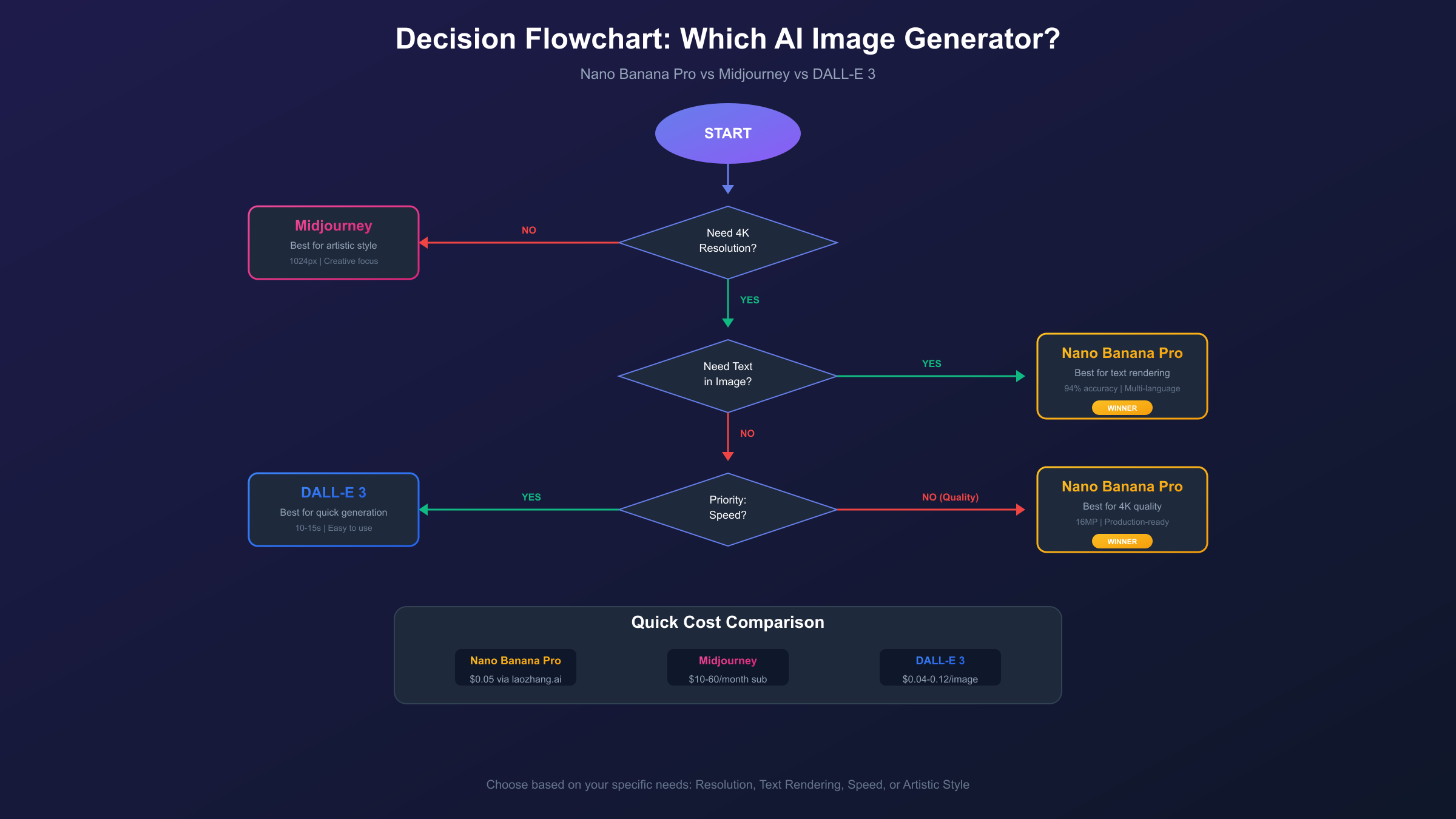
Nano Banana Pro vs Competitors: When to Use What
Understanding competitive positioning helps select the right tool for each project.
Comparison Matrix
| Capability | Nano Banana Pro | Midjourney V7 | DALL-E 3 |
|---|---|---|---|
| Max Resolution | 4K native | 1024×1024 | 4K (Ultra) |
| Text Accuracy | 94% | ~60% | ~75% |
| Generation Speed | 20-60s | 30-90s | 10-15s |
| Artistic Style | Realistic bias | Artistic strength | Balanced |
| API Access | Yes | No (Discord only) | Yes |
| Grounding | Google Search | None | Web browsing |
| Price/Image | $0.134-0.24 | $0.02-0.10 | $0.04-0.12 |
Use Case Recommendations
Choose Nano Banana Pro when:
- Text accuracy is critical (marketing, infographics)
- Maximum resolution required (print, displays)
- Real-time data visualization needed
- Multi-reference consistency matters
- API integration is required
Choose Midjourney when:
- Artistic expression trumps accuracy
- Stylized, atmospheric imagery desired
- Concept exploration over production
- Lower cost per generation needed
Choose DALL-E 3 when:
- Speed is paramount
- Conversational editing preferred
- ChatGPT integration valuable
- Moderate quality acceptable
Combined Workflow Strategy
Professional teams often combine tools strategically. Midjourney explores creative directions cheaply and quickly. Once direction is established, Nano Banana Pro produces the final production-quality assets with accurate text and maximum resolution. This hybrid approach optimizes both cost and quality. For a detailed side-by-side analysis, see our Nano Banana Pro comparison guide.
Production Best Practices
Error Handling and Retry Logic
Nano Banana Pro generation can fail due to content filters, rate limits, or transient errors. Robust production code implements exponential backoff:
hljs pythonimport time
from tenacity import retry, stop_after_attempt, wait_exponential
@retry(
stop=stop_after_attempt(3),
wait=wait_exponential(multiplier=1, min=4, max=60)
)
def generate_with_retry(prompt: str) -> bytes:
"""Generate image with automatic retry on failure"""
try:
return generate_image(prompt)
except requests.exceptions.HTTPError as e:
if e.response.status_code == 429:
# Rate limited - wait longer
time.sleep(30)
raise
Content Safety Filtering
All Nano Banana Pro outputs include SynthID watermarking for provenance tracking. Additionally, Google's safety filters block generation of:
- Photorealistic identifiable individuals
- Depictions of minors
- Excessive violence or gore
- Explicit sexual content
Plan content strategies around these restrictions—they cannot be bypassed through prompt engineering.
Cost Monitoring
Implement usage tracking to prevent budget overruns:
hljs pythonclass UsageTracker:
def __init__(self, daily_budget: float, cost_per_image: float = 0.05):
self.daily_budget = daily_budget
self.cost_per_image = cost_per_image
self.today_usage = 0.0
self.last_reset = datetime.now().date()
def can_generate(self) -> bool:
self._check_reset()
return self.today_usage + self.cost_per_image <= self.daily_budget
def record_generation(self):
self.today_usage += self.cost_per_image
def _check_reset(self):
if datetime.now().date() > self.last_reset:
self.today_usage = 0.0
self.last_reset = datetime.now().date()
Conclusion: Unlocking Nano Banana Pro's Full Potential
Nano Banana Pro represents the current state-of-the-art in AI image generation, combining Gemini 3's reasoning capabilities with breakthrough text rendering and native 4K output. The six access methods outlined in this guide—from Google AI Studio's generous free tier to cost-optimized providers like laozhang.ai—ensure that budget constraints don't limit access to this powerful technology.
For developers building consumer applications, Puter.js's user-pays model eliminates the traditional trade-off between user growth and infrastructure costs. For production workloads, third-party providers offering 63-80% cost savings transform Nano Banana Pro from an occasional luxury into a viable daily tool. Those seeking the most affordable option should explore our cheapest Nano Banana Pro API guide.
The practical reality is that "unlimited" Nano Banana Pro access exists through multiple pathways—each with different trade-offs. Start with the free tier for evaluation, graduate to cost-optimized providers for production, and consider Puter.js for applications where unlimited user scaling matters most.
Whether creating marketing materials with accurate typography, generating product photography at print resolution, or building applications that leverage real-time data visualization, Nano Banana Pro's capabilities justify the effort to optimize access and costs. The technology is here; the only remaining question is how you'll put it to work.