Gemini 3 Pro Image quota planning should start with one correction: the current stable API model code is gemini-3-pro-image, not the older preview-style gemini-3-pro-image-preview naming that still appears in many examples across the web. Google's Gemini 3 Pro Image model page lists Gemini 3 Pro Image as Nano Banana Pro, and Google's Interactions API overview says the Interactions API is generally available and recommended for new projects.
This guide was refreshed on July 8, 2026 to avoid two common quota mistakes: treating old preview IDs as current API contracts, and treating public examples as guaranteed limits. Google's release notes announced that gemini-3-pro-image-preview was deprecated and scheduled to shut down on June 25, 2026. Google's rate-limit page says active limits depend on usage tier and account status, can be viewed in Google AI Studio, and are not guaranteed. Use this page as an implementation and capacity-planning guide, then confirm your live project limits inside AI Studio before you ship.
The Current Gemini 3 Pro Image API Boundary
The public facts that are stable enough to build around are narrower than many quota articles suggest:
| Item | Current official boundary |
|---|---|
| Product name | Gemini 3 Pro Image, also called Nano Banana Pro |
| API model code | gemini-3-pro-image |
| Output type | Image and text |
| Best fit | complex graphic design, product mockups, factual data visualizations, text-heavy images |
| Consumption options | Standard, Batch, Flex, and Priority are listed for this model family |
| Free API price row | Not available for Gemini 3 Pro Image pricing |
| Where to check active limits | Google AI Studio rate-limit view for your project |
That boundary matters because quota behavior is project-specific. A table copied from another developer's account can be useful as anecdotal context, but it is not safe enough for a production launch plan.
Google's Nano Banana image-generation docs also place Gemini 3 Pro Image inside a broader Nano Banana family. As of the current docs, the API lists four image models: gemini-3.1-flash-lite-image, gemini-3.1-flash-image, gemini-3-pro-image, and gemini-2.5-flash-image. For a quota-sensitive application, do not treat them as interchangeable. Use Pro Image when fidelity, text rendering, grounding, and creative control justify the cost; use Flash or Flash Lite when speed and cost matter more than premium output.
What Quotas Actually Measure
Gemini API limits are not one number. A request can fail even when another quota dimension still has room.
Requests per minute (RPM) limits how many API calls your project can send in a rolling window. Bursty user interfaces usually hit this first.
Tokens per minute (TPM) limits the amount of input and output work your project can ask the model to do in the same window. Long prompts, many reference images, grounding, and larger outputs can make this the bottleneck before RPM.
Requests per day (RPD) limits total daily calls where a daily cap applies. This is the limit that often surprises prototypes that work in the morning and fail later in the day.
Image-specific throughput can also matter for image models. Even if your text-model usage is healthy, image generation can have its own practical throughput constraints because it is more expensive compute.
Spend-based rate limits are a separate safety layer. Google documents rolling 10-minute spend caps by usage tier and says a 429 RESOURCE_EXHAUSTED response can be triggered by spend-based limits as well as request or token limits.
The practical rule is simple: build your client as if any one of these dimensions can be the binding constraint.
Usage Tiers Without Overpromising Numbers
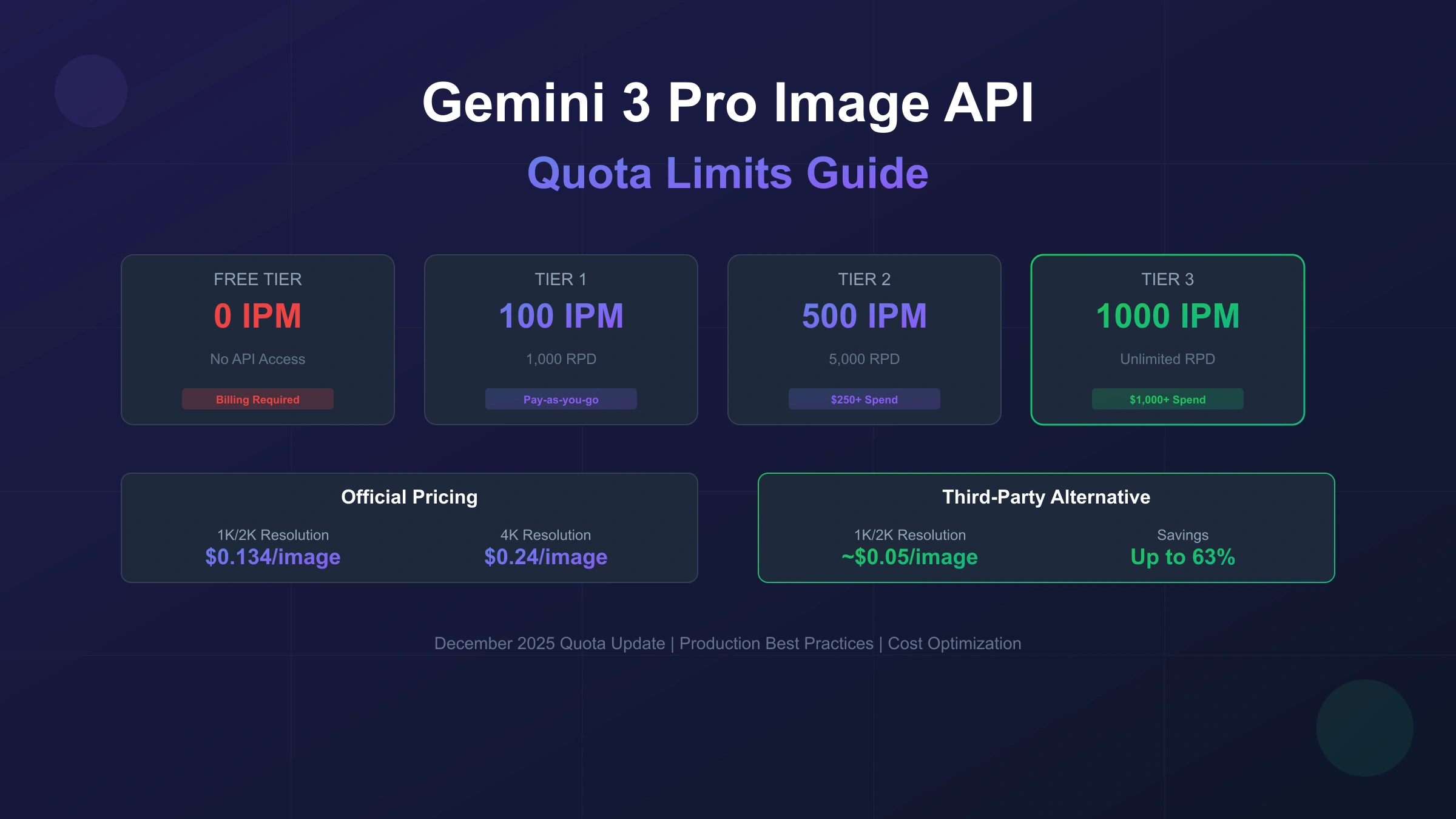
Google ties Gemini API rate limits to the project's usage tier. The current public tier qualifications are:
| Tier | Qualification signal |
|---|---|
| Free | Active project or free trial |
| Tier 1 | Set up and link an active billing account |
| Tier 2 | Paid account with at least $100 cumulative Google Cloud spend and 3 days from first successful payment |
| Tier 3 | Paid account with at least $1,000 cumulative Google Cloud spend and 30 days from first successful payment |
Meeting the stated criteria is generally enough for an upgrade, but Google notes that upgrade requests can be denied in rare cases. It also says active rate limits can change as your tier and account status change.
So the safe production workflow is:
- Enable billing only when you are ready to control cost.
- Check the live model-specific limits in AI Studio for the exact project that will run production traffic.
- Design your application around measured throughput, not a copied public table.
- Re-check limits after tier upgrades, billing changes, or model migrations.
If you need a broader comparison of Google's no-cost API options, use the current details in the Google Gemini API free tier guide. Treat that page as a starting point too; your project dashboard is still the final source for active limits.
Pricing Boundaries for Gemini 3 Pro Image
Gemini 3 Pro Image pricing is clear enough to use for estimates, but not enough to replace a billing review.
Google's current Gemini API pricing page lists gemini-3-pro-image with paid Standard pricing of $2.00 per 1M text/image input tokens. For image output, the same page lists $120 per 1M image output tokens, equivalent to $0.134 per 1K or 2K image and $0.24 per 4K image. Batch and Flex rows list lower image-output prices for eligible non-immediate workloads.
For planning purposes:
| Workload | Better default |
|---|---|
| interactive user generation | Standard or Priority, with queueing and backoff |
| overnight catalog jobs | Batch or Flex if latency can be relaxed |
| preview thumbnails | cheaper Gemini image model first, then Pro only for final assets |
| expensive grounded visuals | explicit budget caps and spend-rate monitoring |
Avoid promising users a fixed monthly image count until you have tested the exact request shape. A short prompt, a single output, and no grounding will not behave like a grounded, reference-heavy, high-resolution production request.
Model Choice: Pro Image vs Flash Image
The quota question is often a model-choice question in disguise.
| Need | Prefer |
|---|---|
| highest text accuracy in generated visuals | gemini-3-pro-image |
| professional mockups or visual reasoning | gemini-3-pro-image |
| low-cost previews or drafts | gemini-3.1-flash-lite-image or gemini-3.1-flash-image |
| legacy compatibility checks | gemini-2.5-flash-image, while planning migration |
| high-volume background jobs | cheapest adequate model plus Batch/Flex when available |
Do not force Pro Image into every step of a pipeline. A better architecture uses a cheaper model for drafts, moderation previews, or internal thumbnails, then reserves Pro Image for the few outputs where its quality changes the business result.
Why 429 Errors Happen
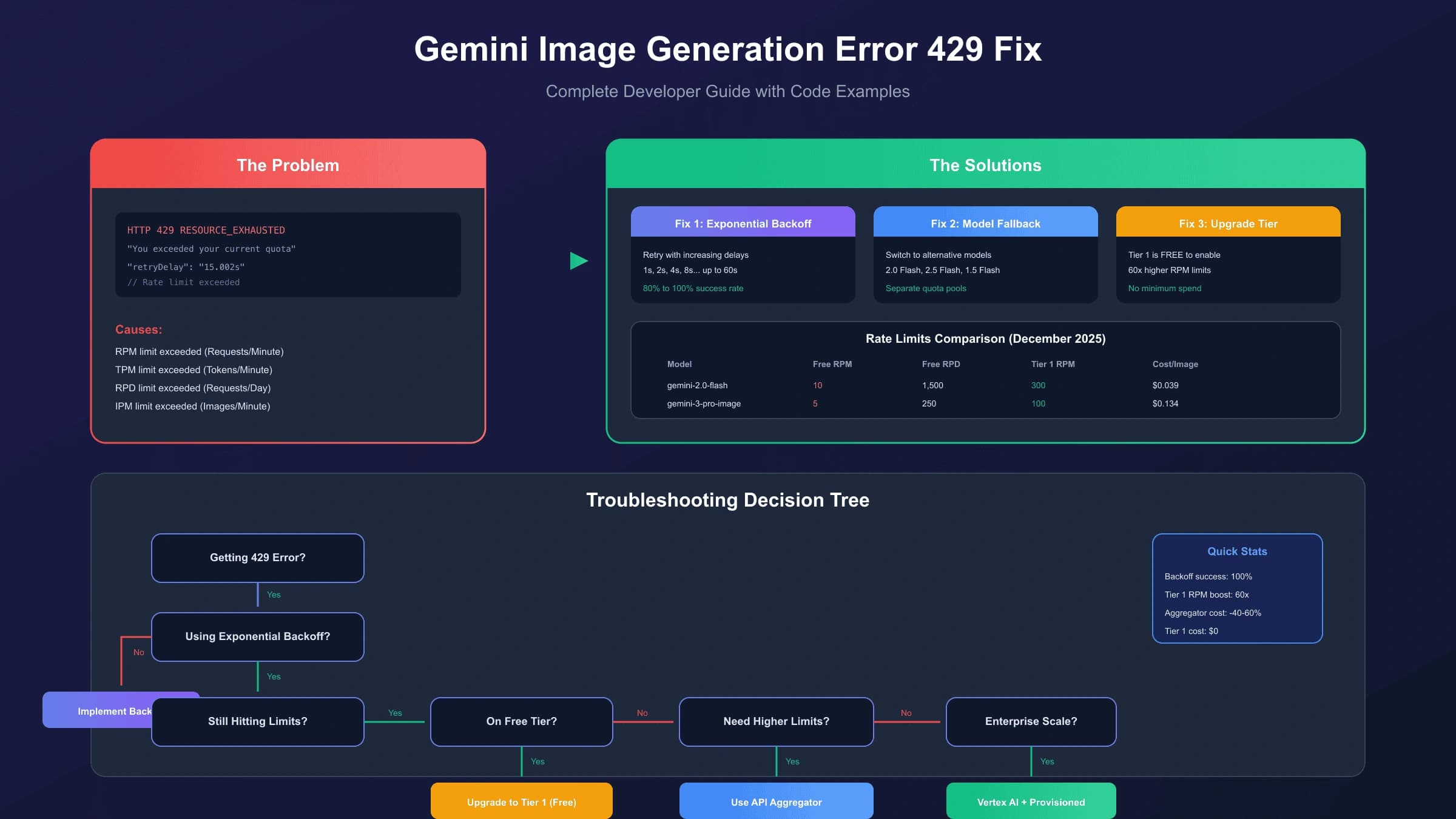
A 429 RESOURCE_EXHAUSTED error means your request exceeded a limit, but the correct fix depends on which limit was binding.
| Symptom | Likely cause | First response |
|---|---|---|
| errors come in short bursts, then recover | RPM or image throughput | backoff with jitter; smooth bursts through a queue |
| errors correlate with long prompts or large outputs | TPM or spend-rate pressure | shorten prompts, reduce reference payloads, lower output size |
| everything works early and fails later | daily quota or budget cap | check RPD, billing caps, and AI Studio dashboard |
| only expensive grounded requests fail | spend-based limit | reduce expensive calls or request a limit increase |
| one project fails while another works | project-level tier or account status | compare AI Studio limits per project |
For a deeper error-only troubleshooting flow, see the Gemini image generation 429 fix guide.
Production Retry Pattern
Retries should protect users without hiding a real capacity problem. Use exponential backoff with jitter for recoverable rate limits, but stop retrying when the request is malformed or blocked by policy.
hljs pythonimport random
import time
from google import genai
client = genai.Client(api_key="YOUR_API_KEY")
def generate_with_backoff(prompt: str, max_retries: int = 5):
delay = 1.0
for attempt in range(max_retries):
try:
interaction = client.interactions.create(
model="gemini-3-pro-image",
input=prompt,
)
return interaction.output_image.data
except Exception as exc:
message = str(exc)
is_rate_limit = "429" in message or "RESOURCE_EXHAUSTED" in message
if not is_rate_limit or attempt == max_retries - 1:
raise
sleep_for = min(delay + random.uniform(0, delay * 0.2), 60)
time.sleep(sleep_for)
delay = min(delay * 2, 60)
hljs typescriptimport { GoogleGenAI } from "@google/genai";
const ai = new GoogleGenAI({ apiKey: process.env.GEMINI_API_KEY });
const wait = (ms: number) => new Promise((resolve) => setTimeout(resolve, ms));
export async function generateWithBackoff(prompt: string, maxRetries = 5) {
let delay = 1000;
for (let attempt = 0; attempt < maxRetries; attempt += 1) {
try {
const interaction = await ai.interactions.create({
model: "gemini-3-pro-image",
input: prompt,
});
return interaction.output_image?.data ?? null;
} catch (error) {
const message = error instanceof Error ? error.message : String(error);
const isRateLimit =
message.includes("429") || message.includes("RESOURCE_EXHAUSTED");
if (!isRateLimit || attempt === maxRetries - 1) {
throw error;
}
const jitter = Math.random() * delay * 0.2;
await wait(Math.min(delay + jitter, 60_000));
delay = Math.min(delay * 2, 60_000);
}
}
return null;
}
The important part is not the exact helper name. The important part is that your client treats quota failures as a load-management signal, not as a reason to retry instantly five times and burn more capacity.
For simple image-only responses, SDK convenience fields such as output_image are useful. For Pro Image flows that return interleaved text and images, follow Google's current image-generation guidance and iterate over interaction.steps so you do not silently miss generated content.
Capacity Architecture That Survives Real Traffic
For production image generation, the safest architecture is usually queue-first:
- Accept the user's request quickly and assign a job ID.
- Validate prompt length, reference-image count, output size, and policy-sensitive inputs before calling the model.
- Send jobs to a worker that respects the measured project limit.
- Store completed outputs and return them through polling, webhooks, or account history.
- Surface queue state to users instead of exposing raw 429 errors.
This design turns quota pressure into predictable waiting time. It also lets you mix models intelligently: low-cost previews first, Pro Image final renders later, and Batch/Flex for non-urgent workloads.
What Not to Do
Avoid these shortcuts:
- Do not create extra API keys in the same project and expect more quota. Limits are project-level.
- Do not publish a hard RPM/RPD table unless it came from your own active AI Studio project and you state the checked date.
- Do not route sensitive prompts through third parties without reviewing data handling, retention, model coverage, and current pricing.
- Do not advertise "unlimited" image generation unless the provider contract really guarantees it for your workload.
- Do not refresh the article date unless the facts were actually updated.
These are also trust rules. A quota page that exaggerates limits or promises a provider outcome it cannot prove is less useful for developers and harder to maintain when the API changes.
Cost Controls Before Launch
Quota management and cost management belong in the same launch checklist:
| Control | Why it matters |
|---|---|
| per-user daily image cap | prevents one account from consuming the whole project quota |
| prompt and reference-size validation | reduces TPM and spend-rate pressure |
| output-size defaults | avoids paying for 4K when a 1K preview is enough |
| queue depth alert | catches capacity pressure before users see failures |
| 429 rate alert | separates normal burst smoothing from real quota exhaustion |
| model-level cost tracking | shows whether Pro Image is being used where it matters |
| cached duplicate prompts | prevents repeated generation of identical internal assets |
For teams migrating from prototypes, the most common fix is not a larger quota request. It is splitting the pipeline into preview, final render, and batch jobs so each model is used where it earns its cost.
Should You Use a Third-Party API Route?
Sometimes a third-party route is useful: failover, multi-model access, local payment needs, or a simpler gateway can matter. But for Gemini 3 Pro Image quota planning, do not treat third-party services as an automatic answer.
Use the official Google API when you need the clearest vendor accountability, the current model surface, or Google's data-handling commitments. Consider a third-party route only after checking four things in the current provider docs: exact model mapping, prompt/image retention policy, pricing date, and whether 429 or concurrency guarantees are actually stated.
If you do use a provider gateway, keep the implementation swappable. Your application should be able to route official Gemini traffic, fallback traffic, and batch traffic through explicit provider adapters rather than hard-coding one endpoint across the whole product.
Quick Reference
| Question | Safe answer |
|---|---|
| What model ID should I use? | gemini-3-pro-image |
| Is the old preview model name safe? | No, update examples and configs to the stable model ID. |
| Where are exact active limits? | Your project's AI Studio rate-limit page. |
| Are public limit tables guaranteed? | No. Google says actual capacity may vary. |
| Can more API keys increase one project quota? | No. Treat quota as project-level. |
| What is the first 429 fix? | Backoff with jitter, then queue and smooth traffic. |
| What is the first cost fix? | Use cheaper models for previews and Pro Image only where quality matters. |
FAQ
Why did my Gemini 3 Pro Image request fail even though I enabled billing?
Billing moves you into a paid usage path, but it does not remove all rate, spend, or project-specific limits. Check the exact model's active limits in AI Studio and look for spend-based 429 RESOURCE_EXHAUSTED behavior.
Should I copy a Tier 1 or Tier 2 quota table from another article?
No. Use public tables only as rough context. Your production plan should use the live limits shown for your project and your measured request shape.
Does Gemini 3 Pro Image have free API pricing?
Google's current pricing row for Gemini 3 Pro Image lists the free tier as not available and provides paid pricing for input and output. Always check the pricing page before quoting costs to users.
Is Batch API always better?
No. Batch and Flex can reduce cost for non-urgent work, but they are wrong for real-time product flows where users expect immediate output.
Can I avoid 429 errors completely?
You can make them rare and non-disruptive, but no serious production system should assume they will never happen. Build queueing, backoff, alerts, and graceful user messaging into the product.
Bottom Line
Use gemini-3-pro-image for current Gemini 3 Pro Image API work, verify active limits inside AI Studio, and design for multiple quota dimensions rather than one copied number. The safest production stack is queue-first, model-aware, and cost-capped: cheaper image models for drafts, Pro Image for final-quality outputs, Batch or Flex for non-urgent work, and backoff for every quota-sensitive path.