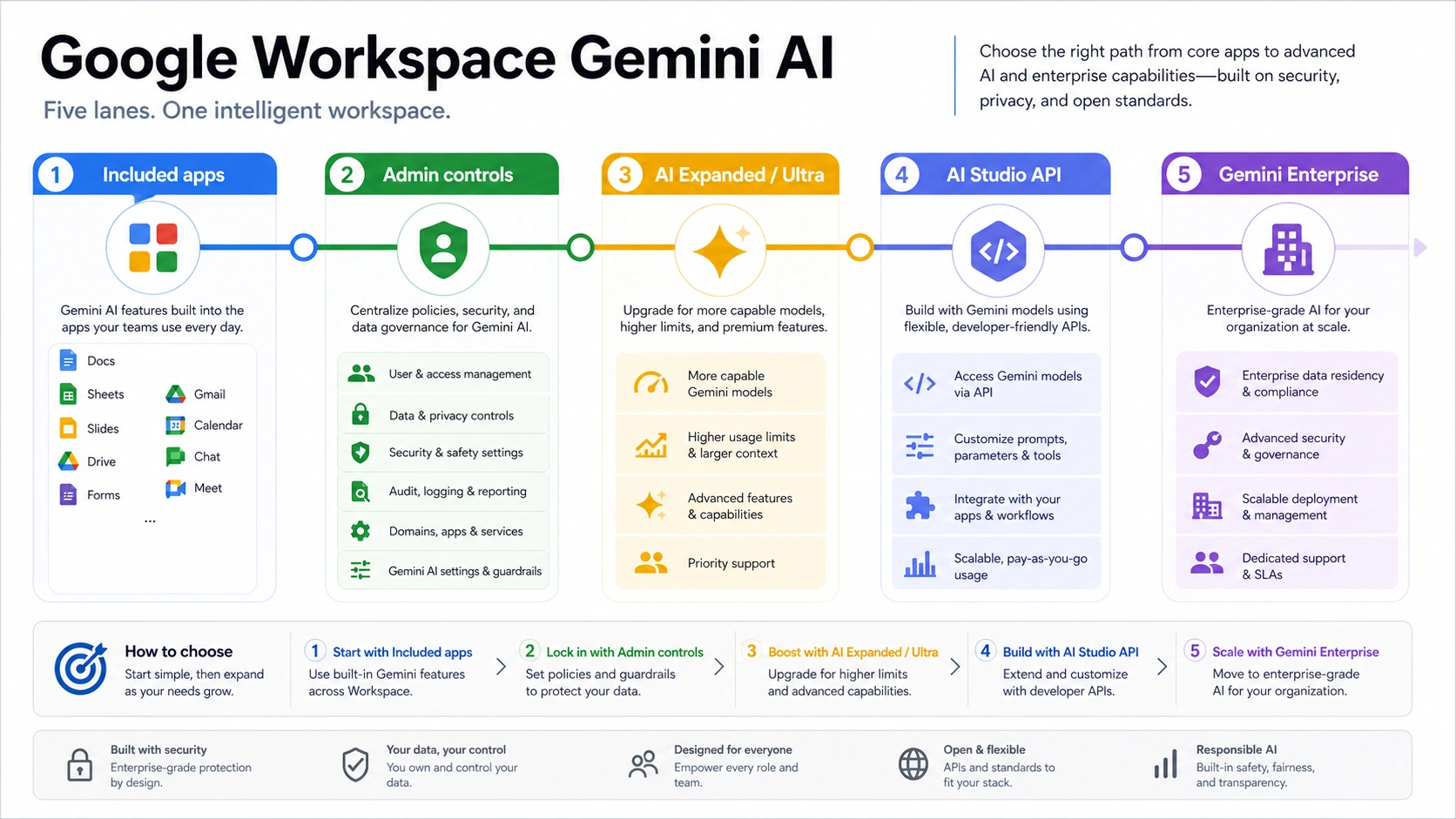
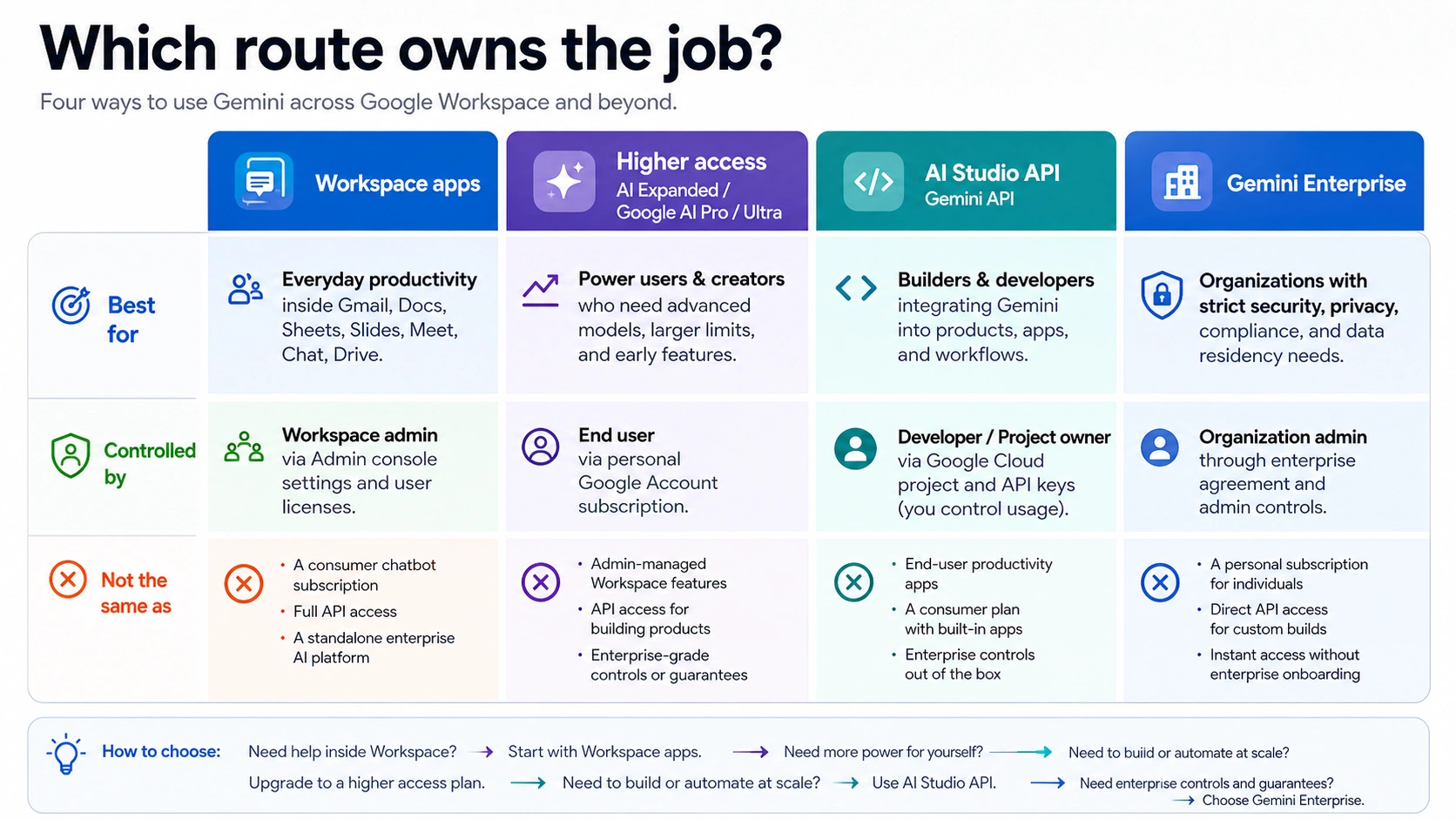
Google Workspace can include Gemini-powered features, but it is not one uniform Gemini entitlement for every user in a domain. As of May 8, 2026, the practical answer starts with edition and Admin console settings: check the Workspace plan, organizational-unit policy, Gemini app access, app-by-app AI features, NotebookLM, Meet, Vids, and whether the job actually belongs to AI Studio, the Gemini API, or Gemini Enterprise.
| Reader need | Treat "Workspace with Gemini AI" as | First check |
|---|---|---|
| AI help inside Gmail, Docs, Sheets, Slides, Drive, Meet, Chat, or Vids | Workspace app AI | Workspace edition, feature rollout, and Admin console service controls. |
| A general Gemini chat surface or research notebook for work accounts | Gemini app, Gems, NotebookLM, and related Workspace access | Whether the admin has enabled the Gemini app and related services for the user's organizational unit. |
| Higher usage, newer app features, or premium personal access | AI Expanded, AI add-ons, Google AI Pro, or Ultra Access depending on the account type | The current Google plan and add-on pages before purchase. |
| API keys, model calls, quotas, or backend integration | AI Studio and Gemini API, not Workspace app AI | Google AI Studio / API availability for the account and project policy. |
| Agents, enterprise search, or custom knowledge workflows | Gemini Enterprise or Google Cloud routes | Whether the job needs an enterprise agent platform rather than built-in Workspace help. |
Stop before buying or rolling out when the request says API key, model quota, embedding, agents, Vertex AI, enterprise search, custom app integration, or cross-system automation. Seeing Gemini in Gmail or Docs does not answer those jobs; verify the AI Studio, Gemini API, or Gemini Enterprise route before quoting capability, price, or rollout timing.
What is included in Google Workspace Gemini AI?
Google Workspace's AI page and current Workspace help material describe Gemini-powered features across Workspace surfaces such as Gmail, Docs, Sheets, Slides, Drive, Chat, Meet, Vids, the Gemini app, and NotebookLM. That is the right starting answer for most teams that are asking whether Workspace now has Gemini AI built in.
The useful caveat is that "included" does not mean "visible everywhere." Google separates edition, age policy, service controls, app rollout, admin settings, regional behavior, and add-on access. A user can be on a Workspace domain where Gemini exists in the subscription but still not see a specific button because the service is off for that organizational unit, the feature has not rolled out to that edition, the user is under an Education age restriction, or the request belongs to an adjacent Google AI product.
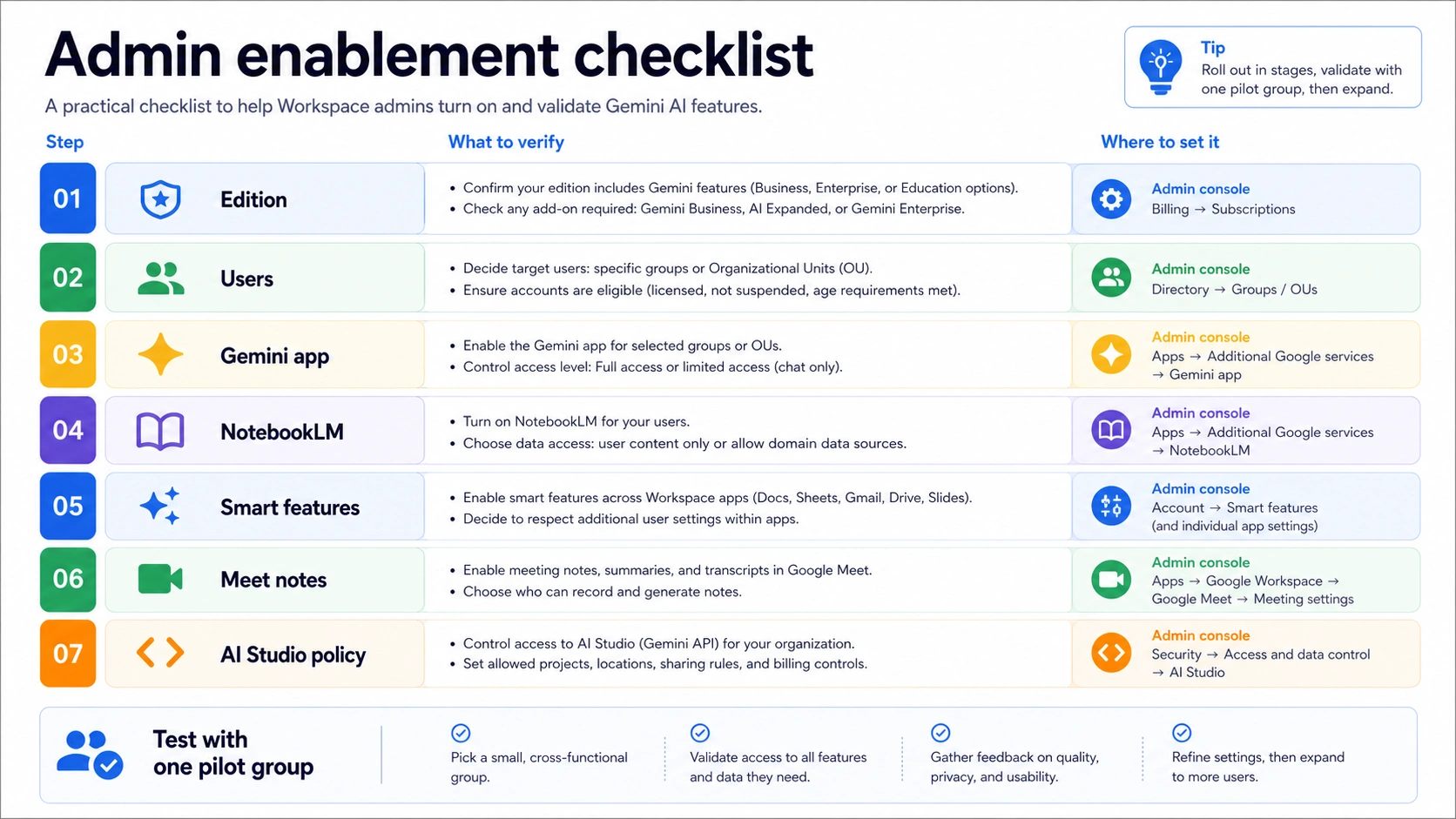
For a team admin, the practical owner is not the Gemini brand name. It is this sequence:
- Confirm the Workspace edition and country-specific pricing page.
- Check whether Gemini app access is on for the user group.
- Check the app-specific services: Gmail, Docs, Sheets, Slides, Drive, Chat, Meet, Vids, NotebookLM, and Workspace Studio.
- Test low-risk work tasks before promising tenant-wide capability.
- Split developer or agent-platform work into AI Studio, Gemini API, Google Cloud, or Gemini Enterprise.
Google also changed the purchasing story. The old advice to buy separate Gemini Business or Gemini Enterprise add-ons is stale for many business subscriptions because Google folded many AI features into Workspace Business and Enterprise plans in 2025. That does not remove add-ons completely; it means the default question changed from "which Gemini add-on do I buy first?" to "what does my plan already include, and what higher-access route is actually needed?"
Which Workspace plan matters first?
Start with the plan because the plan decides the default surface before any user troubleshooting begins. On the US Workspace pricing page checked on May 8, 2026, Google lists Business Starter, Business Standard, Business Plus, and Enterprise. Business plans have a 300-user maximum, while Enterprise is the route for organizations beyond that size or with enterprise-level procurement needs.
The important Gemini difference is not a single price number. It is surface width. Business Starter can have limited Gemini in Workspace apps. Business Standard and Business Plus expose broader Workspace app and Gemini app capabilities. Enterprise is the route for organizations that need larger deployment, advanced administration, security, compliance, and procurement flexibility.
Use this as a plan-read checklist:
| If you have | Good first assumption | What to verify before telling users |
|---|---|---|
| Business Starter | Some Workspace AI may exist, but the surface can be narrower. | Which Gemini features the plan page and Admin console show for the tenant. |
| Business Standard or Business Plus | Workspace app Gemini, Gemini app, and related work features are more likely to be the main route. | Which services are enabled for each organizational unit. |
| Enterprise | Treat Workspace Gemini as part of a larger admin and compliance program. | Whether the need is still Workspace app AI or has become Gemini Enterprise / Google Cloud work. |
| Education editions | Do not assume adult business behavior. | Age-based controls, edition rules, and school policy. |
| Personal Google AI Pro or Ultra | This may affect a personal account route. | Whether the Workspace domain and work account are actually covered. |
Avoid one common mistake: do not use a personal Gemini or Google AI subscription as proof that a Workspace work account has the same feature surface. The same person can hold a personal plan and a managed Workspace account, but the admin policy and contractual route are different.
How admins should enable and test Gemini
For managed domains, the Admin console is the first operational stop. Google documents admin controls for Gemini app access, NotebookLM, Vids, Meet notes, smart features, Workspace Studio, and related services. The setting that matters is not only "Gemini on or off"; it is whether the correct service is enabled for the right organizational unit or access group.
A safe rollout is narrower than a marketing launch:
- Pick one user group that represents the real workflow.
- Confirm the Workspace edition and enabled Gemini services.
- Enable or verify Gemini app access only for the intended group.
- Verify NotebookLM, Vids, Meet notes, and app-specific Gemini surfaces separately.
- Test privacy-sensitive workflows with low-risk data first.
- Document which jobs remain outside Workspace app AI.
Google's Workspace help pages describe enterprise-grade data protections for Gemini features, including boundaries around customer content use and model training. Still, an admin should not turn that into a blanket sentence that every user, app, region, and feature behaves identically. Treat privacy and data handling as a policy review item tied to the exact service being enabled.
The first user-facing test should be boring on purpose. Ask a pilot user to summarize a non-sensitive email thread, draft a short document paragraph, make a small Sheet classification, use Meet notes in a harmless meeting, ask the Gemini app a work-safe question, and create one NotebookLM source set from approved files. If those pass, the team has real evidence that the domain, plan, and app controls are aligned.
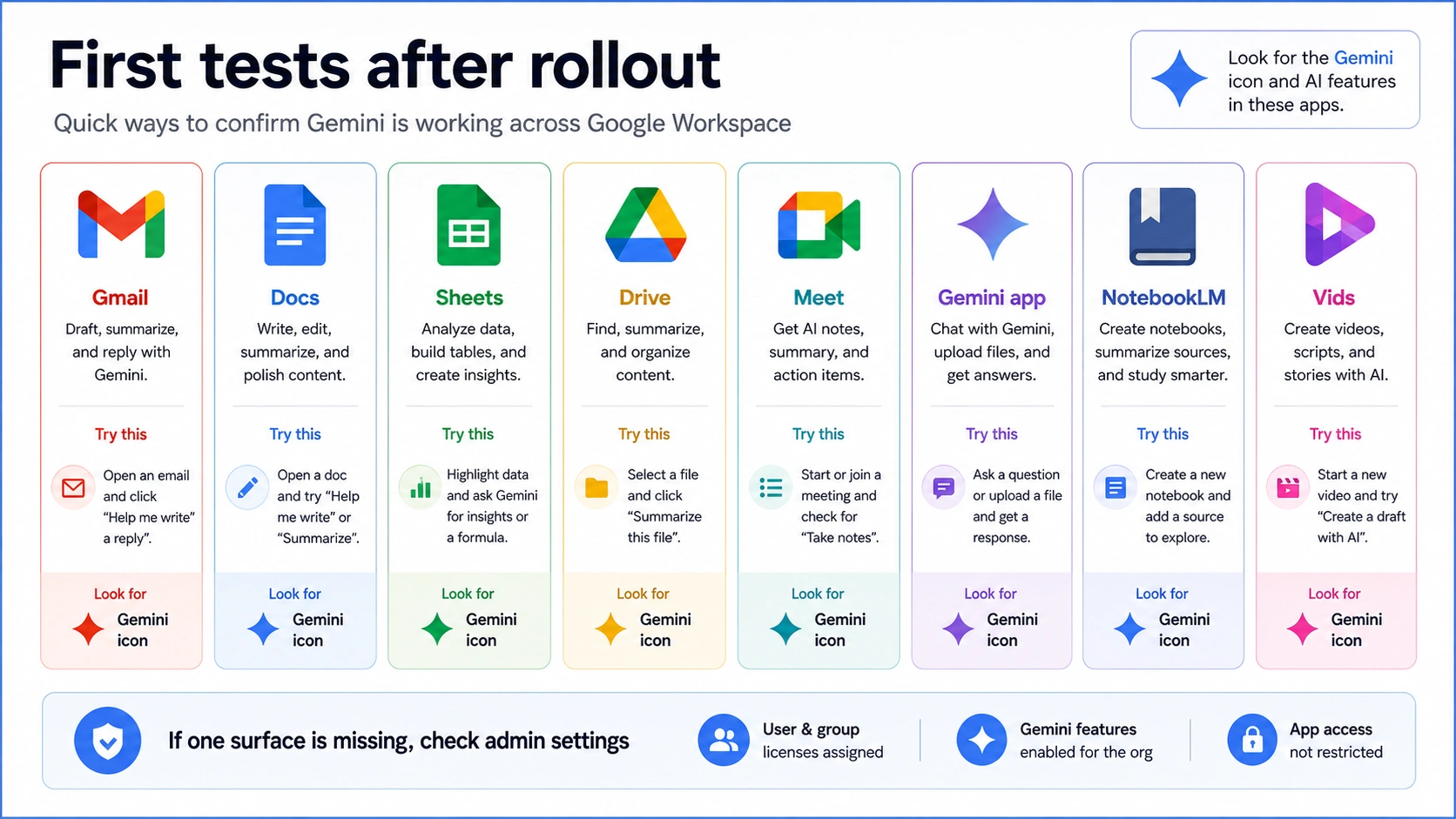
If one surface fails, do not diagnose all of Workspace from that single failure. A missing Docs side panel, a disabled Gemini app, a Meet note issue, and an AI Studio policy block are different branches. The fix can be plan, rollout, browser profile, Admin console service, age policy, or the wrong route entirely.
When is a higher-access add-on the right answer?
Higher access is the right topic only after the base Workspace and admin checks are clear. Google has current help pages for AI Expanded Access and AI Ultra Access, and those pages include volatile details such as Flow access changes and dated transition timelines. Those claims should be rechecked before purchase because Google is actively changing the AI package boundaries.
The decision is simple:
| Need | Do not buy first if | Consider a higher-access route when |
|---|---|---|
| Gemini in Workspace apps is missing | The admin has not checked edition and service controls. | The plan is confirmed and the missing capability is specifically tied to higher access. |
| More image/video or advanced creative capacity | The team only needs basic writing, summarization, or meeting help. | The workload depends on the higher-access features listed on the current Google page. |
| New beta Workspace features | The tenant cannot tolerate changing rollout behavior. | The team accepts that availability can be staged by plan, language, country, or date. |
| Personal premium Gemini behavior | The user is asking from a managed Workspace account. | The official page clearly says the work-account route is covered. |
The stop rule is to avoid using "Gemini included" as a purchasing argument. Inclusion tells you the base route exists. It does not prove that a higher Flow credit tier, a beta feature, or a consumer-plan benefit is part of the same Workspace contract.
When should you leave Workspace for AI Studio or the Gemini API?
Leave Workspace app AI when the job becomes developer work. If the question includes API keys, model IDs, request limits, quotas, billing, embeddings, code integration, batch workflows, or server-side automation, the owner is AI Studio, Gemini API, Google Cloud, or another developer route.
Google's AI Studio documentation for Workspace accounts says Workspace users have access to AI Studio by default, and admins can enable or disable it for organizational units. It also says Workspace for Education users under 18 are restricted from using AI Studio with Education accounts. That makes AI Studio adjacent to Workspace, not identical to Gmail or Docs Gemini.
For developer setup, keep three checks separate:
- Workspace account policy: is AI Studio allowed for this user?
- Google project policy: which project owns the API key, quota, and billing?
- API behavior: which model, endpoint, quota dimension, and error response applies?
If the user needs an API key, use a developer guide such as Google AI Studio API key setup. If the problem is rate limits or quota, use Gemini API free tier limits or Google AI Studio rate-limit recovery. Do not solve API work by changing Workspace app permissions unless the first failure is actually AI Studio access being disabled for that managed account.
When is Gemini Enterprise different from Workspace Gemini?
Gemini Enterprise is not just a bigger name for Gemini in Docs. Google Cloud's Gemini Enterprise agent documentation describes Gemini Enterprise as a governed place to build, register, manage, and use agents, including Google agents, third-party agents, and custom agents from the organization. That is a different buyer job from turning on Gemini in Gmail or NotebookLM.
Use Gemini Enterprise language when the need sounds like this:
- The organization wants agents that work across systems, not only Workspace app suggestions.
- Admins need oversight, registration, or management of custom agents.
- Teams need enterprise search, knowledge workflows, or governed automation.
- The conversation includes Google Cloud, Vertex AI Agent Engine, Agent Development Kit, security controls, or internal agent distribution.
Workspace Gemini helps people work inside familiar apps. Gemini Enterprise is a platform route for agentic work across enterprise data and workflows. They can coexist, but one does not replace the other. A practical deployment may start with Workspace app AI for everyday productivity and keep Gemini Enterprise for governed agent workflows that need IT, security, and Cloud ownership.
FAQ
Is Gemini AI included with Google Workspace?
Yes, many Google Workspace Business and Enterprise subscriptions include Gemini-powered features, but availability depends on edition, admin settings, service controls, rollout, age policy, and the exact app surface. Check the current Workspace help and pricing pages for your tenant before promising every feature.
Why does a user not see Gemini even though Workspace includes it?
The most common reasons are edition limits, an Admin console service being off for that organizational unit, browser/account mismatch, staged rollout, app-specific availability, Education age restrictions, or the request belonging to AI Studio, API, or Enterprise rather than Workspace apps.
Does Google Workspace include the Gemini API?
No. Workspace app Gemini and the Gemini API are different routes. A Workspace account may be allowed to use AI Studio, but API keys, quota, billing, model calls, and backend integration belong to the developer route and the Google project behind it.
Is AI Studio available for Workspace accounts?
Google's developer documentation says Workspace users have AI Studio access by default, but admins can turn access on or off for organizational units. Education users under 18 are restricted from using AI Studio with Education accounts.
Is Gemini Enterprise the same as Google Workspace Gemini AI?
No. Workspace Gemini is built into work apps such as Gmail, Docs, Drive, Meet, Chat, Vids, the Gemini app, and NotebookLM. Gemini Enterprise is a Google Cloud agent-platform route for governed agents, enterprise search, custom agents, and cross-system workflows.
Should I buy AI Expanded or Ultra Access first?
Not before checking the base plan and Admin console. Higher-access products can be useful for specific advanced image, video, Gemini app, NotebookLM, Workspace Studio, or speech translation needs, but those pages are volatile. Recheck Google's current help and pricing pages before buying.
Does Workspace data train public Gemini models?
Google's Workspace Gemini help describes protections for customer content and says Workspace content is not used for other customers, human reviewed, or used for model training outside the domain without permission. Still, admins should review the exact service, data region, compliance setting, and contract terms before enabling sensitive workflows.
What is the safest first test for a team?
Run a small pilot with non-sensitive work: summarize an email thread, draft a Docs paragraph, organize a simple Sheet, use Meet notes in a low-risk meeting, ask the Gemini app a work-safe question, and build a NotebookLM notebook from approved files. Then record which features worked, which were blocked, and which branch was the real owner.