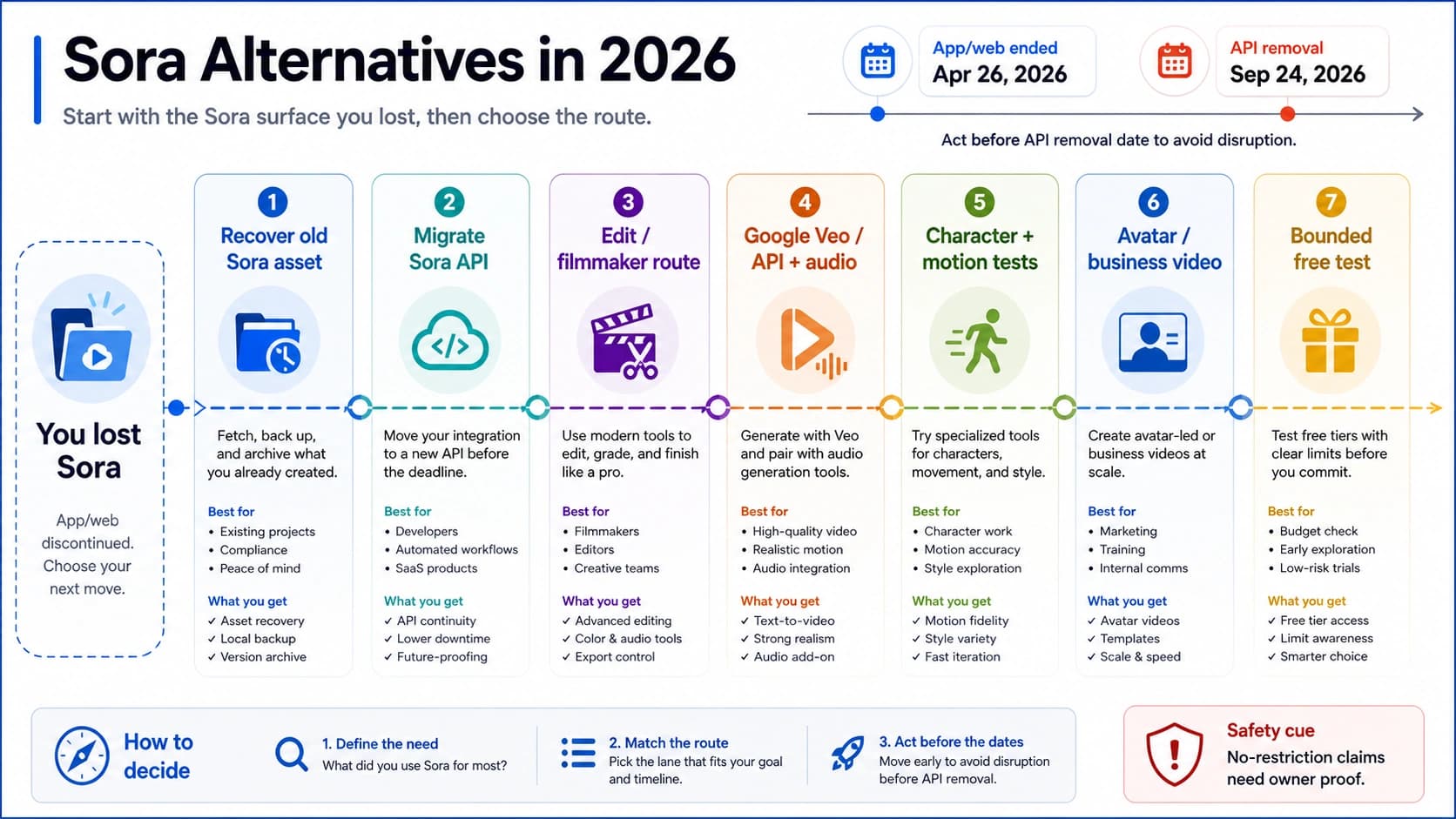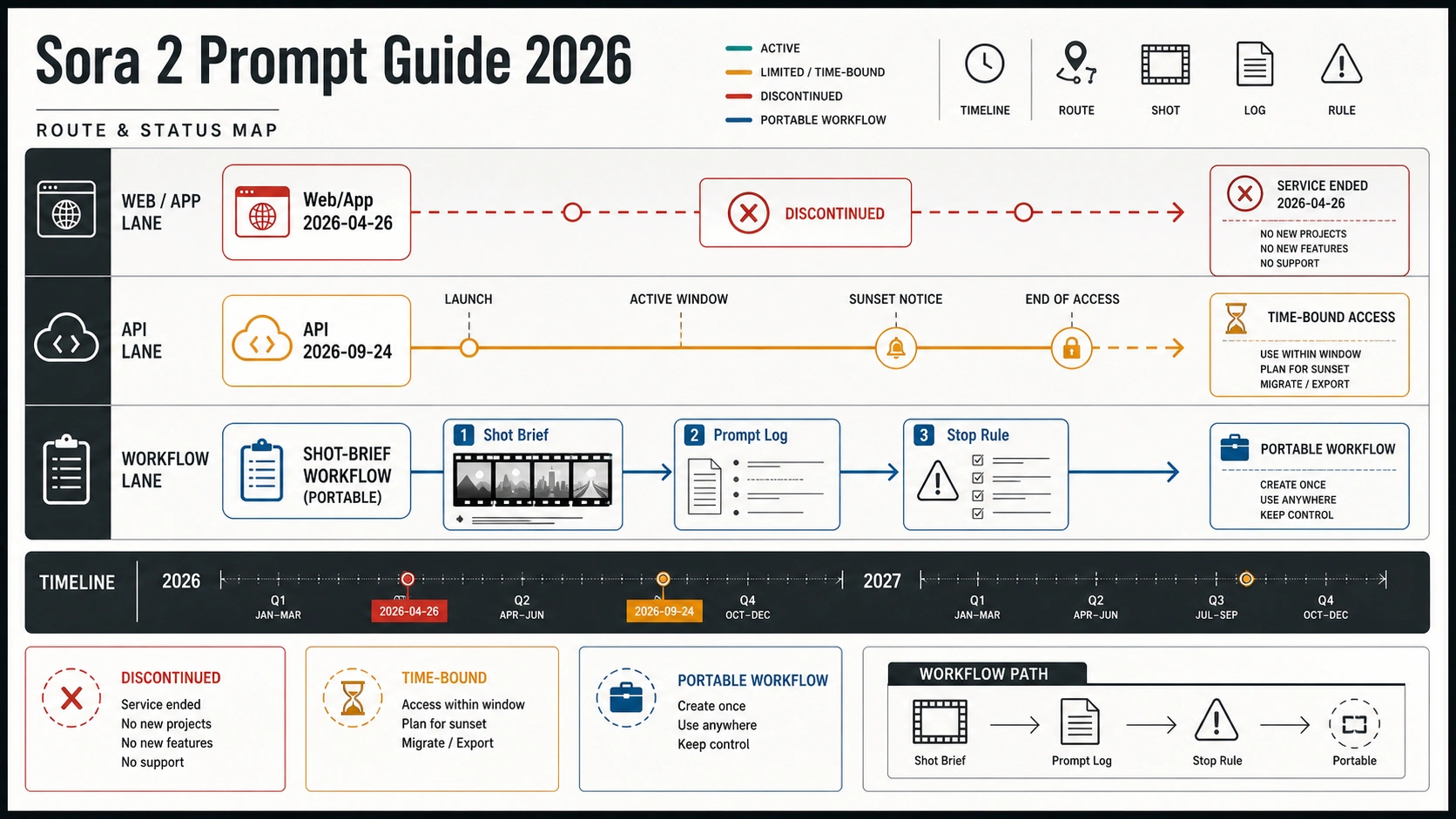
Sora 2 prompting is still worth learning in 2026 only if you treat it as a portable shot-brief workflow, not as a fresh app workflow. OpenAI says Sora web and app experiences were discontinued on April 26, 2026, and the Sora API is scheduled to end on September 24, 2026. That makes the safest prompt work simple: separate API settings from prose, write each idea as a logged shot brief, and stop rewriting when access, policy, or the API sunset is the real blocker.
Quick answer: what still belongs in a Sora 2 prompt guide
The useful part of Sora 2 prompting is not a pile of magic sentences. It is the habit of turning a video idea into a shot brief: route, settings, subject, action, camera, lighting, audio, expected result, and stop rule. That structure survives better than a one-off prompt because it can be copied into another video model, another API route, or a later migration note.
The status boundary comes first:
| Surface | Current status | Prompt work that still helps | Stop rule |
|---|---|---|---|
| Sora web and app | OpenAI says these experiences were discontinued on April 26, 2026 | Use only as historical interface context, not as a current workflow | Do not write a fresh app tutorial around it |
| Sora API / Videos API | OpenAI says the API is scheduled to discontinue on September 24, 2026 | Keep prompt anatomy, request settings, and result logs for any work that still runs before cutoff | Stop if the route is unavailable or the cutoff makes the workflow impractical |
| Official prompt anatomy | OpenAI's Sora 2 prompting guide still teaches scene, camera, motion, lighting, style, and iteration | Convert those fields into portable shot briefs | Do not treat examples as guaranteed outputs |
| Third-party prompt lists | Useful for language inspiration and common user wording | Borrow patterns only after you rewrite them into your own brief | Do not treat a list as proof that the prompt will repeat |
Use OpenAI Help for lifecycle dates, the OpenAI video generation guide for request shape, and the OpenAI Sora 2 prompting guide for prompt anatomy. Everything else should be saved as example language until you test it on the route you actually control.
Separate prompt prose from API settings
The fastest way to waste Sora 2 retries is to ask prose to control fields that belong to the request. A prompt can describe the shot, but it does not replace route settings such as model, size, seconds, character input, image reference, and the endpoint or interface you are using.
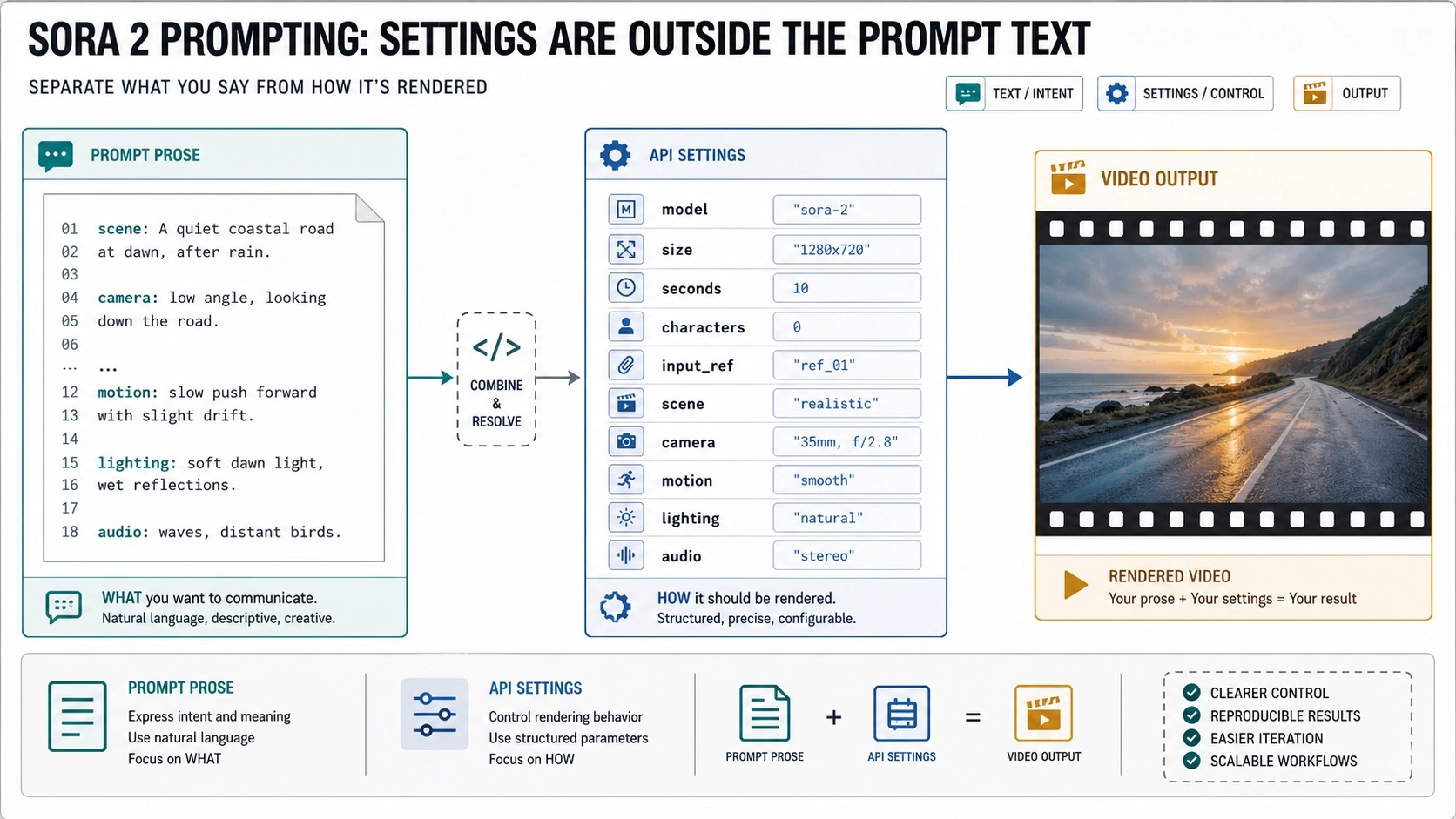
Write the split before you write the scene:
| Field | Put it where | What it controls |
|---|---|---|
| Model | API setting or route note | Whether you are asking for sora-2, sora-2-pro, or another route |
| Size | API setting | Aspect ratio and resolution, such as portrait or landscape output |
| Seconds | API setting | Duration budget and pacing room |
| Characters | API setting or route-specific input | Reuse of a named character asset where supported |
| Input reference | API setting or upload slot | Visual starting point or reference image |
| Prompt prose | Prompt body | Subject, action, camera, motion, lighting, palette, mood, audio, and constraints |
| Stop rule | Prompt log | Whether the next move is rewrite, route fix, policy review, cost check, or migration |
The prompt body should still be detailed. It just should not carry every responsibility. Instead of writing "make this 12 seconds in vertical Pro mode" inside the prose and hoping the system interprets it, record seconds: 12, size: 720x1280, and route separately, then use the prompt for what the viewer should see and hear.
A good Sora 2 prompt therefore has two layers:
hljs textRequest layer: Route: Model: Size: Seconds: Character or input reference: Prompt layer: Subject: Action beats: Camera and framing: Motion: Lighting and palette: Audio: Constraints: Log layer: Expected result: Observed result: Next move: Stop rule:
This matters more in 2026 because the route itself is time-bound. If a prompt fails after the route disappears, a better adjective will not bring the route back. If a policy block appears, a "more cinematic" rewrite may only hide the real issue. The split keeps creative iteration from being confused with access, cost, policy, or lifecycle problems.
Use a shot brief instead of a prompt dump
A shot brief is a small production record. It reads like direction to a camera crew, not like a sentence written for a prompt gallery. The goal is not to make the prompt long. The goal is to make the prompt testable.
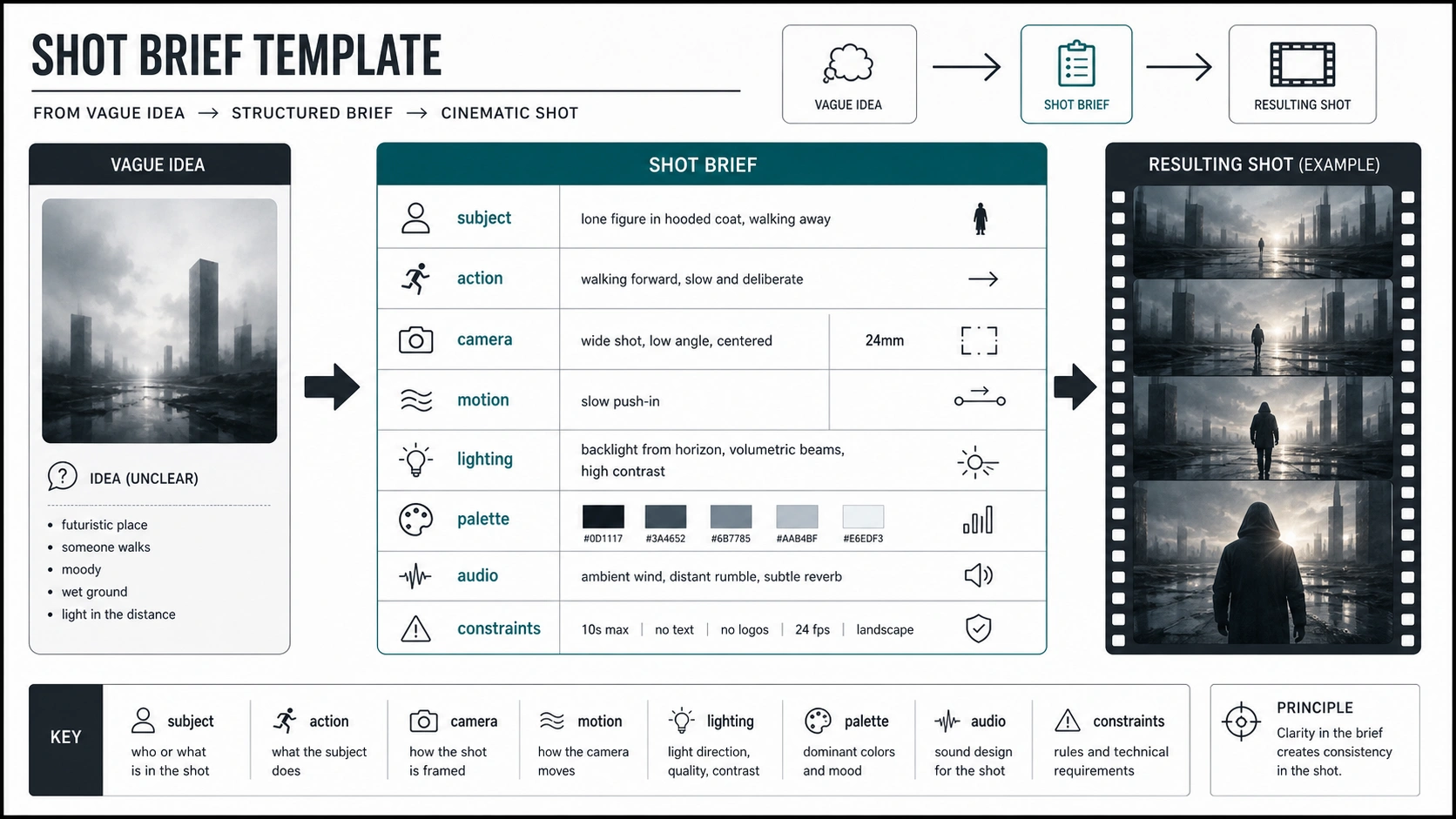
Use this template when you turn an idea into a Sora 2 prompt:
| Brief field | What to write | Why it helps |
|---|---|---|
| Shot ID | A short name such as product-reveal-v1 | Keeps examples, outputs, and retries connected |
| Route | Sora API, Videos API, or migration target | Prevents stale app instructions from mixing with developer settings |
| Settings | Model, size, seconds, references | Keeps request controls outside the prose |
| Subject anchor | The object, person, location, or scene that must stay stable | Gives the model a center of gravity |
| Action beats | 2 to 4 visible changes in order | Prevents a video prompt from becoming a still image description |
| Camera | Framing, lens feel, movement, distance | Defines how the viewer sees the action |
| Motion | Pace, direction, timing, physical behavior | Makes the clip feel planned instead of random |
| Lighting and palette | Key light, contrast, weather, color family | Controls tone without stuffing style words everywhere |
| Audio | Dialogue, ambience, sound effects, or silence | Uses Sora 2's video-plus-audio expectation where relevant |
| Constraints | What must not drift or what must remain readable | Protects product shape, identity, text, or safety boundary |
| Expected result | One sentence describing the acceptable output | Makes the review decision concrete |
| Stop rule | Rewrite, route fix, policy check, cost check, or migration | Stops prompt tweaking when prompting is no longer the owner |
The important move is to judge every output against the brief, not against a vague feeling that the prompt "should have worked." If the subject changed but the camera was right, preserve the camera field and tighten the subject anchor. If the pacing felt too fast, change seconds or action beats before adding more adjectives. If the route rejects the request, open the right troubleshooting path instead of burying the same request inside softer language.
Example rewrites from vague idea to controlled shot brief
Examples are useful when they show the editing decision. A copy-ready prompt without a route, settings, or review rule is only half a workflow.
| Vague idea | Controlled shot brief | Why this is stronger |
|---|---|---|
| "Make a cinematic coffee ad." | Route: Sora API. Settings: landscape, short clip. Subject: clear glass cup on a walnut counter. Action beats: espresso pours, crema rises, steam catches morning side light. Camera: slow 45-degree push-in from table height. Lighting: warm window light, soft shadows, muted background. Audio: quiet cafe room tone and a single cup tap. Constraint: keep brand area blank and cup shape consistent. Expected result: usable product-style reveal, no readable fake logo. | It defines the object, camera, motion, brand risk, and acceptable output instead of relying on "cinematic" to do everything. |
| "A futuristic city chase." | Route: active video route. Settings: portrait test. Subject: two delivery drones flying through a rainy elevated market. Action beats: drone one banks left, passes a neon sign, dodges a hanging cable, then slows above a delivery pad. Camera: tracking shot from behind, slight handheld energy but stable subject. Lighting: blue rain reflections with amber shop lights. Audio: rain, soft rotor hum, distant crowd. Constraint: no crashes, weapons, or real public logos. | It keeps motion and safety clear while removing vague action words that could create an unwanted violent scene. |
| "Nature documentary shot of a fox." | Route: migration-safe shot brief. Settings: 8-second landscape. Subject: red fox standing at the edge of a snowy pine clearing. Action beats: fox lifts its head, listens, steps forward once, snow falls from a branch behind it. Camera: locked telephoto feel, shallow depth of field, eye-level framing. Lighting: cold dawn light, low contrast. Audio: faint wind and snow rustle. Constraint: natural behavior, no human interaction, no exaggerated fantasy style. | It describes a small observable sequence, which is easier to judge than a generic documentary mood. |
The examples also show when not to keep pushing. If the coffee prompt returns fake brand text, the next move is not "make the logo cleaner" unless your route actually supports that text-control job. If the city chase keeps turning into dangerous impact scenes, reduce the action or switch to a safer visual goal. If the fox shot cannot preserve animal anatomy after two focused tries, log the failure and test another route rather than saving a broken template.
Keep a prompt log before the API cutoff
A prompt log turns individual attempts into reusable knowledge. Without one, every new try feels like a fresh prompt problem, even when the real blocker is duration, reference input, safety policy, cost, or an expiring route.
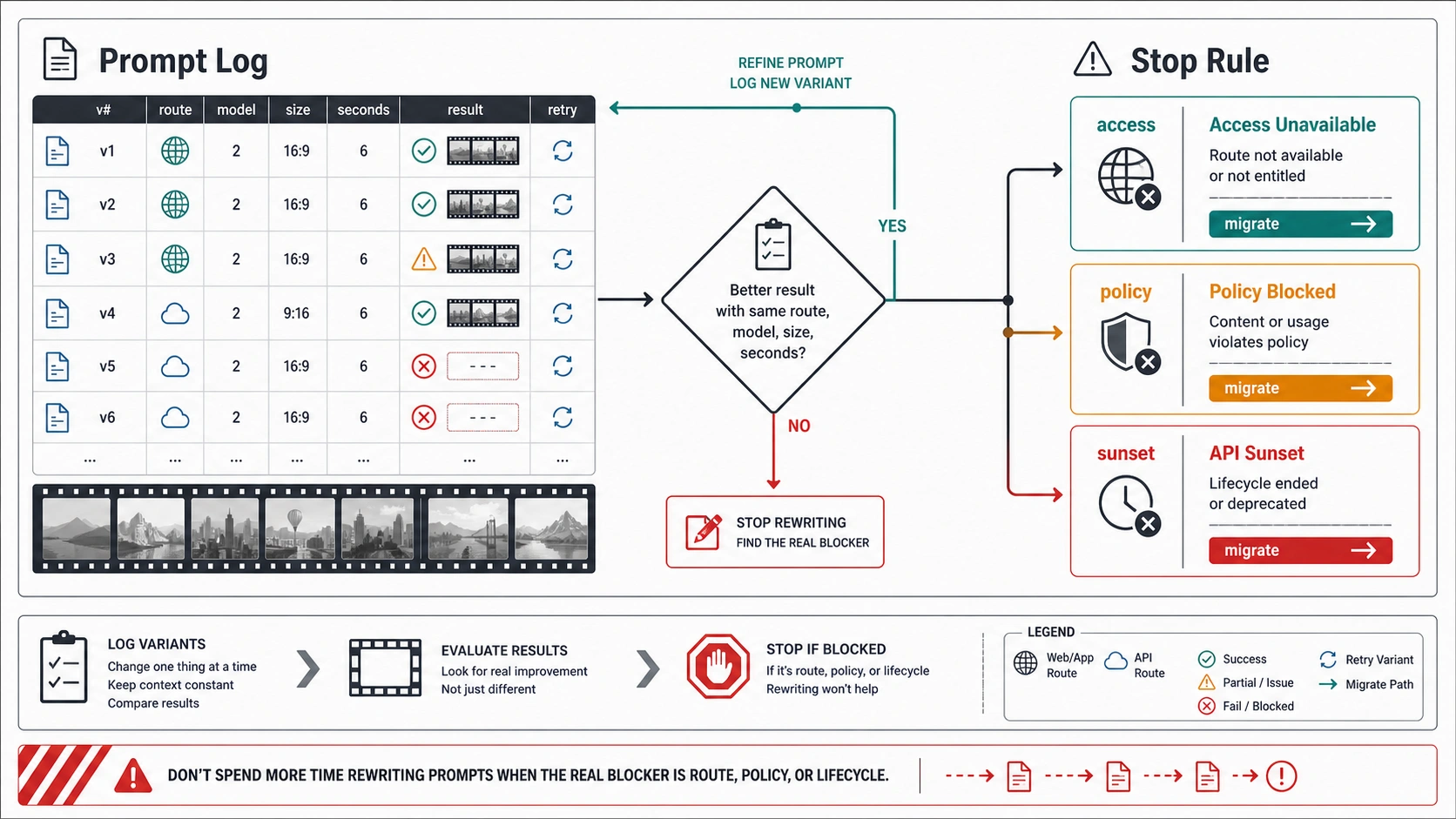
Use a compact log row:
| Log field | Example |
|---|---|
| Version | coffee-reveal-v2 |
| Date | 2026-06-24 |
| Route | Sora API / Videos API |
| Settings | sora-2, landscape, 8 seconds, no reference |
| Prompt change | Added action beats and removed fake brand request |
| Result | Better steam and cup movement; still invented background text |
| Decision | Keep action beats, remove all text surfaces from scene |
| Stop rule | If text artifacts remain after one clean retry, move to route or post-production decision |
| Migration note | Brief can be reused in another video model because settings and prose are separated |
The log should be boring. That is the point. It prevents prompt work from turning into folklore. You can see which fields actually changed, which result improved, and when a failure repeated enough times to stop.
Use the log especially for:
- Input references that change the output more than the wording does.
- Character or subject consistency tests.
- Duration changes where a longer clip adds motion errors.
- Policy or invalid-prompt errors that repeat after neutral rewriting.
- Cost-sensitive jobs where each retry needs a reason.
- Work that may need to migrate after the API sunset.
Do not log provider marketing claims as facts. If a tool page says a route has no practical cap, lower cost, faster output, or more stability, save that as a provider claim unless you have current evidence from the route owner and your own test. The practical recommendation is simpler: keep prompt records clean enough that you can move them when the Sora route no longer owns the next step.
Stop rules: when the next move is not another prompt
Prompt rewriting is useful only while the prompt is the likely cause. Once another owner takes over, more wording can hide the problem.
| Symptom | Likely owner | Better next step |
|---|---|---|
| You cannot access the route or model | Account, region, organization, or lifecycle status | Use the setup and route checklist in Sora 2 API Access Guide |
| The request is rejected as unsafe or invalid | Policy, prompt ambiguity, or requested content | Diagnose the rejection path with Sora 2 Error "Invalid Prompt" Fix |
| The cost or quota changes the job | Pricing, credits, duration, resolution | Check Sora 2 Pricing Per Second and Sora 2 Credits and Limits |
| You need beginner interface steps | Product workflow rather than prompt anatomy | Start with How to Use Sora 2 Video Generator Step by Step, then return to the shot brief |
| You need a production fallback | Reliability, integration, or migration planning | Compare route options with Sora 2 Video API Stable Solution or Sora 2 vs Veo 3 vs Kling |
A hard stop is especially important for unsafe or rights-sensitive requests. Do not try to prompt around policy by disguising the target, naming a celebrity indirectly, copying a copyrighted character, or asking for a hidden workaround. Rewrite only when the underlying request is allowed and the issue is ambiguity, style, or structure.
There is also a lifecycle stop. If the work depends on long-term repeatability after September 24, 2026, do not build the whole process around Sora-only settings. Keep the shot brief, save the prompt log, preserve accepted outputs, and plan a migration test. The brief is the asset; the route is temporary.
A reusable Sora 2 prompt workflow
For one real project, keep the loop short:
- Pick the route and write down its current status.
- Set model, size, seconds, and reference inputs outside the prose.
- Write the shot brief with subject, action beats, camera, motion, lighting, audio, and constraints.
- Generate only if the route still supports the work.
- Review against the expected result, not against a vague aesthetic reaction.
- Change one main variable per retry.
- Stop after two focused failures unless the log shows a clear next cause.
- Save the accepted brief, settings, output, and migration note.
Here is a clean prompt body you can adapt after filling the request layer:
hljs textCreate an 8-second video shot of [subject anchor] in [setting]. The shot begins with [starting frame], then [action beat 1], [action beat 2], and [ending beat]. Use [camera framing] with [camera movement], keeping [protected detail] stable throughout. Lighting should be [lighting], with [palette] and [depth or texture cue]. Audio should include [ambient sound or silence] and avoid [unwanted sound]. Do not add readable brand text, public logos, celebrity likenesses, or extra characters. The acceptable result is [specific output standard].
That template is intentionally plain. The power comes from the fields around it: route, settings, expected result, and stop rule. If you need a different style, change the fields. If you need a different model, keep the shot brief and change the route note.
FAQ
Is Sora 2 prompting still worth learning in 2026?
Yes, but only as a portable workflow. The Sora web and app experiences are not a fresh workflow, and the API has a scheduled cutoff. Learning prompt anatomy still helps if you save structured shot briefs and logs that can move to another route.
What should a Sora 2 prompt include?
Include subject, setting, action beats, camera, motion, lighting, palette, audio, constraints, and an expected result. Keep model, size, seconds, character references, and input references in the request settings instead of hiding them inside prose.
Are model, size, and seconds part of the prompt?
They are part of the request, not the creative prompt body. You can mention creative timing in prose, but the API setting is the owner for duration and output format where the route supports it.
Should I use a Sora 2 prompt generator?
A generator can be a drafting aid, but it should not become the source of truth. Rewrite its output into your own shot brief, add route settings, define an expected result, and log whether the output actually worked.
Can better wording fix an invalid prompt?
Sometimes. Better wording helps when the request is ambiguous or accidentally trips a filter. It does not make disallowed content acceptable, restore unavailable access, reduce cost, or extend the API lifecycle.
How long should a Sora 2 prompt be?
Long enough to define the shot, short enough to review. A structured 120-word brief with clear action beats is often better than a 500-word paragraph full of style adjectives.
Can image references or characters replace prompt detail?
No. References can anchor appearance, but the prompt still needs action, camera, motion, lighting, and constraints. Treat references as inputs, not as a substitute for direction.
What happens after the Sora API sunset?
Do not assume the same route will remain available. Keep the shot brief, accepted output, settings record, and result notes so the work can be tested on another video model or production route.