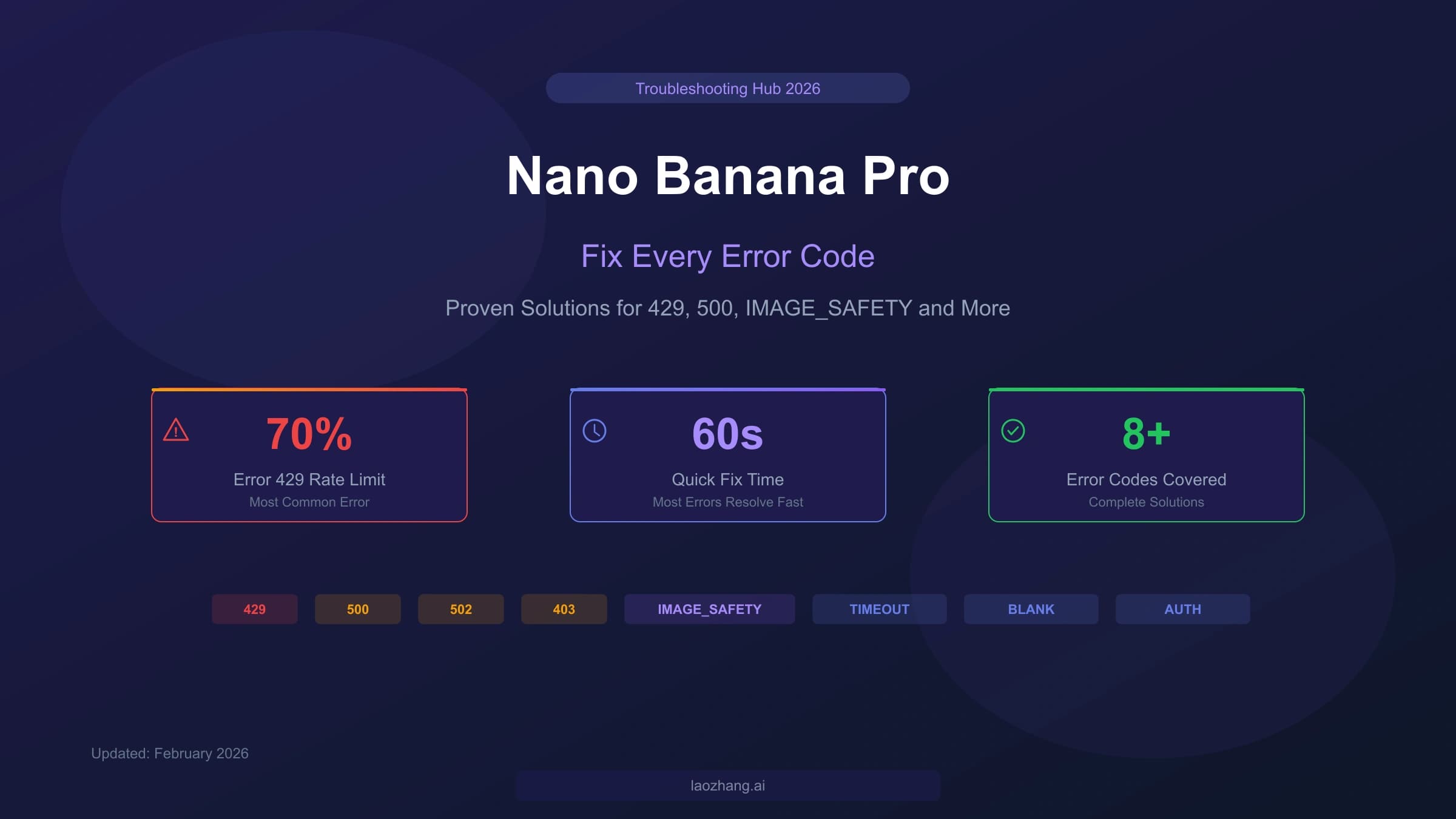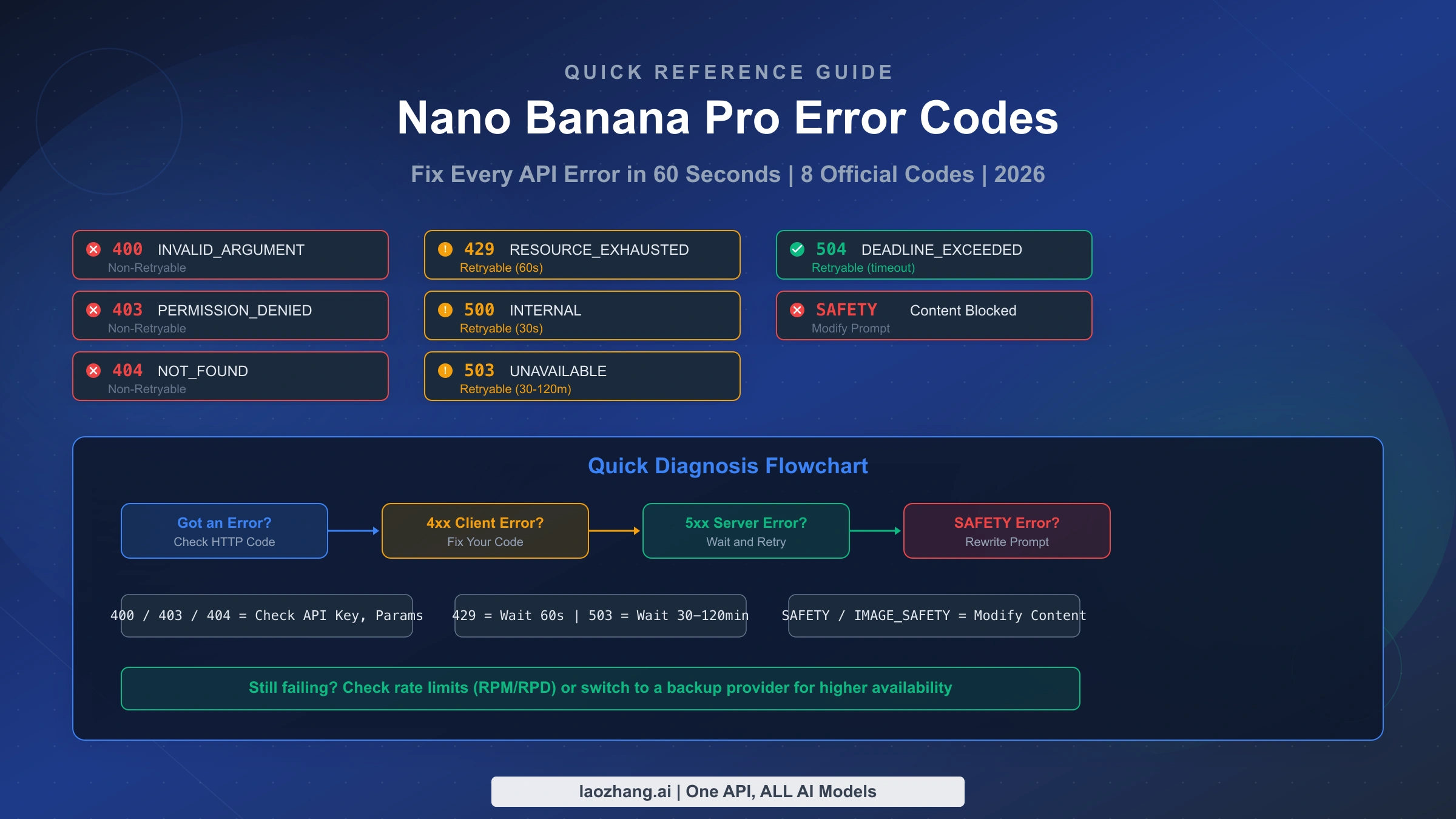
Every Nano Banana Pro error falls into one of three categories: client-side errors you can fix immediately (400, 403, 404), server-side errors that require patience and retry logic (429, 500, 503, 504), and image-specific safety errors that need prompt modification (SAFETY, IMAGE_SAFETY). This quick reference covers all 8 official error codes verified against the Google AI documentation (ai.google.dev, February 2026), with one-line fixes, retryable classifications, and a 30-second diagnosis workflow that matches how developers actually troubleshoot in production.
Complete Nano Banana Pro Error Code Table
Quick Answer: Nano Banana Pro has 8 official HTTP error codes (400, 403, 404, 429, 500, 503, 504) plus image-specific errors (SAFETY, IMAGE_SAFETY). The most common is 429 RESOURCE_EXHAUSTED (~70% of all errors), which resolves by waiting 60 seconds.
The master error code table below is designed for one thing: getting you from error message to fix in under 10 seconds. Every error code includes its official Google API status, whether you should retry or fix your code, and the fastest path to resolution. Unlike the detailed troubleshooting guides that walk through each error over thousands of words, this table gives you the essential information at a glance so you can bookmark this page and return to it every time something breaks.
| HTTP Code | Status | Retryable? | One-Line Fix | Recovery Time |
|---|---|---|---|---|
| 400 | INVALID_ARGUMENT | No | Check request body format and API parameters | Immediate |
| 400 | FAILED_PRECONDITION | No | Enable billing or switch to eligible region | Immediate |
| 403 | PERMISSION_DENIED | No | Regenerate API key and verify permissions | Immediate |
| 404 | NOT_FOUND | No | Verify model name and resource path | Immediate |
| 429 | RESOURCE_EXHAUSTED | Yes | Wait 60s (RPM) or midnight PT (RPD) | 60s to 24h |
| 500 | INTERNAL | Yes | Retry with exponential backoff starting at 30s | 30s to 5min |
| 503 | UNAVAILABLE | Yes | Wait 30-120 min or switch model temporarily | 30min to 2h |
| 504 | DEADLINE_EXCEEDED | Yes | Increase timeout setting or simplify input | Immediate |
| — | SAFETY | No | Rewrite prompt to avoid flagged content | Immediate |
| — | IMAGE_SAFETY | No | Generated image flagged; try different description | Immediate |
The distinction between retryable and non-retryable errors is the single most important concept this table communicates, because it directly determines your next action. When you see a retryable error (429, 500, 503, 504), the correct response is to wait and send the exact same request again — your code is fine, the server just needs time. When you see a non-retryable error (400, 403, 404, SAFETY, IMAGE_SAFETY), retrying the identical request will produce the identical failure every time, so you must change something in your request before trying again. This classification is something no other quick reference provides, yet it is the most actionable piece of information a developer needs when staring at an error in their terminal.
Community data from developer forums and Google AI Studio discussions consistently shows that approximately 70% of all Nano Banana Pro errors are 429 RESOURCE_EXHAUSTED, which means the vast majority of errors you encounter are temporary and self-resolving. Server errors (500, 502, 503 combined) account for roughly 15%, authentication errors (403) represent about 8%, and remaining errors including IMAGE_SAFETY and timeouts make up the final 7%. Understanding this distribution helps you prioritize your debugging efforts — if your application is failing intermittently, rate limiting is almost certainly the cause. For a deeper dive into every error code and its edge cases, see the complete Nano Banana Pro troubleshooting hub.
Client-Side Errors You Can Fix Right Now (400, 403, 404)
Quick Answer: Client-side errors mean something is wrong with your request, not with Google's servers. These are non-retryable — you must fix the underlying issue before the request can succeed. The most common fixes are correcting malformed JSON, regenerating your API key, and verifying the model name.
Client-side errors in the 4xx range are the most frustrating because they tell you that something in your code or configuration is wrong, but the error messages from the Gemini API are not always specific enough to pinpoint the exact problem. The good news is that these errors have deterministic solutions: once you identify and fix the root cause, the error disappears permanently. Unlike server-side errors that come and go unpredictably, a 400 or 403 error will persist until you make a code change, which actually makes them easier to debug systematically.
Error 400 INVALID_ARGUMENT is the most common client-side error and typically means your request body contains malformed JSON, an invalid parameter value, or a missing required field. The Gemini API is particularly strict about the format of image generation requests — common mistakes include using deprecated parameter names, sending an empty prompt string, or specifying an invalid image size. To diagnose this error quickly, compare your request body against the API integration guide examples and look for structural differences. A related variant, 400 FAILED_PRECONDITION, appears when you attempt to use a free-tier feature that is not available in your region, or when your project lacks the required billing configuration.
Error 403 PERMISSION_DENIED indicates that your API key either does not exist, has been revoked, or lacks the necessary permissions to access the Nano Banana Pro model. This error frequently catches developers who have created a key for one Google Cloud project but are making requests against a different project, or who have restricted their key's API access to exclude the Generative Language API. The fastest fix is to navigate to the Google AI Studio console, generate a fresh API key, and replace the old one in your code. If you are using Vertex AI instead of the direct Gemini API, ensure that the service account has the aiplatform.endpoints.predict permission and that the Vertex AI API is enabled in your project.
Error 404 NOT_FOUND occurs when the resource path in your request does not match any existing model or endpoint. For Nano Banana Pro specifically, the most common cause is using the wrong model identifier — the official model name that should appear in your API calls is tied to the "Gemini 3 Pro Image Preview" variant, and developers sometimes confuse it with other Gemini models or use outdated naming from earlier preview versions. Double-check that your endpoint URL follows the pattern https://generativelanguage.googleapis.com/v1beta/models/{model-name}:generateContent and that the model name exactly matches what appears in the Google AI Studio model selector.
Server-Side Errors — When to Wait vs Switch (429, 500, 503, 504)
Quick Answer: Server-side errors are retryable — your code is correct, but the server cannot handle your request right now. Error 429 needs a 60-second wait, 500 needs exponential backoff, 503 means the service is overloaded (wait 30-120 minutes), and 504 means your request timed out.
Server-side errors require a fundamentally different troubleshooting approach than client-side errors because the problem exists on Google's infrastructure, not in your code. The correct response to any 5xx error is to implement retry logic with appropriate backoff intervals, and the correct response to a 429 error is to respect the rate limit by pausing before sending your next request. Attempting to "fix" a server-side error by modifying your request parameters is wasted effort because the identical request would have succeeded if the server had been in a normal state.
Error 429 RESOURCE_EXHAUSTED deserves its own detailed treatment because it represents approximately 70% of all Nano Banana Pro failures according to developer community reports. The Gemini API enforces rate limits across four dimensions simultaneously: RPM (requests per minute), TPM (tokens per minute for input), RPD (requests per day), and IPM (images per minute, specific to Nano Banana Pro). Exceeding any single dimension triggers a 429 error. The critical detail that many developers miss is that rate limits are calculated per project rather than per API key — creating multiple API keys within the same Google Cloud project does not increase your quota (Google AI documentation, verified February 19, 2026). RPD limits reset at midnight Pacific Time, which means developers in other time zones need to plan their batch processing windows accordingly. For comprehensive rate limit strategies and calculations, see our detailed rate limit analysis.
Error 500 INTERNAL signals an unexpected failure within Google's servers and is the hardest error to troubleshoot because it provides minimal diagnostic information. Community data suggests these errors typically resolve within 30 seconds to 5 minutes, making exponential backoff the ideal strategy. Start with a 30-second delay, double the delay with each retry, add random jitter of 0-5 seconds to prevent thundering herd problems, and cap at 5 retry attempts before alerting. If you are consistently seeing 500 errors across multiple consecutive minutes, the issue is likely a broader Google infrastructure problem rather than something specific to your request, and checking the Google Cloud Status Dashboard will confirm whether there is an active incident.
Error 503 UNAVAILABLE is the second most impactful server error and occurs when Nano Banana Pro is experiencing high demand that exceeds Google's serving capacity. This error was especially common during the model's initial preview launch and still appears during peak usage periods. Recovery typically takes 30 to 120 minutes based on developer reports, though severe outages can last longer. When you encounter a 503 error, the most practical immediate response is to switch to a different model temporarily if your application supports fallback logic, or to queue the request for retry using a background job system. The 503 error is often region-specific, so requests routed through different geographic endpoints may succeed even when your primary region is overloaded.
Error 504 DEADLINE_EXCEEDED means your request took longer to process than the server's timeout threshold allows. For image generation requests, this commonly happens with highly complex prompts that describe intricate scenes with many elements, or when the system is under moderate load and processing times increase. The fix is straightforward: increase your client-side timeout setting to at least 120 seconds for image generation requests, and consider simplifying your prompt if the timeout persists. Unlike 503 errors which indicate service-level problems, 504 errors are usually specific to individual requests.
Image Generation Errors (SAFETY, IMAGE_SAFETY, Blank Output)
Quick Answer: Image-specific errors occur at three stages: prompt rejected before generation (SAFETY/blockReason), generated image flagged after creation (IMAGE_SAFETY), and successful generation that returns empty results (blank output). Each requires a different fix approach.
Nano Banana Pro's safety filtering operates through a multi-layer system that evaluates content at different stages of the generation pipeline, and understanding which layer triggered your error is essential for choosing the right fix. The three layers work independently — your prompt can pass the first layer only to have the generated image blocked by the second layer — which is why developers sometimes see inconsistent results when generating similar images with slightly different prompts. For a comprehensive guide to navigating safety filters, see our safety filter troubleshooting guide.
Layer 1: Prompt Safety (finishReason: SAFETY) operates before any image generation begins and evaluates your text prompt against Google's content policies. When this layer triggers, you receive a response with finishReason: SAFETY and the promptFeedback.blockReason field indicates why the prompt was rejected. The SAFETY block reason typically activates for prompts that contain explicit violence, hate speech, or sexually suggestive content, but it can also trigger for edge cases that seem innocuous — prompts mentioning medical procedures, certain historical events, or specific public figures have been reported to occasionally trigger false positives. The fix for Layer 1 blocks is to rephrase your prompt using more neutral language while preserving your creative intent. Instead of describing specific violent actions, describe the emotional aftermath; instead of naming real people, describe character attributes.
Layer 2: Image Safety (finishReason: IMAGE_SAFETY) evaluates the generated image itself after creation, which means Google's servers have already spent compute resources generating an image that gets discarded before you see it. This layer catches images that pass the prompt filter but produce visual content that violates policies — for example, a prompt asking for "a historical battle scene" might pass Layer 1 but generate an image with graphic violence that triggers Layer 2. When you encounter IMAGE_SAFETY errors, try describing your scene from a different angle, adding qualifiers like "stylized," "minimalist," or "watercolor style" to encourage less realistic outputs, or reducing the level of detail in your description.
Layer 3: Special Blocks (BlockedReason.OTHER) indicates a Terms of Service violation that goes beyond standard content policies and is the most restrictive of the three layers. This block cannot be circumvented through prompt engineering alone, as it typically indicates that your content has been flagged for repeated policy violations or falls into a category that Google has explicitly prohibited regardless of phrasing.
Blank Output (No Error Code) is a particularly confusing failure mode because the API returns a 200 OK status with either an empty image array or a response that contains metadata but no actual image data. This is not technically an error from the API's perspective, which is why it does not produce an error code. Blank outputs most commonly occur when the generation process encounters an internal ambiguity that prevents it from producing a complete image — overly complex prompts with contradictory elements, extremely abstract concepts, or requests for images with extensive text content are the most frequent triggers. The fix is to simplify your prompt incrementally, removing one element at a time until generation succeeds, then gradually adding elements back to identify which combination causes the blank output.
Quick Diagnosis Workflow — Find Your Fix in 30 Seconds
Quick Answer: When you get an error, first check the HTTP status code. 4xx means fix your code, 429 means wait for rate limits, 5xx means the server has a problem, and non-HTTP errors (SAFETY/IMAGE_SAFETY) mean modify your prompt.
The diagnosis workflow below matches the natural troubleshooting process that experienced developers follow when they encounter an API error in production. Rather than reading through error documentation sequentially, you start with the broadest classification (HTTP status code range) and narrow down to the specific fix in two to three decision steps. This approach mirrors how debugging actually works in practice — you first determine whether the problem is in your code or on the server, then identify the specific error category, and finally apply the targeted fix.
Step 1: Read the HTTP status code. Every Nano Banana Pro error returns a standard HTTP status code that immediately tells you the error family. If you see a code in the 400 range, the problem is in your request and you need to change something before retrying. If you see 429 specifically, you have hit a rate limit and need to wait. If you see a code in the 500 range, the problem is on Google's side and your request is fine — you just need to retry later. If you do not see an HTTP error but get an empty response or a SAFETY/IMAGE_SAFETY flag in the response body, you are dealing with an image-specific error.
Step 2: Identify the specific error. Within each family, narrow down to the exact error using the status field in the API response. For 4xx errors, check whether it is INVALID_ARGUMENT (fix your request body), PERMISSION_DENIED (fix your API key), or NOT_FOUND (fix your endpoint). For 429, determine whether you hit RPM (wait 60 seconds), RPD (wait until midnight PT), or TPM (reduce request size). For 5xx errors, check whether it is INTERNAL (retry with backoff), UNAVAILABLE (wait 30+ minutes), or DEADLINE_EXCEEDED (increase timeout).
Step 3: Apply the targeted fix and verify. Execute the one-line fix from the master error code table, wait the appropriate interval, and send your request again. If the error persists after applying the fix, escalate to the detailed troubleshooting section for that error code. For intermittent errors that appear and disappear, implement the production error handler template from the next section to handle retries automatically.
Rate Limits and Tier Comparison
Quick Answer: Nano Banana Pro rate limits are per-project (not per API key) and operate across 4 dimensions: RPM, TPM, RPD, and IPM. Free tier is extremely limited. Upgrading to Tier 1 requires linking a billing account; Tier 2 requires $250+ spend and 30 days.
Understanding the tier system is critical for deciding whether to upgrade your Google AI Studio plan or explore alternative API providers. The rate limit structure verified against official Google AI documentation (ai.google.dev/rate-limits, updated February 19, 2026) reveals that the gap between free and paid tiers is enormous — Tier 1 users get roughly 30x more requests per minute than free users. The tier requirements are cumulative and time-gated: reaching Tier 2 requires both spending over $250 total and maintaining an active billing account for 30 days, which means you cannot simply make a large one-time payment to immediately access higher limits.
| Tier | Requirement | Key Limits |
|---|---|---|
| Free | Eligible countries only | Very low RPM, ~100 RPD |
| Tier 1 | Paid billing account | Up to 300 RPM, 10,000 RPD |
| Tier 2 | >$250 total + 30 days | Higher limits (project-specific) |
| Tier 3 | >$1,000 total + 30 days | Highest limits (project-specific) |
The rate limit dimensions work simultaneously, and exceeding any single dimension triggers a 429 error even if you are well within the others. RPM (requests per minute) is the most frequently hit limit for batch processing applications that send rapid-fire requests. RPD (requests per day) catches applications that spread requests over time but generate high volumes. TPM (tokens per minute) primarily affects applications that send very long prompts. IPM (images per minute) is unique to Nano Banana Pro and specifically limits the number of image generation calls regardless of other dimensions.
For developers who consistently hit rate limits and need higher availability, there are two practical paths forward. The first is upgrading your Google Cloud billing tier by linking a payment method and gradually increasing your spend to unlock Tier 2 and Tier 3 limits. The second is using a third-party API aggregator like laozhang.ai that provides access to the same Nano Banana Pro model through a unified endpoint with cost-effective API access options and more predictable availability during peak periods. This approach is particularly valuable during high-demand periods when Google's direct API frequently returns 503 UNAVAILABLE errors, as aggregator platforms often maintain multiple routing paths that can route around congested regions.
Production Error Handler Template
Quick Answer: A production error handler should classify errors as retryable vs non-retryable, implement exponential backoff with jitter for retryable errors, and log every failure for monitoring. Below are copy-paste ready implementations in Python and Node.js.
The error handler code below incorporates every lesson from this quick reference into a single, production-ready function that you can drop into your application. It classifies errors using the retryable/non-retryable framework, applies appropriate retry intervals for each error type, and includes structured logging so you can monitor error rates in production. Both implementations handle the edge cases that most example code ignores — including blank output detection, safety filter classification, and graceful degradation when all retries are exhausted.
hljs pythonimport time
import random
import requests
class NanoBananaErrorHandler:
RETRYABLE_CODES = {429, 500, 502, 503, 504}
NON_RETRYABLE_CODES = {400, 403, 404}
def __init__(self, api_key, max_retries=5, base_delay=30):
self.api_key = api_key
self.max_retries = max_retries
self.base_delay = base_delay
def generate_image(self, prompt, **kwargs):
for attempt in range(self.max_retries):
try:
response = self._make_request(prompt, **kwargs)
if response.status_code == 200:
data = response.json()
# Check for blank output
if not self._has_image(data):
return {"error": "blank_output",
"fix": "Simplify prompt"}
# Check for safety blocks in response
safety = self._check_safety(data)
if safety:
return {"error": safety["type"],
"fix": safety["action"]}
return {"success": True, "data": data}
if response.status_code in self.NON_RETRYABLE_CODES:
return {"error": response.status_code,
"retryable": False,
"fix": self._get_fix(response.status_code)}
if response.status_code in self.RETRYABLE_CODES:
delay = self._calculate_delay(attempt,
response.status_code)
time.sleep(delay)
continue
except requests.Timeout:
if attempt < self.max_retries - 1:
time.sleep(self.base_delay * (2 ** attempt))
continue
return {"error": "max_retries_exceeded",
"fix": "Check service status or switch provider"}
def _calculate_delay(self, attempt, status_code):
if status_code == 429:
base = 60 # RPM resets every 60 seconds
elif status_code == 503:
base = 300 # 5 min minimum for overloaded
else:
base = self.base_delay * (2 ** attempt)
jitter = random.uniform(0, base * 0.1)
return base + jitter
def _get_fix(self, code):
fixes = {
400: "Check request body and parameters",
403: "Regenerate API key, verify permissions",
404: "Verify model name and endpoint URL",
}
return fixes.get(code, "See error documentation")
hljs javascript// Node.js implementation
class NanoBananaErrorHandler {
static RETRYABLE = new Set([429, 500, 502, 503, 504]);
constructor(apiKey, { maxRetries = 5, baseDelay = 30000 } = {}) {
this.apiKey = apiKey;
this.maxRetries = maxRetries;
this.baseDelay = baseDelay;
}
async generateImage(prompt, options = {}) {
for (let attempt = 0; attempt < this.maxRetries; attempt++) {
try {
const response = await this.makeRequest(prompt, options);
if (response.ok) {
const data = await response.json();
if (!this.hasImage(data))
return { error: "blank_output",
fix: "Simplify prompt" };
const safety = this.checkSafety(data);
if (safety) return safety;
return { success: true, data };
}
if (!NanoBananaErrorHandler.RETRYABLE.has(response.status))
return { error: response.status, retryable: false,
fix: this.getFix(response.status) };
const delay = this.calcDelay(attempt, response.status);
await new Promise(r => setTimeout(r, delay));
} catch (err) {
if (attempt === this.maxRetries - 1) throw err;
await new Promise(r =>
setTimeout(r, this.baseDelay * 2 ** attempt));
}
}
return { error: "max_retries",
fix: "Check status or switch provider" };
}
calcDelay(attempt, status) {
const base = status === 429 ? 60000
: status === 503 ? 300000
: this.baseDelay * 2 ** attempt;
return base + Math.random() * base * 0.1;
}
}
The Python implementation uses a class-based approach that encapsulates the retry logic, error classification, and fix recommendations into a single reusable component. The _calculate_delay method adjusts the wait time based on the specific error type — 429 errors get a flat 60-second delay because RPM limits reset on that cycle, while 503 errors get a longer 5-minute base delay because service overload typically requires more recovery time. The Node.js implementation follows the same logic using async/await syntax. For applications that need higher reliability, consider implementing a fallback to a secondary API provider like laozhang.ai when the primary endpoint consistently returns 503 errors — this pattern is especially valuable in production systems where downtime directly impacts revenue.
FAQ — Nano Banana Pro Error Troubleshooting
Quick Answer: Below are direct answers to the most commonly asked questions about Nano Banana Pro errors, sourced from developer forums and Google AI documentation.
What does error 429 mean for Nano Banana Pro?
Error 429 RESOURCE_EXHAUSTED means you have exceeded one of the four rate limit dimensions: RPM (requests per minute), TPM (tokens per minute), RPD (requests per day), or IPM (images per minute). This is the most common Nano Banana Pro error, accounting for approximately 70% of all reported failures based on developer community data. The fix depends on which dimension you hit — RPM limits reset every 60 seconds, so a brief pause usually resolves it. RPD limits reset at midnight Pacific Time. Rate limits are calculated per Google Cloud project, not per API key, so creating additional keys within the same project will not increase your quota (verified against Google AI documentation, February 2026).
How do I fix the Nano Banana Pro overloaded error?
The overloaded error corresponds to HTTP 503 UNAVAILABLE and means Google's servers are experiencing high demand. This is a temporary server-side issue that requires patience rather than code changes. Based on community reports, typical recovery time ranges from 30 minutes to 2 hours during peak periods. Your options while waiting include switching to a different Gemini model variant if your application supports it, queuing failed requests for automatic retry using the production error handler template above, or routing through an alternative API provider that maintains multiple access paths to reduce the impact of regional overloads.
Why does Nano Banana Pro keep blocking my images?
Image blocking occurs through two distinct safety layers. If your prompt is blocked before generation (finishReason: SAFETY), the text content itself triggered a policy violation — rephrase using more neutral language while maintaining your creative intent. If the generated image is blocked after creation (finishReason: IMAGE_SAFETY), the visual output violated policies even though your prompt was acceptable — try adding style modifiers like "watercolor," "minimalist," or "abstract" to encourage less realistic outputs. Persistent blocks with BlockedReason.OTHER indicate a Terms of Service-level restriction that cannot be worked around through prompt engineering. For detailed strategies on navigating each safety layer, see our safety filter troubleshooting guide.
Are Nano Banana Pro rate limits per API key or per project?
Rate limits are calculated per Google Cloud project, not per individual API key. This is a critical detail that many developers miss — creating multiple API keys within the same project gives you no additional quota. To genuinely increase your rate limits, you need to either upgrade your billing tier (which requires both cumulative spending thresholds and a 30-day waiting period) or distribute your requests across multiple separate Google Cloud projects, each with its own billing account.
What is the difference between SAFETY and IMAGE_SAFETY errors?
The SAFETY error (finishReason: SAFETY) triggers during prompt evaluation before any image generation occurs, meaning your text prompt was rejected by the content filter. The IMAGE_SAFETY error (finishReason: IMAGE_SAFETY) triggers after the image has been generated, meaning your prompt passed the text filter but the resulting image was flagged by the visual content filter. This distinction matters because SAFETY errors are deterministic (the same prompt will always be blocked), while IMAGE_SAFETY errors can be non-deterministic (the same prompt might produce different images, some of which pass and some of which fail). When troubleshooting IMAGE_SAFETY, retry the same prompt 2-3 times before concluding that the prompt itself needs modification.