Nano Banana Pro API integration now means integrating Google's current Gemini 3 Pro Image model, whose stable API model code is gemini-3-pro-image. If your older code or a copied tutorial still uses gemini-3-pro-image-preview, update that first before debugging authentication, quota, or image-response issues.
This guide was refreshed on July 8, 2026 around the current Google docs. Google's Gemini 3 Pro Image model page lists gemini-3-pro-image as the stable model and recommends the generally available Interactions API for the latest image features. Google's Nano Banana image-generation docs also show the Interactions API as the default page, with a toggle available for the older generateContent style.
What You Should Build Against Now
Use this boundary before writing code:
| Decision | Current recommendation |
|---|---|
| Model | gemini-3-pro-image |
| Product name | Gemini 3 Pro Image, also called Nano Banana Pro |
| API surface for new work | Interactions API |
| REST endpoint | https://generativelanguage.googleapis.com/v1beta/interactions |
| Best use cases | professional assets, product mockups, factual visualizations, text-heavy images |
| Quota source of truth | your active project limits in Google AI Studio |
| Pricing source of truth | the current Gemini API pricing page |
The most common integration failure is mixing eras: a preview model ID, generateContent request fields, and Interactions API response handling in the same implementation. Pick one API surface. For new Nano Banana Pro work, default to Interactions API unless you have a specific reason to preserve a legacy generateContent integration.
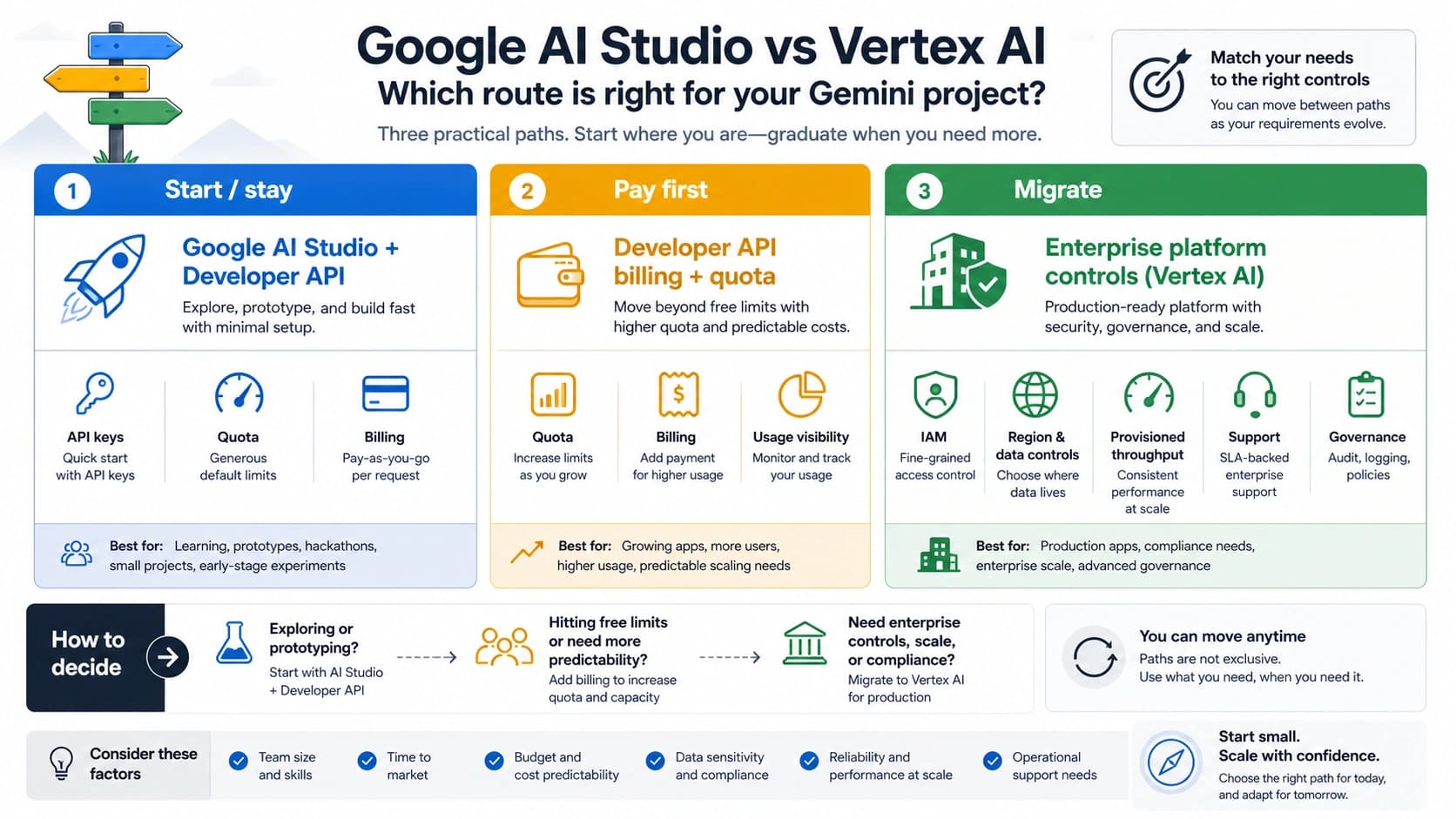
Access Routes: AI Studio API, Vertex AI, or Gateway
There are three common routes, but they are not equivalent.
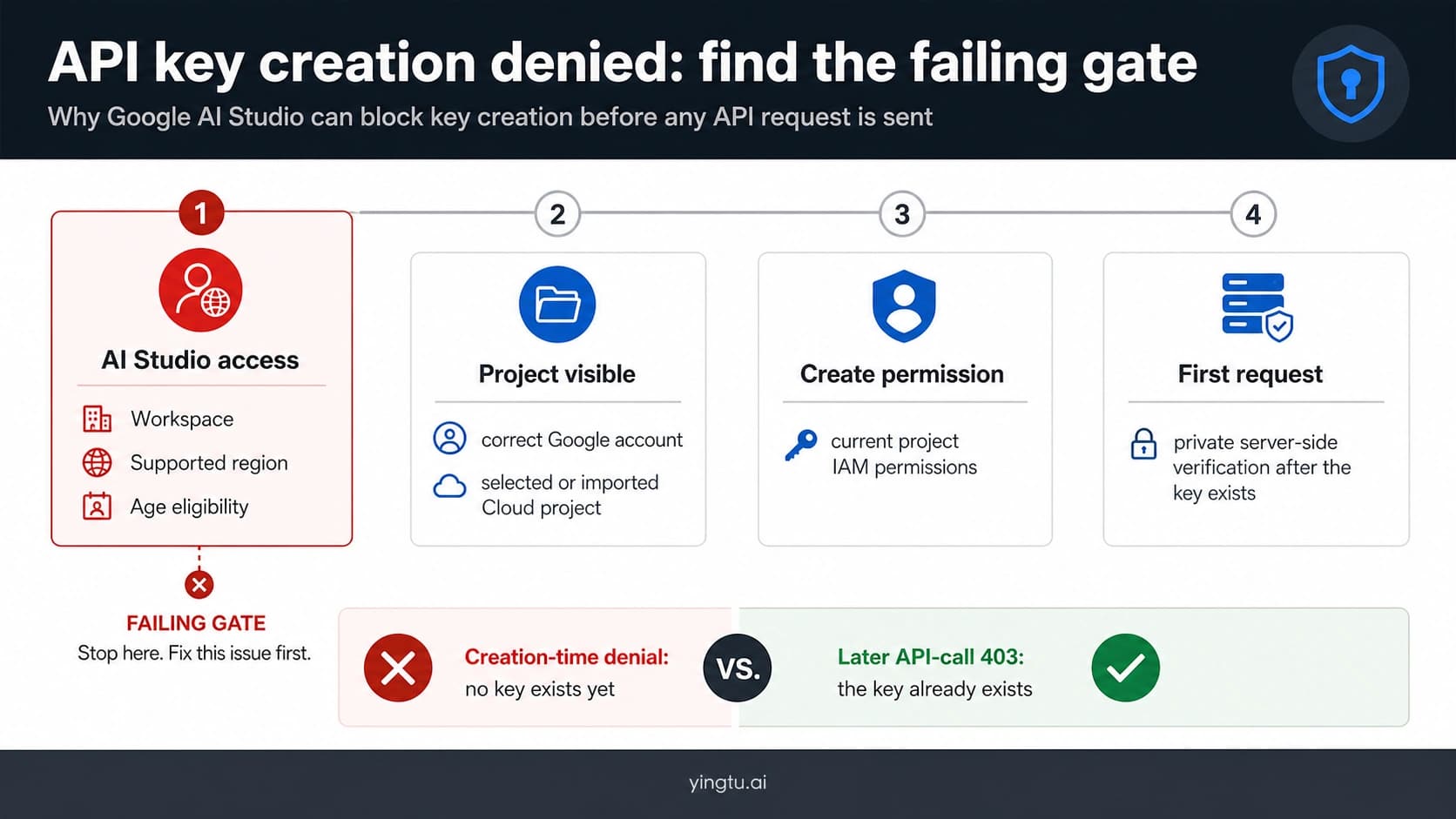
Gemini API through Google AI Studio is the fastest path for most developers. You create an API key, call the Gemini Developer API, and use the project limits shown in AI Studio. This is the right default for prototypes, SaaS features, and most small-to-medium production integrations.
Vertex AI is the enterprise Google Cloud route. Choose it when your organization needs IAM, service accounts, audit logging, VPC/security controls, regional governance, or existing GCP deployment workflows. Do not choose Vertex AI just because an article says it is "more production"; choose it when the GCP controls are actually required.
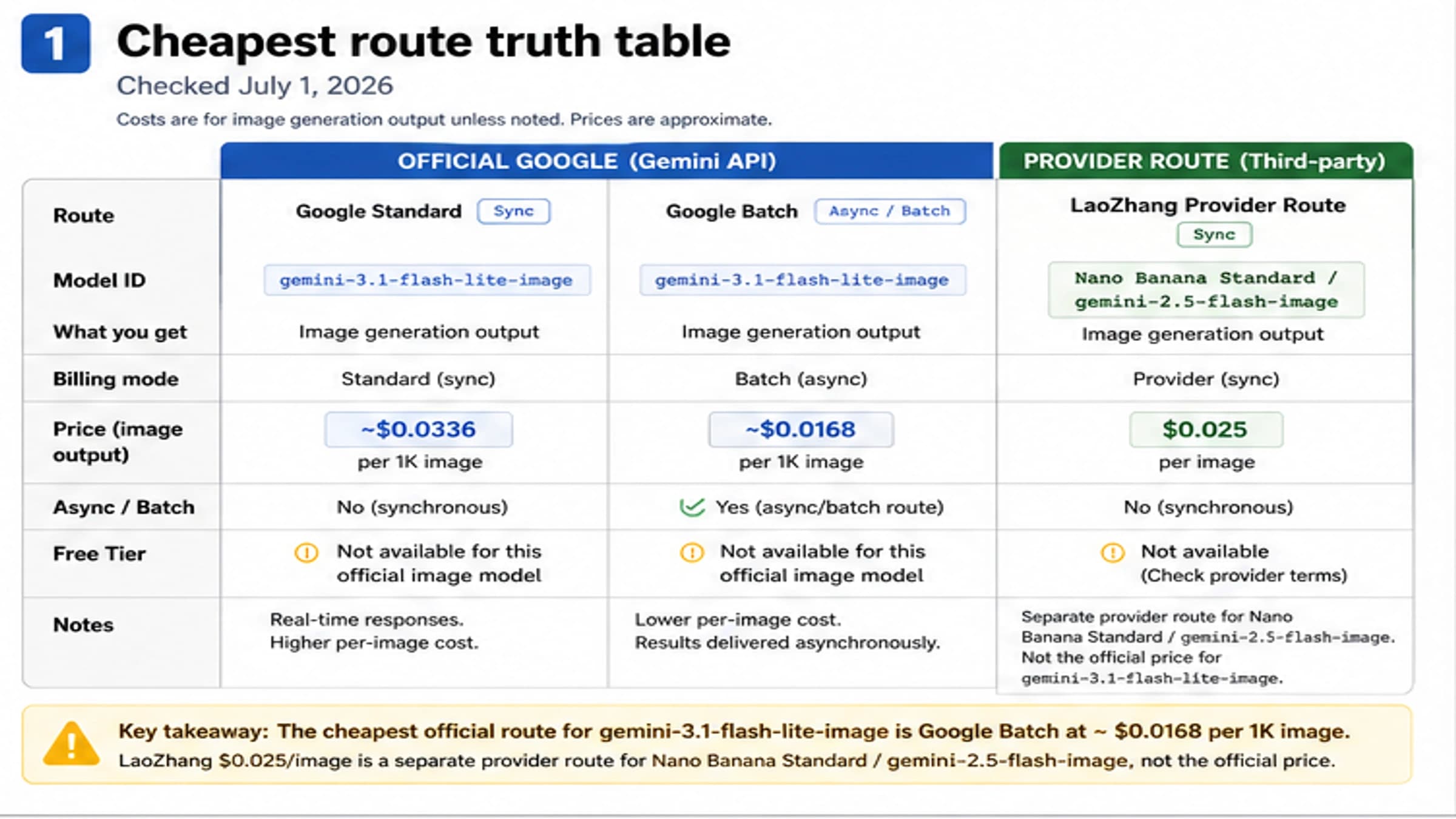
Provider gateways can be useful for multi-model routing, local billing, or failover experiments. They also add a trust and verification step. Before production use, confirm the exact model mapping, prompt/image retention policy, successful-vs-failed-call billing, current pricing date, and concurrency behavior. Do not assume a gateway supports the latest Gemini 3 Pro Image features just because the endpoint accepts a Gemini-looking model name.
Minimal REST Call
This is the current REST shape for the Interactions API. It avoids the old models/{MODEL_ID}:generateContent path so the endpoint and response handling match the current docs.
hljs bashcurl -s -X POST \
"https://generativelanguage.googleapis.com/v1beta/interactions" \
-H "x-goog-api-key: $GEMINI_API_KEY" \
-H "Content-Type: application/json" \
-d '{
"model": "gemini-3-pro-image",
"input": [
{
"type": "text",
"text": "Create a 16:9 product launch hero image for a matte black smart speaker on a neutral studio background. Include clean readable text: Smart Sound Hub."
}
],
"response_format": {
"type": "image",
"mime_type": "image/png",
"aspect_ratio": "16:9",
"image_size": "2K"
}
}'
The response exposes the generated image through the interaction output image helper in the SDK examples. In REST integrations, inspect the returned interaction blocks according to the current API response shape instead of assuming every response mirrors the legacy candidates[0].content.parts structure.
Python SDK Example
Install the current Google Gen AI SDK and keep the API key outside source control:
hljs bashpip install google-genai pillow
hljs pythonimport base64
import os
from pathlib import Path
from google import genai
client = genai.Client(api_key=os.environ["GEMINI_API_KEY"])
def generate_image(prompt: str, output_path: str = "nano-banana-pro.png") -> Path:
interaction = client.interactions.create(
model="gemini-3-pro-image",
input=prompt,
response_format={
"type": "image",
"mime_type": "image/png",
"aspect_ratio": "16:9",
"image_size": "2K",
},
)
if not interaction.output_image:
raise RuntimeError("The response did not include an output image.")
path = Path(output_path)
path.write_bytes(base64.b64decode(interaction.output_image.data))
return path
if __name__ == "__main__":
saved = generate_image(
"Create a polished infographic comparing three subscription tiers. Use clear English labels, neutral colors, and a clean SaaS dashboard style."
)
print(f"Saved image to {saved}")
For production code, treat missing output_image as a real application state. It may mean the request produced text only, was blocked, or failed in a way your wrapper needs to classify.
TypeScript Example
hljs typescriptimport { GoogleGenAI } from "@google/genai";
import * as fs from "node:fs";
const ai = new GoogleGenAI({ apiKey: process.env.GEMINI_API_KEY });
export async function generateImage(prompt: string, fileName = "output.png") {
const interaction = await ai.interactions.create({
model: "gemini-3-pro-image",
input: prompt,
response_format: {
type: "image",
mime_type: "image/png",
aspect_ratio: "16:9",
image_size: "2K",
},
});
if (!interaction.output_image?.data) {
throw new Error("No output image returned by Gemini 3 Pro Image.");
}
const buffer = Buffer.from(interaction.output_image.data, "base64");
fs.writeFileSync(fileName, buffer);
return fileName;
}
If your existing code uses camelCase fields such as outputImage, verify the installed SDK version before shipping. Google's current examples use output_image in the returned interaction object.
Reference Images and Editing
Gemini 3 image models support text-and-image workflows, but reference capacity depends on model and reference type. Google's current image docs say Gemini 3 image models can mix up to 14 reference images, then break the practical categories down by model: Gemini 3 Pro Image supports up to 6 object references, up to 5 character references, and up to 3 style references.
Use that distinction when you design uploads. A single request with too many unrelated references is harder to debug than a staged workflow.
hljs pythonimport base64
import mimetypes
from pathlib import Path
def image_block(path: str) -> dict:
file_path = Path(path)
mime_type = mimetypes.guess_type(file_path.name)[0] or "image/png"
return {
"type": "image",
"mime_type": mime_type,
"data": base64.b64encode(file_path.read_bytes()).decode("utf-8"),
}
def edit_with_references(prompt: str, reference_paths: list[str]):
input_blocks = [{"type": "text", "text": prompt}]
input_blocks.extend(image_block(path) for path in reference_paths)
return client.interactions.create(
model="gemini-3-pro-image",
input=input_blocks,
response_format={
"type": "image",
"mime_type": "image/png",
"aspect_ratio": "4:3",
"image_size": "2K",
},
)
For uploaded images, confirm you have the necessary rights. Google explicitly warns developers not to upload or generate content that infringes rights or is deceptive, harmful, or abusive. Build that check into product UX rather than burying it in terms.
429 and Quota Handling
The Gemini API rate-limit docs describe limits across RPM, TPM, RPD, project-level enforcement, image-specific throughput, and spend-based limits. They also say active limits can be viewed in AI Studio and that specified limits are not guaranteed.
That means a production wrapper should not hard-code a public quota table. It should classify the failure, smooth traffic, and expose queue state to the user.
hljs pythonimport random
import time
def create_with_backoff(payload: dict, max_retries: int = 5):
delay = 1.0
for attempt in range(max_retries):
try:
return client.interactions.create(**payload)
except Exception as exc:
message = str(exc)
is_rate_limit = "429" in message or "RESOURCE_EXHAUSTED" in message
if not is_rate_limit or attempt == max_retries - 1:
raise
time.sleep(min(delay + random.uniform(0, delay * 0.2), 60))
delay = min(delay * 2, 60)
Use retries for short bursts, not as a substitute for capacity planning. If 429s continue during normal traffic, add queueing, reduce expensive request shapes, lower default output size, use Batch or Flex for non-urgent jobs, or request a rate-limit increase through the proper Google workflow.
For a dedicated troubleshooting page, use the Gemini image generation 429 fix guide. For quota planning around this exact model, see the Gemini 3 Pro Image API quota guide.
Cost Planning
Google's current Gemini API pricing page lists Gemini 3 Pro Image (gemini-3-pro-image) with paid Standard pricing. The page lists image output at $120 per 1M image output tokens, equivalent to $0.134 per 1K/2K image and $0.24 per 4K image. Batch and Flex rows list lower image-output prices for eligible delayed workloads.
Plan costs from the request shape:
| Cost driver | Practical control |
|---|---|
| 4K output | default to 1K or 2K unless the final use case needs 4K |
| grounded visuals | use only when current facts materially improve the image |
| repeated prompts | cache deterministic internal assets |
| user bursts | queue requests instead of retrying immediately |
| non-urgent jobs | move to Batch or Flex when latency allows |
| provider gateways | compare successful outputs, failed-call billing, latency, and support, not headline price alone |
Do not advertise a fixed "unlimited" generation promise unless your actual provider contract supports it. For SEO and user trust, it is better to state a measured capacity boundary than to publish a number that will become false when your account tier or provider route changes.
Production Integration Checklist
Before launch, verify these items in the exact project and environment that will serve users:
| Check | Pass condition |
|---|---|
| Model ID | all code uses gemini-3-pro-image for Nano Banana Pro |
| API surface | request and response shapes come from the same Interactions API version |
| Secret handling | keys live in environment or secret storage, not in source code |
| User limits | per-user daily and burst caps protect the project quota |
| Queue behavior | burst traffic becomes predictable wait time, not raw 429 errors |
| Image rights | upload UX requires rights to reference images |
| Safety states | blocked or text-only responses produce useful user messages |
| Cost alerts | spend, 429 rate, queue depth, and model mix are monitored |
| Fallback route | gateway or alternate-model fallback is explicit and auditable |
For advanced aspect-ratio behavior, use the Nano Banana Pro aspect ratio guide. For paid account setup and quota expectations, use the Nano Banana Pro paid tier guide.
FAQ
What model ID should I use for Nano Banana Pro API?
Use gemini-3-pro-image. Treat gemini-3-pro-image-preview as stale unless you are intentionally maintaining old code and have verified it still works in your account.
Should new integrations use generateContent or Interactions API?
Use Interactions API for new work. Google's current image-generation docs put Interactions API first and the model page says it is generally available for the latest features and models.
Can I copy quota numbers from another tutorial?
No. Rate limits are project-level and model-specific, and Google says actual capacity may vary. Check active limits inside AI Studio for your own project.
Is Vertex AI required for production?
No. Vertex AI is useful when you need Google Cloud IAM, audit, regional, or enterprise controls. Many production apps can start with the Gemini Developer API if secret handling, monitoring, quota, and safety states are implemented properly.
Should I use a third-party gateway?
Only after verifying model mapping, logs, retention, billing, failure charges, concurrency, and support. A gateway can be useful, but it should not replace official-route understanding.
Bottom Line
For a current Nano Banana Pro API integration, build around gemini-3-pro-image, the Interactions API, explicit quota checks in AI Studio, and request-shape-based cost controls. Keep old preview IDs and fixed quota tables out of production docs and code. The strongest integration is not the one with the longest example; it is the one that handles missing images, policy blocks, 429s, cost spikes, and provider-route changes without surprising users.