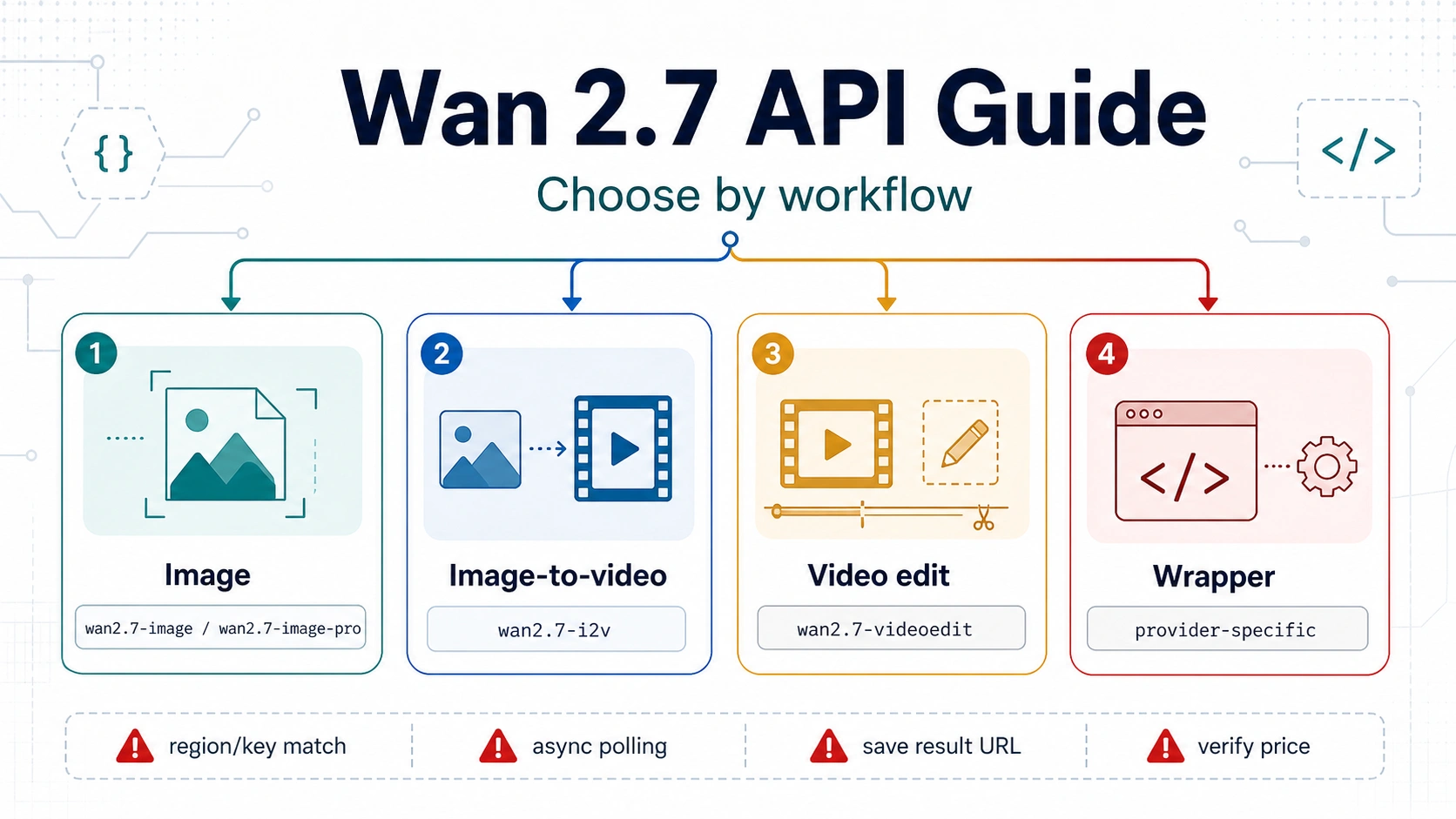
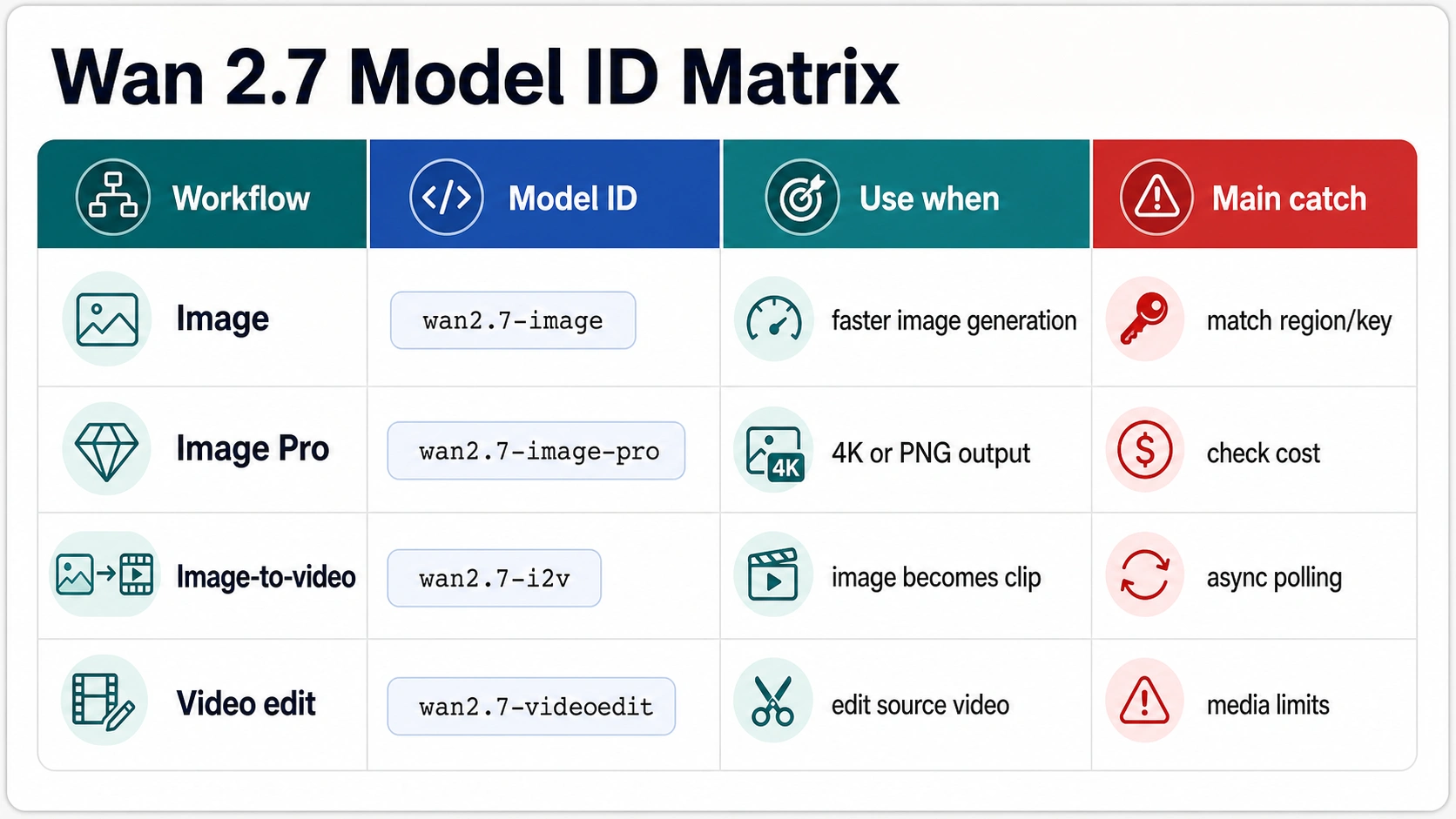
If you are choosing a Wan 2.7 API route, start with the job, not the model name. Use wan2.7-image or wan2.7-image-pro for still-image generation and editing, wan2.7-i2v for image-to-video, and wan2.7-videoedit when you already have a source video to edit.
| Job | Official model ID | Use when | Main catch |
|---|---|---|---|
| Still image generation or editing | wan2.7-image / wan2.7-image-pro | You need a generated or edited image. | Match API key region to endpoint, and verify cost before production. |
| Image-to-video | wan2.7-i2v | You need a clip from an image input. | Video jobs are asynchronous: create the task, poll status, then save the result URL. |
| Video editing | wan2.7-videoedit | You already have a source clip and need instruction-based edits. | Check video duration, format, reference image, output, and audio constraints before sending the job. |
| Third-party wrapper | provider-specific | You need a simplified or unified provider API. | Treat price, model coverage, limits, and support terms as that provider's contract, not Alibaba Cloud's official contract. |
The safest production rule is simple: use official Alibaba Cloud Model Studio documentation for hard API facts, and verify any wrapper claim before you build around it.
What "Wan 2.7 API" Actually Means
Wan 2.7 is not one universal endpoint with one payload shape. For developers, the practical meaning of "Wan 2.7 API" depends on which workflow you are implementing. Still images, image-to-video, and video editing have different model IDs, different inputs, different output handling, and different failure modes.
The official developer route is Alibaba Cloud Model Studio. Current official documentation checked on June 24, 2026 shows three verified Wan 2.7 API families that matter for most implementations:
| Workflow | Official reference family | Model ID to start from | What the route owns |
|---|---|---|---|
| Still image generation and editing | Wan image generation and editing API reference | wan2.7-image or wan2.7-image-pro | Text-to-image, image sets, image-to-image, image editing, and multi-reference image generation. |
| Image-to-video | Image-to-video API reference and Wan image-to-video guide | wan2.7-i2v | Video clips generated from image inputs, with asynchronous task creation and polling. |
| Video editing | Wan video editing API reference | wan2.7-videoedit | Instruction-based edits when you already have an input video and, optionally, reference images. |
That route split is the most important decision in the guide. A still-image request should not be forced through a video route. An image-to-video job should be treated as an asynchronous media job, not as an instant image response. A video edit should be validated against video duration, format, reference image, output, and audio constraints before the request is sent.
Third-party providers can still be useful, but they do not change the official contract. If a wrapper says it supports "Wan 2.7 API," treat that as the wrapper's own access layer. Confirm its model coverage, payload shape, price, limits, retention, and support terms separately from Alibaba Cloud's official documentation.
Still Image Route: wan2.7-image and wan2.7-image-pro
Use the still-image route when the output you need is an image: a generated image, an edited image, an image variation, or a composition from reference images. The official image API reference lists both wan2.7-image and wan2.7-image-pro.
The useful distinction is simple:
| Model ID | Practical role | Use when |
|---|---|---|
wan2.7-image | Faster standard image route | You are iterating, testing prompts, or building a workflow where speed matters. |
wan2.7-image-pro | Professional image route with 4K high-definition output support | You need higher-resolution final assets or a quality-focused image generation/editing path. |
This route is the right starting point for image generation and editing tasks. It is not the right starting point for a clip, motion output, or video edit. If the product surface says "Wan 2.7" but the job is still an image, keep the implementation in the image API family and do not import video assumptions such as polling or temporary video result URLs unless the route documentation requires them.
The most common setup mistake is a region mismatch. Alibaba Cloud separates API keys and request endpoints by region. A key created for Beijing and a Singapore endpoint are not interchangeable. If authentication fails even though the key looks valid, check the region of the model, key, and endpoint before rewriting the prompt or changing the payload.
For production, keep three records for every image route test:
| Record | Why it matters |
|---|---|
| Model ID | Prevents accidental migration between standard and pro image routes. |
| Region and endpoint | Makes authentication and service errors easier to diagnose. |
| Cost source | Keeps exact pricing tied to the current official pricing or console view rather than copied from old notes. |
Do not quote a fixed image price in documentation, a customer estimate, or a dashboard until the exact current price is verified from the official pricing surface or account console. Model names and prices can move independently.
Image-to-Video Route: wan2.7-i2v
Use wan2.7-i2v when your input is an image and your output is a video clip. The official image-to-video API reference identifies wan2.7-i2v as the model ID for the new image-to-video API route and describes it as an asynchronous task workflow.
That async behavior changes how you design the integration. A production system should not expect an immediate video file in the first response. The call pattern is:
- Create a video generation task with the image input and prompt.
- Store the returned task ID.
- Poll the task result endpoint until the task succeeds or fails.
- Download and persist the generated video result before the temporary URL expires.
- Log the model ID, region, endpoint, request parameters, task ID, and final asset path.
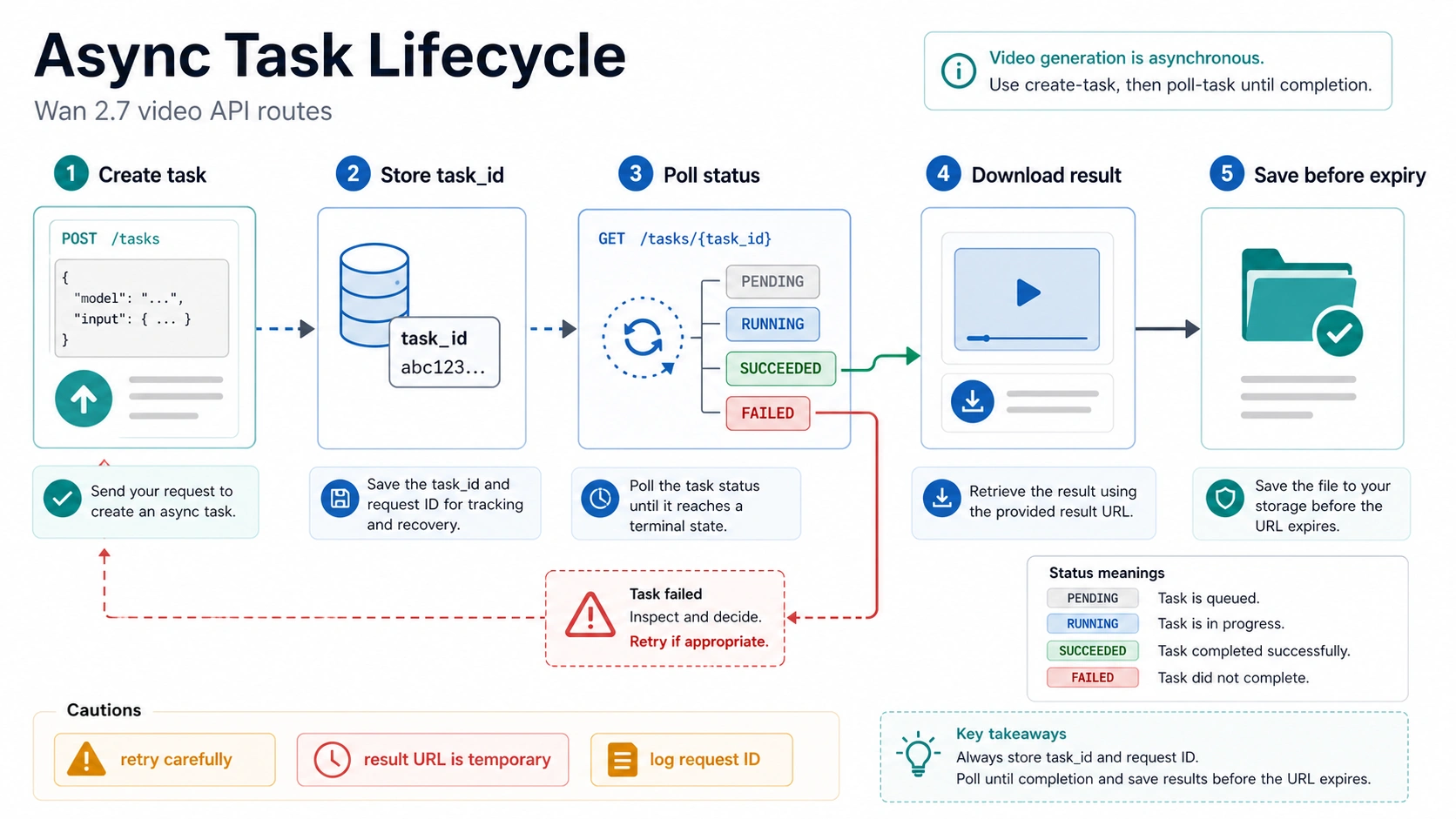
The official documentation describes image-to-video jobs as taking roughly minutes rather than seconds. It also states that task IDs and result URLs are temporary. Design the queue, retry policy, and storage layer around that reality. If your app only stores the final result URL and never downloads the media, a successful task can still become an operational failure after the temporary link expires.
The verified image-to-video endpoint pattern is also region-specific:
| Region | Endpoint |
|---|---|
| Singapore | https://dashscope-intl.aliyuncs.com/api/v1/services/aigc/video-generation/video-synthesis |
| Beijing | https://dashscope.aliyuncs.com/api/v1/services/aigc/video-generation/video-synthesis |
The Wan image-to-video guide also describes first-frame generation, first-and-last-frame generation, continuation, 720p and 1080p output choices, 2 to 15 second duration options, prompt rewriting, watermark controls, and audio-related features. Treat those as route-specific controls. Do not assume they belong to the still-image API, and do not assume a wrapper exposes every option unless that wrapper documents it.
A minimal implementation plan for wan2.7-i2v should answer these questions before code is merged:
| Question | Production answer to define |
|---|---|
| Where is the input image hosted? | Use a stable location the API can fetch, or the exact supported upload mechanism in the official docs. |
| Which region owns the request? | Match the model availability, API key, and endpoint. |
| How long can the job run? | Queue the task and expose pending, failed, and completed states in your app. |
| Where is the output stored? | Download the final video into your own storage before the result URL expires. |
| How is cost tracked? | Log duration, resolution, model ID, and route for reconciliation. |
This route is often the best fit for product flows that start with a poster image, product shot, storyboard frame, or character frame and need motion output. It is not the same as editing an existing video.
Video Editing Route: wan2.7-videoedit
Use wan2.7-videoedit when the input is already a video and the job is to edit, restyle, migrate, or transform it according to an instruction. This route also uses asynchronous task creation and polling. The official video editing API reference requires the asynchronous header pattern and uses the same video-synthesis endpoint family by region.
The preflight checks are stricter than many first-call examples imply:
| Constraint | Current official rule to account for |
|---|---|
| Input video count | One input video. |
| Reference images | Up to three reference images. |
| Video format | MP4 or MOV. |
| Video duration | 2 to 10 seconds. |
| Video dimensions | Width and height between 240 and 4096 pixels. |
| Aspect ratio | Between 1:8 and 8:1. |
| Video file size | Up to 100 MB. |
| Reference image format | JPEG, JPG, PNG without alpha, BMP, or WEBP. |
| Reference image size | Up to 20 MB per image. |
| Output resolution | 720P or 1080P, with 1080P as the default in the official reference. |
| Output duration control | Optional truncation from 2 to 10 seconds. |
| Audio behavior | audio_setting can use auto or origin. |
| Prompt extension | Enabled by default in the official reference. |
| Watermark | Default false in the official reference. |
These details should shape your UI and validation layer. If the video is 14 seconds long, if the reference image is a transparent PNG, or if the file is too large, the better user experience is to catch the issue before the API call. Treat the API error as a fallback, not the first validator.
For a server-side workflow, build the video edit route as a media job:
- Validate media format, duration, dimensions, aspect ratio, and file size.
- Upload or expose the source video and reference images through supported URLs.
- Submit the edit task with
wan2.7-videoeditand the required async behavior. - Persist the task ID and request metadata.
- Poll until the task finishes.
- Save the result media immediately.
- Store enough request context to reproduce or debug the output.
If the same application also supports image-to-video, keep these two paths separate in code. They may share queueing, polling, and storage helpers, but the validation rules and user-facing input forms are different.
Region, Key, Endpoint, and Storage Checks
A large share of first integration failures come from setup boundaries, not from the model itself. Before changing the prompt, changing the model, or switching providers, verify the route contract.
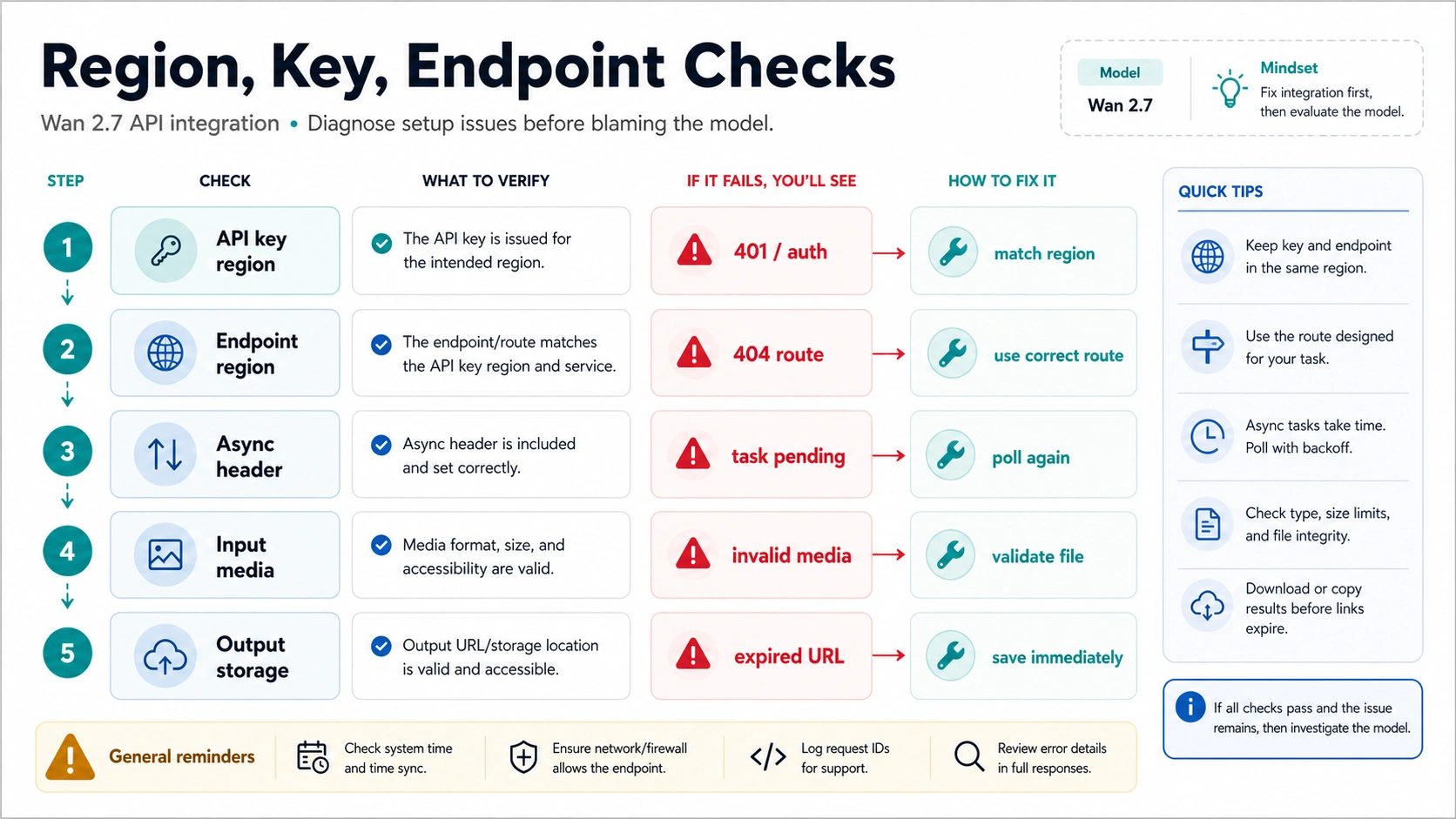
Use this order when a Wan 2.7 API call fails:
| Check | What to confirm | Symptom when wrong |
|---|---|---|
| Route | The selected model ID matches the job: image, image-to-video, or video editing. | The payload looks plausible but the endpoint or model rejects it. |
| Region | The model, endpoint, and API key belong to the same region. | Authentication failures, service errors, or unavailable-model messages. |
| Async behavior | Video routes are submitted and polled as tasks. | The app waits for a direct video response that never arrives. |
| Media constraints | Input video, images, duration, size, and format meet the route limits. | The task fails before generation or after media validation. |
| Result storage | The generated media is downloaded before the temporary result URL expires. | A completed task later points to an unavailable result. |
| Billing source | Prices and route-level billing are checked from the current official or provider-specific surface. | Estimates drift from the actual account bill. |
For official Alibaba Cloud calls, the Beijing and Singapore endpoint split is not cosmetic. Store the region alongside each API key and avoid global helper functions that hide endpoint selection. A multi-region application should make the region explicit in configuration, logs, and alerts.
For video jobs, result retention deserves special handling. A completed task is not the final state of your production workflow. The final state is "asset stored in our own bucket or media system." If the product only saves the temporary result URL, customer support will eventually see successful generations that cannot be retrieved.
Pricing and Billing: What You Can Safely Say
Exact Wan 2.7 API pricing is a volatile implementation fact. The safest public statement is the one you can tie to the current official pricing page, the account console, or the provider contract you are actually using.
For official Alibaba Cloud, the route docs establish billing mechanics that are useful without quoting a number. The video editing reference states that input images are free for that route, while input and output videos are billed per second. The exact price still needs to be verified from the current Model Studio pricing surface or account view before it is published in a customer-facing calculator.
For third-party wrappers, price is even more provider-specific. A wrapper may offer simpler billing, a unified endpoint, a credit model, or a temporary launch price. Those details are not Alibaba Cloud's official contract. If a wrapper price matters to your decision, verify these items on the same day you make the decision:
| Pricing check | Why it matters |
|---|---|
| Supported Wan 2.7 routes | A provider may support image-to-video but not video editing, or expose different names. |
| Unit of billing | Per image, per second, per task, per credit, and subscription credits are not interchangeable. |
| Failed-task billing | Some systems bill differently for validation failures, model failures, and user cancellations. |
| Output resolution and duration | A low advertised price may apply only to a narrow output setting. |
| Minimum balance or subscription | Access cost may differ from per-generation cost. |
| Retention and download policy | Storage and result-window behavior can affect operations even when generation cost is low. |
Do not mix official and wrapper prices in one table unless each row is clearly labeled by owner. The right comparison is not "which page claims the lowest number." The right comparison is "which contract can my product depend on, and what does that contract actually include?"
Official Model Studio or a Third-Party Wrapper?
Choose official Alibaba Cloud Model Studio when contract certainty matters most. It is the best source for model IDs, route ownership, endpoint behavior, media constraints, and official availability. It is also the safer starting point when you are building a production integration that needs clear auditability.
Choose a third-party wrapper only when the wrapper solves a specific operational problem and its own terms are current. Common reasons include a simplified provider interface, consolidated billing, easier account setup, or a unified API across several models. Those benefits can be real, but they belong to the wrapper's contract.
Use this decision rule:
| If you need... | Prefer... | Reason |
|---|---|---|
| Exact official model behavior | Alibaba Cloud Model Studio | Official docs own the route contract. |
| A clean first implementation with known route constraints | Alibaba Cloud Model Studio | You can debug against official model IDs, regions, and endpoints. |
| Multi-model routing through one provider | A verified wrapper | The wrapper may simplify orchestration, but coverage must be checked. |
| A price or payment model not available in your official account | A verified wrapper | Treat price, limits, and support as provider-specific. |
| Enterprise governance or direct cloud controls | Official route first | Governance depends on the account, region, data path, and contract. |
Do not let a wrapper's marketing name change your architecture. Keep route selection in your own code: still image, image-to-video, or video editing. Then map that route to either the official provider or the wrapper implementation. That keeps migration possible if price, availability, limits, or payload support changes later.
Implementation Checklist
Before production, reduce the integration to a checklist your engineering team can test repeatedly.
1. Pick the workflow route
Write the route in code and documentation:
image_generation_or_editingforwan2.7-imageorwan2.7-image-proimage_to_videoforwan2.7-i2vvideo_editingforwan2.7-videoeditwrapper_routeonly when a provider-specific API owns the call
Avoid a single ambiguous wan27 setting. It will hide too many differences.
2. Lock model ID, region, and endpoint together
Treat model ID, region, and endpoint as one configuration bundle. If one changes, review all three. Include the selected bundle in logs so the first failed call can be diagnosed without guessing.
3. Validate inputs before submission
Image routes need image-specific validation. Video routes need media-specific validation. Video editing needs the strictest preflight because it depends on an existing source video and optional reference images.
4. Build video routes as async jobs
For wan2.7-i2v and wan2.7-videoedit, your system needs job states such as submitted, polling, completed, failed, expired, and stored. The user interface should show progress and failure states rather than freezing while the server waits.
5. Save outputs immediately
Temporary result URLs are not durable storage. Download generated video output into your own storage system and store that durable path in your database.
6. Keep exact prices out of static code
Prices should come from a configuration source, billing report, or pricing sync that can be updated. Do not hard-code a price number into product logic unless you also own the update process.
7. Test wrappers separately
If you use a wrapper, test it as its own provider. Confirm which model IDs or aliases it accepts, what payload options it exposes, whether it supports the route you need, how it bills failures, and how long it retains results.
Troubleshooting First-Call Failures
When the first Wan 2.7 API call fails, diagnose by contract boundary instead of by guesswork.
| Symptom | Likely cause | First fix |
|---|---|---|
| Authentication fails with a valid-looking key | Region mismatch | Confirm the key and endpoint were created for the same region. |
| Model ID is rejected | Wrong route or unavailable model in that region | Check the official route reference for the exact model ID and region. |
| Video request never returns a media file | Async flow handled as synchronous | Submit the task, store the task ID, and poll the result endpoint. |
| Video edit fails before generation | Invalid input video or reference media | Check duration, format, dimensions, aspect ratio, size, and image format. |
| Completed task later has no usable output | Temporary result URL expired | Download and persist the result immediately after completion. |
| Wrapper example works but official call fails | Provider-specific payload or alias | Separate wrapper syntax from official Alibaba Cloud payload rules. |
| Cost estimate is wrong | Price copied from a stale or different contract | Re-check the official pricing surface or provider billing terms. |
The fastest debugging path is usually to reproduce one minimal request in the correct route and region, then add product-specific options back one by one. If a wrapper is involved, reproduce the same job in the official route or document why the wrapper route is the only target. That keeps provider issues separate from model issues.
FAQ
Is Wan 2.7 available through an API?
Yes, current official Alibaba Cloud Model Studio documentation checked on June 24, 2026 shows Wan 2.7 API routes for image generation/editing, image-to-video, and video editing. The practical answer depends on the workflow: use wan2.7-image or wan2.7-image-pro for still images, wan2.7-i2v for image-to-video, and wan2.7-videoedit for editing an existing video.
Which Wan 2.7 model ID should I use?
Use the job as the selector. For still-image generation or editing, start with wan2.7-image or wan2.7-image-pro. For generating a video from an image, use wan2.7-i2v. For editing a source video, use wan2.7-videoedit. If a third-party wrapper uses different aliases, confirm how those aliases map to the official route you need.
Is wan.video the same as the developer API?
No. A public product surface and a developer API route can expose related models while still having different account flows, payloads, controls, limits, and pricing. For implementation, rely on Alibaba Cloud Model Studio API documentation or the specific wrapper provider contract you are using.
Can I quote a fixed Wan 2.7 API price?
Only if you have verified the exact price from the current official pricing surface, account console, or provider contract. Billing can differ by route, output duration, resolution, provider, region, and failure policy. Static price claims should be treated as volatile.
Why does my Wan 2.7 API call fail even with the right model ID?
The model ID can be correct while the route setup is wrong. Check that the endpoint and API key belong to the same region, that the payload matches the route, that video jobs are handled asynchronously, and that the input media satisfies the route constraints.
Should I use a third-party Wan 2.7 API wrapper?
Use a wrapper only when it solves a concrete access, billing, or orchestration problem and its current terms are verified. The wrapper may be convenient, but model coverage, price, limits, payload options, result retention, and support belong to that provider's contract.
Do video result URLs last forever?
No. Official video route documentation describes temporary task IDs or result URLs. Production systems should download and store generated media immediately after task completion rather than relying on the returned URL as permanent storage.