나노바나나 2.1은 Google의 최신 Nano Banana 모델(API 모델 ID gemini-nano-banana-2.1)이에요. YingTu에서는 장당 $0.045로 나노바나나 2($0.055)보다 저렴하고, 1K·2K·4K를 8:1까지 14가지 비율로 출력하며, 참고 이미지 최대 5장으로 편집할 수 있어요. 2026년 10월 9일부터 스튜디오 기본 모델이에요.
나노바나나 2.1(모델 ID gemini-nano-banana-2.1)은 Google의 이미지 생성·편집 모델로, Google DeepMind 모델 카드에 따르면 Gemini 3.6 Flash를 바탕으로 해요. Google은 2026년 10월 6일에 공개했어요. YingTu는 LaoZhang API로 이 모델을 쓰는 독립 사이트예요.
가격: 1K·2K·4K 모두 장당 $0.045, 비율은 1:8~8:1의 14가지. 나노바나나 2($0.055)보다 저렴하고 나노바나나 Pro($0.09)의 절반이에요. 구독 없이 LaoZhang이 장마다 과금해요.
Gemini 앱에서 나노바나나 2.1은 Google AI Pro·Plus·Ultra 요금제용이고, 무료 사용자는 나노바나나 2를 써요. 여기서는 Google 요금제 없이 장당 결제해요.
실측 시간: YingTu에서 실제로 10번 생성한 중앙값 20초(가장 빠름 15초, 가장 느림 26초). 나노바나나 2 중앙값은 14초.
편집: 참고 이미지 최대 5장, 장당 20MB까지. Gmail로 로그인한 신규 사용자는 $0.1(나노바나나 2.1 약 2장).
바로 쓰는 프롬프트
누르면 그 프롬프트와 비율이 들어간 이미지 스튜디오가 열려요.
글자 포스터
3:4
A clean poster for a weekend farmers market: the headline "HARVEST MARKET" and the line "Saturday 9 AM – 1 PM · Riverside Park", wooden crates of pumpkins and apples, warm autumn palette, crisp legible text.
제품을 새 장면에
4:5
Keep the product from the reference image exactly, including its shape, color and label, and place it on a sunlit marble kitchen counter next to a few fresh herbs, soft morning light, natural shadows.
초광폭 배너
21:9
An ultra-wide website banner of a quiet coastal town at dusk, warm window lights, calm sea, a wide empty sky on the left for a headline.
YingTu에서 나노바나나 2.1로 만든 예시
프롬프트 모음의 실제 결과물이에요. 프롬프트와 생성에 걸린 시간을 함께 적었어요. 열면 같은 프롬프트로 바로 만들 수 있어요.
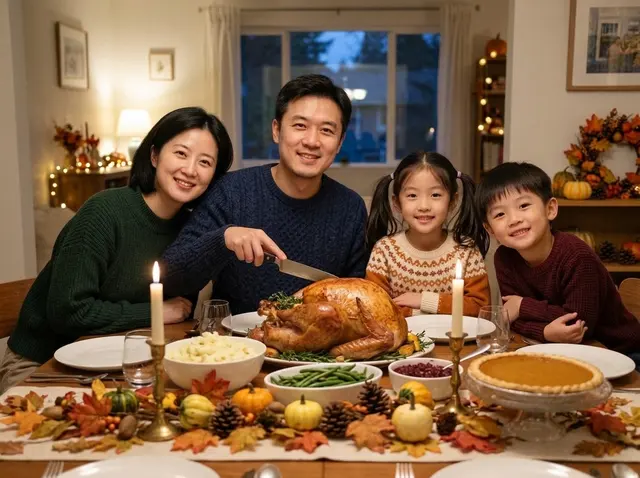
추수감사절 가족 저녁 사진 · 17초프롬프트
Place the family in the reference image around a Thanksgiving dinner table at home: a golden roast turkey in the center, mashed potatoes, green beans, cranberry sauce and a pumpkin pie, taper candles and a table runner of autumn leaves and small gourds. Everyone wears a cozy fall sweater and smiles at the camera, the father holding the carving knife. Warm evening window light, soft string lights behind, a natural family-photo look. Keep each person's face, hairstyle and age.
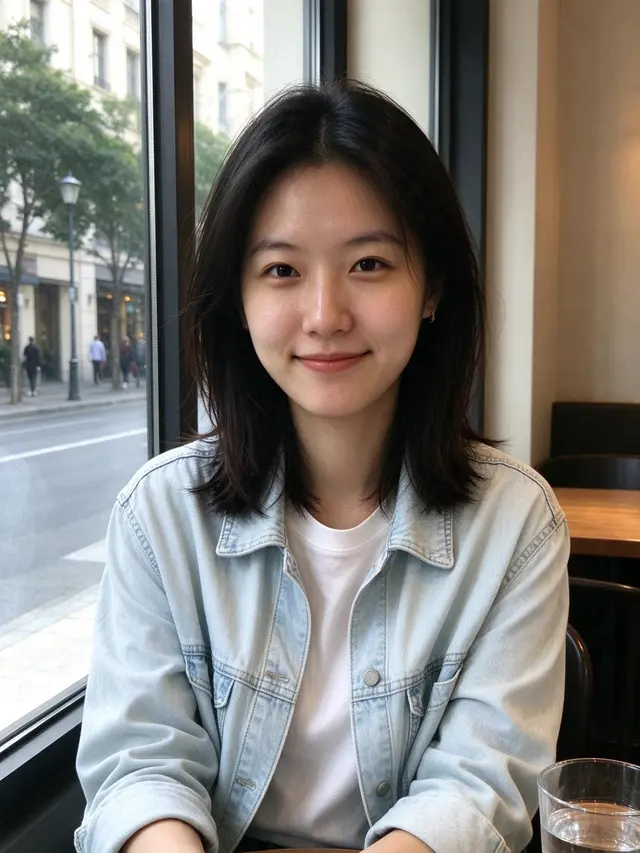
Turn the person in the reference image into a professional headshot: beige blazer, chest-up framing, body slightly angled and smiling at the camera. Blurred modern office background, soft key light from the left with a rim light, 85mm lens look, natural skin tones, same facial features. Suitable for LinkedIn and a résumé.
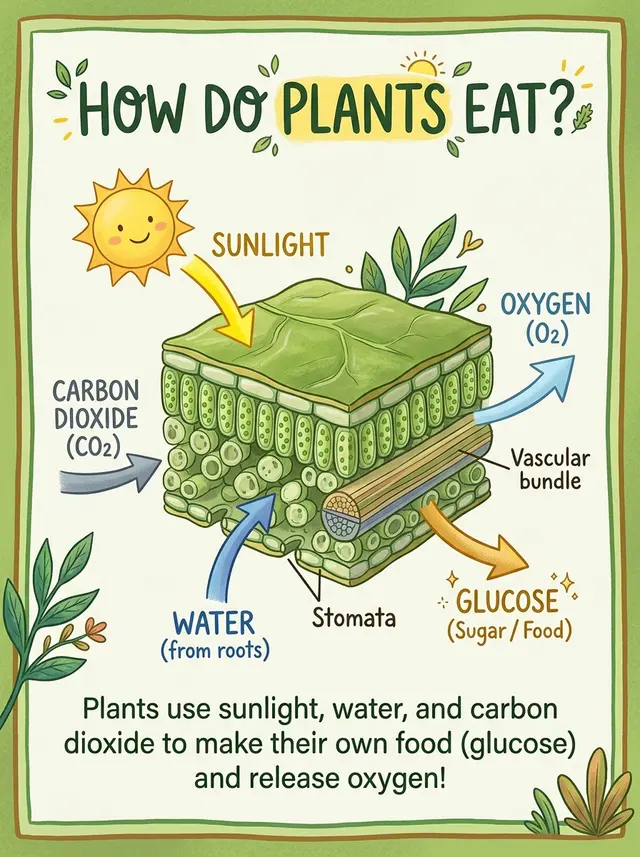
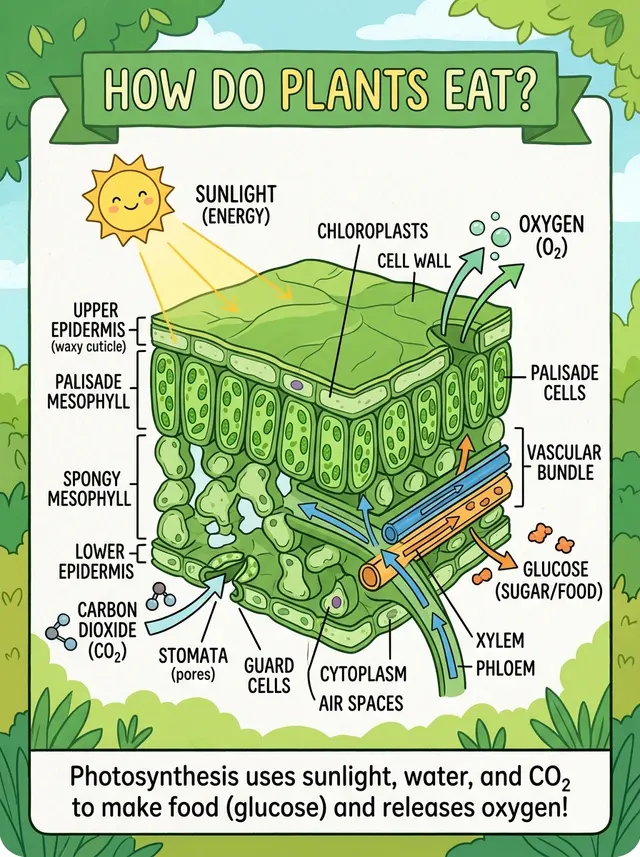
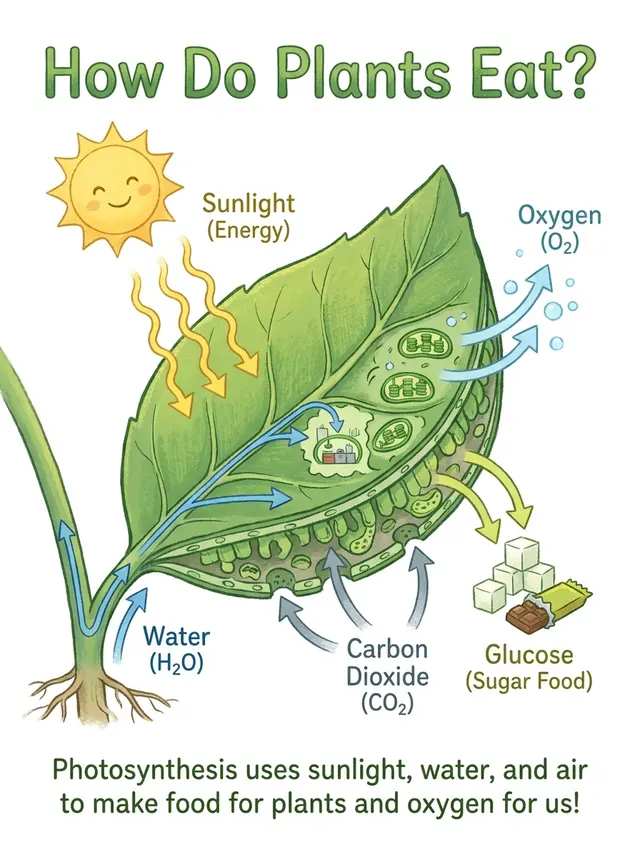
An explainer card about photosynthesis: a cross-section illustration of a leaf in the middle, with arrows showing sunlight, carbon dioxide and water going in, and oxygen and glucose coming out. Title at the top "How Do Plants Eat?", a one-line summary at the bottom. Fresh green palette, children's science book style, clear and accurate labels.
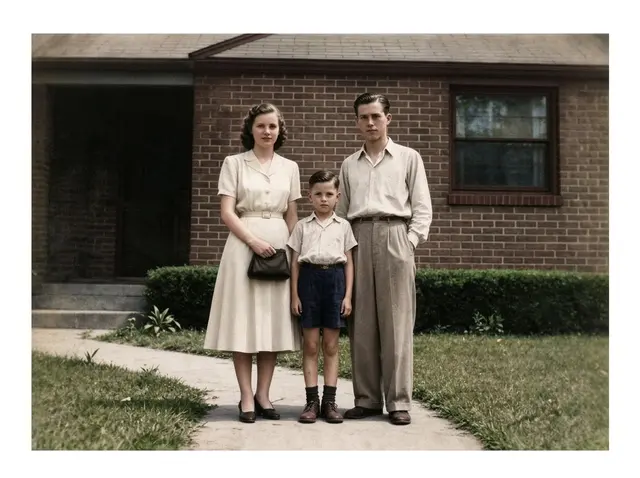
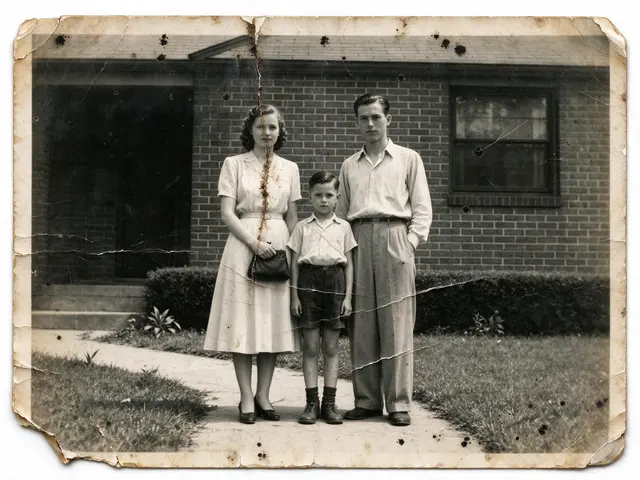
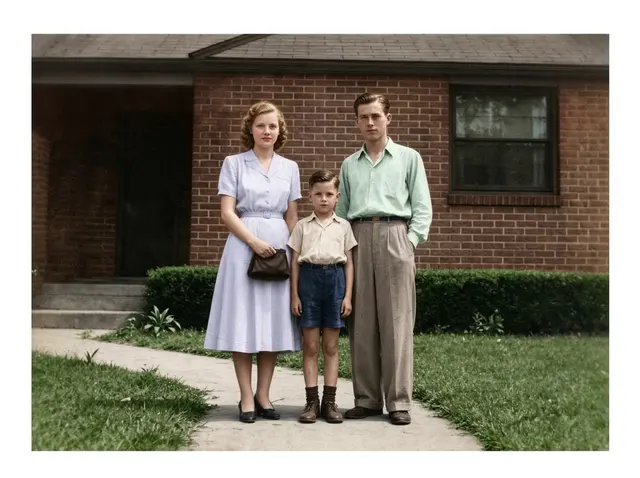
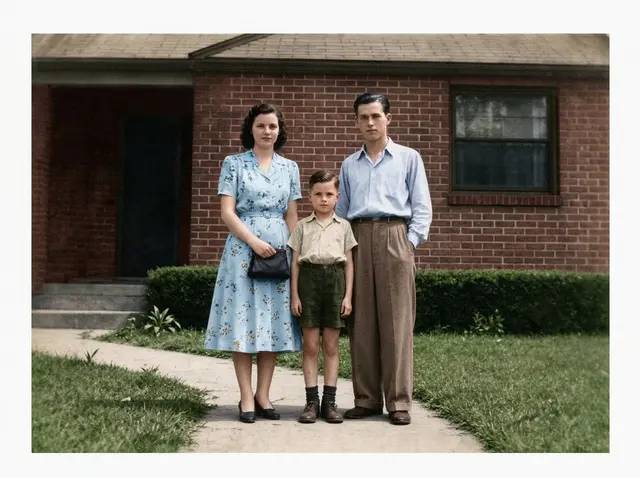
Restore this old photo: remove scratches, creases, mold spots and noise, fill in missing areas, sharpen it, then colorize it naturally with period-accurate skin, clothing and background colors. Keep every face, expression, pose and the composition exactly the same, no beautifying, so it looks like it was shot on color film at the time.
프롬프트 4개를 YingTu에서 세 모델로 각각 돌렸어요. 예시가 하나씩이라 벤치마크가 아니라 참고용으로 봐 주세요.
지식 카드
아이용 과학책처럼 단순한 설명 카드를 요청했어요. 나노바나나 2.1은 라벨 몇 개를 단 잎 단면을 그려 나노바나나 2의 해부도보다는 단순하고 Pro보다는 복잡했어요. 라벨과 마지막 문장의 철자는 모두 정확했어요.
Nano Banana 2.1 · 26초
Nano Banana 2 · 18초
Nano Banana Pro
프롬프트
An explainer card about photosynthesis: a cross-section illustration of a leaf in the middle, with arrows showing sunlight, carbon dioxide and water going in, and oxygen and glucose coming out. Title at the top "How Do Plants Eat?", a one-line summary at the bottom. Fresh green palette, children's science book style, clear and accurate labels.
아이소메트릭 미니어처 도시
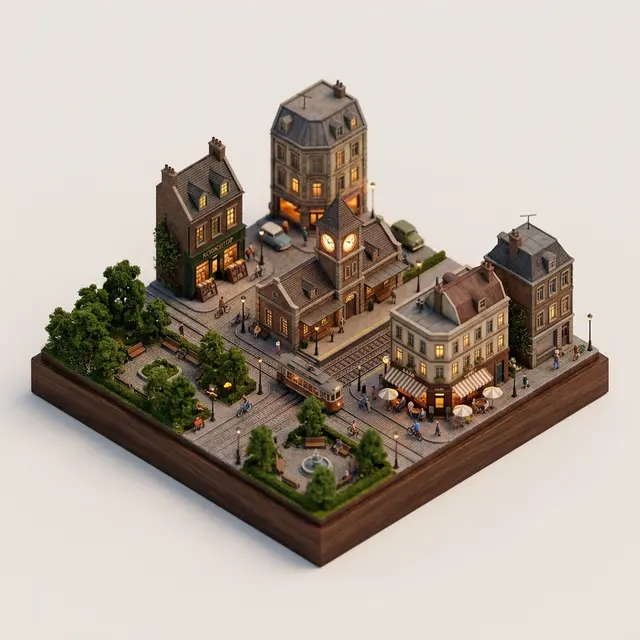
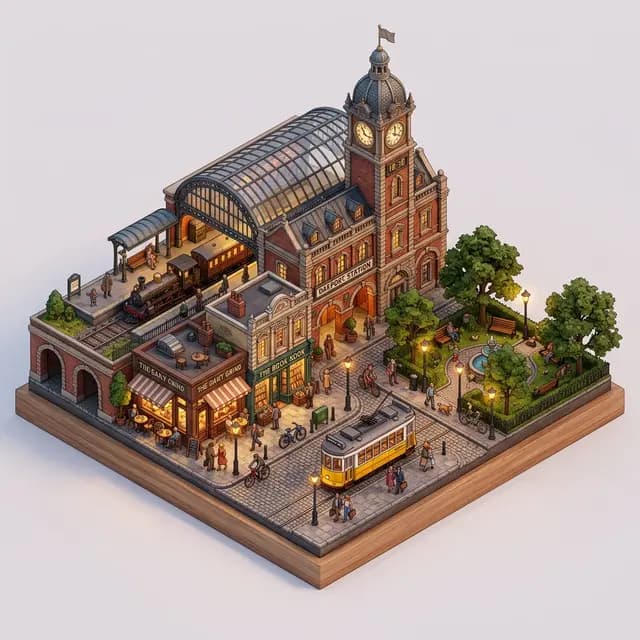
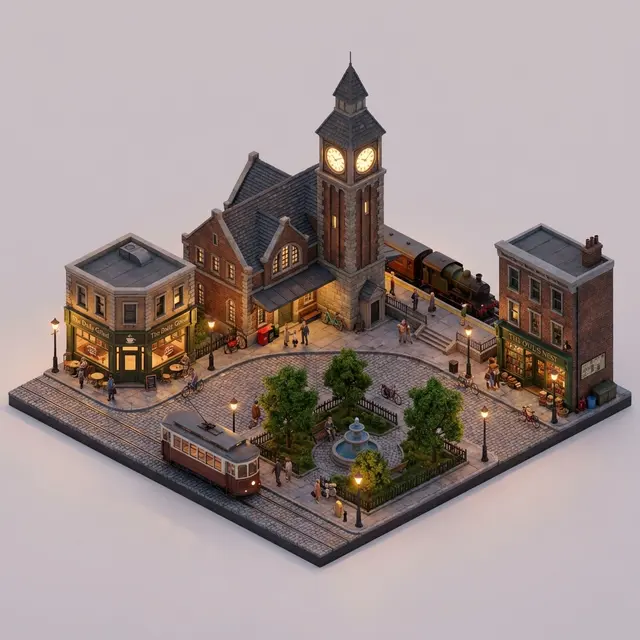
세 모델 모두 역 시계탑, 카페, 서점, 공원, 트램을 그렸어요. 나노바나나 2.1은 나노바나나 2처럼 블록을 나무 받침 위에 올렸고 Pro는 단색 배경이에요.
Nano Banana 2.1 · 16초
Nano Banana 2 · 13초
Nano Banana Pro
프롬프트
A 45° isometric miniature city block: an old train station with a clock tower in the middle, surrounded by a café, a bookshop, a small park and a tram, with people and bikes on the streets. Detailed 3D render, soft evening light, warm streetlights just turning on, plain light background, like a fine tabletop model.
비즈니스 프로필 사진
세 모델 모두 얼굴을 유지했어요. 나노바나나 2.1은 뒤쪽 사무실이 더 많이 보이고 나머지는 거의 같아요.
입력 이미지(AI 생성)
Nano Banana 2.1 · 16초
Nano Banana 2 · 14초
Nano Banana Pro
프롬프트
Turn the person in the reference image into a professional headshot: beige blazer, chest-up framing, body slightly angled and smiling at the camera. Blurred modern office background, soft key light from the left with a rim light, 85mm lens look, natural skin tones, same facial features. Suitable for LinkedIn and a résumé.
옛날 사진 복원과 컬러화
프롬프트는 얼굴은 그대로, 시대에 맞는 색으로. 나노바나나 2.1은 여성의 어두운 머리와 원본의 밝은 원피스·셔츠를 지키고 색을 가장 절제했어요. Pro는 머리는 지켰지만 파란 꽃무늬 원피스로, 나노바나나 2는 머리를 밝은 적갈색으로 바꿨어요.
입력 이미지(AI 생성)
Nano Banana 2.1 · 20초
Nano Banana 2 · 18초
Nano Banana Pro
프롬프트
Restore this old photo: remove scratches, creases, mold spots and noise, fill in missing areas, sharpen it, then colorize it naturally with period-accurate skin, clothing and background colors. Keep every face, expression, pose and the composition exactly the same, no beautifying, so it looks like it was shot on color film at the time.
나노바나나 2.1, 나노바나나 2, 나노바나나 Pro, GPT Image 2 중 무엇을 쓸까?
모델
가격
이럴 때 선택
Nano Banana 2.1
$0.045
일상 이미지와 편집은 이것부터. 4K가 되는 Nano Banana 중 가장 저렴하고 중앙값 20초. 옛날 사진 복원 예시에서 가장 덜 바꿨어요.
Nano Banana 2
$0.055
512px 초안이 필요하거나 이미 잘 맞는 프롬프트가 있을 때. 중앙값 14초.
Nano Banana Pro
$0.09
나노바나나 2.1이 자세한 요청을 놓칠 때. 가격은 두 배($0.09). 중앙값 21초.
GPT Image 2 VIP
$0.03
정확한 픽셀 크기, 바로 인쇄할 평면 카드·포스터, 가장 낮은 가격($0.03)이 필요할 때.
설정
여기 있는 설정은 모두 YingTu 이미지 스튜디오에서 쓸 수 있고, 신규 사용자는 $0.1를 무료로 써 볼 수 있어요.
잘 맞는 작업
• 나노바나나 2보다 저렴한 일상 이미지
• 원본 사진의 느낌을 살려야 하는 편집
• 글자를 정확히 넣어야 하는 카드·메뉴판·포스터
쓰기 전에
• 512px 초안 크기는 없고 가장 작은 출력은 1K예요.
• Google 모델 카드에 따르면 1K에서는 작은 글자가 흐려지기 쉽고 긴 문단에 약해요. 작은 글자는 2K나 4K로 만들고 한 글자씩 확인하세요.
• 마스크·낙서 방식의 부분 편집은 지시의 일부만 반영될 수 있어요(모델 카드). 바꿀 내용을 글로도 적어 주세요.
import base64
import mimetypes
import os
import sys
import requests
API_KEY = os.environ.get("LAOZHANG_API_KEY")
ifnot API_KEY:
raise RuntimeError("Set the LAOZHANG_API_KEY environment variable before running this example.")
API_URL = "https://api2.laozhang.ai/v1beta/models/gemini-nano-banana-2.1:generateContent"
REQUEST_TIMEOUT_SECONDS = 500
headers = {
"Authorization": f"Bearer {API_KEY}",
"Content-Type": "application/json",
}
payload = {
"contents": [{
"parts": [
{"text": "A clean poster for a weekend farmers market: the headline \"HARVEST MARKET\" and the line \"Saturday 9 AM – 1 PM · Riverside Park\", wooden crates of pumpkins and apples, warm autumn palette, crisp legible text."}
]
}],
"generationConfig": {
"responseModalities": ["IMAGE"],
"imageConfig": {
"imageSize": "2K"
}
}
}
try:
response = requests.post(
API_URL,
headers=headers,
json=payload,
timeout=REQUEST_TIMEOUT_SECONDS,
)
except requests.Timeout as error:
print(
"Request timed out after 500 seconds. The result status may be unknown; ""check call and billing logs before retrying.",
file=sys.stderr,
)
raise SystemExit(1) from error
if response.status_code != 200:
print(f"API error {response.status_code}: {response.text}", file=sys.stderr)
raise SystemExit(1)
try:
result = response.json()
except ValueError as error:
print("API returned a non-JSON response.", file=sys.stderr)
raise SystemExit(1) from error
ifnotisinstance(result, dict):
print("API returned an unexpected JSON shape.", file=sys.stderr)
raise SystemExit(1)
image_part = Nonefor candidate in result.get("candidates", []):
for part in candidate.get("content", {}).get("parts", []):
inline_data = part.get("inlineData") or part.get("inline_data")
if inline_data and inline_data.get("data"):
image_part = inline_data
breakif image_part:
breakifnot image_part:
response_id = result.get("responseId", "not provided")
print(f"No image data in response. responseId={response_id}", file=sys.stderr)
raise SystemExit(1)
mime_type = image_part.get("mimeType") or image_part.get("mime_type") or"image/png"
encoded_image = image_part["data"]
if encoded_image.startswith("data:"):
header, encoded_image = encoded_image.split(",", 1)
mime_type = header[5:].split(";", 1)[0] or mime_type
extension_by_mime = {
"image/jpeg": "jpg",
"image/png": "png",
"image/webp": "webp",
"image/gif": "gif",
}
extension = extension_by_mime.get(mime_type, "bin")
output_path = f"output.{extension}"withopen(output_path, "wb") as output_file:
output_file.write(base64.b64decode(encoded_image, validate=True))
print(f"Image saved: {output_path} ({mime_type})")
자주 묻는 질문
나노바나나 2.1이 뭐예요?
나노바나나 2의 뒤를 잇는 Google의 이미지 생성·편집 모델로, Google DeepMind 모델 카드에 따르면 Gemini 3.6 Flash 기반이에요. API 모델 ID는 gemini-nano-banana-2.1, 공개일은 2026년 10월 6일이에요. 텍스트로 이미지를 만들고 참고 이미지로 사진을 편집할 수 있어요.
여기가 나노바나나 2.1 공식 사이트인가요?
아니에요. Google 공식 경로는 Gemini 앱, Google AI Studio, Gemini API예요. YingTu는 LaoZhang API로 같은 모델(gemini-nano-banana-2.1)을 부르는 독립 스튜디오이고 장당 과금해요.
나노바나나 2.1은 무료인가요?
Gemini 앱에서는 무료가 아니에요. Google AI Pro·Plus·Ultra 요금제용이고 무료 사용자는 나노바나나 2를 써요. 여기서는 Gmail로 로그인한 신규 사용자에게 $0.1(나노바나나 2.1 약 2장)를 드리고, 그다음은 장당 $0.045, 구독은 없어요.
나노바나나 2.1 가격은?
YingTu에서 1K·2K·4K 모두 장당 $0.045이에요. 나노바나나 2는 $0.055, 나노바나나 Pro는 $0.09, GPT Image 2는 $0.03예요.
나노바나나 2.1과 2의 차이는?
여기서는 2.1이 더 저렴하지만($0.045 대 $0.055) 512px 크기가 없어요. 이 페이지의 비교 4개에서 2.1이 프롬프트를 더 잘 따랐어요. 설명 카드는 더 단순했고, 옛날 사진 복원에서 원래 머리색과 옷을 지켰어요. 중앙값은 20초 대 14초.
나노바나나 2.1과 Pro 중 무엇을 쓸까요?
먼저 2.1을 써 보세요. 가격은 Pro의 절반($0.045 대 $0.09)이고, 이번 예시에서 얼굴 유지도 Pro와 비슷했어요. 자세한 요청이 빠질 때 Pro로 바꾸세요. 아이용 설명 카드는 Pro가 가장 단순하게 그렸어요.
이번 예시에서는 추수감사절 카드, 저녁 메뉴판, 설명 카드의 글자를 모두 맞게 썼어요. Google 모델 카드에는 1K에서 작은 글자가 흐려지기 쉽다고 되어 있으니 작은 글자는 2K나 4K로 만드세요. 카드를 “찍은 카드 사진”처럼 그리는 경향이 있어서 인쇄용이면 “평면 디자인”이라고 적어 주세요.
내 사진을 편집할 수 있나요?
네. 참고 이미지를 최대 5장(장당 20MB) 올리고 바꿀 내용을 적으세요. 쓰기 전에 얼굴, 로고, 글자를 확대해서 확인하세요.
API로 쓸 수 있나요?
네. 이 페이지의 코드는 스튜디오가 보내는 것과 같은 LaoZhang API 요청이고, 모델에 gemini-nano-banana-2.1를 넣으면 돼요. Nano Banana API 페이지에 cURL과 Node.js 예시가 있어요.