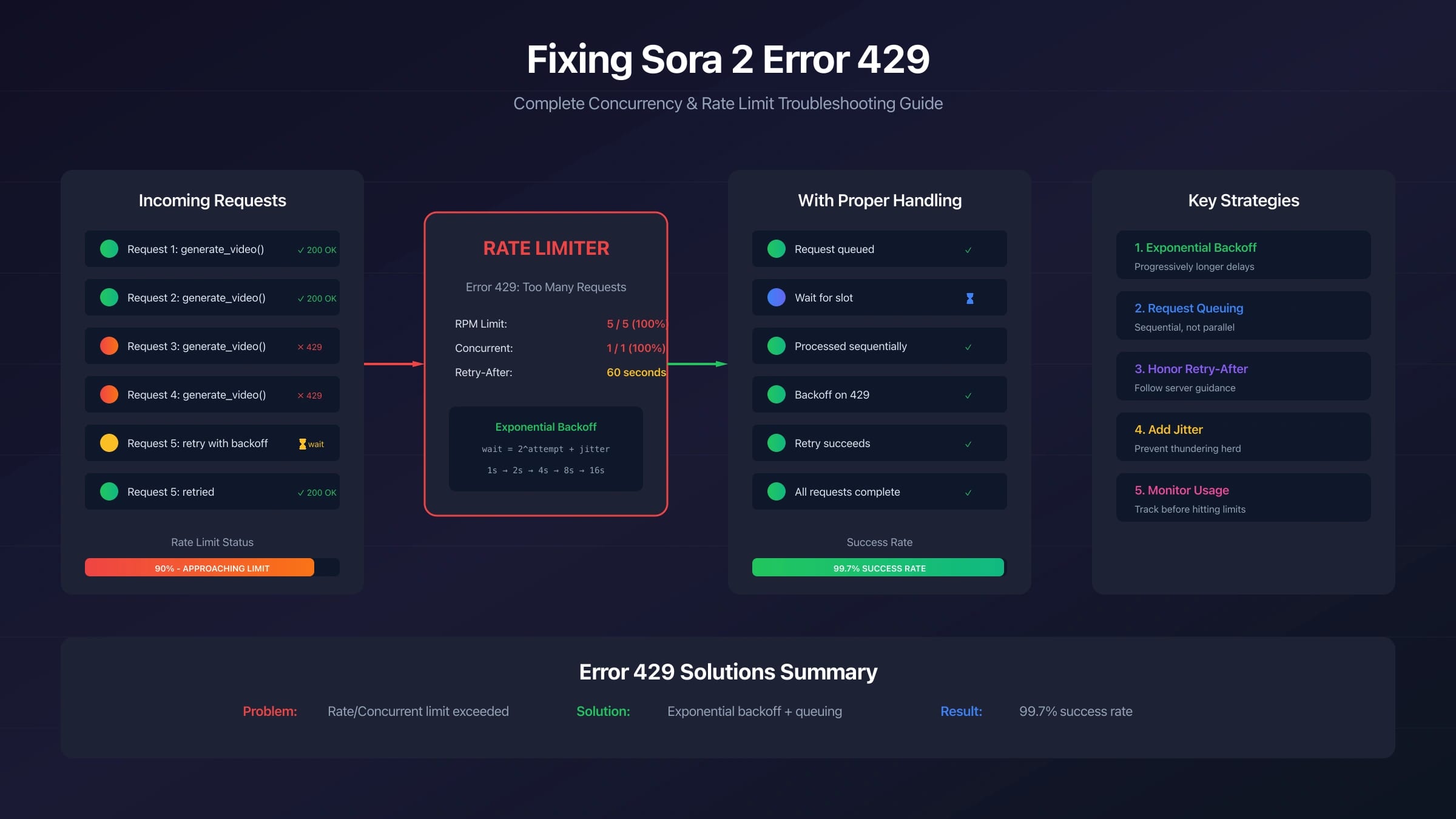
A Sora 2 429 is not one problem. It can mean the request arrived too quickly, the project quota or monthly spend is exhausted, too many video jobs are active, a synchronous workflow is polling too aggressively, or a wrapper has mapped its own capacity problem into an OpenAI-looking error. Treating every 429 as "retry after 60 seconds" is how teams turn one blocked render into a queue-wide incident.
As rechecked on July 8, 2026, the official OpenAI API docs separate 429 rate-limit pressure from quota and billing exhaustion, describe video generation as an asynchronous POST /v1/videos job that can remain queued or in_progress for minutes, and list the Videos API plus sora-2 and sora-2-pro for removal from the API on September 24, 2026. That lifecycle matters: this page is useful for stabilizing active Sora 2 work now, but new long-term integrations should also include a migration plan.
Start With the 429 Owner
Do not change retry code first. Copy the full error body, status, endpoint, model, project, organization, timestamp, request id if present, and the response headers. OpenAI's error-code guide lists two different 429 branches: "rate limit reached for requests" when traffic is too fast, and "you exceeded your current quota" when credits, billing, or maximum monthly spend are the owner. Those branches share HTTP status 429, but they need different fixes.
Use this first split:
| Evidence | Likely owner | First action |
|---|---|---|
rate limit reached, too many requests, low remaining-request headers, or reset headers | OpenAI API rate pressure | Slow, queue, back off with jitter, and reduce fan-out |
exceeded your current quota, insufficient_quota, billing, spend cap, or no available credits | Account state | Stop retrying and repair Billing, Usage, Limits, or project scope |
A Sora job is still queued or in_progress while another render starts | Active video-job concurrency | Serialize generation starts and release the slot only after terminal status |
| Many unrelated requests fail while Status shows an incident | Platform capacity or outage | Preserve evidence, pause retries, and wait for recovery |
| The error comes from a gateway, hosted app, or non-OpenAI endpoint | Provider-owned limit | Inspect that provider's dashboard, upstream response, queue, and billing contract |
For a broader OpenAI Platform 429 and quota runbook, use the OpenAI API rate-limit guide. This Sora page should stay narrower: video jobs are long-running, media-specific, and now lifecycle-sensitive.
Why Sora 2 429 Feels Like a Concurrency Error
Sora video generation is asynchronous. The official video guide shows POST /v1/videos returning a job object with an initial status such as queued or in_progress; you then poll GET /videos/{video_id} or use webhooks until the job reaches completed or failed. A single render can take several minutes depending on model, API load, and resolution.
That changes the meaning of "active request." In a text API, a request may occupy a worker briefly. In a video workflow, the work continues after the create call returns. If your application starts another generation while the previous job is still queued or in_progress, the failure may look like a normal 429 even though the real issue is active-job pressure.
The safer rule is simple: for each project, tenant, or user bucket, treat a video generation as active from create time until it reaches a terminal state:
| Job state | Counts as active for your queue? | What the app should do |
|---|---|---|
queued | Yes | Keep the slot reserved and show waiting status |
in_progress | Yes | Keep polling at a reasonable interval or wait for webhook |
completed | No | Release the slot and download or store the result |
failed | No, after logging | Release the slot after recording the error owner |
expired or cancelled state from your own queue | No, after cleanup | Release the slot and notify the requester |
This is not a claim that every account has the same public concurrency number. OpenAI rate limits vary by organization, project, model, and usage tier. The right limit for your app is the lower of your live OpenAI limit, your own product budget, and the user experience you can safely support.
Replace Parallel Starts With a Job Queue
The most reliable fix for repeated Sora 2 429 errors is not a larger retry loop. It is a queue that prevents your app from starting too many active video jobs at once.
A minimal production queue needs five pieces of state:
| Field | Why it matters |
|---|---|
job_id | Maps your internal request to the OpenAI video id |
owner_scope | Separates tenant, user, project, or organization capacity |
status | Tracks queued, in_progress, completed, failed, and local timeout states |
last_polled_at | Prevents status polling from becoming its own rate-limit problem |
retry_count and last_error | Stops one bad prompt or exhausted account from looping forever |
Then enforce a small worker rule: before creating a new Sora job, check the number of active jobs in the same owner scope. If the bucket is at its configured cap, leave the request queued locally instead of calling OpenAI. When a job reaches completed or failed, release the slot and start the next queued item.
For interactive products, return a local job id immediately. The UI should show queued, generating, finalizing, failed, or ready instead of encouraging repeated clicks. Duplicate clicks are one of the fastest ways to create self-inflicted 429s in video products.
Use Headers and Reset Signals Before Retrying
OpenAI's rate-limit guide says rate limits can be measured as requests per minute, requests per day, tokens per minute, tokens per day, images per minute, and other model-specific dimensions. It also says limits are defined at organization and project level, vary by model, and can be inspected in the account Limits page. Response headers can include limit, remaining, and reset fields such as x-ratelimit-remaining-requests and x-ratelimit-reset-requests.
That means a stale public table is weaker than your own response and dashboard. When a Sora create call or status poll fails with a retryable rate branch, read:
| Signal | Use it for |
|---|---|
| Error body | Separating rate pressure from quota, billing, or wrong surface |
x-ratelimit-remaining-* | Knowing whether the next request has room |
x-ratelimit-reset-* | Choosing when to resume the worker |
| Project and organization | Confirming you are looking at the same scope that sent traffic |
| Endpoint | Separating create-job pressure from polling or download pressure |
| Status page | Avoiding retry storms during platform incidents |
If a transport layer or gateway also returns Retry-After, honor it. But do not build your entire Sora recovery path on that one header being present. The OpenAI rate-limit headers and account Limits page are the stronger live evidence for direct API calls.
Backoff Is Useful Only After Classification
Exponential backoff with random jitter is correct when the owner is temporary rate pressure. OpenAI's rate-limit guide recommends this pattern and warns that unsuccessful requests contribute to per-minute limits, so continuously resending a request will not work.
A safe Sora retry policy should behave like this:
hljs tstype RetryDecision =
| "retry_after_reset"
| "queue_locally"
| "stop_for_quota_or_billing"
| "stop_for_policy_or_prompt"
| "collect_provider_evidence";
function classifySora429(error: any): RetryDecision {
const status = error?.status || error?.response?.status;
const code = error?.error?.code || error?.code;
const type = error?.error?.type || error?.type;
const message = String(error?.error?.message || error?.message || "");
if (status !== 429) return "collect_provider_evidence";
if (code === "insufficient_quota" || type === "insufficient_quota") {
return "stop_for_quota_or_billing";
}
if (/quota|billing|monthly spend/i.test(message)) {
return "stop_for_quota_or_billing";
}
if (/rate limit|too many requests|slow down/i.test(message)) {
return "retry_after_reset";
}
return "collect_provider_evidence";
}
After that classification, retry only the rate-pressure branch. Use jitter, cap retries, and move the failed item back into a queue instead of blocking the request thread. If the branch is quota or billing, stop. If the branch is a policy or prompt failure, rewriting the prompt is the fix. If the branch is a provider wrapper, compare the provider's local error with any upstream OpenAI response before changing your OpenAI-side limiter.
Poll Less, Webhook More
Status polling can create its own 429 pattern. The video guide recommends polling at a reasonable interval, for example every 10 to 20 seconds, or using webhooks for a more efficient approach. If twenty frontend tabs or workers poll the same video id every two seconds, the original create call may be fine while the status checks hit request pressure.
Use one server-side poller or webhook receiver per job. Do not let every client tab query OpenAI directly. Store job state in your database, then let the browser read your own job status. That gives you a single place to slow polling during incidents, pause a tenant, or surface a useful wait message.
Webhook-based designs are especially useful when renders are long. A webhook can move the job from in_progress to completed or failed without keeping a busy polling loop alive. You can still keep a slow fallback poll for missed webhook events, but the normal path should not be a tight loop.
Use Batch Only for Offline Video Queues
The Batch API is useful when the job does not need an immediate response. OpenAI's video guide says Batch currently supports POST /v1/videos for video generation, uses JSON rather than multipart, requires assets to be uploaded ahead of time, and can fit shot lists, scheduled render queues, offline processing, review pipelines, or studio workflows.
Batch is not a user-facing concurrency bypass. Use it when the product contract allows waiting and when you can map results back with stable custom_id values. It is a bad fit when a user is staring at a live editor waiting for one clip to appear.
Good Batch candidates:
| Workload | Why Batch fits |
|---|---|
| Overnight campaign variations | No immediate user response needed |
| Internal review renders | Editors can inspect results later |
| Shot-list generation | Stable custom_id values map outputs to asset rows |
| Large offline prompt experiments | Queue delay is acceptable and synchronous limits stay cleaner |
Poor Batch candidates:
| Workload | Why Batch does not solve it |
|---|---|
| A live "Generate" button | The user needs immediate state feedback |
| Multipart uploads created at click time | Batch video requests must use JSON |
| Interactive prompt iteration | Waiting for a batch defeats the workflow |
| Attempts to avoid quota or billing | Batch has its own queue limits and billing boundary |
Do Not Promise Stable Third-Party Capacity
Some pages and provider dashboards describe "Sora-compatible" access, different queues, or higher concurrency. Those claims belong to the route owner that makes them. They do not prove OpenAI official limits, they do not remove the need for upstream evidence, and they do not change the September 24, 2026 Videos API removal notice.
If you use a gateway, log the provider route id, provider status, local queue status, upstream status if exposed, request id, billing record, and final asset delivery. If the provider returns 429, first ask whether the provider pool is full, your provider account hit a cap, the upstream OpenAI request was rate-limited, or the request never reached OpenAI. Those are different incidents.
The article should not recommend key rotation, account hopping, hidden retries, or any "unlimited" workaround. That behavior is operationally fragile and can violate provider contracts. A reliable queue and honest capacity budget will outperform an evasion pattern.
The Shutdown Date Changes Long-Term Fixes
OpenAI's deprecations page says developers using the Videos API and Sora 2 model aliases and snapshots were notified on March 24, 2026 of deprecation and API removal on September 24, 2026. The affected entries include the Videos API, sora-2, sora-2-pro, sora-2-2025-10-06, sora-2-2025-12-08, and sora-2-pro-2025-10-06.
That does not mean every current integration must stop today. It does mean a 429 fix should not be your only engineering plan. Add:
| Migration control | What to preserve |
|---|---|
| Route abstraction | So a future video provider or OpenAI replacement does not require rewriting product code |
| Prompt and parameter logs | So failed Sora jobs can be replayed or adapted later |
| Asset storage outside temporary download URLs | OpenAI video download URLs are time-limited |
| Queue state and user messages | So the UI can explain migration, capacity, or provider changes |
| Cost and failure tags | So you know which jobs are worth moving first |
If your real issue is size, duration, or reference-image validation, use the focused Sora 2 API size-error guide. If the issue is access or route setup, use the Sora 2 API access guide. If you need a broad code list, use the Sora 2 error-code guide.
A Practical Recovery Sequence
When production is already failing, use this sequence:
| Step | Action | Stop condition |
|---|---|---|
| 1 | Capture the exact body, headers, endpoint, model, project, org, timestamp, and request id | Do not continue if logs hide the body |
| 2 | Classify the 429 as rate pressure, quota/billing, active-job pressure, incident, or provider-owned | Do not retry quota or billing |
| 3 | Pause new create calls for the affected owner scope | Prevent duplicate videos and user click storms |
| 4 | Inspect active Sora jobs and local queue state | Release only terminal jobs |
| 5 | Resume one worker with backoff, jitter, and reset-header awareness | Stop after capped retries |
| 6 | Move non-urgent work to a Batch queue if the workflow allows offline completion | Do not Batch live-editor clicks |
| 7 | Record whether the fix is temporary or needs migration before September 24, 2026 | Do not call the incident closed without lifecycle notes |
The most common repair is boring: serialize active renders, slow the poller, stop duplicate clicks, read live headers, and make the UI show a queue instead of resubmitting. That is less dramatic than claiming a magic concurrency number, but it is also less likely to be wrong.
FAQ
Is every Sora 2 429 a concurrency error?
No. It can be rate pressure, quota or billing exhaustion, active video-job pressure, a status incident, or a provider-owned limit. Read the error body and headers before deciding the fix.
What public Sora 2 concurrency limit should I code against?
Do not hard-code a universal public number. OpenAI limits vary by organization, project, model, and tier. Start with a conservative local queue, inspect your current Limits page and response headers, and raise concurrency only when your own account evidence supports it.
Should I retry immediately after a 429?
No. Retry only after the owner is rate pressure. Use reset headers when available, exponential backoff with random jitter, and a maximum retry count. OpenAI warns that unsuccessful requests can still contribute to per-minute limits.
Why do I get 429 even when I started only one or two videos?
A previous video may still be queued or in_progress, your status poller may be too aggressive, your project quota may be exhausted, or another service may share the same organization or project limit. Check active jobs and account scope before changing code.
Does Batch remove Sora 2 rate limits?
No. Batch is for offline queues and has its own constraints. It can reduce pressure on synchronous request flows, but it is not a billing, quota, or capacity bypass.
Should I build a new long-term Sora 2 API integration in July 2026?
Only with a migration plan. OpenAI's deprecations page lists the Videos API and Sora 2 API models for removal on September 24, 2026, so new work should isolate the video route, preserve logs, and avoid hard-wiring product architecture to a soon-to-be-removed API surface.