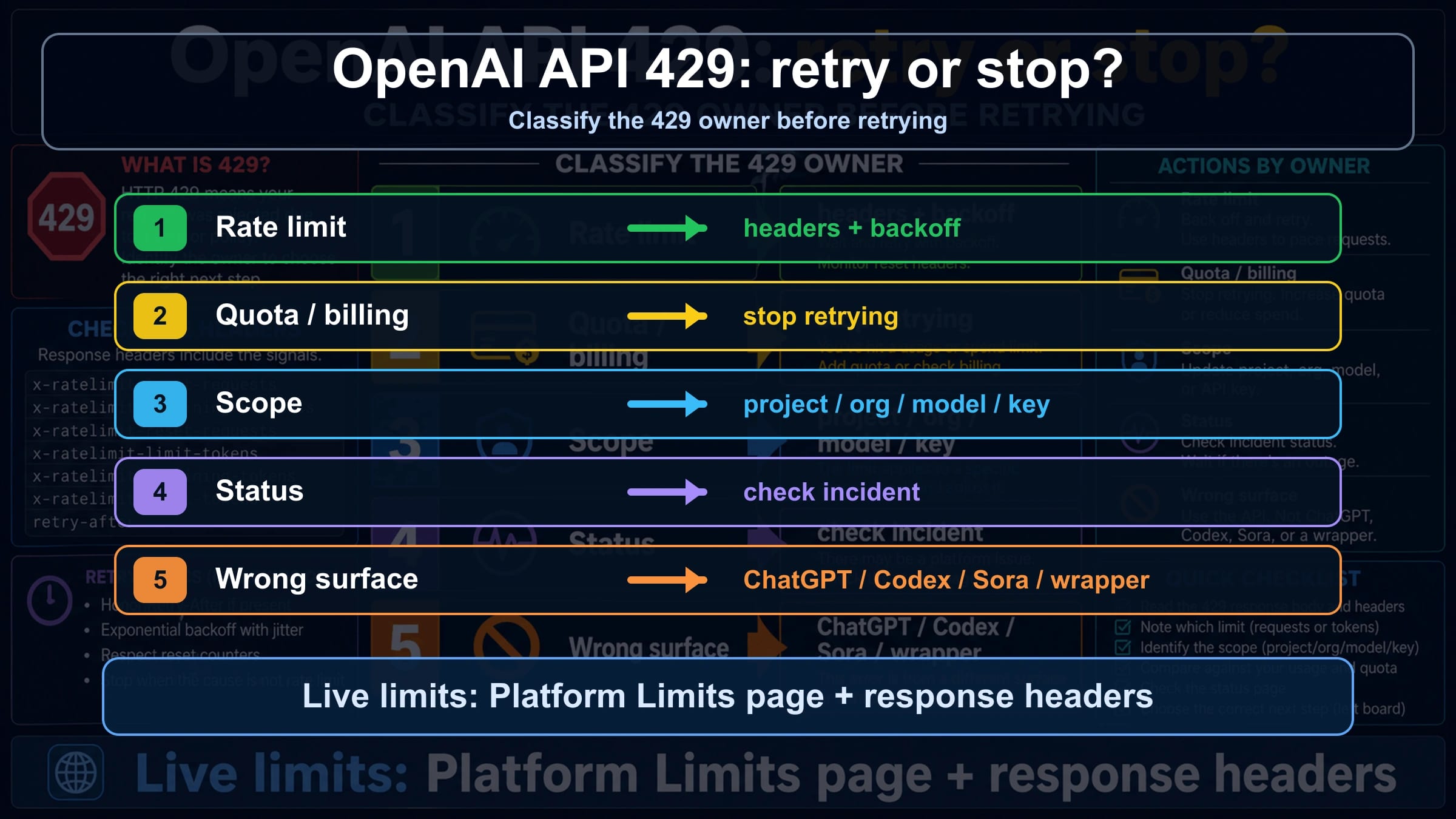
If an OpenAI Platform API call says quota exceeded or returns 429, do not add retries until you read the error body. A retryable rate-limit error needs backoff, throttling, or queueing; insufficient_quota, billing, project scope, model access, status, and wrapper limits need different checks and can get worse if you keep looping.
| Error clue | Likely owner | Check first | Retry or stop |
|---|---|---|---|
rate limit reached, too many requests, or remaining headers near zero | Request or token rate limit | Response headers, Limits page, model family, reset window | Retry with backoff and jitter, then throttle or queue |
You exceeded your current quota or insufficient_quota | Quota, billing, or spend cap | Billing, Usage, Limits, monthly spend, account state | Stop retrying until the account state changes |
| A new key fails the same way, or only one project/model fails | Project, organization, model, or key scope | Selected project, organization, model access, shared family limit | Fix the scope before changing traffic |
| Many calls fail while OpenAI Status shows an incident | Platform status or capacity event | OpenAI Status, timestamp, request id, affected endpoint | Wait, preserve evidence, and avoid account churn |
| The error comes from ChatGPT, Codex, Sora, Azure OpenAI, or a wrapper | Wrong surface or provider-owned limit | Product surface, provider docs, API route, headers | Route to that contract before applying Platform API fixes |
The stop rule is simple: retry only after the owner is request or token pressure and you have a reset signal. If the body points to quota, billing, wrong project, wrong model, wrong surface, or a status incident, repeating the same request is not a fix; capture the error body, request id, headers, project, organization, model, Limits page state, and status page state instead.
Read the 429 body before you change code
OpenAI documents two very different 429 messages in its API error codes guide: one says the rate limit was reached because requests are arriving too quickly, and another says the current quota has been exceeded. Those messages can share the same HTTP status, but they do not share the same repair path.
The first branch is traffic pressure. Your application may be sending too many requests per minute, too many tokens per minute, too many requests per day, or too much image traffic for the selected model and project. That branch can be handled with backoff, jitter, request shaping, queues, and lower-concurrency work.
The second branch is account state. insufficient_quota, current-quota wording, monthly spend exhaustion, expired billing, or a project that cannot access a model should not be treated as a transient network blip. A retry loop will usually burn more failed attempts, make logs noisier, and hide the real fix: billing, usage, project selection, organization selection, or model access.
In code, classify the body before deciding whether the request enters retry logic:
hljs tsfunction classifyOpenAI429(error: any) {
const status = error?.status || error?.response?.status;
const code = error?.error?.code || error?.code;
const type = error?.error?.type || error?.type;
const message = String(error?.error?.message || error?.message || "");
if (status !== 429) return "not_429";
if (code === "insufficient_quota" || type === "insufficient_quota") {
return "quota_or_billing_stop";
}
if (/exceeded your current quota/i.test(message)) {
return "quota_or_billing_stop";
}
if (/rate limit|too many requests/i.test(message)) {
return "retryable_rate_limit_check_headers";
}
return "unknown_429_collect_evidence";
}
That classifier is intentionally conservative. If the body is not clear, do not guess. Keep one request path stable and inspect the headers, Limits page, selected project, organization, model, and status page before changing multiple variables at once.
The 10-minute recovery board
The fastest recovery path is a fixed sequence, not a bag of random fixes. Start by copying the full error body exactly as returned. Save the HTTP status, error type, error code, request id if present, endpoint, model, project, organization, and timestamp with timezone. If your logs only say "429 Too Many Requests," improve logging before retrying because the missing body is the diagnosis.
Next, check whether the same request is failing because of rate pressure or account state. Open the current Limits view for the organization and project that the request is actually using. Then compare that account state with the response headers and the model family. OpenAI's rate limits guide says limits can be measured across requests, tokens, days, and images, and they can be scoped by organization, project, and model. That means a static number from an old blog post is weaker than the live evidence in your own account.
Use this short sequence:
| Minute | Action | What it tells you |
|---|---|---|
| 0-1 | Capture the raw body and headers | Whether the error names rate limit, quota, or another owner |
| 1-3 | Open Limits, Usage, and Billing for the same project and organization | Whether capacity, spend, or account state is the blocker |
| 3-5 | Compare model, endpoint, and model family | Whether the selected model has a stricter or shared limit |
| 5-7 | Check OpenAI Status | Whether there is a declared broad platform problem |
| 7-10 | Send one smaller controlled request | Whether the issue follows workload size, concurrency, or account state |
If the smaller controlled request succeeds, you likely have a workload-shaping problem: token size, request burst, concurrency, or image throughput. If it fails with the same quota wording, you likely have an account-state problem. If several unrelated endpoints fail while the status page shows a relevant incident, preserve evidence and avoid account churn.
When retry and backoff are correct
Retry is correct when the evidence points to temporary request or token pressure. The usual signs are rate-limit wording, low remaining-request or remaining-token headers, a reset window in the headers, and a workload pattern that sends bursts faster than your allowed limit. The goal is not to "try harder." The goal is to send fewer requests at a better pace.
OpenAI's Help Center article on 429 Too Many Requests recommends exponential backoff for rate-limit errors, and OpenAI's Cookbook example shows retry handling with randomized exponential backoff. Use jitter so all workers do not wake at the same instant. Cap retries so a degraded worker cannot keep hammering the API forever.
Good retry behavior usually includes:
| Control | Why it matters |
|---|---|
| Exponential backoff with jitter | Spreads retries across the reset window instead of creating a retry storm |
| A maximum retry count | Prevents one request from consuming worker capacity indefinitely |
| Per-project and per-model concurrency caps | Matches the scope that OpenAI actually limits |
| Token budgeting before the request | Reduces TPM pressure before the API rejects the call |
| Queueing instead of synchronous fan-out | Turns spikes into scheduled work |
| Batch for async work when appropriate | Moves non-urgent workloads away from synchronous pressure |
Also remember the uncomfortable part: unsuccessful requests can still count toward per-minute limits. If twenty workers all retry a failing request every second, the application can keep itself inside the failure window. A correct retry policy slows down, sheds work, or queues. It does not turn one 429 into hundreds.
When retry is wrong
Retry is wrong when the error says current quota, insufficient_quota, billing, monthly spend, or account state. That branch is not solved by waiting a few seconds. It is solved by checking the Billing and Usage views, confirming the selected organization and project, reviewing spend caps, and making sure the account is eligible to use the model and endpoint you are calling.
This is the branch behind many confusing reports such as "I have credits but still get 429" or "my first request returns 429." Credits can exist in one account while the request is sent from another organization or project. A monthly spend cap can be hit even when a payment method is present. A new project can have lower limits than the one you intended to use. A model can be unavailable to that project or can share a family limit with another workload.
Use one stable request while checking account state. Do not rotate keys, change models, change projects, change billing settings, and alter retry code in the same pass. If the quota wording remains, your best next move is evidence collection and account repair, not more retries.
Why a new API key may not help
An API key is not a private rate-limit bucket. If the same organization, project, model family, or billing owner remains in control, a new key can fail exactly like the old one. Creating keys can be useful when the old key was revoked, mis-scoped, leaked, or attached to the wrong project, but it does not create new capacity by itself.
Check these four scope layers before assuming the key is the problem:
| Scope layer | Check | Common failure |
|---|---|---|
| Organization | The request uses the intended org | Personal org and team org have different billing or limits |
| Project | The key belongs to the project you inspected | You checked Limits in one project while traffic uses another |
| Model or model family | The selected model has access and headroom | A stricter model or shared family limit is exhausted |
| Team workload | Other services share the same capacity | A batch job or another app consumed the pool |
If only one model fails, test a small request against a model you know the project can access. If every model and endpoint fails with quota wording, inspect Billing and Usage before writing retry code. If only one service fails but the same key works elsewhere, inspect that service's concurrency and request size.
Use headers and Limits as live evidence
The live evidence for an OpenAI API 429 lives in two places: the response and the account. The response body tells you the branch. The headers can show request and token limit, remaining capacity, and reset timing. The Limits page shows the current limits for the organization, project, and model context. Together they are stronger than any universal public table.
Do not paste API keys, bearer tokens, or full private payloads into tickets or forum posts, but do preserve safe operational evidence:
| Evidence | Use |
|---|---|
| HTTP status and error body | Separates retryable rate pressure from quota or billing |
| Request id, if present | Gives support an exact lookup handle |
| Rate-limit headers | Shows limit, remaining value, and reset timing |
| Project and organization names or ids | Confirms the scope that owns the request |
| Model and endpoint | Reveals stricter model limits or wrong endpoint use |
| Limits and Usage screenshots | Shows live account state at the time of failure |
| OpenAI Status snapshot | Separates declared incidents from account-local failures |
On April 29, 2026, the public OpenAI Status page showed no declared broad active incident during a public status check. That sentence is not a permanent guarantee. Treat status as a live branch during your own incident: if the relevant API component is degraded, wait and preserve evidence; if status is green, continue through account scope, headers, and workload shape.
Prevent the next 429 in production
After the immediate incident is stable, move the fix out of human debugging and into production controls. The best prevention is to make your application know its own budget before OpenAI has to reject it. That means request shaping, token budgeting, tenant-level quotas, queue depth alerts, and model-specific concurrency gates.
For request bursts, use a central limiter per project and model family. Per-worker limiters are useful only if workers share state; otherwise each worker thinks it is within the budget while the fleet exceeds it. For token-heavy workloads, estimate prompt and output size before dispatch. A smaller prompt, shorter max output, or cheaper routing model can prevent TPM pressure without changing user-visible behavior.
For asynchronous work, stop treating every task as a synchronous user request. Queue jobs, smooth spikes, and consider OpenAI Batch when latency is not urgent. Batch is not a magic bypass for every application, but it is a better fit for non-interactive workloads than having many workers compete with user-facing calls.
For multi-tenant applications, keep tenant budgets separate. One noisy customer should not exhaust the whole project's minute window. Record the tenant id, model, token estimate, queue delay, retry count, and final outcome for every 429. Without those fields, your next incident review will still be guesswork.
Route out wrong surfaces
"OpenAI API error 429" should mean the OpenAI Platform API request made by your code. It should not automatically mean ChatGPT message limits, Codex product limits, Sora video capacity, Azure OpenAI quota, or an OpenAI-compatible wrapper's private limit. Those surfaces can also show limit messages, but the owner and repair path changes.
Use this split before applying Platform API advice:
| Surface | Do not assume | Check instead |
|---|---|---|
| ChatGPT web or mobile | ChatGPT Plus or team access changes API quota | ChatGPT product limits and account state |
| Codex product surface | A coding-agent limit is the same as API RPM or TPM | Codex usage contract and current product status |
| Sora or video generation | Video capacity maps to text API limits | Sora route, plan, queue, and video-specific status |
| Azure OpenAI | OpenAI Platform Limits page owns the deployment | Azure quota, deployment, region, and subscription |
| Wrapper or gateway | OpenAI headers always pass through untouched | Provider dashboard, provider docs, upstream headers, and route id |
If you are not calling api.openai.com directly, identify the provider boundary first. A wrapper may return 429 because its own pool is full, because it mapped an upstream OpenAI failure into a local error, or because your account on that provider hit a plan cap. Applying OpenAI Platform fixes without that boundary can waste time.
Escalate with evidence
Escalation is useful after you have separated the branch and stopped changing variables. A support packet should be short, reproducible, and free of secrets. It should show what failed, where it failed, which account scope owned the request, and why you believe retry, billing, scope, status, or provider routing is the remaining owner.
Include:
| Item | Detail to include |
|---|---|
| Timestamp | Date, local time, and timezone |
| Request identity | Request id if present, endpoint, model, and SDK version |
| Account scope | Organization, project, billing owner, and relevant model family |
| Error evidence | Full error body, safe headers, and retry count |
| Limits evidence | Limits page state, Usage state, and any spend cap |
| Status evidence | OpenAI Status state at the time of failure |
| Workload shape | Concurrency, prompt size, expected output size, queue depth |
| Recent changes | New key, new project, billing change, model change, deploy, provider route change |
Redact secrets before sharing. Do not include bearer tokens, full API keys, private user data, card details, or proprietary prompts unless support specifically provides a secure route and the data is necessary. A clean packet is faster for support and safer for your users.
FAQ
Is every OpenAI API 429 retryable?
No. Retry is appropriate when the error body and headers point to temporary request or token pressure. If the body says insufficient_quota or current quota exceeded, stop retrying and inspect Billing, Usage, Limits, project, organization, and model access.
What does insufficient_quota mean?
It means the request is blocked by quota, billing, spend, or account state rather than a short-lived request burst. The exact owner can vary, so check the account pages tied to the same organization and project that sent the request.
Why do I get 429 even though I added credits?
The request may be using a different organization or project, a monthly spend cap may still be active, the billing state may not have propagated, the model may have its own access or family limit, or a provider wrapper may be enforcing its own pool. Verify the route before retrying.
Do multiple API keys increase my OpenAI rate limit?
Not by themselves. If the keys belong to the same project and organization, they usually share the same capacity owner. A new key fixes revoked, leaked, or wrong-project credentials; it does not create a new quota pool by magic.
Which headers should I inspect?
Inspect rate-limit headers that show limit, remaining capacity, and reset timing for requests and tokens when they are present in the response. Pair those headers with the current Limits page because account-specific limits can change and can differ by model family.
Should I check OpenAI Status for 429?
Yes, but status is only one branch. If the status page shows a relevant incident, wait and preserve evidence. If it is green, continue checking the error body, headers, Limits, Billing, project, organization, model, and provider surface.
Is ChatGPT Plus quota the same as OpenAI API quota?
No. ChatGPT consumer plans and OpenAI Platform API billing are separate surfaces. A ChatGPT subscription does not automatically explain or repair a Platform API 429 from your code.
What should I send to support?
Send the timestamp, timezone, request id if available, endpoint, model, project, organization, safe error body, safe headers, Limits and Usage state, OpenAI Status state, retry count, workload shape, and recent account or deploy changes. Redact API keys and private data.