
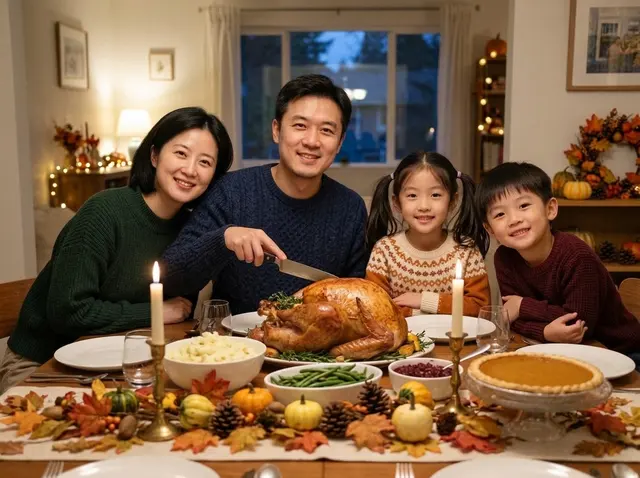
提示词
把参考图中的一家四口放进感恩节晚餐桌前:桌子中央是一只金黄的烤火鸡,旁边有土豆泥、四季豆、蔓越莓酱和一块南瓜派,长蜡烛和铺满秋叶、小葫芦的桌旗;每个人穿着秋季针织毛衣,看着镜头微笑,爸爸手里拿着切火鸡的刀;傍晚窗边暖光,身后有柔和的小灯串,像一张自然的家庭合照。保留每个人的脸、发型和年龄。
模型与价格
Nano Banana · GPT Image
在线用 Nano Banana 2.1 生图改图,单张 $0.045,比 Nano Banana 2 便宜,1K 到 4K、最长 8:1,附与 2、Pro 的同题对比。
Nano Banana 2.1 是 Google 最新的 Nano Banana 模型(API 模型 ID gemini-nano-banana-2.1)。在 YingTu 单张 $0.045,比 Nano Banana 2 的 $0.055 便宜,可以出 1K、2K、4K,14 种比例最长到 8:1,支持最多 5 张参考图改图。2026 年 10 月 9 日起是图片工作台的默认模型。
gemini-nano-banana-2.1点一下,就会带着这段提示词和推荐比例打开图片工作台。
周末农夫市集的简洁海报:大标题「丰收市集」,下面一行「周六 上午 9 点至下午 1 点 · 滨河公园」,木箱里装满南瓜和苹果,温暖的秋季配色,文字清晰可读。
完全保留参考图里的商品,包括形状、颜色和标签,把它放到阳光照进来的大理石厨房台面上,旁边几枝新鲜香草,柔和的晨光,自然阴影。
一张超宽的网站横幅:黄昏时安静的海边小镇,窗户透出暖光,海面平静,左侧留出大片空白天空放标题。
都来自提示词库的真实生成结果,附提示词和这次请求的耗时;点开可以直接用同一条提示词。
把参考图中的一家四口放进感恩节晚餐桌前:桌子中央是一只金黄的烤火鸡,旁边有土豆泥、四季豆、蔓越莓酱和一块南瓜派,长蜡烛和铺满秋叶、小葫芦的桌旗;每个人穿着秋季针织毛衣,看着镜头微笑,爸爸手里拿着切火鸡的刀;傍晚窗边暖光,身后有柔和的小灯串,像一张自然的家庭合照。保留每个人的脸、发型和年龄。

Turn the person in the reference image into a professional headshot: beige blazer, chest-up framing, body slightly angled and smiling at the camera. Blurred modern office background, soft key light from the left with a rim light, 85mm lens look, natural skin tones, same facial features. Suitable for LinkedIn and a résumé.
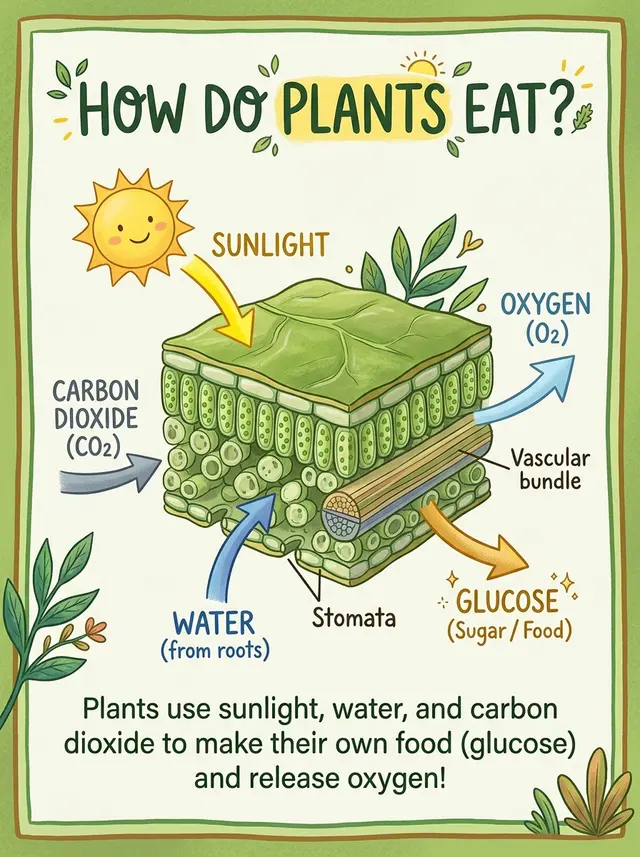
An explainer card about photosynthesis: a cross-section illustration of a leaf in the middle, with arrows showing sunlight, carbon dioxide and water going in, and oxygen and glucose coming out. Title at the top "How Do Plants Eat?", a one-line summary at the bottom. Fresh green palette, children's science book style, clear and accurate labels.
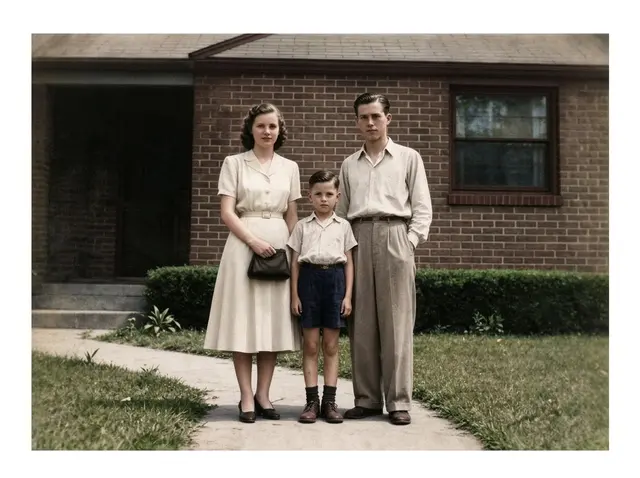
Restore this old photo: remove scratches, creases, mold spots and noise, fill in missing areas, sharpen it, then colorize it naturally with period-accurate skin, clothing and background colors. Keep every face, expression, pose and the composition exactly the same, no beautifying, so it looks like it was shot on color film at the time.
四条提示词在三个模型上各跑一次。每组只有一个例子,当作参考,不是评测。
要求的是简单的儿童科普风格。Nano Banana 2.1 画了带几处标注的叶片剖面,比 Nano Banana 2 的完整解剖图简洁,比 Pro 复杂;所有标注和底部总结句都拼写正确。
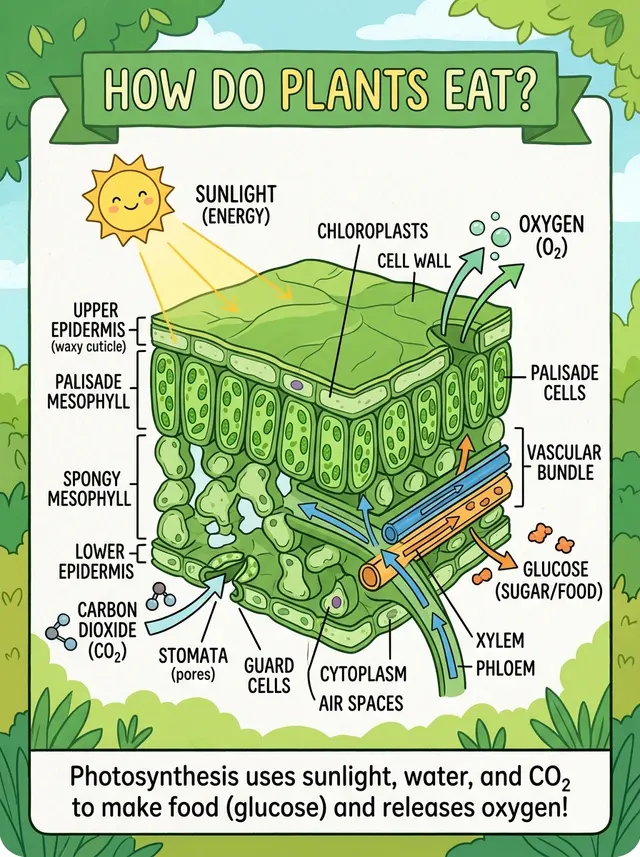
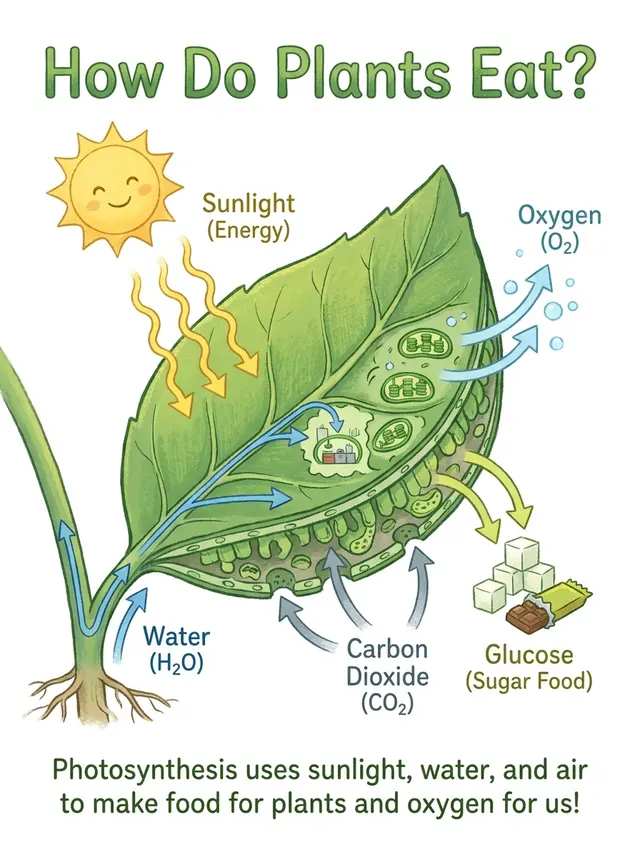
An explainer card about photosynthesis: a cross-section illustration of a leaf in the middle, with arrows showing sunlight, carbon dioxide and water going in, and oxygen and glucose coming out. Title at the top "How Do Plants Eat?", a one-line summary at the bottom. Fresh green palette, children's science book style, clear and accurate labels.
三个模型都画出了车站钟楼、咖啡馆、书店、公园和电车。Nano Banana 2.1 和 Nano Banana 2 一样把街区放在木底座上,Pro 是纯色背景。
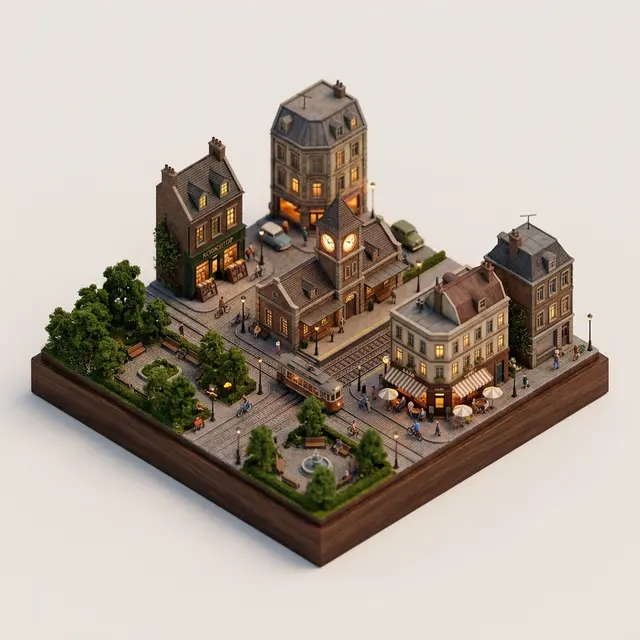
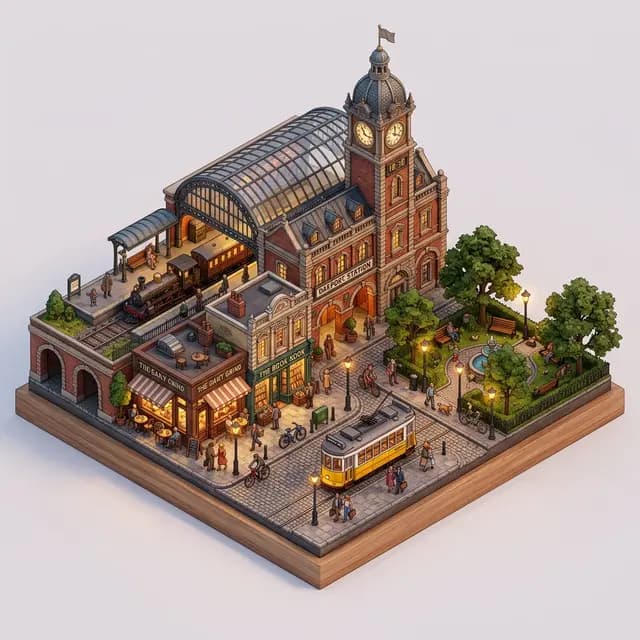

A 45° isometric miniature city block: an old train station with a clock tower in the middle, surrounded by a café, a bookshop, a small park and a tram, with people and bikes on the streets. Detailed 3D render, soft evening light, warm streetlights just turning on, plain light background, like a fine tabletop model.
三个模型都保住了人脸。Nano Banana 2.1 拍进的办公室背景更多,其他方面三张头像差别很小。
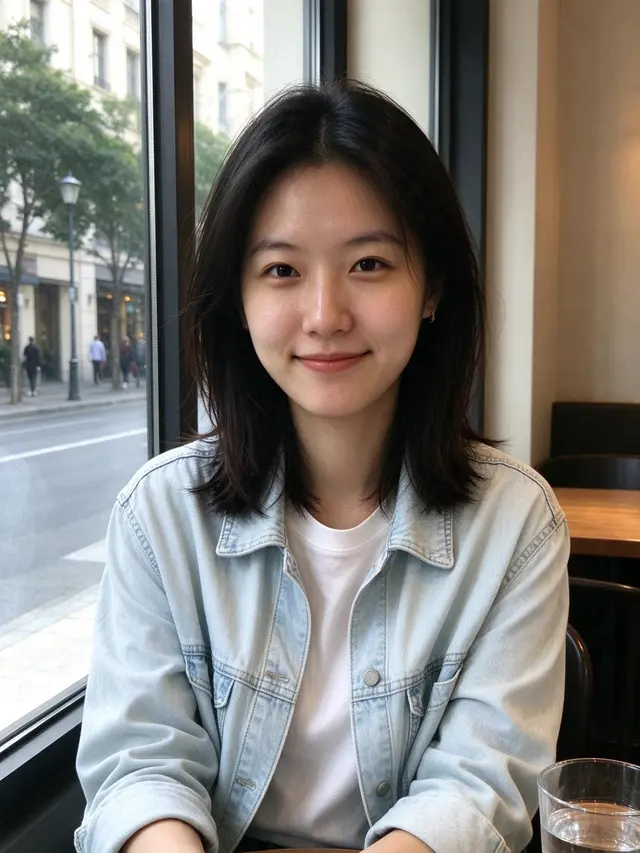


Turn the person in the reference image into a professional headshot: beige blazer, chest-up framing, body slightly angled and smiling at the camera. Blurred modern office background, soft key light from the left with a rim light, 85mm lens look, natural skin tones, same facial features. Suitable for LinkedIn and a résumé.
提示词要求每张脸不变、按年代上色。Nano Banana 2.1 保住了女士的深色头发和原图的浅色裙子、衬衫,颜色最克制;Pro 保住了头发,但把裙子画成了蓝色碎花;Nano Banana 2 把头发改成了浅红棕色。
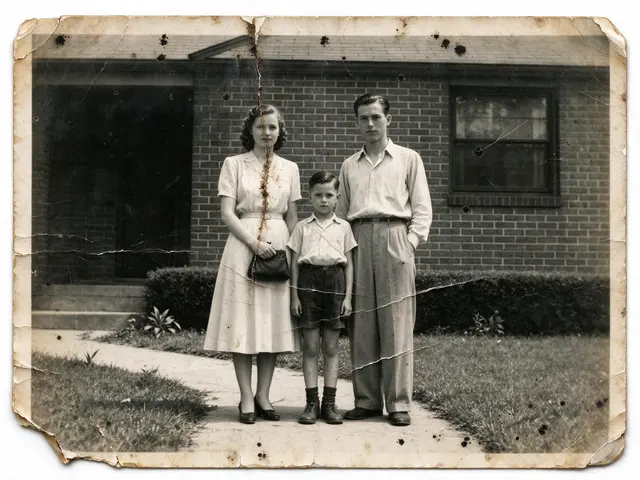
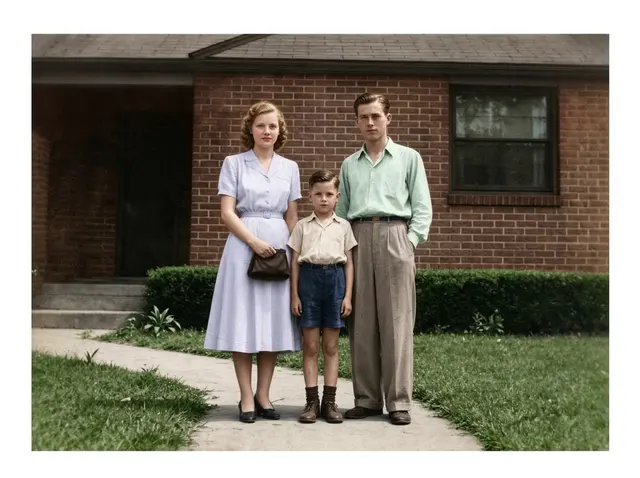
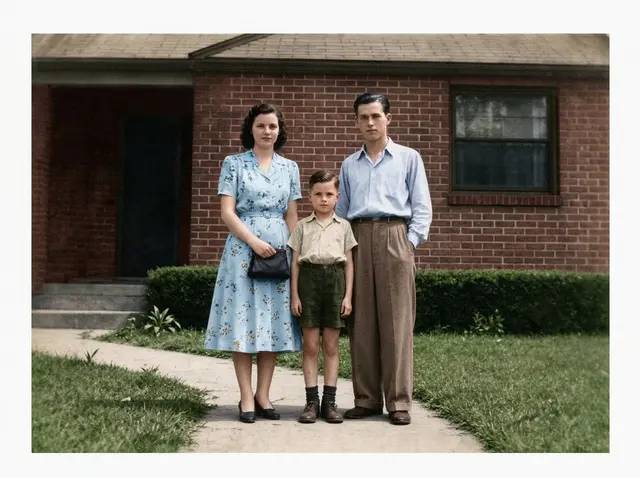
Restore this old photo: remove scratches, creases, mold spots and noise, fill in missing areas, sharpen it, then colorize it naturally with period-accurate skin, clothing and background colors. Keep every face, expression, pose and the composition exactly the same, no beautifying, so it looks like it was shot on color film at the time.
| 模型 | 单价 | 什么时候选 |
|---|---|---|
| Nano Banana 2.1 | $0.045 | 日常出图和改图先用它:能出 4K 的 Nano Banana 里最便宜,中位数 20 秒;在我们的老照片修复示例里改动最少。 |
| Nano Banana 2 | $0.055 | 需要 512 像素草稿,或者某条提示词在它上面已经很好用。中位数 14 秒。 |
| Nano Banana Pro | $0.09 | Nano Banana 2.1 没做到复杂要求时再换;Pro 贵一倍($0.09)。中位数 21 秒。 |
| GPT Image 2 VIP | $0.03 | 要精确像素尺寸、能直接打印的平面贺卡或海报,或者要最低单价($0.03)。 |
这些参数在 YingTu 图片工作台里都能直接选,新用户还有 $0.1 免费额度。
和图片工作台同一套请求格式,复制就能跑。
import base64
import mimetypes
import os
import sys

import requests

API_KEY = os.environ.get("LAOZHANG_API_KEY")
if not API_KEY:
    raise RuntimeError("Set the LAOZHANG_API_KEY environment variable before running this example.")

API_URL = "https://api2.laozhang.ai/v1beta/models/gemini-nano-banana-2.1:generateContent"
REQUEST_TIMEOUT_SECONDS = 500

headers = {
    "Authorization": f"Bearer {API_KEY}",
    "Content-Type": "application/json",
}

payload = {
    "contents": [{
        "parts": [
            {"text": "周末农夫市集的简洁海报:大标题「丰收市集」,下面一行「周六 上午 9 点至下午 1 点 · 滨河公园」,木箱里装满南瓜和苹果,温暖的秋季配色,文字清晰可读。"}
        ]
    }],
    "generationConfig": {
        "responseModalities": ["IMAGE"],
        "imageConfig": {
            "imageSize": "2K"
        }
    }
}

try:
    response = requests.post(
        API_URL,
        headers=headers,
        json=payload,
        timeout=REQUEST_TIMEOUT_SECONDS,
    )
except requests.Timeout as error:
    print(
        "Request timed out after 500 seconds. The result status may be unknown; "
        "check call and billing logs before retrying.",
        file=sys.stderr,
    )
    raise SystemExit(1) from error

if response.status_code != 200:
    print(f"API error {response.status_code}: {response.text}", file=sys.stderr)
    raise SystemExit(1)

try:
    result = response.json()
except ValueError as error:
    print("API returned a non-JSON response.", file=sys.stderr)
    raise SystemExit(1) from error

if not isinstance(result, dict):
    print("API returned an unexpected JSON shape.", file=sys.stderr)
    raise SystemExit(1)

image_part = None
for candidate in result.get("candidates", []):
    for part in candidate.get("content", {}).get("parts", []):
        inline_data = part.get("inlineData") or part.get("inline_data")
        if inline_data and inline_data.get("data"):
            image_part = inline_data
            break
    if image_part:
        break

if not image_part:
    response_id = result.get("responseId", "not provided")
    print(f"No image data in response. responseId={response_id}", file=sys.stderr)
    raise SystemExit(1)

mime_type = image_part.get("mimeType") or image_part.get("mime_type") or "image/png"
encoded_image = image_part["data"]
if encoded_image.startswith("data:"):
    header, encoded_image = encoded_image.split(",", 1)
    mime_type = header[5:].split(";", 1)[0] or mime_type

extension_by_mime = {
    "image/jpeg": "jpg",
    "image/png": "png",
    "image/webp": "webp",
    "image/gif": "gif",
}
extension = extension_by_mime.get(mime_type, "bin")
output_path = f"output.{extension}"

with open(output_path, "wb") as output_file:
    output_file.write(base64.b64decode(encoded_image, validate=True))

print(f"Image saved: {output_path} ({mime_type})")Google 接替 Nano Banana 2 的生图和改图模型,据 Google DeepMind 模型卡基于 Gemini 3.6 Flash。API 模型 ID 是 gemini-nano-banana-2.1,Google 于 2026 年 10 月 6 日发布。可以文字生图,也可以带参考图改图。
不是。Google 官方的使用方式是 Gemini 应用、Google AI Studio 和 Gemini API。YingTu 是独立的在线工作台,通过 LaoZhang API 调用同一个模型(gemini-nano-banana-2.1),按张计费。
在 Gemini 应用里不免费:Google 只给 Google AI Pro、Plus、Ultra 计划开放,免费用户用的是 Nano Banana 2。在这里,Gmail 登录的新用户送 $0.1,约够 2 张 Nano Banana 2.1;之后单张 $0.045,不用订阅。
YingTu 上单张 $0.045,1K、2K、4K 同价。Nano Banana 2 是 $0.055,Nano Banana Pro $0.09,GPT Image 2 $0.03。
能。YingTu 在浏览器里打开就能用,不需要 Gemini 应用或 Google 计划:用 Gmail 登录领 $0.1 试用,或者填自己的 LaoZhang API Key(API 中转方式),按张付费。
在这里它更便宜($0.045 对 $0.055),但没有 512 像素尺寸。本页四组同题示例里,它比 Nano Banana 2 更贴近提示词:科普卡更简洁,老照片修复保住了原来的发色和衣服。中位数耗时 20 秒对 14 秒。
先用 Nano Banana 2.1:价格是 Pro 的一半($0.045 对 $0.09),我们的示例里保脸效果和 Pro 一样。复杂要求没做到再换 Pro;儿童科普卡那组,Pro 画得最简洁。
1K、2K、4K(1:1 时分别是 1024、2048、4096 像素),14 种比例从 1:8 到 8:1,包括 21:9 和 4:1;8:1 出图是 2928 × 352 像素。没有 512 像素。
我们的示例里,感恩节贺卡、晚宴菜单和科普卡的字都写对了,中文菜单也一字不差。Google 模型卡提到 1K 下小字容易糊、长段文字效果差,小字多的图用 2K 或 4K。它还常把贺卡画成「拍下来的卡片」,要打印文件时写明「平面设计」。
能。本页的代码就是工作台发出的同一个 LaoZhang API 请求,模型填 gemini-nano-banana-2.1;Nano Banana API 页有 cURL 和 Node.js 示例。
更新于 2026-10-12