Nano Banana Pro vs Flux 2 vs Sora 2: Text Rendering, Resolution, and Use Cases Compared (2026)
In-depth comparison of Nano Banana Pro, Flux 2, and Sora 2 across text rendering, resolution, speed, pricing, and real-world use cases. Includes benchmark data from multiple sources and practical decision framework.
Nano Banana Pro
4K-80%Google Gemini 3 Pro · AI Inpainting
谷歌原生模型 · AI智能修图

Choosing between Nano Banana Pro and Flux 2 comes down to what you value most: instruction precision or cinematic aesthetics. But the decision gets more interesting when you add Sora 2 into the mix for video-capable workflows. After analyzing benchmark results from multiple independent sources, the picture is more nuanced than any single review suggests—some tests crown Nano Banana Pro as the text rendering champion, while others give that title to Flux 2.
This comparison cuts through the conflicting claims with data from real-world tests across text rendering, resolution output, generation speed, and pricing. Rather than declaring a single winner, the goal is to help you match each model's strengths to your specific use case. Whether you are building marketing assets, generating product photography, or creating cinematic content, the right choice depends on the task at hand—and in many professional workflows, the answer is using more than one model.
For a deeper philosophical analysis of the logic-first vs aesthetic-first design approaches, see our previous Nano Banana Pro vs Flux 2 comparison.
What Sets Nano Banana Pro and Flux 2 Apart
Nano Banana Pro and Flux 2 emerged within days of each other in late 2025 and represent two fundamentally different approaches to AI image generation. Both produce high-quality results, but their architectures optimize for different outcomes, which explains why benchmark results vary depending on what is being tested.
Google's Nano Banana Pro is built on the Gemini 3 Pro infrastructure with a reasoning-first architecture. It processes prompts through a multimodal reasoning layer before generating pixels, which means it "thinks" about what the image should contain—spatial relationships, text accuracy, object counts—before rendering. This makes it particularly strong at following complex, multi-part instructions where precision matters more than mood.
Black Forest Labs' Flux 2 uses a 32-billion-parameter rectified flow transformer optimized for visual quality. Its architecture processes multiple visual embeddings simultaneously and supports a 32K token context window, enabling extremely detailed prompt control. The model prioritizes atmospheric depth, cinematic lighting, and what users describe as "painterly realism"—images that feel emotionally compelling rather than just technically accurate.
The practical difference shows up immediately in testing. Give both models a prompt like "a coffee shop with a chalkboard menu listing five specific items," and Nano Banana Pro is more likely to get the menu items right while Flux 2 produces a more atmospheric, inviting scene where the text may not be fully legible. Neither result is wrong—they reflect different design priorities.
Architecture Deep Dive: Reasoning Engine vs Diffusion Excellence
Understanding the technical foundations helps predict how each model will behave across different tasks. The architecture differences are not marketing claims—they produce measurably different outputs.
Nano Banana Pro separates the generation process into two stages. First, the Gemini 3 reasoning core analyzes the prompt, identifies required elements, resolves ambiguities, and creates a structured plan. Then, a high-fidelity diffusion engine executes that plan. This two-stage approach is why Nano Banana Pro handles counting prompts ("exactly seven birds on the wire") and layout instructions ("logo in the top-left corner, tagline centered below") better than most competitors. The reasoning layer also enables Google Search integration, grounding generations in real-world data when relevant.
Flux 2's architecture is a single unified pipeline, but that simplicity is deceptive. The 32B parameter transformer processes text and visual information through the same attention mechanisms, which means the model develops deeply integrated understanding of how text descriptions map to visual features. Its multi-reference capability—accepting up to 10 input images simultaneously for style, character, or product consistency—is native to the architecture rather than bolted on. This makes Flux 2 particularly powerful for brand-consistent content production where you need dozens of variations that all feel cohesive.
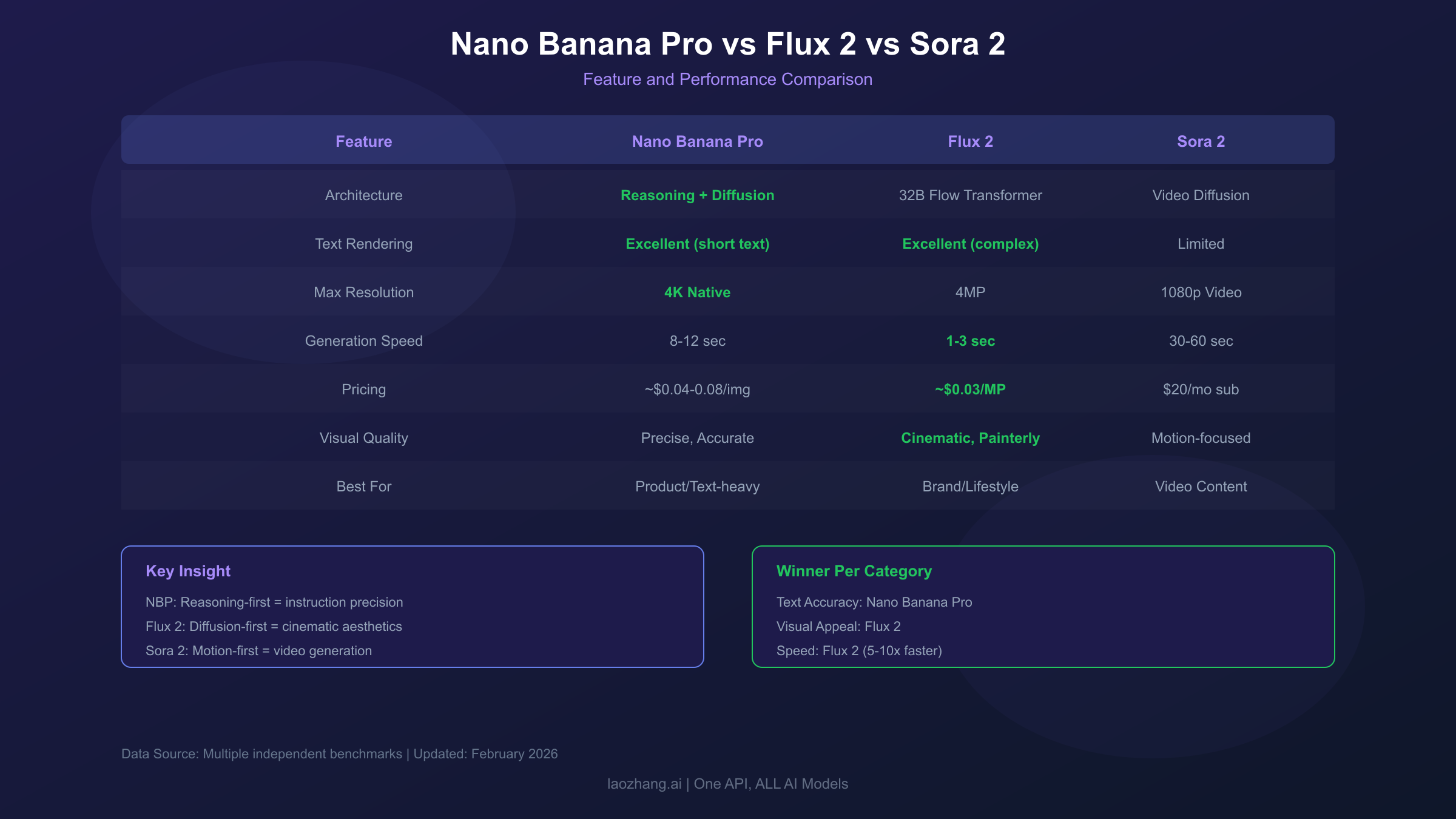
The parameter difference matters for output quality but also for speed and cost. Nano Banana Pro's reasoning stage adds latency—typically 8-12 seconds per generation—while Flux 2 can produce comparable-resolution images in roughly one-tenth the time for simpler prompts. For production workflows generating hundreds of images, this speed difference directly impacts project timelines and API costs.
Text Rendering: Where Benchmark Results Diverge
Text rendering is the single most debated capability when comparing these two models. Independent benchmarks show genuinely conflicting results, and understanding why is more useful than picking a side.
Tests from Overchat AI's comparison found that Nano Banana Pro rendered text "with virtually no errors" while Flux 2 produced "lots of nonsense text" in typography-heavy prompts. Nano Banana Pro's reasoning layer appears to give it a systematic advantage when prompts specify exact text strings—it treats text content as a logical constraint rather than a visual pattern.
However, Dzine.ai's real-world testing produced the opposite result for data-dense infographics, where Flux 2 demonstrated "accurate and legible text rendering across all chart labels, titles, and data points" while Nano Banana Pro's output was "clear but sparse." The likely explanation is that Flux 2's larger context window (32K tokens) allows it to handle prompts with extensive text specifications more completely, while Nano Banana Pro's reasoning may simplify overly complex text requirements.
The practical conclusion from synthesizing multiple sources is this: for short, precise text strings (product names, taglines, signs), Nano Banana Pro is more reliable. For complex layouts with multiple text elements embedded in data visualizations, Flux 2 holds its own and sometimes surpasses. For multilingual text rendering—particularly CJK characters alongside Latin text—Nano Banana Pro has a clear advantage thanks to its multimodal training on Google's diverse dataset.
| Text Rendering Scenario | Winner | Confidence |
|---|---|---|
| Short taglines and signs | Nano Banana Pro | High |
| Multilingual text combinations | Nano Banana Pro | High |
| Data-dense infographics | Varies by test | Medium |
| Complex multi-paragraph layouts | Flux 2 | Medium |
| Mathematical expressions | Nano Banana Pro | High |
| Stylized/artistic typography | Flux 2 | Medium |
For teams where text accuracy is mission-critical, running the same prompt through both models and selecting the better result is a common production strategy. The API cost of generating two images is typically under $0.30 combined, a negligible expense compared to the time saved versus manual text correction.
Resolution and Visual Quality Compared
Both models support high-resolution output, but their approaches to quality differ at a fundamental level.
Nano Banana Pro supports native 2K and 4K output resolution, generating approximately 1,120 tokens per 4MP image. The 4K mode is particularly notable—it produces genuinely high-resolution output rather than upscaled lower-resolution images, making it suitable for print-quality deliverables. Google's infrastructure handles the computational demands of 4K generation without significant latency penalties, typically adding 2-3 seconds compared to standard resolution.
Flux 2 focuses on 4MP output through its rectified flow architecture, which produces images with exceptional textural detail and dynamic range even at standard resolutions. The visual quality per pixel is arguably Flux 2's strongest differentiator—images exhibit film-grain-like noise patterns, nuanced shadow gradients, and the kind of micro-detail that makes AI-generated images harder to distinguish from photographs.
In objective quality assessments, Nano Banana Pro scores higher on prompt adherence and structural accuracy (getting the right number of objects, correct spatial relationships). Flux 2 consistently wins on subjective quality metrics—human evaluators rate its images as more visually appealing, more realistic in mood, and more emotionally engaging. This tracks with the architectural priorities: Nano Banana Pro optimizes for what the image should contain, while Flux 2 optimizes for how the image should feel.
For high-resolution commercial work, the choice often depends on the final use case. Product photography for e-commerce catalogs benefits from Nano Banana Pro's structural precision—product features are rendered correctly and consistently. Lifestyle imagery for brand campaigns benefits from Flux 2's atmospheric quality—the images tell a more compelling visual story.
Speed, Throughput, and Workflow Efficiency
Generation speed matters significantly for production workflows, and the difference between these models is substantial.
Nano Banana Pro's two-stage architecture (reasoning then rendering) means baseline generation times of 8-12 seconds per image at standard resolution. The reasoning stage cannot be parallelized with rendering—the model must complete its analysis before any pixels are generated. For 4K output, generation times increase to 12-18 seconds. These times are consistent regardless of prompt complexity because the reasoning stage takes roughly the same time for simple and complex prompts.
Flux 2 generates standard-resolution images in approximately 1-3 seconds, making it roughly 5-10x faster than Nano Banana Pro for equivalent outputs. This speed advantage makes Flux 2 the preferred choice for iterative creative workflows where designers generate dozens of variations before selecting a direction. The model's speed also makes it more economical for high-volume production—faster generation means lower compute costs per image.
Sora 2 operates on an entirely different timescale since it generates video rather than still images. A 10-second video clip typically takes 30-60 seconds to generate, making direct speed comparisons with image generators misleading. However, for workflows that need both stills and video, Sora 2 eliminates the need for a separate motion tool.
For professional workflows, the speed-quality tradeoff is the key decision factor. If you are iterating on creative concepts and need rapid feedback, Flux 2's speed makes it the clear choice. If you are generating final production assets where accuracy matters more than iteration speed, Nano Banana Pro's slower but more precise output is worth the wait.
Pricing and API Access Options
API pricing structures differ significantly between models, and the cost-per-image calculation depends heavily on your usage pattern.
| Model | Official Pricing | Resolution | Billing Model |
|---|---|---|---|
| Nano Banana Pro | ~$0.04-0.08/image (Google AI Studio) | Up to 4K | Per-generation |
| Flux 2 Pro | ~$0.03/megapixel | Up to 4MP | Per-megapixel |
| Sora 2 | Included in ChatGPT Plus ($20/mo) | Up to 1080p video | Subscription + credits |
For developers and businesses using these models via API, the official pricing represents the baseline. Third-party platforms often provide more cost-effective access, especially for high-volume usage.
Nano Banana Pro through Google AI Studio offers free tier access with limited daily generations (approximately 50 images/day for free), making it accessible for prototyping. For production use, the per-image cost drops with volume. Through API aggregators like laozhang.ai, Nano Banana Pro access costs approximately $0.05 per image—roughly 60% below the standard API rate—with the additional benefit of a unified endpoint that also provides access to Flux 2 and other models through a single API key. This eliminates the overhead of managing separate accounts and billing for each provider.
Flux 2's megapixel-based pricing means lower-resolution images cost proportionally less, which can be advantageous for workflows that generate thumbnails or social media assets at standard resolution. The open-weight variants (Flux 2 Dev, Flux 2 Schnell) can be self-hosted for teams with GPU infrastructure, eliminating per-image API costs entirely—though the setup and maintenance costs of running GPU servers should be factored in.
For teams evaluating total cost of ownership, the calculation should include API costs, integration time, and the operational overhead of managing multiple model providers. Aggregator platforms simplify this significantly by providing a single integration point for all models. More details on Nano Banana Pro API pricing are available in our complete pricing guide.
Where Sora 2 Fits: The Video Dimension
Sora 2 is not a direct competitor to either Nano Banana Pro or Flux 2 in the still image space, but it occupies an increasingly relevant position in creative workflows that span both stills and video.
OpenAI's Sora 2 generates video clips from text, image, or video inputs with physics-aware motion simulation. It can produce cinematic clips with synchronized audio, making it a one-stop solution for short-form video content. The model excels at narrative-driven content—product demonstrations, atmospheric establishing shots, and social media clips where motion adds emotional impact.
The key distinction is that Sora 2 generates video, not still images. Its still-image capabilities exist but are secondary to its motion-generation strengths. Teams that need both high-quality stills and video typically use Nano Banana Pro or Flux 2 for images and Sora 2 for motion content, rather than trying to use Sora 2 for everything.
Where Sora 2 genuinely competes is in the conceptual space of "visual content generation." A marketing team deciding between a static hero image (Nano Banana Pro or Flux 2) and a short video loop (Sora 2) for a landing page is making a format decision, not just a model decision. Sora 2's ability to generate video from a single image means you can create a still with Nano Banana Pro, then animate it with Sora 2—a workflow that combines the strengths of both. For more on this topic, see our Nano Banana Pro vs Sora 2 detailed comparison.
Use Case Decision Guide: Which Model When
Rather than declaring an overall winner, the more useful framework is matching model strengths to specific project requirements.
Choose Nano Banana Pro when:
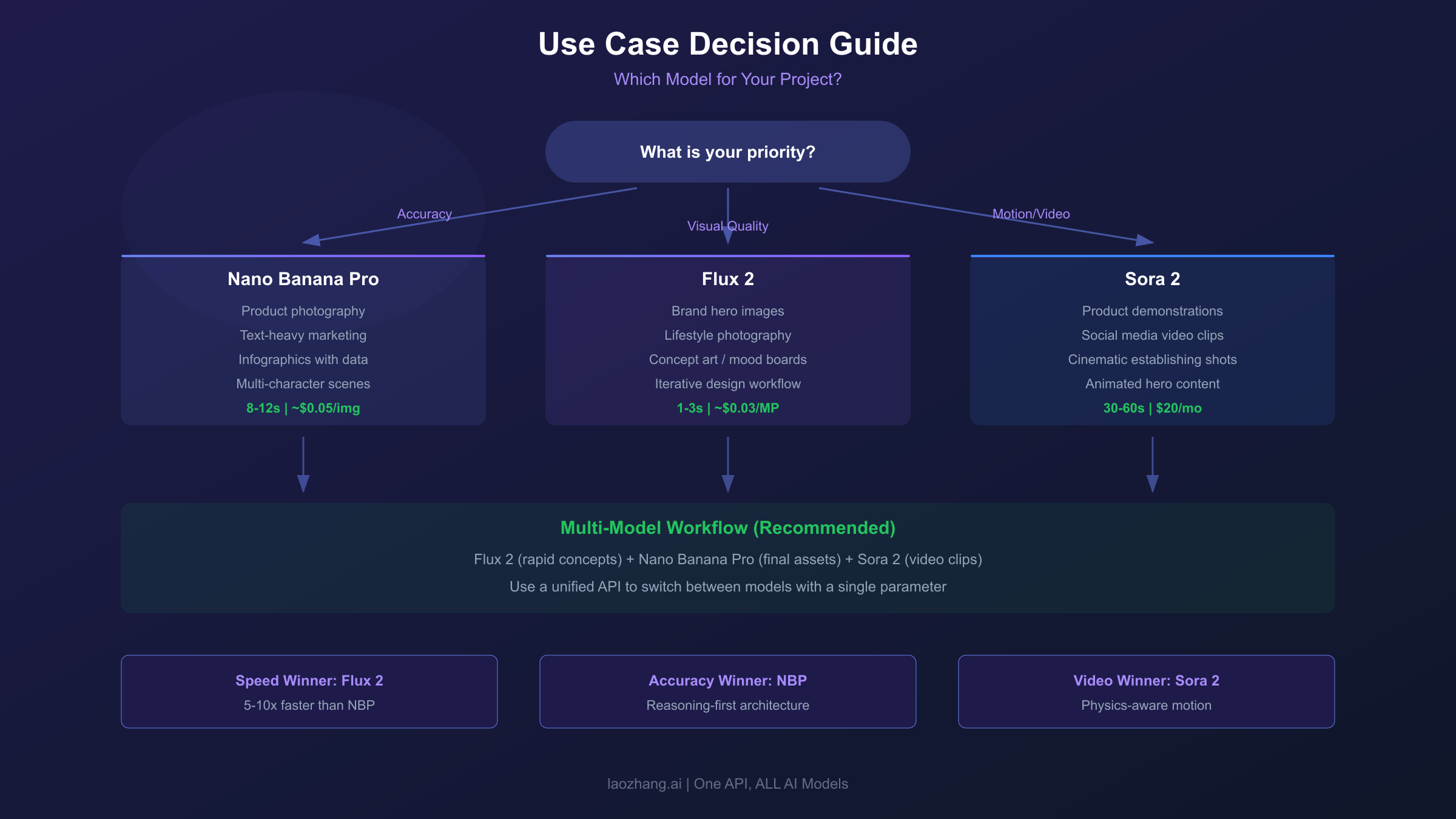
Accuracy and instruction-following are the priority. This includes product photography where features must be rendered correctly, infographics with specific text that must be legible, marketing materials with brand-specific text and logos, and multi-character scenes where identity consistency matters across variations. Nano Banana Pro's reasoning layer gives it a systematic advantage in these scenarios because it verifies logical constraints before rendering.
The model also excels when you need Google Search grounding—generating images of real locations, current events, or trending topics with contextual accuracy. This capability is unique to Nano Banana Pro and has no equivalent in Flux 2 or Sora 2.
Choose Flux 2 when:
Visual quality and emotional impact are the priority. This includes hero images for brand campaigns, lifestyle photography for social media, concept art and mood boards, and any scenario where the image needs to "feel right" rather than be technically precise. Flux 2's atmospheric quality, cinematic lighting, and painterly textures create images that engage viewers emotionally.
Flux 2 is also the better choice for iterative creative workflows where speed matters. At 5-10x faster generation than Nano Banana Pro, designers can explore more variations in less time. The open-weight variants make it the only option for teams that require self-hosted, fully private image generation.
Choose Sora 2 when:
Motion is essential. Product demos, social media video clips, cinematic establishing shots, and any content where movement adds value beyond what a still image provides. Sora 2 is not a replacement for still image generators—it is a complement that extends visual content into the time dimension.
Building a Multi-Model Workflow
Professional creative teams increasingly use multiple AI image generators in a single workflow rather than committing to one model. Understanding how to combine Nano Banana Pro, Flux 2, and Sora 2 effectively can significantly improve both output quality and production speed.
A practical multi-model workflow for a product launch campaign might look like this: use Flux 2 for rapid concept exploration (generating 50+ variations in minutes to find the right visual direction), then use Nano Banana Pro for final production assets where text accuracy and product detail matter, and finally use Sora 2 to create short video clips from the selected hero images for social media and ads.
The API integration aspect of this workflow matters more than most comparisons discuss. Managing separate accounts, billing, and API integrations for three different model providers adds operational complexity. Unified API platforms reduce this friction—a single integration that routes requests to the appropriate model based on parameters. For production environments, the time saved on integration and billing management often outweighs the per-image cost differences between platforms.
The key insight from teams running multi-model workflows is that model selection should be a parameter in the generation request, not a separate system decision. Configuring your pipeline to accept a model parameter and route accordingly makes it trivial to switch between models or A/B test outputs without code changes. For comprehensive prompt strategies across models, check our Nano Banana Pro prompt optimization guide.
FAQ
Is Nano Banana Pro better than Flux 2 for text in images?
For short, precise text strings (brand names, taglines, signs), Nano Banana Pro is generally more reliable. For complex data visualizations with multiple text elements, results vary by test and prompt complexity. The safest approach for text-critical work is generating with both models and selecting the better result—the combined API cost is typically under $0.15 per comparison.
Can I use Nano Banana Pro and Flux 2 through the same API?
Yes. API aggregation platforms like laozhang.ai provide access to both models (and many others) through a single endpoint and API key. This eliminates the need to manage separate accounts, simplifies billing, and allows model switching with a single parameter change. Nano Banana Pro runs approximately $0.05/image through such platforms (see pricing details).
Which model generates images faster?
Flux 2 is approximately 5-10x faster, generating images in 1-3 seconds compared to Nano Banana Pro's 8-12 seconds. This makes Flux 2 better suited for iterative design workflows where rapid feedback is important.
Does Sora 2 replace the need for Nano Banana Pro or Flux 2?
No. Sora 2 is primarily a video generation model. While it can produce still images, its strengths are in motion content. Most professional workflows use Sora 2 alongside still image generators, not as a replacement.
What is the maximum resolution each model supports?
Nano Banana Pro supports up to 4K (approximately 4MP) native output. Flux 2 supports 4MP output. Sora 2 generates video at up to 1080p resolution. For more on Nano Banana Pro's resolution capabilities, see our 4K generation guide.
Which model is more cost-effective for high-volume production?
Flux 2 is typically more cost-effective for high volume due to its faster generation (lower compute time per image) and megapixel-based pricing that rewards lower-resolution outputs. However, if text accuracy reduces the need for manual corrections, Nano Banana Pro's higher per-image cost may be offset by lower post-production costs.