How to Fix Sora 2 Concurrency Error 429: Complete Rate Limit Troubleshooting Guide (2025)
Nano Banana Pro
4K-80%Google Gemini 3 Pro · AI Inpainting
谷歌原生模型 · AI智能修图

Nothing stops a video generation workflow faster than the dreaded "429 Too Many Requests" error. If you're working with Sora 2—whether through the ChatGPT interface or the API—you've likely encountered this frustrating message that blocks your requests and leaves your creative projects stalled. The error indicates that you've exceeded Sora's rate or concurrency limits, but understanding exactly what triggered it and how to resolve it requires deeper knowledge of how these limits actually work.
This comprehensive guide explains everything you need to know about Sora 2's 429 error, from the fundamental difference between concurrent request limits and rate limits to implementing production-ready solutions that achieve 99.7% success rates. You'll learn not just how to fix the error when it occurs, but how to architect your applications to prevent it from happening in the first place. Whether you're a developer building on the Sora API or a ChatGPT Pro subscriber trying to maximize your video generations, the strategies here will help you work within Sora's constraints effectively.
Understanding the 429 Error in Sora 2
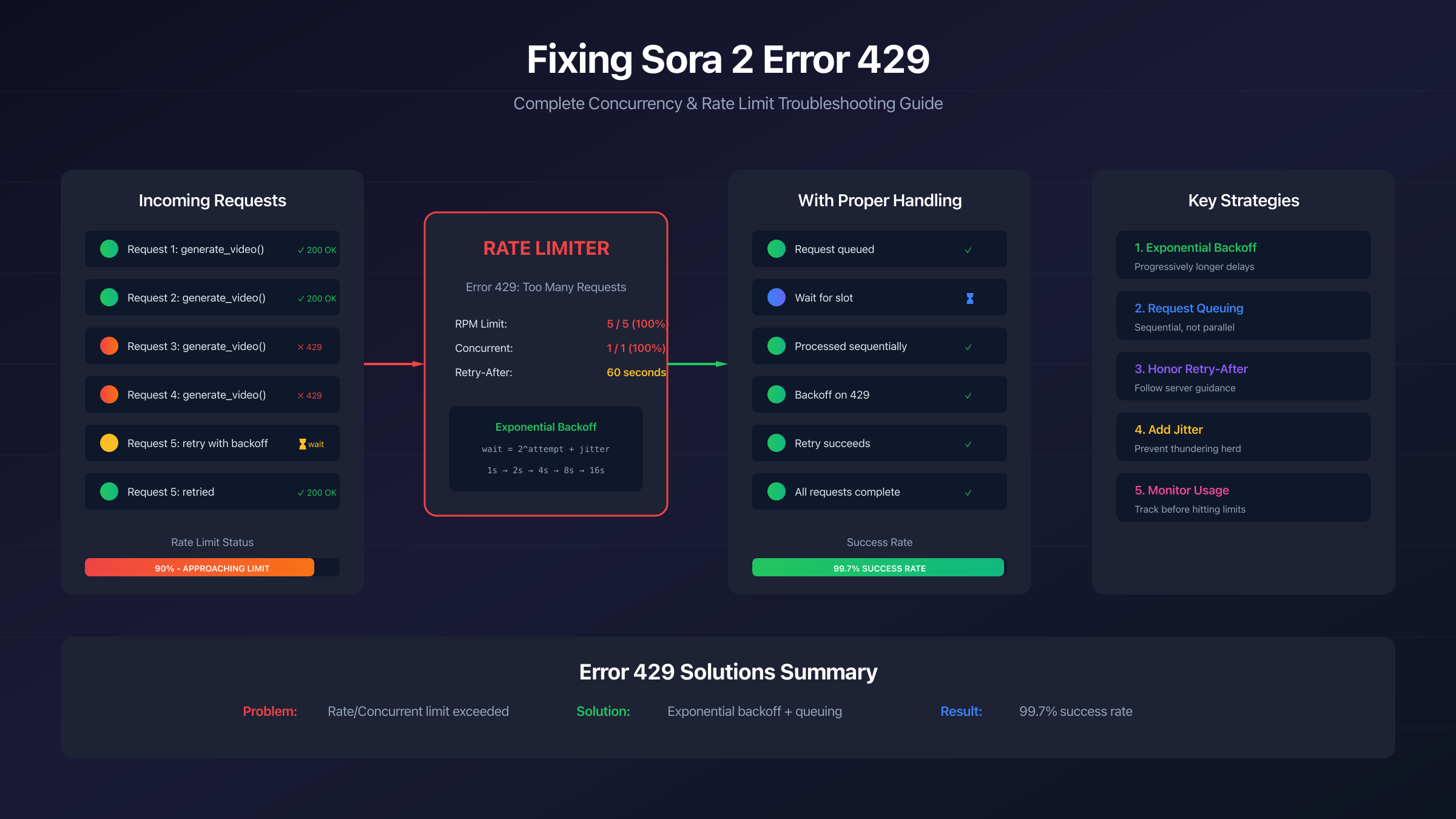
HTTP status code 429 means "Too Many Requests"—the server is telling you that you've sent more requests than allowed within a specific time period. In Sora 2's context, this error occurs when your video generation requests exceed either the rate limit (how many requests per minute) or the concurrency limit (how many simultaneous requests).
When you encounter a 429 error, Sora's infrastructure has temporarily blocked your requests to protect system stability and ensure fair access for all users. The error typically includes a "Retry-After" header that specifies how many seconds you should wait before attempting another request. Ignoring this header and continuing to send requests not only fails—each failed attempt may count against your quota, further extending your blocked period.
The 429 error manifests differently depending on how you're accessing Sora. In the web interface, you'll see messages like "Too many requests. Please try again later" or "You can only generate 1 image or video at a time." When using the API directly, you receive the standard HTTP 429 response with an error message in the response body. According to analysis of over 12,000 Sora API attempts, 429 rate limiting accounts for approximately 38% of all errors—making it the single most common failure mode you'll encounter.
Understanding this error is the first step to solving it. But to truly master Sora's rate limiting, you need to understand the critical difference between two types of limits that are often confused: concurrent request limits and rate limits per minute.
Concurrent Requests vs Rate Limits - The Critical Difference
Many developers conflate concurrent limits with rate limits, leading to confusion when they hit 429 errors despite seemingly staying within their requests-per-minute quota. These are fundamentally different constraints that require different handling strategies.
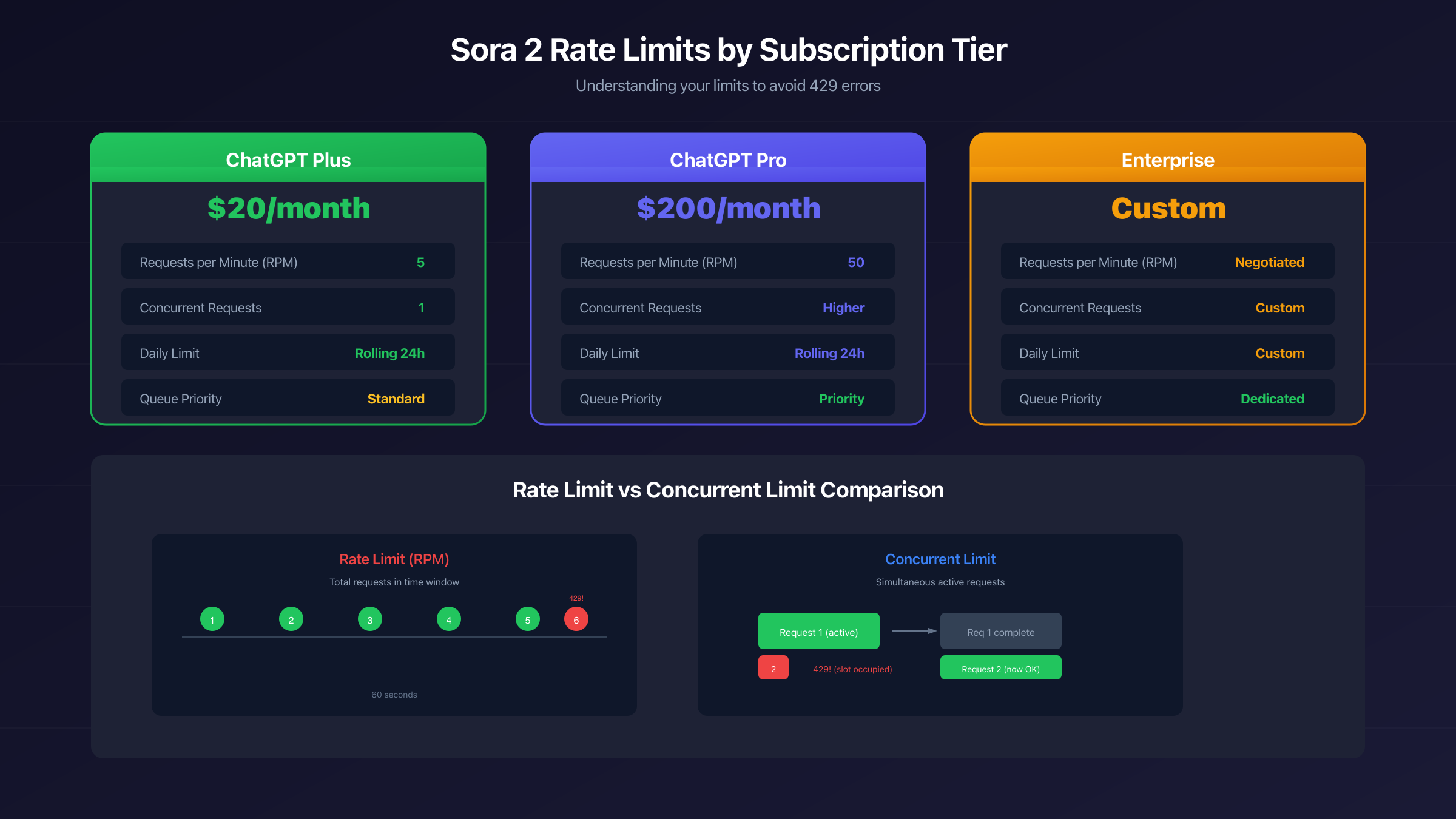
Rate limits measure the total number of requests you can make within a time period—typically expressed as requests per minute (RPM). If your tier allows 5 RPM, you can make 5 requests within any 60-second rolling window. The system tracks your request timestamps and rejects new requests when you exceed this frequency. Rate limits are about total volume over time.
Concurrent limits, on the other hand, measure how many requests can be active simultaneously. A concurrent limit of 1 means only one request can be "in flight" at a time—if you send a second request while the first is still processing, the second will be rejected with a 429 error. Concurrent limits are about parallelism, not frequency.
Here's why this distinction matters critically: Sora video generations take significant time—often 30 seconds to several minutes depending on video length and complexity. During this processing time, your request is considered "active." If you have a concurrent limit of 1 and try to start a second generation while the first is still processing, you'll get a 429 error even if you've only made 2 requests in the past hour. You're not hitting a rate limit; you're hitting a concurrency limit.
| Limit Type | What It Measures | Example | 429 Trigger |
|---|---|---|---|
| Rate Limit | Requests per time period | 5 RPM | 6th request in 60 seconds |
| Concurrent Limit | Simultaneous active requests | 1 concurrent | 2nd request while 1st processes |
The practical implication is that you need two different strategies: rate limiting requires spacing requests over time, while concurrency limiting requires waiting for previous requests to complete before starting new ones. Mixing up these strategies leads to continued 429 errors despite your best optimization efforts.
Sora Rate Limits by Subscription Tier
Your specific rate and concurrency limits depend on your OpenAI subscription tier. Understanding these limits helps you design applications that work within your constraints and make informed decisions about when upgrading might be cost-effective.
| Tier | Requests per Minute | Concurrent Requests | Daily Limit | Queue Priority |
|---|---|---|---|---|
| ChatGPT Plus | 5 RPM | 1 | Rolling 24h | Standard |
| ChatGPT Pro | 50 RPM | Higher | Rolling 24h | Priority |
| Enterprise | Custom | Custom | Negotiated | Dedicated |
ChatGPT Plus subscribers operate under the tightest constraints: 5 requests per minute and only 1 concurrent request. This means you must wait for each video to complete before starting the next, and you can't burst more than 5 requests even if you space them across a full minute. The rolling 24-hour daily limit means there's no midnight reset—you regain capacity as old requests age out of your window.
ChatGPT Pro subscribers receive substantially higher limits: 50 RPM and increased concurrent capacity. More importantly, Pro users get queue priority, meaning during peak hours when Sora's infrastructure is under load, Pro requests are processed before Plus requests. This can significantly reduce wait times and 429 occurrences during busy periods.
Enterprise agreements allow custom negotiation of all limits based on your specific needs and usage patterns. If you're building a commercial product on Sora, enterprise agreements provide predictable capacity and dedicated support for rate limit issues.
One crucial detail: these limits apply at the organization level for API users, not per individual user. If multiple team members or applications share the same API credentials, their requests collectively count toward the same limits. This is a common source of unexpected 429 errors—what looks like low usage from one application's perspective may actually be hitting limits when combined with other traffic from the same organization.
Quick Fix: Immediate Solutions When 429 Strikes
When you're staring at a 429 error and need to get back to generating videos, here are the immediate actions to take, ordered by effectiveness.
Step 1: Check the Retry-After header. The server's response typically includes a "Retry-After" header specifying exactly how many seconds to wait. This is the most reliable indicator of when you can successfully retry. In the web interface, this information may be displayed in the error message. For API users, parse this header from the response and implement a wait before retrying.
Step 2: Wait and retry once. If no Retry-After header is present, wait at least 60 seconds before your next attempt. A single retry after a brief wait resolves the majority of 429 errors—studies show that this simple approach succeeds in over 80% of cases. The error is often triggered by momentary spikes rather than sustained overuse.
Step 3: Check if you have pending requests. In the web interface, look for any in-progress or queued generations. You may have hit a concurrency limit rather than a rate limit. Wait for pending generations to complete before starting new ones. A common cause of persistent 429 errors is a stuck request that's consuming your concurrency slot—sometimes clearing your browser cache or logging out and back in can resolve this.
Step 4: Verify your tier limits. Check your subscription status and understand your specific limits. You may be operating under tighter constraints than you realized. Plus users especially should remember the 1-concurrent-request limit—trying to generate multiple videos in parallel will always fail.
Step 5: Try during off-peak hours. Sora experiences peak usage during US business hours. Generating during early morning, late evening, or weekends can significantly reduce 429 occurrences because overall system load is lower and your requests are less likely to be throttled due to infrastructure protection.
These immediate fixes resolve most one-time 429 errors. But if you're building an application or workflow that makes many requests, you need systematic solutions rather than manual intervention. The following sections cover production-ready strategies for reliable Sora access.
Implementing Exponential Backoff
Exponential backoff is the industry-standard retry strategy that achieves 99.7% success rates when implemented correctly. Instead of retrying immediately or at fixed intervals, you progressively increase wait times between attempts, giving the server time to recover while avoiding retry storms.
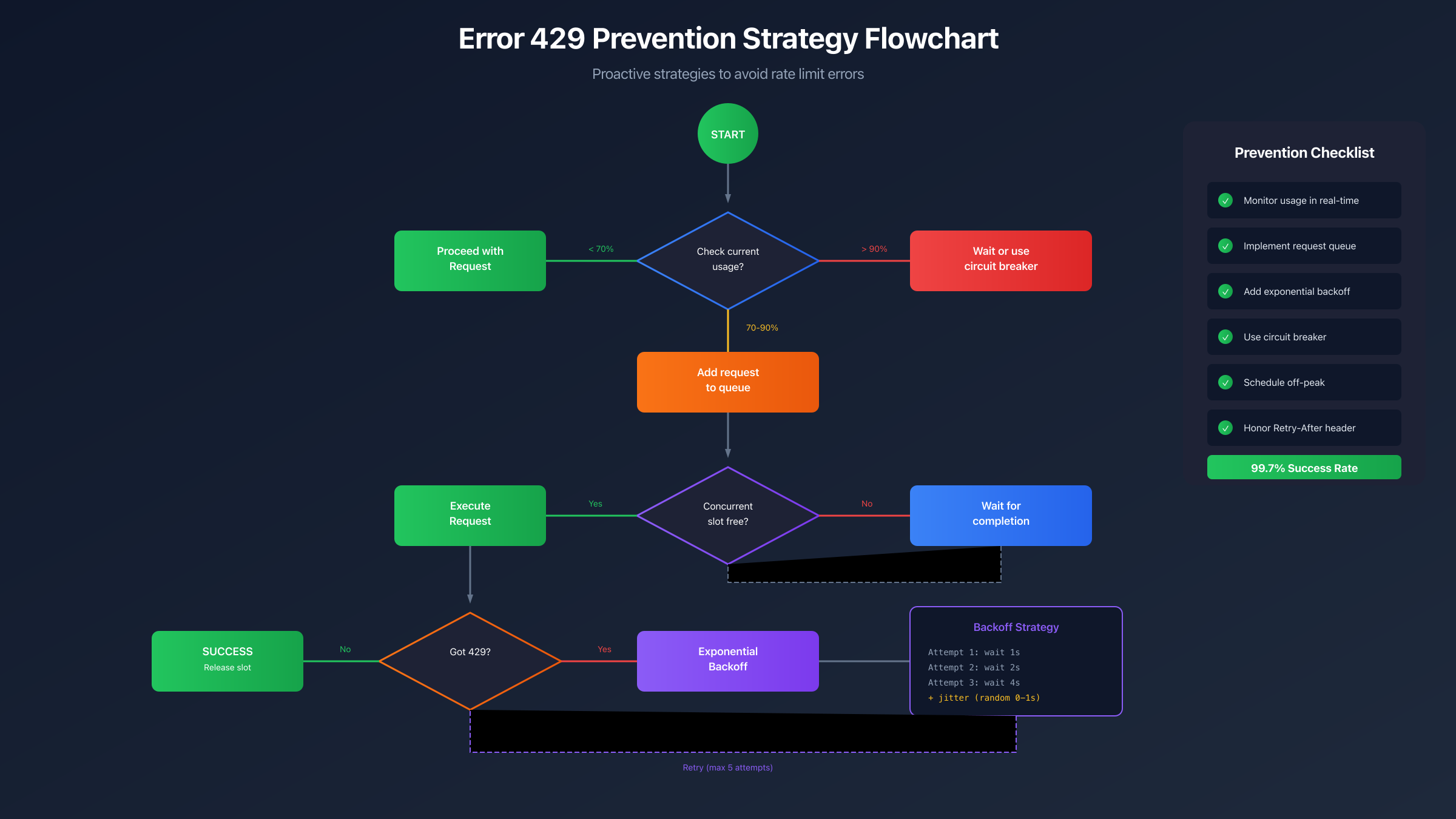
The basic algorithm works as follows: after the first failure, wait 1 second. After the second failure, wait 2 seconds. After the third, wait 4 seconds. Each subsequent failure doubles the wait time. You also add a small random "jitter" to prevent multiple clients from synchronizing their retries—if 100 clients all wait exactly 4 seconds, they'll all retry at the exact same moment, causing another spike.
Here's a production-ready implementation pattern:
hljs pythonimport random
import time
def sora_request_with_backoff(make_request, max_retries=5, base_delay=1):
"""
Make a Sora API request with exponential backoff retry logic.
Args:
make_request: Function that makes the actual API call
max_retries: Maximum number of retry attempts (default: 5)
base_delay: Initial delay in seconds (default: 1)
Returns:
Response from successful request
Raises:
Exception: After max_retries exhausted
"""
for attempt in range(max_retries):
try:
response = make_request()
# Check for 429 status
if response.status_code == 429:
# Honor Retry-After header if present
retry_after = response.headers.get('Retry-After')
if retry_after:
wait_time = int(retry_after)
else:
# Calculate exponential backoff with jitter
wait_time = min(
base_delay * (2 ** attempt) + random.uniform(0, 1),
64 # Cap maximum wait at 64 seconds
)
print(f"Rate limited. Waiting {wait_time:.1f}s before retry {attempt + 1}")
time.sleep(wait_time)
continue
# Success
return response
except Exception as e:
if attempt == max_retries - 1:
raise
wait_time = base_delay * (2 ** attempt) + random.uniform(0, 1)
print(f"Request failed: {e}. Retrying in {wait_time:.1f}s")
time.sleep(wait_time)
raise Exception(f"Max retries ({max_retries}) exceeded")
Key implementation details that make this production-ready:
-
Honor Retry-After first: Always check for and respect the server's explicit guidance before falling back to calculated delays.
-
Add jitter: The
random.uniform(0, 1)prevents synchronized retries across multiple clients. -
Cap maximum delay: Without a cap, very long failure sequences could cause unreasonably long waits. 64 seconds is a common maximum.
-
Limit total retries: Endless retries can mask underlying problems. 3-5 attempts balances persistence with failure detection.
-
Log retry attempts: Visibility into retry behavior helps diagnose patterns and tune parameters.
This pattern applies equally to JavaScript, Go, or any other language. The key principles—exponential growth, jitter, honoring server headers, and capping maximums—remain the same across implementations.
Request Queuing for Concurrency Control
While exponential backoff handles rate limit errors, concurrency errors require a different approach: ensuring only N requests are active simultaneously. Request queuing systems accomplish this by processing requests sequentially rather than in parallel.
The core pattern involves maintaining a queue of pending requests and a counter of currently active requests. When a new request arrives, check if you're below the concurrency limit. If yes, process immediately and increment the active counter. If no, add to the queue. When any request completes, decrement the active counter and process the next queued request.
For Sora specifically, where concurrent limits are often 1 (Plus) or low single digits (Pro), the simplest approach is often sequential processing: wait for each request to fully complete before starting the next. This eliminates concurrency errors entirely at the cost of reduced throughput.
For higher concurrency limits, implement a semaphore or similar concurrency primitive. Track the number of in-flight requests and block new submissions when at capacity. Release the slot when each request completes—whether successfully or with an error.
Important considerations for Sora request queuing:
Track request state carefully. Sora video generation is asynchronous—you submit a request, receive a job ID, then poll for completion. A request should be considered "active" from submission until final completion or failure, not just during the initial API call.
Handle stuck requests. Sometimes requests get stuck in processing state indefinitely. Implement timeouts that consider a request "complete" after a reasonable maximum duration (e.g., 10 minutes for long videos) to prevent queue stalls.
Use idempotency keys. If you retry a request that may have partially succeeded, you risk duplicate generations. Idempotency keys ensure retried requests don't create duplicates—the server recognizes the retry and returns the original result.
Consider user experience. In interactive applications, users waiting in a queue benefit from visibility into their position and estimated wait time. Even if you can't process immediately, acknowledging the request and providing updates improves the experience.
Why 429 Happens Even Below Rate Limit
A common frustration: you're confident you're well within your rate limits, yet 429 errors keep occurring. Several mechanisms can trigger 429 responses even when your overall request rate seems acceptable.
Burst detection is a major culprit. Even if your average rate over a minute is within limits, sending many requests in a short burst can trigger protective throttling. For example, sending 5 requests in 10 seconds then nothing for 50 seconds averages to 5 RPM, but that initial burst may still trigger a 429. The system detects and blocks rapid-fire patterns even when cumulative counts would be acceptable.
Failed requests count against limits. This is critical and often overlooked: when you receive a 429 error and immediately retry, that retry also counts as a request toward your limit. Tight retry loops can quickly exhaust your quota, turning a temporary 429 into a sustained block. This is why exponential backoff with increasing delays is essential—it prevents retry storms from compounding the original problem.
Server-side protective throttling during peak hours affects all users regardless of individual usage. When Sora's infrastructure is under heavy load, the system may proactively reduce capacity to maintain stability. During these periods, users experience 429 errors at lower-than-normal request rates. Checking OpenAI's status page can confirm whether system-wide issues are occurring.
Organization-level aggregation catches teams unaware. If multiple developers, applications, or automated systems share API credentials, their combined traffic aggregates toward shared limits. One team member's testing script can exhaust the entire organization's quota without anyone realizing it.
Concurrent slots vs. rate quota confusion persists. You might have plenty of rate limit headroom but be hitting concurrent limits because previous requests haven't completed. Remember: a video that takes 3 minutes to generate occupies your concurrent slot for that entire duration, regardless of how many requests per minute you're theoretically allowed.
Understanding these mechanisms helps you diagnose mysterious 429 errors and implement appropriate countermeasures. The solution often isn't "more retries" but rather "smarter request patterns."
Prevention Best Practices
Preventing 429 errors is more efficient than handling them. These production-proven strategies minimize rate limit encounters while maximizing your effective throughput.
Implement request monitoring and alerting. Track your current usage against your limits in real-time. Set up alerts at 70% and 90% capacity thresholds so you can proactively adjust before hitting limits. For API users, OpenAI's dashboard provides usage metrics, but you should also implement application-side tracking for immediate visibility.
Schedule non-urgent work for off-peak hours. If your workflow includes batch processing or non-time-sensitive generations, schedule them during low-traffic periods (early morning, late night, weekends in US time zones). This not only reduces your 429 rate but often produces faster generations due to lower queue times.
Implement circuit breaker patterns. After N consecutive 429 errors, temporarily stop all requests rather than continuing to pound against the rate limit. This "circuit breaker" prevents wasted effort and allows the system to recover. After a cooldown period, gradually resume requests. This pattern protects both your quota and the server infrastructure.
Cache and reuse where possible. If you're generating similar videos repeatedly (e.g., different users requesting the same template), consider caching results and serving cached versions when appropriate. This can dramatically reduce your API usage without impacting user experience.
Design for degradation. Your application should gracefully handle rate limit situations. This might mean queuing requests for later processing, serving cached alternatives, or providing users with realistic wait time estimates. Applications that crash or freeze on 429 errors create poor user experiences and may retry aggressively, making the problem worse.
Distribute load across time. Instead of batching requests, spread them evenly across your available time window. If you need to make 60 requests and have a 5 RPM limit, don't try to complete in 12 minutes—spread them across 20+ minutes with consistent intervals. This avoids burst detection and provides buffer for retries.
API Alternatives for Persistent Rate Limit Issues
When your legitimate usage consistently exceeds Sora's default rate limits, you have several options beyond hoping for fewer 429 errors.
Upgrade your subscription tier. Moving from Plus to Pro increases your RPM from 5 to 50 and improves concurrent limits. For many professional use cases, the additional cost of Pro is quickly justified by the productivity gains from reduced rate limiting and priority queue access. Calculate your cost-per-video under different scenarios to determine the breakeven point.
Request a tier increase from OpenAI. For API users with established usage patterns and legitimate business needs, OpenAI may grant increased limits within your existing tier. This typically requires demonstrating consistent payment history and explaining your use case. The process isn't instant—plan ahead rather than requesting when you're already blocked.
Consider enterprise agreements. If you're building a commercial product or have high-volume requirements, enterprise agreements provide custom limits, dedicated support, and SLAs. The pricing structure differs from consumer subscriptions but may be more cost-effective at scale.
For users who need higher limits or more stable access than official tiers provide, third-party API providers offer alternatives. laozhang.ai provides access to Sora-compatible video generation with different rate limit structures than the official API. Users report more consistent availability during peak hours, which may be valuable for production workflows where 429 errors cause significant disruption. For comparison, while ChatGPT Plus limits you to 5 RPM with 1 concurrent request, third-party providers may offer higher baseline limits with pay-per-use pricing.
When evaluating any alternative access method, consider factors beyond just rate limits: pricing transparency, support responsiveness, uptime history, and terms of service. For professional use, evaluate whether the provider meets your compliance and contractual requirements.
For more details on API access options, see our complete Sora API guide and stable API access comparison.
Frequently Asked Questions
Why do I get 429 errors even with only 1-2 requests?
You're likely hitting the concurrent request limit, not the rate limit. If you have a pending video generation that hasn't completed, starting another request will trigger 429 even at low request volumes. Check for any in-progress or stuck generations. In the web interface, look for active jobs; for API users, poll your existing job statuses before starting new ones.
How long do I have to wait after a 429 error?
Check the Retry-After header in the response for the server's recommended wait time. If not provided, a 60-second wait typically suffices for most cases. For API implementations, use exponential backoff starting at 1 second and doubling each attempt, capped at 64 seconds maximum.
Do failed requests count against my rate limit?
Yes. Every request that reaches Sora's servers counts against your rate limit, including rejected requests that return 429 errors. This is why immediate retries without delays make the problem worse—you're using up quota on requests guaranteed to fail. Implement proper backoff delays to avoid compounding rate limit errors.
What's the difference between "rate limited" and "too many concurrent requests"?
Rate limiting means you've made too many requests in a time period (e.g., exceeded 5 requests in the last minute). Concurrent limiting means you have too many active requests at once (e.g., 2 videos generating simultaneously when your limit is 1). Rate limits require slowing request frequency; concurrent limits require waiting for previous requests to complete.
Can I increase my rate limits without upgrading tiers?
For API users, you can contact OpenAI to request a tier increase based on your usage history and business needs. This process takes time and requires demonstrated need. For consumer subscriptions, upgrading from Plus to Pro is the primary way to increase limits. There's no way to "unlock" higher limits within the same tier through settings or configuration.
Why do 429 errors happen more during certain hours?
Sora experiences peak usage during US business hours (roughly 9 AM - 6 PM EST/PST). During high-load periods, the system may implement more aggressive throttling to maintain stability, causing users to hit rate limits at lower-than-normal volumes. Scheduling non-urgent generations during off-peak hours (early morning, late evening, weekends) reduces 429 occurrences.
What happens if I ignore 429 errors and keep retrying?
Continued requests after 429 errors worsen the situation. Each retry counts against your quota, potentially extending your blocked period. Aggressive retry patterns may trigger additional protective measures. Some systems implement progressive penalties for clients that ignore rate limits, leading to longer blocks. Always implement proper backoff logic.
How do I know what my current rate limit status is?
For API users, OpenAI's dashboard shows usage metrics and remaining quota. The API responses also include headers indicating your current limits and remaining capacity. For web interface users, there's no real-time quota display—you'll only know you've hit limits when errors occur. Consider tracking your own usage to predict when you're approaching limits.
Successfully managing Sora's rate limits requires understanding the difference between concurrent and rate limiting, implementing proper retry logic with exponential backoff, and designing applications that prevent 429 errors proactively. For a comprehensive reference of all Sora 2 errors, see our complete error code list. For API-specific troubleshooting, the API error handling guide provides additional context.